
Best Invoice Generators for Small Business (2026)
My first invoice was a .doc Word document. Cobbled together in ten minutes, logo slightly off-center, payment terms buried at the bottom in size 9 font. Clients paid late. Not because they were bad clients… but because the invoice looked like it came from someone who didn’t quite have their act together. Because it did.
When I switched to proper invoice software, payment times dropped. Same clients, same rates, same terms. The only difference? The invoice looked like it came from a real business. Turns out, presentation and professionalism matter more than you’d think when you’re asking someone to part with money.
But the real value isn’t how invoices look. It’s what happens after you hit send. Payment tracking, automatic reminders, click-to-pay links, accounting integration. The best invoice generators handle all of this so you can focus on the work. Here’s what I use, what I recommend, and what you can skip.
Why Small Businesses Need Dedicated Invoice Software
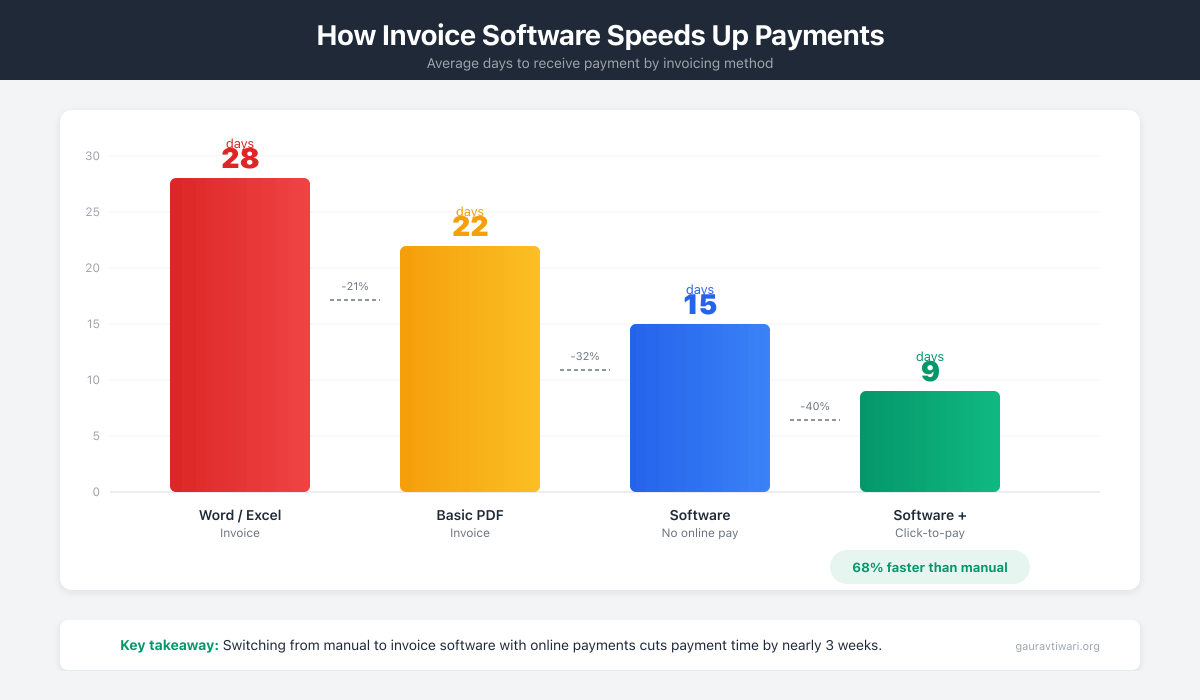
Look, you can send invoices from a Word doc. Plenty of people do. But here’s what you’re missing when you do that.
Payment tracking alone justifies the switch. Which invoices are paid? Which are pending? Which are 45 days overdue and you forgot about? Before I used dedicated software, I tracked all this in a spreadsheet. It was always three weeks out of date. I was either chasing payments late or, worse, forgetting to chase them at all.
Automatic reminders save relationships. I hate the “hey, just checking in on that invoice” email. Hate it. Having software send a polite nudge on day 7, day 14, and day 30 means I’m never the bad guy. And honestly? Clients don’t take it personally when it’s automated. They expect it.
Payment integration removes friction. When clients can pay by credit card or ACH directly from the invoice, they pay faster. Every extra step between “receive invoice” and “click pay” costs you days of waiting. I saw my average payment time drop from 22 days to 9 days after adding click-to-pay invoicing.
Accounting integration eliminates double entry. Invoice data flows straight to your bookkeeping. No copy-paste. No reconciliation nightmares at tax time. If you’re still manually entering invoice data into a spreadsheet, you’re burning hours you could spend on actual work.
Time and expense tracking keeps everything in one place. Log work, log expenses, convert to invoice, send. If you bill hourly or pass through expenses, this workflow alone is worth the subscription.
And tax time? Your accountant will actually smile at you. Organized invoice records, exportable reports, everything categorized. Instead of scrambling every April, you export a file and you’re done.
If you send more than a handful of invoices each month, a dedicated invoice generator pays for itself. Usually within the first month, through faster payments alone.
What to Look for in an Invoice Generator
Not every feature matters equally. After testing dozens of these tools, here’s what actually moves the needle on getting paid faster.
Payment Processing
Can clients pay directly from the invoice? This is the single most important feature. Every extra step between “receive invoice” and “click pay” costs you days. Credit card and ACH processing should be built in. Check the processing fees, but don’t let 2.9% scare you. Getting paid in 5 days instead of 30 is worth it.
Recurring Invoices
For retainer or subscription clients, automatic recurring invoices are a must. I have retainer clients who get invoiced on the first of every month without me lifting a finger. That’s 12 invoices per client per year I don’t have to remember. Multiply that by however many recurring clients you have, and the time savings add up fast.
Time Tracking Integration
If you bill hourly, integrated time tracking eliminates double-entry completely. Track hours, convert to invoice, send. No spreadsheet gymnastics. For dedicated time tracking options, see our guide to time tracking tools for freelancers.
Client Portal
Clients can view all their invoices, payment history, and documents in one place. This reduces “can you resend that invoice?” emails to near zero.
Customization
Does the invoice look like your brand? Custom logos, colors, and layouts matter. Your invoice is often the last touchpoint in a project. Make it look professional.
Pricing Model
Per-user versus per-feature pricing affects costs as you grow. Watch for tools that seem cheap now but get expensive as you add team members or exceed invoice limits.
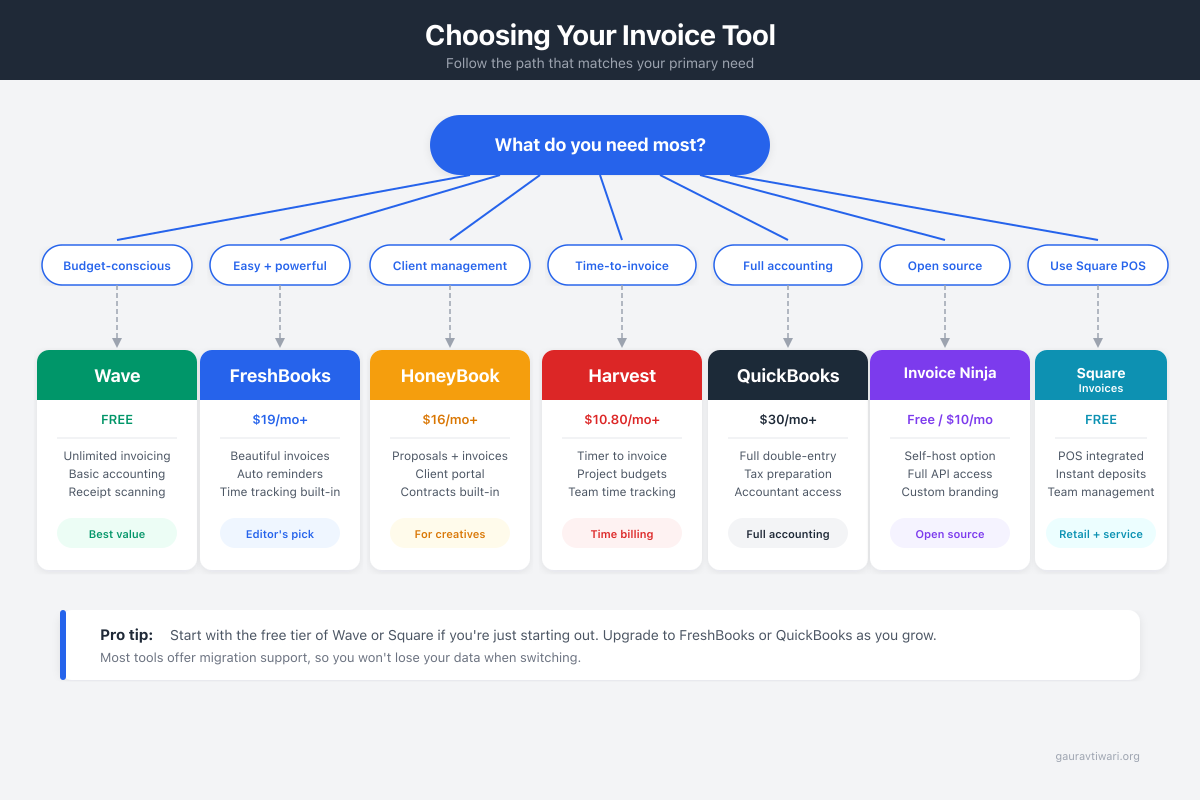
Best Invoice Generator Overall: FreshBooks
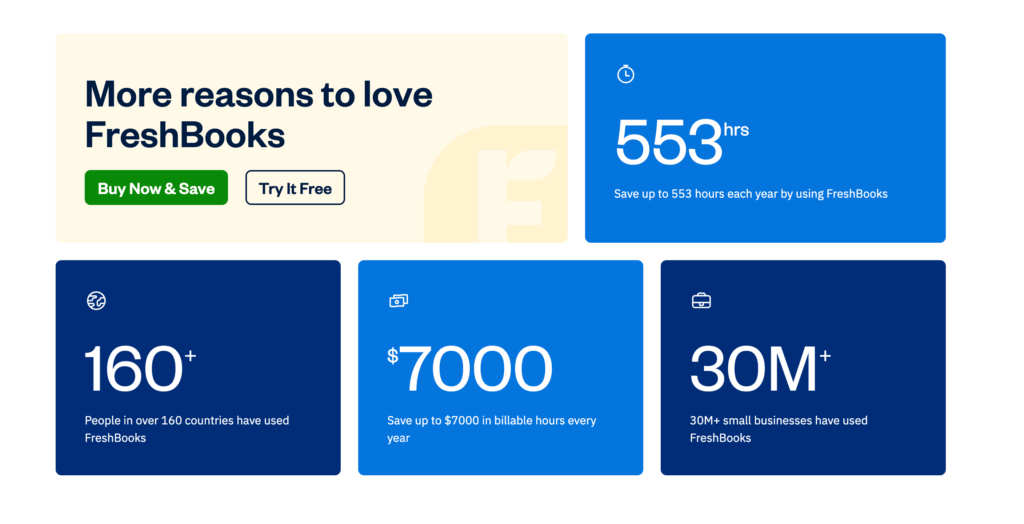

FreshBooks
- Professional invoice templates
- Automatic payment reminders
- Expense tracking with receipt scanning
- Built-in time tracking
- Accept credit cards and bank transfers
FreshBooks is my top recommendation for most small businesses. The interface is intuitive enough that non-accountants can send professional invoices in 15 minutes, and the time tracking integration makes hourly billing painless.
FreshBooks has been the small business invoicing go-to for years. And honestly, the reputation is earned.
The interface is genuinely intuitive. I’ve recommended it to freelancers with zero accounting background and they’re sending professional invoices within 15 minutes. No tutorial. No head-scratching. Just clean design that makes sense the first time you open it.
Invoices look professional out of the box. Time tracking integrates cleanly. Log time, convert to invoice, send. The workflow is smooth enough that it doesn’t feel like admin work. And automatic late payment reminders? They handle those awkward follow-up conversations so you don’t have to.
The mobile app handles invoicing from anywhere. I’ve created and sent invoices from my phone between meetings. That flexibility matters when cash flow depends on getting invoices out quickly.
Expense tracking, mileage logging, and basic accounting are included. The client portal lets customers view and pay all their invoices in one place. For a tool that started as “just invoicing,” the feature depth is impressive.
Pricing starts at $17/month for basic features, scaling up for more clients and functionality.
- What works: Intuitive interface. Professional invoice design. Time tracking integration. Mobile app.
- What doesn’t: Price increases with scale. Limited users on lower tiers.
- Price: From $17/month
- Best for: Service businesses. Freelancers. Small agencies.
Best Free Invoice Generator: Wave
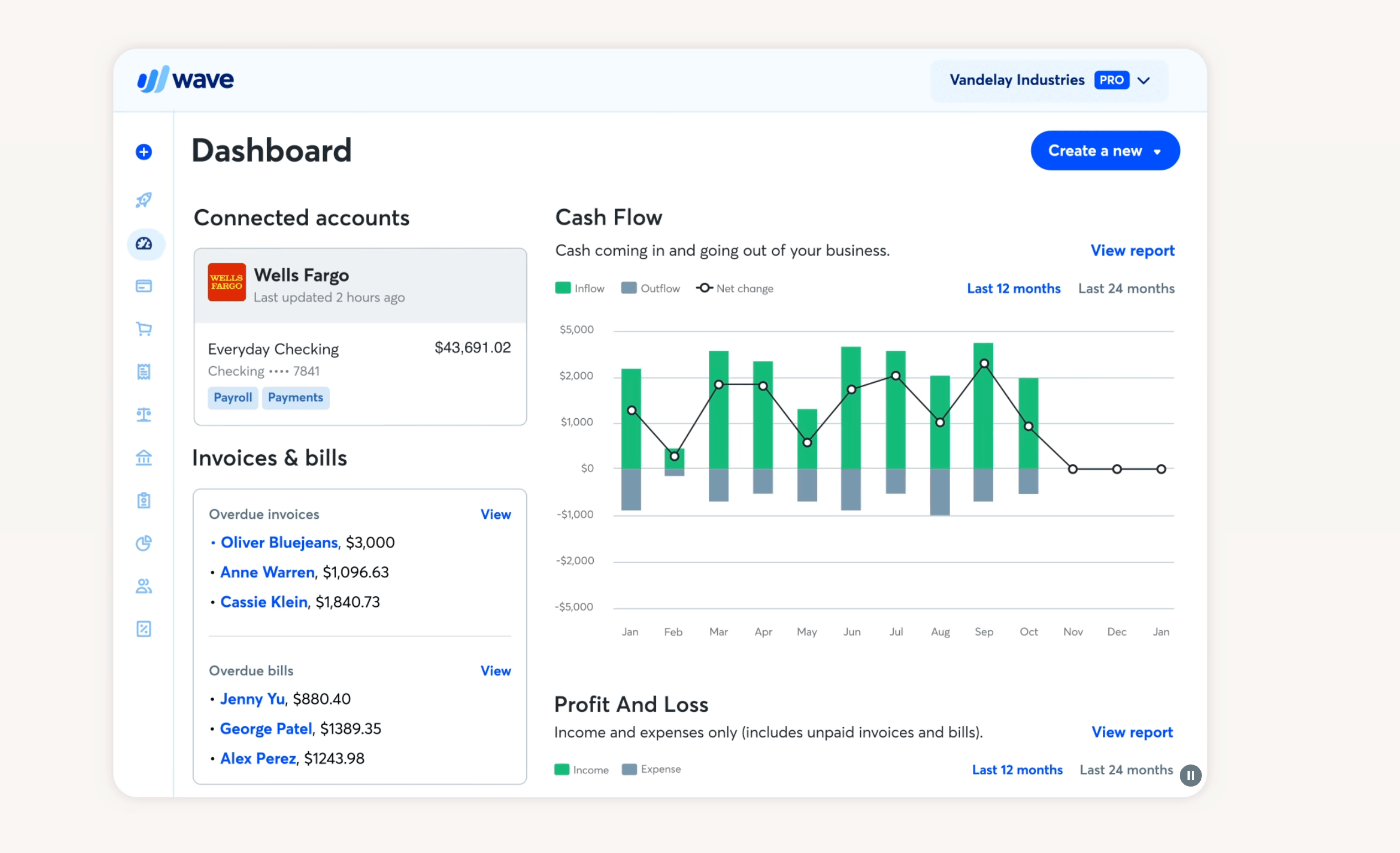
- Unlimited free invoicing
- Full accounting included free
- Recurring invoices and estimates
- Receipt scanning
- Payment processing optional
Wave offers completely free invoicing with no catches. They monetize through optional payment processing and payroll services. For small businesses just needing an invoice generator without the budget for software, Wave delivers real value at zero cost.
The invoice creator is straightforward. Customize with your logo and branding. Track invoice status. Set up recurring invoices. It does everything you’d expect from a basic invoicing tool, and it costs nothing.
The optional payment processing (2.9% + 60 cents for credit cards) integrates directly into invoices. Full accounting features are included free as well, which means you’re getting a legitimate accounting tool alongside your invoicing.
The limitations are support (email only for free users) and some advanced features you won’t find here. But for pure invoicing needs, Wave is genuinely hard to beat at zero dollars. I recommend it to every freelancer just starting out.
- What works: Completely free. Full invoicing features. Accounting included.
- What doesn’t: Limited support. Fewer integrations than paid options.
- Price: Free (payment processing optional)
- Best for: Budget-conscious businesses. Startups. Freelancers testing invoicing needs.
Best Invoice Generator for Freelancers: HoneyBook
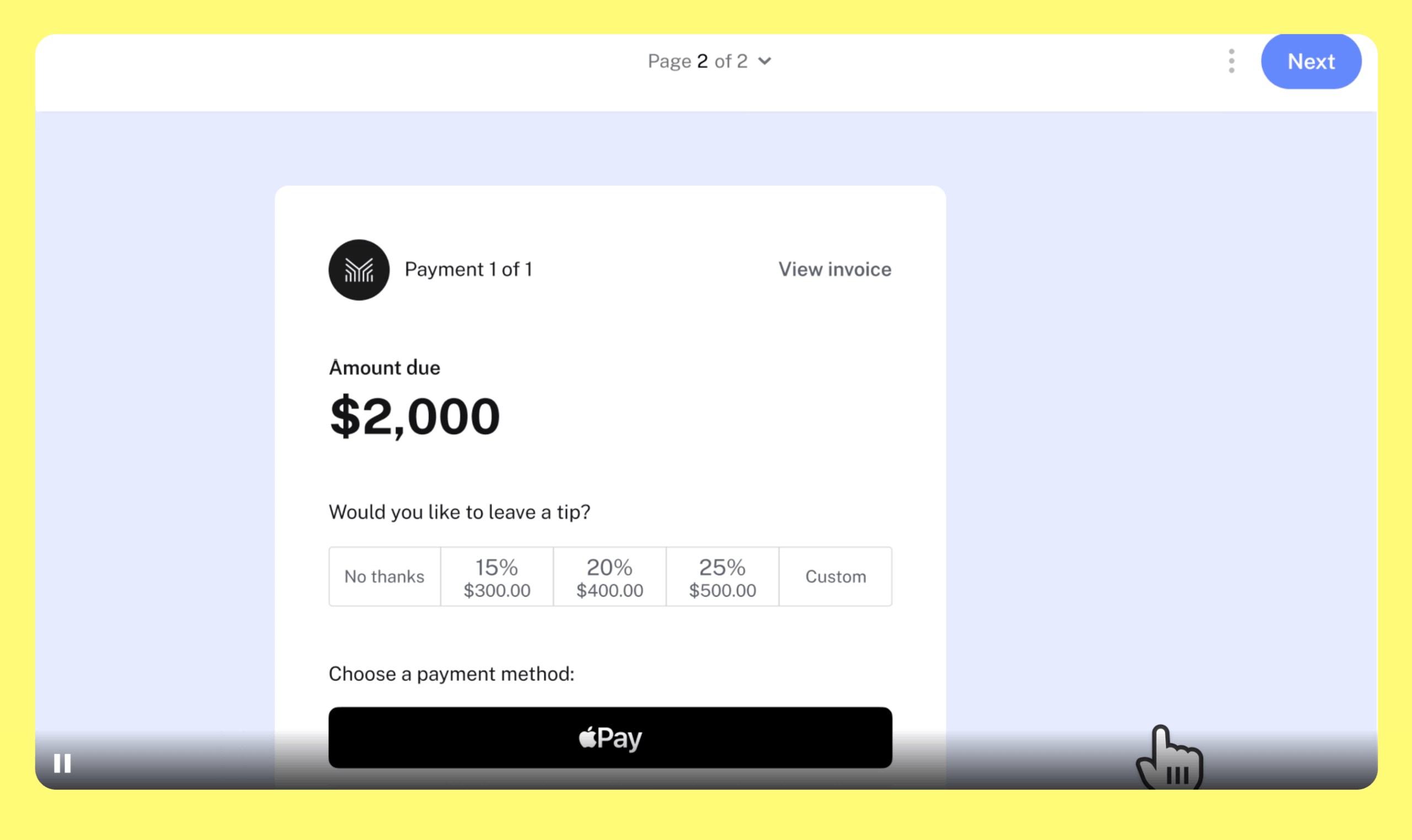
- Proposals that convert to invoices
- Contract and e-signature built-in
- Client portal and communication
- Payment plans and scheduling
- Workflow automation
HoneyBook goes beyond invoicing to cover the entire client relationship. Contracts, proposals, scheduling, and invoicing all live in one platform. For freelancers managing everything themselves, this integration eliminates the need for four separate tools.
Create proposals that convert to contracts that convert to invoices. Client communication stays in one place throughout the entire lifecycle. Payment plans and scheduling are built in. The experience feels connected rather than cobbled together.
The templates are well-designed, particularly for creative professionals. The workflow automation handles repetitive tasks that would otherwise eat your afternoons. The client experience feels polished from their side too, which matters for your professional image.
Pricing at $19/month (or $9/month with annual billing for the starter plan) is reasonable for the breadth of features you’re getting.
- What works: End-to-end client management. Great templates. Contracts + invoices together.
- What doesn’t: May be more than you need if you only want invoicing. No free tier.
- Price: From $9/month (annual)
- Best for: Creative freelancers. Photographers. Designers. Event professionals.
Best Invoice Generator for Contractors: Invoice Ninja
- Unlimited invoices on free plan
- Multi-currency and multi-language
- Self-hosting option available
- Time tracking included
- White-label on Pro plan
Invoice Ninja offers powerful open-source invoicing with a generous free tier. Unlimited invoices for unlimited clients on the free plan. The feature depth rivals paid competitors, which is impressive for a free tool.
Recurring invoices, automatic reminders, multiple currencies, time tracking. All included free. Self-hosting is available for those wanting complete control over their data, which is a rare option in this category.
The paid tier ($12/month) adds more features, white-labeling, and priority support. But the free tier handles most small business needs completely without feeling stripped down.
- What works: Generous free tier. Feature-rich. Open source option. Multi-currency support.
- What doesn’t: Interface less polished than FreshBooks. Steeper learning curve.
- Price: Free tier available; Pro from $12/month
- Best for: Contractors. International businesses. Open-source preference.
Best Invoice Generator for Quick Invoices: Square Invoices
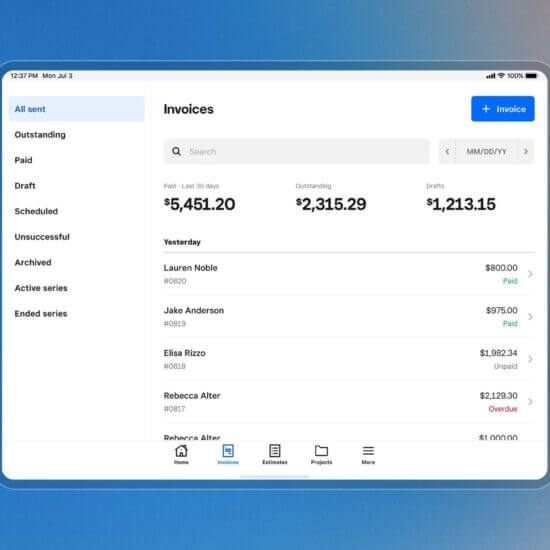
- Free invoicing, no subscription
- Integrated with Square POS
- Accept cards and ACH
- Recurring invoices
- Real-time payment tracking
If you already use Square for payments, Square Invoices integrates naturally into your existing setup. Create and send invoices from the same dashboard as your point-of-sale.
The interface is extremely simple. Enter amount, add details, send. No complex setup required. Payment processing uses your existing Square account. For businesses wanting invoicing without a separate system or login, Square’s simplicity is genuinely the feature.
Invoicing is free. Square’s standard processing rates apply to payments received.
- What works: Very simple. Square integration. Virtually no learning curve.
- What doesn’t: Limited features compared to dedicated tools. Basic customization only.
- Price: Free (Square processing rates apply)
- Best for: Square users. Simple invoicing needs. Retail and service businesses.
Best Invoice Generator for Professional Services: Harvest
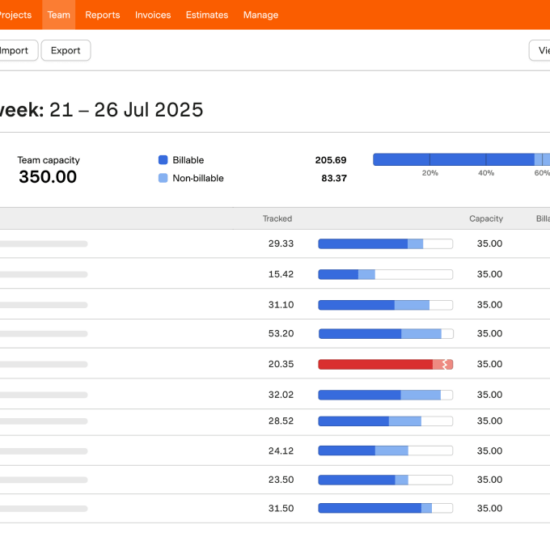
- Best-in-class time tracking
- Invoice from tracked hours
- Project profitability reports
- Team utilization insights
- 50+ integrations
Harvest excels at time tracking first, invoicing second. That ordering makes it perfect for professional services firms that bill hourly. Track time across projects, then generate invoices from tracked time without any data transfer.
The time tracking is excellent. Timer-based, manual entry, and integrations with other tools. Team time tracking aggregates hours for project billing across multiple team members.
Invoices pull from tracked time automatically. Reports show profitability, utilization, and trends. The data enables better business decisions beyond just getting paid. You can see which projects are profitable and which are quietly losing money.
Pricing at $10.80/month per user positions it for small teams rather than solo freelancers.
What works: Excellent time tracking. Project profitability insights. Team-oriented.
What doesn’t: Per-user pricing adds up. Less feature-rich for non-billable work.
Price: From $10.80/month per user
Best for: Agencies. Consulting firms. Professional services.
Best All-in-One Invoice Generator: QuickBooks Online
- Full double-entry accounting
- Bank feed reconciliation
- Invoicing with click-to-pay
- Tax-ready reports
- 700+ app integrations
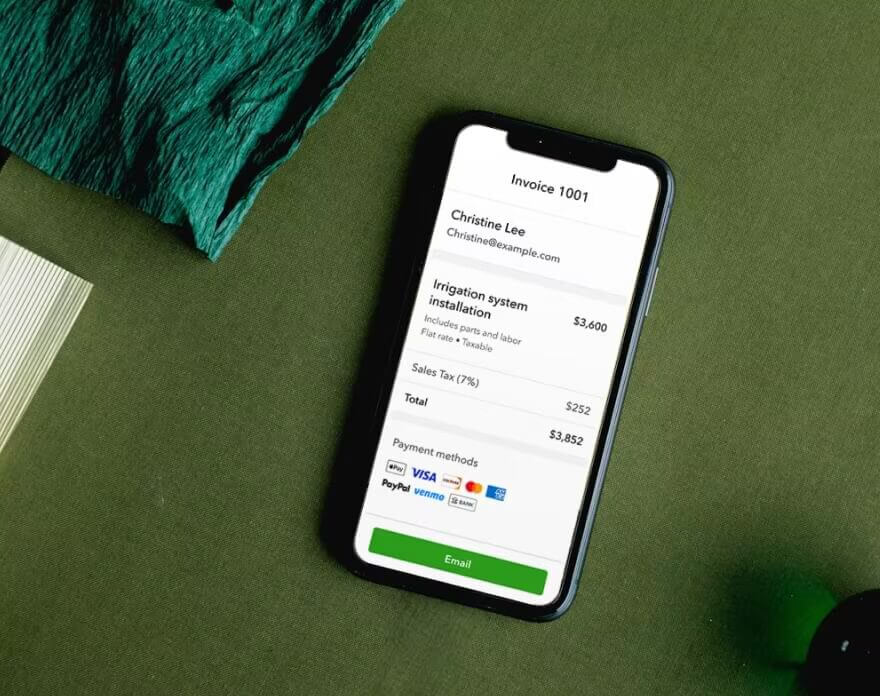
QuickBooks Online is the small business accounting standard, and invoicing is a core feature. If you’re already using QuickBooks for accounting, invoicing integrates naturally without another subscription.
Create invoices, track payments, reconcile with bank feeds. All in one system. The accounting depth exceeds pure invoicing tools by a significant margin. For businesses needing true accounting alongside invoicing, QuickBooks eliminates the integration questions entirely.
Pricing starts at $30/month, making it more of an investment than pure invoicing tools. But if you need real accounting capabilities, you’re going to pay for them anyway. Might as well have invoicing included.
- What works: Full accounting. Bank reconciliation. Industry standard. Tax prep friendly.
- What doesn’t: More than just invoicing needs. Higher price point. Steeper learning curve.
- Price: From $30/month
- Best for: Businesses needing accounting. Growing companies. Tax preparation priority.
Invoice Generators for Small Business: Comparison Table
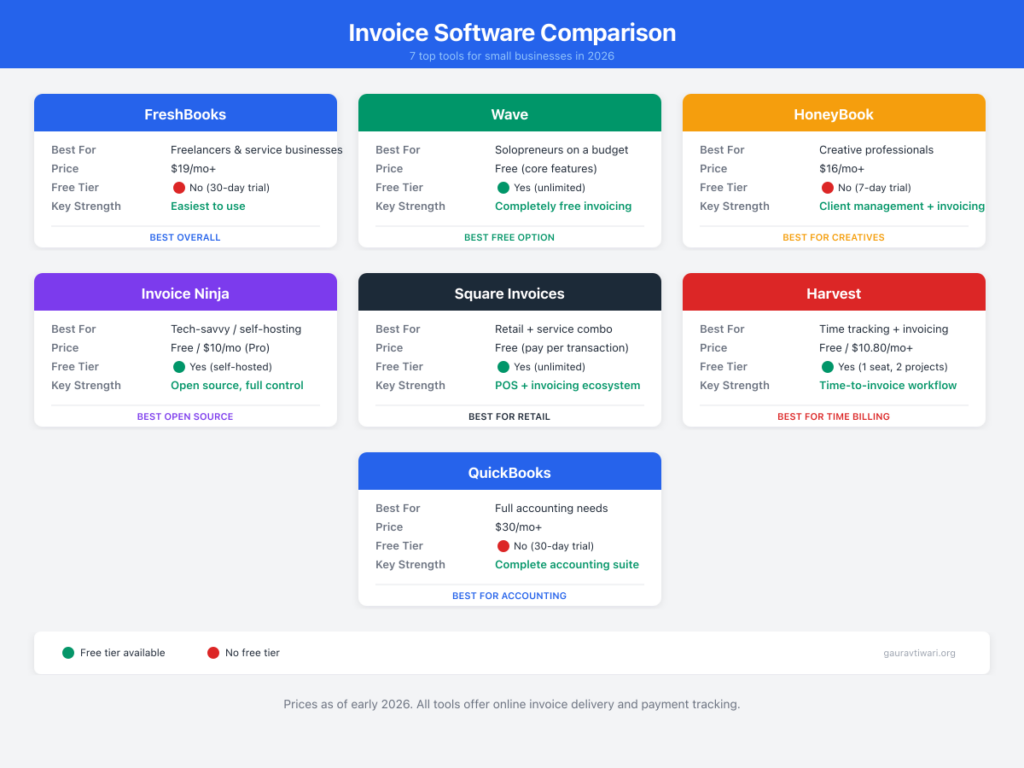
| Platform | Free Tier | Payment Processing | Time Tracking | Price From |
|---|---|---|---|---|
| FreshBooks | No | Built-in | Yes | $17/mo |
| Wave | Yes | Optional (2.9%+60¢) | No | Free |
| HoneyBook | No | Built-in | Yes | $9/mo |
| Invoice Ninja | Yes | Integration | Yes | Free |
| Square Invoices | Yes | Square rates | No | Free |
| Harvest | No | Integration | Excellent | $10.80/mo |
| QuickBooks | No | Built-in | Add-on | $30/mo |
Invoice Best Practices
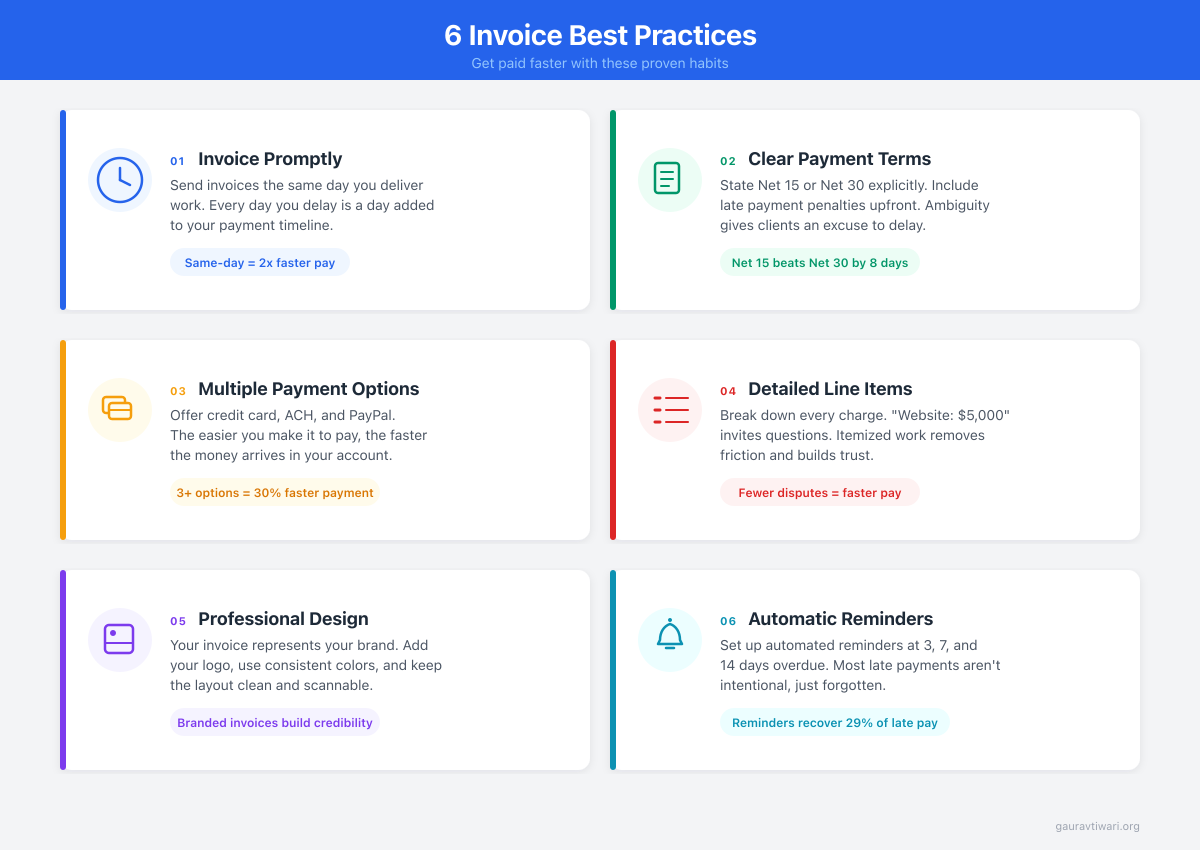
OK, here’s the thing. The software matters less than the habits you build around it. You could use the fanciest invoicing app on the market, but if you’re sending invoices two weeks after delivering work, you’re still getting paid late.
Invoice Promptly
Send invoices the day you finish work. Not tomorrow. Not “when I get around to it.” The same day. Clients who receive invoices weeks late pay weeks later because the project faded from their memory. I invoice same-day, no exceptions. It’s the single highest-impact habit I’ve built.
Clear Payment Terms
Net 30, Net 15, Due on Receipt. Whatever your terms, spell them out clearly on every invoice. I use Net 15 for new clients and Net 30 for established relationships. And you know what? Most clients don’t push back on shorter terms. I think we all just assumed Net 30 was the default, and nobody questioned it.
Multiple Payment Options
Accept credit cards and ACH/bank transfer at minimum. The easier payment is, the faster it happens. I’ve had clients tell me they paid immediately because the “Pay Now” button was right there. Reduce friction, get paid faster.
Detailed Line Items
Break down your work into understandable components. Clients pay faster when they understand exactly what they’re paying for. “Website development” is vague. “Homepage design (8hrs), contact form setup (3hrs), mobile optimization (4hrs)” tells a story. It justifies the number. And it makes scope creep conversations easier later.
Professional Appearance
Your invoice represents your business. Clean design with your logo, consistent formatting, and clear totals builds the kind of trust that leads to prompt payment.
Automatic Reminders
Set reminders for 7, 14, and 30 days overdue. Polite but persistent follow-up works. Let the software be the reminder so you can stay focused on the work.
Payment Processing Considerations
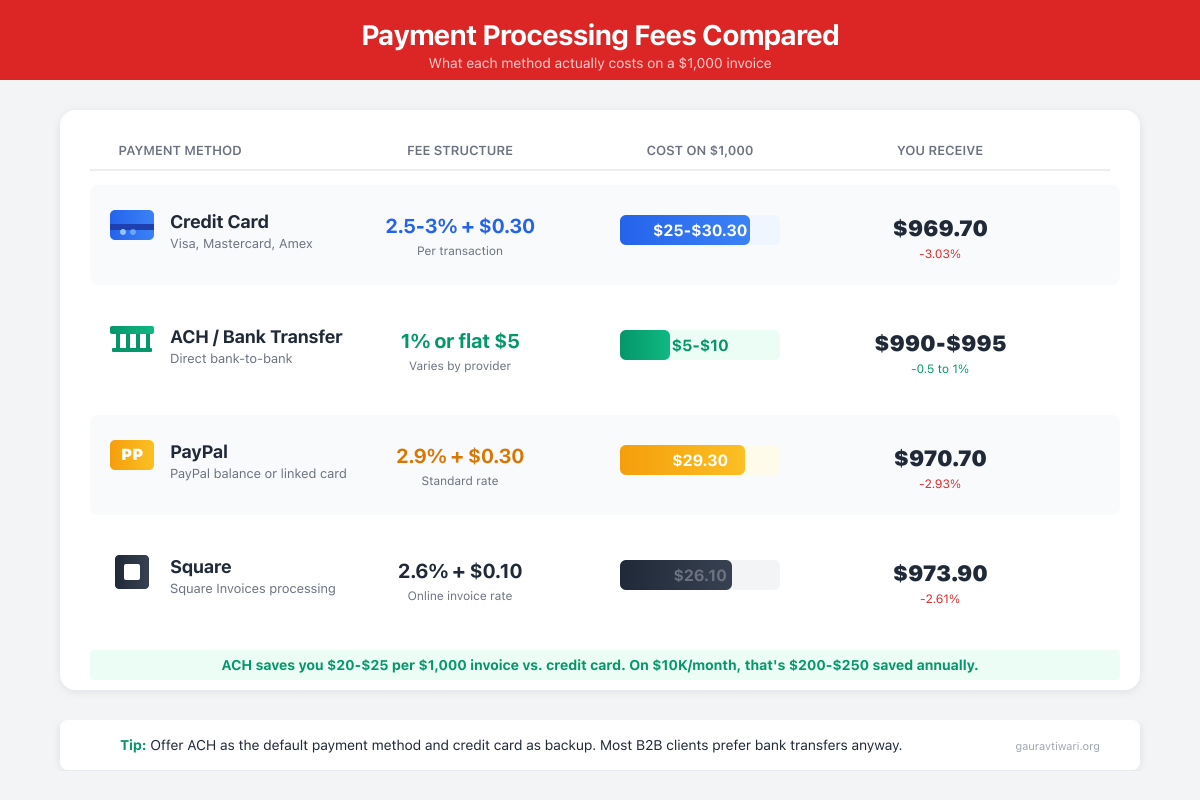
Most invoice platforms offer integrated payment processing. Here’s what to expect.
Credit card rates typically run 2.5-3% plus a per-transaction fee. That’s standard industry pricing, not a markup from your invoicing tool. The convenience of getting paid faster almost always outweighs the fee.
ACH or bank transfers often cost 1% or a flat fee. Lower cost, but 2-5 day settlement time. Good for larger invoices where 3% represents real money.
PayPal integration is worth offering as an option. Some clients strongly prefer it, and refusing to accept their preferred payment method just slows things down.
Stripe serves as the backend for many platforms. Developer-friendly processing that handles the technical complexity behind the scenes.
The convenience of click-to-pay invoices almost always outweighs processing fees. I’d rather pay 3% and get paid in 5 days than save the fee and wait a month. That’s not opinion. That’s math.
Try FreshBooks Free for 30 Days
My average payment time dropped from 22 days to 9 days after adding click-to-pay invoicing. Same clients, same rates, same terms. The only difference was removing friction between receiving the invoice and paying it.
Frequently Asked Questions
What’s the best free invoice software?
Wave offers completely free invoicing with professional features. Invoice Ninja has a generous free tier. Square Invoices is free for Square users. For pure invoicing without budget, start with Wave.
Do I need invoice software or can I use Word/Excel?
You can use Word/Excel, but dedicated software adds payment tracking, automatic reminders, online payments, and accounting integration. These features save significant time and improve cash flow. Free options like Wave eliminate the cost argument.
What percentage do invoice apps charge for payments?
Credit card processing typically runs 2.5-3% plus a per-transaction fee (often 25-60 cents). ACH/bank transfers are usually 1% or less. These are standard payment processing rates, not invoice software markups.
Should I use my accounting software for invoices?
If you use QuickBooks, Xero, or similar accounting software, their invoicing features work well and keep everything in one system. If you only need invoicing, dedicated tools may be simpler and cheaper.
How do I handle clients who pay late?
Automatic reminders help. Clear payment terms upfront help. Offering easy online payment helps. For chronic late payers, consider requiring deposits, shorter payment terms, or adjusting whether to continue the relationship.
What should be on an invoice?
Your business name and contact info. Client name and contact. Invoice number and date. Line items describing work/products with prices. Total amount. Payment terms. Payment instructions or link. Professional invoices include all of these.
The best invoice generators for small business turn scattered billing into a system. The right one pays for itself through faster payments and less time spent on admin you shouldn’t be doing manually.
Start with Wave if you’re bootstrapping. Go with FreshBooks if you want the most polished experience. Pick HoneyBook if invoicing is just one piece of a bigger client management puzzle.
Whichever invoice generator you choose, the real win isn’t the software. It’s the habit. Invoice same-day. Accept online payments. Set up automatic reminders. Do those three things and you’ll get paid faster than 90% of small business owners who are still emailing PDFs and hoping for the best.
Disclaimer: This site is reader-supported. If you buy through some links, I may earn a small commission at no extra cost to you. I only recommend tools I trust and would use myself. Your support helps keep gauravtiwari.org free and focused on real-world advice. Thanks. - Gaurav Tiwari