
 by
by
I use a 40-minute timer to write blog posts faster, but the timer is a drafting boundary, not a scientific optimum or a promise that a post will be publish-ready in an hour. After 18 years of writing online, the part I trust is simpler: separating drafting from checking stops one uncertain sentence from stalling the whole piece.
The method gives each mode one job. Plan the claim, draft forward, mark missing evidence, leave the screen, then edit and verify. The clock does not create expertise. It only makes the boundary visible.
My recommendation is to begin with one 40-minute draft sprint and measure the whole job, including research, source checks, images, links, editing, corrections, and distribution. If total production time falls while the correction rate stays flat, keep it. If the draft gets faster but the rewrite gets longer, you have moved the cost rather than removed it.
- Practitioner context: Gaurav Tiwari, writing and publishing online since 2008
- The core method: a single 40-minute timed draft sprint, no editing mid-draft
- Measure: draft time, total production time, corrections, and the useful outcome after publication
- Best for: writers who already know their topic and want to ship more often
- Skip the speed push if: you’re researching an unfamiliar subject or writing about money, health, or anything where a wrong fact does real harm
Orbit Media’s 2025 Annual Blogger Survey reports an average of 3 hours and 25 minutes per article across 808 respondents. That is self-reported production time, not a quality threshold, and the survey says the recent decline may be related to AI. It does not prove that one hour is realistic for your topic or standards.
What the 2025 survey shows: the latest available Orbit survey, published in 2025, says only 5% of its 808 respondents used no AI and about one in ten used AI to write complete articles. Those are survey results, not proof of better content. The useful question is whether a tool removes a measured bottleneck without weakening sources, voice, judgment, or accountability.
Why 40 Minutes Works Better Than Pomodoro
The Pomodoro Technique uses a 25-minute work interval. That may fit email or a short edit. I often prefer 40 minutes for a new section because it gives the argument more room, but that is a workflow choice, not a universal attention limit.
Forty minutes is useful because it is long enough to attempt one bounded piece of work and short enough to review honestly. Define that piece before starting: a section, an explanation, a procedure, or a revision pass. When the timer ends, record what actually finished.
Do not justify 40 minutes with ultradian rhythms; they do not establish a 40-minute writing optimum. A 48-person laboratory study of interrupted email work found faster completion but higher stress, frustration, time pressure, workload, and effort after interruption. Read the original interruption study, then use the modest lesson: protect the block, and choose its length from your own output and strain data.
The Complete Blog Writing Process That Helps You Write Blog Posts Faster
To write blog posts faster without publishing weaker work, treat the timer as one part of the process. A defensible blog writing process still needs four distinct modes: plan, draft, recover, and edit. Research and verification sit around those modes according to the risk of the subject.
Phase 1: Plan Before the Timer Starts (5-10 minutes)
Never start the 40-minute clock without knowing what you’re writing. That’s a recipe for staring at a blank screen while precious minutes tick away.
Before hitting start, answer four questions:
- What’s the main point? One sentence. If you can’t summarize it, you’re not ready to write.
- Who’s reading this? Picture a specific person. Not “WordPress users” but “a freelance designer who just started their own business.”
- What do they already know? This determines your starting point. Writing for beginners when your audience is intermediate wastes everyone’s time.
- What action should they take after reading? Every article needs a clear next step.
Write the smallest outline that prevents a blank start: the claim, reader, proof, section order, and next action. Four to six bullets may be enough for a short article, but the number is not the point. Log the planning time and see whether the outline reduces later restructuring.
In 2026, I may ask Claude or ChatGPT to challenge an outline: what decision is missing, which section repeats another, and which claim lacks a source? I compare the answer with the brief and primary research. Count prompting, reading, verification, and rewriting in the time budget; generation time alone is not production time.
Phase 2: Start the Timer and Write (40 minutes)
This is the critical phase. Once the timer starts, you have one job: write. Not edit. Not research. Not check if your opening sounds good. Write.
Rules during the 40 minutes:
- No backspace for whole sentences. If something sounds wrong, leave it and keep moving. Mark it with [FIX] and continue.
- No browser tabs. Close everything except your writing app. If you need to fact-check something, write [CHECK THIS] and continue.
- No notifications. Phone on silent. Computer notifications off. Slack closed. I put my phone in a different room entirely.
- No stopping. If you’re stuck, write “I don’t know what to write here because…” and explain the problem. Often, writing about the problem reveals the solution.
Do not use 1,000 words as the pass mark. The useful target is a complete section with its reasoning intact. My older note says normal talking speed is 125-150 words per minute, but speech rate does not predict researched drafting speed. Measure usable words after editing, not raw words before checking.
A 500-word session is not a failure. If the draft needs a wording change, mark [FIX]. If it needs evidence, mark [CHECK THIS]. Continue only when the missing item is safe to defer; stop immediately when the next paragraph depends on knowing the answer.
Phase 3: Take a Real Break (10-15 minutes)
When the timer ends, step away from the screen. Don’t just switch to email or social media. That’s not a break. That’s trading one form of screen fatigue for another.
Good break activities:
- Walk around your home or office
- Get water or coffee
- Stretch for a few minutes
- Look out the window (sounds silly, but it resets your focus)
- Have a brief conversation
The break has one practical job: end the continuous push and let you notice fatigue before starting another block. Capture a useful thought if one appears, but do not treat a break as a guaranteed creativity technique.
Phase 4: Edit in a Separate Session
Separate the editing pass from forward drafting. The pause can be ten minutes, an hour, or overnight depending on the deadline and risk. The important part is changing the task from producing sentences to testing what those sentences claim.
When you return, run an editing session with explicit checks:
- Fix all the [FIX] markers
- Verify all the [CHECK THIS] items
- Cut repetition, throat-clearing, and details that do not change the reader’s decision
- Break long sentences into shorter ones
- Add headers where sections feel long
- Read the opening. Does it hook immediately? If not, rewrite it.
Separate passes reduce mode switching inside the draft, but they do not guarantee better editing. Track the corrections found, factual errors caught, sections moved, and time spent. That evidence tells you whether the pause helped.
Build a Template System for Recurring Content
If you write the same format regularly, a template can remove repeated structural decisions. Pair it with the relevant content marketing strategies, then measure whether planning and revision time actually fall. A template that forces irrelevant sections creates work instead of saving it.
I have templates for my most common article types:
- Software review: Intro with personal context, what it does, my setup, pros, cons, pricing, who should use it, FAQ
- How-to guide: Problem statement, what you need, step-by-step, common mistakes, FAQ
- Comparison post: Quick verdict, criteria, detailed breakdown per tool, winner by use case
- List post: Intro with selection criteria, entries with consistent format, summary picks
Each template lives as a simple text file with section placeholders. When I start a new article, I copy the template, fill in the topic-specific details, and I’m writing within minutes. The structure is already decided. My 40-minute timer starts with momentum instead of uncertainty.
This approach works especially well if you monetize your blog and need consistent output. Templates don’t make content generic. They make structure consistent so your creative energy goes toward insights, not formatting decisions.
Batch Your Writing Days
Context switching changes both pace and strain, but there is no honest 15-minute tax for every writer. I batch similar stages when I create content efficiently across a whole pipeline: outlines together, drafts together, and verification together. Log transition time if batching is meant to solve it.
Protect one block first. Close communication tools, define the section, and record the result. Add another session only if the first draft’s accuracy and later rewrite cost remain acceptable. More raw words are not useful when the verification queue grows faster.
The key is protecting these blocks. Treat them like meetings you can’t reschedule. If someone asks for a call during your writing block, the answer is no. Your content marketing strategy depends on consistent output, and consistent output depends on protected writing time.
Batching also works by phase. Prepare several approved briefs or outlines in one block, then draft from that queue later. Keep a stop rule: do not draft a topic whose intent, evidence, or destination page is still unclear.
Use AI as a Speed Tool (Not a Writing Tool)
A preregistered experiment assigned occupation-specific writing tasks to 453 college-educated professionals and exposed half to ChatGPT. Average completion time fell 40% and evaluator-rated quality rose 18%. The Noy and Zhang study tested bounded professional tasks, not researched blog production. It shows that AI can speed some writing; it does not remove sourcing, domain judgment, or publication accountability.
The tools in this workflow have narrow jobs: Jasper can propose a structure, Notion AI can organize notes inside a document, and Grammarly can flag language issues. I still compare the structure with the brief, read the sources, decide the stance, and accept or reject every edit.
Where AI actually helps me write faster:
- Outline challenge: Give the model the audience, decision, stance, and proof. Ask what is missing or duplicated, then decide against the brief.
- Source organization: Let AI classify research you already collected. Read every primary source used for a claim; a summary is not evidence.
- Alternative phrasing: Ask for several ways to explain a difficult point, then write the version that preserves the evidence and your voice.
- Editing passes: I’ll paste a section and ask “what’s unclear or redundant here?” It catches things I’m too close to see. Not a replacement for my own editing, but a useful second pair of eyes.
Do not manufacture first-hand proof with AI. A sentence such as “I tested this on 12 sites” is evidence only when the test exists and can be explained. Use AI to challenge structure or clarity; keep facts, experience, judgment, and final responsibility with the author. Google’s people-first content guidance is a useful quality boundary.
Where AI often wastes time: generating a full draft before the angle, sources, and structure are settled. Measure the entire loop, including prompting, review, fact-checking, rewriting, and corrections. Stop using the tool for that task when the loop costs more than drafting directly.
| AI task | Evidence to record | Human control |
|---|---|---|
| Outline challenge | Total minutes and structural changes accepted | Intent, stance, proof, and section order |
| Source-note organization | Sources opened and claims independently verified | Primary-source reading and factual boundaries |
| Alternative phrasing | Rewrite time and corrections introduced | Voice, meaning, and final wording |
| Clarity critique | Useful issues found versus false alarms | Every accepted or rejected edit |
| Full draft | Total prompt, review, fact-check, and rewrite time | Stop when it costs more than direct drafting |
Formatting That Keeps Readers Moving
A wall of text loses readers. Even great writing needs visual breaks. During your editing session, add structure that makes scanning easy and keeps people scrolling.
Use Headers Every 200-300 Words
The heading above names a common editing heuristic, not a quota. Add a heading when the subject or reader task changes. A long coherent section may need none; a short procedural page may need several.
Good headers are specific. “Why This Matters” says nothing. “Why 40 Minutes Works Better Than Pomodoro” tells readers exactly what they’ll learn. I aim for headers that could stand alone as tweet-length takeaways.
Use Bullet Lists for Multiple Items
Use bullets when the items are parallel and comparison or sequence matters. Three items do not automatically require a list. Use prose when the relationship between ideas matters more than scanning.
Don’t overuse them. If your entire article is bullets, you’ve replaced prose with an outline. Mix bullets with paragraphs. The variety itself creates momentum.
Bold Key Phrases, Not Whole Sentences
Bolding can create a second reading path, but there is no two-to-four-word rule. Emphasize the claim, action, contrast, or warning a scanner must notice. Do not bold keywords mechanically.
Good: Finish one bounded section, then verify it.
Bad: Bold an entire sentence because every detail feels important.
Add Images and Links Last
Keep image sourcing and link verification outside a forward-drafting sprint unless the visual or source determines what you can honestly write. A tutorial screenshot, chart, or primary dataset may need to come first; a decorative image can wait.
After your content is edited and polished, add:
- Featured image: One strong visual that represents the article
- Section images: Optional. Only if they genuinely illustrate the point
- Internal links: Add the published pages that help the reader understand or take the next step. Do not target a quota.
- External links: Credible sources that support your claims
Treat links and images as their own logged pass when they are not prerequisites for the draft. If you blog consistently, the log will show whether that sequencing reduces total time or merely moves it to the end.
Proofreading: The Final 10 Minutes
Budget ten minutes for the final pass, then extend it when the subject requires more. Read the article aloud or use text-to-speech, verify the claims and links, and inspect the rendered page. A grammar checker cannot decide whether the evidence supports the sentence.
Check for:
- Typos: Spell check misses correctly spelled wrong words (their/there/they’re)
- Repeated words: “Really really” happens more than you’d think
- Awkward sentences: If you stumble reading it aloud, readers will stumble too
- Missing words: Your brain auto-fills words you forgot to type
- Broken links: Click every link. Every time.
Reading aloud is useful because it exposes rhythm, missing words, and sentences that are difficult to parse. It does not verify a statistic, price, link destination, calculation, or screenshot. Keep those as separate checks.
Common Speed Writing Mistakes to Avoid
Timed writing fails when the workflow optimizes raw output and ignores the work around it. Speed helps only after the topic, audience, stance, and evidence are ready. If they are not, slow down and build a real content marketing plan before starting the draft.
Starting without a decision. A timer cannot choose the audience, main claim, evidence, or next action for you. Prepare the smallest outline that answers those questions, and include its time in the production total.
Editing without a stop rule. Fix a word when meaning depends on it. Otherwise mark the sentence and continue. Do not attach a fake 10-minute recovery penalty or 40% output loss to every edit; log your own interruptions and resumed work.
Skipping the quality check between sessions. Before starting another block, record whether the last section finished, which claims remain open, and whether strain or error rate rose. Take a break when it helps you recover; do not force the same interval on every task.
Copying someone else’s ideal time. Test morning, afternoon, or evening blocks against usable output, corrections, and strain. Keep other conditions as stable as practical. Your measured pattern matters more than a universal claim about mornings.
Tracking words but not rework. Record the session duration, usable words or completed section, later editing minutes, factual corrections, and publication outcome. A faster draft with more rework is not an improvement.
The Speed Writing Checklist
Before a writing session, use this checklist as a readiness gate. Skip any item that does not fit the task, but do not start a factual section without knowing where its evidence will come from.
Pre-Session Checklist
Try the 40-Minute Timer
I built the timer below to make the boundary visible. It includes 25-, 40-, 50-, and 60-minute presets, fullscreen mode, local session counts, and keyboard controls. Choose one duration, define one deliverable, and record what required correction afterward.
40-Minute Writing Timer
Focus. Write. Ship.
The timer alerts you with ten minutes remaining and at the end. It stores today’s session count, focused minutes, and streak in the browser. Those numbers measure use, not writing quality, so pair them with an editing and correction log.
Real Results From This System
I do not have a controlled archive of session durations, edit time, and quality scores that proves this timer halves production time. I do have a first-party distribution check. I queried Google Search Console performance data for six published writing and content-workflow guides across two adjacent 45-day windows.
| GSC window | Pages with impressions | Impressions | Clicks | Weighted position |
|---|---|---|---|---|
| Apr 28-Jun 11, 2026 | 4 of 6 | 45 | 0 | 40.09 |
| Jun 12-Jul 26, 2026 | 3 of 6 | 32 | 0 | 52.84 |
| Change | -1 page | -13 (-28.89%) | 0 | 12.75 positions worse |
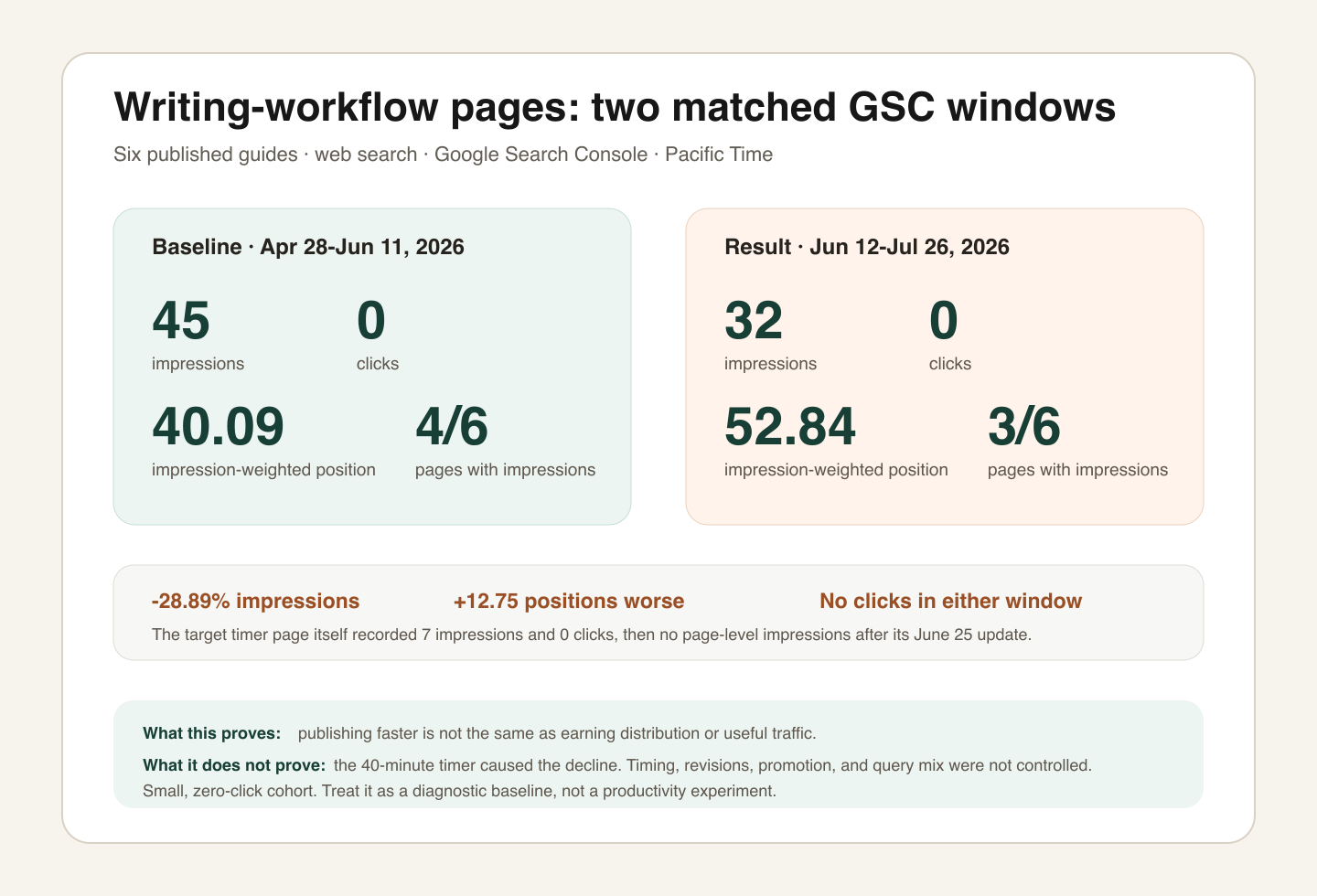
The target timer page recorded 7 impressions and zero clicks from March 23 through June 4, 2026. After its June 25 content change, it had no page-level impressions through July 26. Across the six-page cohort, the baseline was 45 impressions; impressions then fell 28.89%, clicks stayed at zero, and weighted position moved 12.75 places worse. Publishing or revising faster did not create distribution.
Limitation: this is not a timer experiment. Session length, research difficulty, revisions, promotion, query mix, and content changes were not controlled. The sample is tiny and had no clicks, so it cannot estimate engagement or prove causality. Its value is as a hard baseline: drafting speed and the things that make high-quality content that actually ranks must be measured separately.
A timed draft passes only when the later checks pass: sources support the claims, calculations reproduce, links resolve, the page renders, and the intended reader can act. Search impressions and clicks then test distribution. Analytics and conversions test whether the visit was useful.
This system works for:
- Blog articles (what I use it for most)
- Newsletter issues
- Email sequences
- Documentation and tutorials
- Social media batching (multiple posts per session)
- First drafts of any kind
Use timed forward drafting cautiously for technical, medical, legal, financial, mathematical, or unfamiliar subjects. Stop the clock when the next sentence depends on a fact you have not verified. Creative exploration may also need an open session with no output target.
Start Your First Sprint Today
Pick one article and define a bounded section. Prepare the claim and sources, open the timer, draft forward, and mark safe-to-defer checks. Afterward, log drafting time, editing time, corrections, and whether the section survived the final version.
Run at least three comparable sessions before deciding. Compare 25, 40, or 60 minutes if useful, but hold the task type and quality checks as steady as you can. Keep the duration with the lowest total cost per usable section, not the highest raw word count.
If you want more practical blogging tips, use the same standard: define the task, test the workflow, keep the evidence, and separate what felt faster from what actually produced a usable result.
Books on Deep Focus and Productivity
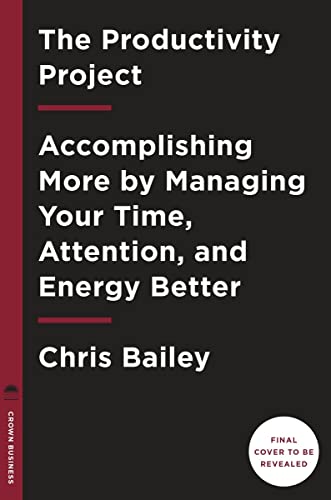
These books offer practical frameworks for protecting attention and reviewing how time is spent. They do not validate a universal 40-minute cycle. Use them for ideas, then test the routine against your own output, corrections, and strain.
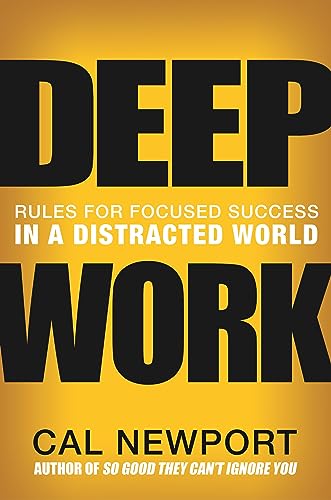
Deep Work: Rules for Focused Success in a Distracted World
- Cal Newport's framework for eliminating distractions and producing high-quality work
Frequently Asked Questions
Why 40 minutes instead of 25 or 60?
Forty minutes is a practical default, not a scientifically proven optimum. It gives me enough room to draft one coherent section while keeping the boundary visible. Use the timer’s 25-, 40-, 50-, and 60-minute presets, log completed sections and corrections, and keep the duration that produces usable work for you.
Can I use AI tools during my 40-minute sprint?
You can, but count prompting, reading, verification, and rewriting as part of the session. I prefer to use AI before a sprint for a structure challenge or after it for critique. If a claim needs help, write [AI CHECK], continue drafting, and verify it against the primary source before publication.
What if I can’t write 1,000 words in 40 minutes?
Nothing is wrong. Word count is not the quality gate. Track the useful unit you completed, such as one section, one argument, or one procedure, plus the corrections the draft needed later. A slower accurate draft is cheaper than a fast draft that requires a full rewrite.
How many 40-minute sessions can I do per day?
There is no reliable universal number. Start with one session. Add another only if your later drafts, verification accuracy, and recovery remain acceptable. Stop when error rate, strain, or rewrite time rises. The timer records sessions and minutes; use those records with an editing log instead of copying someone else’s quota.
Does this work for long-form content like guides or ebooks?
It can help with bounded sections after the research and structure are ready. Do not convert a large guide into a word-count race. Assign one section, proof task, or revision goal to each sprint, then run a separate whole-document pass for consistency, missing evidence, transitions, and duplication.
Tell Google you want more of this.
Add Gaurav Tiwari as a preferred sourceOne tap, and this site shows up more often in your own Top Stories, AI Overviews and AI Mode. Remove it any time.
Disclaimer: This site is reader-supported. If you buy through some links, I may earn a small commission at no extra cost to you. I only recommend tools I trust and would use myself. Your support helps keep gauravtiwari.org free and focused on real-world advice. Thanks. - Gaurav Tiwari
