
Best A/B Testing Tools in 2026 (Google Optimize Alternatives)
Your landing page converts at 2.1%. Your competitor’s converts at 4.8%. The difference? They test everything. Headlines, button colors, form layouts, pricing displays, even the number of fields in a signup form.
Google Optimize was the go-to free A/B testing tool for years. Then Google killed it in September 2023, leaving millions of marketers scrambling for alternatives. I’ve tested 8 A/B testing tools across client sites over the past year, running over 40 experiments. Some of these tools are enterprise-grade with five-figure annual contracts. Others are genuinely free.
Here are the best A/B testing tools available right now, with honest pricing breakdowns and recommendations based on your actual needs.
What is A/B Testing?
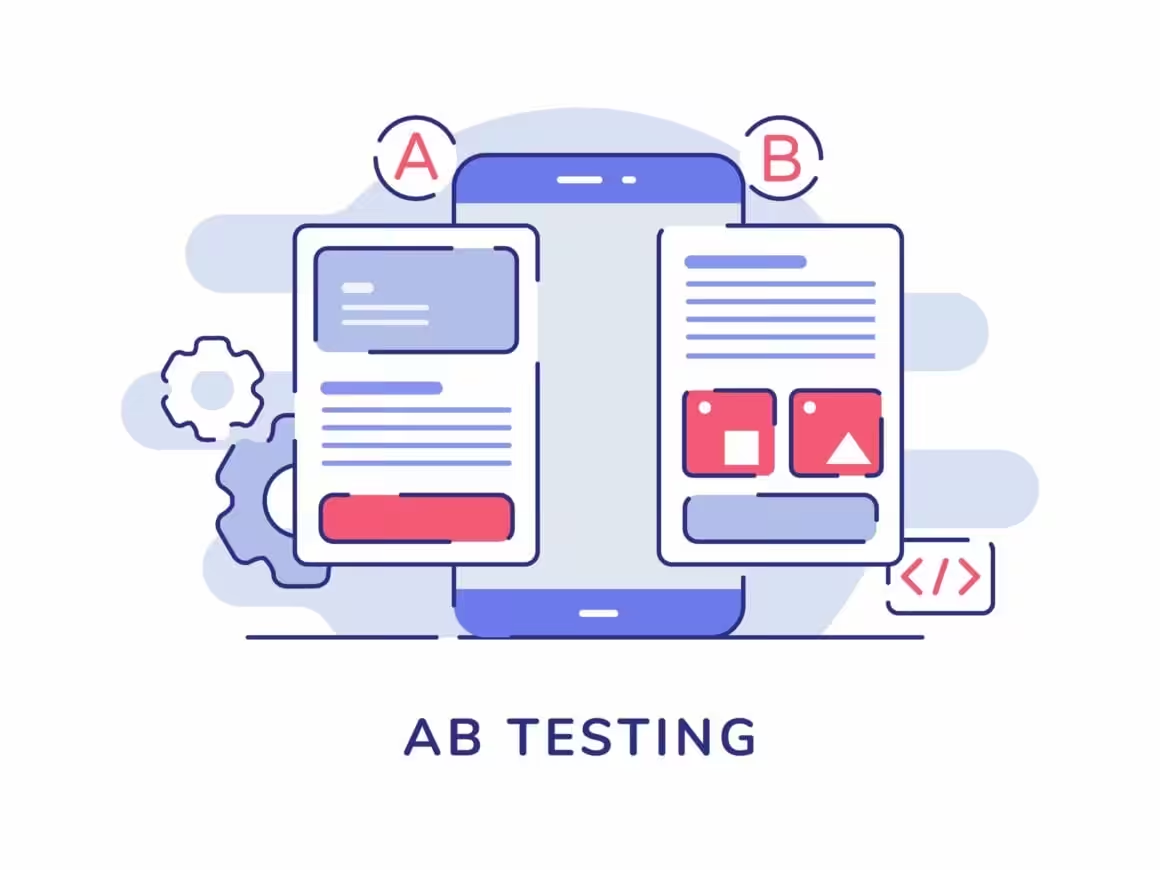
A/B testing is the process of splitting your web traffic and sending visitors to two different versions of a page (or element) to see which one performs better. Sometimes called split testing, it’s the most reliable way to make data-driven decisions about your website.
You show Version A to 50% of visitors and Version B to the other 50%. After enough data accumulates, you know which version converts better. No guessing, no opinions, just numbers.
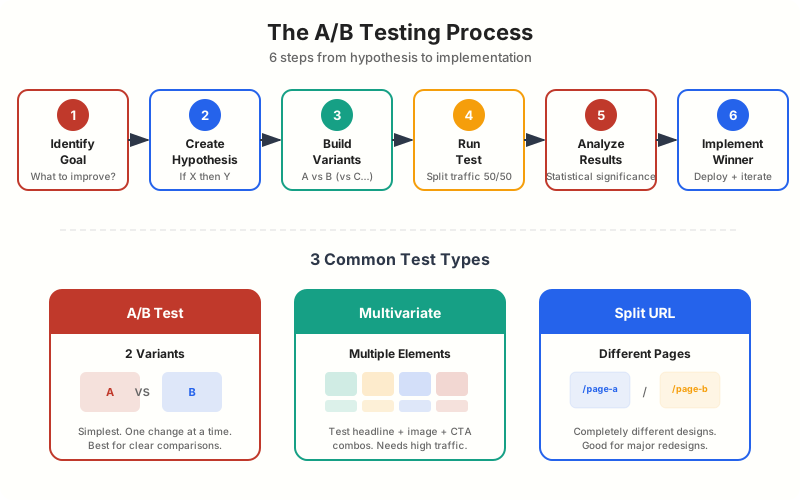
The concept extends beyond two versions. A/B/N testing (or multivariate testing) lets you test three, four, or more variants simultaneously. But the principle is the same: split traffic, measure outcomes, pick the winner.
A/B Testing Example
Say you run an online store and want to know which product page design generates more sales. You create two versions: one with a blue “Buy Now” button and one with a green “Buy Now” button.


You track how many people from each group click the button and complete a purchase. The version that generates more sales wins. In this case, let’s say the green button outperforms blue by 12%. You roll out the green button to 100% of traffic.
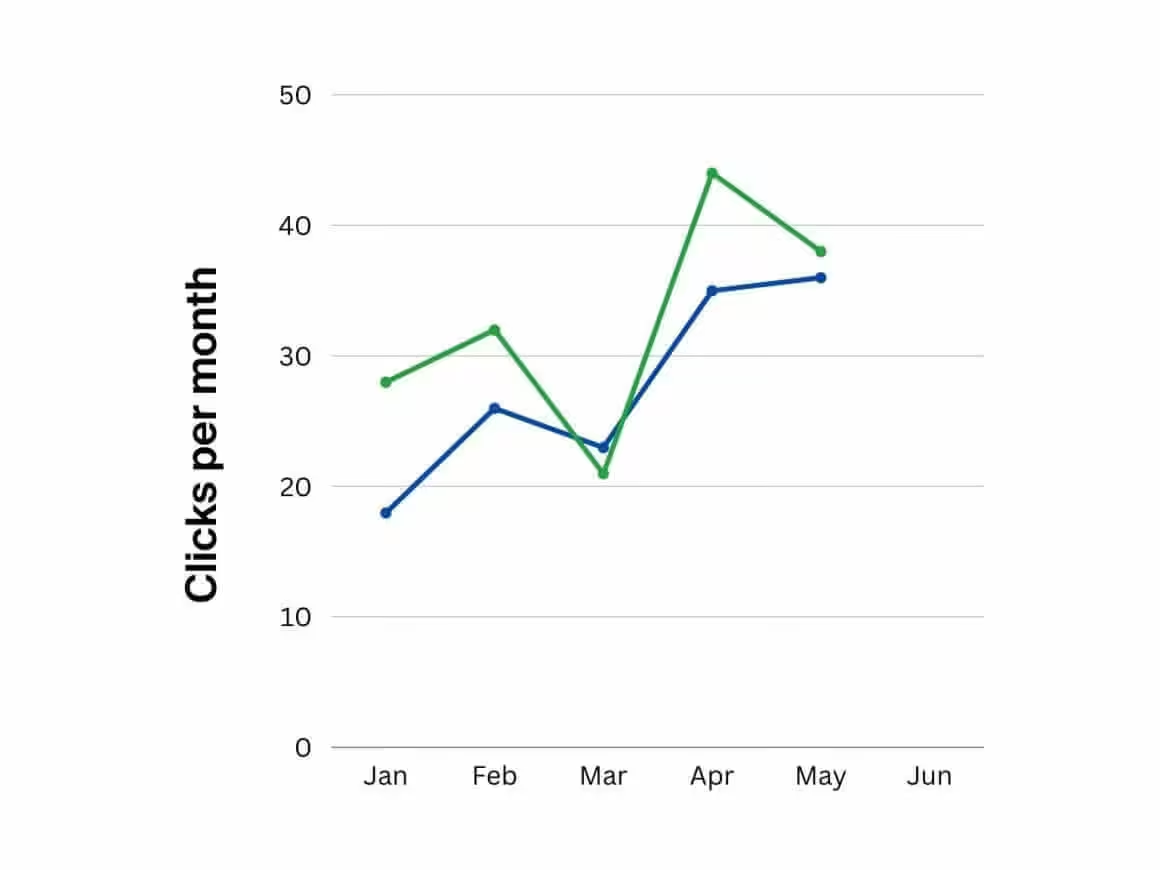
Don’t test random things. Start with your highest-traffic pages and test elements closest to the conversion point. A button color test on a page with 200 monthly visitors will take months to reach statistical significance. A headline test on a page with 10,000 visitors can show results in days.
Why A/B Testing Matters in 2026
The math is simple. If your site converts at 2% and you increase that to 3%, you’ve grown revenue by 50% without spending a dollar more on traffic. That’s the power of conversion rate optimization.
Here’s what’s changed recently: AI-powered testing tools now suggest what to test based on your data, automatically allocate traffic to winning variants, and reach statistical significance faster. Tools like VWO and Optimizely use machine learning to identify winning patterns that manual analysis would miss.
Server-side testing has also matured. Instead of flickering page loads (where visitors briefly see the original before the variant loads), modern tools render the correct variant on the server before the page reaches the browser. The result is faster, cleaner tests that don’t hurt user experience.
If you want to understand why CRO matters more than ever, the short version is this: ad costs keep rising, organic traffic keeps getting harder, and squeezing more conversions from existing traffic is the highest-ROI activity most businesses ignore.
Best A/B Testing Tools in 2026
Since Google Optimize was discontinued, the A/B testing landscape has consolidated around a handful of serious tools. Here are the 8 best options, ranked by overall value.
1. VWO (Visual Website Optimizer) – Best Overall

VWO (Visual Website Optimizer)
- Visual editor for no-code test creation
- Heatmaps, session recordings, and surveys built in
- AI-powered test suggestions and insights
- Free plan with 50,000 MTU and web testing
- Server-side testing and feature flags (Pro+)
Full-suite experimentation platform with A/B testing, heatmaps, session recordings, and surveys. Free plan available for up to 50,000 monthly tracked users.
VWO is the closest thing to a Google Optimize replacement that actually improves on what Google offered. The free plan includes A/B testing for up to 50,000 monthly tracked users. That covers most small to mid-sized businesses.
What sets VWO apart is the integrated research tools. Heatmaps show you where visitors click and scroll. Session recordings let you watch real user behavior. Surveys capture qualitative feedback. You don’t just know what performs better. You understand why.
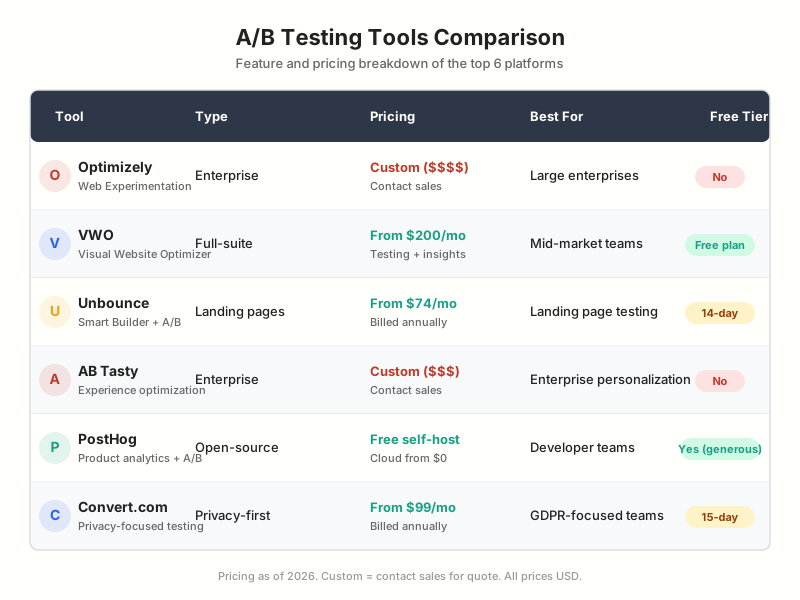
The visual editor makes test creation accessible to non-technical marketers. Point, click, change a headline, launch the test. For developers, there’s a code editor and full API access. Pricing scales with traffic: Growth starts around $200/month, Pro at $480/month, and Enterprise at $1,068/month.
Best for: Teams that want A/B testing plus user research in one platform. The free plan makes it the obvious starting point.
2. Optimizely – Best for Enterprise

Optimizely
- WYSIWYG visual editor for non-technical teams
- Stats Engine for faster statistical significance
- Feature flags and progressive delivery
- Full Stack SDKs for server-side experiments
- Content management and digital asset platform
Enterprise experimentation leader with A/B testing, multivariate testing, feature flags, and content personalization across web and mobile.
Optimizely is the industry leader in experimentation. If you work at a Fortune 500 company or a funded startup with a dedicated CRO team, Optimizely is probably already on your radar.
The Stats Engine reaches statistical significance faster than traditional methods, which means shorter test durations and more experiments per quarter. The Full Stack SDKs let you run server-side experiments in any programming language. Feature flags and progressive delivery are built in, so your engineering team can use the same platform for both experimentation and feature rollouts.
The catch: pricing is custom and enterprise-level. Expect five figures annually. There’s no self-serve plan and no free tier. You’ll need to talk to sales.
Best for: Large enterprises with dedicated experimentation teams and budget. The platform is powerful but not accessible to small businesses.
3. Unbounce – Best for Landing Pages

Unbounce
- AI Smart Traffic auto-optimizes variant routing
- Drag-and-drop landing page builder
- A/B testing built into every plan
- 100+ high-converting templates
- Integrations with HubSpot, Salesforce, Mailchimp
Landing page builder with built-in A/B testing and AI-powered Smart Traffic that automatically routes visitors to highest-converting variants.
Unbounce takes a different approach. Instead of testing changes on your existing site, you build dedicated landing pages with A/B testing built in from the start.
The AI Smart Traffic feature is the standout. Instead of a simple 50/50 split, Smart Traffic uses machine learning to route each visitor to the variant most likely to convert for them, based on attributes like device, location, and time of day. Unbounce claims this can improve conversion rates by up to 30% compared to standard A/B testing.
Plans start at $74/month (billed annually) for the Launch plan, scaling up to $649/month for the Concierge plan. Every plan includes A/B testing and Smart Traffic.
Best for: Marketers running paid ad campaigns who need high-converting landing pages with built-in testing. Particularly strong for PPC campaigns.
4. AB Tasty – Best for Personalization

AB Tasty
- AI-powered test optimization and insights
- Feature flagging and progressive rollouts
- Advanced audience segmentation and targeting
- Server-side and client-side testing
- ROI dashboard connecting tests to revenue
Enterprise experimentation and personalization platform with AI-driven optimization, feature management, and audience targeting.
AB Tasty combines A/B testing with advanced personalization. While most tools let you test two versions, AB Tasty lets you serve different experiences to different audience segments automatically.
The ROI dashboard connects test results directly to revenue impact. You can see exactly how much money a winning variant generated, not just that it had a higher click rate. The feature management module lets engineering teams do feature flagging alongside marketing tests in one platform.
Pricing is custom and generally falls in the mid-to-enterprise range. Expect $1,000-5,000/month depending on traffic volume and features needed.
Best for: Mid-to-large companies that want to combine A/B testing with audience personalization and feature management.
5. PostHog – Best Free/Open-Source
PostHog
- Open-source with self-hosting option
- Generous free tier (1M events/month on cloud)
- A/B testing + feature flags + analytics in one
- Session recordings and heatmaps included
- No vendor lock-in, full data ownership
Open-source product analytics platform with A/B testing, feature flags, session recordings, and surveys. Self-host for free or use the cloud.
PostHog is the developer’s choice. It’s open-source, self-hostable, and the cloud version offers a generous free tier: 1 million events per month, which covers A/B testing, feature flags, analytics, session recordings, and surveys.
Unlike most tools on this list, PostHog gives you full data ownership. Self-host on your own infrastructure and no data ever leaves your servers. This matters for companies in regulated industries (healthcare, finance) or those with strict data governance requirements.
The trade-off: PostHog is developer-focused. There’s no drag-and-drop visual editor for creating test variants. You’ll need a developer to implement experiments in code. For technical teams, that’s a feature. For marketing teams without engineering support, it’s a blocker.
Best for: Developer-led teams that want full-stack experimentation with product analytics. Especially strong for SaaS products and technical teams.
6. Convert.com – Best for Privacy/GDPR
Convert.com
- GDPR, CCPA, and ePrivacy compliant by default
- No third-party cookies or personal data tracking
- Visual editor and code editor for tests
- Advanced targeting with 40+ conditions
- SmartInsert technology for flicker-free testing
Privacy-first A/B testing platform, fully GDPR compliant out of the box. No third-party cookies, no personal data collection by default.
Convert.com built its entire platform around privacy compliance. No third-party cookies, no personal data collection by default, fully GDPR and CCPA compliant out of the box. If your legal team has concerns about testing tools and data privacy, Convert eliminates those conversations.
The SmartInsert technology eliminates the flicker effect that plagues many A/B testing tools. Tests load cleanly without visitors seeing the original page flash before the variant appears. Plans start at $99/month for up to 100,000 monthly visitors.
Convert is popular with European businesses and companies in regulated industries. The platform itself is solid for testing, with both visual and code editors, but the privacy compliance is the main selling point.
Best for: Companies that need strict privacy compliance (GDPR, CCPA, ePrivacy) without sacrificing testing capabilities.
7. Crazy Egg – Best for Beginners
Crazy Egg
- Heatmaps, scroll maps, and click reports
- Simple A/B testing with visual editor
- Session recordings and error tracking
- One-line install (single script tag)
- A/B testing from $99/month (Plus plan)
Visual analytics and A/B testing tool known for heatmaps, scroll maps, and click tracking. Simple setup with a single script tag.
Crazy Egg is the simplest tool on this list. Install one script tag, and you get heatmaps, scroll maps, click reports, session recordings, and A/B testing. The entire setup takes under 5 minutes.
The A/B testing features are basic compared to VWO or Optimizely. No multivariate testing, no server-side experiments, no advanced targeting. But for small businesses running their first tests, Crazy Egg’s simplicity is an advantage. Less to learn, faster to start, fewer ways to mess up.
A/B testing starts at $99/month (Plus plan). Heatmap-only plans start at $29/month (Basic). The Plus plan at $99/month and Pro at $249/month include unlimited A/B tests. The heatmaps and recordings are genuinely useful even if you never run an A/B test.
Best for: Small businesses and beginners who want visual analytics with simple A/B testing. Great first tool.
8. LaunchDarkly – Best for Developer Teams

LaunchDarkly
- Feature flags with experimentation built in
- Test features before full rollout
- Server-side SDKs for 25+ languages
- Percentage-based and targeted rollouts
- Integrations with CI/CD pipelines
Feature management platform with built-in experimentation. Run A/B tests on features, not just page elements. Developer-first approach.
LaunchDarkly approaches A/B testing from the engineering side. It’s primarily a feature flag platform that added experimentation capabilities. Instead of testing page elements, you test entire features.
Roll out a new checkout flow to 10% of users, measure conversion rates, then gradually increase to 100% if it performs well. This is fundamentally different from traditional A/B testing. You’re testing product changes, not just design changes.
LaunchDarkly integrates with CI/CD pipelines, supports 25+ server-side SDKs, and can handle billions of feature flag evaluations per day. Pricing starts at $10/seat/month for the Developer plan, with Pro and Enterprise tiers for larger teams.
Best for: Engineering teams that want to combine feature flagging with experimentation. Ideal for SaaS companies with continuous deployment.
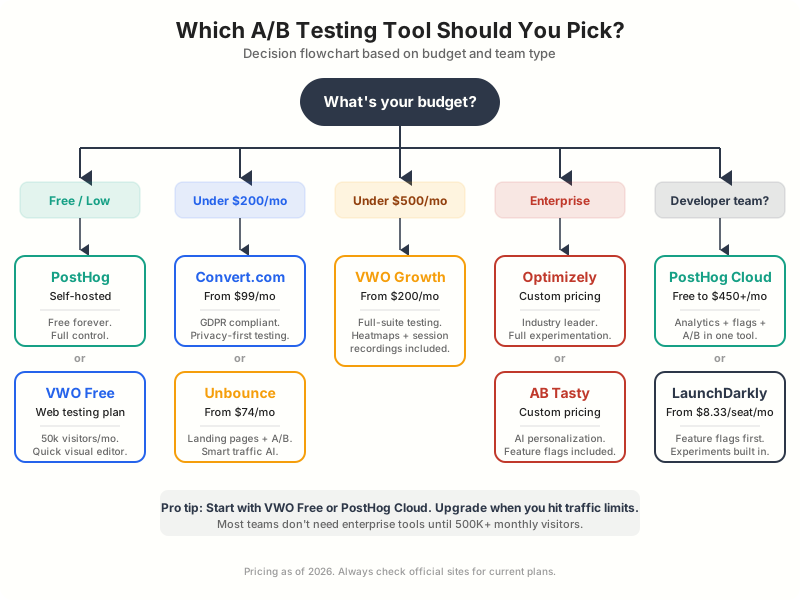
Which A/B Testing Tool Should You Pick?
Here’s my recommendation based on your situation:
“I need a free Google Optimize replacement”: VWO Free. It covers web testing for up to 50,000 monthly tracked users. The closest thing to what Google Optimize offered, but better.
“I’m a small business just starting”: Crazy Egg ($99/month for A/B testing). Simple setup, visual analytics, and basic A/B testing. You can learn the fundamentals without a steep learning curve.
“I run paid ad campaigns”: Unbounce. Build dedicated landing pages with AI-powered traffic routing. The Smart Traffic feature consistently outperforms manual A/B splits.
“I need enterprise-grade experimentation”: Optimizely or AB Tasty. Both offer comprehensive platforms with advanced features. Optimizely for pure experimentation power, AB Tasty if you also need personalization.
“I’m a developer”: PostHog. Open-source, self-hostable, generous free tier, and full data ownership. Or LaunchDarkly if feature flagging is your primary use case.
“Privacy compliance is critical”: Convert.com. Purpose-built for GDPR, CCPA, and ePrivacy compliance.
Google Optimize was discontinued on September 30, 2023. Google cited the need to invest in more effective solutions. There is no direct replacement from Google. GA4 offers basic experimentation features, but for serious A/B testing, you need a dedicated tool. VWO’s free plan is the closest replacement for former Google Optimize users.
What Happened to Google Optimize?
Google Optimize was a free A/B testing tool that integrated directly with Google Analytics. Google retired it on September 30, 2023, citing the need to invest in more effective solutions.
The timing was frustrating. Google Optimize had millions of users, and Google offered no direct replacement. GA4 includes basic experimentation features (Experiments in the Admin panel), but it’s limited: no visual editor, no multivariate testing, no personalization.
For most former Google Optimize users, VWO’s free plan is the best migration path. It offers similar features (visual editor, basic A/B testing) with a generous free tier. PostHog is another strong free option, especially for technical teams.
A/B Testing Best Practices
Test one element at a time. If you change the headline, button color, and layout simultaneously, you won’t know which change drove the improvement. Isolate variables for clear results.
Calculate sample size before starting. Use a sample size calculator (VWO and Optimizely both have free ones) to determine how long your test needs to run. Ending tests early based on incomplete data leads to false positives.
Always run tests for full weeks. User behavior varies by day of the week. A test that runs Monday through Thursday misses weekend traffic patterns. Two full weeks (14 days) is the minimum.
Prioritize tests by impact. Test elements closest to the conversion point first. CTA buttons, form fields, pricing displays, and headlines have the highest impact. Footer layout changes won’t move the needle.
Document everything. Keep a testing log with hypotheses, variants, sample sizes, results, and learnings. Patterns emerge over time. Our guide on successful A/B testing for businesses covers the full process.
Frequently Asked Questions
What is the best free A/B testing tool?
VWO offers the best free A/B testing plan with up to 50,000 monthly tracked users and full web testing capabilities. PostHog is another excellent free option, especially for developer teams, with a generous free tier (1 million events/month on cloud) and full self-hosting available at no cost.
What replaced Google Optimize?
Google Optimize was discontinued in September 2023 with no direct replacement from Google. GA4 includes basic experimentation features, but for proper A/B testing, VWO, Optimizely, or PostHog are the most popular alternatives. VWO’s free plan is the closest match to what Google Optimize offered.
How much traffic do I need for A/B testing?
You need at least 1,000 visitors per week to the page you’re testing for meaningful results within a reasonable timeframe. Pages with fewer than 250 weekly visitors will take months to reach statistical significance. For multivariate tests (testing multiple elements), you need even more traffic, roughly 10x what a simple A/B test requires.
Is A/B testing worth it for small websites?
If your site gets fewer than 5,000 monthly visitors, traditional A/B testing is challenging because reaching statistical significance takes too long. Instead, focus on qualitative research: user recordings, heatmaps, and surveys (tools like Crazy Egg and PostHog include these). Once traffic grows, start with high-impact tests on your most visited pages.
What’s the difference between A/B testing and multivariate testing?
A/B testing compares two complete versions of a page (Version A vs Version B). Multivariate testing tests multiple elements simultaneously (headline A + button blue vs headline B + button green vs headline A + button green). A/B tests need less traffic and give clear results. Multivariate tests require significantly more traffic but reveal which specific element combinations perform best.
How long should I run an A/B test?
Run tests for a minimum of two full business weeks (14 days), even if you reach statistical significance earlier. This accounts for day-of-week variations in user behavior. Most tools will tell you when you’ve reached 95% statistical significance. Never end a test early just because one variant looks better after a few days.
Can I do A/B testing on WordPress?
Yes. You can use WordPress plugins like Nelio AB Testing or integrate external tools like VWO, Optimizely, or PostHog via a JavaScript snippet. For landing page testing specifically, Unbounce creates and hosts pages independently of your WordPress site. Most A/B testing tools work with any website platform, including WordPress.
The A/B testing landscape has improved since Google Optimize’s shutdown. Tools are smarter (AI-powered optimization), more accessible (VWO and PostHog free tiers), and more privacy-conscious (Convert.com). The hardest part isn’t choosing a tool. It’s building the habit of testing consistently.
Start with VWO Free or PostHog. Run your first test this week. Test your most visited page’s headline or primary CTA. Even a single experiment that increases conversion by 0.5% compounds into significant revenue over a year.
Disclaimer: This site is reader-supported. If you buy through some links, I may earn a small commission at no extra cost to you. I only recommend tools I trust and would use myself. Your support helps keep gauravtiwari.org free and focused on real-world advice. Thanks. - Gaurav Tiwari