
TeXstudio Review: The Most Complete Free LaTeX Editor in 2026
I first installed TeXstudio back in 2012, version 2.3. After years of wrestling with raw LaTeX in basic text editors, TeXstudio felt like someone finally understood what academic writers actually need. The word I used to describe it? Peaceful. Over a decade later, now at version 4.8+, that feeling hasn’t changed.
Writing LaTeX is a real pain when you’re producing lengthy documents, research papers, or math-heavy content. I’ve written mathematics blogs and books with it, and the difference between a bare-bones editor and TeXstudio is night and day: auto-completion of LaTeX commands, built-in PDF preview, integrated spell checking, and a compiler that just works.
No more memorizing every LaTeX command. No external compilers. No extra plugins to install. TeXstudio handles it all in one window.
TeXstudio packs features that genuinely cut your LaTeX writing effort in half. Auto-fill suggestions, syntax highlighting, real-time PDF preview, spell and reference checking, bibliography support, and profile management. I’ll cover each of these in detail, but first, some context on the app’s origin.
About TeXstudio
| Product | TeXstudio |
| Developer | Benito van der Zander, Jan Sundermeyer, Daniel Braun, Tim Hoffmann |
| Initial release | April 2009 |
| Stable release | 4.8.2 (2024) |
| Programming language | C++ / Qt |
| Operating system | Windows, macOS, Linux, BSD |
| License | GPL v3 (Open Source) |
| Price | Free |
| Features | Syntax highlighting, auto-completion, spell check, code folding, error highlighting, reference checking, built-in PDF viewer, live preview, support for LaTeX, XeLaTeX, LuaLaTeX, and more |
| Integrations | Git, SVN, MiKTeX, TeX Live, Ghostscript |
| Download | texstudio.org |
TeXstudio vs TeXMaker
TeXstudio is an integrated writing environment for creating LaTeX documents. It’s completely open source and available on all major desktop platforms: Windows, Linux, BSD, and macOS. The project was started by Benito van der Zander, Jan Sundermeyer, Daniel Braun, and Tim Hoffmann as a fork of TeXMaker, whose open-source development had stalled in 2009.
Originally called TeXMakerX (intended as a set of extensions for TeXMaker), the project was renamed to TeXstudio in 2009 and became a fully independent, open-source application. TeXMaker still exists and is free to use, but its development remains closed. TeXstudio has since surpassed it in features, community support, and active development.
Also see: 10 Best LaTeX Editors for Windows and Mac and Best Online LaTeX Editors
TeXstudio Features & Tutorial
Easy Writing and Editing
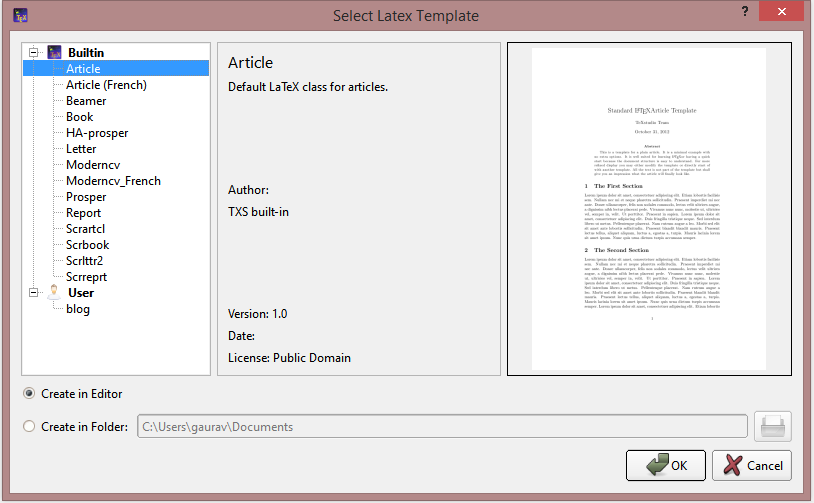
TeXstudio provides a streamlined writing experience with premade TeX templates and quick wizards. As a first-time user, you can open File → New from template and you’re ready to go. If you want to save the .tex file to a specific location instead of the default folder, you can select your preferred destination.
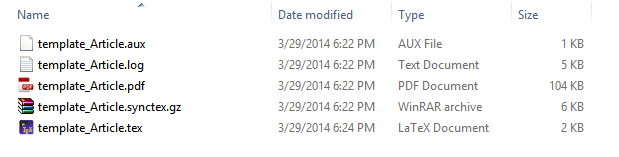
TeXstudio builds five or more files at once, so I recommend using a dedicated folder for each document. This keeps all generated files organized and prevents conflicts during compilation.
Experienced users can start with a blank file from File → New. Standard Microsoft Office keyboard shortcuts work in TeXstudio, so the learning curve is minimal if you’re coming from Word or Google Docs.
Key writing features that save time daily:
- Auto-Completion: Start typing any Math or LaTeX command, and the editor suggests completions. This alone saves hours when you’re writing complex equations.
- Content Navigation: Jump between sections, bookmarks, and labels effortlessly. Word-by-word navigation makes editing precise.
- Syntax Highlighting: LaTeX commands, math environments, and comments are color-coded, making it easy to spot errors at a glance.
- Spell Check: Integrated spell checking catches typos in real-time, with language-specific dictionaries for multi-language documents.
- Drag and Drop: Drop images directly into the document. Add tables, bookmarks, and customize shortcuts, menus, and toolbars to your workflow.
Instant Previews
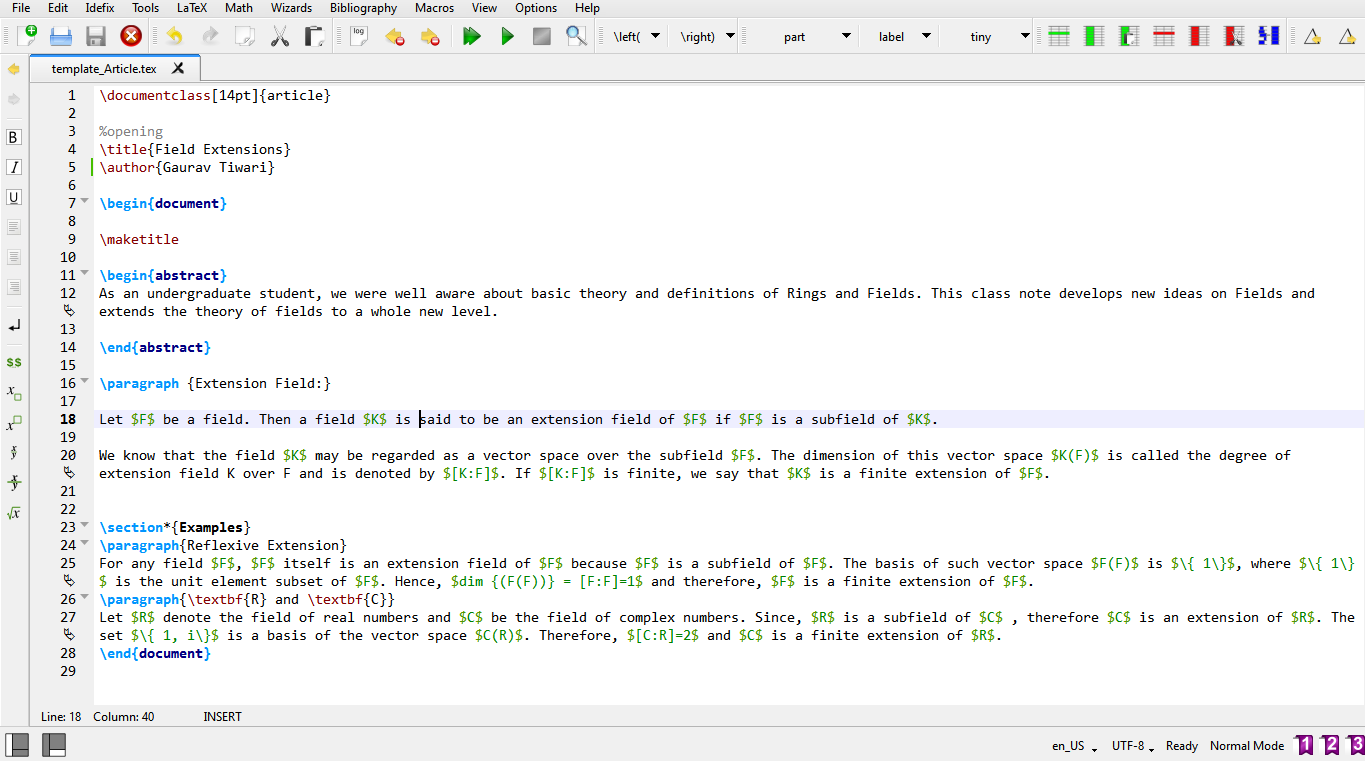
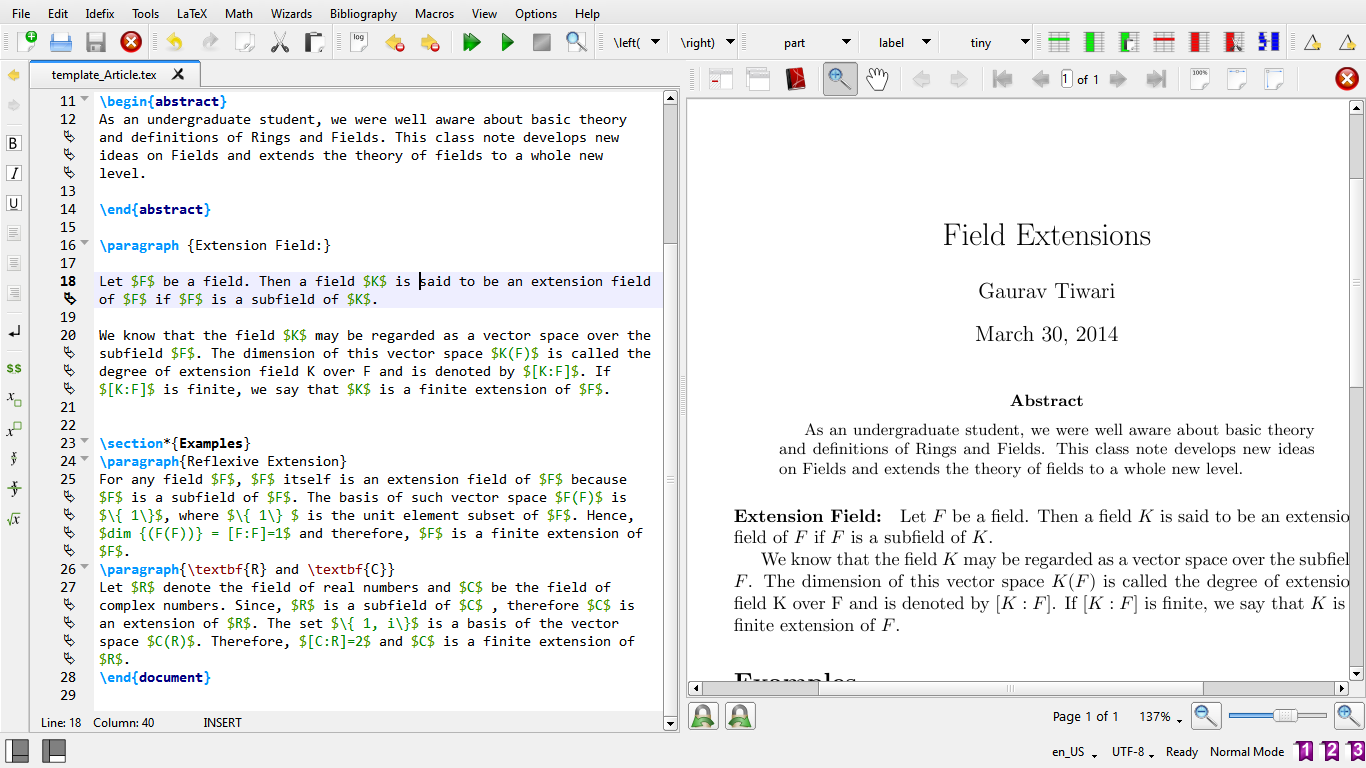
This is one of TeXstudio’s strongest features. Write your document, press F1 (or go to Tools → Build & View), and an instant PDF preview appears on the right side of the editor. No external PDF viewer needed. The preview supports zooming, dragging, and syncs with your cursor position in the source code. Click a word in the PDF, and the editor jumps to the corresponding line in your .tex file.
Compiling
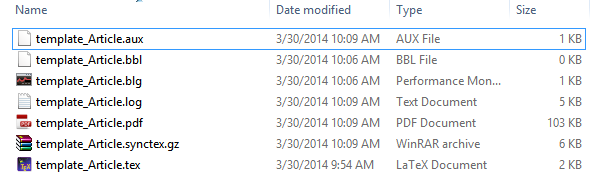
Compile your document with Tools → Compile or by pressing F6. The compiled PDF/PS file appears in your destination folder. After compilation, you’ll have at least seven files instead of five (the additional files include the compiled output and auxiliary data). TeXstudio supports multiple compilers: pdfLaTeX, XeLaTeX, LuaLaTeX, and others, configurable in the settings.
Profile Management
TeXstudio lets you save different configurations as profiles. If you write in multiple LaTeX workflows (say, one for academic papers with BibLaTeX and another for class notes with simple bibliography), you can switch between profiles instead of reconfiguring the editor each time. Profiles cover compiler settings, macro configurations, and UI preferences.
Bibliography Support
Managing references in LaTeX is usually tedious. TeXstudio simplifies it with a dedicated Bibliography menu that helps you insert citations, footnotes, and bibliographic entries. It integrates with BibTeX and BibLaTeX, auto-completes citation keys, and even provides error checking for missing or duplicate references.
Other Notable Features
Beyond the core writing and compiling features, TeXstudio includes several capabilities that make it a complete LaTeX environment:
- Git and SVN Support: Version control integration for collaborative academic writing
- Structure View: Navigate your document’s section hierarchy in a sidebar
- Code Folding: Collapse sections to focus on what you’re editing
- HTML Export: Convert LaTeX documents to HTML format
- Auto-Detection: Automatically detects installed TeX distributions (MiKTeX, TeX Live, Ghostscript)
- User Macros: Create custom macros and scripts to automate repetitive tasks
- Error Highlighting: Real-time error detection and navigation to faulty lines
- Multi-Format Support: Works with LaTeX, XeLaTeX, LuaLaTeX, pdfLaTeX, and others
TeXstudio vs Alternatives
If you’re choosing a LaTeX editor, here’s how TeXstudio compares to the main alternatives.
| Feature | TeXstudio | Overleaf | TeXMaker | LyX | VS Code + LaTeX |
|---|---|---|---|---|---|
| Price | Free (GPL) | Free / $21+/mo | Free | Free (GPL) | Free |
| Platform | Win/Mac/Linux | Browser | Win/Mac/Linux | Win/Mac/Linux | Win/Mac/Linux |
| Real-time collaboration | No | Yes ✓ | No | No | Via Live Share |
| Built-in PDF preview | Yes ✓ | Yes ✓ | Yes | Yes | Via extension |
| Auto-completion | Excellent | Good | Good | N/A (WYSIWYM) | Excellent |
| Offline use | Yes ✓ | No (cloud) | Yes | Yes | Yes |
| Open source | Yes ✓ | Server: no | GPL | Yes | MIT (editor) |
| Git integration | Yes | Yes | No | No | Yes ✓ |
| Learning curve | Medium | Low | Medium | Low (visual) | High |
| Best for | Dedicated LaTeX work | Collaboration | Lightweight use | LaTeX beginners | Developers |
Overleaf is the main competitor for collaborative work since it runs in the browser and supports real-time co-editing. But it requires an internet connection and the free tier limits compile time. For solo writing or when you need to work offline, TeXstudio is the better choice.
TeXMaker is lighter and simpler, but TeXstudio has surpassed it in features, active development, and community support. Unless you specifically need a minimal editor, TeXstudio is the upgrade.
For a complete list, see my best LaTeX editors comparison and online LaTeX editors for browser-based options.
Who Should Use TeXstudio
Academic researchers and writers. If you write research papers, dissertations, or theses in LaTeX, TeXstudio is the most complete desktop editor available. The auto-completion, reference checking, and bibliography support save hours on every project. See my dissertation writing tips for more guidance.
Mathematics and science students. LaTeX math mode is where TeXstudio’s auto-completion truly shines. Complex equations that would take minutes to type manually are done in seconds with auto-completion and live preview.
Anyone switching from TeXMaker. If you’re on TeXMaker and want more features without learning a new interface, TeXstudio is the natural upgrade. The UI is similar enough that the transition is seamless.
My Verdict
What I Like
- Best auto-completion of any desktop LaTeX editor
- Free and fully open source (GPL v3)
- Built-in PDF preview with source/PDF sync
- Cross-platform: Windows, macOS, Linux, BSD
- Active development and community
- Profile management for multiple workflows
- Excellent bibliography and reference support
What Could Be Better
- Requires TeX distribution setup (MiKTeX or TeX Live) before first use
- No real-time collaboration (Overleaf wins here)
- UI looks dated compared to modern editors
- Learning curve for LaTeX itself (not TeXstudio-specific)
- No cloud sync or browser version
TeXstudio is still the most complete desktop LaTeX editor in 2026. It’s free, open source, cross-platform, and packed with features that make LaTeX writing genuinely enjoyable instead of painful. The auto-completion alone justifies the switch from any other editor.
The only scenario where I’d recommend something else is if you need real-time collaboration, where Overleaf is the clear winner. For everything else, solo academic writing, research papers, books, math-heavy content, TeXstudio is my first recommendation. 4.5/5.
TeXstudio
Pros
- Best auto-completion of any desktop LaTeX editor
- Free and fully open source (GPL v3)
- Built-in PDF preview with bidirectional sync
- Cross-platform: Windows, macOS, Linux, BSD
- Active development and community support
Cons
- Requires TeX distribution setup before first use
- No real-time collaboration
- UI looks dated compared to modern editors
- No cloud sync or browser version
Summary
TeXstudio is the most complete free, open-source desktop LaTeX editor. Excellent auto-completion, built-in PDF preview, bibliography support, and cross-platform availability make it the top choice for academic researchers, math students, and anyone writing LaTeX documents. The only drawback is the lack of real-time collaboration (use Overleaf for that).
Frequently Asked Questions
Is TeXstudio free?
Yes. TeXstudio is completely free and open source under the GPL v3 license. There are no paid tiers, no premium features, and no ads. You can download it from texstudio.org for Windows, macOS, and Linux.
Is TeXstudio better than Overleaf?
For solo writing and offline work, TeXstudio is better. It’s faster, more feature-rich, and doesn’t require an internet connection. Overleaf is better for real-time collaboration with co-authors. Many researchers use both: TeXstudio for focused writing and Overleaf for group projects.
Do I need to install anything else to use TeXstudio?
Yes. TeXstudio is an editor, not a compiler. You need a TeX distribution installed: MiKTeX (Windows), TeX Live (all platforms), or MacTeX (macOS). TeXstudio auto-detects these distributions once installed.
Can TeXstudio handle large documents?
Yes. TeXstudio handles multi-chapter books and dissertations well. The Structure View sidebar lets you navigate large documents by section. Code folding keeps things manageable. I’ve used it for 200+ page books without performance issues.
Is TeXstudio still maintained?
Yes. TeXstudio is actively maintained on GitHub with regular releases. The project has been continuously updated since 2009 and shows no signs of slowing down. The community contributes translations, packages, and bug fixes.
Disclaimer: This site is reader-supported. If you buy through some links, I may earn a small commission at no extra cost to you. I only recommend tools I trust and would use myself. Your support helps keep gauravtiwari.org free and focused on real-world advice. Thanks. - Gaurav Tiwari