
Modern 2FA as a Key Business Tool for Scalable and Secure Customer Protection
Passwords are broken. Not theoretically broken, but practically, measurably broken. Over 80% of hacking-related breaches involve stolen or weak credentials, according to Verizon’s Data Breach Investigations Report. I’ve seen businesses lose customer accounts, revenue, and trust because they relied on passwords alone. Two-factor authentication (2FA) fixes this, and in 2026, it’s not optional anymore.
The good news? Modern 2FA has evolved far beyond clunky SMS codes that arrive 30 seconds too late. Today’s authentication tools are fast, invisible to users when they need to be, and scale from a 5-person startup to a million-user platform. Here’s what you need to know to implement it right.
What Two-Factor Authentication Actually Does
2FA requires two separate proofs of identity before granting access. The concept is simple: something you know (a password) plus something you have (a phone, a hardware key) or something you are (a fingerprint, face scan). Even if an attacker steals the password, they can’t get in without that second factor.
Think of it like a bank vault with two locks. The manager has one key, the assistant has the other. Neither can open the vault alone. That’s what 2FA does for every login to your business systems.
The reason this matters so much is the scale of credential theft. Billions of username-password combinations are available on the dark web from previous breaches. If your customers reuse passwords (and roughly 65% of people do), their accounts on your platform are already compromised the moment another service gets breached. 2FA breaks that chain completely.
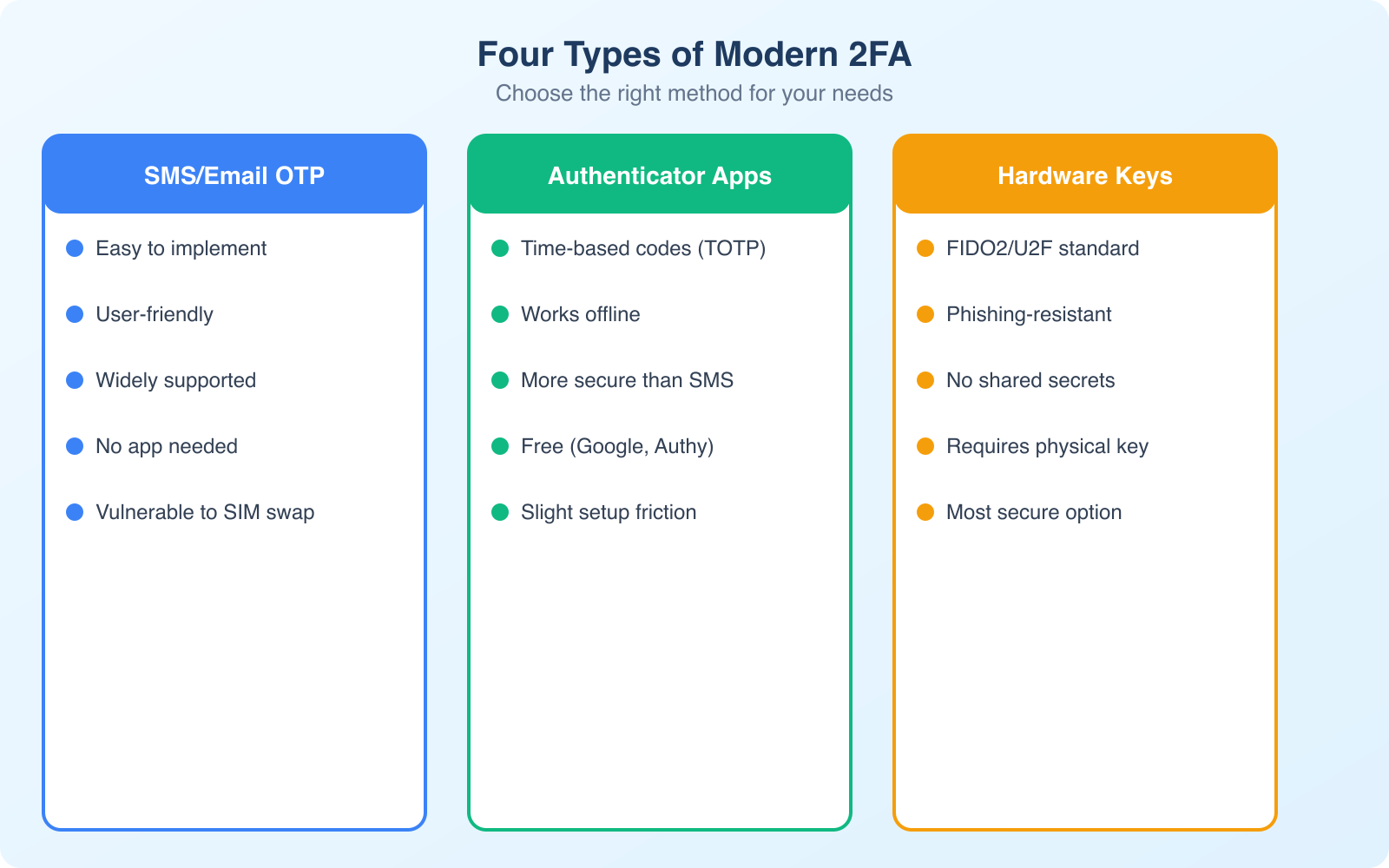
The Four Types of Modern 2FA (and When to Use Each)
Not all 2FA methods provide the same level of protection. Understanding the tradeoffs helps you choose the right approach for your business and your customers.
SMS and Voice Codes
This is the 2FA most people know. You log in, receive a 6-digit code via text or voice call, and enter it. It’s simple and requires no app installation. The problem? SMS is vulnerable to SIM swapping attacks, where attackers convince a carrier to transfer your phone number to their device. They then receive your codes. In 2026, SIM swap attacks are well-documented and increasingly common.
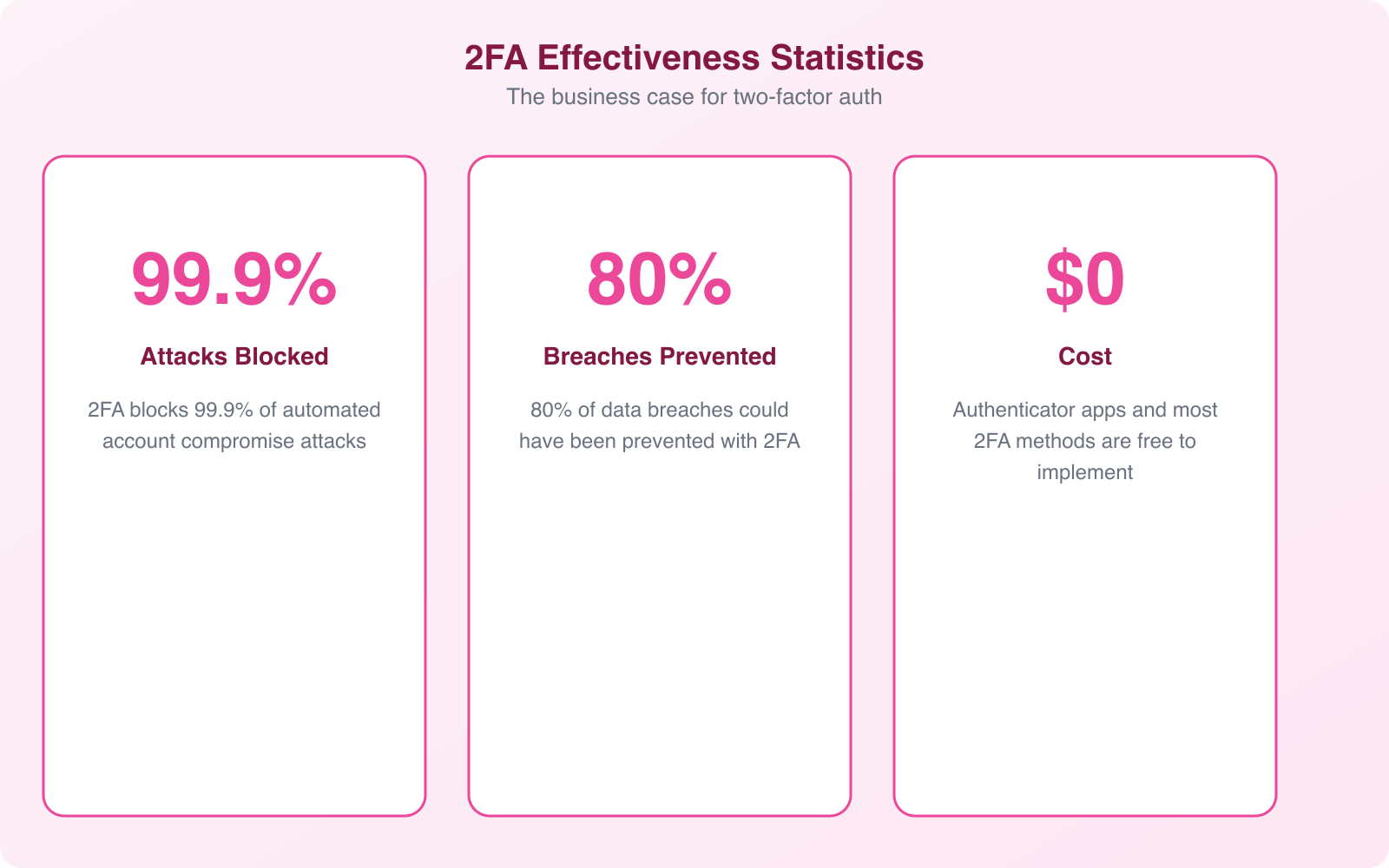
That said, SMS-based 2FA is still dramatically better than no 2FA at all. Google’s research shows it blocks 100% of automated bot attacks and 96% of bulk phishing attacks. If your customers won’t adopt anything more complex, SMS is a valid starting point.
TOTP (Time-Based One-Time Passwords)
Apps like Google Authenticator, Authy, and 1Password generate codes that refresh every 30 seconds. The code is generated locally on the device using a shared secret, so there’s nothing to intercept in transit. No network connection is needed, which eliminates SIM swap and interception attacks entirely.
TOTP is my default recommendation for most business applications. It’s free to implement, works offline, and provides significantly stronger security than SMS. The only friction point is initial setup: users need to scan a QR code and install an authenticator app. That’s a one-time process that takes about 60 seconds.
Hardware Security Keys
Physical devices like YubiKey and Google Titan Key use the FIDO2/WebAuthn standard. You plug the key into a USB port (or tap it via NFC) to authenticate. These are phishing-proof because the key cryptographically verifies the website’s identity before responding. Even if an attacker builds a perfect replica of your login page, the hardware key won’t authenticate against the wrong domain.
Hardware keys are the gold standard for high-security scenarios: admin accounts, financial systems, and any role with access to sensitive customer data. Google reported zero successful phishing attacks against employees after mandating hardware keys company-wide. The downside is cost ($25 to $70 per key) and the possibility of losing the physical device.
Passkeys: The Future of Authentication
Passkeys represent where authentication is heading. Built on the same FIDO2/WebAuthn standard as hardware keys, passkeys are stored on your device and authenticated through biometrics (fingerprint, face scan) or device PIN. They’re phishing-proof, passwordless, and sync across devices through your platform’s ecosystem (iCloud Keychain, Google Password Manager).
Apple, Google, and Microsoft all support passkeys now. For businesses building customer-facing applications, passkey support removes the password entirely. No password means nothing to steal, nothing to phish, and nothing for customers to forget. The tradeoff is that passkey adoption is still growing, so you’ll need to support traditional 2FA methods alongside passkeys during the transition period.
Pro Tip: Don’t force a single 2FA method on all users. Offer SMS as the baseline, TOTP for security-conscious users, and hardware key or passkey support for admin accounts. This layered approach maximizes adoption while giving your highest-risk accounts the strongest protection. Track adoption rates by method, and you’ll see natural migration toward stronger options over time.
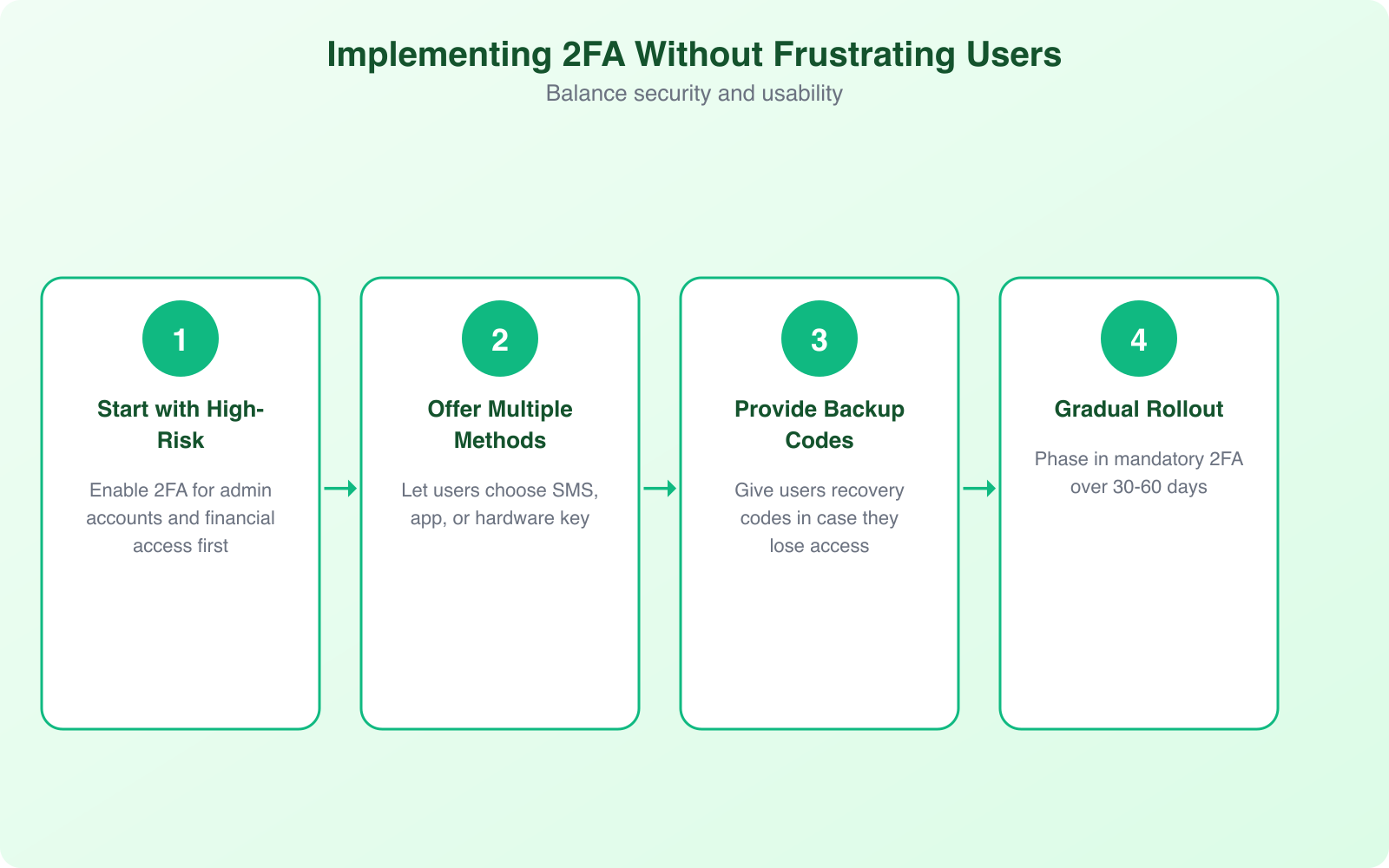
How to Implement 2FA Without Frustrating Your Users
The biggest 2FA failure I see isn’t technical. It’s implementation that annoys users so much they abandon the process. Here’s how to get adoption right.
Start with risk-based authentication. Not every login needs a 2FA prompt. If a user logs in from their usual device, at their usual location, during business hours, the risk is low. Reserve 2FA challenges for new devices, unusual locations, sensitive actions (like changing account settings or initiating transactions), and after extended inactivity.
Make enrollment dead simple. One screen. One QR code. One confirmation. Done. Every additional step in your enrollment flow reduces completion rates. I’ve seen 2FA enrollment drop from 85% to 40% when businesses added a “watch this tutorial video” step before the QR code scan. People don’t want education. They want to finish the task.
Provide clear recovery options. Users will lose phones, switch devices, and forget backup codes. Your recovery process needs to be secure but not punishing. Backup codes at enrollment, a secondary recovery method (like a verified email), and a human-assisted recovery process for edge cases. If account recovery takes 3 weeks, you’ll lose the customer permanently.
Offer remember-this-device tokens. After successful 2FA on a trusted device, don’t ask again for 30 days (or whatever period matches your risk tolerance). This dramatically reduces friction while maintaining security. If the device context changes (new browser, different IP range), re-challenge automatically.
Communicate the “why” during enrollment. A single sentence like “This protects your account if your password is ever leaked in a data breach” converts more users than a paragraph of security jargon. People comply when they understand the personal benefit.
The Business Case: 2FA Beyond Security
2FA does more for your business than prevent breaches. It delivers tangible returns across multiple dimensions.
Customer trust and loyalty. When customers see 2FA on your platform, they interpret it as a signal that you take their data seriously. This is especially true in financial services, healthcare, and e-commerce. Research from Ponemon Institute shows that 71% of consumers consider authentication security when choosing which online services to use.
Reduced fraud costs. Account takeover fraud costs businesses an average of $12,000 per incident when you factor in chargebacks, refunds, investigation time, and support costs. With 2FA blocking 99.9% of automated attacks, the math is straightforward. Even a handful of prevented incidents pays for the entire implementation many times over.
Regulatory compliance. PCI DSS requires multi-factor authentication for any access to cardholder data environments. HIPAA mandates unique user identification with appropriate authentication for PHI access. SOX requires internal controls for financial reporting access. GDPR requires “appropriate security measures.” 2FA satisfies requirements across all these frameworks simultaneously.
Lower support costs. This sounds counterintuitive, but businesses that implement 2FA properly see a reduction in account-related support tickets. Password reset requests drop because users have a backup authentication method. Fraud-related complaints decrease. Account lockout issues become easier to resolve with clear 2FA recovery workflows.
Insurance premiums. Cyber insurance providers increasingly offer lower premiums to businesses with MFA implemented across their systems. Some insurers now require MFA as a condition of coverage. If you’re paying for cyber insurance without 2FA, you’re likely overpaying.
Scaling 2FA from Startup to Enterprise
The 2FA approach that works for a 50-user SaaS product is different from what works for a platform with 5 million accounts. Here’s how to plan for growth.
For small teams (under 100 users): TOTP apps are the sweet spot. They’re free to implement, provide strong security, and don’t require SMS delivery infrastructure. Use a library like proven open-source implementations for your platform’s language. Google Authenticator compatibility is the baseline. Make sure you generate and store backup recovery codes at enrollment.
For growing platforms (100 to 10,000 users): Add SMS as a secondary option for users who resist app-based 2FA. Use an SMS delivery service with global reach and fallback routing. Monitor delivery rates by carrier and region. If SMS delivery drops below 95% for any carrier, investigate immediately. Failed code delivery means locked-out users flooding your support queue.
For large-scale platforms (10,000+ users): Implement risk-based adaptive authentication. Use device fingerprinting, behavioral analytics, and location data to adjust authentication requirements dynamically. Low-risk logins get seamless access. High-risk logins get step-up challenges. Add passkey support for users who want passwordless convenience with maximum security.
Regardless of scale, every implementation needs rate limiting on code verification (prevent brute force attempts), account lockout after excessive failed attempts, monitoring for authentication anomalies, and clear incident response procedures for compromised accounts.
Common 2FA Implementation Mistakes
I’ve reviewed dozens of 2FA implementations across client projects. These mistakes show up repeatedly, and each one creates a vulnerability that undermines the protection you’re trying to build.
Making 2FA optional for admin accounts. This is the single worst mistake. Admin accounts have the highest privileges and the highest value to attackers. If any accounts require mandatory 2FA, it’s these. I’ve seen breaches where the attacker compromised a single admin account with password-only access and then disabled 2FA for the entire platform.
Not rate-limiting verification attempts. Without rate limiting, an attacker can attempt thousands of 6-digit codes per second. With only 1 million possible combinations (000000 to 999999), a brute-force attack succeeds quickly. Limit attempts to 5 per code period, lock the account after 10 consecutive failures, and implement exponential backoff.
Storing TOTP secrets in plaintext. Your TOTP shared secrets need encryption at rest. If an attacker gains database access and your secrets are in plaintext, they can generate valid codes for every account. Encrypt secrets with a key stored separately from the database, ideally in a hardware security module (HSM) or key management service.
Weak recovery flows that bypass 2FA. If your “I lost my phone” recovery flow only requires an email confirmation, attackers who compromise the email account bypass 2FA entirely. Recovery should require identity verification through a separate channel: backup codes generated at enrollment, a secondary verified device, or identity document verification for high-value accounts.
Ignoring the user experience data. Track enrollment completion rates, authentication success rates, and recovery request volumes. If enrollment drops below 70%, your flow has UX problems. If authentication failure rates exceed 5%, something’s wrong with code delivery or timing. If recovery requests spike, your enrollment flow isn’t generating backup codes prominently enough.
Note: If you’re running a WordPress site and need 2FA for your admin panel, don’t build it yourself. Plugins like Wordfence, WP 2FA, and Google Authenticator for WordPress handle TOTP implementation correctly, including backup codes, trusted device management, and proper secret storage. Use a proven plugin and focus your development time on your actual product.
The Passwordless Future: Where 2FA Is Heading
The authentication industry is converging on a passwordless future, and 2FA is the bridge. Passkeys, backed by the FIDO Alliance and supported by Apple, Google, and Microsoft, are making passwords obsolete for consumer applications. Instead of typing a password and then entering a code, you authenticate with a biometric scan or device PIN. One step, maximum security.
For businesses, this means preparing for a transition period. Your authentication system should support both traditional 2FA (for users who haven’t adopted passkeys yet) and passkey authentication (for those who have). The platforms that handle this transition smoothly will have a significant competitive advantage in customer experience.
Behavioral biometrics represent the next evolution beyond passkeys. These systems analyze typing patterns, mouse movements, and device interaction habits to continuously verify identity. Instead of a one-time check at login, the system constantly confirms you are who you claim to be. This approach catches account takeovers that happen after initial authentication, like session hijacking.
The direction is clear: authentication is becoming invisible. The most secure systems will be the ones users don’t even notice. But getting there requires investing in 2FA today as the foundation for everything that comes next.
Getting Started: A 30-Day 2FA Rollout Plan
Here’s the rollout plan I recommend for businesses implementing 2FA for the first time. It balances security urgency with practical adoption.
Week 1: Foundation. Choose your 2FA library or provider. For most businesses, a TOTP implementation with SMS fallback covers the widest user base. Configure your authentication backend, set up backup code generation, and build the enrollment UI. Test extensively with edge cases: expired codes, clock drift, recovery flows.
Week 2: Admin rollout. Mandate 2FA for all admin and privileged accounts first. These are your highest-risk accounts, and your internal team can provide feedback before the wider rollout. Document any friction points and fix them before customer-facing launch.
Week 3: Soft launch. Offer 2FA as an option to all users. Send a clear email explaining why it matters and how to set it up. Don’t mandate it yet. Track enrollment rates and support tickets to identify issues.
Week 4: Progressive enforcement. Based on enrollment data, decide your enforcement timeline. Some businesses mandate 2FA for all users within 60 days. Others keep it optional for low-risk accounts indefinitely. Either approach works, but high-value accounts (financial, healthcare, admin) should have a mandatory deadline.
The critical metric isn’t just “how many users enrolled.” It’s “how many users successfully authenticated on their second login.” That tells you whether your implementation actually works in practice, not just in theory.
Frequently Asked Questions
Is SMS-based 2FA still safe to use in 2026?
SMS 2FA is significantly better than no 2FA at all. It blocks 100% of automated bot attacks and 96% of bulk phishing attacks. However, it’s vulnerable to SIM swapping and SS7 protocol interception. For high-value accounts (admin panels, financial systems), use TOTP apps or hardware keys instead. For general customer accounts, SMS is an acceptable starting point if adoption of stronger methods is low. The goal is to get some form of 2FA in place rather than waiting for the perfect implementation.
What happens if a user loses their phone with their authenticator app?
This is why backup codes are critical. During 2FA enrollment, generate 8 to 10 single-use backup codes and instruct users to store them securely (not on the same phone). Each code can be used once to access the account and reconfigure 2FA with a new device. For apps like Authy that support cloud backup, the transition to a new device is seamless. For Google Authenticator, users need to re-enroll using their backup codes. Always provide a human-assisted recovery path for users who lose both their device and backup codes.
How much does it cost to implement 2FA for a small business?
TOTP-based 2FA is essentially free to implement using open-source libraries. The only cost is developer time for integration and testing. SMS-based 2FA costs $0.01 to $0.05 per message through providers like Twilio or AWS SNS. For a business with 1,000 active users averaging 2 SMS codes per week, that’s roughly $80 to $400 per month. Hardware keys cost $25 to $70 per device, one-time. For WordPress sites, free plugins like WP 2FA or Wordfence include 2FA at no additional cost.
Should I make 2FA mandatory for all users or keep it optional?
Make it mandatory for admin and privileged accounts immediately. For regular users, the answer depends on your industry and risk profile. Financial services, healthcare, and any platform handling payment data should mandate 2FA for all users. For general SaaS products, offering strong encouragement (enrollment prompts, security score indicators) often achieves 60 to 80% adoption without the customer support burden of mandatory enforcement. The most effective approach is progressive: optional at first, then mandatory after a 90-day grace period.
What are passkeys and should my business support them?
Passkeys are a passwordless authentication method built on the FIDO2/WebAuthn standard. They replace passwords entirely with device-based cryptographic credentials authenticated through biometrics or device PIN. Apple, Google, and Microsoft all support them. You should add passkey support if you’re building a customer-facing application where login friction affects conversion. Passkeys provide stronger security than any password-based 2FA method while eliminating the password entirely. However, keep traditional 2FA as a fallback since not all users have passkey-compatible devices yet.
Two-factor authentication isn’t a nice-to-have anymore. It’s the bare minimum for protecting your business and your customers. The tools are mature, the costs are negligible, and the alternative, recovering from an account takeover breach, is orders of magnitude more expensive. Start with your admin accounts this week. Expand to your customers next month. Your future self will thank you for not waiting.