
 by
by
FreshBooks vs Wave vs QuickBooks looks like a price question, but each tool is built around a different starting point and that is why people pick the wrong one. FreshBooks is built around the client you bill and QuickBooks around the books your accountant closes every month, while Wave gives a small business a free ledger to begin with. Choose on the entry price alone and you either pay for an accounting system you rarely open or push billable client work through a ledger that was never built for it.
For a freelancer, consultant or small agency that bills clients for time and projects, I’d start with FreshBooks Plus. Wave Starter is the better answer when the business is in the US or Canada and the job is free bookkeeping. QuickBooks Online earns its higher price when bills, inventory, several users or an accountant’s workflow run the books.
Here is what each one is. FreshBooks is invoicing and accounting software built around clients, billable time and proposals. Wave is a free bookkeeping and invoicing app for small businesses in the US and Canada, with a paid Pro plan for bank imports. QuickBooks Online is Intuit’s cloud accounting software, priced by users and accounting depth. Two more names come up in the same searches, so I’ve kept a short answer for each:
- HoneyBook when your work starts with an inquiry, a contract and a deposit.
- Invoice Ninja when you only need invoices and want to choose the payment gateway yourself.
Quick Comparison
These are US monthly list prices in 2026, before any promotion. The column that matters most is the limit, because that limit decides which plan you actually pay for.
| Tool | Best For | Free Option | Paid Entry | Limit That Forces an Upgrade | Main Restriction |
|---|---|---|---|---|---|
| FreshBooks | Freelancers and agencies billing clients | 30-day trial | Lite, $23/month | Lite stops at 5 billable clients; Plus at 50 | Proposals, retainers and accountant access start on Plus |
| Wave | Free bookkeeping for a small business | Starter, $0 | Pro, $19/month | Bank imports and receipt capture need Pro | New businesses in the US and Canada only |
| QuickBooks Online | Books with bills, inventory or a team | Free, $0 | Simple Start, $38/month | Free allows 2 invoices a month and 1 bank connection | Time entry starts on Essentials; inventory on Plus |
| HoneyBook | Inquiry-to-deposit client work | Trial | Starter, $36/month | Automations and team members start on Essentials | No general ledger; it syncs to QuickBooks Online |
| Invoice Ninja | Invoices on your own payment gateway | Free, up to 5 clients | Pro, $14/month | A 6th client needs Pro | Invoicing records only, no general ledger |
Promotions run on all three main sites. FreshBooks currently sells Lite at $1 a month for the first year and takes 80% off Plus or Premium for 3 months, QuickBooks takes 50% off for 3 months and Wave halves Pro for 3 months. Those are welcome, but you will be paying the list price for every year after, so that is the number to compare.
Where your money work starts settles most of this before price does:
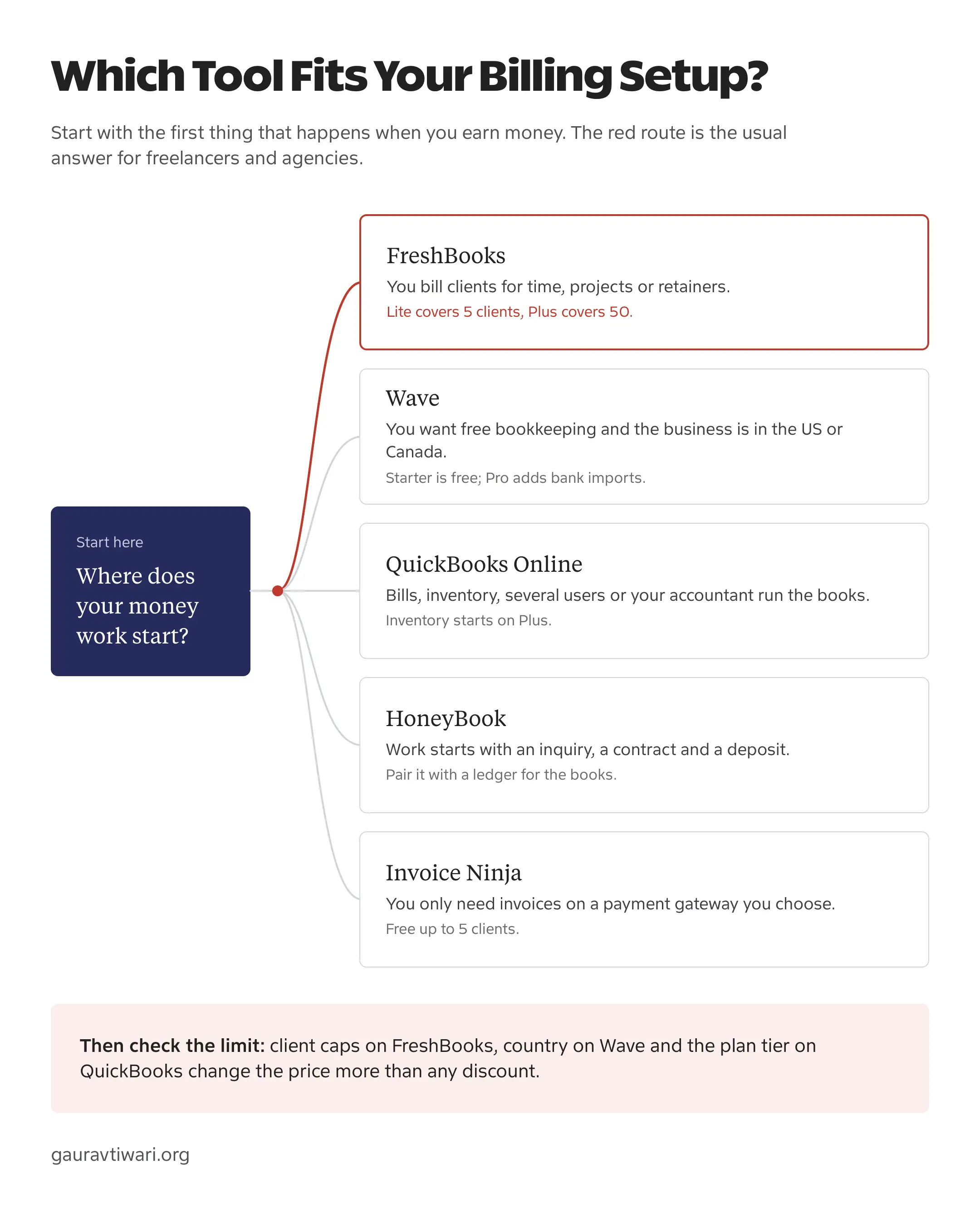
FreshBooks, Wave and QuickBooks Plans
Each of the three has a free or cheap way in and one plan where most businesses end up. I’d budget for that second plan from day one.
FreshBooks
FreshBooks is the pick for service businesses that sell time or expertise. Time tracking, expenses, invoices, payments and bank import sit on every plan, and Plus adds the parts an agency uses daily: proposals, client retainers, e-signatures, bank reconciliation, double-entry reports and accountant access.

- Lite: $23/month, invoices for 5 billable clients
- Plus: $43/month, 50 clients, proposals, retainers and accountant access
- Premium: $70/month, unlimited clients, project profitability and accounts payable
- Unlimited time tracking and automatic bank import on every plan
- Team members cost $11/month each
The upgrade trigger is the client count, and it is stricter than most people expect. FreshBooks counts both active and archived clients against the limit, so a Lite account with 3 current clients and 2 finished ones is already full. Deleting an old client frees the slot and keeps its invoices on record, but the 6th client you actually bill still moves you to Plus.
FreshBooks counts billable clients and leaves invoices unlimited. Lite covers 5 clients and Plus covers 50, and archived clients still count until you delete them.
Why it fits:
- Billable time, expenses and invoices live in one client view.
- Bank import is included even on Lite.
- Plus covers most freelancers and small agencies up to 50 clients.
Watch out for:
- Lite’s 5-client cap makes Plus the real entry plan for most service businesses.
- Every extra team member adds $11 a month.
- Its plan pages list no inventory tracking, so product sellers belong elsewhere.
Wave
Wave is the strongest free choice here for a small US or Canadian business that needs invoices and a proper ledger. Starter costs nothing and still allows unlimited estimates, invoices, bills and bookkeeping records, so it does the bookkeeping job without a paid plan.
- Starter: $0 with unlimited estimates, invoices, bills and records
- Pro: $19/month or $190/year
- Pro adds bank import, auto-categorizing, receipt capture and late-payment reminders
- Card payments: 2.9% + $0.60 on Starter, 2.9% + $0 on Pro's first 10 a month
- New businesses in the US and Canada only
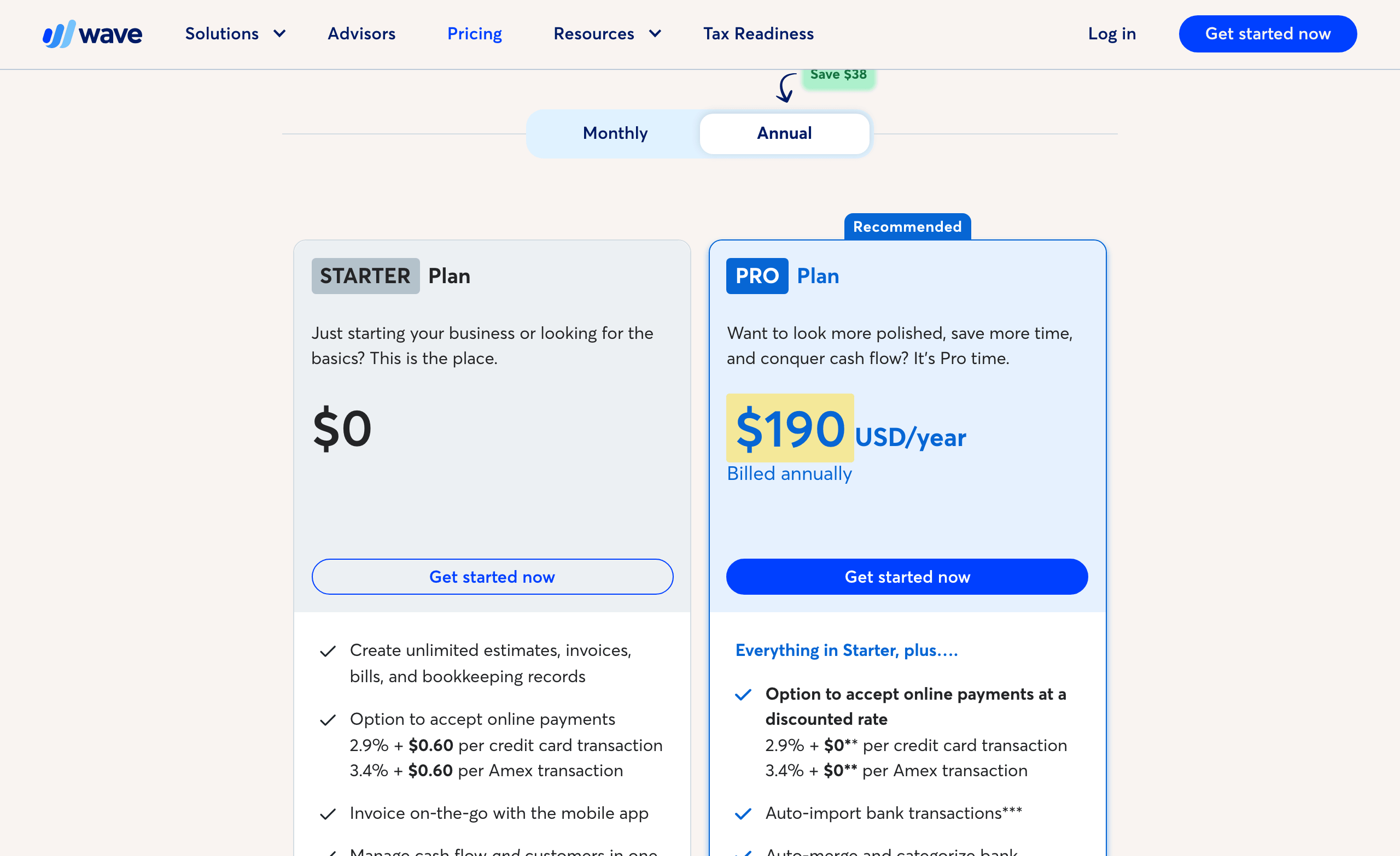
Free works as long as you are happy to enter or upload transactions yourself. The moment you want bank activity to arrive on its own, Wave becomes a $19 a month decision, which is still half the price of QuickBooks Simple Start.
Why it fits:
- A free ledger with unlimited invoices and bills.
- Pro is the cheapest paid plan of the three.
- Card fees drop to 2.9% with no fixed fee for Pro’s first 10 transactions each month.
Watch out for:
- New sign-ups are limited to the US and Canada, with no US territories.
- Automatic bank import needs Pro.
- No time tracking or proposals on its plan list, so client billing stays manual.
QuickBooks Online
QuickBooks Online is the accounting-first choice. It costs more because each plan step adds users and accounting depth, and that depth earns its price when an accountant closes your books, inventory affects your margin or several people need controlled access.
- Free: $0, 1 user, 2 invoices a month, 1 bank connection, no accountant access
- Simple Start: $38/month, 1 user plus 2 accountant seats
- Essentials: $85/month, 3 users, time entry and multiple currencies
- Plus: $140/month, 5 users, inventory, budgets and project profitability
- Advanced: $340/month, 25 users and custom permissions
QuickBooks Free is a real plan, but a narrow one. It tracks income and expenses and runs a profit and loss report, yet it stops at 2 invoices and 1 estimate a month, connects 1 bank and has no accountant access, mobile app or integrations. It suits a side business that bills rarely. Anyone sending invoices every week will be on Simple Start soon.
Why it fits:
- The deepest accounting of the three: inventory, purchase orders, budgets, classes and locations.
- Users are included in the plan price, up to 25 on Advanced.
- Most accountants already work in it.
Watch out for:
- Time entry needs Essentials at $85 a month.
- Inventory needs Plus at $140 a month.
- The free plan’s 2-invoice limit rules it out for regular billing.
FreshBooks vs QuickBooks
FreshBooks is the better choice for a service business that bills clients for time and projects. QuickBooks Online is the better choice when the accounting itself is the work: bills from many vendors, inventory, purchase orders, budgets or several people in the books.
Lite against Simple Start is a poor comparison, because the two plans do different jobs. Time tracking is on every FreshBooks plan, while QuickBooks only adds time entry on Essentials. So for a consultant who bills hours, the like-for-like pair is FreshBooks Plus at $43 a month against QuickBooks Essentials at $85.
- Accountant access: QuickBooks includes 2 accountant seats from Simple Start. FreshBooks adds accountant access on Plus.
- Team size: QuickBooks Essentials includes 3 users. FreshBooks Plus with 2 extra team members costs $43 + $22 = $65 a month.
- Inventory: QuickBooks Plus tracks stock and purchase orders. FreshBooks lists no inventory module.
- Client limits: QuickBooks has no client cap. FreshBooks Plus stops at 50 billable clients, then Premium at $70 removes the cap.
My rule is simple: if the first question every Monday is “who do I invoice this week?”, FreshBooks fits. If it is “what do we owe and what is in stock?”, QuickBooks does. It is wise not to buy QuickBooks just because your accountant mentioned it; ask whether they need full access or only a year-end export, because FreshBooks Plus can give them both.
Wave vs QuickBooks
Wave is the better start for a small business in the US or Canada that wants free books and can live with a lean feature set. QuickBooks is the better buy once you need inventory, purchase orders, controlled users or an accountant who already works in QuickBooks files.
Both have a $0 plan, and the two free plans are not equal. Wave Starter allows unlimited invoices, estimates and bills. QuickBooks Free allows 2 invoices and 1 estimate a month. For anyone who invoices regularly, Wave Starter is the stronger free plan by a wide margin.
- First paid step: Wave Pro costs $19 a month; QuickBooks Simple Start costs $38.
- Bank feeds: Wave needs Pro for automatic import. QuickBooks connects 1 bank on Free and more on paid plans.
- Eligibility: Wave takes new businesses only from the US and Canada. QuickBooks sells regional editions with their own prices and features.
If your books are simple today, start on Wave and move when a missing feature costs you real hours. Moving later is a planned job, but paying $456 a year for Simple Start while using a fraction of it isn’t a good idea either.
FreshBooks vs Wave
Wave wins on price and FreshBooks wins on client work. If you sell hours or projects and send more than a few invoices a month, FreshBooks saves you time Wave cannot. If you sell products or simple services and mainly need clean books, Wave Starter is hard to argue with at $0.
- Time tracking and proposals: FreshBooks tracks time on every plan and adds proposals and retainers on Plus. Wave’s plans list neither.
- Bank import: included on FreshBooks Lite; needs Wave Pro.
- Cost for 8 clients: FreshBooks Plus at $516 a year against Wave Pro at $228 or Wave Starter at $0.
- Where you are: Wave is US and Canada only for new businesses. FreshBooks runs regional sites, though payment methods vary by country.
The 6th billable client is the line to watch. Below it, FreshBooks Lite at $23 a month is a fair price for the client workflow. Above it you are comparing $43 a month against Wave’s $0 or $19, and the billable hours FreshBooks helps you capture have to cover that gap.
FreshBooks vs HoneyBook
HoneyBook handles the client side before the invoice: the inquiry form, scheduler, proposal, contract, deposit and client portal. FreshBooks handles billing and accounting after the work is agreed. For a photographer, planner or coach who manages leads through a booking flow, HoneyBook fits. For a consultant or agency whose clients are already signed and need time-based billing, FreshBooks does.
- Pricing: Starter $36, Essentials $59 and Premium $129 a month, or $29, $49 and $109 a month billed yearly.
- Books: HoneyBook tracks expenses, offers bookkeeper access and syncs payments with QuickBooks Online on Essentials. It keeps no general ledger.
- Clients: unlimited clients and projects on every plan, where FreshBooks caps Lite and Plus.
- Country: accounts are open to businesses in the US, Canada, UK and Australia.
The same logic answers Wave vs HoneyBook. They do different jobs, so many service businesses run both: HoneyBook to win and book the client, and Wave or QuickBooks to keep the books. HoneyBook’s built-in sync is with QuickBooks Online, so pairing it with Wave means recording those payments on the Wave side.
Annual Cost and Plan Limits
Say you have 8 billable clients. FreshBooks Lite caps you at 5, Invoice Ninja Free at 5 and QuickBooks Free at 2 invoices a month, so none of the cheapest plans actually works. At US monthly list prices, 12 months on the plan that does work costs:
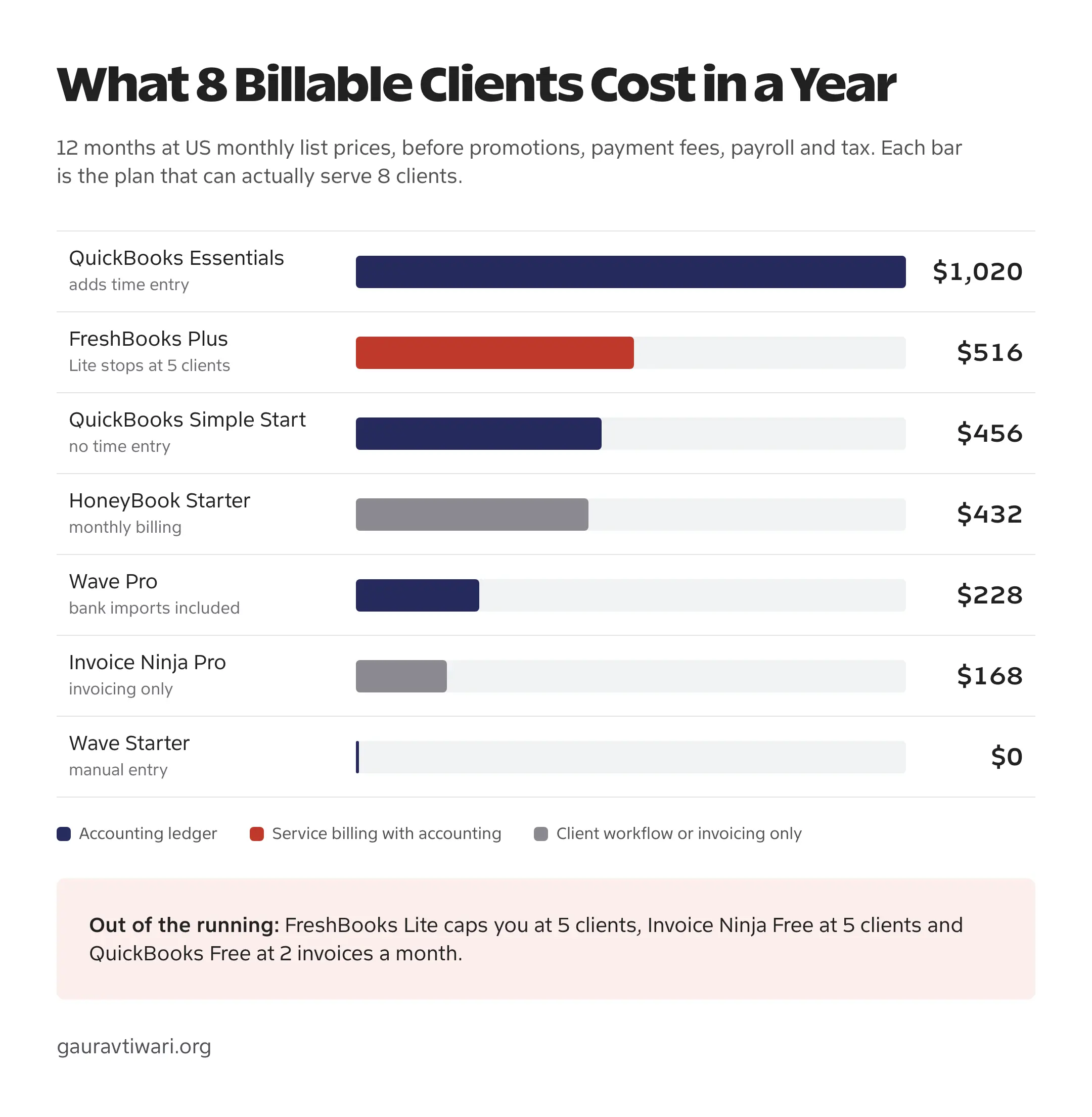
The cheapest bar isn’t automatically the answer. Wave Starter costs nothing but has no time tracking and no automatic bank import. QuickBooks Simple Start looks cheaper than FreshBooks Plus until you need to bill hours, and then the fair comparison is Essentials at $1,020. Yearly billing narrows the numbers a little, but it doesn’t change their order.
Country and Payment Availability
Where your business is registered can remove a tool before price comes into it. Account eligibility and payment features are two separate checks, so confirm both for your country.
- Wave: new businesses must be in the US or Canada, and US territories are not supported.
- HoneyBook: accounts are open in the US, Canada, UK and Australia, but some features are narrower. Business phone and SMS work only for members in the US and Canada.
- FreshBooks: runs regional sites, and the payment methods your clients can use depend on your country.
- QuickBooks Online: regional editions have their own prices and features, so the US plan names and prices here don’t carry over.
- Invoice Ninja: the payment gateway you connect, such as Stripe, PayPal or GoCardless, decides country support and fees.
If you invoice under GST in India, check e-invoicing and GST return support before choosing any of these US-priced plans. A local package such as TallyPrime, which also runs on a Mac, may fit the compliance side better.
Invoice Ninja
Invoice Ninja is the control-first option. It handles invoices, quotes, recurring billing, expenses and projects, and you connect whichever payment gateway suits your country. It keeps invoicing records and no general ledger, so it sits alongside an accountant or a ledger app.
- Free: $0 for up to 5 clients with unlimited invoices.
- Pro: $14 a month or $140 a year for unlimited clients, branding removal, reminders and API access.
- Enterprise: from $18 a month for 1 to 2 users, adding permissions, bank sync and e-invoicing.
- Self-hosted: the code is under the Elastic License, and a $40 a year white-label license removes its branding.
Self-hosting removes the subscription and adds the work. Updates, backups, email delivery and security become your job. For a developer who already runs servers that is fine; for everyone else, hosted Pro at $14 is the better deal.
Switching Checklist
Changing invoice templates is easy. Moving balances, open invoices, recurring schedules and payment links is where a casual switch turns into accounting work, so follow this order:
- Choose a reconciled cutover date. Month-end or quarter-end is cleaner than splitting an active period.
- Export before canceling. Save clients, invoices, payments, expenses, balances, tax records and attachments.
- Move the opening state first. Clients, unpaid invoices, vendors and reconciled opening balances matter more than old invoice history.
- Rebuild recurring rules by hand. A CSV carries the invoice rows and leaves behind the schedule, stored card authorization, reminders and tax settings.
- Keep read-only access to the old books. You will need it for questions about past payments and filings.
If none of these five fits, my lists of invoice generators for small businesses and accounting and bookkeeping software cover the wider field.
FAQs on FreshBooks, Wave and QuickBooks
Can QuickBooks Free send unlimited invoices?
No. QuickBooks Free allows 2 invoices and 1 estimate a month, 1 bank connection and 1 user, with no accountant access. Unlimited invoicing starts on Simple Start at $38 a month.
Does the FreshBooks client limit count invoices?
No. FreshBooks limits billable clients and leaves invoices unlimited: 5 on Lite, 50 on Plus and unlimited on Premium. Archived clients still count until you delete them.
Is Wave really free?
Wave Starter costs $0 and includes unlimited estimates, invoices, bills and bookkeeping records. Automatic bank import, receipt capture and payment reminders need Pro at $19 a month or $190 a year, and card payments carry processing fees.
Can I use Wave outside the US and Canada?
Not as a new business. Wave accepts new businesses only in the United States and Canada, and US territories are excluded.
Can HoneyBook replace bookkeeping software?
No. HoneyBook runs client workflow, contracts, scheduling and payments, with expense tracking and bookkeeper access. It keeps no general ledger, so pair it with QuickBooks Online, Wave or an accountant’s system.
Will a CSV export move my recurring invoices?
Usually only the invoice rows. Recurring schedules, stored card authorizations, reminders and tax settings need to be rebuilt and checked in the new tool.
Final Remarks
Before you sign up, count your billable clients, archived ones included, and write down the one job you can’t do without: time tracking, bank import, inventory or a booking flow. Then price the first plan that covers both. For most freelancers and small agencies that lands on FreshBooks Plus, and for a simple US or Canadian business it is Wave until a missing feature starts costing real hours.
Tell Google you want more of this.
Add Gaurav Tiwari as a preferred sourceOne tap, and this site shows up more often in your own Top Stories, AI Overviews and AI Mode. Remove it any time.
Disclaimer: This site is reader-supported. If you buy through some links, I may earn a small commission at no extra cost to you. I only recommend tools I trust and would use myself. Your support helps keep gauravtiwari.org free and focused on real-world advice. Thanks. - Gaurav Tiwari