
I’ll let you in on something that took me years to figure out. The highest-converting affiliate content on my entire site isn’t my reviews. It’s not my tutorials. It’s my comparison posts.
My “WP Rocket vs FlyingPress” article converts at nearly 3x the rate of either standalone review. My “Best WordPress Hosting” roundup consistently drives more affiliate revenue per month than any other single page. And my “[Product] alternatives” pages capture traffic I’d never get otherwise.
Comparison content works because it meets readers at a different point in their buying decision. Someone searching for a single product review is still evaluating. Someone searching “[Product A] vs [Product B]” has already decided they need something. They just need help choosing. That’s a reader with their wallet out, and your job is to help them make a smart decision.
But comparison content has a specific structure that works. Get it wrong, and you’ll come across as biased, confusing, or unhelpful. Get it right, and you’ll build pages that convert for years.
The Three Types of Comparison Content
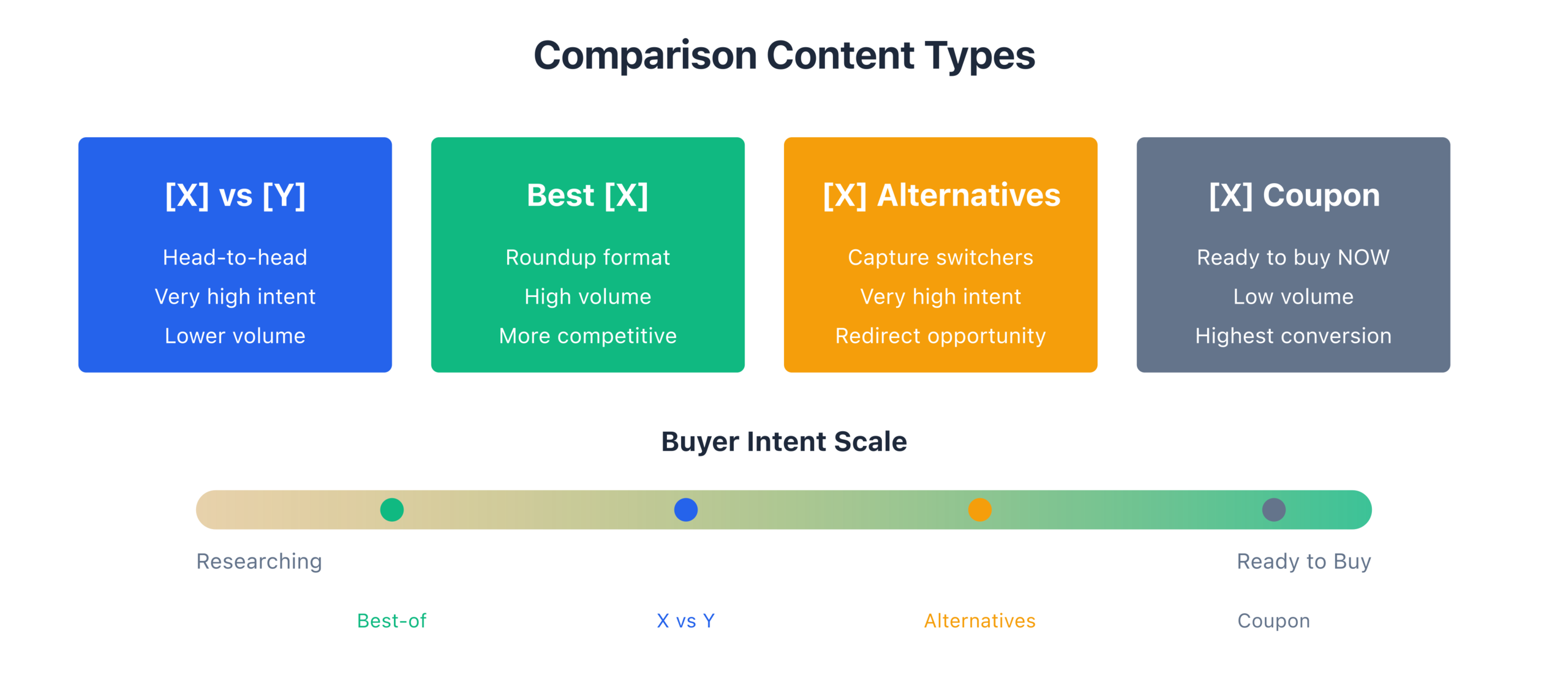
Not all comparison content is the same. There are three distinct types, and each serves a different search intent:
Head-to-Head (A vs B): Direct comparison of two specific products. “WP Rocket vs FlyingPress.” “Ahrefs vs Semrush.” “Mailchimp vs Kit.” These target readers who’ve narrowed their choices to two options and need help picking one.
Multi-Product Roundups (Best of): Curated lists of the top products in a category. “Best WordPress Caching Plugins.” “Best Email Marketing Platforms for Bloggers.” These target readers who know what they need but haven’t narrowed their options yet.
Alternative Pages: Content focused on alternatives to a specific product. “Best WP Rocket Alternatives.” “Mailchimp Alternatives for Small Businesses.” These target readers who’ve either tried a product and want something different, or who’ve heard of a product but want to see what else exists before committing.
Each type has different search volume patterns, different competition levels, and different conversion characteristics. And you need all three in your affiliate content strategy.
When Each Type Works Best
The type of comparison you write should match where the reader is in their buying process.
Head-to-Head posts work best for readers in the late decision stage. They’ve already researched both products. They know the features. They might even have free trials running. They just need someone with experience to break the tie. These readers convert the highest because they’re the closest to buying. My A-vs-B posts convert at 4-7% click-through rates on affiliate links, compared to 2-3% for general roundups.
Multi-Product Roundups work best for readers in the mid-decision stage. They know what type of tool they need but haven’t settled on specific products yet. These posts have the highest search volume because the queries are broader. “Best caching plugin” gets 10x the searches of “WP Rocket vs FlyingPress.” But the conversion rate per visitor is lower because the reader is less committed.
Alternative Pages work best for capturing competitor traffic. When someone searches “Mailchimp alternatives,” they’re usually frustrated with Mailchimp or looking at it but open to other options. These pages are gold for two reasons: they capture brand-name search traffic (which is often high-volume), and the reader is pre-qualified as someone who needs this type of tool.
My content calendar includes all three types. For every major product category I cover, I aim for: 3-5 head-to-head comparisons, 1-2 comprehensive roundups, and 2-3 alternative pages. That covers nearly every comparison search query in the niche.
The Structure of a Fair Comparison That Recommends a Winner
Here’s the tension with comparison content: you want to be fair, but you also need to recommend a winner. Because a comparison that ends with “both are great, it depends on your needs!” is useless. The reader came to you specifically because they want someone with experience to tell them which one to pick.
The solution is structured fairness with a clear conclusion.
Start with your bottom line. Just like with reviews, give your recommendation upfront. “Between WP Rocket and FlyingPress, I recommend FlyingPress for most WordPress sites. But WP Rocket is the better choice if you want zero-configuration caching. Here’s why.”
Now the reader knows your stance. They’ll read the rest of the comparison to understand your reasoning. If they agree with your criteria, they’ll follow your recommendation. If they have different priorities, they have enough information to choose the other option.
Establish your comparison criteria. Don’t just randomly jump between features. Lay out the criteria you’re using to compare and explain why these criteria matter. For a caching plugin comparison, my criteria might be:
- Performance impact (speed test results on the same site)
- Ease of setup (time from install to optimized)
- Feature set (what’s included vs what requires add-ons)
- Pricing (annual cost for typical use cases)
- Support quality (response time and helpfulness from personal experience)
By establishing criteria upfront, you’re showing the reader your framework. They can weigh the criteria based on their own priorities. Someone who values ease of setup above all else might choose differently than someone who wants maximum performance.
Compare each criterion with specifics. For every criterion, show your experience with both products. Not marketing claims. Real results.
“Performance: I installed both plugins on the same staging site, a 2,500-word blog post with 15 images. WP Rocket brought the page load time from 3.2 seconds to 1.6 seconds. FlyingPress brought it to 1.1 seconds. On mobile, the gap was even bigger: 2.8 seconds vs 1.4 seconds. FlyingPress wins on raw performance, and it’s not close.”
That’s a comparison a reader can trust. Specific numbers. Same testing conditions. A clear winner for that criterion.
Acknowledge where the “loser” wins. This is where trust gets built. If you recommend Product A but Product B is genuinely better in some areas, say so.
“Setup: WP Rocket took me 3 minutes to install and configure. FlyingPress took about 20 minutes because I needed to fine-tune the CSS optimization settings. If you’re not comfortable poking around in caching settings, WP Rocket’s installation is basically plug-and-play. WP Rocket wins on ease of use, hands down.”
Admitting where your recommended product falls short makes your overall recommendation stronger. Paradox of persuasion: the more balanced you are, the more persuasive you become.
Feature-by-Feature vs Use-Case Comparison
This is a distinction that took me a while to learn. Most comparison posts are feature-by-feature breakdowns. Product A has feature X, Product B has feature X, here’s how they differ. Repeat for every feature.
That structure is logical, but it’s often not the most helpful approach for readers. Because readers don’t buy features. They buy solutions to problems.
The better approach for most comparisons is use-case based. Instead of asking “which product has better features?” ask “which product is better for this specific situation?”
- “For a new blogger publishing 2-4 posts per month, which caching plugin is better?”
- “For a WooCommerce store with 5,000 products, which caching plugin handles dynamic content better?”
- “For an agency managing 20+ client sites, which plugin offers the best multi-site pricing?”
Use-case comparisons are more work because you need experience across different scenarios. But they’re dramatically more helpful for readers because most people can identify their own use case immediately.
I use a hybrid approach in my comparison posts: I do a brief feature comparison section (for the detail-oriented readers who want specifics), followed by a longer use-case section that addresses 3-5 common scenarios. The use-case section is where most of my affiliate clicks come from, because that’s where readers find themselves in the comparison and feel confident about the recommendation.
Feature-by-feature comparisons also have a tendency to feel like spreadsheets. And nobody gets excited reading a spreadsheet. Use-case comparisons tell stories. “When I set up FlyingPress on a client’s WooCommerce store, the cart and checkout pages, which can’t be cached normally, still loaded 40% faster because of the CSS and JavaScript optimization.” That’s a feature (CSS/JS optimization) presented as a real-world outcome. Much more persuasive.
The “Who Should Choose What” Conclusion Format
The conclusion of a comparison post is where the conversion happens. And I’ve found one format that consistently outperforms everything else: the “Who Should Choose What” framework.
Instead of saying “Product A is better,” you segment readers by their situation and make specific recommendations for each segment.
Choose FlyingPress if:
- Performance is your top priority and you’re willing to spend 20 minutes configuring it
- You run a content site or blog where page speed directly impacts ad revenue and SEO
- You want a developer who actively responds to bug reports (I’ve had issues fixed within 48 hours)
- You’re OK with a newer product that has a smaller community
Choose WP Rocket if:
- You want the easiest setup experience with reasonable performance
- You need extensive documentation and a large community for troubleshooting
- You’re managing sites for non-technical clients who might need to adjust settings
- You value a proven track record (WP Rocket has been around since 2013)
Choose neither if:
- You’re on managed WordPress hosting that includes built-in caching (like Kinsta or Cloudways)
- Your site gets under 1,000 monthly visitors (the performance difference won’t meaningfully impact your traffic or revenue at that scale)
That last category, “choose neither if,” is important. It shows readers that you’re not just trying to sell them something. If the product category isn’t right for their situation, you’re honest about it. This builds enormous trust.
I include a “Who Should Choose What” section in every comparison post I write. It’s consistently the section with the highest engagement. Readers scroll straight to it, find their situation, and click. Simple.
How Comparison Posts Capture Competitor Traffic
One of the most underappreciated benefits of comparison content is its ability to capture competitor traffic. When you write about “Product A vs Product B,” you rank for searches that include both brand names. And brand-name searches tend to have higher conversion intent than generic searches.
Think about it. Someone searching “best caching plugin” is exploring. Someone searching “WP Rocket vs FlyingPress” already knows both products exist and is ready to choose. That second searcher is much closer to buying.
Alternative pages take this a step further. When you write “Best WP Rocket Alternatives,” you’re capturing traffic from people who’ve searched for a specific brand. Some of these people are current users looking to switch. Some are potential buyers who want to compare before committing. Either way, they’re high-intent visitors.
I have alternative pages for every major product in my niche. Each one targets the brand name plus “alternatives” and includes 5-7 genuine alternatives with brief reviews and my ranking. The top recommendation gets the most detailed coverage, and it’s always a product I genuinely believe is the best alternative.
These pages also compound over time. As a product gets more popular, more people search for alternatives to it. My “Elementor Alternatives” page was a slow performer when I first published it. Two years later, as Elementor grew and some users became frustrated with performance issues, that page became one of my top 10 affiliate earners.
The strategy for building comparison content around competitor traffic:
- Identify the top 5-10 products in your niche
- Write an alternatives page for each one
- Write head-to-head comparisons between the most commonly compared pairs
- Update these pages every 6 months as products evolve
- Track which comparison pages convert best and double down on that content
One ethical note: don’t write comparison content just to bash a product and funnel readers to your preferred affiliate product. Readers can see through that. Every product in your comparisons should get a fair assessment. If you’ve used both products honestly and one is genuinely better for most use cases, your recommendation will be credible. If you’re manufacturing criticism to make your preferred product look good, readers will notice, and your reputation will suffer.
Chapter Checklist
- [ ] I understand the three types of comparison content (Head-to-Head, Roundup, Alternatives)
- [ ] I know when each type matches the reader’s buying stage
- [ ] My comparisons state the recommendation upfront, then explain the reasoning
- [ ] I establish clear comparison criteria before diving into details
- [ ] Each criterion includes specific results from my own testing
- [ ] I acknowledge where the “loser” genuinely wins
- [ ] I use use-case comparisons alongside (or instead of) feature-by-feature breakdowns
- [ ] Every comparison ends with a “Who Should Choose What” section
- [ ] I have alternative pages planned for the top products in my niche
- [ ] I update comparison content every 6 months
Chapter Exercise
Pick two products in your niche that you’ve both used. Build the skeleton of a head-to-head comparison:
- Write your upfront recommendation: In 2-3 sentences, state which product you’d recommend and why. Include one condition where the other product is better.
- List 5 comparison criteria: What are the 5 things that matter most when choosing between these products? Rank them by importance to your typical reader.
- For each criterion, write one sentence of evidence: Not a feature description. A specific result from your experience. Example: “FlyingPress loaded my homepage in 0.9 seconds vs WP Rocket’s 1.4 seconds on the same server.”
- Write the “Who Should Choose What” section: Create 2-3 bullet points for each product, describing the reader type who should choose it. Add a “choose neither if” section with at least one scenario.
- Identify 3 alternative-page opportunities: List 3 products in your niche where an “[X] Alternatives” page would attract meaningful search traffic.
If you can complete this exercise with real data from your own experience, you have the foundation for comparison content that converts. If you can’t fill in specific results for each criterion, you need more hands-on time with one or both products before you’re qualified to compare them.
Disclaimer: This site is reader-supported. If you buy through some links, I may earn a small commission at no extra cost to you. I only recommend tools I trust and would use myself. Your support helps keep gauravtiwari.org free and focused on real-world advice. Thanks. - Gaurav Tiwari