
Content Marketing for Educators: Attract and Engage Students in 2026
You’re putting real effort into your courses, workshops, or school programs. But enrollment numbers aren’t moving. Your website gets a trickle of traffic, mostly from people who already know you exist. Meanwhile, competing educators and institutions keep showing up in Google results with blog posts, videos, and guides that pull in students you never even had a chance to reach.
The frustrating part? Those competitors aren’t necessarily better at teaching. They’re just better at being found. Every month you don’t publish useful content, you’re handing prospective students to someone who does. A 2026 Google study found that 74% of prospective students start their research online. If they can’t find you there, you don’t exist to them.
Content marketing fixes this. Not with expensive ad campaigns or billboards that expire in two weeks, but with blog posts, videos, and resources that compound over time. I’ve watched educators go from zero organic traffic to full course rosters in under six months just by publishing consistently on the right platforms. This guide covers exactly how to do it: understanding your audience, picking the right channels, creating content that actually converts, and measuring what works.
Why Content Marketing Matters for Educators
Content marketing isn’t just for SaaS companies and ecommerce brands. Educators who publish useful content consistently attract 3-5x more organic traffic than those relying on paid ads alone. I’ve seen this pattern across dozens of education websites I’ve worked with.
The reason is simple: students, parents, and administrators search Google before making enrollment decisions. A 2026 study by Google found that 74% of prospective students start their school research online. If your institution doesn’t show up with helpful content, a competitor will.
Traditional marketing for schools meant billboards, newspaper ads, and open house events. Those still work in specific contexts, but they don’t scale. A single well-written blog post about your school’s STEM program can attract hundreds of qualified visitors every month for years. A billboard gets ignored after two weeks.
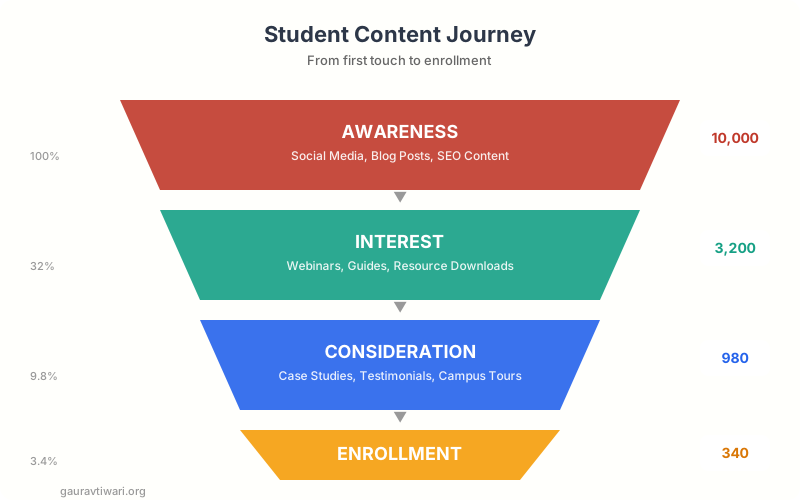
Content marketing also builds trust before a student or parent ever contacts you. When someone reads your detailed guide on scholarship applications or watches your campus tour video, they’re already halfway to saying yes. That’s the kind of warm lead no cold email can create.
If you’re an independent educator, tutor, or course creator, content marketing is even more critical. You don’t have a brand name behind you. Your content IS your brand. Every blog post, video, and social media update positions you as someone worth learning from. I’ve watched educators go from zero students to full course rosters in under six months just by publishing consistently on the right platforms. For a broader framework on how to set this up, check out my content marketing strategy guide.
Understanding Your Education Audience
Education audiences aren’t monolithic. You’re talking to at least three distinct groups, and each one cares about different things. Getting this wrong means your content misses everyone.
Students (Ages 14-25)
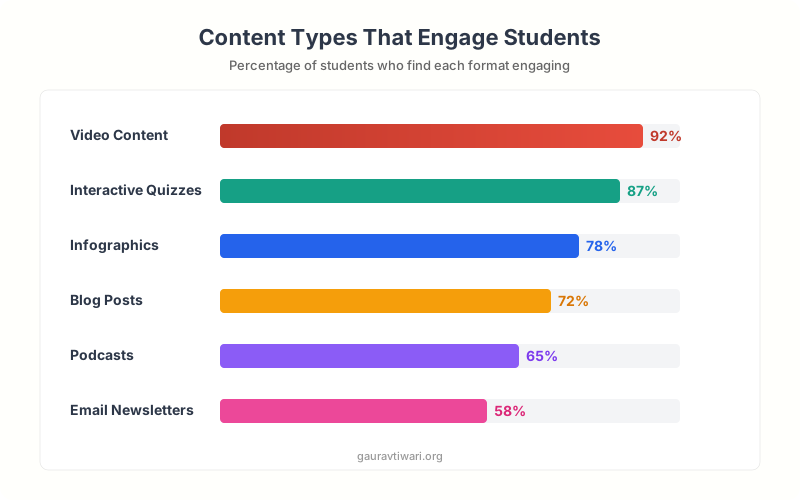
Students consume content on YouTube, Instagram, and TikTok. They want short, visual, and honest content. They’ll watch a 60-second campus tour reel but won’t read a 2,000-word brochure. Their primary concerns: Will this help me get a job? Is it worth the money? What’s student life actually like?
For this group, peer proof matters more than institutional claims. Student testimonials, day-in-the-life content, and behind-the-scenes videos outperform polished marketing materials every time.
Parents and Guardians
Parents search for safety, outcomes, and value. They’re on Facebook and Google, reading reviews and comparing programs. They respond to content about accreditation, career placement rates, financial aid options, and campus security. Blog posts addressing specific parent concerns (“How safe is your campus?” or “What’s the average starting salary for graduates?”) perform exceptionally well.
Administrators and Decision-Makers
If you sell educational tools, courses, or services to schools, administrators are your audience. They care about ROI, compliance, ease of implementation, and case studies from similar institutions. LinkedIn and email are their primary channels. White papers, comparison guides, and data-heavy content convert this audience.
Create separate content tracks for each audience. A single blog post targeting “everyone” usually resonates with no one. Map your content calendar so 40% targets students, 30% targets parents, and 30% targets administrators or professional peers.
Building Your Content Strategy for Education
A content strategy for education starts with three questions: Who are you trying to reach? What do they need to know before saying yes? Where do they spend time online? Everything else flows from these answers.
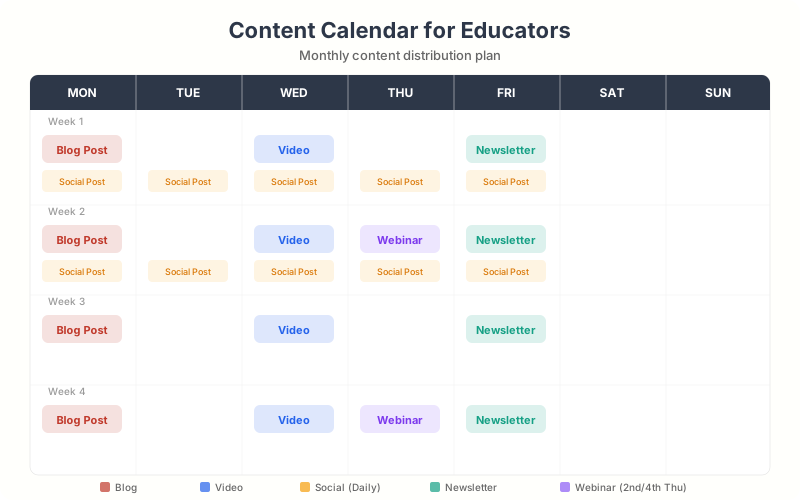
I recommend starting with a simple content calendar. You don’t need a fancy tool. A Google Sheet with columns for topic, target audience, format, publish date, and distribution channel works fine. Aim for 2-4 pieces per week if you’re an institution, or 1-2 per week if you’re an individual educator.
Here’s a proven content mix that works for education:
60% Educational Content: Tutorials, how-to guides, study tips, subject explainers. This attracts organic traffic and builds authority. Think “How to Write a College Application Essay” or “5 Study Techniques Backed by Science.”
25% Social Proof Content: Student success stories, alumni interviews, campus events, awards. This builds trust and shows real outcomes.
15% Promotional Content: Course announcements, enrollment deadlines, event invitations. Keep this lean. If more than 20% of your content is promotional, you’ll lose your audience fast.
For individual educators building a personal brand, the split shifts slightly: 70% educational, 20% behind-the-scenes/personal, and 10% promotional. People follow educators they trust, and trust comes from consistent value delivery, not constant selling.
Blog Content for Schools and Educators
Blogging remains the highest-ROI content format for education. A well-optimized blog post compounds over time, bringing in traffic months and years after publication. I’ve seen individual education blog posts generate 500+ visits per month for 3+ years straight.
The key is writing about topics your audience actually searches for, not topics you think are important. Use Semrush or Google’s free Keyword Planner to find what prospective students and parents search for. You’ll be surprised: terms like “Is a computer science degree worth it” or “best colleges for nursing in Texas” get thousands of searches per month.
Here are blog content types that consistently perform well in education:
Program Explainers: Detailed breakdowns of each program you offer. Include curriculum details, career outcomes, faculty highlights, and student testimonials. These pages often become your highest-converting content.
Comparison Posts: “Online vs. In-Person Learning: Which is Right for You?” or “Community College vs. University: Cost Breakdown.” These capture students at the decision stage.
How-To Guides: “How to Apply for FAFSA” or “How to Choose the Right Major.” These attract massive search traffic and position you as a helpful resource. Check out my list of content marketing tools for platforms that help you write and distribute this kind of content faster.
Student Life Content: Day-in-the-life posts, campus event recaps, club spotlights. These help prospective students picture themselves at your institution.
Expert Roundups: Interview faculty members about trends in their field. This creates unique content that’s hard for competitors to replicate and builds faculty credibility.
Don’t publish blog posts without a clear next step for the reader. Every post should end with a relevant CTA: schedule a campus visit, download a program guide, sign up for a webinar, or subscribe to your newsletter. Content without a CTA is a wasted opportunity.
Video Marketing for Educators
Video is the fastest-growing content format in education marketing, and it’s not even close. YouTube is the second-largest search engine, and TikTok has become the discovery platform for Gen Z. If you’re not creating video content in 2026, you’re invisible to an entire generation of students.
You don’t need a production studio. Some of the best-performing education videos I’ve seen were shot on an iPhone with natural lighting. Authenticity beats production value for education content. Students want real, not polished.
YouTube for Educators
YouTube works best for longer educational content: lectures, tutorials, campus tours, program overviews, and Q&A sessions. Aim for 8-15 minute videos for tutorials and 3-5 minutes for promotional content. Optimize titles and descriptions with keywords your audience searches for.
A math teacher publishing weekly problem-solving videos can build a subscriber base of 10,000+ in a year. I’ve seen educators build entire course businesses from YouTube channels alone. The platform rewards consistency, so publish at least once a week and stick with it for six months before judging results.
TikTok and Instagram Reels for Education
Short-form video is where you grab attention. TikTok and Instagram Reels work for quick study tips, fun campus moments, “things I wish I knew before college” content, and trending audio paired with educational context. The algorithm favors watch time and engagement, so hook viewers in the first 2 seconds.
Don’t overthink short-form content. Batch-record 10-15 clips in one session, edit them in Canva‘s video editor, and schedule them throughout the week. Consistency matters more than perfection.
Live Streaming and Webinars
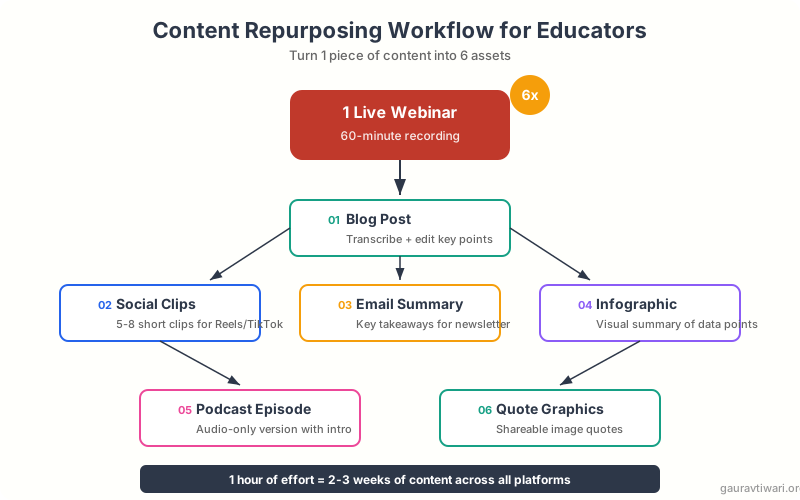
Live content creates urgency and real-time engagement. Host monthly Q&A sessions for prospective students, live virtual campus tours, or guest lectures from industry professionals. Record these and repurpose them into blog posts, clips, and email content. Tools like Google Classroom make it easy to integrate live sessions into your teaching workflow.
Social Media Strategy for Educational Institutions
Social media for education isn’t about being on every platform. It’s about being excellent on 2-3 platforms where your audience actually spends time. Spreading yourself across seven platforms means mediocre results everywhere.
Here’s where each audience lives:
| Platform | Primary Audience | Best Content Types | Posting Frequency |
|---|---|---|---|
| Students (16-24) | Reels, stories, campus photos | 5-7x/week | |
| TikTok | Students (14-22) | Short tips, trending content | 3-5x/week |
| YouTube | Students + Parents | Tutorials, tours, lectures | 1-2x/week |
| Parents + Alumni | Events, news, community | 3-4x/week | |
| Administrators + Professionals | Thought pieces, case studies | 2-3x/week |
User-generated content is your secret weapon. Encourage current students to tag your institution in their posts. Feature student content on your official channels (with permission). This is more credible than anything your marketing team can produce, and it costs nothing.
Run a branded hashtag campaign. Something like #LifeAt[YourSchool] or #MyFirstDayAt[YourSchool]. When prospective students search that hashtag, they’ll find authentic peer content instead of marketing materials. I’ve seen hashtag campaigns generate 500+ student posts in a single semester.
Schedule your social media content in batches. Spend 2-3 hours every Monday planning and scheduling the entire week’s content. Tools like Canva’s content planner and Buffer’s free tier handle this well. Reactive posting leads to inconsistency and burnout.
Email Marketing for Student and Parent Engagement
Email delivers the highest ROI of any marketing channel at roughly $36 for every $1 spent, and education is no exception. The problem is most schools treat email like a broadcast channel instead of a relationship-building tool.
Start by building segmented email lists. At minimum, separate prospective students, current students, parents, and alumni. Each group gets different content. Sending the same newsletter to everyone is lazy and ineffective.
I recommend ConvertKit (now called Kit) for individual educators and course creators. It’s built for creators, has excellent automation features, and the free plan supports up to 10,000 subscribers. For larger institutions, platforms like Mailchimp or HubSpot work better because they handle complex segmentation and CRM integration.
Email Sequences That Work for Education
Welcome Sequence (5-7 emails): When someone downloads your program guide or signs up for updates, don’t just add them to a newsletter. Send a structured sequence: introduce your institution, share student success stories, address common objections (cost, time commitment, outcomes), and end with a clear enrollment CTA.
Nurture Sequence: For leads who aren’t ready to enroll, send biweekly emails with genuinely helpful content: study tips, career advice, scholarship deadlines, industry trends. Stay top of mind without being pushy.
Event-Triggered Emails: Automated emails based on actions: visited the pricing page (send financial aid info), started an application (send encouragement and deadline reminder), attended a webinar (send recording and next steps). These convert at 2-3x the rate of batch emails.
Parent-Specific Emails: Parents want different information than students. Create a separate track covering safety, academic rigor, financial planning, and career outcomes. Address their specific fears: “Will my child be safe?” and “Is this worth the investment?”
SEO for Educational Content
Search engine optimization is the engine that makes your content marketing work long-term. Without SEO, you’re publishing content into a void. With proper SEO, a single blog post can bring in traffic for years.
Educational content has a natural SEO advantage: you’re creating genuinely helpful, informational content. Google’s Helpful Content Update rewards exactly this kind of material. Schools and educators who write thorough, experience-based content tend to rank well.
Keyword Research for Education
Focus on three types of keywords:
Informational Keywords: “How to become a nurse,” “best study techniques for finals,” “what is a liberal arts degree.” These drive top-of-funnel traffic and build authority.
Comparison Keywords: “Online MBA vs. in-person MBA,” “[Your School] vs. [Competitor],” “public vs. private university cost.” These capture students in the decision phase.
Local Keywords: “Best nursing schools in Chicago,” “coding bootcamps near me,” “private high schools in [city].” These drive high-intent, location-specific traffic.
Use Semrush‘s Keyword Magic Tool to find these terms. Filter by search volume (500+) and keyword difficulty (under 40) to find realistic opportunities. I typically find 50-100 viable keywords for any education niche within an hour of research.
On-Page SEO Fundamentals
Every piece of content should follow these basics: include the target keyword in the title, first paragraph, and at least one H2. Write meta descriptions that compel clicks (under 155 characters). Use descriptive alt text on all images. Link to 3-5 related internal pages. Keep URLs short and descriptive.
For educational institutions, local SEO matters enormously. Claim and optimize your Google Business Profile. Encourage student and parent reviews. Create location-specific content for each campus or program. Schools with 50+ Google reviews and a complete Business Profile typically rank 2-3 positions higher for local searches.
Don’t stuff keywords into your content. Google’s algorithms are sophisticated enough to understand context and synonyms. Write naturally for humans first, then optimize for search engines. A post that reads like it was written for a robot won’t rank well and certainly won’t convert readers into students.

AI Tools for Educator Content Creation
AI tools have changed how educators create content. I’m not talking about using ChatGPT to write your entire blog post (please don’t). I’m talking about using AI to speed up the tedious parts so you can focus on adding your expertise and perspective.
Here are the tools I actually recommend for educator content creation:
Canva (with AI features): This is my top pick for educators who need to create visual content fast. Canva’s Magic Write generates first drafts for social captions and email subject lines. Magic Design creates presentation layouts from a text prompt. The background remover and image generator save hours on graphic creation. The education plan gives teachers and students free Pro access, which is a massive perk. I use Canva daily for creating social graphics, presentations, and video thumbnails.
ChatGPT (OpenAI): Use it for brainstorming content ideas, creating lesson plan outlines, generating quiz questions, and drafting email sequences. Don’t use it for final content. It’s a starting point, not a replacement for your expertise. The free tier works fine for most educator needs.
Descript: If you create video or podcast content, Descript is a solid choice for editing. It transcribes your videos, lets you edit by editing the text transcript, and removes filler words automatically. Their free plan handles up to 1 hour of transcription per month.
Semrush ContentShake AI: For educators who blog, this tool generates content briefs, suggests keywords, and helps you write SEO-optimized drafts. It’s particularly useful for understanding what topics to cover and how to structure your posts for search visibility.
Canva Docs: For creating visually appealing course materials, worksheets, and handouts. The AI-assisted design suggestions make it easy to turn plain text into professional-looking documents without any design skills.
Use AI to accelerate your content creation, not replace your voice. The educators who succeed with content marketing bring personal experience, specific opinions, and real classroom stories. AI can’t replicate that. Use it for drafts and ideas, then add your unique perspective before publishing.
Measuring Content Marketing ROI in Education
Most educators create content but never measure whether it’s working. That’s like teaching a class without grading assignments. You need data to know what’s effective and what’s wasting your time.
Track these metrics monthly:
Traffic Metrics: Total website visitors, organic search traffic (separate from paid), page views on key content, and traffic sources. Google Analytics 4 is free and handles all of this. Set it up on day one.
Engagement Metrics: Average time on page (aim for 3+ minutes on blog posts), bounce rate (under 65% is good), email open rates (25-35% is strong for education), and social media engagement rate (3-5% is solid).
Conversion Metrics: This is what actually matters. Track how many people move from reading your content to taking action: application starts, campus visit bookings, course enrollments, webinar registrations, and email sign-ups. Set up conversion tracking in Google Analytics to connect content consumption to enrollment actions.
Revenue Attribution: For course creators and online teaching platforms, track which content sources drive actual revenue. If a blog post brings in 50 email subscribers who eventually buy a $200 course, that post generated $10,000 in pipeline value. Teachable and similar platforms show you which traffic sources drive sales.
Create a simple monthly dashboard. I use a Google Sheet with four tabs: traffic, engagement, conversions, and revenue. Update it on the first of each month. After 3-6 months of data, patterns emerge that tell you exactly where to double down and what to drop.
Repurposing Content Across Platforms
Creating content from scratch for every platform is unsustainable. Smart educators create one piece of anchor content and repurpose it across 5-7 channels. I call this the “create once, distribute everywhere” approach, and it’s the only way to maintain a content presence without burning out.
Here’s how the repurposing chain works in practice:
Start with a blog post or video. This is your anchor content, the longest and most detailed piece. Spend 70% of your content creation time here.
Extract social media posts. Pull 5-8 key insights from the anchor content. Turn each into a standalone social post. One blog post about “Study Techniques” becomes eight Instagram carousels, five tweets, and three LinkedIn posts.
Create an email from the highlights. Summarize the anchor content’s three biggest takeaways into a newsletter. Link back to the full piece for readers who want more depth.
Record a short video. Take the blog post’s main points and record a 3-5 minute video. This works for YouTube, and you can clip 30-60 second segments for TikTok and Instagram Reels.
Build a downloadable resource. Turn the content into a checklist, worksheet, or infographic using Canva. Offer it as a lead magnet to grow your email list.
One blog post becomes 15-20 pieces of content across multiple platforms. That’s not lazy, it’s efficient. Your audience isn’t on every platform, so they won’t see the repetition. And the core message reinforces itself through multiple touchpoints.
Getting Started: Your First 30 Days
I know this is a lot of information. If you’re starting from zero, don’t try to do everything at once. Here’s a realistic 30-day plan that gets you moving without overwhelming you.
Week 1: Foundation. Define your target audience (pick one primary segment). Set up a blog if you don’t have one (WordPress is my recommendation). Create accounts on 2 social platforms where your audience lives. Set up ConvertKit for email collection.
Week 2: Content Creation. Publish your first blog post (aim for 1,500+ words on a topic your audience searches for). Record one video (even if it’s just you talking to your phone). Create 5 social media posts from the blog content.
Week 3: Distribution. Share your blog post across all channels. Send your first email to your list (even if it’s just 10 people). Engage with other educators’ content. Comment, share, and build relationships.
Week 4: Analyze and Adjust. Check Google Analytics for your first traffic data. See which social posts got the most engagement. Ask your audience what topics they want to see next. Plan next month’s content based on what you learned.
The biggest mistake educators make with content marketing isn’t creating bad content. It’s quitting after two weeks because they expected immediate results. Content marketing is a long game. The results compound over time. Commit to six months of consistent publishing before you judge whether it’s working. I promise it will be.
Frequently Asked Questions
How much should an educator spend on content marketing?
Start with zero budget. Blog posts, social media, and email marketing through free tools like ConvertKit’s free plan and Canva’s free tier cost nothing but time. As you grow, invest $50-200 per month in tools like Semrush for SEO research and Canva Pro for advanced design features. For institutions, a realistic budget is $1,000-5,000 per month covering tools, paid promotion, and potentially a part-time content creator.
What type of content works best for attracting students?
Video content and authentic student stories consistently outperform other formats for student recruitment. Short-form videos on TikTok and Instagram Reels grab attention, while longer YouTube videos build deeper engagement. Blog posts covering topics students actively search for (career outcomes, program comparisons, financial aid guides) drive the most organic traffic over time.
How long does it take to see results from content marketing in education?
Expect 3-6 months before seeing meaningful organic traffic from blog content. Social media engagement can happen faster, often within 2-4 weeks of consistent posting. Email marketing typically shows results within the first month if you have an existing audience. The key is consistency. Most educators who quit do so before the compounding effect kicks in around month 4-5.
Can individual tutors and teachers use content marketing effectively?
Absolutely. Individual educators often have an advantage over institutions because they can be more personal, authentic, and responsive. A tutor who publishes weekly study tips on YouTube and Instagram can build a client base of 50+ students within a year. Focus on one platform where your students spend time, publish consistently, and let your teaching expertise shine through your content.
Should schools be on TikTok?
If your target audience includes students aged 14-22, yes. TikTok is where this demographic discovers new content, including educational institutions. You don’t need polished production. Authentic behind-the-scenes content, quick campus tours, student takeovers, and trending audio with educational context all perform well. Start with 3 videos per week and let students contribute content.
What is the best email marketing platform for educators?
For individual educators and course creators, I recommend ConvertKit (now Kit). It supports up to 10,000 subscribers on the free plan, has excellent automation features, and is built specifically for creators. For larger institutions that need complex segmentation and CRM integration, HubSpot or Mailchimp are better choices. Avoid platforms that charge per email sent rather than per subscriber count.
How do I create content consistently when I am already busy teaching?
Batch your content creation into one dedicated session per week, ideally 2-3 hours. Create one anchor piece (blog post or video) and repurpose it into 5-8 social posts, an email, and a downloadable resource. Use AI tools like Canva and ChatGPT to speed up the creation process. Involve students by featuring their stories and perspectives. Most importantly, start small with 1-2 posts per week rather than trying to be everywhere at once.
Content marketing isn’t optional for educators anymore. Whether you run a university, teach online courses on Teachable, or tutor students one-on-one, your content is what attracts, engages, and converts your audience. The educators who start building their content engine now will have an enormous advantage over those who wait. Pick one format, pick one platform, and start publishing this week. You can refine your strategy as you go, but you can’t optimize what doesn’t exist.
Disclaimer: This site is reader-supported. If you buy through some links, I may earn a small commission at no extra cost to you. I only recommend tools I trust and would use myself. Your support helps keep gauravtiwari.org free and focused on real-world advice. Thanks. - Gaurav Tiwari