
Email Marketing Cost Calculator
Wondering how much email marketing will cost you each month? Whether you’re just starting with a small list or already sending millions of emails, pricing can be tricky to predict. Some providers charge by subscriber count, others by total sends, and many add hidden overage fees if you go beyond plan limits.
To help you estimate your expenses accurately, I have made this Email Marketing Cost Calculator that simplifies the process.
This calculator does the math for you. Simply enter your subscriber list size and how often you plan to email them, and you’ll see estimated costs across popular email platforms like MailerLite, Brevo, ConvertKit, Mailchimp, SendGrid, and more.
Compare base plans, included emails, and potential overage charges—so you can choose the best provider for your budget.
Estimate monthly email costs. Enter your audience and sends. See the cheapest plan across top providers.
Best priced plan this month
Enter details to calculate.
Compare providers
| Provider | Plan | Base Price | Included Emails | Overage | Total |
|---|
Provider Notes & Limitations
Table of Contents
How the Email Marketing Cost Calculator Works
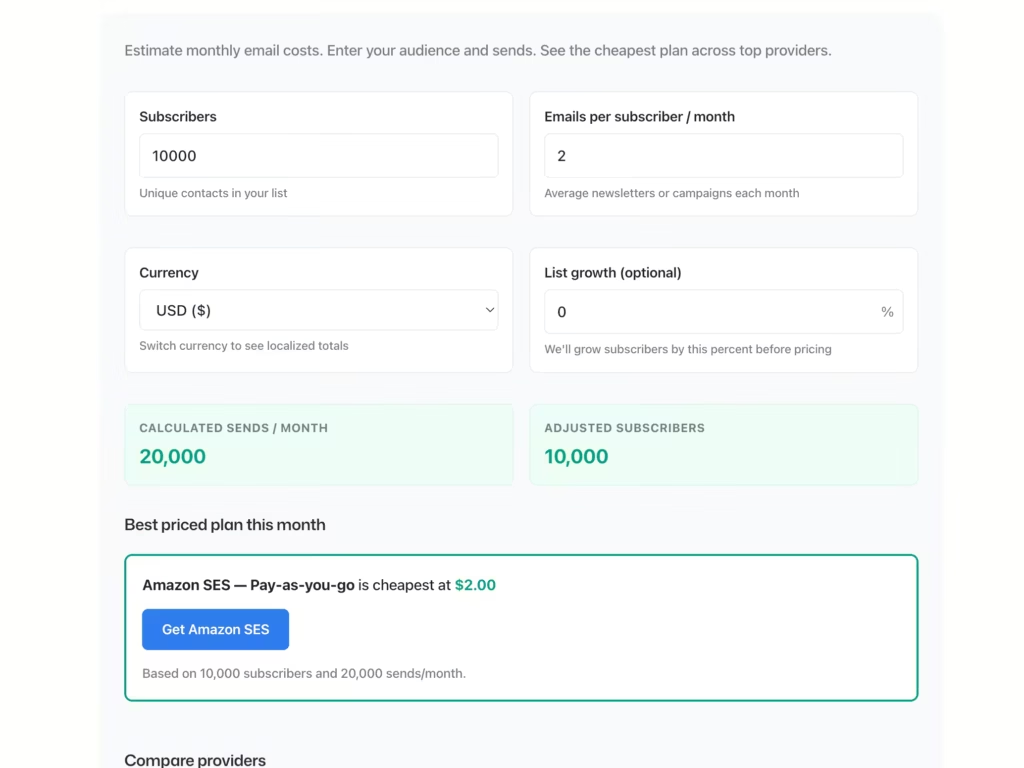
This tool does the math you’d otherwise do in a dozen browser tabs. Here’s what each input means.
- Subscribers is your total unique contacts. Not segments, not tags. Just the actual number of people on your list.
- Emails per subscriber is your average monthly send rate. If you send a weekly newsletter, that’s 4. If you also run a monthly promo, bump it to 5. Be honest here because underestimating kills your budget.
- Currency switches between USD and INR. The conversion uses current rates, so your estimates stay realistic.
- Growth is optional but useful. Planning to run ads or launch something? Add 10-20% growth to see where costs land in a few months. Better to know now than get surprised later.
The calculator then compares 13 providers and finds the cheapest plan that actually fits your numbers. If a provider doesn’t allow overages, it bumps you to the next tier automatically. No guesswork.
Popular Email Marketing Platforms Compared
I’ve tested most of these over the years. Some I love. Some I tolerate. Here’s what actually matters for each.
MailerLite
MailerLite is my go-to recommendation for beginners and small businesses. The interface is clean, the automation builder makes sense, and paid plans include unlimited emails. You pay based on subscriber count, which keeps things predictable.
The free plan covers 1,000 subscribers and 12,000 monthly emails. That’s enough to validate an idea before spending a dime. The main limitation? Advanced features like the website builder and auto-resend require the Advanced plan.
Brevo (formerly Sendinblue)
Brevo flips the pricing model. You pay for emails sent, not subscribers stored. This is perfect if you have a big list but only email occasionally. Think seasonal businesses or companies with large dormant segments.
The free plan gives you 300 emails per day with unlimited contacts. Paid plans start at $9 for 20,000 monthly emails. The catch? The email editor feels clunky compared to MailerLite, and deliverability can be inconsistent if you don’t warm up properly.
Kit (formerly ConvertKit)
Kit is built for creators. Bloggers, course sellers, YouTubers. The tagging and automation system is genuinely excellent for segmenting audiences based on behavior.
All paid plans include unlimited sends, with pricing based on subscriber count. The free plan now supports up to 10,000 subscribers but limits you to basic features. The downside? It’s pricier than alternatives at similar subscriber counts, and the email templates are intentionally minimal. Great for text-focused newsletters, frustrating if you want visual designs.
Mailchimp
Mailchimp is the name everyone knows. It’s been around forever and integrates with basically everything. The free plan is now very limited though. 500 contacts and 1,000 sends per month.
Paid plans cap your monthly sends at 10-12x your contact limit. So 10,000 contacts means roughly 100,000-120,000 emails max. The big limitation is cost. Mailchimp gets expensive fast, especially above 10,000 subscribers. I’ve seen people pay 3x what they’d pay elsewhere for the same list size.
SendGrid
SendGrid is developer-first. If you’re comfortable with APIs or need to send both transactional and marketing emails from one platform, it’s solid.
Plans are based on email volume with clear overage fees ($0.88 per 1,000 extra emails). The Essentials plan at $19.95 for 50,000 emails is competitive. The limitation? The marketing campaign builder feels like an afterthought compared to the transactional side. Great infrastructure, mediocre UX.
Amazon SES
Amazon SES is the cheapest option for high volume. At $0.10 per 1,000 emails with no subscriber limits, the math works out beautifully if you’re sending millions.
But here’s the reality check. SES is infrastructure, not a platform. No drag-and-drop editor. No built-in automation. You need technical skills to set it up, and you’re responsible for managing bounces, complaints, and deliverability yourself. Perfect for developers. Nightmare for marketers who just want to send newsletters.
Zoho ZeptoMail
ZeptoMail is Zoho’s transactional email service. You buy credits at $2.50 per 10,000 emails, and they’re valid for 6 months. The first 10,000 emails are free.
This is strictly for transactional emails. Order confirmations, password resets, shipping notifications. Not marketing campaigns. The deliverability is excellent because they keep marketing emails off their servers entirely. If you need both transactional and marketing, you’ll need a separate tool for campaigns.
EmailOctopus
EmailOctopus is the budget champion for straightforward email marketing. The free plan includes 2,500 subscribers and 10,000 monthly emails. Pro plans start at just $9.
The clever bit? You can connect your own Amazon SES account for even cheaper sending. The limitation is features. No advanced automation, limited templates, basic reporting. But if you just need to send newsletters reliably without paying Mailchimp prices, it’s hard to beat.
Sender
Sender offers one of the most generous free plans around. 2,500 subscribers and 15,000 monthly emails with all features included. No artificial restrictions.
Paid plans start at $11 for 5,000 subscribers. The platform includes email and SMS, decent automation, and solid deliverability. The limitation? It’s less polished than MailerLite and has fewer integrations. But for pure value, Sender punches way above its weight.
ActiveCampaign
ActiveCampaign is where you graduate when basic automation isn’t enough. The CRM integration, lead scoring, and conditional logic are genuinely powerful.
Plans start at $15 for 1,000 contacts with a 10x email limit. No free plan, just a 14-day trial. The limitation? Steep learning curve and pricing that climbs quickly. At 10,000 contacts, you’re looking at $139+ monthly. Worth it if you’ll actually use the advanced features. Overkill if you just send weekly newsletters.
HubSpot
HubSpot is the enterprise play. Email marketing is just one piece of their CRM, sales, and service ecosystem.
The free tools include 2,000 monthly emails and basic CRM features. The Starter plan at $20 per seat removes branding and adds simple automation. But here’s the catch. The Professional plan jumps to $890 per month. That’s not a typo. HubSpot is designed for companies that will use the full platform, not just email.
MailPoet
MailPoet lives inside WordPress. If your entire business runs on WordPress and WooCommerce, the native integration is genuinely useful.
The free plan covers 1,000 subscribers and 5,000 monthly emails using their sending service. Paid plans start at $10. The limitation? It’s WordPress-only. No standalone option. And if your host has email restrictions, you might hit sending limits regardless of your MailPoet plan.
Emailit
Emailit is a developer-focused API service with simple pricing. Buy credits at $2 per 10,000 emails. No subscriptions, no monthly fees. Credits never expire.
It’s ideal for transactional emails or developers who want to integrate email into apps without ongoing costs. The limitation? No visual campaign builder. No marketing automation. This is pure email infrastructure for people who know what they’re doing.
Which Provider Should You Choose?
There’s no universal answer. But I can give you a framework.
- Small list, high engagement? Go with MailerLite or Kit. Subscriber-based pricing with unlimited sends means you can email frequently without watching costs spike.
- Large list, infrequent sends? Brevo or EmailOctopus will save you money. You’re only paying for what you actually send.
- Need advanced automation? ActiveCampaign is worth the premium if you’ll use conditional logic, lead scoring, and CRM features. If that sounds like overkill, it probably is.
- Running on WordPress? MailPoet keeps everything in one dashboard. Simple.
- Developer building an app? Amazon SES or Emailit for the lowest per-email costs. Just be ready to handle the technical setup yourself.
- Enterprise with budget? HubSpot makes sense if you need the full CRM ecosystem. Otherwise, you’re paying for features you won’t touch.
Use the calculator above with your actual numbers. Try different subscriber counts and email frequencies. Watch how costs scale. Then pick the provider that balances features with what you’ll actually spend.
The cheapest option isn’t always the best. But overpaying for features you don’t use isn’t smart either. Find the middle ground.
Disclosure: Some links on this page are affiliate links. This means if you click and purchase, I may earn a commission at no extra cost to you. I only recommend tools I genuinely trust and use.