
Best Time Tracking Tools for Freelancers (2026)
Freelancers who don’t track time lose money. Period. The right time tracking tools for freelancers aren’t about micromanagement. They’re about knowing your numbers.
I learned this the hard way. In my early freelance years, I’d quote projects at a flat rate, work way more hours than expected, and end up making less than minimum wage. No data. No leverage. No clue where my time actually went.
Time tracking changed that. Not because I love filling out timesheets, but because the best time tracking tools show you where your hours actually go. That lets me price properly, scope accurately, and identify which clients drain my energy versus which ones actually make the business profitable.
Here’s what actually works for freelancers… without the corporate bloat that makes most time trackers feel like punishment.
Why Freelancers Need Time Tracking Tools
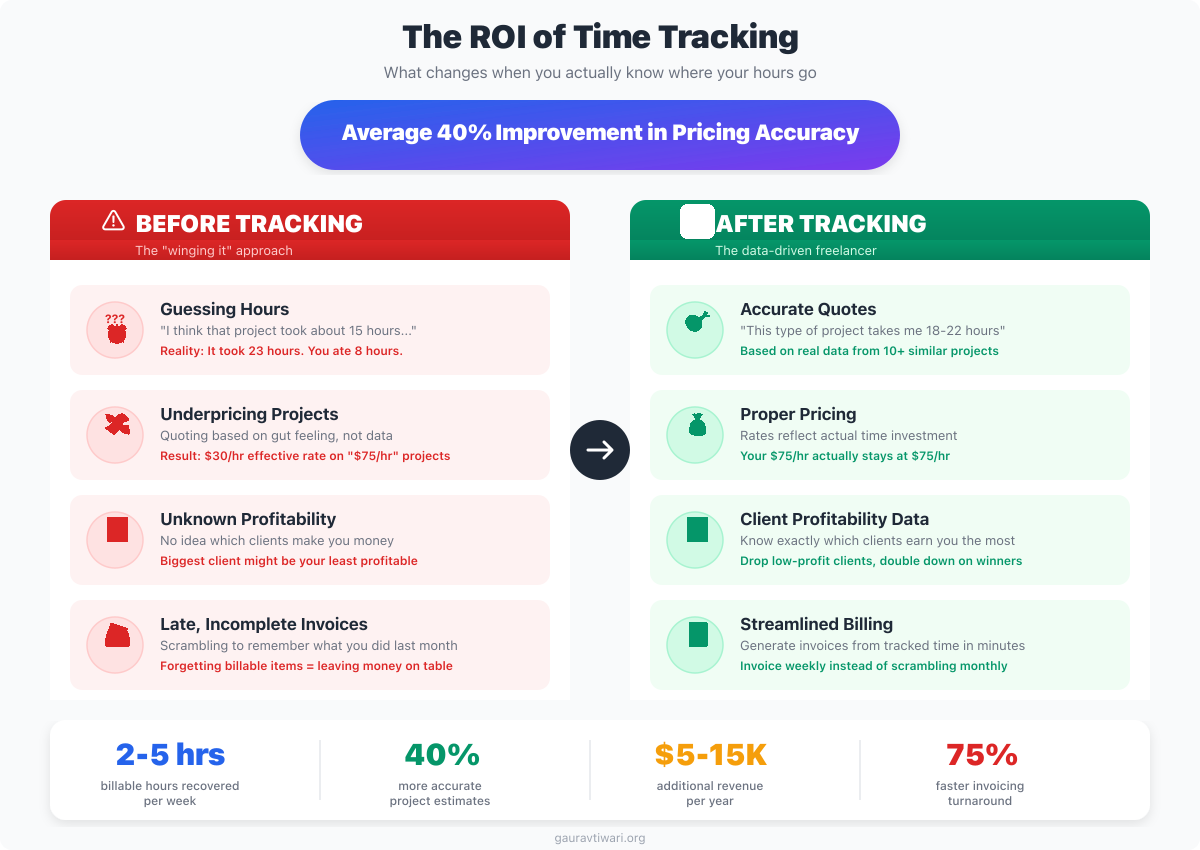
That 10-hour website you quoted? It’s 20 hours minimum once you count communication, revisions, and testing. Without data, you’re pricing blind. One week of honest time tracking will teach you more about your business than a year of guessing.
Before I get into the tools, the reasons. Because if you don’t understand why tracking matters, you’ll abandon it within a week.
Accurate Pricing
Guess how long projects take? You’ll guess wrong. Every time. I did for years. Track similar projects over a few months and you’ll have real data to work with. That 10-hour website you quoted? Twenty hours minimum once you count communication, revisions, and testing. But the next quote? Accurate. Because you have the numbers.
Client Billing
Some clients pay hourly. Even for fixed-fee work, time tracking shows exactly what went into a project. Useful for scope creep discussions when a “quick revision” turns into three hours of back-and-forth.
Identifying Time Drains
That client who emails constantly? The project with endless revisions? Time tracking reveals which work is actually profitable and which quietly bankrupts you. I discovered one client was costing me 30% more time than any other for the same rate. That changed the conversation.
Tax Documentation
Billable hours documentation matters for taxes, especially if you’re ever audited. Digital records beat guessing every time. Pair time tracking with good accounting software for complete financial visibility.
Best Free Time Tracking Tools for Freelancers
Toggl Track
- One-click timer with browser extension
- 100+ integrations with popular tools
- Visual reports and exportable dashboards
- Free for up to 5 team members
- Cross-platform: web, desktop, mobile
Toggl Track
Toggl Track is my primary recommendation for freelancers who want simplicity. I’ve used it as my main time tracker for years. The browser extension is excellent, idle detection catches forgotten timers, and the free tier covers everything a solo freelancer needs. It stays out of my way, which is exactly what a time tracker should do.
Free tier includes:
- Unlimited time tracking.
- Unlimited projects and clients.
- Up to 5 team members.
- Browser extension, desktop, and mobile apps.
- Exportable reports.
- Pomodoro timer.
- Idle detection.
Why it works:
- One-click start/stop. No friction.
- Browser extension tracks time in context.
- Clean interface. Easy to understand immediately.
- Reports show exactly where time went.
- Tags for categorization without complexity.
The browser extension is what sold me, honestly. Hit the icon, select project, start tracking. Switch projects with two clicks. The Pomodoro timer helps focus during deep work sessions. And idle detection catches when I forget to stop the timer, which happens more than I’d like to admit. It’s the tool I’ve used longest because it stays out of my way.
Limitations:
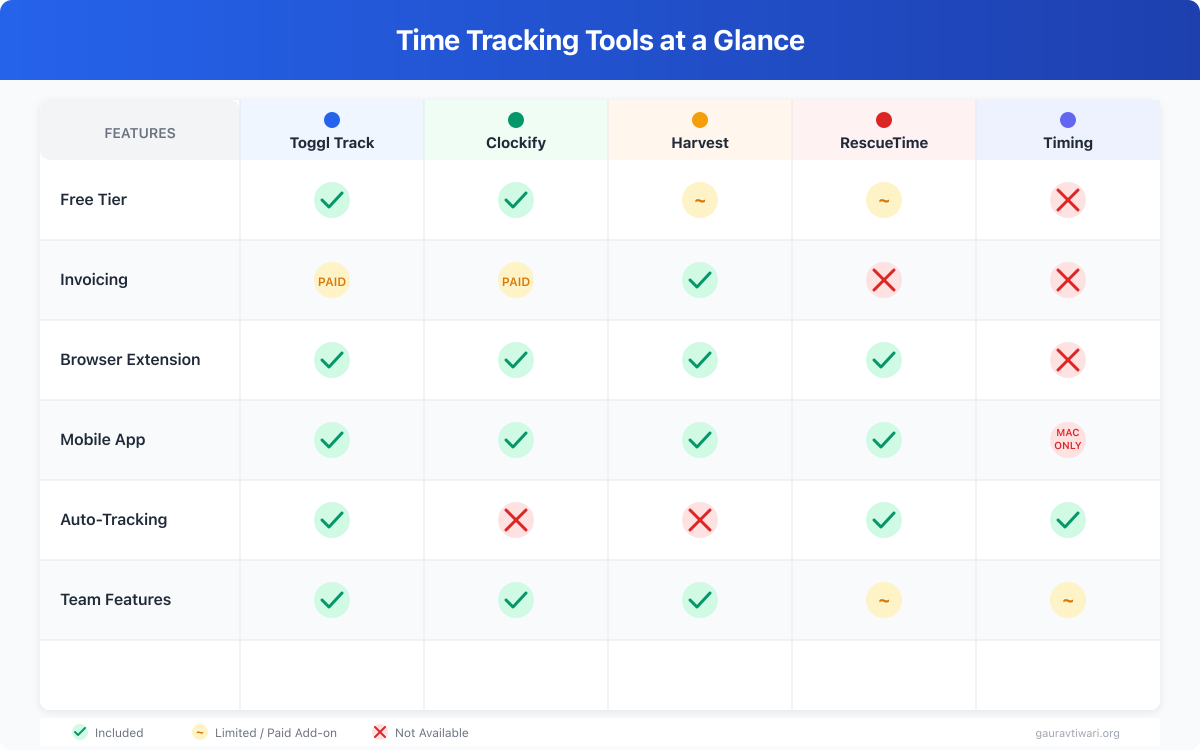
- No built-in invoicing.
- Advanced reporting requires paid plan.
- No automatic time tracking (like RescueTime).
Pricing: Free for individuals and small teams. Starter plan at $9/user/month adds billable rates and project time estimates. Premium at $18/user/month for advanced features.
Best for: Freelancers who want reliable tracking without complexity.
Clockify
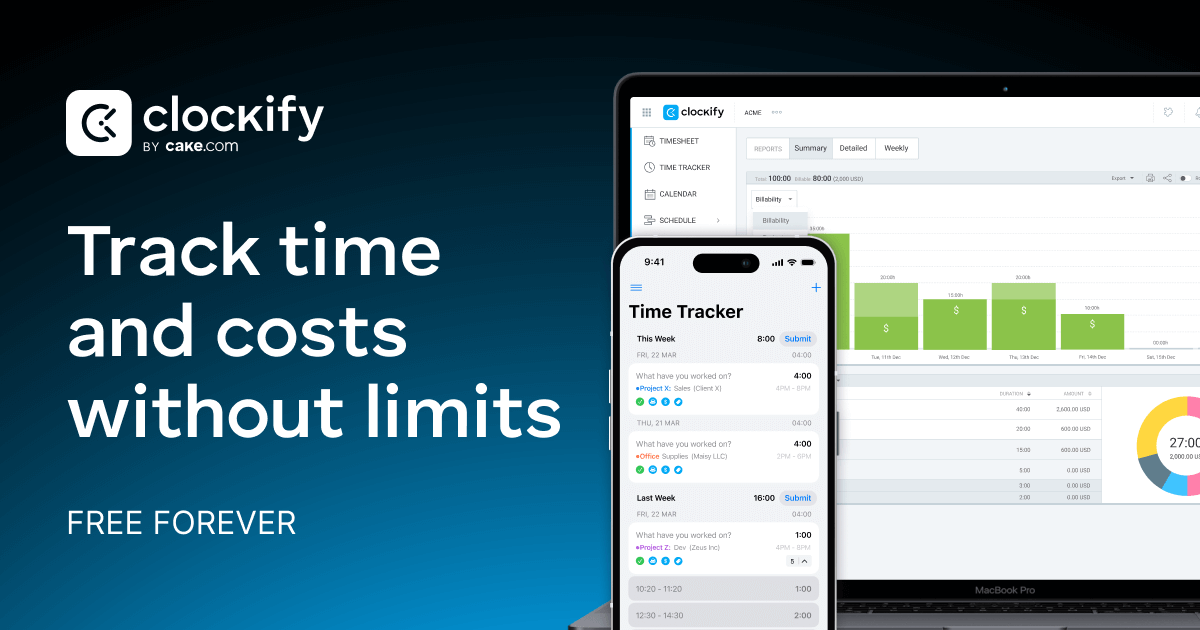
Clockify offers the most generous free tier I’ve seen in this category. And I mean genuinely free, not the “free until you actually need something” kind.
Free tier includes:
- Unlimited users.
- Unlimited projects.
- Unlimited time tracking.
- Timesheets.
- Basic reports.
- Browser, desktop, and mobile apps.
- Team features.
Why it works:
- Genuinely free with no practical limits.
- Multiple tracking modes: timer, manual, timesheet.
- Project and client organization.
- Team features work on free tier.
- Cross-platform availability.
The timesheet view is great for weekly summaries. You can see entire weeks at a glance, which makes invoicing straightforward. Multiple team members can use it free, and that’s genuinely rare. If you collaborate with other freelancers occasionally, this matters. Look, I still prefer Toggl’s interface, but Clockify’s free tier is hard to argue with if budget is tight.
Limitations:
- Interface feels busy compared to Toggl.
- Invoicing requires paid plan.
- Mobile app has mixed reviews.
- Advanced features locked to Pro.
Pricing: Free with unlimited core features. Basic at $3.99/user/month (annual) adds time audits and break tracking. Standard at $5.49/user/month adds invoicing. Pro at $7.99/user/month for scheduling and budgeting.
Best for: Freelancers and small agencies who need team tracking without paying.
Harvest

Harvest combines time tracking with invoicing, which is the feature that sets it apart.
Free tier includes:
- 1 user.
- 2 projects.
- Time tracking.
- Invoicing.
- Expense tracking.
- Basic reporting.
Why it works:
- Time directly converts to invoices. One click.
- Expense tracking with receipt attachments.
- Clean, professional interface.
- Strong accounting integrations (QuickBooks, Xero).
OK, here’s why Harvest exists in a world with Toggl: the time-to-invoice workflow. Track time, generate invoice, send to client. All in one tool. If you bill hourly, this reduces admin significantly. I’ve used it for specific hourly clients where the integrated invoicing saves me about 30 minutes per billing cycle. That adds up.
Limitations:
- Free tier is very limited (2 projects only).
- Per-user pricing adds up for teams.
- Less feature-rich than Toggl for pure tracking.
Pricing: Free for 1 user with 2 projects. Pro at $12/user/month for unlimited projects and full features. Premium at $17.50/user/month adds profitability reporting and approvals.
Best for: Hourly freelancers who want integrated invoicing. For more invoicing options, see our guide to invoice generators for small business.
Best Paid Time Tracking Tools
Sometimes the free tier isn’t enough. If you’re managing 5+ active clients or need profitability reporting, paid tiers earn their cost back quickly. Here’s when upgrading makes sense.
I discovered one client was costing me 30% more time than any other for the same rate. That single insight from paid reporting features paid for a year of Toggl Premium.
Toggl Track (Starter/Premium)
Starts at: $9/user/month.
What you get:
- Project time estimates and tracking against them.
- Billable rate management.
- Project profitability reporting.
- Time audits.
- Rounding options.
- Priority support.
Worth upgrading for: Multiple billable rates across different clients, project profitability analysis, and tracking against estimates. If you’re managing more than 5 active clients, the paid features genuinely improve your workflow.
Harvest (Pro/Premium)
Pricing: $12/user/month (Pro), $17.50/user/month (Premium).
What you get:
- Unlimited projects.
- Full invoicing suite.
- Expense tracking.
- Team management.
- Payment reminders.
- Stripe/PayPal integration.
- Profitability reports (Premium).
Worth upgrading for: The complete time-to-invoice workflow. If you bill hourly clients regularly, this pays for itself in the first month through time saved on admin alone.
RescueTime
RescueTime takes a completely different approach. It tracks automatically.
What it is: A background app that monitors what you work on. No manual start/stop needed.
Why consider it:
- Automatic tracking requires zero daily effort.
- Shows productivity patterns across your entire workday.
- Identifies time sinks you didn’t know existed.
- Works passively in the background.
Limitations:
- Not designed for client billing (measures activity, not billable work).
- Privacy concerns for some users.
- More for productivity analysis than invoicing.
Pricing: Free basic version with limited history. Premium at $12/month for full features.
Best for: Understanding where time actually goes, especially for project-based freelancers where manual tracking feels tedious.
Timing (Mac Only)
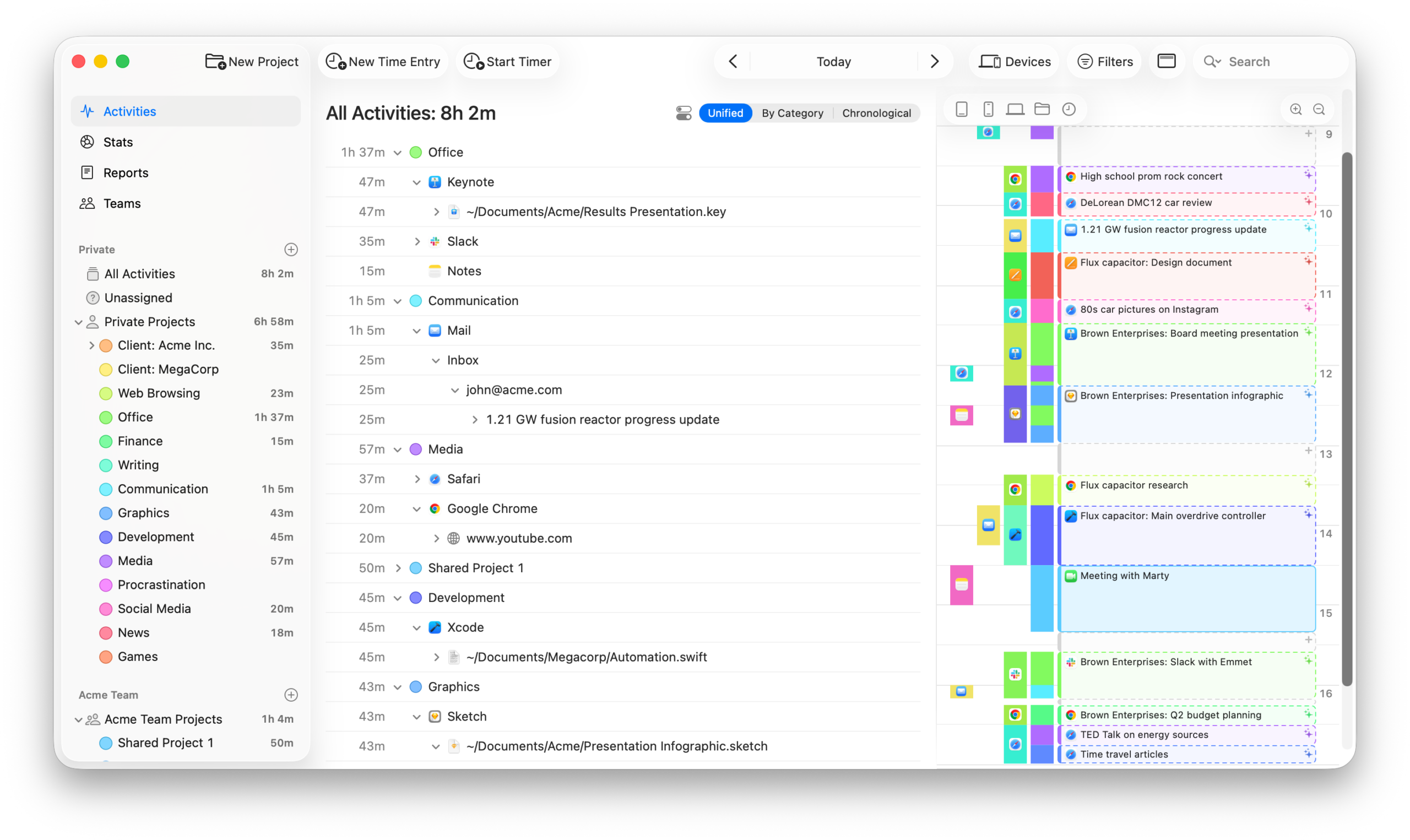
Timing is automatic time tracking built specifically for Mac users. I’ve used it as a secondary layer alongside Toggl.
What it does:
- Automatically tracks all app and website usage.
- Groups activities into projects using customizable rules.
- Shows detailed productivity breakdowns.
- Syncs across Mac devices.
Why consider it:
- Zero manual effort after initial setup.
- Catches time you’d forget to track manually.
- Beautiful interface and reports.
Limitations:
- Mac only. No Windows or Linux support.
- Requires initial setup to categorize activities properly.
- Not ideal for client billing without manual review and adjustment.
Pricing: Professional at $8/month (annual). Expert at $11/month.
Best for: Mac users who want automatic tracking without manual timers. For freelancers managing remote client work, automatic tracking ensures nothing slips through the cracks.
What to Look for in Time Tracking Tools
After testing every major time tracker over the years, I’ve narrowed down what actually matters. Spoiler: it’s not feature lists.
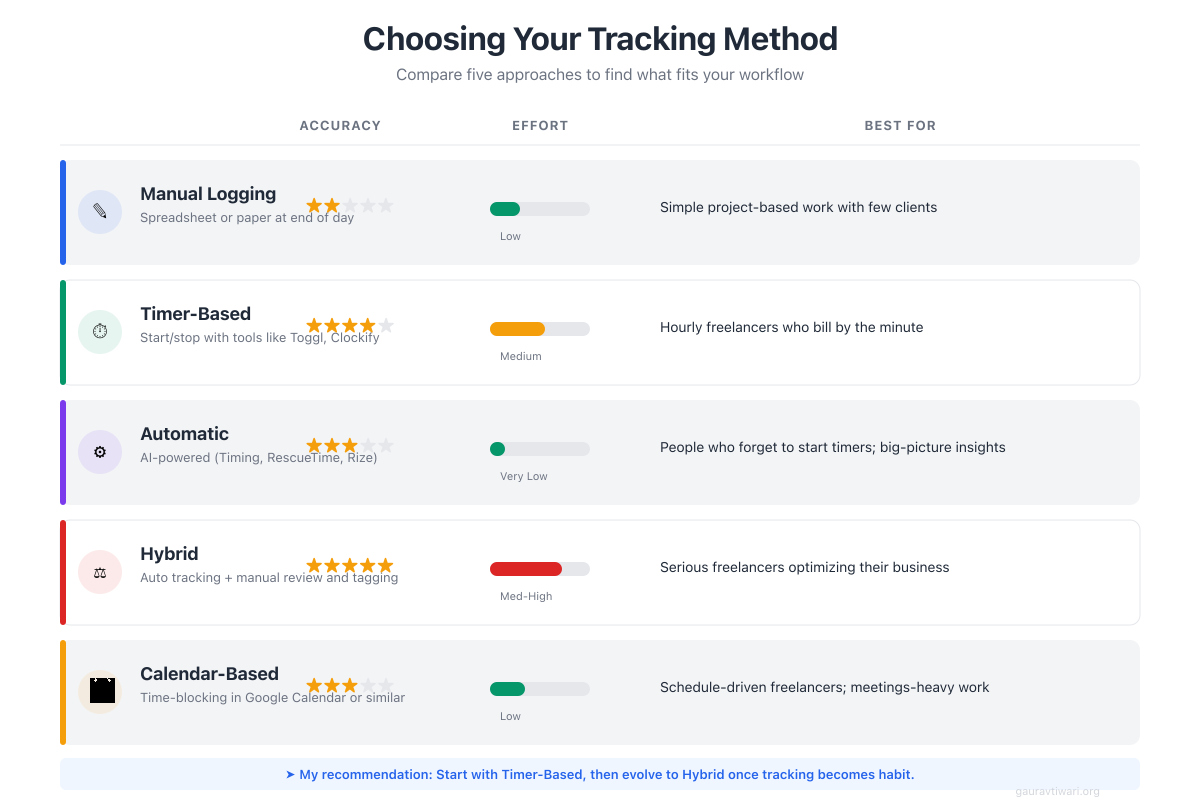
Friction Reduction
This is the most important factor. If starting a timer takes more than 2 seconds, you won’t do it consistently. Browser extensions, keyboard shortcuts, and mobile apps all matter because they reduce the barrier to actually tracking. I’ve abandoned tools that were technically better because starting a timer felt like work.
Project/Client Organization
Separate time by client and project. One flat list becomes useless within a week. You need hierarchy: Client > Project > Task type at minimum.
Reporting
Weekly summaries. Client totals. Project breakdowns. Reports reveal patterns that change how you price and who you work with. If the reporting is weak, the tracking is busywork.
Integrations
Connect to your invoicing tool. Connect to your project management. Reduce double entry wherever possible. Manual data transfer is where most freelancers give up.
Export Options
CSV exports for spreadsheets. PDF reports for clients. API access for automation. Your data should be portable and usable outside the tool.
My Time Tracking Workflow
Here’s exactly how I track time across my business:
Tool: Toggl Track (free tier) as primary, Timing as backup layer.
Setup:
- One client per client (obvious, but I’ve seen freelancers lump everything together).
- One project per engagement or retainer.
- Tags for work types: writing, development, calls, admin, marketing.
Daily process:
- Start timer when beginning focused work.
- Use browser extension for context switching between clients.
- Stop timer for breaks. Seriously, stop it.
- Quick review at day’s end to catch anything I missed.
Weekly process:
- Export weekly report from Toggl.
- Review client totals against expectations.
- Identify any over-served clients who are eating into profitability.
Monthly process:
- Generate client summaries for the month.
- Compare actual hours to quotes and retainer allocations.
- Adjust future pricing based on what the data shows.
This takes about 10 minutes daily and 30 minutes weekly. The insights are worth hours of guessing. If you’re juggling multiple clients, pair this with a solid system for staying productive across projects. And honestly? It becomes automatic after a couple weeks. You stop thinking about it.
Common Time Tracking Mistakes
Tracking Too Granularly
You don’t need 47 different task types. Three to five categories per project is plenty. More granularity creates friction, and friction kills consistency. I learned this by creating an elaborate 20-category system that lasted exactly one week.
Not Stopping the Timer
Ran to the kitchen for 30 minutes? Timer still running. Inflated hours make your data useless for analysis. Use idle detection or build the discipline to stop and start. The data is only as good as its accuracy.
Not Tracking Everything
Just tracking client work? That’s half the picture at best. Track admin, marketing, sales calls, email, professional development. That’s where time disappears. A freelancer billing 8 hours daily still works 10-12. Track all of it.
Ignoring the Data
Time tracking without analysis is expensive busywork. Review weekly at minimum. Monthly for deep analysis. The patterns in the data are worth more than the tracking itself.
Time Tracking vs Project Management
Tools like Asana, ClickUp, and Notion have time tracking features. They work. But they’re not optimized for it. It’s like using a Swiss Army knife to cut a steak… technically possible, not ideal.
Use dedicated time tracking when:
- Accurate billing matters.
- You want detailed profitability reporting.
- Integration with invoicing is important.
Use project management timers when:
- Time tracking is secondary to task management.
- Rough estimates are fine for your needs.
- You genuinely don’t want another tool in your stack.
I use both. Notion for project organization. Toggl for time tracking. They connect via Zapier without much fuss. For a complete overview of task management options, see our guide to project management tools.
- Free for 5 users
- Best browser extension
- Pomodoro timer built in
- No invoicing
- Clean, minimal interface
- Unlimited free users
- Timesheet view
- Invoicing on paid plan
- Busier interface
- More features free
- Built-in invoicing
- Expense tracking
- Accounting integrations
- Free tier: 2 projects only
- $12/user/mo for Pro
Getting Started
Don’t overthink this. Seriously. I’ve seen freelancers spend more time researching time trackers than they’d ever save using one.
- Pick one tool. Toggl or Clockify for free. Start there. Don’t research for a week.
- Set up structure. Clients and projects. Simple tags. Nothing elaborate.
- Track for one week. Everything. Be brutally honest with yourself.
- Review the data. Where did time go? Any surprises? (There will be surprises.)
- Adjust workflow. Based on what you actually learned, not what you assumed.
One week of honest tracking teaches you more about your work than a year of guessing. The best time tracking tools for freelancers don’t need to be complicated. They need to be consistent. Combined with other essential freelancer tools, time tracking forms the foundation of a profitable freelance business.
Frequently Asked Questions
What’s the best free time tracking tool for freelancers?
Toggl Track is my top pick for solo freelancers. The free tier covers unlimited projects, clients, and tracking, plus there’s a browser extension that makes one-click start/stop dead simple. Clockify is the better choice if you collaborate with other freelancers, since their free plan supports unlimited users and team features.
Do I really need time tracking software as a freelancer?
Yes, especially if you do any fixed-fee work. Without data, you’re guessing on project estimates, and you’ll guess wrong consistently. One week of honest tracking usually reveals that your projects take 30-50% longer than you think. That single insight is worth more than any productivity hack.
Can time tracking tools generate invoices?
Most time trackers handle tracking but not invoicing on their free tiers. Toggl Track and Clockify both require paid plans for invoicing. If you need invoicing baked in, look at Harvest, which starts at $12/month, or pair your tracker with a free tool like Wave or Invoice Ninja.
How do I track time accurately if I forget to start timers?
Use idle detection (Toggl Track has this built in) so it catches when you’ve walked away and forgot to stop the timer. Some tools like Timely track automatically by recording your app usage in the background, then let you assign time to projects retroactively. I find the browser extension habit easier to build than automatic tracking.
Is time tracking useful for fixed-price projects, not just hourly work?
Absolutely, this is where it matters most. Fixed-price projects are where most freelancers lose money because they underestimate scope. Tracking your hours on fixed-fee work gives you a real cost-per-project number. After 3-4 similar projects, your next quote will be accurate instead of hopeful.
Disclaimer: This site is reader-supported. If you buy through some links, I may earn a small commission at no extra cost to you. I only recommend tools I trust and would use myself. Your support helps keep gauravtiwari.org free and focused on real-world advice. Thanks. - Gaurav Tiwari