
WP Engine vs GreenGeeks: Is Managed WordPress Hosting Worth the Premium?
Most hosting comparisons follow a predictable formula. They line up two providers, list specs, and tell you to pick the one that fits your budget. That is not particularly useful when the two providers in question operate on entirely different hosting models with entirely different pricing logic. WP Engine sells managed WordPress hosting starting at $30/month. GreenGeeks sells optimized shared hosting starting at $2.95/month. Comparing them on a spreadsheet alone misses the real question underneath the numbers: does the managed WordPress model deliver enough additional value to justify a price tag that is roughly 10 times higher? The answer depends on what you are building, how much technical work you want to handle yourself, and how much performance headroom your site actually requires.
What Each Provider Actually Costs
The pricing gap between WP Engine and GreenGeeks is the first thing worth addressing because it frames everything else.
WP Engine runs 5 tiers on annual billing:
| Plan | Sites | Storage | Bandwidth | Price/Month |
|---|---|---|---|---|
| Startup | 1 | 10 GB | 75 GB | $30 |
| Professional | 3 | 15 GB | 150 GB | $55 |
| Growth | 10 | 20 GB | 240 GB | $109 |
| Scale | 30 | 50 GB | 550 GB | $276 |
| Core | Contact Sales | Contact Sales | Contact Sales | $400 |
There is also an Enterprise tier with custom pricing. Monthly billing raises costs above the annual rates shown above. WP Engine does not include email hosting or domain registration with any plan, so those are separate expenses.
GreenGeeks runs 3 tiers:
| Plan | Sites | Storage | Price/Month |
|---|---|---|---|
| Lite | 1 | 25 GB | $2.95 |
| Pro | Unlimited | 50 GB | $4.95 |
| Premium | Unlimited | 100 GB | $8.95 |
Every GreenGeeks plan includes a free domain for the first year, free SSL, nightly backups, a free CDN, built-in LiteSpeed caching, and email accounts. These are annual introductory prices; renewal rates are higher (Lite renews at $13.95/month, Pro at $18.95/month, Premium at $30.95/month).
The difference is stark. GreenGeeks gives you 25 GB of storage on its cheapest plan. WP Engine gives you 10 GB on its cheapest plan at roughly 10 times the cost.
How They Perform Under Testing
Raw pricing means little if the cheaper option cannot keep a site running properly. So here is what independent benchmarks show.
WP Engine
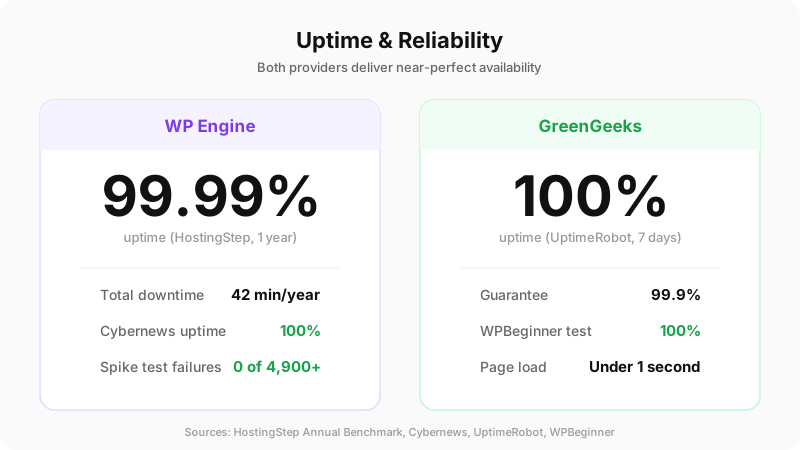
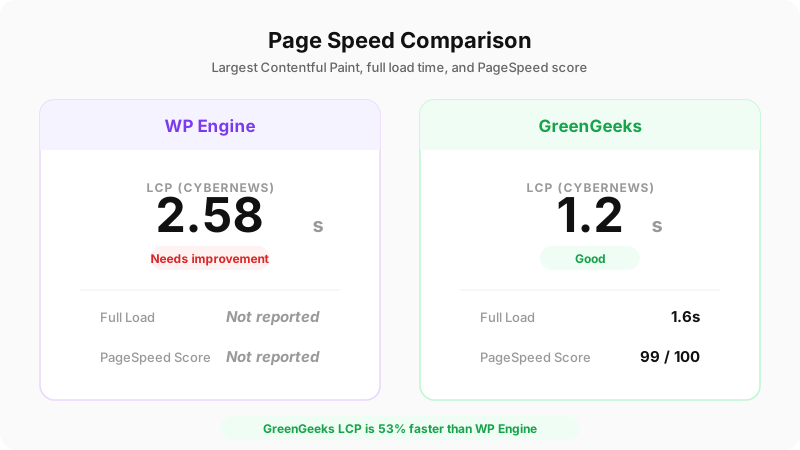
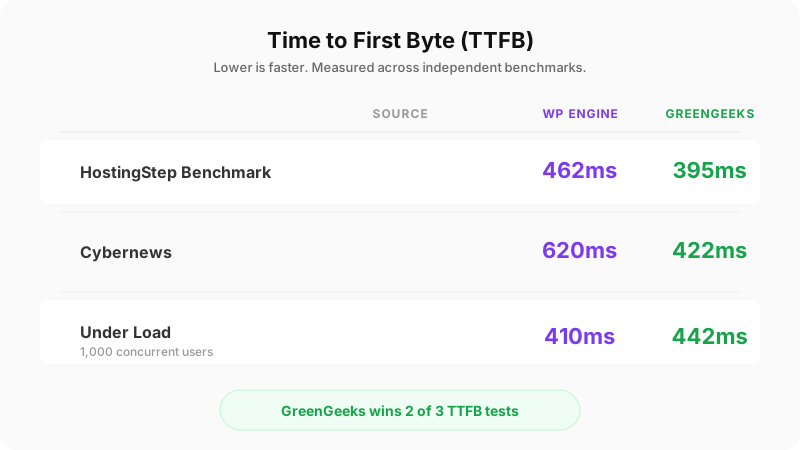
Cybernews testing recorded 100% uptime, average global latency of 4.53ms, a time to first byte of 0.62 seconds, and a Largest Contentful Paint of 2.58 seconds. WP Engine handled over 4,900 requests with zero failures during traffic spike testing.
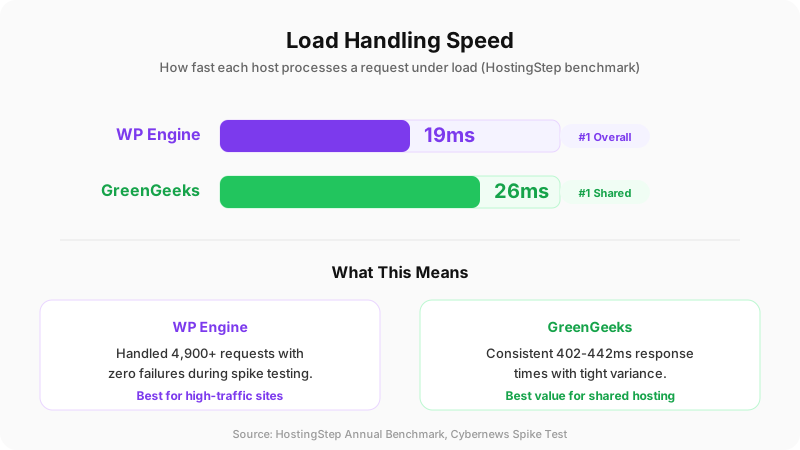
HostingStep’s annual benchmark placed WP Engine at 99.99% uptime with 42 minutes of total downtime across an entire year. It posted a 462ms time to first byte and 19ms load handling time, which earned it the top position in load testing for the first time, according to HostingStep, because of recent upgrades to its tech stack.
A separate 30-day independent test measured average time to first byte at 127ms from Dallas, 210ms from London, and 340ms from Sydney. Under a 1,000-user load, that number never exceeded 410ms globally.
GreenGeeks

Cybernews measured GreenGeeks with a Largest Contentful Paint of 1.2 seconds and a fully loaded time of 1.6 seconds. That LCP figure is notably faster than WP Engine’s 2.58 seconds in the same testing source.
AllAboutCookies recorded a PageSpeed score of 99, a 0.6-second average first contentful paint, and a 0.8-second average LCP. GreenGeeks confirmed its 99.9% uptime guarantee during UptimeRobot monitoring, with a perfect 100% uptime recorded over a week of testing. Response times ranged from 402ms to 442ms with an average of 422ms.
HostingStep’s benchmark gave GreenGeeks a 395ms time to first byte and a 26ms load handling time, placing it at the top of the shared hosting category.
WPBeginner’s testing found 100% uptime and page loads in under 1 second.
Both providers perform well. GreenGeeks posts competitive numbers against a provider that charges many times more per month.
What You Get for the Money With WP Engine
WP Engine builds its entire infrastructure around WordPress. Every plan includes free SSL, Cloudflare CDN, daily and on-demand backups, automatic WordPress and PHP updates, development/staging/production environments, and access to 10 premium StudioPress themes.
The proprietary EverCache system handles page, object, and database caching at the server level without requiring any plugins. WP Engine’s caching rules also extend to Cloudflare’s edge network, which reduces the number of requests hitting the origin server. Security includes Layer 3 and 4 DDoS protection and Cloudflare Polish for lossless image compression.
One detail worth noting: WP Engine delays WordPress core updates intentionally. Their security team reviews and tests each release against the platform before pushing it to customer sites. This protects against updates that break common plugin or theme compatibility.
WP Engine provides a 60-day money-back guarantee, which is double the industry standard.
The limitations are real, though. There is no cPanel; WP Engine uses its own custom portal. Chat-only support on the Startup plan (phone support requires Professional or higher). Email hosting and domain registration require third-party services. Security features like AI-powered plugin updates and uptime monitoring are optional add-ons on Essential plans, only included with Core ($400/month) and above.
What You Get for the Money With GreenGeeks
GreenGeeks runs on LiteSpeed servers with built-in caching, which accounts for the strong benchmark numbers at a fraction of the cost. Every plan comes with 1-click WordPress installation, managed updates, free CDN, free site migration, and a choice of more than 5 data center locations.
For developers, GreenGeeks supports WP-CLI, SSH, Git, and custom PHP.ini configuration. It uses the industry-standard cPanel interface, which most hosting users already know how to operate.
Security includes DDoS protection, a web application firewall, and automatic malware scanning. The auto-update feature covers WordPress core, plugins, and themes.
A full email service comes bundled with every plan. This is a meaningful inclusion because many hosting providers, WP Engine among them, either charge extra for email or leave users to find their own solution. Check out my list of the best web hosting services for more comparisons.
GreenGeeks also backs a 30-day money-back guarantee with no conditions attached.
Does Managed WordPress Hosting Earn Its Price in 2026?
The managed hosting model covers server-level caching, automatic updates, security monitoring, daily backups, and WordPress-specific support. The provider handles the technical work so the site owner does not have to.
Performance benchmarks consistently show managed WordPress hosting outperforms traditional shared hosting by 2 to 3 times in load speed while reducing maintenance overhead and security risk. Google’s Core Web Vitals remain a primary ranking factor, and field data suggests improving LCP from 4.0 to 2.5 seconds can increase conversion rates by as much as 15%.
Managed hosting makes sense for high-traffic sites, agencies managing client portfolios, and businesses where downtime directly translates to revenue loss. The premium support staffed by WordPress specialists is a real advantage when things break at inconvenient hours.
But here is the practical reality for most site owners. WP Engine is not a value choice for running a simple blog or a site with low to moderate traffic. WP Engine is worth the premium for demanding or high-traffic sites, but the investment needs to be justified by the workload. For a broader look at what’s available in the managed cloud hosting space, I’ve reviewed 10 providers separately.
Who Should Pick Which
Uptime & Reliability
Load Handling Speed
Page Speed Comparison
Time to First Byte (TTFB)
WP Engine makes sense when:
- The site generates enough revenue that downtime has a direct financial cost
- You manage multiple client sites and need staging environments built into the platform
- You want server-level caching and CDN edge rules handled without any configuration
- Your monthly hosting budget starts at $30 and can scale to $276 or beyond
GreenGeeks makes sense when:
- You need solid WordPress hosting without spending $30/month or more per site
- Email hosting bundled into your plan matters to you
- You want cPanel access and developer tools like SSH, Git, and WP-CLI
- Environmental responsibility in your hosting provider is something you care about
- You are building a small business site, a personal project, or a growing blog
HostingStep’s Q4 2025 data, based on testing 34 hosting providers, lists both GreenGeeks and WP Engine among the top recommended picks for WordPress hosting.
Compare Managed WordPress Hosting Providers
| Feature | Cloudways | Kinsta | WPX Hosting | Rocket.net | Flywheel |
|---|---|---|---|---|---|
| Starting Price | $14/mo | $35/mo | $20.83/mo | $25/mo | $15/mo |
| Sites Included | Unlimited (per server) | 1 (Starter) | 5 | 1 | 1 |
| Agency Features Key Differentiator | Team roles, client billing | Company dashboard, user roles | Managed migrations | White-label option | Client billing, white-label |
| Infrastructure | DigitalOcean, Vultr, AWS, GCP | Google Cloud (C2) | Custom cloud (28 locations) | Cloudflare Enterprise | Google Cloud |
| Staging | Yes (1-click) | Yes (with push to live) | Yes | Yes | Yes (with push to live) |
| Free Migrations | Yes (1 free, then $25) | Unlimited | Unlimited | Unlimited | 1 free |
| Git Integration | Yes | No (SSH only) | No | No | No |
| SSH/WP-CLI | Full SSH + WP-CLI | SSH + WP-CLI | No | No | SFTP only |
| PHP Versions | 7.4 – 8.3 | 7.4 – 8.3 | Latest stable | Latest stable | 7.4 – 8.2 |
| Uptime SLA | 99.99% | 99.9% | 99.95% | 99.99% | 99.9% |
| Best For | Developers who want server control | Premium WP sites with traffic | Speed-focused bloggers | Cloudflare Enterprise stack | Designers and small agencies |
| Visit Cloudways | Visit Kinsta | Visit WPX | Visit Rocket.net | Visit Flywheel |
Independent testing confirms that GreenGeeks is a solid hosting provider, particularly for small businesses and beginners who value sustainability. GreenGeeks matches or beats WP Engine on several performance metrics while costing a fraction of the price and including services that WP Engine charges extra for or does not offer at all.
For the majority of WordPress site owners, GreenGeeks delivers the performance, features, and support needed to run a reliable site without the managed hosting premium. The money saved can go toward better content, marketing, or tools that grow the business itself.
Disclaimer: This site is reader-supported. If you buy through some links, I may earn a small commission at no extra cost to you. I only recommend tools I trust and would use myself. Your support helps keep gauravtiwari.org free and focused on real-world advice. Thanks. - Gaurav Tiwari