
Top Reasons to Use Live Chat Software on Business & Ecommerce Websites
You just lost another customer. They had a question about your return policy, couldn’t find the answer in 10 seconds, and bounced to a competitor who answered instantly via chat. This happens roughly 53% of the time on websites without live chat, according to Forrester Research. The cost isn’t just one lost sale. It’s lifetime value, referrals, and brand trust evaporating because you made someone wait.
I’ve installed live chat on 40+ client websites since 2018. The pattern repeats every single time: response times drop from hours to seconds, customer satisfaction climbs 20-35%, and conversion rates increase 8-15% within the first month. But here’s what’s changed in 2026. AI chatbots now handle 60-70% of incoming conversations without a human touching a keyboard. The question isn’t whether you need live chat anymore. It’s whether you need AI, human agents, or a hybrid of both. I’ll break down exactly what works, what doesn’t, and which tools deliver real results for WordPress and e-commerce sites.
Why Live Chat Matters More Than Ever in 2026
Live chat is the fastest customer communication channel on the internet. Average response time sits at 42 seconds, compared to 12 hours for email and 11 minutes for phone hold times. Your customers already know this. They’ve been trained by WhatsApp, iMessage, ChatGPT, and every other tool that makes waiting feel like a relic from 2010.
The numbers back this up. Websites with live chat see 40-50% higher conversion rates compared to those relying on contact forms alone. Customer satisfaction scores for live chat hover around 85%, while email support manages just 61%. And live chat costs roughly $5 per interaction, compared to $12 for phone and $8 for email.
The math is straightforward. Live chat costs less, resolves faster, and makes customers happier. If you’re still relying on email and phone support exclusively, you’re spending more money to deliver a worse experience. That’s not a strategy. That’s a leak in your business budget you haven’t plugged yet.
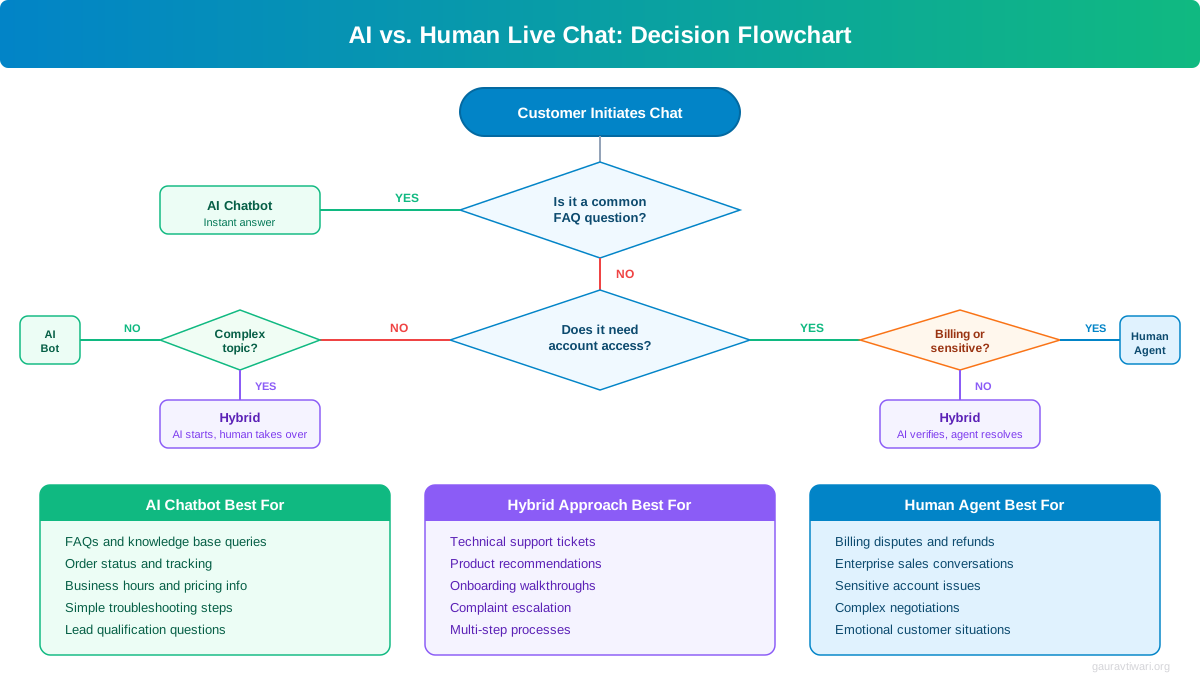
AI vs Human Agents: The 2026 Decision
The biggest shift in live chat since 2026 isn’t a new widget design or a prettier dashboard. It’s AI. Modern AI chat agents are trained on your knowledge base, product docs, FAQ pages, and past conversations. They understand natural language, handle multi-turn conversations, and know when to hand off to a human.
Traditional live chat required human agents at keyboards, staffed shifts, and an “offline” badge outside business hours. AI eliminated most of those constraints. But that doesn’t mean you should fire your support team and let a robot handle everything. The reality is more nuanced.
When AI Chatbots Win
AI handles routine questions brilliantly. Product specs, shipping timelines, return policies, password resets, order tracking, business hours, pricing tiers. These represent 60-70% of all customer inquiries. An AI agent answers them in 3-5 seconds, 24 hours a day, 365 days a year. No training needed. No sick days. No turnover.
Tidio’s AI agent (Lyro) is a solid example. You feed it your website content and support docs, and it starts answering customer questions accurately within minutes. When it hits something beyond its training, it transfers the conversation to a human with full context preserved.
When Human Agents Win
Complex complaints, emotional situations, high-value sales negotiations, and edge cases still need humans. A customer who received a damaged $500 order doesn’t want a chatbot saying “I’m sorry to hear that.” They want empathy, ownership, and a resolution that feels personal. AI can’t match that yet.
Enterprise sales conversations also need humans. When someone’s evaluating a $10,000/year contract, they want to talk to a person who understands their specific situation and can negotiate terms. AI can qualify the lead and schedule the call. But closing the deal? That’s human territory.
The Hybrid Model (What I Recommend)
The best setup for most businesses in 2026 is hybrid. AI handles first contact. It answers routine questions instantly, qualifies leads, collects contact info during off-hours, and escalates complex issues to humans with full conversation history attached. Your human agents focus exclusively on conversations that need judgment, empathy, or authority.
I’ve seen this model cut support costs by 40-60% while improving satisfaction scores. The AI handles volume. The humans handle value. Everyone wins.
Live Chat Drives Real Revenue (Not Just Support)
Live chat isn’t just a support channel. It’s a sales engine. When a potential customer browses your pricing page, compares products, or reads reviews, they’re in buying mode. A well-timed chat message can be the nudge that converts a browser into a buyer.
Proactive chat triggers are the key. Instead of waiting for visitors to start a conversation, you set rules that trigger messages based on behavior. Someone spending 30+ seconds on your pricing page? Trigger a message offering to answer questions. Cart value over $200? Offer a discount code via chat. Return visitor viewing the same product a third time? Ask if they need help deciding.
I’ve seen proactive triggers increase e-commerce conversion rates by 20-30% on high-intent pages. The trick is timing and relevance. A chat message 2 seconds after page load feels aggressive. One after 30 seconds of engaged browsing feels helpful. Both Tidio and LiveChat let you target by page URL, time on page, scroll depth, visit count, and cart value. Setting up 3-5 smart triggers takes about 30 minutes and can meaningfully impact revenue from day one.
Proactive chat triggers on high-intent pages recovered 12% of abandoned carts on one WooCommerce client’s site. That was $4,200 in monthly revenue from a 30-minute setup.
Lead Generation Through Chat
Live chat is one of the most underused lead generation tools available. Here’s why: when someone engages with your chat, you capture their email, their specific question, and their intent. That’s a warmer lead than any newsletter signup or gated PDF download.
Set up your chat to collect email before the conversation starts during off-hours. During business hours, have the AI or agent ask for contact info after resolving the issue. “Happy to help! Want me to email you a summary of what we discussed?” This approach collects 30-40% more leads than a standard contact form, and the leads convert at higher rates because they’ve already had a positive interaction with your brand.
Best Live Chat Software Compared
I’ve tested most live chat tools on the market over the past 8 years. Here are the ones I’d actually recommend based on your specific situation and budget.
LiveChat: Best for Dedicated Support Teams
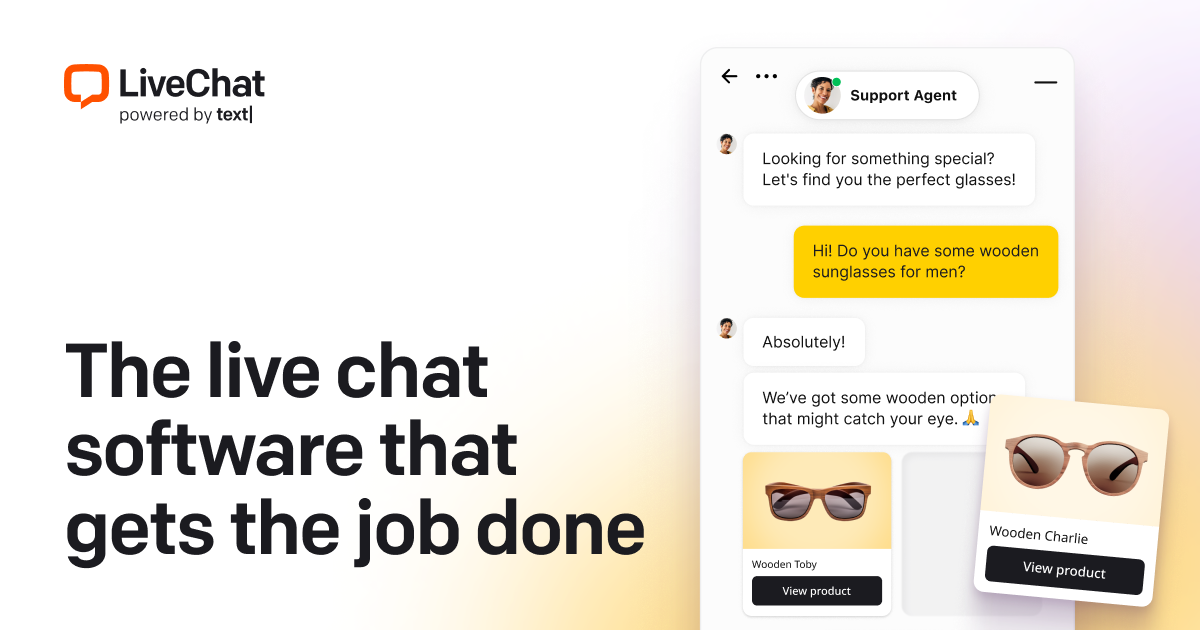
LiveChat has the most polished agent dashboard in the industry. Sneak peek lets you see what visitors type before they hit send. Canned responses, detailed visitor profiles, and routing rules make it ideal for teams with 3+ agents who handle high chat volume. The ChatBot add-on (separate product, same company) handles AI automation. It starts at $20/agent/month, which is reasonable for the quality you get.
- Sneak peek: see what visitors type before sending
- 200+ integrations including WordPress and WooCommerce
- Advanced routing rules for multi-agent teams
- Built-in ticketing system for complex issues
- Real-time visitor monitoring and analytics
Tidio: Best All-in-One for Small Businesses
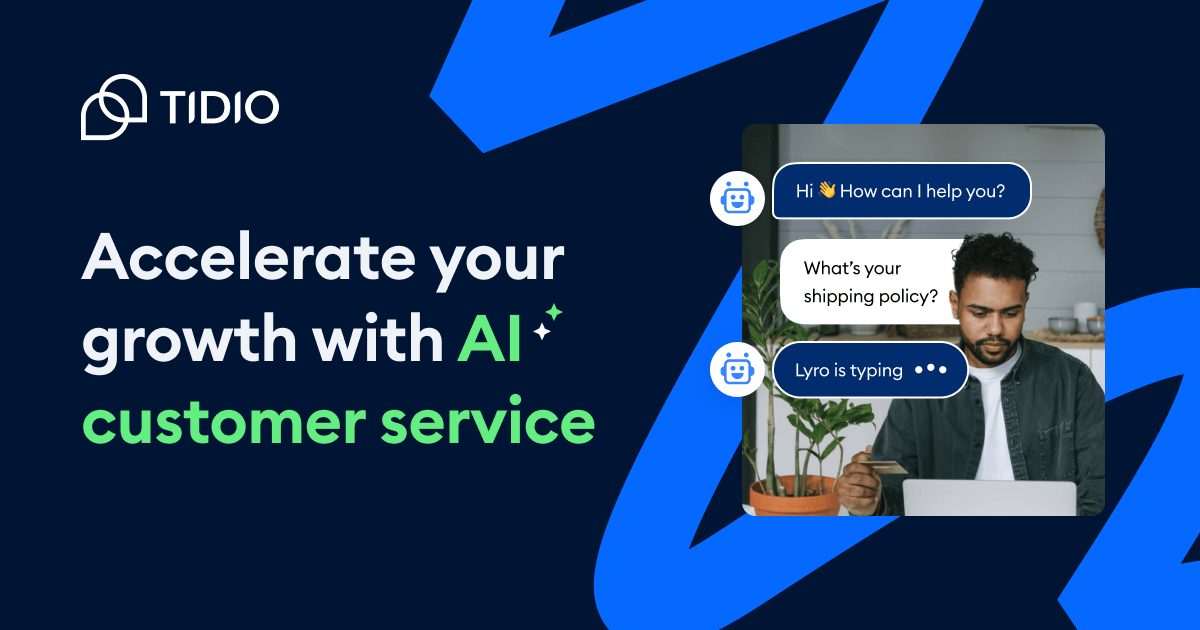
Tidio combines live chat, AI chatbot (Lyro), email, and Instagram DMs into a single inbox. The AI is genuinely good. Not a glorified keyword matcher. It understands context, handles follow-up questions, and learns from your knowledge base. Free plan covers basic live chat. AI features start at $29/month. Integrates with WordPress, Shopify, WooCommerce, and most platforms you’d use.
- Lyro AI chatbot with natural language understanding
- Unified inbox: live chat, email, Instagram, Messenger
- Free plan includes basic live chat for 50 conversations
- WordPress plugin with WooCommerce order integration
- Visual chatbot flow builder with drag-and-drop
Freshchat: Best for Growing Teams
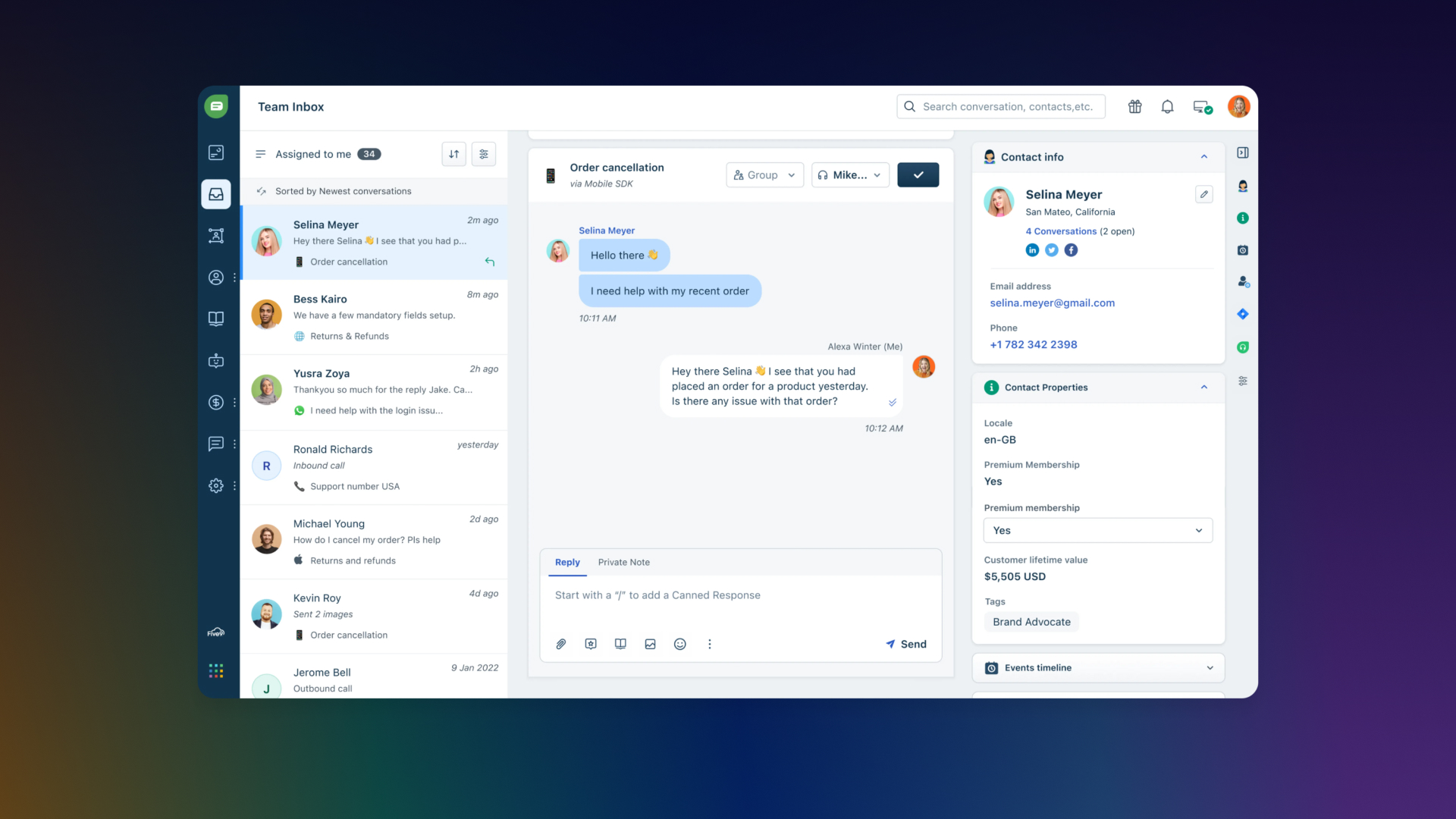
Freshchat (part of the Freshworks suite) shines when your team is scaling. It connects seamlessly with Freshdesk for ticketing, offers AI-powered chatbots (Freddy AI), and supports WhatsApp, Apple Business Chat, and LINE alongside web chat. Pricing starts at $19/agent/month for the Growth plan. The free plan covers up to 10 agents with basic features, making it surprisingly generous for startups.
- Freddy AI chatbot with intent detection
- Free plan supports up to 10 agents
- Seamless Freshdesk and Freshworks CRM integration
- WhatsApp, Apple Business Chat, LINE support
- IntelliAssign auto-routes chats by skill and load
Other Tools Worth Considering
Tawk.to is 100% free with unlimited agents and unlimited chats. The trade-off? You’re the product. Tawk.to monetizes through optional paid “hire an agent” services and branding removal ($19/month). The interface isn’t as polished as LiveChat or Tidio, but for zero dollars, it handles basic live chat competently. Good starting point if you have zero budget.
Intercom is the enterprise choice. It has the most sophisticated AI (Fin), workflow automation, product tours, and a full customer communication platform. But it starts at $74/seat/month and scales steeply. I recommend it for SaaS companies with 1,000+ customers who need more than just chat.
HubSpot Live Chat is solid if you already use HubSpot CRM. It’s free, integrates directly with your contact database, and lets you create chatbot flows without coding. Standalone chat experience isn’t as strong as dedicated tools, but the CRM integration adds real value.
Cost Comparison at a Glance
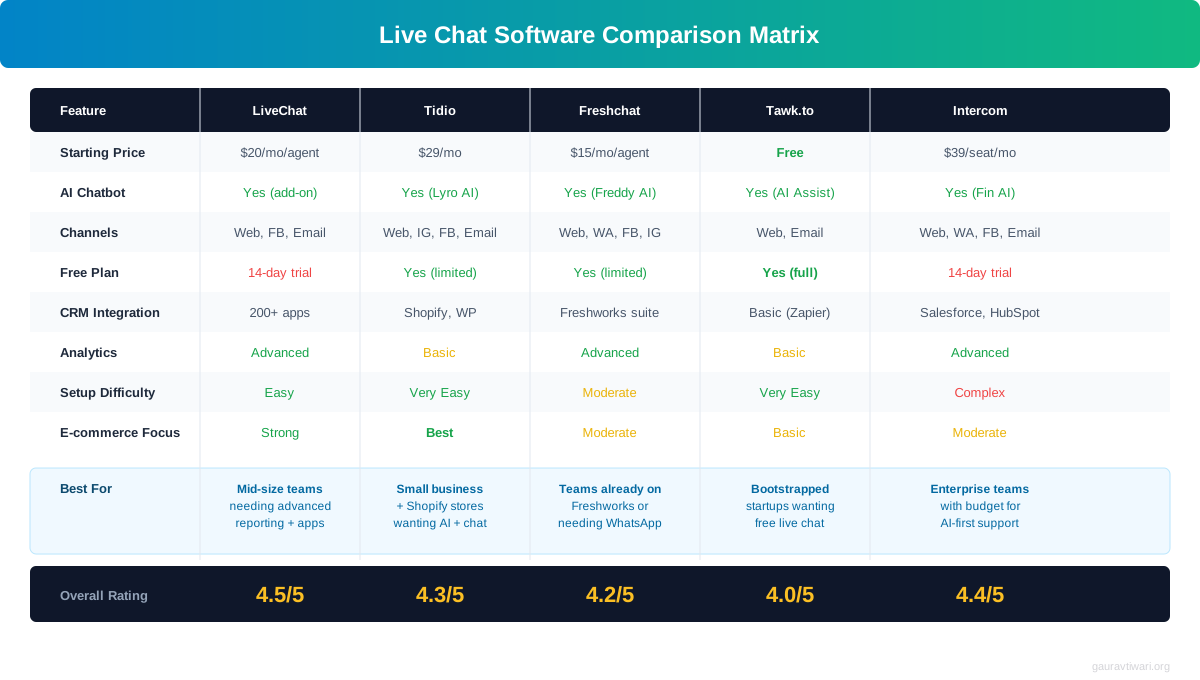
| Tool | Starting Price | AI Chatbot | Free Plan | Best For |
|---|---|---|---|---|
| LiveChat | $20/agent/mo | ChatBot add-on ($52/mo) | 14-day trial | Dedicated support teams |
| Tidio | $29/mo (AI) | Lyro (built-in) | Yes (50 chats) | Small businesses, all-in-one |
| Freshchat | $19/agent/mo | Freddy AI (built-in) | Yes (10 agents) | Growing teams, multichannel |
| Tawk.to | Free | AI Assist (beta) | Yes (unlimited) | Zero budget, basic needs |
| Intercom | $74/seat/mo | Fin AI (built-in) | 14-day trial | Enterprise SaaS |
How to Set Up Live Chat on WordPress
Installing a chat widget takes 5 minutes. Setting it up to actually work well takes thought. Here’s the process I follow with every client, whether they’re running a blog, a WooCommerce store, or a business website.
Step 1: Define Your Goals
Are you using chat for support, sales, or both? This determines everything. A support-focused chat should be reactive and helpful. A sales-focused chat should be proactive and consultative. Most e-commerce sites need both, which means different trigger rules for different pages.
Step 2: Install the Plugin
Tidio and LiveChat both have dedicated WordPress plugins that install in two clicks. They integrate with WooCommerce automatically, pulling order data, product info, and customer history into your chat dashboard. Both add less than 50KB to page weight and load asynchronously. Your Core Web Vitals won’t suffer.
Step 3: Build Your Knowledge Base
Before enabling AI, document your 20-30 most common questions and answers. Include product specs, pricing, shipping info, return policies, and account procedures. This is your AI’s foundation. Feed it systematically, not all at once. Start with the top 20 questions that represent 80% of volume.
Step 4: Configure Proactive Triggers
Create 3-5 triggers for high-value pages. Pricing page: offer to explain plans after 20 seconds. Checkout page: address common objections (shipping cost, return policy) when someone pauses. Product pages: suggest alternatives or answer sizing questions. Exit intent: offer help before they leave. Start conservative with 20-30 second delays and adjust based on data.
Step 5: Set Hours and Routing
Set clear expectations for human availability. During off-hours, let AI handle conversations and collect contact info for follow-up. Route chats by type: sales inquiries to sales, support to support, billing to billing. Both Tidio and LiveChat handle this through tag-based or department-based routing.
Live Chat and E-commerce: The Revenue Impact
Online shopping has a massive abandoned cart problem. Average cart abandonment rates sit around 70%. Seven out of ten people who add items to their cart leave without buying. Live chat addresses the top reasons: unexpected costs, complicated checkout, lack of trust, and unanswered questions.
A chat message triggered when someone pauses on checkout can address all four issues in real time. Something like: “Just so you know, we offer free shipping on orders over $50, and you can return anything within 30 days. Need help with anything?” That single automated message, triggered at the right moment, recovers 10-15% of abandoned carts. At scale, that’s significant revenue from a trigger that takes 2 minutes to configure.
For WooCommerce stores, the integration goes deeper. Both Tidio and LiveChat pull real-time cart contents into the agent dashboard. Your agent can see what’s in the cart, suggest complementary products, and offer targeted discounts. This isn’t theoretical. One WooCommerce client saw average order value increase 18% after agents started recommending add-ons during checkout chats.
Repeat customers spend 67% more than new customers (Bain & Company). If live chat helps you retain even 5% of customers who would otherwise churn, the ROI pays for the tool 10x over.
Measuring Live Chat ROI
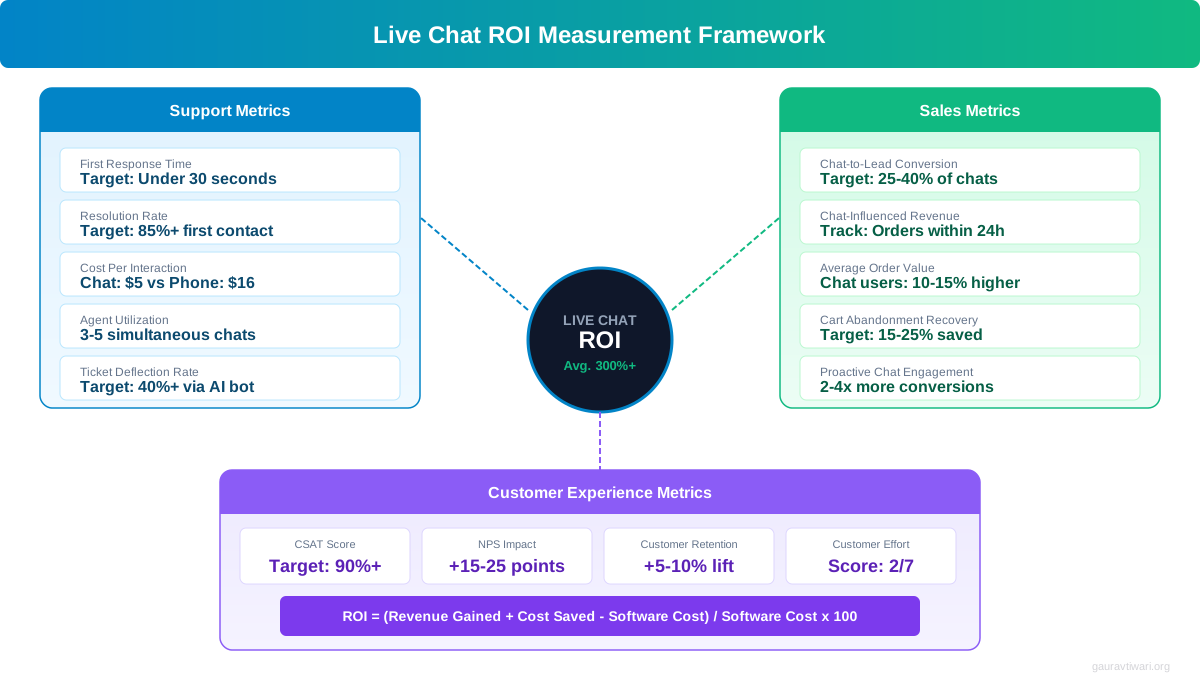
You can’t improve what you don’t measure. Here’s the framework I use to track live chat performance across client sites. It covers support efficiency, sales impact, and customer experience in one dashboard.
Support Metrics
First response time measures how fast you reply. Target: under 30 seconds for AI, under 60 seconds for humans. Resolution time tracks how long it takes to solve the issue. Target: under 5 minutes for routine queries. AI resolution rate shows what percentage of conversations AI handles without human intervention. Target: 60-70% within 90 days.
Sales Metrics
Chat-influenced revenue tracks sales where a chat conversation happened during the buying journey. Most tools attribute this through cookie-based tracking. Proactive trigger conversion rate measures how many triggered messages lead to purchases. Target: 3-8% conversion on high-intent pages. Lead capture rate tracks how many chat conversations result in email collection.
Customer Experience Metrics
CSAT (Customer Satisfaction Score) from post-chat surveys. Target: 85%+. Keep surveys short: one satisfaction rating and one optional comment. In-chat survey response rates hit 30-40%, dramatically higher than email surveys. NPS from chat interactions correlates strongly with overall brand loyalty. Track it monthly.
Common Live Chat Mistakes (And How to Avoid Them)
I’ve audited dozens of live chat setups. These mistakes show up repeatedly, and each one costs real money.
Mistake 1: Showing Chat on Every Page Immediately
An omnipresent chat widget that fires a popup 2 seconds after every page load annoys visitors and increases bounce rates. Start with high-intent pages only: pricing, checkout, product pages, and contact page. Expand from there based on data. Use scroll or time-based triggers, not instant popups.
Mistake 2: No Knowledge Base Before Enabling AI
Turning on an AI chatbot without a knowledge base is like hiring a support agent and refusing to train them. The AI will hallucinate answers, frustrate customers, and damage trust. Build the knowledge base first. Test with internal team members. Then go live.
Mistake 3: No Human Escalation Path
Every AI chatbot needs a clear escalation path to a human. If a customer asks to speak with a person and gets stuck in a bot loop, you’ve lost them permanently. Configure escalation triggers: certain keywords (“speak to a person,” “manager,” “complaint”), conversation length thresholds, and sentiment detection.
Mistake 4: Ignoring Mobile Chat Experience
Over 60% of website traffic is mobile. If your chat widget covers half the screen on phones or the input field sits behind the keyboard, you’re losing mobile conversions. Test your chat on actual devices. Both LiveChat and Tidio handle mobile well by default, but custom CSS or aggressive trigger timing can break the experience.
Mistake 5: Not Connecting Chat to Your CRM
Every chat conversation is a data point. If that data lives only in your chat tool and never reaches your CRM, you’re losing context. Connect chat to your CRM so sales teams see conversation history, support agents know purchase history, and marketing can segment by chat engagement. Most live chat tools integrate with HubSpot, Salesforce, and Pipedrive natively.
Building Customer Relationships Through Chat
Beyond metrics, live chat builds something harder to measure: customer relationships. Every conversation is a chance to make someone feel heard and valued. The businesses that do this best treat chat as a conversation, not a ticket.
They use the customer’s name. They reference purchase history. They follow up after issues get resolved. Small touches like “Hey Sarah, I see you ordered the blue variant last month. The new color just dropped, want me to send a link?” turn transactions into loyalty. LiveChat shows browsing history, previous conversations, and CRM data in real time. Your agents can personalize every interaction without asking customers to repeat themselves.
This matters because retention drives profitability. Acquiring a new customer costs 5-7x more than retaining an existing one. If live chat improves retention even slightly, the compounding effect on lifetime value is substantial. It’s one of the most effective online marketing strategies for businesses that sell recurring products or services.
What live chat solution do you use?
Gathering Feedback and Improving Your Business
Every chat conversation is unfiltered, real-time customer feedback. What questions do customers ask most? Where do they get confused? What objections come up during sales? What features do they wish you had?
Unlike surveys with 5-10% response rates, chat captures genuine sentiment during the actual experience. I recommend reviewing transcripts weekly. Look for patterns. If 15% of conversations mention confusion about your pricing tiers, your pricing page needs a rewrite. If customers keep asking about a feature you don’t offer, that’s product development insight no focus group could match.
Post-chat surveys work well too. Keep them to one satisfaction rating and one optional comment. In-chat surveys get 30-40% response rates because the customer is already engaged. This data improves support quality, product decisions, and the overall customer experience on your website.
Frequently Asked Questions
What is the best live chat software for small businesses in 2026?
Tidio is the best live chat software for small businesses. It offers a free plan with basic live chat and paid plans starting at $29/month for AI chatbot features (Lyro). It combines live chat, AI, email, and social messaging in one tool. Tidio integrates with WordPress, Shopify, WooCommerce, and all major platforms. For teams needing a better agent dashboard, LiveChat at $20/agent/month is the premium alternative.
Does live chat really increase conversions?
Yes. Websites with live chat see 40-50% higher conversion rates compared to those with only contact forms. The impact is strongest on high-intent pages like pricing and checkout. Proactive chat triggers on these pages increase e-commerce conversions by 20-30%. The key is targeting the right pages with the right message at the right time, not showing chat everywhere immediately.
Can AI chatbots fully replace human support agents?
AI chatbots handle 60-70% of routine inquiries without human involvement, including product questions, order tracking, FAQ answers, and basic troubleshooting. However, complex issues, emotional situations, and high-value sales conversations still need humans. The best approach in 2026 is a hybrid model where AI handles routine queries and escalates complex ones to humans with full conversation context.
Does adding live chat slow down my website?
Modern tools like Tidio and LiveChat add less than 50KB to page weight and load asynchronously, meaning they don’t block page rendering. The Core Web Vitals impact is negligible. Some tools offer lazy-loading that only loads the chat widget when a user scrolls or hovers near the chat icon, reducing initial load even further.
How much does live chat software cost in 2026?
Prices range from free to $74+/month. Tawk.to is 100% free with unlimited agents. Freshchat offers a free plan for up to 10 agents. Tidio starts free with AI from $29/month. LiveChat starts at $20/agent/month. Intercom starts at $74/seat/month. Most small businesses spend $20-50/month for a solid live chat setup with AI capabilities.
What is the best free live chat software?
Tawk.to is the most feature-complete free option with unlimited agents and chats. Freshchat’s free plan supports up to 10 agents with basic features. HubSpot Live Chat is free if you use HubSpot CRM. Tidio’s free plan includes basic live chat for 50 conversations per month. For zero-budget startups, Tawk.to gives you the most functionality without paying anything.
How do I add live chat to WordPress?
Install a WordPress plugin from your chosen provider (Tidio, LiveChat, Freshchat, or Tawk.to all have dedicated plugins). Go to Plugins > Add New, search the tool name, install, and activate. Connect your account. The chat widget appears on your site immediately. For WooCommerce stores, these plugins automatically integrate with order data and customer profiles.
Should I use AI chatbot or human live chat?
Use both. The hybrid model works best for most businesses. AI handles first contact, answers routine questions (60-70% of volume), and collects info during off-hours. Human agents handle complex issues, emotional situations, and high-value sales. This model cuts support costs 40-60% while maintaining high satisfaction scores. Start with AI for routine queries and add human agents for escalations.
Live chat has evolved from a basic support widget to a full revenue engine powered by AI. The combination of AI automation and human agents creates support that works around the clock, costs less than traditional methods, and actively drives sales.
If you haven’t added live chat yet, start with Tidio’s free plan. Set up basic chat, build your knowledge base, and measure the impact for 30 days. Most businesses see measurable improvements in that first month. From there, decide whether you need more AI power, more agent seats, or deeper integrations. The tools are mature, the pricing is reasonable, and the ROI is proven. The only mistake is waiting.
Disclaimer: This site is reader-supported. If you buy through some links, I may earn a small commission at no extra cost to you. I only recommend tools I trust and would use myself. Your support helps keep gauravtiwari.org free and focused on real-world advice. Thanks. - Gaurav Tiwari