
Rise of AI in Landing Page Design: What You Need to Know
Building a landing page the traditional way takes 8-15 hours: wireframing, designing, writing copy, configuring A/B tests, waiting weeks for statistical significance. Then you find out the headline doesn’t convert and start over. Unbounce’s Smart Traffic now routes visitors to the right variant automatically and outperformed manual A/B tests by 47%. Framer generated a complete SaaS landing page from a single prompt in under 90 seconds.
The old workflow of dragging blocks around for hours, running manual split tests for weeks, and guessing which headline might work is dying fast. AI handles layout generation, copy optimization, traffic routing, and personalization in real time. If you’re still building pages the way you did in 2023, you’re leaving conversions on the table while competitors ship and iterate at 10x your speed.
This guide breaks down how AI is changing landing page design, which tools actually deliver, and how to pick the right one for your stack. I’ve tested 12+ AI-powered landing page builders across WordPress and standalone platforms to give you honest, first-hand recommendations.
Why Traditional Landing Page Design Is Broken
Traditional landing page design follows a predictable, painfully slow cycle. You design a page, publish it, wait for traffic, run an A/B test, wait 2-4 weeks for statistical significance, make changes, and repeat. Most teams spend 40-60 hours building a single high-converting landing page from scratch. That’s not sustainable when you need dozens of campaign-specific pages per quarter.
The bigger problem isn’t speed, it’s accuracy. Manual optimization relies on human intuition, and we’re bad at predicting what converts. I’ve seen experienced marketers confidently pick the wrong headline variant in A/B tests more often than they’d admit. Traditional methods also treat every visitor the same. A first-time visitor from a Google ad sees the exact same page as a returning visitor from an email campaign. That’s a conversion killer.
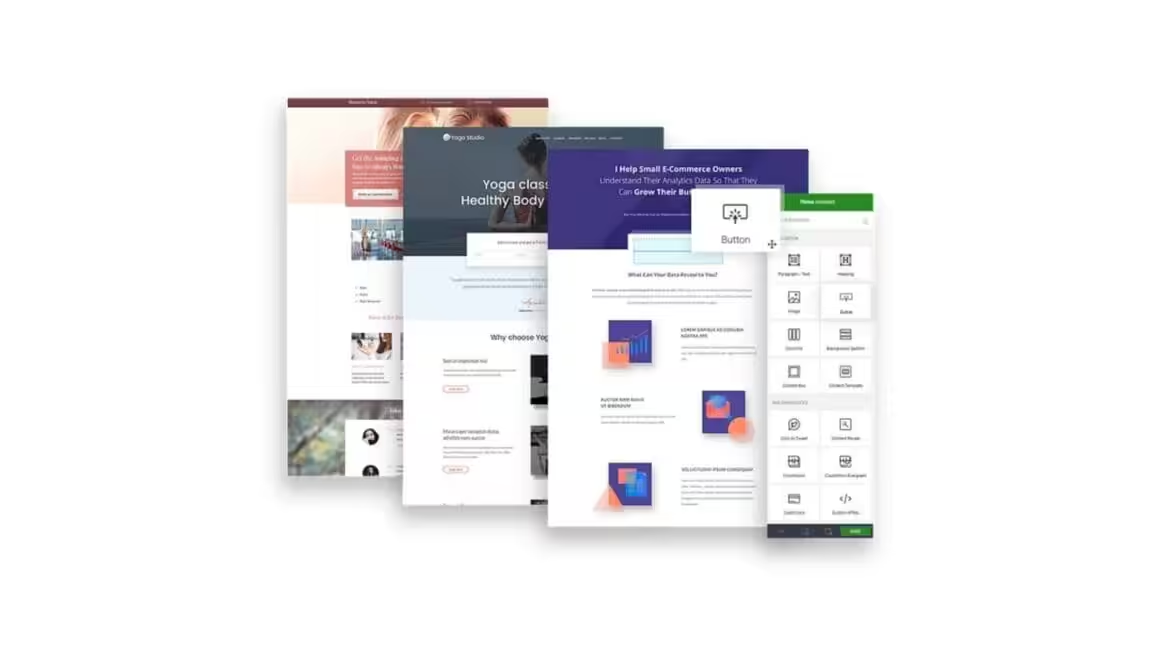
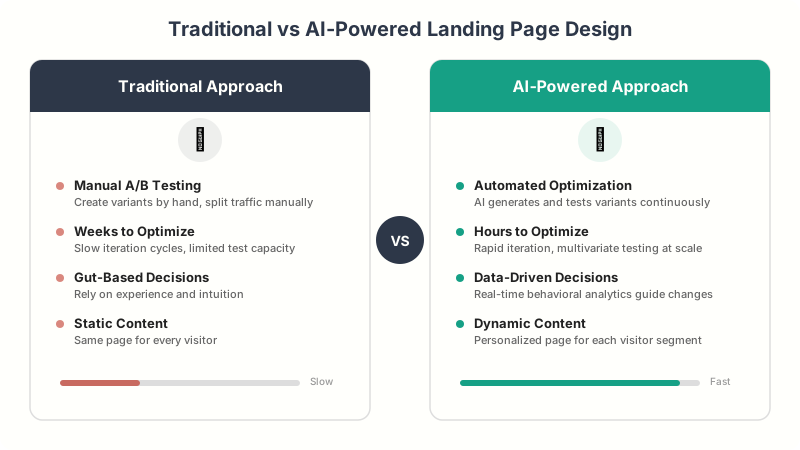
Here’s what traditional landing page workflows typically look like versus what AI enables:
| Aspect | Traditional Approach | AI-Powered Approach |
|---|---|---|
| Page creation time | 2-5 days | 10-30 minutes |
| A/B testing cycle | 2-4 weeks per test | Continuous, real-time |
| Copy optimization | Manual rewriting | AI-generated variants |
| Visitor targeting | Same page for everyone | Dynamic per-visitor content |
| Design decisions | Gut feeling + best practices | Data-driven recommendations |
| Conversion lift | 5-15% per test cycle | 20-30% within first week |
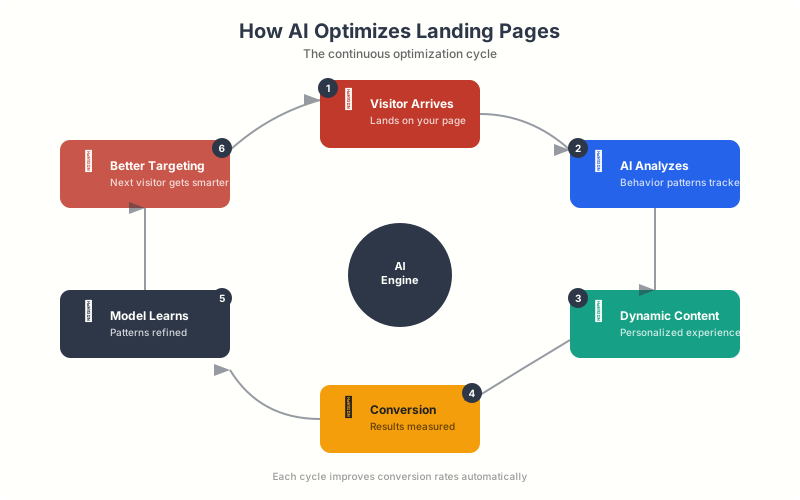
How AI Is Transforming Landing Page Builders
AI in landing page design isn’t one feature. It’s a collection of capabilities that touch every part of the creation and optimization process. The most impactful AI features fall into five categories: page generation, copy writing, traffic optimization, design suggestions, and personalization. Each one solves a specific bottleneck that used to require human hours.
AI Page Generation (Prompt-to-Page)
The most visible AI feature in modern landing page builders is prompt-to-page generation. You describe what you want (“SaaS pricing page with three tiers and a FAQ section”), and the AI generates a complete, styled page in seconds. Framer does this exceptionally well. Their AI generates not just layout but actual design decisions: typography pairings, spacing ratios, color schemes, and responsive breakpoints. It’s not a template fill. It’s generative design.
Hostinger’s Website Builder takes a similar approach but targets beginners. Describe your business, pick a style, and the AI builds a full site with landing pages included. The quality isn’t Framer-level, but for small businesses launching quickly, it works surprisingly well.
AI Copy Generation and Optimization
Copy is where AI has the most immediate impact on conversions. Unbounce’s Smart Copy generates headlines, CTAs, and body text trained on billions of conversion data points. You input your product, audience, and tone, and it produces multiple variants ready for testing. Landingi’s AI Assistant does something similar but integrates SEO optimization directly, suggesting keyword-rich copy that ranks and converts.
The real power isn’t just generation. It’s iteration. These tools can analyze your existing copy, identify weak spots (vague CTAs, missing urgency, unclear value props), and suggest specific improvements. I ran my own landing page copy through Unbounce’s analyzer and it caught three issues I’d missed after multiple rounds of manual editing.
Smart Traffic and Automated A/B Testing
This is the AI feature that delivers the highest ROI. Traditional A/B testing splits traffic 50/50 between variants and waits for statistical significance. Unbounce’s Smart Traffic uses machine learning to analyze visitor attributes (device, location, time of day, referral source) and routes each visitor to the variant most likely to convert them specifically. It’s not A/B testing. It’s multi-armed bandit optimization.
The difference in practice is substantial. A traditional A/B test might find that Variant B converts 8% better overall. Smart Traffic might find that Variant B converts 15% better for mobile users from paid ads, while Variant A converts 12% better for desktop users from organic search. Both variants stay active, each serving the audience it converts best.
Best AI Landing Page Builders Compared
I’ve tested every major AI landing page tool over the past year. Here’s how the top platforms compare on the features that actually matter for conversions. Each one has a different strength, and the right choice depends on your technical comfort level, budget, and whether you’re building on WordPress or a standalone platform.
Unbounce: Best AI Optimization for Conversions
Unbounce pioneered AI-driven landing page optimization with Smart Traffic and Smart Copy. Their Conversion Intelligence platform analyzes your landing page performance and automatically routes visitors to the highest-converting variant without manual intervention. It’s the most mature AI optimization engine in the landing page space.
Smart Traffic alone justifies the price for teams running multiple campaigns. In my testing, it improved conversion rates by 20-30% compared to evenly-split A/B tests, typically within the first 50 visits per variant. The AI copy generator is solid for headlines and CTAs, though I still prefer writing body copy myself. Pricing starts at $74/month for the Build plan, with Smart Traffic available on the Optimize plan at $112/month.
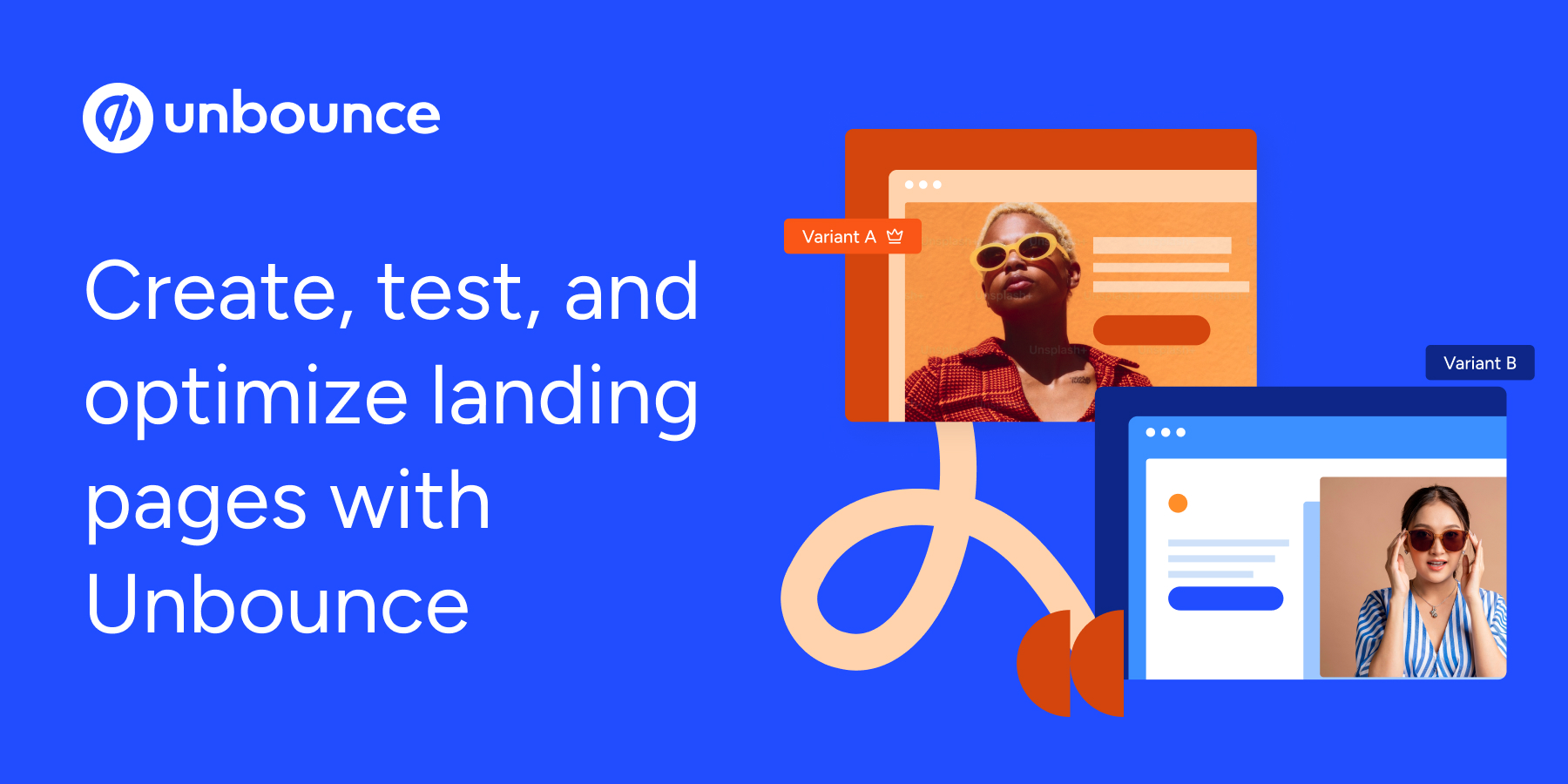
- Smart Traffic routes visitors to best-converting variant automatically
- Smart Copy generates headlines, CTAs, and body text
- 100+ conversion-optimized templates included
- Dynamic text replacement for PPC campaigns
- Built-in popups and sticky bars
Framer: Best AI for Design-First Landing Pages
Framer has the best AI page generation I’ve tested. Describe your page in natural language, and Framer builds a complete, production-ready design with real content, proper typography hierarchy, responsive layouts, and smooth animations. It’s not a wireframe. The output looks like something a senior designer spent hours on.
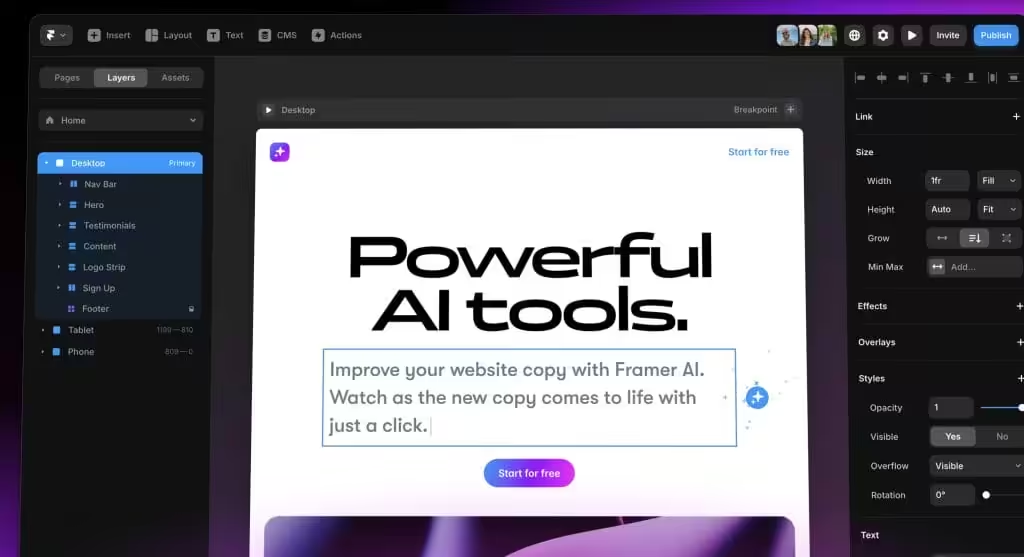
Where Framer falls short is post-launch optimization. There’s no built-in A/B testing or smart traffic routing. You get a beautifully designed page but need external tools (Google Optimize alternatives, Hotjar, or manual testing) to optimize it. For startups and designers who prioritize aesthetics and speed-to-launch, Framer is unbeatable. For conversion-focused marketers, pair it with a separate analytics tool. The free plan lets you publish one site; paid plans start at $5/month.
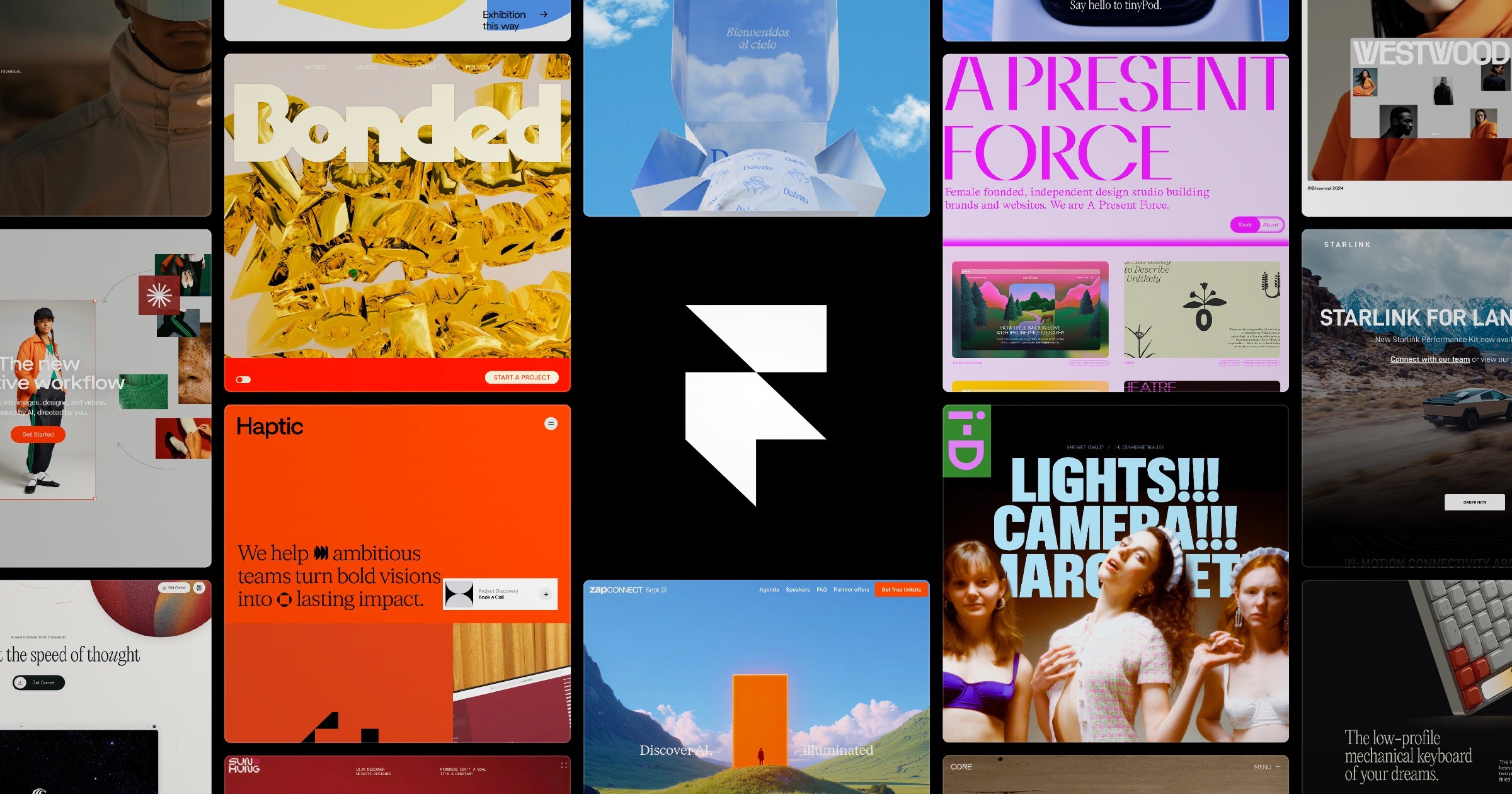
- AI generates complete pages from natural language prompts
- Production-ready design with typography, spacing, and animations
- AI sections for adding new components to existing pages
- Built-in CMS and hosting with custom domains
- Free plan available for single-site publishing
Landingi: Best AI for Budget-Conscious Teams
Landingi quietly built one of the most complete AI landing page toolkits at a fraction of Unbounce’s price. Their AI Assistant handles copy generation, SEO suggestions, and image editing within the builder. The AI Landing Page feature generates entire pages from a brief description, and the EventTracker provides micro-conversion analytics without external tools.
What impressed me most was the programmatic landing pages feature. Feed Landingi a spreadsheet of product data, and it generates unique landing pages for each entry. For e-commerce campaigns with hundreds of products or location-based services with dozens of cities, this saves weeks of manual work. Plans start at $29/month with AI features included on all tiers.
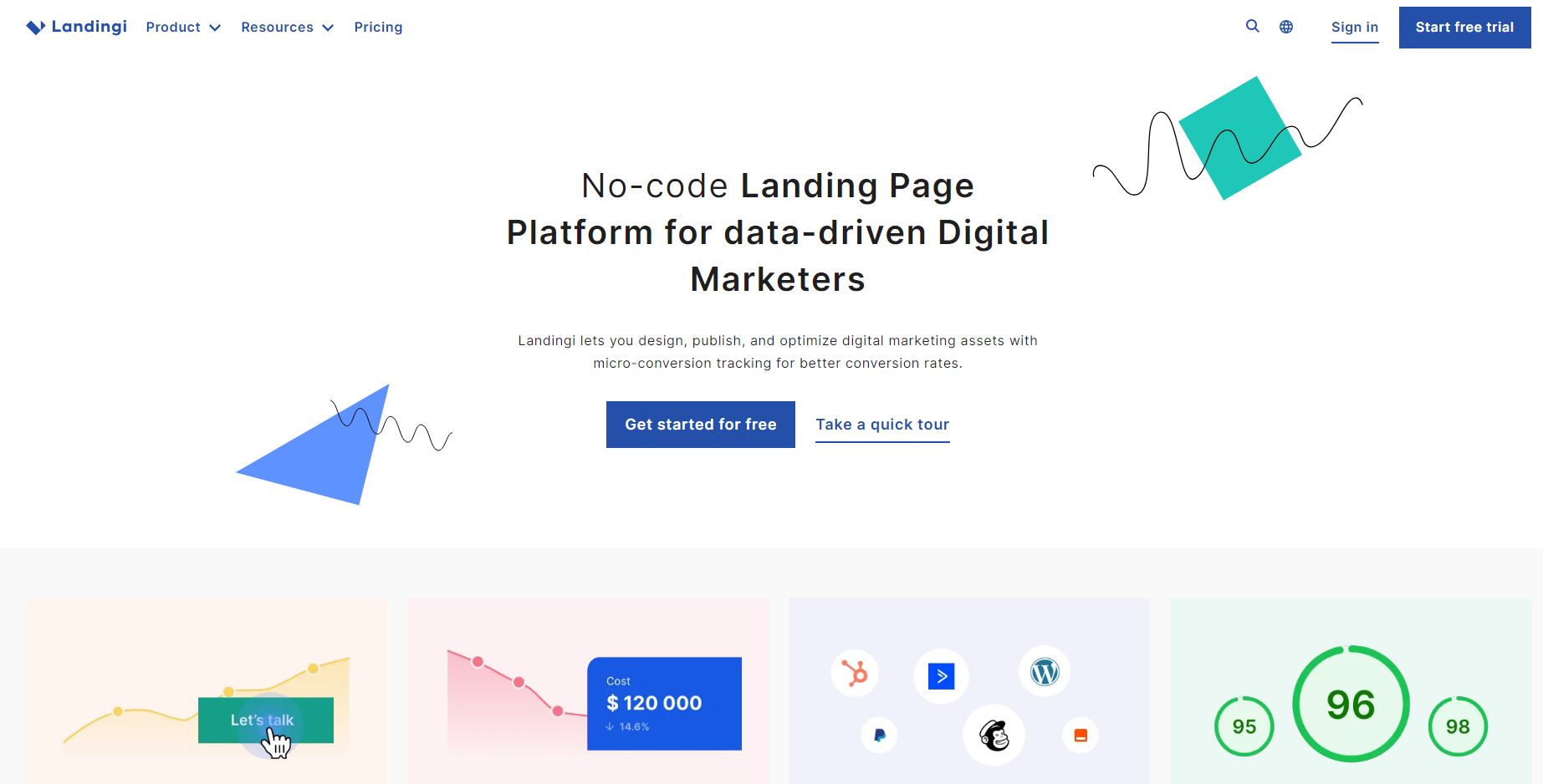
- AI Assistant for copy, SEO, and image editing
- Programmatic pages from spreadsheet data
- Built-in A/B testing and EventTracker analytics
- 400+ customizable templates
- AI features included on all pricing tiers
Hostinger Website Builder: Best AI for Beginners
Hostinger’s AI Website Builder is the simplest path from “I have an idea” to “my landing page is live.” You answer a few questions about your business, pick a style, and the AI generates a complete website with landing pages, contact forms, and even initial copy. No design skills needed. No learning curve worth mentioning.
The AI handles logo creation, text generation, image suggestions, and SEO meta descriptions. It’s not going to produce the conversion-optimized masterpiece that Unbounce or Framer can, but for freelancers, local businesses, and solo entrepreneurs who need a professional landing page without the learning curve, it’s hard to beat at $2.99/month with hosting included.
- Full AI site generation from business description
- AI logo maker, copy writer, and image suggestions
- Hosting, SSL, and domain included in price
- AI SEO meta descriptions and page titles
- No coding or design skills required
Instapage: Best AI for Enterprise PPC Teams
Instapage targets enterprise teams running large-scale PPC campaigns. Their AI features focus on ad-to-page relevance: AdMap connects each ad group to a dedicated landing page, AI content generation produces ad-specific copy, and Thor Render Engine ensures pages load in under a second. The 1:1 ad-to-page personalization is where Instapage shines.
It’s the most expensive option on this list (starting at $79/month), but for teams spending $10K+ monthly on Google Ads, the conversion lift from personalized post-click experiences easily justifies the cost. If you’re running fewer than 5 active campaigns, the simpler tools on this list will serve you better.
Relume: Best AI for Wireframing and Sitemaps
Relume takes a different approach than the other tools here. Instead of building finished pages, it uses AI to generate sitemaps and wireframes that export directly to Figma or Webflow. Describe your project, and Relume creates a complete sitemap with page structure, then generates wireframes for each page using its AI-powered component library.
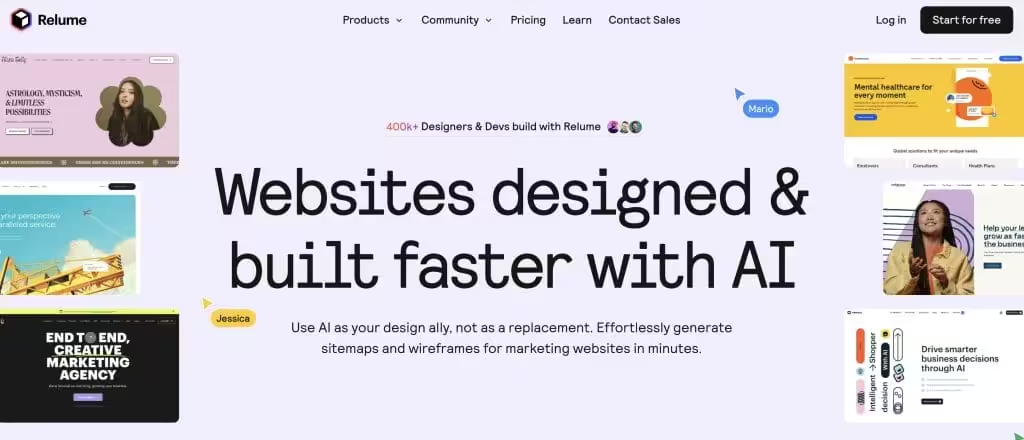
For agencies and design teams who use Figma or Webflow, Relume is a massive time-saver in the planning phase. The AI recommends specific components (hero sections, testimonial blocks, pricing tables) based on your page goals, drawing from a library of conversion-tested patterns. Free tier available; Pro starts at $38/month.
v0.dev by Vercel: Best AI for Developers
v0.dev is Vercel’s AI-powered UI generator that produces React and Next.js components from text prompts. Unlike drag-and-drop builders, v0 outputs actual code: clean, responsive, accessible React components using Tailwind CSS and shadcn/ui. Describe a landing page section, and v0 generates production-ready code you can drop into any Next.js project.
It’s the best option for developers who want AI-generated starting points without sacrificing code quality or framework flexibility. The free tier includes 200 generations per month. For landing pages specifically, v0 excels at hero sections, feature grids, pricing tables, and CTA blocks. You’ll need to handle hosting, analytics, and A/B testing separately.
AI Landing Page Builders: Feature Comparison
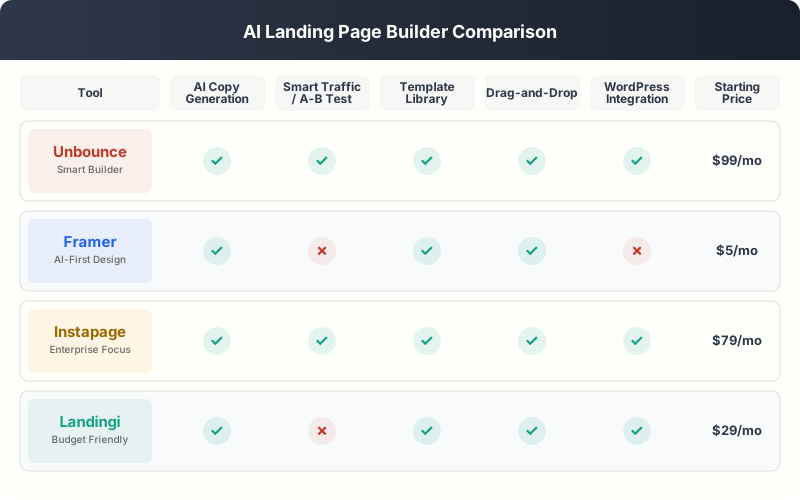
Here’s a side-by-side breakdown of the key AI features across all the platforms I tested. Use this to narrow down which tool fits your specific workflow.
| Feature | Unbounce | Framer | Landingi | Hostinger | Instapage |
|---|---|---|---|---|---|
| AI page generation | Templates only | Full prompt-to-page | From description | Full site generation | Templates + AI copy |
| AI copy writing | Smart Copy (excellent) | Basic | AI Assistant (good) | AI text generation | AI content generation |
| Smart traffic/A-B | Smart Traffic (best) | None built-in | A/B testing | None | A/B + personalization |
| WordPress integration | Embed/plugin | None | WordPress plugin | Separate product | WordPress plugin |
| Starting price | $74/mo | Free / $5/mo | $29/mo | $2.99/mo | $79/mo |
| Best for | Conversion optimization | Design quality | Budget teams | Beginners | Enterprise PPC |
AI in WordPress Landing Page Design
WordPress powers over 40% of the web, and AI is finally catching up in the WordPress landing page ecosystem. Elementor AI is leading the charge, but it’s not the only option. Here’s where WordPress stands in 2026 for AI-powered landing page creation.
Elementor AI
Elementor integrated AI directly into its builder in 2024, and it’s gotten significantly better since. The AI can generate complete page sections from text prompts, write and rewrite copy, generate custom CSS, create custom code snippets, and even produce images. You select a widget, click the AI button, describe what you want, and Elementor generates it in context.

The AI-generated sections are decent starting points but need manual refinement for conversion-critical pages. Where Elementor AI genuinely shines is copy iteration. Highlight a headline, click “Improve with AI,” and get three better variants in seconds. That alone saves hours per campaign. Elementor AI requires a paid subscription ($6.99/month for AI credits on top of your Elementor plan).
10Web AI Website Builder
10Web built an AI WordPress website generator that creates entire sites from a business description. It generates pages using Elementor widgets, so you can edit everything in the familiar Elementor interface. The AI handles layout, copy, images, and even basic SEO settings. For WordPress users who want AI generation without leaving their existing ecosystem, 10Web bridges the gap.
The catch: AI-generated pages tend to follow similar patterns, so if you’re building multiple landing pages, they can start looking samey. Use 10Web for the initial generation, then customize heavily. Plans with AI start at $10/month.
Spectra (formerly StarterTemplates AI)
Spectra by Brainstorm Force offers AI-powered website building within the WordPress block editor. No Elementor dependency. It generates starter sites from prompts, creates custom block patterns, and integrates with the Starter Templates library for AI-customized designs. For teams committed to the native WordPress block editor (Gutenberg), Spectra is the best AI option available.
AI Copy Optimization: The Biggest Conversion Lever
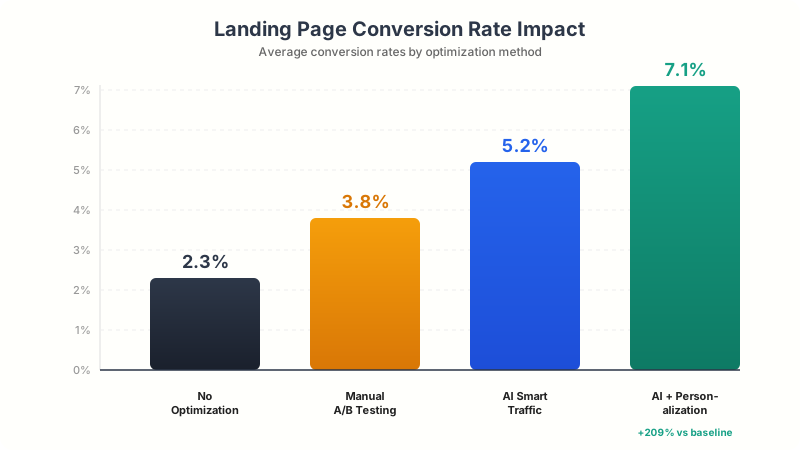
If I had to pick the single most impactful AI feature for landing pages, it’s copy optimization. Layout, images, and design matter, but the words on the page drive the buying decision. AI copy tools have gotten remarkably good at understanding conversion psychology and producing copy that actually moves people to act.
Here’s what I’ve seen work best across my testing:
Headline generation. AI tools consistently produce better headlines than most humans. Unbounce Smart Copy and Jasper are the standouts. They understand urgency, specificity, and benefit-driven framing. I generate 10-15 headline variants per campaign and pick the top 3 for testing.
CTA optimization. Generic CTAs like “Sign Up” or “Learn More” underperform specific, benefit-driven CTAs like “Start My Free Trial” or “Get My Custom Report.” AI tools suggest CTAs based on your page context and audience. Small change, big impact. I’ve seen CTA rewrites alone lift conversions by 8-12%.
Social proof framing. AI can rewrite testimonials and case study snippets for maximum impact without changing the substance. It identifies the most persuasive elements (specific numbers, emotional language, relatable situations) and restructures the copy to lead with them.
AI-Powered Personalization for Landing Pages
Personalization is where AI landing page technology gets really interesting. Instead of showing every visitor the same static page, AI-powered personalization changes content dynamically based on who’s viewing the page. This isn’t just dynamic text replacement (putting someone’s city in the headline). It’s real-time content adaptation.
Unbounce and Instapage both offer dynamic content that changes based on visitor attributes: traffic source, device, location, time of visit, and past behavior. A visitor from a Google Ad about “enterprise CRM” sees different hero copy and social proof than someone from an organic search for “free CRM tool.” Same URL, completely different experience.
The personalization data speaks for itself. Conversion rate optimization studies consistently show that personalized landing pages convert 20-40% better than generic ones. With AI handling the segmentation and content matching automatically, you don’t need a data science team to implement it. You need the right tool and enough traffic to train the model (typically 200+ monthly visitors per variant).
Building an AI-Optimized Landing Page: Step by Step
Here’s the exact workflow I use when building a new landing page with AI tools. This combines the best of AI generation with human judgment for the parts AI still gets wrong.
AI Landing Page Build Checklist
Step 1: Define the goal. Every landing page needs one clear conversion action. Not three. Not “sign up or read our blog or follow us on social.” One action. The AI can’t optimize for multiple competing goals.
Step 2: Generate, don’t design. Use AI to create 2-3 complete page variants. Don’t start from a blank canvas. Framer, Landingi, or even Hostinger can produce solid starting points in minutes. Pick the best structure and refine from there.
Step 3: AI for copy, you for proof. Let AI generate headlines, CTAs, and body copy variants. But write your own social proof sections. AI can’t fabricate authentic testimonials or case studies (and you shouldn’t let it). Real numbers and real customer quotes from real campaigns are what build trust.
Step 4: Set up testing from day one. Don’t publish a single variant and “optimize later.” Launch with 3-4 variants and Smart Traffic (or at minimum, a standard A/B test). The sooner the AI gets data, the sooner it starts improving conversions.
Step 5: Let the AI cook. The hardest part is resisting the urge to manually intervene in the first 48-72 hours. Smart Traffic needs time to identify patterns. Let it collect data on at least 200-300 visitors before drawing any conclusions or making changes.
Common Mistakes with AI Landing Page Tools
After testing a dozen AI builders and consulting with clients who use them, I keep seeing the same mistakes. Here are the ones that actually cost conversions.
Over-relying on AI copy without editing. AI-generated copy is a starting point, not a final draft. It tends to be correct but generic. The headlines that convert best combine AI-generated structure with human-added specificity. “Grow Your Business Faster” (AI) becomes “Add 47 Qualified Leads Per Week to Your Pipeline” (AI + human).
Testing too few variants. Smart Traffic and AI optimization algorithms work best with 3-5 variants. A single page with no variants gives the AI nothing to optimize. Two variants is basically an old-school A/B test. Give the algorithm options.
Ignoring page speed. AI-generated pages can be bloated with animations, large images, and unnecessary scripts. A beautiful AI-generated page that loads in 4 seconds will convert worse than an ugly page that loads in 1.2 seconds. Always audit Core Web Vitals after AI generation.
Using AI for social proof. I’ve seen people use AI to generate fake testimonials. Don’t. It’s unethical, often illegal, and surprisingly easy for visitors (and Google) to detect. AI should optimize how you present real proof, not fabricate it.
Skipping mobile optimization. Most AI builders generate responsive pages, but “responsive” doesn’t mean “mobile-optimized.” Check your AI-generated page on actual mobile devices. The CTA should be visible without scrolling, forms should be thumb-friendly, and text should be readable without zooming.
The Future of AI in Landing Page Design
We’re still in the early innings of AI landing page technology. Here’s where I see things heading based on current development trajectories and what the major platforms are building.
Real-time page generation per visitor. Instead of creating a few variants and letting AI route traffic, the AI will generate unique page layouts for each visitor in real time. Unbounce has hinted at this direction. It’s technically possible today but computationally expensive. Give it 12-18 months.
Conversation-driven landing pages. AI chatbots embedded in landing pages that qualify visitors and dynamically adjust the page content based on the conversation. If a visitor tells the chatbot they’re price-sensitive, the page shifts to emphasize ROI and value. If they mention a specific competitor, the page highlights relevant differentiators.
Cross-channel AI optimization. Landing page AI that connects to your ad platform, email tool, and CRM to optimize the entire funnel, not just the landing page. The page adjusts based on what email the visitor opened, which ad they clicked, and where they are in the sales cycle. Instapage and Unbounce are both building toward this.
AI-native analytics. Instead of dashboards with charts you have to interpret, AI will tell you in plain language: “Your headline is underperforming for mobile visitors from paid search. Here are three alternatives that should improve conversions by 15-20%.” Actionable recommendations, not just data.
How to Choose the Right AI Landing Page Builder
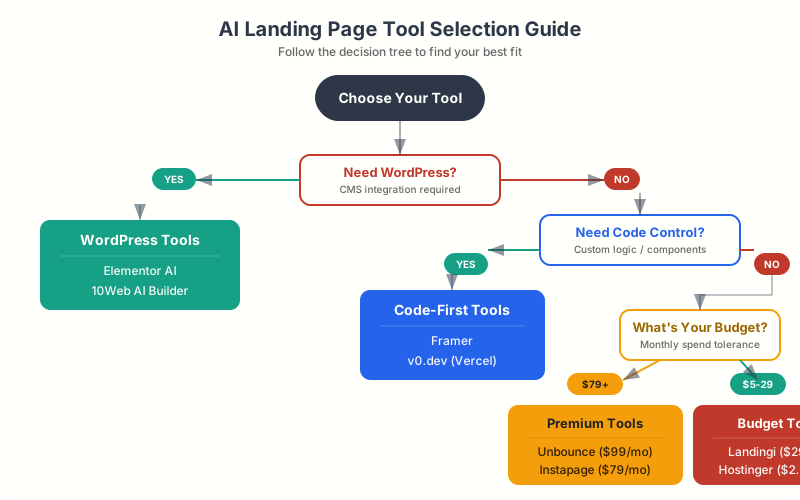
The right tool depends on three factors: your technical skill level, your budget, and whether you’re on WordPress.
For WordPress users: Elementor AI if you’re already in the Elementor ecosystem. Spectra if you prefer the block editor. Unbounce or Landingi as external builders that embed into WordPress with plugins.
For non-technical users: Hostinger Website Builder for the simplest experience, Landingi for more features at a reasonable price, or Unbounce if conversion optimization is the priority.
For designers and developers: Framer for design-first pages, v0.dev for React/Next.js code generation, or Relume for wireframing workflows that export to Figma and Webflow.
For enterprise PPC teams: Instapage for ad-to-page personalization at scale, or Unbounce for Smart Traffic optimization.
Don’t overthink it. Pick the tool that fits your current workflow, start with AI copy generation (the lowest-effort, highest-impact feature), and expand to AI optimization once you have traffic data to work with. The best AI landing page builder is the one you’ll actually use consistently.
The teams seeing the biggest conversion lifts aren’t using the fanciest AI tools. They’re using AI copy generation on every campaign, running Smart Traffic on every page, and letting the algorithm learn from real data instead of second-guessing it.
Which AI landing page feature would help your business most?
Frequently Asked Questions
Can AI really build a landing page from scratch?
Yes. Tools like Framer, Hostinger Website Builder, and Landingi can generate complete landing pages from a text description in under 2 minutes. The AI handles layout, copy, images, and responsive design. The output quality varies by platform. Framer produces the most design-polished results, while Hostinger is simplest for beginners. You should always refine AI-generated pages before publishing, especially social proof sections and CTAs.
What is Unbounce Smart Traffic and how does it work?
Smart Traffic is Unbounce’s AI-powered visitor routing system. Instead of traditional A/B testing that splits traffic 50/50, Smart Traffic analyzes each visitor’s attributes (device, location, referral source, time of day) and sends them to the landing page variant most likely to convert them specifically. It uses multi-armed bandit optimization, which means it starts learning from the first visitor and continuously improves. Most users see measurable conversion lifts within the first 50 visits per variant.
Is AI landing page copy good enough to use without editing?
AI-generated copy is a strong starting point but rarely publish-ready. It tends to be structurally sound (good format, clear benefits, proper CTA placement) but lacks specificity and authentic voice. The best approach is to use AI to generate 10-15 headline variants and 3-4 body copy options, then pick the best structure and add your own specific numbers, testimonials, and brand voice. AI handles the framework; you add the substance.
Which AI landing page builder works best with WordPress?
Elementor AI is the most integrated option, working directly within the WordPress editor. For native block editor users, Spectra offers AI-powered site generation. For more advanced AI optimization (Smart Traffic, AI copy), Unbounce and Landingi both offer WordPress plugins that embed their pages into your WordPress site. The choice depends on whether you want everything inside WordPress (Elementor/Spectra) or are willing to use an external builder with WordPress integration (Unbounce/Landingi).
How much traffic do AI optimization tools need to work?
Most AI optimization tools, including Unbounce Smart Traffic, start learning from the very first visitor. However, meaningful optimization typically requires 200-300 visitors per variant to identify reliable patterns. For a page with 4 variants, that means roughly 800-1,200 total visitors before the AI has strong confidence in its routing decisions. Pages with fewer than 100 monthly visitors won’t benefit much from AI traffic optimization; focus on AI copy generation instead.
Are AI-generated landing pages good for SEO?
AI-generated landing pages can rank well if you optimize them properly. Most AI builders generate clean HTML structure and mobile-responsive layouts, which are SEO positives. However, AI-generated copy often lacks the specificity and original insights that Google’s helpful content system rewards. For SEO-focused landing pages, use AI to generate the layout and initial copy, then manually add original content, specific data points, and authentic expertise signals. Also check page speed, as AI-generated pages sometimes include heavy assets that hurt Core Web Vitals.
What’s the cheapest AI landing page builder that’s actually good?
Landingi at $29/month offers the best value with AI copy generation, A/B testing, and programmatic pages included on all plans. If you need the absolute cheapest option, Hostinger Website Builder at $2.99/month includes AI site generation and hosting but lacks advanced optimization features. Framer’s free plan is also worth considering if you only need one published site. For WordPress users, Spectra is free and includes basic AI features.
Can I use multiple AI tools together for landing pages?
Absolutely, and I recommend it. The most effective setup I’ve tested combines a design tool (Framer for the initial build) with an optimization tool (Unbounce for Smart Traffic and A/B testing) and an analytics tool (Hotjar for heatmaps and session recordings). You can also use standalone AI copy tools like Jasper alongside any builder. The key is choosing tools with complementary strengths rather than overlapping features.
Will AI replace human landing page designers?
Not anytime soon. AI is excellent at generating starting points, optimizing copy, and routing traffic, but it still struggles with brand-specific design nuance, emotional storytelling, and the kind of creative risk-taking that produces breakthrough campaigns. The best results come from humans using AI as a force multiplier: AI handles the data-driven optimization and repetitive tasks, while humans provide creative direction, authentic social proof, and strategic positioning. Think of AI as a very fast junior designer who needs senior oversight.
AI in landing page design isn’t coming. It’s here, and it’s already delivering measurable results. The tools I’ve covered in this guide range from $2.99/month beginner builders to enterprise-grade optimization platforms. Start with the AI feature that addresses your biggest bottleneck: copy generation if you’re spending hours writing, Smart Traffic if you’re running A/B tests manually, or full page generation if you need to launch campaigns faster.
The one thing I’d stress: don’t wait for AI tools to get “perfect” before adopting them. The teams winning right now are the ones using imperfect AI tools consistently, not the ones waiting for a magic button. Pick a landing page builder with AI features, start testing on your next campaign, and let the data guide your optimization. Your competitors are already doing it.
Disclaimer: This site is reader-supported. If you buy through some links, I may earn a small commission at no extra cost to you. I only recommend tools I trust and would use myself. Your support helps keep gauravtiwari.org free and focused on real-world advice. Thanks. - Gaurav Tiwari