
5 Ways to Use Technology to Reduce Operating Costs for Your Business
You’re paying for 12 different software subscriptions, three of which do the same thing. Your accounting software costs $50/month when a free alternative exists. And you’re still doing manually what a $10/month automation tool could handle.
Every unnecessary subscription and manual process bleeds money. $50 here, $30 there. It adds up to thousands per year. And the time you spend on tasks that should be automated? That’s the hidden cost nobody tracks. You could be earning revenue during those hours instead.
I’ve run my business for over 16 years. During that time, I’ve tested hundreds of SaaS tools, overpaid for dozens I didn’t need, and eventually built a lean stack that handles everything for a fraction of what I used to spend. The savings aren’t theoretical. I track them quarterly.
Here’s my complete SaaS audit framework. The exact tools that replaced expensive processes in my business, how much each one saves, and a quarterly review system to keep your tool stack lean. Whether you’re a freelancer or running a team of 20, this approach works.
Start With a SaaS Audit (Most Businesses Skip This)
A SaaS audit is the single fastest way to cut operating costs without changing how you work. Most businesses have 3-5 tools they’re paying for but not actively using. I found a $29/month analytics tool I hadn’t logged into for 8 months. That’s $232 gone for nothing.
The process is straightforward. Pull up your credit card and bank statements from the last 90 days. Search your email for “receipt,” “invoice,” and “subscription.” Check your App Store and Google Play subscriptions. You’ll be surprised what shows up.
Once you have the full list, score each tool on four criteria: how often you use it, whether it directly impacts revenue, if another tool does the same thing, and cost per active user. Anything scoring below 10 out of 20 is a candidate for immediate cancellation.
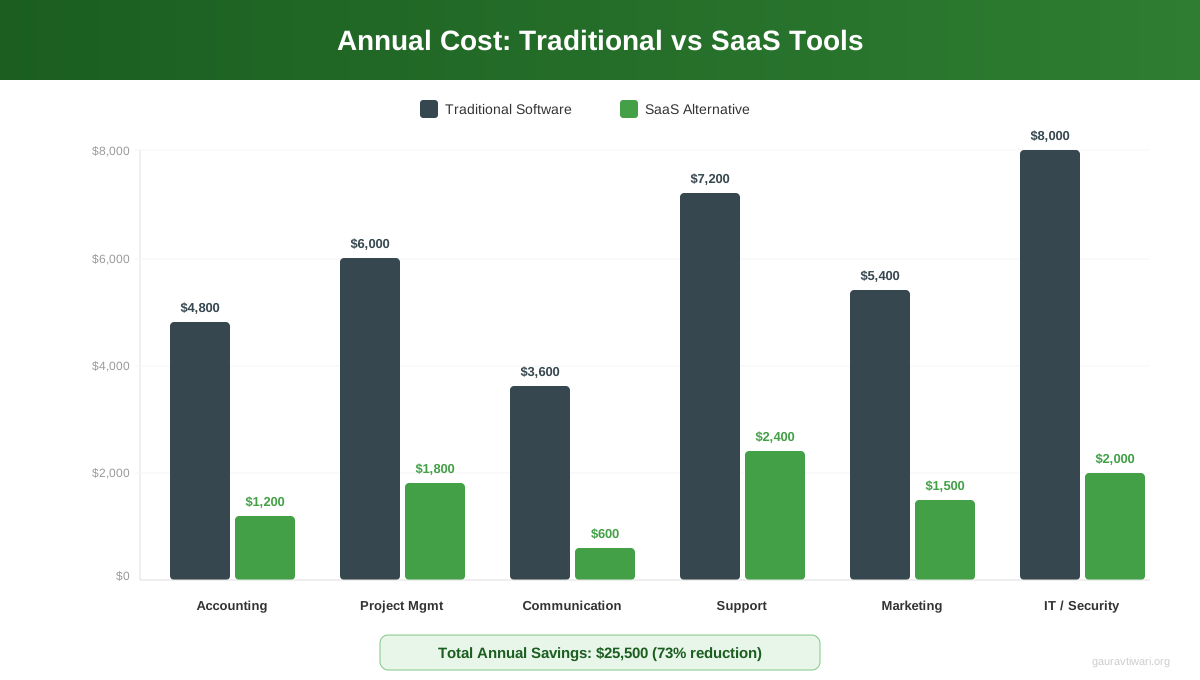
I run this audit at the start of every quarter. Takes about 45 minutes. In the first year alone, I cut $4,200 in redundant subscriptions. The tools weren’t bad. I just didn’t need three project management apps and two email marketing platforms running simultaneously.
Communication Tools: Replace Your $7,000/Year Phone System
Google Workspace at $7.20/user/month replaced three separate tools in my business: email hosting ($5/user), video conferencing ($15/user), and cloud storage ($10/user). That’s $30/user/month down to $7.20. For a 5-person team, you’re saving $1,368/year on communication alone.
The real savings go deeper. Google Workspace includes Docs, Sheets, Slides, Chat, Meet, Drive, and Calendar in one subscription. Before I consolidated, I was paying separately for Zoom ($14.99/month), Dropbox ($11.99/month), and a business email host ($4.99/month per mailbox). Three invoices, three logins, three admin panels. Now it’s one.
- Email, video, storage, docs in one plan
- Starts at $7.20/user/month
- 30 GB to 5 TB cloud storage per user
- Custom domain email with Gmail interface
- Real-time collaboration on all file types
For team chat, Slack’s free tier handles most small businesses. You get 90 days of message history and 10 integrations. If you need more, the Pro plan at $8.75/user/month is still cheaper than Microsoft Teams’ enterprise pricing. I’ve used both extensively. Slack is better for small teams. Microsoft Teams makes more sense if you’re already locked into the Microsoft 365 ecosystem.
One thing I’ve learned the hard way: don’t pay for both Slack AND Microsoft Teams. Pick one. I’ve seen businesses running both because different departments “preferred” different tools. That’s $15+/user/month wasted on redundancy, plus the productivity cost of messages getting lost between platforms.
Project Management: How I Manage a Team for $10/User/Month
Monday.com handles everything from content calendars to client deliverables to internal operations in my business. At $10/seat/month on the Standard plan, it replaced a combination of Trello ($12.50/user), a separate time tracker ($8/user), and a shared spreadsheet system that wasted hours every week.
The math is simple. Before Monday.com, my project management stack cost roughly $25/user/month across three tools. Now it’s $10. For 5 team members, that’s $900/year in direct subscription savings. But the real savings come from efficiency. Automated status updates, deadline reminders, and workload views mean I spend about 3 hours less per week on project coordination. At even $50/hour, that’s $7,800/year in recovered productive time.
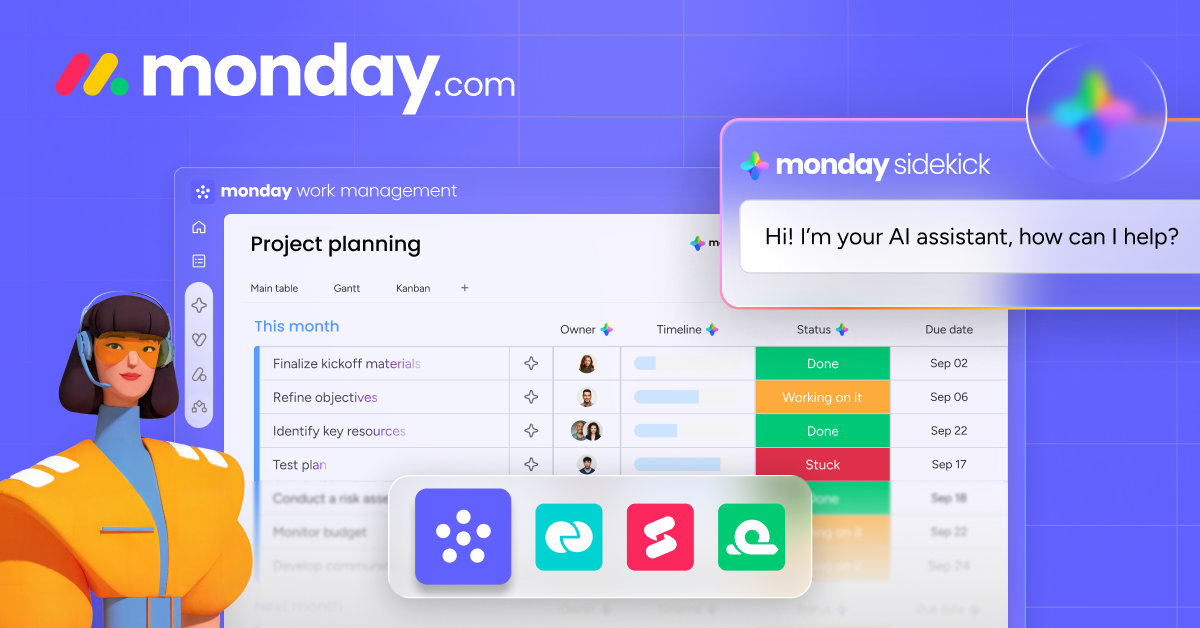
- Visual project boards with automations
- $10/seat/month on Standard plan
- Built-in time tracking and workload views
- 200+ integrations (Slack, Google, Zoom)
- Free plan available for up to 2 users
If Monday.com is more than you need, Notion offers a generous free tier that handles basic project management, documentation, and wikis. I use Notion for personal knowledge management alongside Monday.com for team projects. Asana is another solid option with a free tier for up to 10 users.
If you’re a freelancer working solo, check out my guide on the best time tracking tools for freelancers. Time tracking is where most freelancers leak the most money, billing for 6 hours when they actually worked 8.
Customer Support: $1,000/Year Instead of $5,000
Freshdesk offers a free plan for up to 2 agents that includes email ticketing, a knowledge base, and basic reporting. For most small businesses, that’s enough. The Growth plan at $18/agent/month adds automations and SLA management. Compare that to hiring even a part-time support person at $15-20/hour, and the economics aren’t even close.
I switched from a $89/month help desk to Freshdesk’s Growth plan 4 years ago. The feature set is comparable. The savings? $852/year, recurring. But the bigger win was the self-service knowledge base. About 40% of my support volume now gets resolved through documentation before a ticket is even created. That’s 40% fewer hours spent on repetitive questions.
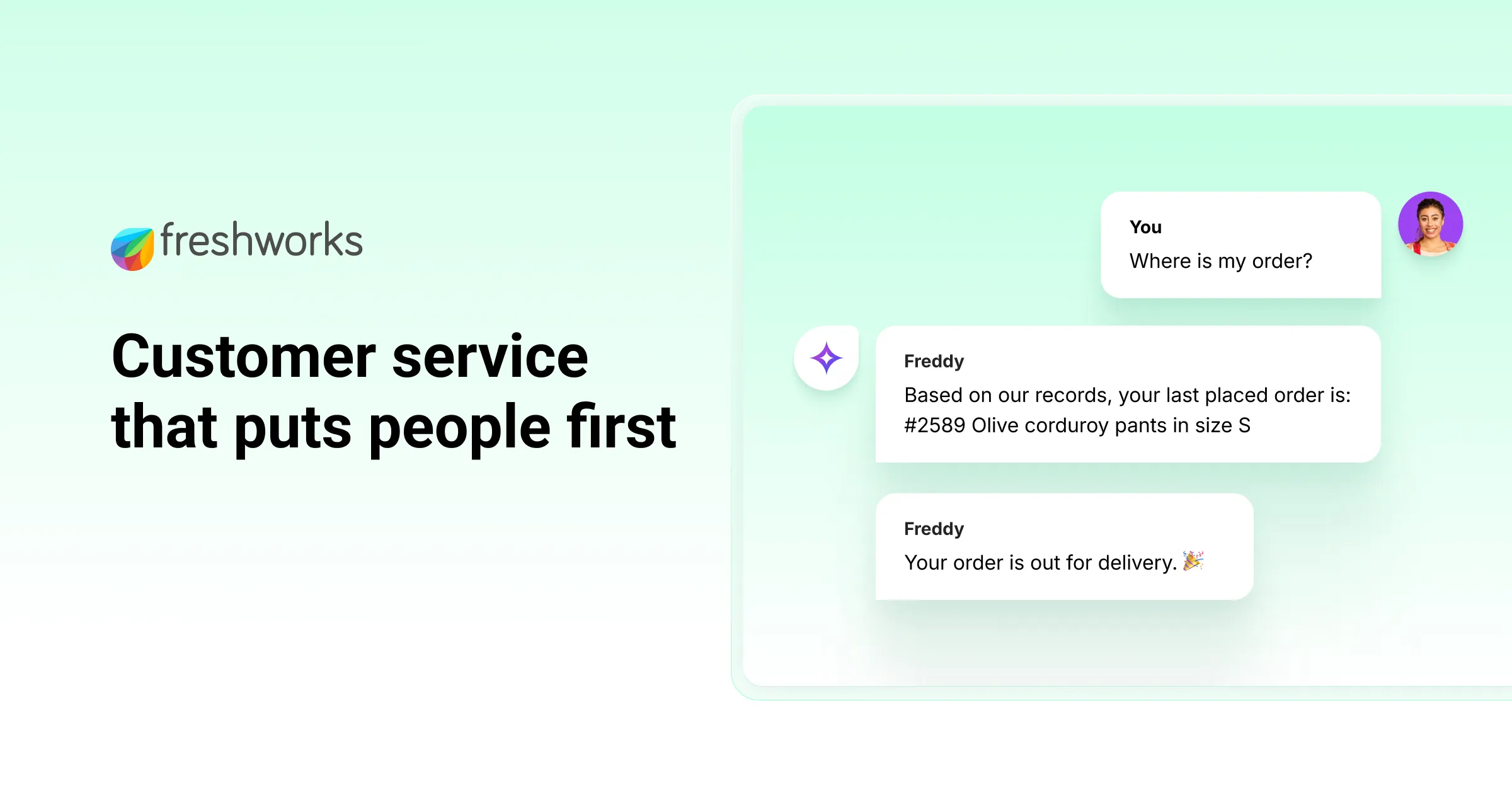
- Free plan for up to 2 support agents
- Email ticketing + knowledge base included
- Growth plan at $18/agent/month
- Automations, SLA tracking, reporting
- Integrates with Slack, Monday, and 1000+ apps
For live chat, LiveChat starts at $24/agent/month and integrates directly with Freshdesk. The combination of async ticketing plus real-time chat covers both support channels without needing an expensive all-in-one platform like Zendesk ($69/agent/month) or Intercom ($74/agent/month). That’s a $45-50/agent/month difference for essentially the same functionality.
The most expensive support tool is the one your customers never use. Before paying for live chat, check if your customers actually want it. Mine did. Yours might prefer email.
Accounting and Invoicing: From $600/Year to Free
Wave Accounting is genuinely free for invoicing, accounting, and receipt scanning. No trial period, no feature restrictions on the core product. I used it for 3 years before my business complexity required FreshBooks. For a business doing under $500K in revenue with straightforward finances, Wave handles everything.
FreshBooks starts at $19/month ($228/year) and adds time tracking, project profitability reports, and more advanced invoicing features. Compare that to QuickBooks Online at $35/month ($420/year) or hiring a bookkeeper at $300-500/month. I switched from QuickBooks to FreshBooks and saved $192/year with better invoicing features for my type of business (service-based, project-focused).
Here’s what most people miss about accounting software: the real cost isn’t the subscription. It’s the time spent on manual data entry. FreshBooks auto-imports bank transactions, auto-categorizes expenses, and auto-generates the reports my accountant needs for tax season. That alone saves me roughly 4 hours per month. At $75/hour (my effective rate), that’s $3,600/year in time savings from a $228 subscription.
If you’re just starting out and need to send professional invoices without paying anything, I compared the best invoice generators for small business. Several are completely free.

Marketing Automation: Powerful Free Tiers Most Businesses Ignore
Marketing is where most businesses overspend on SaaS. I’ve seen solo entrepreneurs paying $99/month for HubSpot Marketing Hub when Mailchimp’s free tier (500 contacts, 1,000 emails/month) would handle their actual volume. Know your numbers before picking a plan.
Here’s what genuinely free marketing tools can do in 2026:
| Function | Free Tool | What You Get | Paid Alternative Cost |
|---|---|---|---|
| Email marketing | Mailchimp Free | 500 contacts, 1,000 sends/month | $13-99/month |
| Social scheduling | Buffer Free | 3 channels, 10 posts/channel | $15-99/month |
| SEO research | Google Search Console | Full search data for your site | $99-449/month |
| Analytics | Google Analytics 4 | Complete traffic analytics | $150-500/month |
| CRM | HubSpot CRM Free | 1M contacts, deal tracking | $50-800/month |
| Landing pages | Carrd | 3 sites on free plan | $29-99/month |
That table represents $356-2,046/month in potential savings if you’re currently paying for premium tools you don’t fully utilize. I’m not saying free is always better. But if you’re using 10% of a $99/month tool’s features, you’re overpaying by $89.
The key insight: start with free tiers and only upgrade when you hit a genuine limitation. Not when the tool nags you to upgrade. Not when a feature sounds nice. When your actual workflow breaks without it.
AI Tools Replacing Expensive Services
AI didn’t just add new tools. It made entire service categories cheaper. Here’s where I’ve seen the biggest impact on operating costs in 2026.
Content drafting. I used to pay freelance writers $0.10-0.15/word for first drafts. For a 2,000-word article, that’s $200-300. Now I use AI for initial research and rough drafts, then edit heavily. The editing takes me 90 minutes instead of the 3-4 hours a from-scratch article would. AI doesn’t replace good writing. But it’s eliminated the most expensive part of the content pipeline: the blank page.
Customer support triage. AI chatbots handle roughly 30% of initial support queries for businesses using them well. That’s 30% fewer tickets hitting your human agents. At scale, this cuts support costs significantly. Even Freshdesk now includes AI-powered suggested responses in their Growth plan.
Data analysis. Tasks that used to require a $100/hour analyst, like cleaning spreadsheets, generating reports, and spotting trends, can now be done with AI tools built into Google Sheets and Excel. I’ve reduced my monthly data analysis costs from roughly $400 (4 hours of analyst time) to about $20 (AI tool subscription + my review time).
Design work. Basic graphic design for social posts, presentations, and simple marketing materials used to cost $25-75 per piece from freelancers. Canva’s AI features and template library handle 80% of my design needs for $13/month. The remaining 20% (logos, brand identity, complex illustrations) still needs a professional designer.
Bookkeeping and admin. Virtual assistant services used to cost $25-40/hour. AI-powered bookkeeping tools like Bench or Pilot automate categorization, reconciliation, and monthly close processes. I haven’t done manual expense categorization in over a year. The AI gets it right about 92% of the time, and the 8% I correct takes 10 minutes per month instead of 2 hours.
AI works best as a cost reducer when you treat it as a first-draft machine, not a final-output machine. The businesses overpaying for AI are the ones trying to eliminate human judgment entirely.
The Tool Stack Audit: My Exact Process
Every January and July, I do a complete tool stack review. Here’s the exact process that saves me $15,000+/year.
Step 1: Export everything. Pull a CSV from your accounting software showing all recurring charges. Every subscription. Every SaaS tool. Every app. I typically find 25-35 line items.
Step 2: Categorize by function. Group tools into communication, project management, marketing, finance, support, development, and “other.” The “other” category is where waste hides. Last audit, I found a $15/month stock photo subscription I hadn’t used in 6 months and a $9/month URL shortener when my WordPress setup handles that natively.
Step 3: Check for overlap. This is the big one. If two tools in the same category serve similar purposes, one needs to go. I was running both Notion and Google Docs for documentation. Same content, two platforms, double the confusion. Consolidated to Google Docs for team stuff, Notion for personal notes only.
Step 4: Calculate cost per active user. A $50/month tool used daily by 5 people costs $10/user. That same $50 tool used weekly by 1 person costs $50/user. The per-user cost reveals whether a tool is worth keeping better than the sticker price does.
Step 5: Negotiate or switch billing. For tools you’re keeping, check if annual billing saves money (it almost always does, typically 15-20%). Then email the vendor. Seriously. A simple “I’m considering canceling, is there a retention discount?” works surprisingly often. I’ve gotten 20-40% off several tools this way.
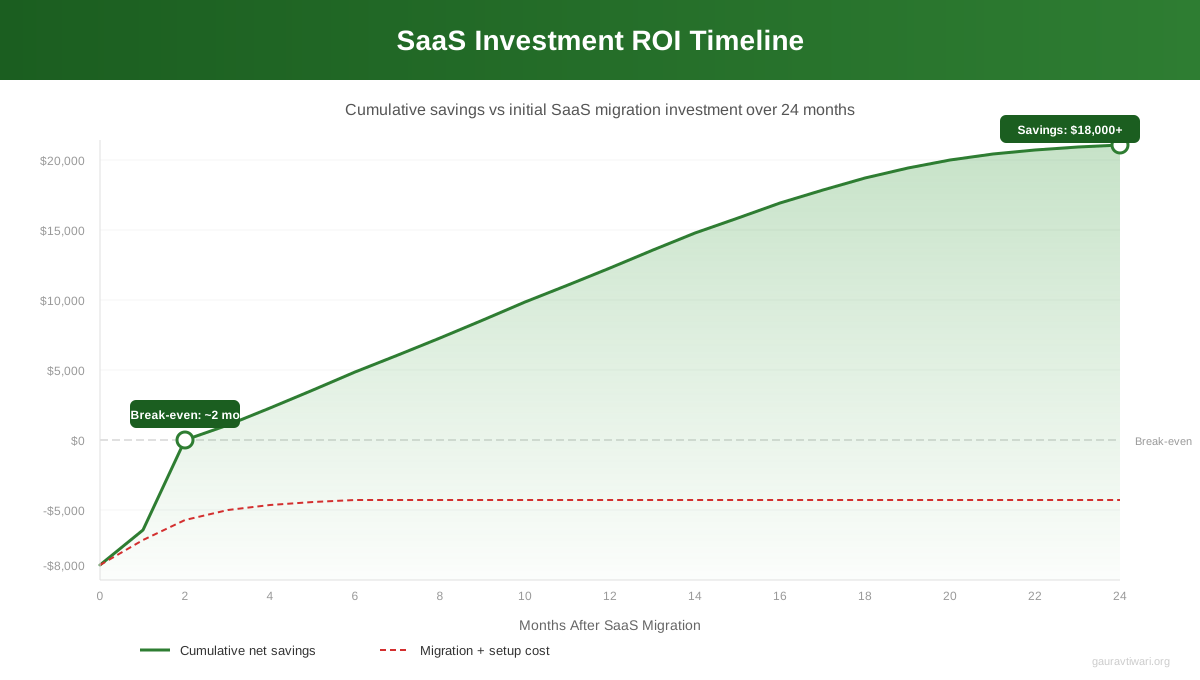
Annual vs Monthly Billing: The Math Nobody Does
Most SaaS tools offer 15-20% off for annual billing. Sounds small. It’s not when you add it up across your entire stack.
Here’s a real example from my business. I have 8 SaaS subscriptions that offer annual discounts. The combined monthly cost is $347. Annual billing brings that to $289/month equivalent. That’s $696/year in savings just for paying upfront. No feature changes. No tool switches. Just a billing toggle.
The caveat: only commit to annual billing on tools you’ve used for at least 3 months and know you’ll keep. I made the mistake of buying an annual plan for a project management tool, switching to Monday.com two months later, and eating $180 in unused subscription. Now my rule is: monthly for the first quarter, annual after that.
Protecting the Money You Save
Cutting operating costs is only half the equation. If the savings just disappear into general spending, you haven’t actually improved your financial position. You’ve just redistributed waste.
When I cut $4,200 in redundant subscriptions during my first audit, I moved that exact amount into a dedicated business savings account. Quarterly, I reconcile: what did I save, and where did it go? This accountability loop is what separates a one-time cost cut from a permanent financial improvement.
The saved money should go to one of three places: an emergency fund (3-6 months of operating expenses), reinvestment in revenue-generating activities (better marketing, new product development), or profit distribution. Not into more tools. I’ve written a detailed guide on how to protect your business income that covers the financial side of this equation.
If you’re launching a new business and want to keep costs low from the start, my guide on reducing start-up costs covers the foundation. It’s much easier to build lean than to cut fat later.
Which business function costs you the most?
Building Your Online Presence Without Overspending
Your website is the foundation of your business presence, but it doesn’t need to cost $5,000 upfront. WordPress powers 43% of the web, and a professional setup runs $100-300/year total (hosting + domain + theme). Compare that to custom development at $5,000-15,000 or platforms like Squarespace at $192-528/year with less flexibility.
I’ve built hundreds of WordPress sites. The technology stack has gotten so good that what used to require a $3,000 developer can now be done with a good theme and a few plugins. If you’re still debating whether your business even needs a website, I answered that question thoroughly: do you actually need a website? (Spoiler: yes, but not the kind you think.)
The biggest website-related cost savings I’ve found: skip the premium page builder plugins ($49-199/year each) and learn the native WordPress block editor. It’s free, it’s fast, and it does 90% of what paid builders do. The remaining 10% rarely justifies the cost for a small business site.
Hosting is another area where businesses overspend. Managed WordPress hosting runs $25-50/month. Shared hosting from reputable providers handles most small business sites perfectly at $5-12/month. I’ve managed sites getting 50,000 monthly visitors on $10/month hosting without any performance issues. You only need managed hosting when your traffic or technical requirements demand it.
Putting It All Together: My $15,000/Year Savings Breakdown
Here’s the actual math from my business, tracked over the past 3 years:
| Category | Before (Annual) | After (Annual) | Savings |
|---|---|---|---|
| Communication (email, video, chat) | $4,320 | $1,036 | $3,284 |
| Project management | $1,800 | $720 | $1,080 |
| Customer support | $1,068 | $216 | $852 |
| Accounting/invoicing | $420 | $228 | $192 |
| Marketing tools | $2,388 | $468 | $1,920 |
| Redundant/unused tools | $4,200 | $0 | $4,200 |
| Annual billing discounts | — | — | $696 |
| Time savings (valued at $75/hr) | — | — | $3,600 |
| Total | $14,196 | $2,668 | $15,824 |
These numbers are specific to my business. Yours will differ. But the framework works for any size. The businesses I’ve consulted with typically find 20-35% savings on their first SaaS audit, with the biggest wins coming from eliminating tool overlap and switching to annual billing.
The key is consistency. A one-time audit saves money once. A quarterly review keeps your stack lean permanently. Set a recurring calendar event. Block 45 minutes. Do the audit. Your future self will thank your present self. And if you want to put that saved money toward something productive, consider investing in creating a business budget that actually makes sense.
Related Reading
If you found this useful, these guides dive deeper into specific areas of business cost optimization:
- Best Invoice Generators for Small Business – free and paid options compared
- Best Time Tracking Tools for Freelancers – stop losing billable hours
Frequently Asked Questions
What is the fastest way to reduce business operating costs?
Run a SaaS audit. Pull your bank statements, list every subscription, and cancel anything you haven’t used in 30 days. Most businesses find $200-500/month in waste within the first hour. After that, consolidate overlapping tools (e.g., pick one PM tool instead of three) and switch remaining tools to annual billing for 15-20% savings.
How much can SaaS tools save compared to traditional business processes?
For a small business with 1-10 employees, switching from traditional processes to SaaS tools typically saves $10,000-30,000/year. The biggest savings come from communication (replacing phone systems and separate email hosting with Google Workspace), accounting (FreshBooks or Wave vs. bookkeeper fees), and marketing (free tiers of tools like Mailchimp and Google Analytics replacing paid alternatives).
Is Google Workspace worth it for a small business?
Yes. At $7.20/user/month, Google Workspace replaces separate email hosting ($5/user), video conferencing ($15/user), and cloud storage ($10/user). That is $30/user down to $7.20. For a 5-person team, you save $1,368/year while getting better integration between all your communication tools.
What free project management tools actually work?
Monday.com offers a free plan for up to 2 users. Notion’s free tier handles basic project management and documentation. Asana’s free plan supports up to 10 users with task management and basic workflows. For solo freelancers, Trello’s free tier with unlimited boards is often enough. The key is picking one and committing to it rather than spreading work across multiple platforms.
Should I use free accounting software or pay for FreshBooks?
Start with Wave (free) if your finances are straightforward and you do under $500K in revenue. Switch to FreshBooks ($19/month) when you need time tracking, project profitability reports, or more advanced invoicing. The $228/year investment pays for itself if it saves you even 3 hours of manual bookkeeping per month.
How often should I audit my SaaS subscriptions?
Quarterly at minimum. I do a full audit in January and July, with lighter usage checks in April and October. The full audit takes about 45 minutes and typically finds at least one tool to cut or downgrade. Set a recurring calendar event so you don’t skip it.
Can AI tools really replace expensive business services?
For certain tasks, yes. AI handles content drafting, customer support triage, data analysis, and basic design work at a fraction of traditional costs. I reduced content drafting costs by roughly 60% and data analysis costs by 95% using AI tools. The catch: AI works best as a first-draft tool that humans refine. Fully automated AI output without human review usually produces mediocre results.
Is annual billing always cheaper than monthly?
Almost always. Most SaaS tools offer 15-20% off for annual billing. But only commit to annual plans on tools you have used for at least 3 months and know you will keep. I lost $180 once by switching tools 2 months into an annual plan. My rule: monthly for the first quarter, annual after that. Across 8 subscriptions, annual billing saves me $696/year.
Disclaimer: This site is reader-supported. If you buy through some links, I may earn a small commission at no extra cost to you. I only recommend tools I trust and would use myself. Your support helps keep gauravtiwari.org free and focused on real-world advice. Thanks. - Gaurav Tiwari