
 by
by
Protecting a WordPress blog from DDoS attacks and other security threats in 2026 is genuinely simpler than it was a decade ago — but the threat landscape has also evolved. Automated bot attacks now account for over 40% of WordPress login attempts, ransomware that targets WordPress sites is a growing problem, and supply-chain attacks via compromised plugin updates have become more common since 2023. The good news: a small number of well-configured defenses (Cloudflare WAF, Wordfence or Sucuri, daily backups, careful plugin hygiene) blocks 99%+ of real-world attacks. This guide is my updated 2026 take, written from running WordPress sites professionally for 18 years and surviving multiple genuine attack attempts.
No matter what, you own a world class website or a simple blog – hackers and attackers will always be against you, trying to access your backend and modifying it according to their needs. Daily hundreds of top-level and thousands of other websites are attacked by the security-attackers. The reason for these attacks can be either personal gain or just even simple jealousy. These attacks are regular and that is the reason that you should regularly analyze the security parameters of your website. One of the most popular methods is a DDOS attack, but there are other methods hackers will use to try to either gain access to or shut-down your website in order to drive your loyal readers away.
One of the most popular methods of breaking the security of a website is a DDOS attack. DDOS attacks have harmed not just the small websites but almost all top websites of the world. DDOS isn’t the only way but there are also some other methods hackers use to gain access or shut-down your website. This article is an overview of these attacks explaining how you can prepare yourself to handle any upcoming attacks.The 2026 WordPress Security Baseline
Five layers that should be in place on every serious WordPress site in 2026. 1. Cloudflare in front (free tier is enough for most sites): blocks DDoS, hides your origin IP, rate-limits login attempts, and applies their managed WAF rules. The free tier covers more than 95% of single-site use cases. 2. Wordfence Free or Sucuri: WordPress-aware firewall, malware scanner, login security. Wordfence is better for self-hosted defense; Sucuri is better for cloud-based scanning and cleanup if you’ve been compromised. 3. Two-factor authentication on every admin account: via Google Authenticator, Authy, or hardware key. Non-negotiable in 2026.
4. Automated daily backups stored off-site: UpdraftPlus to Dropbox/Google Drive, or your host’s built-in backup if they keep at least 14 days. The 3-2-1 rule applies — three copies, two media types, one off-site. 5. Plugin and theme hygiene: only install plugins from reputable developers, keep everything updated, remove any plugin you don’t actively use, and subscribe to the Wordfence threat-feed email so you hear about compromised plugins within hours of the disclosure. This five-layer baseline blocks essentially all real-world WordPress attacks I see in 2026. The one threat it doesn’t address — targeted attacks by a sophisticated adversary specifically going after your site — requires enterprise-tier solutions like AWS Shield Advanced or commercial DDoS mitigation services starting at $3,000/month.
DDOS Security
What is a DDOS attack?

How to defend your site from DDOS attacks?
There are ways for you to defend against this sort of problem, however. You will probably want to install security plugins for your website in order to protect it against a lot of these types of attacks. For a decent listing of the best WordPress security listings you might want to check out this website. But the best way to make sure your website stands a DDoS attack is to use a hosting provider which has stable and highly-available servers. This does not mean you need to spend additional cost on hosting. For the same configuration, some hosting companies may host a large number of websites, thus reducing the availability of resources like RAM and CPU for your account. Just select your hosting wisely. Finally, preparation is the key to really managing a DDOS attack. You are going to want to keep your IP address as secure as possible so that hackers cannot target you. You will also want to find out who you might need to call at your ISP in order to manage the problem. You will likely be troubled for a period of time, but know that eventually your attackers will quit and leave you alone.Brute Force Attacks
What is a brute force attack?
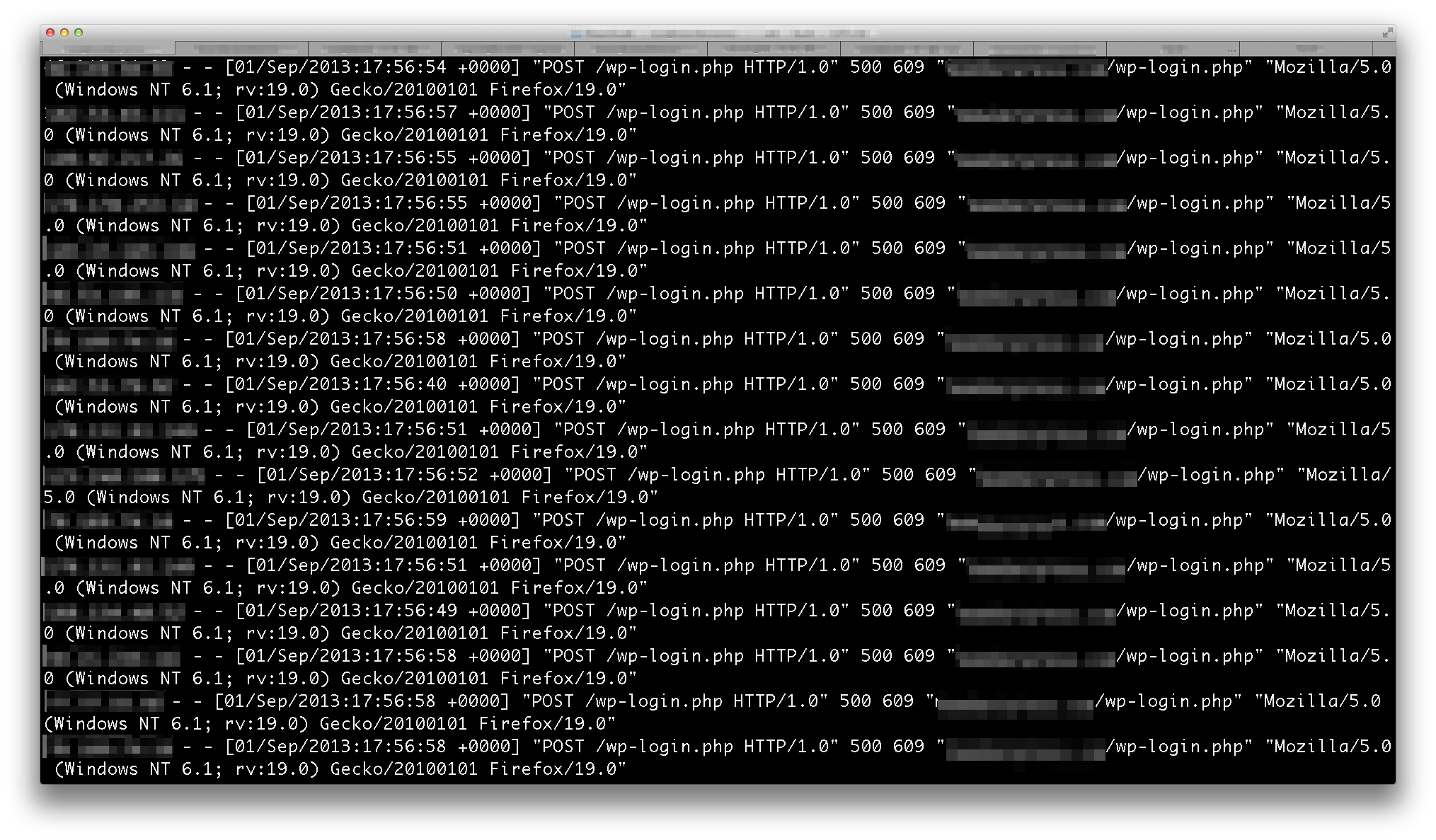
How to protect your site against Brute Force Attacks?
There are a few things you can do in order to make sure that you don’t easily fall victim. You should first make sure that your username is not “admin” anywhere so that you will avoid the programs that assume that and start there. In addition to this, you are going to want to get a really strong password (you can find a great guide to making a good password here). You should also note that if someone out there is trying many login attempts per second to access your server or website, then the performance can suffer. To prevent such an attack, you will likely want to get a plugin for your blog or website that will eventually use IP blocking after a certain number of attempts to get in. There are multiple ones out there so you will have to find one that is right for you but all of them will help keep your site running smoothly in addition to making sure that no one gets access to your administrative powers.Attack through Public Networks and VPN Use
There are other ways that hackers might be able to attack you and get into your blog, some of them using trickery more than force. The best example of this would be a hacker waiting in a café or other place that that uses a public network that is relatively unprotected. What will happen is that they will wait for an unsuspecting user to login into the network and then use WordPress. The hacker will then intercept the username and password of the user and use that information to get in and cause problems. In order to avoid this particular trap, you will probably want to use a Virtual Private Network (VPN) because a VPN will protect your communications and privacy. It will set up a secure connection to an offsite server so that no one can read your communications and you can manage your blog in peace. Different users might have different needs, so you might want to take a look at some reviews online and figure out the right one for you.Thank you for reading, and may you never have to deal with one of the attacks mentioned above and the unfortunate consequences.
Tell Google you want more of this.
Add Gaurav Tiwari as a preferred sourceOne tap, and this site shows up more often in your own Top Stories, AI Overviews and AI Mode. Remove it any time.