
How to Promote Your Blog for Maximum Exposure and Traffic?
I have promoted over 2,000 blog posts across 50+ websites in the past 16 years. Some posts took off immediately. Others sat at zero traffic for months before something clicked. The difference was almost never the content quality. It was the promotion strategy.
Most bloggers spend 80% of their time writing and 20% promoting. Flip that ratio and your traffic will grow faster than you expect. The best blog post in the world is worthless if nobody reads it.
This guide covers every promotion channel I have used, what worked, what flopped, and the exact strategies that consistently drive traffic in 2026. Whether you are a new blogger or an experienced one looking to break through a traffic plateau, these methods work.
The 80/20 rule of blog promotion: spend 20% of your time creating content and 80% promoting it. For every hour you spend writing, spend four hours distributing. This sounds extreme, but it is how successful bloggers actually grow. One well-promoted post outperforms ten posts nobody sees.
Leverage Social Media Platforms

Social media is still the fastest way to get eyeballs on a new blog post. But the landscape has shifted dramatically. Organic reach on Facebook is effectively dead for business pages (down to 1-2% of followers). Instagram prioritizes Reels. X/Twitter rewards hot takes and threads. And Threads is the new wildcard. Here is what actually works on each platform in 2026.
Facebook, Threads, and Instagram
Facebook: Groups are the only organic play left. Join 5-10 groups in your niche and share genuinely helpful content (not just links). Facebook penalizes link-only posts. Write a mini-version of your post as a Facebook post, then add the link in the comments or as a “read more” CTA.
Instagram: Use Reels to tease blog content. A 30-second Reel summarizing your post’s key takeaway gets more reach than a static image. Link in bio tools like Linktree or your own landing page let you drive traffic from your profile. Use Canva to create carousel posts from your blog’s main points.
Threads: Meta’s text-based platform is growing fast. It works like early Twitter without the algorithm punishment. Post your blog’s key insights as a thread. Keep it conversational. Add the link at the end. Threads rewards engagement, so ask questions and respond to comments.
X/Twitter
X/Twitter rewards threads. Take your blog post’s main points and turn them into a 5-8 tweet thread. The first tweet needs a strong hook. End with a link to the full post. I have seen single threads drive 500+ clicks to a blog post. Schedule your threads for peak engagement times (8-10 AM and 5-7 PM in your target timezone).
Other X strategies that work: quote tweet relevant conversations with your own take, reply to larger accounts with genuinely useful insights (not self-promotion), and use 1-2 relevant hashtags per tweet. Avoid over-hashtagging. It looks desperate.
LinkedIn is the most underrated blog promotion channel for B2B and professional content. The algorithm still gives generous organic reach. Write a LinkedIn post that summarizes your blog’s key insight. Make it personal. Add your opinion. Include the link at the end (or in the first comment). LinkedIn native posts with no external links get more reach, so some bloggers write a full version on LinkedIn and link to the blog in the comments.
Pinterest is a visual search engine, not a social media platform. This distinction matters. Create 2-3 pin designs per blog post using Canva. Use keyword-rich pin descriptions. Pin to relevant boards. Pinterest traffic is evergreen. Posts I pinned 3 years ago still drive traffic today. For how-to guides, listicles, and visual content, Pinterest can become your #2 traffic source behind Google.

- Drag-and-drop design with 100M+ templates
- Social media templates for every platform
- AI-powered Magic Design and text-to-image
- Brand kit with custom fonts and colors (Pro)
- Free plan covers most blogger needs
Canva is the go-to design tool for bloggers. Create social media graphics, Pinterest pins, blog headers, infographics, and carousels in minutes. The free plan covers most needs. Pro ($12.99/month) adds brand kits, Magic Resize, and AI features.
SEO Optimization: Your Long-Term Growth Engine
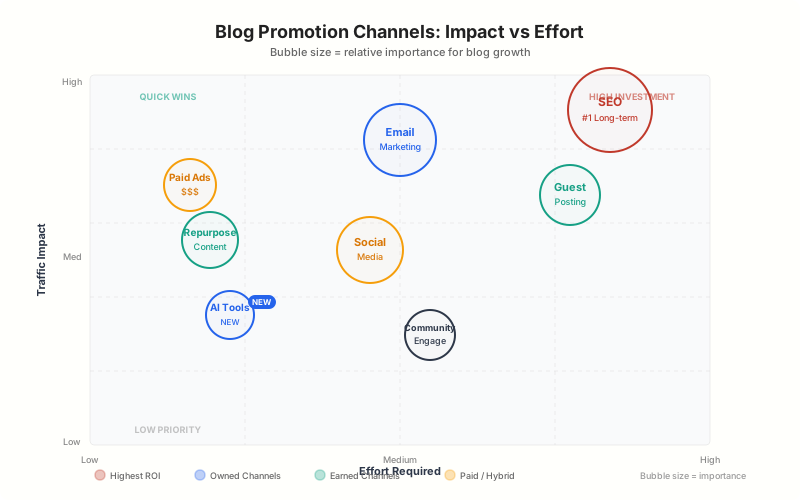
SEO is the highest-ROI blog promotion strategy. It takes 3-6 months to see results, but once your posts rank, they drive traffic on autopilot. I have posts from 2019 that still bring in 1,000+ visitors per month. No other channel delivers that kind of compounding return.
Start with keyword research. SEMrush is what I use for keyword discovery, competitor analysis, and rank tracking. Google Keyword Planner works for basics but misses the competitive analysis that makes SEMrush worth it.
On-Page SEO Essentials
- Target one primary keyword per post. Include it in the title, URL, first paragraph, and 2-3 subheadings. Do not keyword stuff.
- Write compelling meta descriptions. These show up in search results. A good meta description is a mini-ad for your post (150-160 characters).
- Use header tags (H2, H3) logically. They help Google understand your content structure. Include related keywords in subheadings naturally.
- Optimize images. Compress them, add descriptive alt text, use WebP format. Large images slow your site, and slow sites rank lower.
- Internal linking. Link to 3-5 related posts from every new article. This helps Google discover your content and keeps readers on your site longer.
- Add schema markup. FAQ schema, Article schema, and HowTo schema help your content appear in rich results. Use a plugin like Rank Math to add schema without coding.
GEO: Optimizing for AI Search
In 2026, blog promotion means optimizing for both Google and AI search engines (ChatGPT, Perplexity, Claude, Gemini). AI engines cite content that has high entity density (specific names, numbers, dates), answer-first paragraphs, and original first-party data. If your blog post starts with a direct answer and backs it up with specifics, AI search engines are more likely to cite you.

- Keyword research with search volume and difficulty
- Competitor traffic and keyword analysis
- Site audit for technical SEO issues
- Backlink tracking and outreach tools
- Content marketing toolkit with topic research
SEMrush is the most comprehensive SEO toolkit for bloggers. Keyword research, rank tracking, site audits, backlink analysis, and competitor research in one platform. I have used it for 8+ years.
Engage with the Blogging Community
The blogging community offers free promotion through genuine relationships. Guest posting, comment engagement, and cross-promotion cost nothing but your time.
Guest Posting
Guest posting is still one of the best ways to reach new audiences and build backlinks. Target blogs with higher domain authority than yours. Pitch unique angles they have not covered. Include a natural link back to your blog in your author bio or within the content. I got my first 10,000 monthly visitors primarily through guest posting on 20+ blogs in my niche.
Community Participation
Participate in Facebook groups, subreddits, LinkedIn communities, and forums related to your niche. The key is genuine engagement. Answer questions. Share your expertise. Build a reputation. Then, when you share your blog post, people actually click because they know you provide value.
Email Marketing: Your Most Reliable Traffic Channel
Email consistently delivers the highest ROI of any marketing channel. Every dollar spent on email marketing returns $36-$42 on average. Unlike social media, you own your email list. No algorithm changes can take it away.
Start building your list from day one. Offer a lead magnet (PDF guide, checklist, template) in exchange for email addresses. Place opt-in forms in your header, within blog posts, and as exit-intent popups. For every 1,000 email subscribers, you can expect 200-400 clicks per email (20-40% open rate, 3-5% click rate).
Choosing an Email Platform
ConvertKit is my top recommendation for bloggers. Free up to 10,000 subscribers, visual automation builder, and landing pages included. MailerLite is a budget alternative with a generous free plan and a clean interface. Both integrate easily with WordPress.
For more advanced needs (e-commerce, CRM, complex automations), ActiveCampaign offers powerful automation workflows. Check my full comparison of the best email marketing software for a detailed breakdown.
- Free plan up to 10,000 subscribers
- Visual automation builder for email sequences
- Built-in landing pages and forms
- Commerce features to sell digital products
- Easy WordPress integration
ConvertKit (now rebranding as Kit) is the email platform built for creators and bloggers. Free up to 10,000 subscribers. Visual automation builder, landing pages, and commerce features included.

Use Analytics for Smarter Promotion
Data-driven promotion beats guessing every time. Google Analytics 4 and Google Search Console are free and non-negotiable. Together, they tell you what content gets traffic, where it comes from, which keywords drive clicks, and what pages lose visitors.
- Google Analytics 4: Track traffic sources, user behavior, and conversion rates. Set up goals for email signups, affiliate clicks, and engagement metrics.
- Google Search Console: See exactly which queries bring traffic, your average position, and click-through rates. Optimize posts that rank on page 2 (positions 11-20) to push them to page 1.
- SEMrush: Track keyword rankings, monitor competitors, and find content gaps you can fill.
- Email analytics: Track open rates, click rates, and unsubscribes. A/B test subject lines. The data tells you what your audience actually wants to read.
Paid Advertising: When and How to Invest
Paid ads can accelerate growth, but they are not for beginners. Only invest in ads after you have a proven content strategy, an email opt-in that converts, and a way to monetize traffic (affiliate links, products, services). Otherwise, you are paying to rent traffic that disappears when you stop spending.
When Paid Ads Make Sense
- Promoting a lead magnet: $1-3 per email subscriber through Facebook/Instagram ads is reasonable if your email list generates revenue.
- Boosting high-converting content: If a post drives affiliate sales or product signups, paid traffic amplifies that revenue.
- Retargeting: Show ads to people who already visited your blog. These convert at 3-5x the rate of cold traffic. Low budget, high ROI.
- Testing headlines: Run $20-50 worth of ads to test which headlines get clicks. Use the winner for your organic promotion.
Content Repurposing: Multiply Your Reach
One blog post should become 10+ pieces of content across different platforms. This is the most time-efficient promotion strategy I know. Write once, distribute everywhere.
- Blog post (original)
- X/Twitter thread summarizing key points
- LinkedIn post with personal angle
- Instagram carousel of main takeaways
- Pinterest pins (2-3 designs)
- Email newsletter featuring the post
- YouTube video covering the same topic
- Podcast episode discussing the topic
- Quora/Reddit answers linking back to the post
- Short-form video (Reels, Shorts, TikTok) teasing the content
Use Canva for visual content, AI writing tools to adapt the content for each format, and scheduling tools to automate distribution.
AI-Powered Blog Promotion in 2026
AI tools have changed blog promotion. What used to take hours (writing social posts, creating graphics, optimizing headlines) now takes minutes. Here is how I use AI for promotion.
- ChatGPT/Claude for social media posts: Paste your blog post and ask for 5 tweet variations, a LinkedIn post, and an Instagram caption. Edit for your voice, then schedule.
- AI headline testing: Generate 20 headline variations for your post. Pick the 3 best, A/B test them on social media, then use the winner as your actual blog title.
- Canva AI: Generate social graphics, resize for every platform, and create pin designs in seconds.
- AI for email subject lines: Test AI-generated subject lines against your own. I have found that AI suggestions often outperform mine by 10-15% in open rates.
- AI content analysis: Use AI to identify which sections of your post are most quotable, most shareable, and most likely to generate engagement.
AI helps with promotion speed, not strategy. You still need to understand your audience, pick the right channels, and engage authentically. Bloggers who auto-post AI-generated content without editing it get flagged as spam and ignored. Use AI as an assistant, not a replacement. Your voice and perspective are what make people follow you.
Create Content That Promotes Itself
The best promotion strategy is creating content so useful that people share it without being asked. Here is what makes content inherently shareable.
- Original data and research. Posts with unique statistics get cited by other bloggers and journalists. Run a survey, analyze your own data, or compile industry numbers nobody else has.
- Definitive guides. The “ultimate guide to X” format works because it becomes a reference. People bookmark and share reference content. This post is an example.
- Templates and tools. Free templates, checklists, calculators, and downloadable resources get shared because they are immediately useful.
- Strong opinions. Content that takes a clear stance gets shared because people either agree enthusiastically or disagree loudly. Both drive traffic.
- Visual content. Infographics, charts, and diagrams get shared 3x more than text-only content. Invest in visuals.
- AI-powered grammar and style suggestions
- Autocomplete that learns your writing style
- Integrates with Gmail, LinkedIn, CRM tools
- Better accuracy than Grammarly in my testing
- Free plan available for basic checks
Sapling is my preferred grammar and writing assistant. It catches errors that other tools miss and suggests completions that actually sound natural. Clean, polished writing gets shared more.
Blog Post Promotion Checklist
I use this checklist every time I publish a new blog post. Complete it within 48 hours of publishing for maximum impact.
- Share on X/Twitter (thread format)
- Post on LinkedIn (personal angle, link in comments)
- Create and publish 2-3 Pinterest pins
- Share in relevant Facebook groups (value-first, link second)
- Post on Threads
- Send email newsletter to subscribers
- Submit to relevant subreddits (follow community rules)
- Answer 2-3 Quora questions with insights from the post
- Update internal links from older related posts
- Check Google Search Console after 1 week for early keyword data
Frequently Asked Questions
How long does it take to see results from blog promotion?
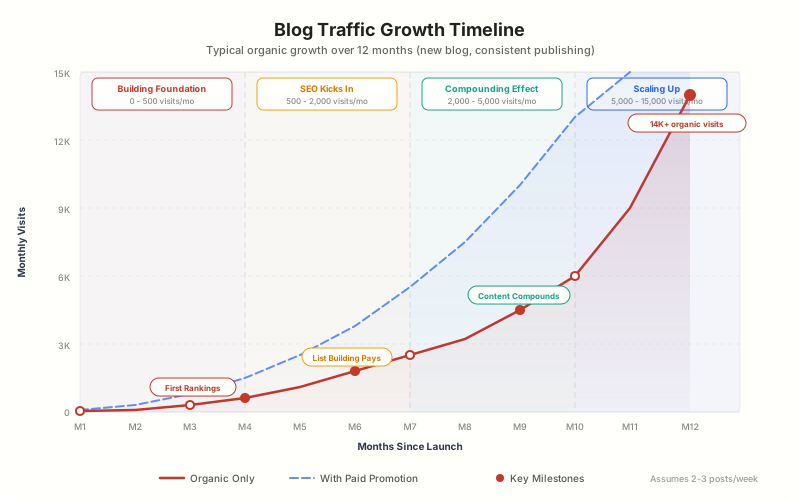
SEO takes 3-6 months to show meaningful results. Social media promotion can drive traffic within hours. Email marketing delivers immediate clicks from your subscriber base. The best approach is combining all three: social and email for immediate traffic, SEO for long-term compounding growth. Most blogs see significant traffic growth between months 6-12 of consistent promotion.
What is the best social media platform for blog promotion?
It depends on your niche. LinkedIn is best for B2B and professional content. Pinterest is best for visual, lifestyle, and how-to content (and drives evergreen traffic). X/Twitter works for tech, news, and opinion content. Instagram Reels work for visual niches. Test 2-3 platforms, measure results after 3 months, and double down on what works.
How often should I promote my blog posts?
Promote every new post actively for 1-2 weeks after publishing. Then re-share your best performing content monthly. Evergreen posts can be re-promoted every 3-6 months with updated angles. Your email list should hear about every new post. Social media can handle 3-5 shares per post across different platforms and formats.
Is paid advertising worth it for blog promotion?
Only after you have a monetization strategy. If your blog earns from affiliate links, products, or services, paid ads can amplify revenue. Use retargeting ads (showing ads to past visitors) for the highest ROI. Budget $100-300/month to start and track cost per visitor vs revenue per visitor. If the math works, scale up.
How do I get more backlinks to my blog?
Create link-worthy content: original research, comprehensive guides, free tools, and infographics. Guest post on relevant blogs with higher domain authority. Use SEMrush backlink analytics to find who links to your competitors and reach out to them. Broken link building (finding dead links on other sites and offering your content as a replacement) also works consistently.
What are the best free blog promotion tools?
Google Search Console and Google Analytics (traffic and SEO data), Canva free plan (graphics), ConvertKit free plan (email up to 10,000 subscribers), Buffer free plan (social scheduling), and Google Keyword Planner (keyword research). These cover 80% of what you need without spending a dollar.
How do I promote my blog with AI tools in 2026?
Use AI (ChatGPT, Claude) to generate social media posts, email subject lines, and content variations from your blog posts. Canva AI creates graphics instantly. AI can also help with SEO optimization by suggesting related keywords and meta descriptions. The key is editing AI output to match your voice. Do not publish raw AI content. It sounds generic and your audience will notice.
Start Promoting Today
Blog promotion is not optional. It is the difference between a blog that grows and one that stays invisible. Start with the channels that match your strengths: good writer? Focus on SEO and guest posting. Visual thinker? Pinterest and Instagram. Good with people? Email and community engagement.
My recommended starting stack: SEMrush for SEO, ConvertKit for email, Canva for graphics, and Sapling for polished writing. All have free plans to start with.
For more strategies, check out my guides on content marketing tools, SEO tools, content marketing KPIs, and email marketing mistakes to avoid.
Disclaimer: This site is reader-supported. If you buy through some links, I may earn a small commission at no extra cost to you. I only recommend tools I trust and would use myself. Your support helps keep gauravtiwari.org free and focused on real-world advice. Thanks. - Gaurav Tiwari