
GT Page Blocks Builder
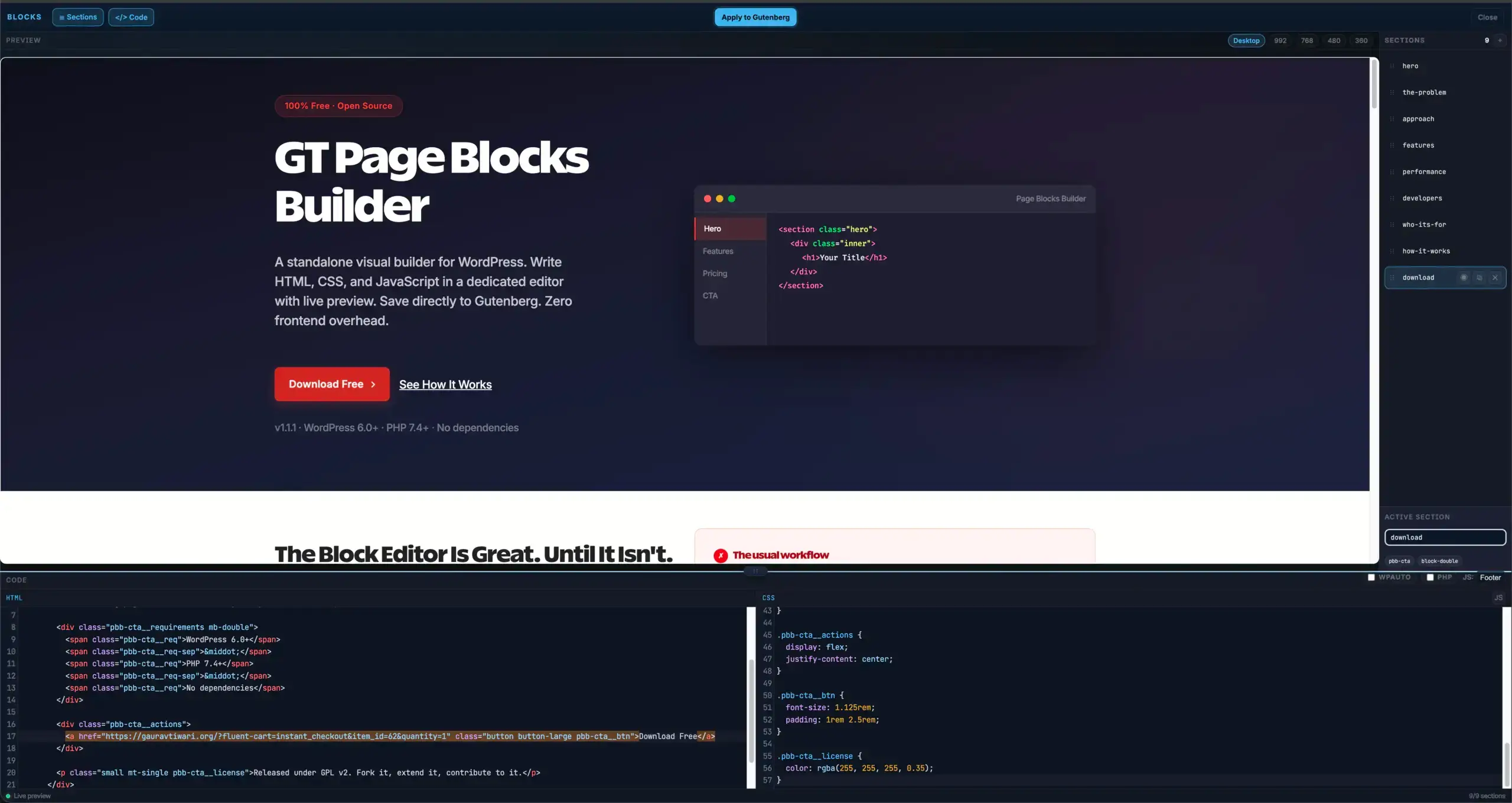
A standalone visual builder for WordPress. Write HTML, CSS, and JavaScript in a dedicated editor with live preview. Save directly to Gutenberg. Zero frontend overhead.
The Block Editor Is Great. Until It Isn’t.
Gutenberg works for blog posts. Drop in some paragraphs, add a heading, maybe an image. Simple enough.
But the moment you need a custom landing page with precise layouts, custom CSS per section, and JavaScript interactions, you’re fighting the editor instead of building.
You end up with a Custom HTML block. Then another. Then inline styles that conflict with each other. JavaScript scattered across blocks with no idea what loads where.
By the time you’ve assembled a landing page, your post content is an unreadable mess of HTML blocks that Gutenberg can barely render without choking.
- Custom HTML block for each section
- CSS in separate blocks or inline styles
- JS in yet another Custom HTML block
- No preview until you hit “Update”
- Styles leaking between blocks
- Content buried in block markup soup
- One section = HTML + CSS + JS together
- Live preview as you type
- Responsive viewport testing
- Saves as native Gutenberg blocks
- Zero frontend overhead
- Keyboard shortcuts for everything
A Different Way to Build Pages
A standalone editor, separate from Gutenberg, purpose-built for writing HTML/CSS/JS sections with live preview.
Write your sections
Each section has its own HTML, CSS, and JS pane. Code with syntax highlighting and your theme’s CSS class suggestions.
Preview instantly
A live preview updates as you type, loaded with your actual theme stylesheets. Test responsive at 5 viewport widths.
Save to Gutenberg
Hit Cmd+S. Sections sync as native Gutenberg blocks. No proprietary storage. Your content lives in post_content.
Pages built entirely in code. Rendered without builder overhead. Still editable whenever you come back.
Everything Included. Nothing Upsold.
Every feature ships free. No premium tier. No add-ons. No annual renewal.
Standalone Visual Builder
A full-screen editor outside Gutenberg. Three code panes, a section sidebar, and live preview. No distractions.
Live Preview + Viewports
See changes as you type. Test at Desktop, 992, 768, 480, and 360px. Uses your actual theme stylesheets.
CodeMirror Syntax Highlighting
Full syntax highlighting for HTML, CSS, and JS. Mode-aware autocompletion and error detection built in.
Section-Based Architecture
Every section has isolated HTML, CSS, and JS. Add, duplicate, drag to reorder, collapse, or delete independently.
Theme CSS Class Suggestions
Scans your active theme’s stylesheets and suggests available CSS classes as you write HTML.
PHP Execution
Toggle PHP per section for dynamic content. Pull WordPress data, run queries, display conditional output.
AJAX Save to Gutenberg
Sections save as native marketers-delight/page-block blocks in post_content. No proprietary storage.
Autosave + Draft Recovery
Autosaves to localStorage every 5 seconds. Browser crash? Tab closed? Your unsaved work is recovered.
Rank Math SEO Integration
Page Block content feeds automatically into Rank Math’s analysis. SEO scores reflect your actual content.
Page Templates
Two built-in templates: Page Blocks Builder (with theme wrapper) and Full Page Builder (bare output).
Any Post Type
Enable for pages, posts, or any custom post type. Configure from Settings > Page Blocks Builder.
Keyboard Shortcuts
Cmd+S save, Cmd+N new section, Cmd+D duplicate, Alt+Arrow reorder, Alt+1/2/3 focus panes.
Performance That Actually Matters
GT Page Blocks Builder adds zero frontend overhead. The builder only loads when you’re building. Your visitors get raw, minified output.
The builder shell never loads on the frontend. No React, no jQuery, no framework runtime.
HTML, CSS, and JS are automatically minified before rendering. Comments stripped, whitespace collapsed.
Vectors like javascript: URIs, expression(), and data URIs are stripped automatically.
Scripts from multiple sections collect into the footer by default. Choose inline when you need critical JS.
Built for Developers
If you’re building client sites or maintaining your own projects, here’s what’s under the hood.
// Control which post types support the builder
add_filter( 'md_page_blocks_builder_post_types', function( $types ) {
    $types[] = 'landing_page';
    return $types;
});

// Inject custom assets into the preview iframe
add_filter( 'md_page_blocks_builder_preview_injection', function( $data, $post_id ) {
    $data['css'] .= '.custom-class { color: red; }';
    return $data;
}, 10, 2 );

// Restrict PHP execution to specific roles
add_filter( 'gt_page_blocks_can_execute_php', function( $can, $content ) {
    return current_user_can( 'manage_options' );
}, 10, 2 );
Clean Architecture
- Namespaced
GT_Page_Blocks_Builderclass - Standard
register_block_type - WordPress nonce verification on all endpoints
- Capability checks on every action
Extensible
- Filter post types, preview injection, PHP execution
- Template system via
template_include - Admin bar integration with fallback
- AJAX endpoints for save and preview
No Dependencies
- Single PHP class + vanilla JS
- No React, jQuery, or external libs on frontend
- No Node build step required
- No database migrations
Who Should Use GT Page Blocks Builder
This Is For You If
- You build landing pages, sales pages, or custom layouts in HTML/CSS
- You want live preview while writing code, not after saving
- You need JavaScript interactions per section without plugin conflicts
- You’re tired of fighting Custom HTML blocks in Gutenberg
- You want responsive preview at real device widths
- You build client sites and need a repeatable workflow
- You want PHP execution for dynamic WordPress content
This Is Not For You If
- You want a drag-and-drop page builder with pre-made templates
- You’re not comfortable writing HTML and CSS
- You need a visual layout tool with drag-and-drop columns
- You want a WYSIWYG editor, not a code editor
- You need complex conditional logic between fields
No judgment either way. If you want drag-and-drop, Elementor or GenerateBlocks will serve you better. This is for people who already know how to build a page in code.
How It Works
Four steps from install to live page.
Open the Builder
Navigate to any page or post. Click “Page Blocks Builder” in the admin bar. The standalone builder loads in a clean, full-screen interface with your theme’s stylesheets pre-loaded.
Write Your Sections
Each section has three panes: HTML, CSS, and JS. Write your markup with syntax highlighting. Add scoped styles. Add interactions. The live preview updates as you type.
Test Responsive
Click the viewport buttons to test at 992px, 768px, 480px, and 360px. The preview iframe resizes to match. See exactly how your sections stack and reflow at every breakpoint.
Save & Go Live
Hit Cmd+S or click “Apply to Gutenberg.” Your sections save as native Gutenberg blocks in the post content. Close the builder and your page is live. Come back anytime to edit.
One Plugin. Full Pages. 100% Free.
GT Page Blocks Builder is free forever. No premium tier. No license key. No annual renewal. Download it, install it, and start building pages that render exactly how you wrote them.
Released under GPL v2. Fork it, extend it, contribute to it.