
Learnworlds Review: The Best Rated Online Course Platform & LMS
Most online course platforms promise “all-in-one” and deliver half of it. I’ve tested enough of them to know the pattern: great marketing page, mediocre course builder, and zero AI features bolted on as an afterthought.
LearnWorlds breaks that pattern. It’s one of the few course creation platforms where the interactive learning tools genuinely impressed me, and the AI features actually save time instead of creating more work. Whether you’re building your first course or migrating from another LMS, this review covers everything you need to decide.
I’ve helped clients set up course platforms on Teachable, Thinkific, and LearnDash. LearnWorlds stands out because it doesn’t treat interactivity as optional. The interactive video editor alone makes it worth the switch for anyone serious about learner engagement.

LearnWorlds Overview
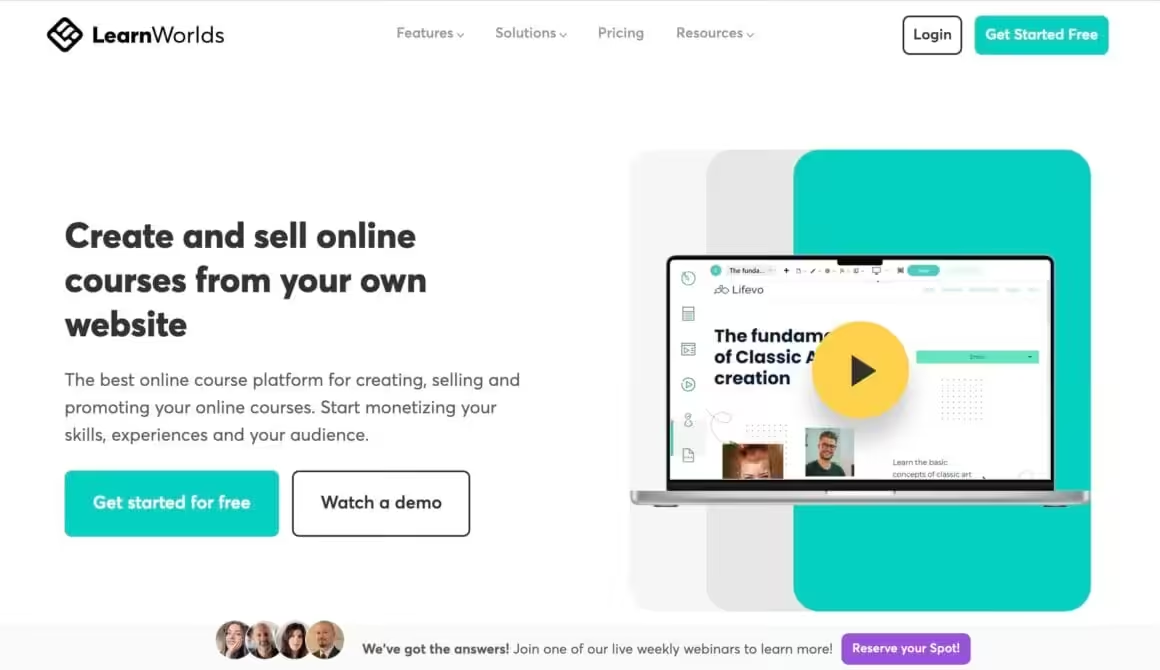
LearnWorlds is an online course platform built for interactive learning experiences. It handles everything from simple course creation and digital downloads to corporate training and customer education programs. What sets it apart from most competitors is SCORM compliance, built-in community features, and an AI Course Creator that actually works.
Here’s what LearnWorlds brings to the table:
- Intuitive course builder with AI-powered course creation wizard
- Interactive video editor with in-video questions, CTAs, and AI-generated subtitles
- Live sessions via Zoom and Webex integration
- SCORM compliance (rare at this price point)
- Assessment builder with AI-graded open-text assignments
- Built-in community with groups and social learning
- Drag-and-drop site builder with 50+ industry-specific templates
- White-label mobile app builder for iOS and Android
- Digital credentials via Accredible and Credly integrations
- Multiple sales channels: coupons, bundles, subscriptions, memberships
- In-depth reporting with AI-powered insights
Crafting Interactive Learning Experiences
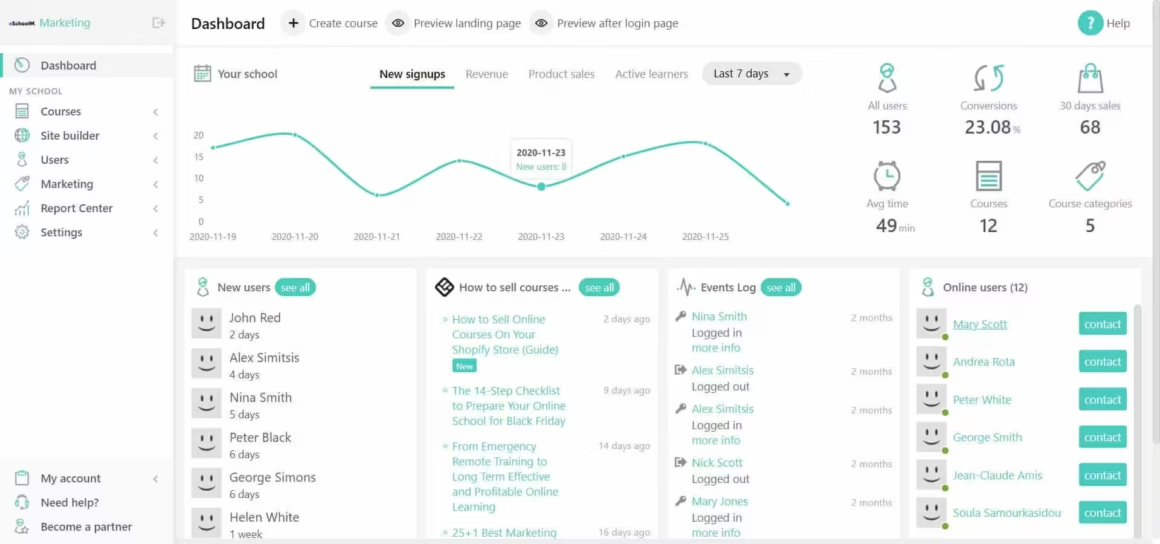
The course builder is where LearnWorlds really shines. It uses a step-by-step wizard that walks you through the entire course creation process, and I was genuinely impressed by how many content types it supports. You’re not limited to “upload a video and write some text.” You get interactive video, eBooks, assessments, multimedia, live sessions, and SCORM files, all in one builder.
One feature I didn’t expect: you can copy-paste entire learning activities or sections from one course to another. If you’re building multiple courses, that’s a significant time-saver.
Also see: 7 Best Thinkific Alternatives to Create an Online Course in 2026
Here’s what I found inside the Course Builder:
Interactive Video
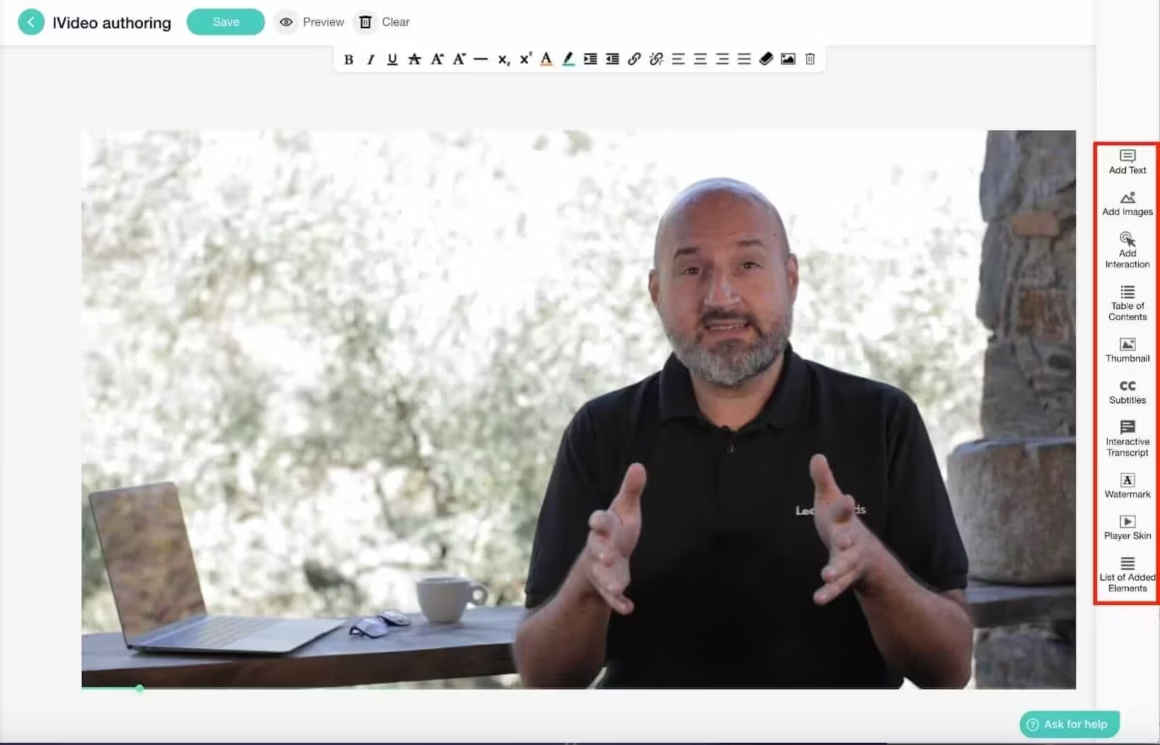
This is LearnWorlds’ standout feature. You can add buttons, pop-up questions, and clickable links directly inside your videos. Want to show a special offer midway through a lesson? Drop it right into the video timeline. The AI assistant now helps generate in-video questions and translates subtitles automatically, which saves hours of manual work.
Other enhancements include images, text overlays, thumbnails, watermarks, transcripts, and subtitles. It’s the most complete interactive video editor I’ve seen on any course platform at this price range.
Interactive eBooks
Import a Word file or create an eBook from scratch. You can embed audio and video directly into the eBook, and learners can highlight text, add notes, and mark important stuff with stars. The AI assistant can now turn prompts into structured chapters, bullet points, and summaries, which makes creating eBooks significantly faster.
Multimedia Content
Beyond video and eBooks, LearnWorlds supports PDF files, audio learning activities, YouTube embeds, and Soundcloud integration. You get enough variety to keep learners engaged without needing third-party tools.
Assessments, Exams, and Surveys
The assessment options go deeper than I expected. Multiple-choice, true/false, text and file assignments, video assignments, self-reflection journals, and survey forms. The AI can now auto-generate quiz questions and grade open-text assignments, which saves a huge amount of time for course creators managing large cohorts.
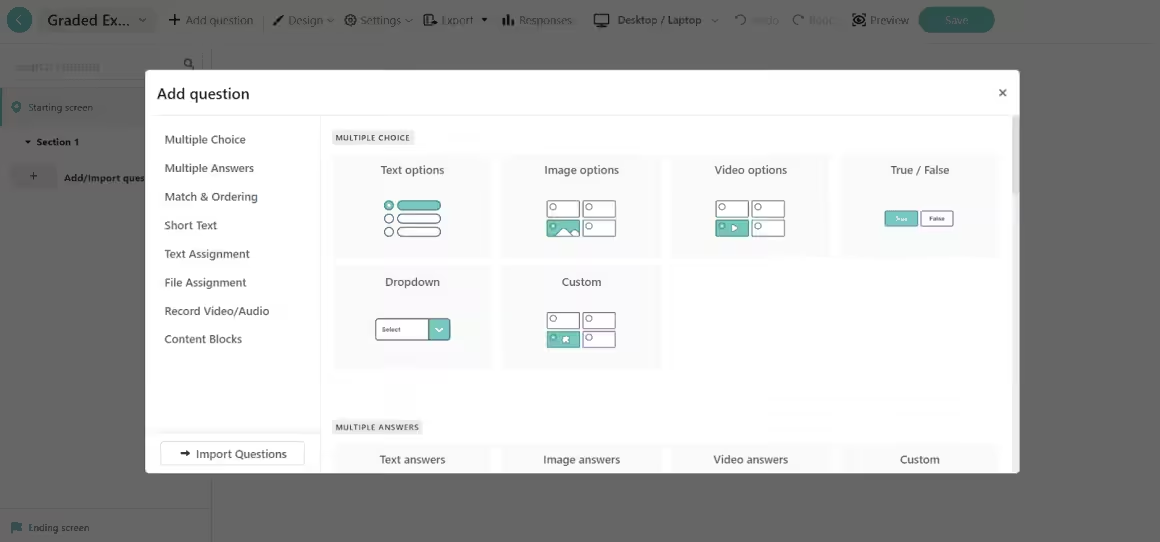
The self-assessment feature deserves special mention. LearnWorlds gives you options for non-graded assessments: learners can write in reflection journals, submit video or audio assignments, and receive personalized feedback. That personal touch is something most online learning environments miss completely.
Live Sessions
LearnWorlds integrates with Zoom and Webex for real-time one-on-one or group sessions. The Calendly integration lets learners schedule sessions on their own, which is a game-changer for coaches and consultants who don’t want to play email tag with 50 students.
Certificate Builder and Digital Credentials
You can issue Certificates of Knowledge or Completion to reward learners. But LearnWorlds went further in late 2024 by integrating with Accredible and Credly for verifiable digital credentials. Your learners can share their certifications on LinkedIn and other platforms with verification built in. That’s a serious upgrade over a simple PDF certificate.
SCORM Files
Unlike most competitors at this price point, LearnWorlds is SCORM-compliant. If you’re working with corporate training content or need to import courses from other LMS platforms, this matters. Most platforms either don’t support SCORM or charge significantly more for it.
Beyond all this, the Course Builder lets you:
- Customize the course player’s look and feel
- Drip-feed content to control learning pace
- Set Course Completion rules
- Offer part of your course as a free preview
AI-Powered Course Creation
This is what changed my perspective on LearnWorlds in 2024. The AI Course Creator doesn’t just generate text. It helps you plan your entire course structure, suggests content for each section, generates quiz questions, translates subtitles, and even creates eBook chapters from prompts.
Here’s what the AI assistant handles:
- Course outlines: Generate titles, descriptions, and full section structures as a starting point
- Assessment questions: Auto-generate multiple-choice, true/false, and open-ended questions from your content
- AI grading: Grade open-text assignments and simulate AI dialogue for practice scenarios
- Video enhancements: Create summaries, tables of contents, and translate subtitles for interactive videos
- eBook creation: Turn prompts into structured chapters with bullet points and summaries
- Marketing copy: Draft email campaigns and social media posts for course promotion
- AI Insights: Automated learner analytics that surface actionable data without manual report building
Look, I’m usually skeptical of “AI-powered” features. Most platforms just wrap a ChatGPT API call and call it innovation. LearnWorlds’ AI is more tightly integrated into the actual workflow. You’re not copying and pasting from a chatbot. The suggestions appear exactly where you need them, in the course builder, in the assessment editor, in the video tooling.
Building Your Online Academy

Creating individual courses is only part of the equation. LearnWorlds lets you build a complete online academy, a fully white-labeled learning hub with your branding, your domain, your online community, and your rules.
Site Builder
The site builder caught me off guard. Over 50 templates designed for specific industries: coaching, customer education, NGOs, healthcare, and more. The “Site Flavors” feature lets you create an alternative version of your entire website to test new designs without risking your live site. That’s something even most dedicated website builders don’t offer.
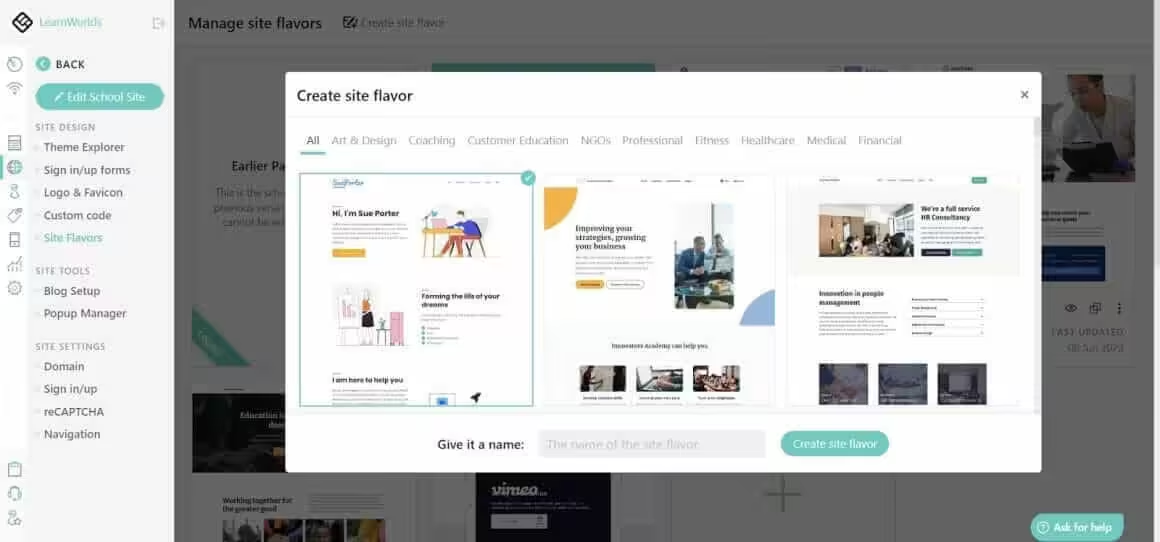
You get popups, countdown timers, social media integration, and full HTML/CSS/JavaScript access for custom work. Security is solid too: encrypted data storage, isolated databases, password requirements, and reCAPTCHA.
Mobile App Builder
LearnWorlds lets you build native, white-labeled mobile apps for iOS and Android with zero code. This got a significant upgrade in early 2025 with improved design flexibility, new widgets, smarter offline learning controls, and faster access for learners to join live sessions directly through native Zoom or Microsoft Teams apps. If mobile learning matters to your audience (and it should), this feature alone justifies the platform.
Built-in Community
The community features turn your course into more than just a content library. Learners can share posts, run polls, upload images, follow each other, and comment. You can create groups beyond the automatic Course Discussion groups, and add a Daily News Section fed by RSS.
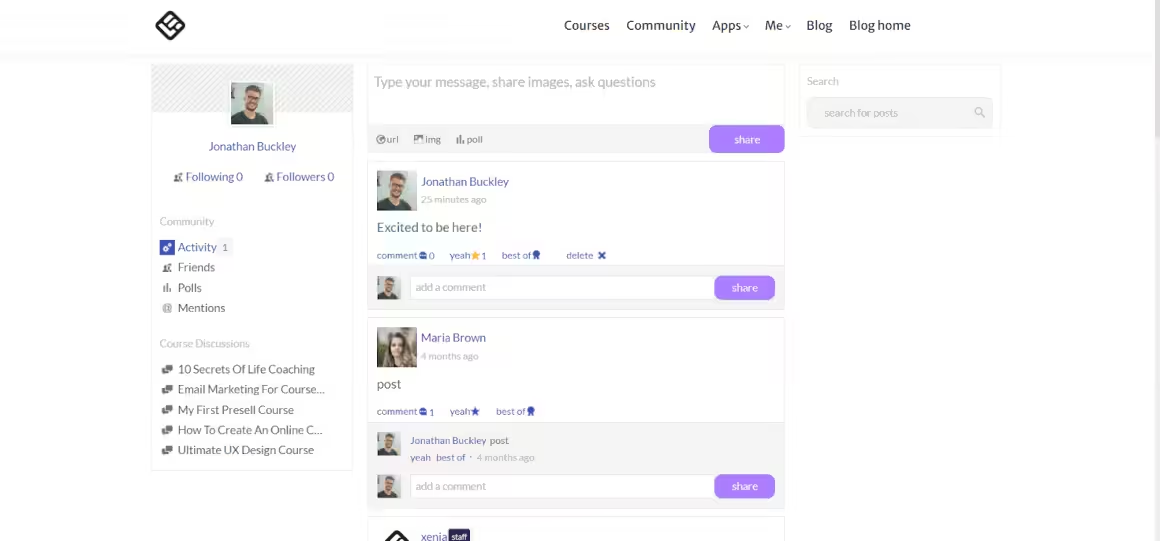
Social learning transforms online education from a lonely experience into something that actually keeps people coming back. I’ve seen completion rates jump significantly on courses with active community features versus those without.
Marketing & Selling Your Courses
LearnWorlds’ marketing and sales tools are above what most online course platforms offer. You’re not stuck with a basic checkout page and hoping for the best.
Coupons & Bundles
Create discount coupons with expiration dates (urgency works) and bundle complementary courses into packages. Simple, effective, and something I always recommend course creators use from day one.
Subscriptions & Memberships
Recurring revenue through memberships is one of the most sustainable business models for course creators. LearnWorlds supports both subscriptions and memberships with community features that create genuine belonging. If you can commit to regular live events and new content, this model builds loyalty that one-time purchases can’t match.
Multiple Seats
This is LearnWorlds’ B2B play. Your customers can purchase multiple course seats for their teams and manage user groups themselves. If you’re selling to businesses or organizations, this feature is essential.
Affiliate Marketing
Set up an affiliate program and let others promote your courses. You set the commission rate, LearnWorlds handles the tracking. It’s a proven way to scale without increasing your marketing budget.
SEO Settings
LearnWorlds covers the SEO basics: title tags, meta descriptions, and keyword settings. It won’t replace a dedicated SEO strategy, but it gives your course pages a fighting chance in Google.
NPS Surveys and Qualification Questions
Net Promoter Score surveys and editable Qualification Forms let you collect real feedback directly from your learners. Are they satisfied enough to recommend you? What do they love? What frustrates them? You can customize the appearance and questions to fit your brand.
Email Marketing Integrations
LearnWorlds doesn’t have built-in email marketing, but it integrates with eight major platforms: Mailchimp, ActiveCampaign, AWeber, ConvertKit, GetResponse, Constant Contact, MailerLite, and Moosend. You can keep using whatever email tool you already have.
Multiple Payment Gateways
Losing customers because their preferred payment method isn’t available is frustrating and avoidable. LearnWorlds connects with Stripe, PayPal, Shopify, and PagSeguro, plus mobile payments through Apple Pay and Google Pay for frictionless checkout.
Flexible Payment Plans
LearnWorlds supports Klarna and Afterpay/Clearpay for Buy Now/Pay Later, plus custom installment plans. Two extras I appreciate: Sandbox Mode for test purchases before going live, and Quaderno integration for automated sales tax management.
Measure Everything
Sales analytics, conversion pixels, and Google Tag Manager integration. You can track exactly where your best results come from and optimize accordingly.
The combination of native payment flexibility, built-in affiliate marketing, and BNPL support makes LearnWorlds one of the most sales-ready course platforms I’ve used.
Report Center
The Report Center is where LearnWorlds quietly outperforms most competitors. The reporting depth is seriously impressive, and the AI-powered insights now surface actionable data without you having to build reports manually.
User Progress Report
Track completion rates, average scores, progress status, and time spent on each learning activity. All the metrics you need to identify what’s working and what isn’t.
User Segments Report
Identify learners who match specific criteria, a critical tool for spotting students about to drop out or fail. Both User Progress and User Segments reports can be scheduled for automatic delivery and exported. The Training and Activity Matrix (added in late 2024) visualizes learner progress at a glance.
Course Insights
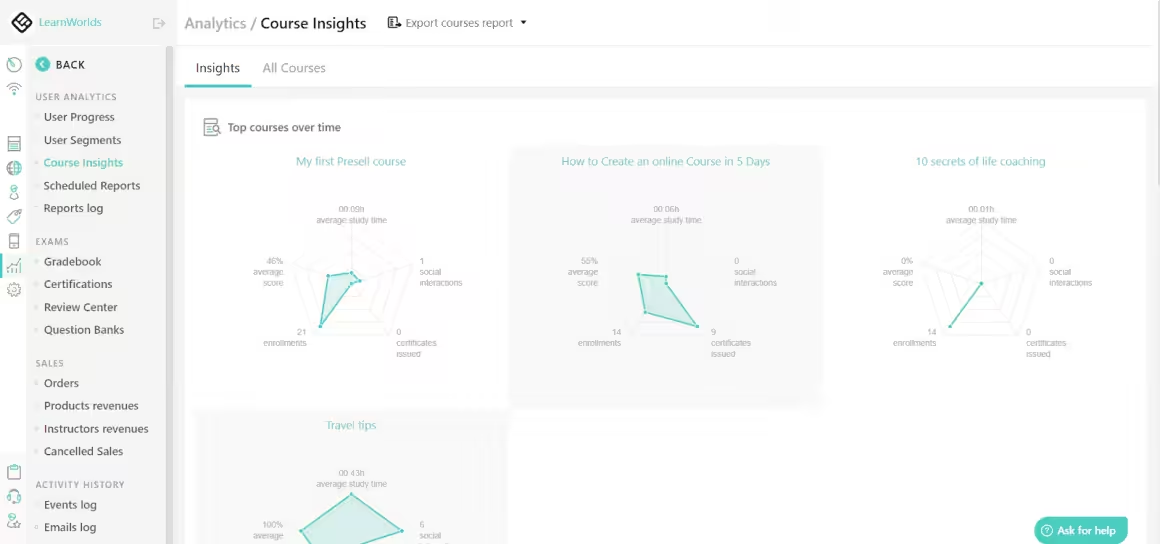
This is the reporting feature I keep coming back to. Course Insights shows average scores, social interactions, your most popular and most dropped-out courses, performance trends over time, and per-activity breakdowns. The data visualization makes it genuinely useful rather than overwhelming.
LearnWorlds Pricing
LearnWorlds is competitively priced for what it offers. Here’s the current breakdown:
- Starter — $29/mo ($24/mo billed annually) — includes $5/sale transaction fee
- Pro Trainer — $99/mo ($79/mo billed annually) — no transaction fees, most popular plan
- Learning Center — $299/mo ($249/mo billed annually) — full white-label, unlimited admins
- High Volume / Enterprise — Custom pricing for large organizations
All plans include a 30-day free trial with no credit card required. My recommendation? Start with the free trial, and if you’re serious about course creation, go directly to the Pro Trainer plan. The Starter plan’s $5 per-sale fee adds up quickly once you start generating revenue.
- AI Course Creator with auto-generated quizzes and content
- Interactive video editor with in-video CTAs and questions
- SCORM compliance included on all plans
- White-label mobile app builder (iOS + Android)
- Built-in community with groups and social learning
- Digital credentials via Accredible and Credly
LearnWorlds Pros and Cons
After spending considerable time with the platform, here’s my honest assessment:
Pros
- AI Course Creator genuinely speeds up content development
- Best interactive video editor at this price point
- SCORM compliance included (rare for under $100/mo)
- White-label mobile app builder with zero coding
- Built-in community creates genuine learner engagement
- Digital credentials via Accredible and Credly
- Generous 30-day free trial, no credit card
- 50+ industry-specific site templates
- Comprehensive reporting with AI-powered insights
Cons
- Starter plan charges $5 per sale transaction fee
- No built-in email marketing (relies on integrations)
- Learning curve for advanced site builder customization
- Mobile app builder only available on higher-tier plans
Final Verdict
LearnWorlds earns its reputation as one of the most complete online course platforms available. The interactive video tools, AI course creation, SCORM compliance, and built-in community features put it ahead of most competitors, and the pricing is reasonable for what you get.
If you’re building your first course, the 30-day free trial gives you enough time to explore everything without commitment. If you’re migrating from Thinkific, Teachable, or another platform, LearnWorlds’ interactive features and AI tools make it worth the switch.
Skip the Starter plan if you plan to sell courses seriously. The $5 per-sale fee eats into your margins fast. Go directly to Pro Trainer at $79/mo (annual) and scale from there.
Start your free 30-day LearnWorlds trial here →
Frequently Asked Questions
Is LearnWorlds worth it in 2026?
Yes. LearnWorlds offers one of the most feature-complete course platforms available, with interactive video, AI course creation, SCORM compliance, and a built-in community. The Pro Trainer plan at $79/mo (annual) eliminates transaction fees and gives you everything you need to build and sell courses professionally.
How much does LearnWorlds cost?
LearnWorlds starts at $24/mo (Starter, billed annually) with a $5 per-sale transaction fee. The Pro Trainer plan costs $79/mo (annual) with no transaction fees. The Learning Center plan costs $249/mo (annual) with unlimited admins and full white-labeling. All plans include a 30-day free trial with no credit card required.
Does LearnWorlds have AI features?
Yes. LearnWorlds includes an AI Course Creator that generates course outlines, quiz questions, eBook chapters, video subtitles, and marketing copy. The AI can also grade open-text assignments and provide learner analytics through AI Insights. These features are integrated directly into the course builder workflow.
Is LearnWorlds better than Teachable or Thinkific?
LearnWorlds has stronger interactive video tools, SCORM compliance, and a built-in community, which Teachable and Thinkific lack at comparable price points. However, Teachable is simpler to set up for basic courses, and Thinkific offers a free plan. Choose LearnWorlds if interactivity and engagement features matter most to your courses.
Can I create a mobile app with LearnWorlds?
Yes. LearnWorlds includes a no-code mobile app builder that creates native, white-labeled apps for iOS and Android. The mobile experience was significantly upgraded in early 2025 with improved design flexibility, offline learning controls, and direct integration with Zoom and Microsoft Teams for live sessions.
Does LearnWorlds support SCORM?
Yes. LearnWorlds is fully SCORM-compliant, which is rare among course platforms at this price point. You can import SCORM packages from other LMS platforms and track learner progress through the standard SCORM reporting framework.
Disclaimer: This site is reader-supported. If you buy through some links, I may earn a small commission at no extra cost to you. I only recommend tools I trust and would use myself. Your support helps keep gauravtiwari.org free and focused on real-world advice. Thanks. - Gaurav Tiwari