
How Brands Use Data to Inform Their Marketing and Attract Customers?
Most small business owners I talk to collect data but don’t use it. They’ve got Google Analytics installed, an email list running, and social accounts posting. But when I ask “what did your data tell you this month?”, I get blank stares. The gap isn’t in collection. It’s in action. I’ve spent years helping businesses turn raw numbers into marketing decisions that actually move revenue. And the shift to first-party data after cookie deprecation has made this skill more important than ever. Here’s how to build a marketing operation that runs on data you own, using tools that won’t break a small business budget.
The Data That Matters for Small Businesses
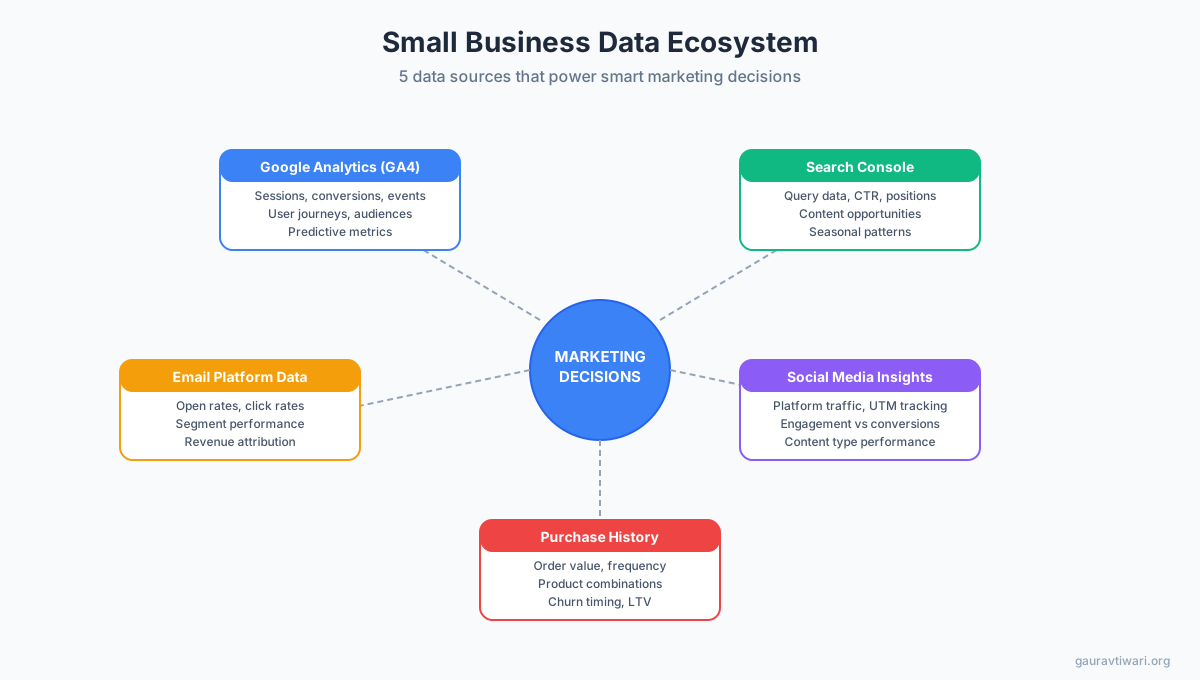
GA4 events, email open rates, Search Console clicks, social engagement, and purchase history. Those five sources give you 90% of what you need to make smart marketing calls. You don’t need a data warehouse or a $50,000/year analytics platform.
The problem is that most small businesses treat these as separate islands. Your email tool doesn’t talk to your analytics. Your social data sits in a dashboard you check once a month. And Search Console? That gets opened during a panic when traffic drops.
I run five data sources for my own sites, and each one answers a different question:
- GA4: Who’s visiting, what pages they see, how long they stay, and what they click
- Google Search Console: What queries bring people to you and which pages rank for what
- Email platform data: Open rates, click rates, unsubscribe patterns, and segment performance
- Social media insights: Which platforms send actual traffic (not just likes)
- Customer purchase history: What people buy, how often, and what they buy together
When you connect these dots, you stop guessing. You know that your Tuesday emails outperform Friday ones by 23%. You know that your “how to” posts bring 4x more Search Console clicks than your opinion pieces. You know that Instagram drives engagement but LinkedIn drives actual conversions that show up in your KPIs.
First-Party Data Strategy: Your Most Valuable Marketing Asset
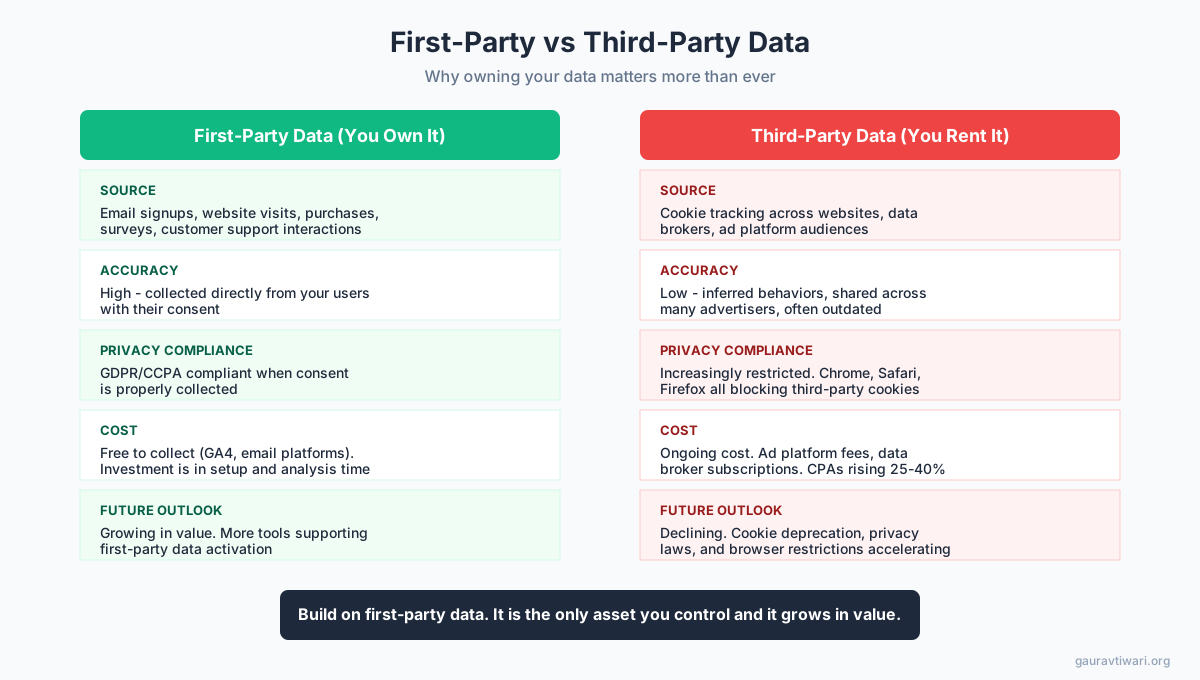
First-party data is information you collect directly from your audience, with their consent. Your email list, website behavior logs, customer database, and survey responses all count. This data is now more valuable than anything you could buy from a third-party broker.
The reason is simple: third-party cookies are dying. Google Chrome started restricting them in 2026, Safari and Firefox blocked them years ago, and ad platforms like Meta and Google Ads now perform worse when they can’t track users across sites. The businesses that built their marketing on rented data are scrambling. The ones who invested in first-party data barely noticed the change.
I’ve watched this play out across client projects. The sites with strong email lists and loyal repeat visitors kept growing. The ones relying on retargeting ads saw their cost-per-acquisition jump 30-60% over 18 months.
Your first-party data strategy needs three pillars:
Email List as Your Data Foundation
Every email subscriber gives you permission to track opens, clicks, purchases, and engagement over time. A list of 2,000 engaged subscribers is worth more than 50,000 social followers because you own the relationship. The platform can’t throttle your reach or change an algorithm overnight.
I segment my email list by behavior, not demographics. Someone who clicked three product links in the last month gets different content than someone who only reads tutorials. The behavioral segments convert 3-5x better than demographic ones in my testing.
Website Behavior Data Through GA4
GA4’s event-based model lets you track exactly what visitors do. Not just page views, but scroll depth, button clicks, video plays, form submissions, and file downloads. I set up custom events for every meaningful action on a site: newsletter signups, pricing page visits, contact form starts (even if they don’t submit), and outbound clicks to affiliate links.
This data tells you where people get stuck, what content drives action, and which traffic sources bring visitors who actually do something. A page with 10,000 visits and zero conversions isn’t a success. It’s a problem to fix.
Customer Database and Purchase History
If you sell anything, your transaction records are gold. Average order value, purchase frequency, product combinations, and churn timing all live in your payment processor or CRM. I’ve helped WooCommerce stores increase repeat purchase rates by 18% just by sending a targeted email 21 days after the first purchase (the exact timing came from analyzing their purchase interval data).
GA4 for Marketing Decisions: Beyond Page Views
GA4 replaced Universal Analytics, and most people still use it like UA. They check sessions, bounce rate, and top pages. That’s maybe 10% of what GA4 can do for your marketing.
The features that changed how I make decisions:
Custom audiences based on behavior. I create audiences like “visited pricing page but didn’t convert in 7 days” or “read 3+ blog posts in one session.” These audiences sync directly to Google Ads for targeted campaigns. The cost per click drops because you’re targeting people who already showed interest.
Path exploration reports. These show the actual sequence of pages people visit before converting. I discovered that one client’s users who visited the FAQ page before the pricing page converted 2.4x more often. So we added an FAQ link to every product page. Conversions went up 15% in the first month.
Predictive metrics. GA4 can predict purchase probability and churn probability for your users. For sites with enough data (at least 1,000 monthly purchasers), these predictions let you target high-value users before they leave.
Event-based funnels. Instead of tracking page-to-page funnels, you track action-to-action funnels. “Clicked CTA” to “started form” to “submitted form” to “completed purchase.” Each step shows you exactly where people drop off, and the percentages tell you which step needs work first.
For keyword and competitive research alongside GA4, I use Semrush to cross-reference which queries drive traffic with which content actually converts. GA4 shows behavior on your site. Semrush shows the competitive picture around it. Together, they paint a complete picture of what to write and how to rank.

- Keyword research with search volume, difficulty, and CPC data
- Site audit catches 140+ technical SEO issues automatically
- Position tracking for your target keywords across Google, Bing, and Baidu
- Content marketing toolkit with topic research and SEO writing assistant
- Competitive analysis shows your rivals' top pages and backlink sources
Email Data for Smarter Marketing
Your email platform knows more about your audience than any other tool. Open rates tell you if your subject lines work. Click rates show what content interests people. Unsubscribe patterns reveal when you’re annoying your list. And purchase data tied to email campaigns shows real ROI, not vanity metrics.
Three email data strategies that work for small businesses:
Behavioral Segmentation
Stop segmenting by “interests they checked on a signup form.” People lie on forms. They don’t lie with clicks. Segment by what people actually do: links they click, products they view, emails they open, and pages they visit through email links.
I run four behavioral segments on every list I manage: active buyers (purchased in last 90 days), window shoppers (click links but don’t buy), content readers (open emails, rarely click), and going cold (haven’t opened in 60+ days). Each segment gets different content, different frequency, and different calls to action.
A/B Testing with Real Sample Sizes
Most small business A/B tests are statistically meaningless. Testing two subject lines on a list of 500 doesn’t prove anything. You need at least 1,000 opens per variant for a reliable result, which means you need a list of roughly 5,000+ (assuming 20% open rate).
If your list is smaller, test bigger changes. Don’t A/B test “Free Guide” vs “Free eBook” in the subject. Test a question subject line against a number-based one. Test plain text emails against designed ones. The bigger the difference, the smaller the sample size you need to see a real effect. I’ve written about correlation vs causation in testing, and the same principles apply to email.
Send Time Analysis
Every email platform now offers send-time optimization. But their algorithms need data to work. For lists under 5,000, I pick two time slots, test them for 4 weeks, and go with the winner. For my own newsletters, Tuesday 10am IST consistently beats everything else. Your audience will be different, and the only way to find out is to test for at least a month.
Social Media Data: Which Platforms Drive Conversions
Social media analytics are the most misleading data source in marketing. Likes, shares, and follower counts feel good but they don’t pay bills. The only social metric that matters for a small business is: how many people clicked through to your site, and what did they do when they got there?
I track this with UTM parameters on every social link. Every post, every bio link, every story link gets tagged. In GA4, I can then see that LinkedIn sent 342 visitors last month with a 4.2% conversion rate, while Instagram sent 1,200 visitors with a 0.3% conversion rate. LinkedIn wins, even with fewer visitors.
The social platforms themselves show you:
- Reach vs. engagement rate: High reach with low engagement means your content gets shown but doesn’t connect
- Follower growth rate: A sudden spike usually means one viral post. Steady growth means consistent value
- Content type performance: On LinkedIn, my text posts with a single image outperform carousel posts by 2x in clicks. On X, threads outperform single tweets by 5x in profile visits
- Best posting times: Built-in analytics show when your audience is active. For me, LinkedIn performs best between 8-10am on weekdays, X peaks around 1pm
I use Monday.com to track social content performance in a board alongside my content calendar. Each post gets a row with the platform, content type, link clicks, and conversion result. After 3 months of data, patterns jump out that you’d never see in individual platform dashboards.
The Cookie Deprecation Impact: What’s Changing and How to Prepare
Third-party cookies tracked users across websites. They powered retargeting ads, cross-site analytics, and audience building on ad platforms. With Chrome joining Safari and Firefox in restricting them, the entire ad ecosystem is shifting.
What this means for small businesses:
Retargeting ads cost more. Without cross-site tracking, platforms like Google Ads and Meta Ads have less data to work with. I’ve seen CPAs increase 25-40% for clients who relied heavily on retargeting. The fix? Build your own remarketing lists through email and first-party site data.
Attribution gets harder. Multi-touch attribution models that tracked a user across sites and sessions are breaking. GA4’s consent mode helps, but you’ll never get the same accuracy as the old Universal Analytics cookie setup. Accept that you’ll work with directional data, not exact numbers.
Server-side tagging becomes the new standard. Instead of loading tracking scripts in the browser (where they get blocked), server-side tagging sends data from your server. Google Tag Manager offers a server-side container. Setup costs $50-150/month for hosting, but it gives you more reliable data collection that respects user privacy.
Consent management is now required. GDPR in Europe, CCPA in California, and India’s DPDP Act all require explicit consent before tracking. A consent management platform like Cookiebot or Complianz handles this automatically. Without one, you risk fines and you lose data from visitors who would have consented if asked properly. I reviewed Cookiebot and it’s the simplest setup I’ve found for WordPress sites.
The shift from traditional SEO to GEO adds another layer. AI search engines don’t use cookies at all. They cite content based on quality signals. Your first-party data strategy and strong content work together here.
Data-Driven Content Decisions Using Search Console
Google Search Console is the most underused free tool in marketing. It shows you exactly what queries bring people to your site, which pages rank for those queries, your click-through rate, and your average position. That’s a content roadmap sitting right in front of you.
I use Search Console data to make four types of content decisions:
Find content to update. Filter by pages with impressions above 1,000 but CTR below 2%. These pages rank but people don’t click. The fix is usually a better title tag and meta description. I’ve seen CTR jump from 1.8% to 5.4% with a single title rewrite. That’s 3x more traffic from the same ranking. Learn more about finding and fixing content decay.
Discover new content opportunities. Check the Queries report for terms where your average position is 8-20. You’re showing up on page 1-2 but not in the top spots. Write a dedicated, better article targeting that exact query. I’ve turned page 2 rankings into position 3-5 rankings this way, which typically means 5-10x more clicks.
Identify cannibalization. When multiple pages rank for the same query, Google splits the ranking power. Search Console shows this clearly. If two pages target “best CRM for small business” and both hover at positions 12-15, consolidate them into one strong piece.
Track seasonal patterns. Compare performance year-over-year. Some queries spike in January (planning), others in Q4 (buying). Plan your content calendar around these patterns, not your own arbitrary schedule.
For deeper keyword research beyond what Search Console shows, I pair it with Semrush’s keyword magic tool. Search Console shows what you already rank for. Semrush shows what you could rank for.
Customer Surveys: Qualitative Data That Numbers Miss
Analytics tells you what people do. Surveys tell you why. And the “why” is where the real marketing insights hide.
I run three types of surveys for marketing data:
Post-purchase surveys (Google Forms, free). One question: “What almost stopped you from buying?” The answers reveal objections your marketing needs to address. I’ve collected responses from 400+ buyers across different projects, and the top three blockers are always: price uncertainty, unclear return policy, and not knowing what happens after purchase.
Content preference surveys (Typeform, from $25/month). Ask your email list what they want to read about. Don’t give them open-ended questions. Give them 8-10 options ranked by interest. The results often surprise you. My audience consistently picks “case studies with real numbers” over “how-to guides,” even though how-to guides get more search traffic.
NPS surveys (any tool, quarterly). Net Promoter Score gives you a single number: would your customers recommend you? More importantly, the follow-up question “why?” gives you quotes you can use in marketing copy. Real customer language beats anything a copywriter invents.
The statistics and data literacy basics I’ve written about before apply here. Sample size matters. Asking 10 people isn’t a survey, it’s a conversation. You need at least 50-100 responses for patterns to be reliable.
What data do you use most for marketing decisions?
Building Your Weekly Marketing Dashboard: 10 Numbers to Check
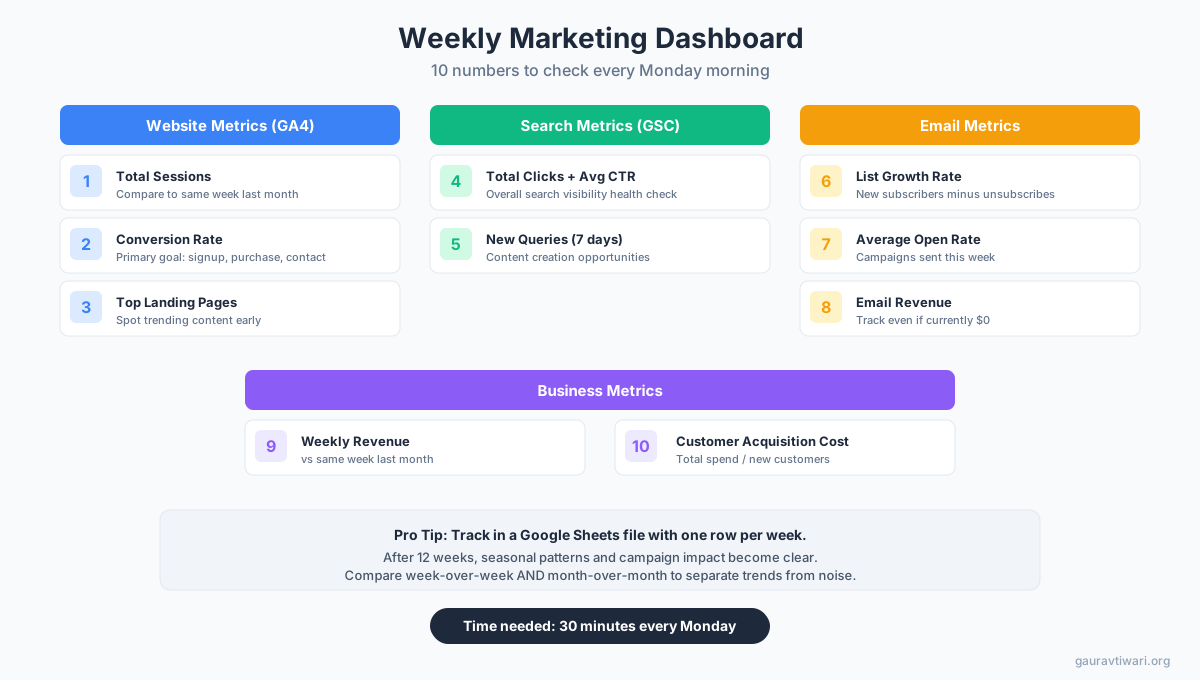
Checking data daily leads to panic over normal fluctuations. Checking monthly means you react too slowly. Weekly is the sweet spot for small businesses. Here are the 10 numbers I check every Monday morning.
Website metrics (from GA4):
- Total sessions, compared to same week last month (not last week, which has too much noise)
- Conversion rate for your primary goal (signup, purchase, contact form)
- Top landing pages by sessions, to spot trending content early
Search metrics (from Search Console):
- Total clicks and average CTR across all pages
- New queries appearing in the last 7 days (opportunities to create content)
Email metrics:
- List growth rate (new subscribers minus unsubscribes)
- Average open rate for campaigns sent that week
- Revenue attributed to email (even if it’s $0, track it)
Business metrics:
- Revenue this week vs same week last month
- Customer acquisition cost (total marketing spend / new customers)
I keep this in a simple Google Workspace spreadsheet with one row per week. After 12 weeks, you’ll see trends that no real-time dashboard can show you. Seasonal patterns, the impact of content campaigns, and the actual correlation between traffic and revenue become clear.

- Sheets for marketing dashboards with real-time data connections
- Gmail with custom domain for professional email marketing
- Drive for team collaboration on marketing assets and reports
- Meet for client calls and team standups
- Starts at Rs 136/user/month for Business Starter
Organizing Your Marketing Data With a Project System
Data without organization is noise. You need a system to collect findings, track experiments, and connect insights to actions. A spreadsheet works for the dashboard. But for managing the actual marketing tasks that come from data insights, you need something more structured.
I use Monday.com for this. Each marketing initiative gets a board with columns for: data source (what triggered this idea), hypothesis (what I expect to happen), action (what I’m doing), measurement (how I’ll know if it worked), and result (what actually happened).
This turns random data observations into a structured experimentation pipeline. Last quarter, I ran 8 data-informed experiments. Five worked, two were inconclusive, one failed. Without the system, those experiments would have been “I should try that sometime” thoughts that never happened.
Your content calendar should live in the same system. When Search Console shows a new query opportunity, it becomes a card. When email data reveals a high-performing topic, it spawns a blog post card. This is how you build a content marketing plan that’s based on evidence, not vibes.
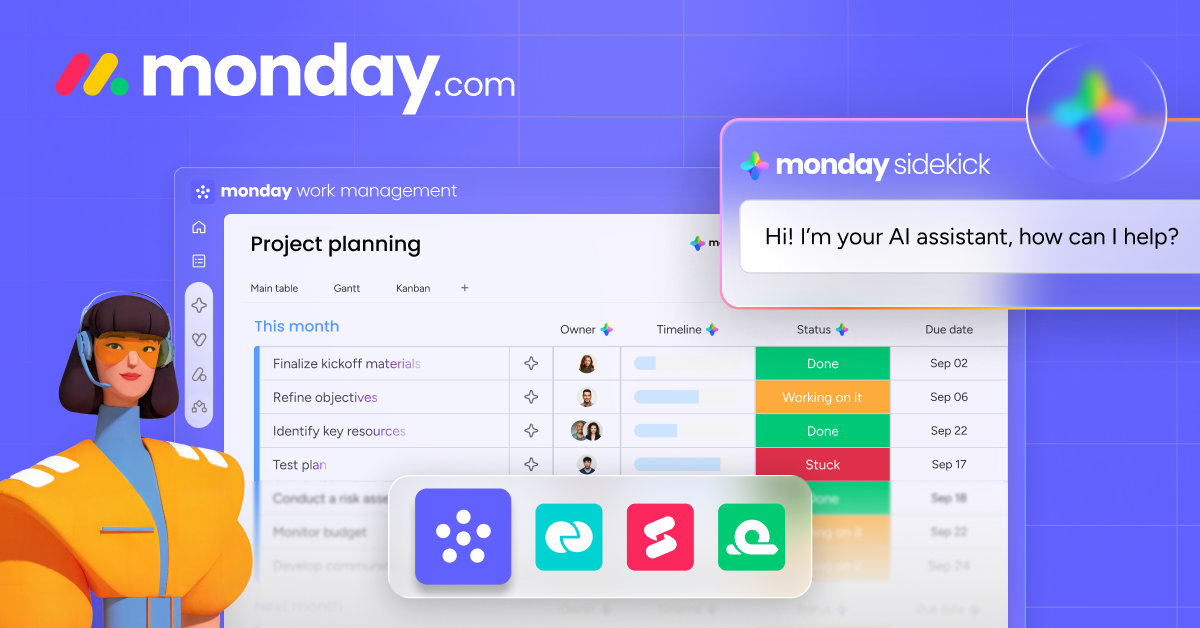
- Custom boards for content calendars, marketing experiments, and campaign tracking
- Automations that trigger actions based on status changes and dates
- Dashboard views that combine data from multiple boards
- Integrations with Google Analytics, Mailchimp, and 200+ tools
- Free plan for up to 2 users, paid plans from $9/seat/month
Privacy Compliance: GDPR, CCPA, and Cookie Consent
You can’t collect data without following privacy laws. And in 2026, there’s no excuse for ignoring this. GDPR (European Union), CCPA/CPRA (California), and DPDP (India) all require businesses to be transparent about data collection and give users control over their information.
For small businesses, here’s what you need:
A cookie consent banner. Not the dark-pattern kind that makes “Accept All” the only visible button. A real one that lets users choose what they consent to. Cookiebot handles this well for WordPress. It scans your site monthly, categorizes every cookie, and auto-blocks scripts until consent is given. Setup takes about 15 minutes.
A privacy policy that’s actually readable. Not a 4,000-word legal document. A clear page that says: what data you collect, why you collect it, who you share it with, and how people can delete their data. Most WordPress privacy policy generators create legally adequate but unreadable policies. I rewrite mine in plain English and have a lawyer review it once a year.
GA4 consent mode. This setting in Google Tag Manager adjusts how GA4 collects data based on user consent. Without consent, it collects anonymized, aggregated data. With consent, full tracking kicks in. You get usable analytics either way, but more accurate data when users opt in. Google reports that consent mode recovers about 70% of conversion data that would otherwise be lost.
Email double opt-in. Single opt-in is faster but double opt-in proves consent. For GDPR compliance, double opt-in is the safest choice. Yes, you’ll lose 15-20% of signups at the confirmation step. But your list quality goes up, deliverability improves, and you have a clear consent record if anyone ever asks.
Common Data Mistakes Small Businesses Make
I’ve audited marketing setups for dozens of small businesses. The same mistakes show up repeatedly.
Tracking everything, analyzing nothing. Having 47 GA4 events and never looking at the data is worse than having no analytics at all. It gives you a false sense of being “data-driven.” Pick 5-10 metrics that directly connect to revenue and ignore the rest.
Reacting to single data points. Traffic dropped 15% this week? Don’t panic. Check the week-over-week comparison for the last month. Check if it’s a seasonal pattern. Check if Google released an update. One week of data is noise, not a signal. I see business owners completely change their strategy based on one bad week, which is a recipe for chaos.
Ignoring the data you already have. I’ve watched a business owner pay $200/month for a social listening tool while ignoring the 2 years of Search Console data sitting untouched in their Google account. Free tools first. Paid tools only when you’ve maxed out what the free ones can tell you.
Measuring vanity metrics. Page views, social followers, email list size. These numbers feel good but don’t predict revenue. A list of 500 people who buy is worth more than a list of 50,000 people who don’t open your emails. Focus on conversion metrics: conversion rate, revenue per visitor, customer lifetime value, and cost per acquisition.
Not connecting online data to offline actions. If you run a local business, track how many website visitors call you, visit your store, or mention your website. Use unique phone numbers, discount codes, or “how did you hear about us” questions at checkout. Online data alone tells an incomplete story for businesses with offline revenue. If you’re creating a lot of content, make sure you’re measuring its full impact across channels.
Getting Started: Your First 30 Days
Don’t try to build an entire data infrastructure at once. Here’s the order I’d set things up for a small business starting from scratch.
Week 1: Install GA4 and Search Console. Both are free. Set up GA4 with enhanced measurement enabled (it auto-tracks scrolls, outbound clicks, file downloads, and video plays). Verify your site in Search Console. Set up a basic conversion event in GA4 (newsletter signup or contact form submission).
Week 2: Audit your email setup. Make sure your email platform tracks opens and clicks. Set up UTM parameters for email links so GA4 can attribute traffic correctly. Create at least two behavioral segments: engaged (opened 3+ emails in 30 days) and cold (no opens in 60+ days).
Week 3: Add cookie consent and privacy policy. Install Cookiebot or Complianz. Update your privacy policy. Turn on GA4 consent mode in Tag Manager. This step is boring but legally required and protects your data quality.
Week 4: Build your weekly dashboard. Create a Google Sheets file with the 10 metrics listed earlier. Fill in the first two rows manually. Set a recurring Monday reminder to update it. After 4-6 weeks, you’ll start seeing patterns that will inform your first data-driven marketing decision.
That’s the foundation. Everything else (social tracking, customer surveys, competitive analysis, advanced segmentation) builds on top of these four weeks. And once you have this foundation, every marketing dollar you spend gets smarter because you can measure what’s working.
Frequently Asked Questions
What is first-party data and why does it matter for small businesses?
First-party data is information you collect directly from your audience with their consent. This includes email subscriber data, website analytics, purchase history, and survey responses. It matters because third-party cookies are being deprecated across major browsers, making first-party data your most reliable source for marketing decisions. Unlike rented third-party data, you own and control first-party data completely.
How much does a data-driven marketing setup cost for a small business?
The foundation is free. GA4, Google Search Console, and Google Sheets cost nothing. A cookie consent tool like Cookiebot starts at $14/month. Email platforms like Mailchimp or ConvertKit start free for small lists. The total for a solid setup is $0-50/month for most small businesses. Premium tools like Semrush ($129.95/month) and Monday.com ($9/seat/month) add value but aren’t required to start.
How often should I check my marketing analytics?
Weekly is the sweet spot for most small businesses. Daily checking leads to overreacting to normal fluctuations. Monthly checking means you miss problems until they’ve compounded for weeks. Set a fixed day each week (Monday works well) to review your 10 key metrics. Compare week-over-week and month-over-month to separate real trends from random noise.
Do I need to comply with GDPR if my business is based in India?
Yes, if any of your website visitors or customers are in the EU. GDPR applies to processing data of EU residents regardless of where your business is located. India’s own Digital Personal Data Protection (DPDP) Act also requires consent-based data collection. If you serve a global audience through your website, complying with GDPR covers you for most other privacy regulations too.
What is the difference between GA4 and Universal Analytics?
GA4 uses an event-based data model instead of session-based. Every interaction (page view, click, scroll, purchase) is an event with parameters. GA4 also includes predictive metrics, cross-platform tracking, and built-in consent mode. Universal Analytics was retired in July 2023. If you haven’t switched yet, you’re not collecting any Google Analytics data at all.
Can I do data-driven marketing without technical skills?
Yes. GA4 and Search Console have user-friendly interfaces. Email platform analytics are built into the dashboard. The weekly spreadsheet approach described in this article requires no coding or advanced skills. You need about 30 minutes per week to check your numbers and maybe 2-3 hours for the initial setup. If you can use a spreadsheet, you can do data-driven marketing.
Disclaimer: This site is reader-supported. If you buy through some links, I may earn a small commission at no extra cost to you. I only recommend tools I trust and would use myself. Your support helps keep gauravtiwari.org free and focused on real-world advice. Thanks. - Gaurav Tiwari