
FlyingPress Review: I Ditched WP Rocket After 10 Years for This!
The world of WordPress optimization is crowded, opinionated, and, to be frank, confusing. Out of 18 plugins that I know, every plugin claims to be the fastest, the easiest, and the most innovative.
But here’s the thing: speed doesn’t lie. Neither does the real-world browsing experience.
FlyingPress isn’t just another cache plugin—it’s a well-crafted toolset (combined with FlyingCDN for maximum impact) designed for those who care about core web vitals, user experience, and scalability.
After using WP Rocket for nearly a decade (2014–2024) and seeing it fall behind in adaptability and customer centricity with increased prices, I switched to FlyingPress in November 2024. And boy, am I glad I did.
What is FlyingPress?
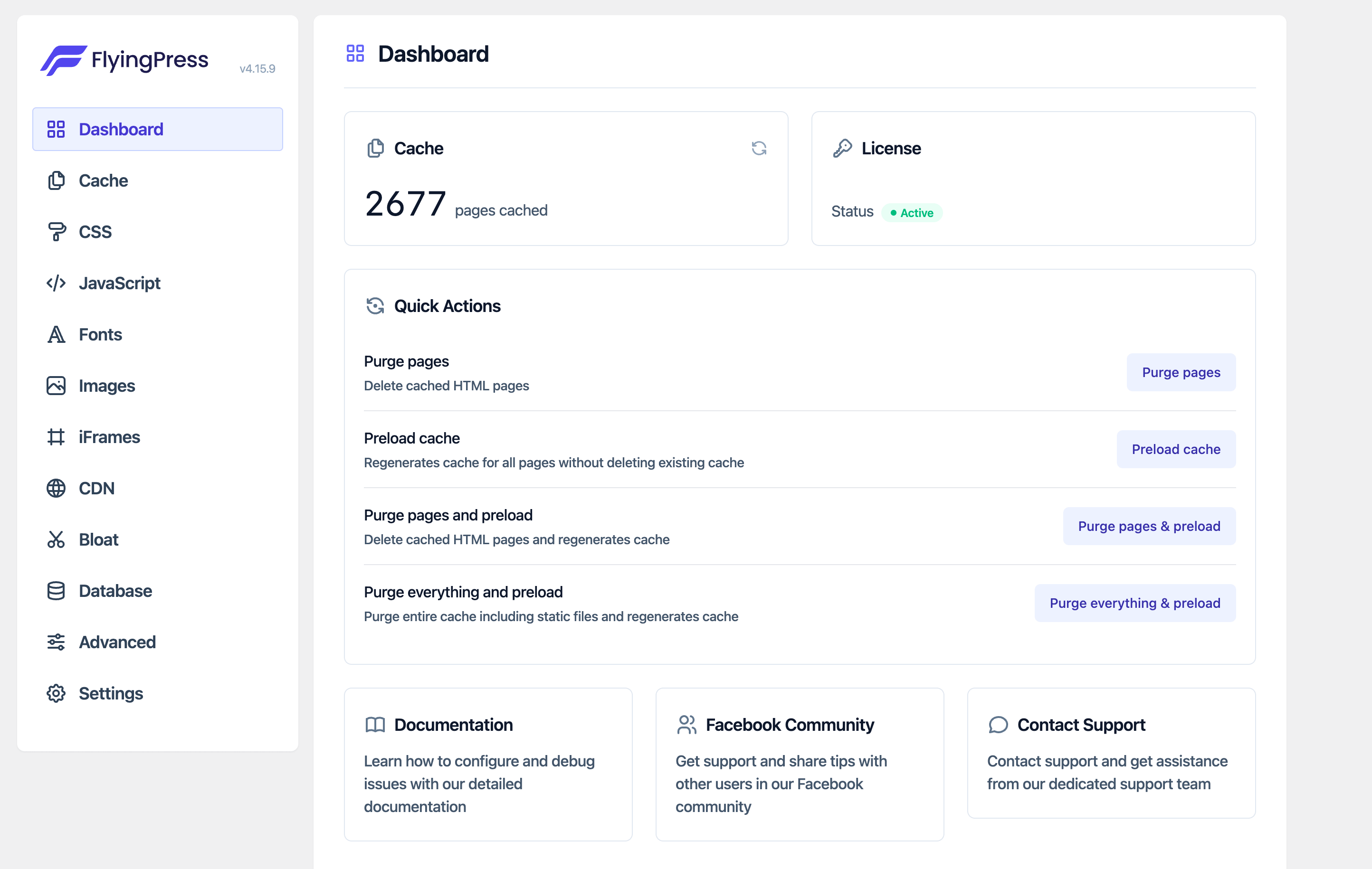
FlyingPress is a premium WordPress performance optimization plugin designed to make websites blazing fast, boost core web vitals, and provide a smoother experience for users and search engines alike. Unlike many plugins that rely on flashy gimmicks or unnecessary bloat, FlyingPress takes a streamlined, efficient approach to website optimization.
Whether you’re a blogger, small business owner, or developer managing large-scale websites, FlyingPress makes performance optimization accessible and effective.
Pricing
FlyingPress offers four pricing plans tailored to different user needs:
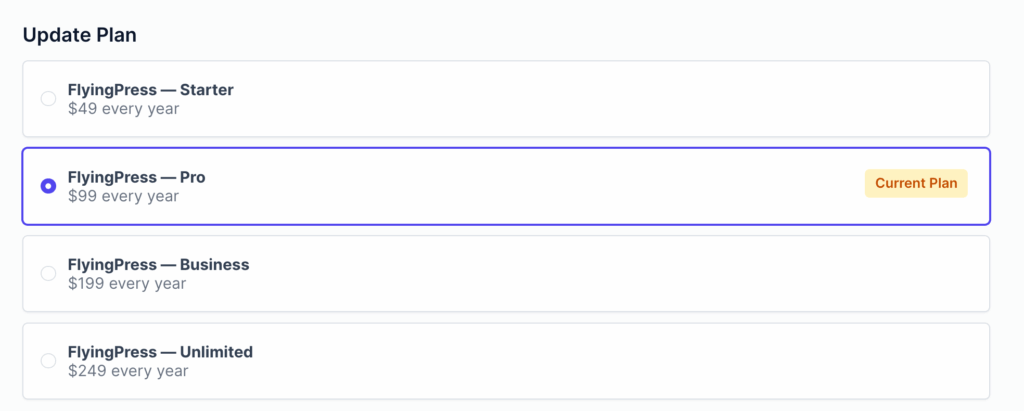
- Starter: $49/year for a single website, ideal for individuals or small blogs.
- Pro: $99/year for up to 3 websites, suited for freelancers or small agencies.
- Business: $199/year for up to 25 websites, perfect for larger agencies or businesses.
- Unlimited: $249/year for unlimited websites, designed for enterprises or developers managing many sites.
All plans include the same features like advanced caching, image optimization, and performance enhancements but only the number of websites where you can use the plugin differ.
Check FlyingPress pricing and Features →
What Makes FlyingPress Exceptional?
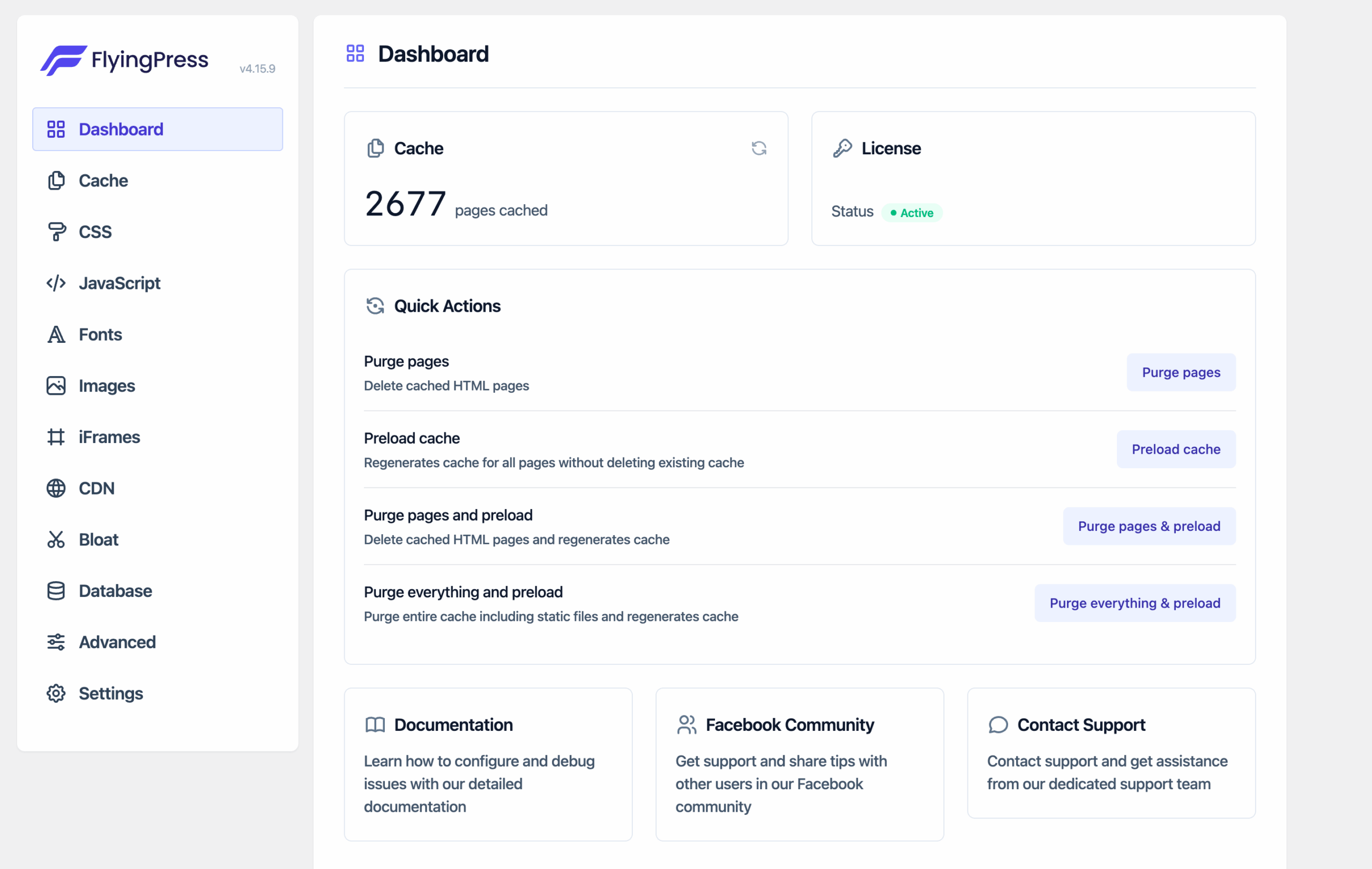
FlyingPress doesn’t rely on flashy marketing or trendy buzzwords to grab attention. It focuses on what really matters: delivering measurable, tangible, and impactful results for your website’s performance.
Here’s how FlyingPress is raising the bar for WordPress caching and optimization:
1. Unmatched Core Web Vitals Optimization
FlyingPress doesn’t just focus on scoring well on Google PageSpeed Insights—it optimizes for real-world browsing speed. It targets metrics like LCP, CLS, and FID with precision, thanks to features like:
- Faster CSS Optimization:
- The remove unused CSS functionality is miles ahead of WP Rocket. It’s well optimized and filewise, and rather than rendering the whole CSS at once, it removes unused CSS by file.
- Note: On this site, I’ve opted to use Perfmatters‘ “Remove Unused CSS” feature instead of FlyingPress. It’s not a matter of preference but simply because I’ve been using Perfmatters for this specific task for a long time. FlyingPress handles everything else seamlessly here. However, on my other websites, FlyingPress takes care of everything, including unused CSS, and does it brilliantly.
- Comprehensive Caching:
- FlyingPress generates static HTML versions of your pages to speed up load times.
- It includes options for page caching, preload caching, and more, ensuring your site serves the fastest version to every visitor.
- JavaScript Optimization:
- FlyingPress excels in JavaScript optimization by intelligently delaying unnecessary scripts, reducing render-blocking, and ensuring faster load times.
- Its advanced features minimize JavaScript execution, boost interactivity, and improve Core Web Vitals, making websites faster and more user-friendly.
- Lazy Loading for Everything:
- Images, iframes, and even background images are lazy-loaded for faster initial page loads.
- Unique features like Lazy Render HTML Elements help optimize slower parts of your page (e.g., comments or footers).
- Preloading Critical Images: FlyingPress detects images in the viewport and preloads them automatically. This saves you hours of manual effort.
- CDN Integration:
- Comes with FlyingCDN (optional at $5/month per website but highly recommended) for serving content lightning-fast globally. It integrates quickly using just an API key.
- Powered by Cloudflare Enterprise, it optimizes images, fonts, and other assets for better bandwidth efficiency and lower latency.
- Google Fonts Optimization: FlyingPress lets you self-host, combine, and preload Google Fonts effortlessly. Optionally, you can set fallback fonts for a native font experience.
- Smart Link Preloading: Anticipate user actions and improve bounce rate by preloading pages just before they click, boosting navigation speed.
- Database Cleanup & Automation: It helps you streamline your database with automated optimization and cleanup, ensuring peak performance with zero manual effort.
- Easy Setup:
- No advanced coding knowledge required. The interface is simple and beginner-friendly but powerful enough for advanced users.
All optimizations are centered around improving Largest Contentful Paint (LCP), First Input Delay (FID), and Cumulative Layout Shift (CLS), metrics that directly impact user experience and SEO.
FlyingPress leads the Chrome UX Report for Core Web Vitals, excelling in metrics like load speed, interactivity, and stability based on real-user data from the HTTP Archive.
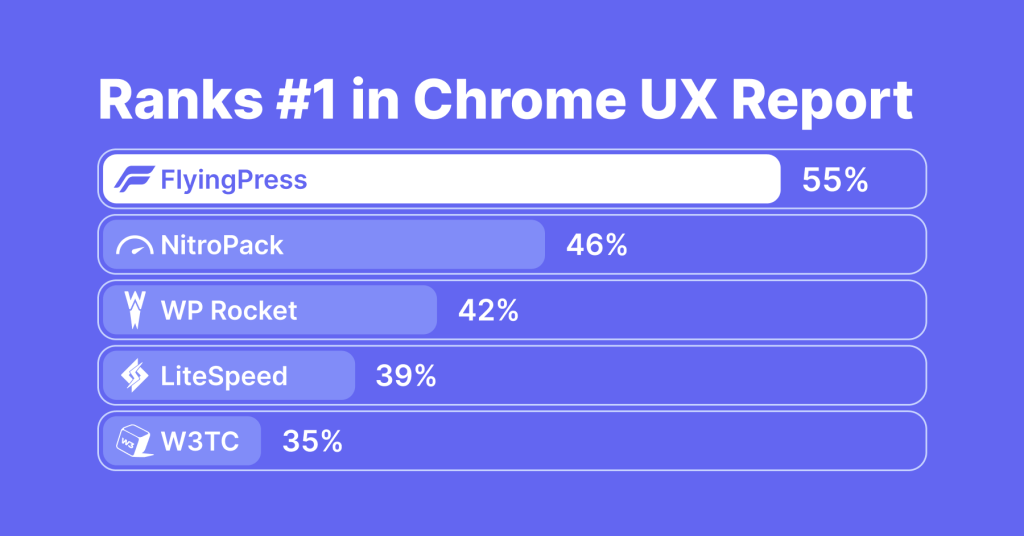
Unlike synthetic tests, FlyingPress focuses on improving actual user experiences, aligning with Google’s priorities for performance. Its top ranking reflects measurable, impactful results that benefit websites worldwide. With a commitment to pushing web performance boundaries, FlyingPress continues to deliver faster, smoother experiences for users. Full data insights are available on their website.
2. FlyingCDN: A Game-Changer
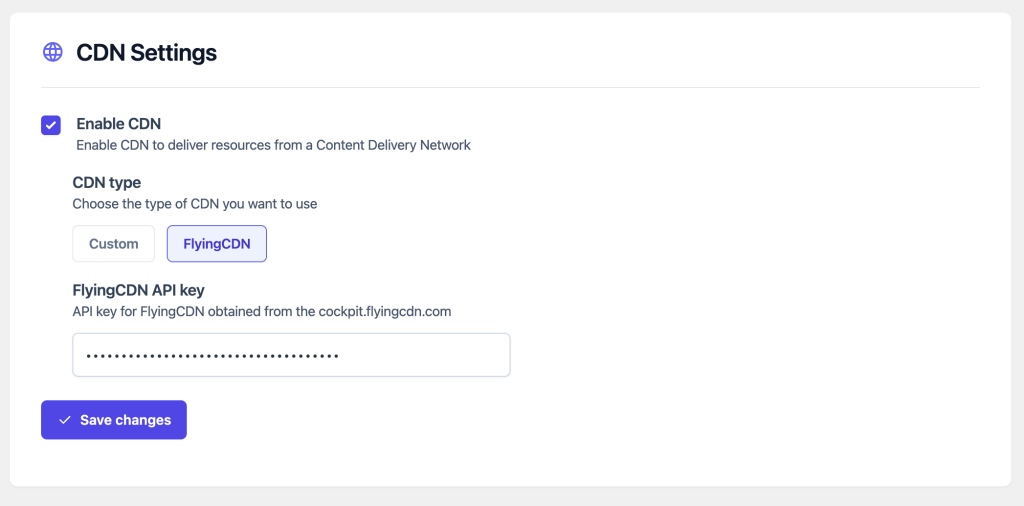
FlyingCDN leverages Cloudflare Enterprise for a level of performance that no other CDN can match. Here’s why FlyingCDN is great:
Key Features
- Edge Page Caching: Speeds up content delivery with cached HTML pages on over 310 edge locations globally.
- Image Optimization: Compresses and serves images in modern formats like WebP for faster loading.
- Global Coverage: Covers 120+ countries, ensuring low latency worldwide.
- Enhanced Security: Provides enterprise-grade DDoS protection and a strong firewall.
- WooCommerce Optimization: Efficiently caches cart pages for seamless shopping.
- Pricing: $5/site/month for 100GB bandwidth, with additional bandwidth at $5 per 100GB.
- Integration with FlyingPress: Works seamlessly with FlyingPress, optimizing caching settings automatically for maximum performance. Note that FlyingPress is required for FlyingCDN to work.
- Setup Process: Easy setup with a detailed guide, requiring DNS updates and API key input into FlyingPress settings.
FlyingCDN combined with FlyingPress ensures faster, secure, and optimized WordPress websites.
Why I Ditched WP Rocket After 10 Years
I’ve been a loyal WP Rocket user since 2014, back when it was the undisputed king of cache plugins. But in recent years, WP Rocket has struggled to keep up:
- Stagnant Innovation: WP Rocket’s feature set has barely evolved, focusing on SaaS based “plug-and-play” simplicity rather than meaningful performance upgrades.
- Sluggish Remove Unused CSS: WP Rocket inlines unused CSS, which often breaks websites and increases server load.
- Poor CDN Integration: Not that I was using it, RocketCDN is barebones compared to FlyingCDN, lacking HTML caching, geo-replication, and critical optimization features.
- Community Disconnect: WP Rocket’s roadmap feels detached from user feedback, with updates often causing compatibility issues.
- Sensless Pricing Increment: I hate products that don’t take existing users into account when increasing the prices. WP Rocket is too costly now for the features it offers. It now starts at $59 per year (from $39 a couple of years ago.) I understand that pricing changes are time-based but their pricing increment correlated with their recent acquisition. Also, I don’t think they had any ideas about grandfathering the prices.
- Adware: Even as a paying WP Rocket user, I couldn’t help but notice constant promotions for their other plugins right in my WordPress dashboard. Every time I accessed the “Add New Plugin” section, there were hooks for their brands like Imagify, Rank Math, BackWPup, and Termly. On top of that, RocketCDN was heavily promoted directly within the WP Rocket settings. It felt more like a marketing showcase than a seamless experience.
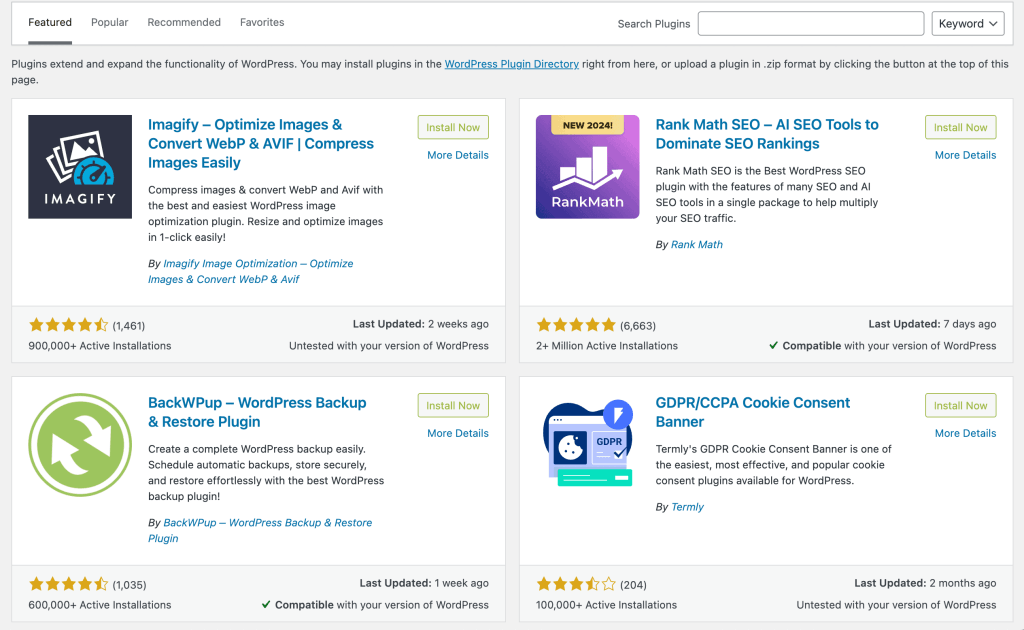
Switching to FlyingPress felt a fresh breath. It’s faster, smarter, and more reliable, and above all, it doesn’t force-sell you anything.
FlyingPress Features That Stood Out For me
- FlyingCDN Above All: Not the core plugin feature, but the FlyingCDN add-on has been a steal deal at just $5 per month. The rankings have improved a lot due to this, and that makes it the most important feature for which I’d use FlyingPress.
- Smart Caching: FlyingPress’ cache is very fast and modular. There are options to load and preload caches per page, without scripts & assets, and with scripts & assets.
- Lazy Render HTML Elements: This lets you lazy load elements like footers and comment sections, something WP Rocket had too but that came with clumsiness.
- Self-Host YouTube Placeholders: By hosting video thumbnails locally, FlyingPress eliminates external requests, reducing load times and fixing PageSpeed Insights errors.
- Excluding Leading Images from Lazy Load: Instead of manually excluding above-the-fold images, FlyingPress allows you to set a number, simplifying the process.
- Customer Support: I never understood why WP Rocket didn’t have live chat support. But the live chat support on FlyingPress (that also covers FlyingCDN) is exceptional and almost realtime. For a plugin for which you are paying just $49 a year, getting live support is surreal.
My FlyingPress Settings
Here’s how I have set-up FlyingPress for Gaurav Tiwari.
Cache Settings
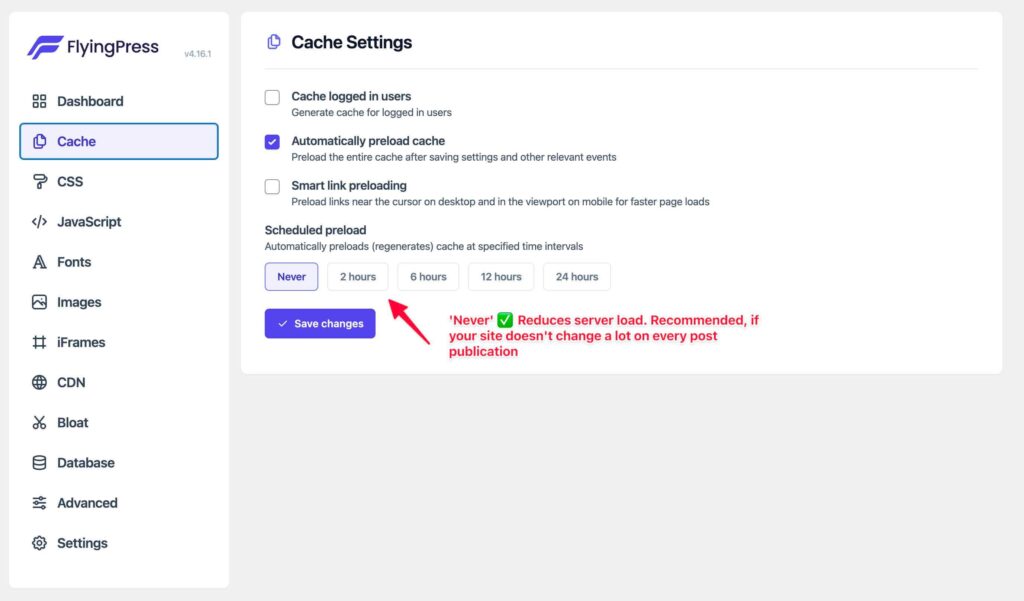
- Enabled “Cache logged in users” if you have members logging into your site.
- Automatically preload cache to refresh cached pages periodically, when I make important changes.
- Not using smart link preloading which enables preloading links near the cursor for faster navigation.
- Set “Scheduled preload” to “Never” to reduce server load.
CSS Settings
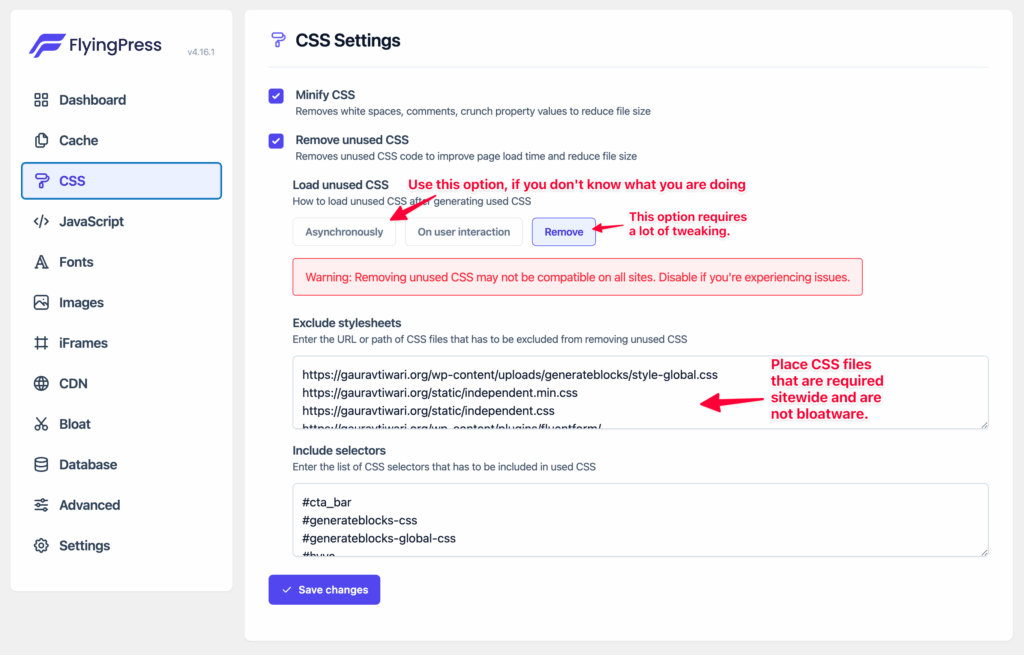
- Enabled “Minify CSS” and “Remove unused CSS” to eliminate unnecessary styles.
- Choosen “Remove” for loading unused CSS.
- Add essential CSS files and selectors to the “Excludes” to avoid breaking critical functionality.
JavaScript Settings
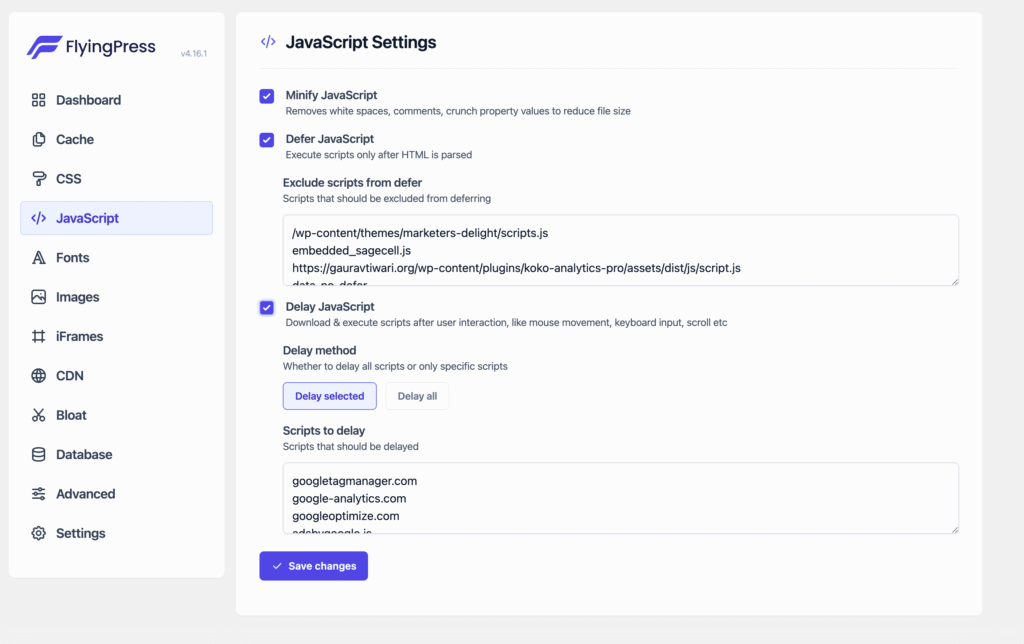
- Enabled “Minify JavaScript” and “Defer JavaScript” for faster execution.
- Used the “Delay JavaScript” option to delay loading non-critical scripts. But I also added a list of scripts to defer some files.
- Added not-readily required scripts (e.g., analytics or interactive elements) to delay as necessary.
Font Settings
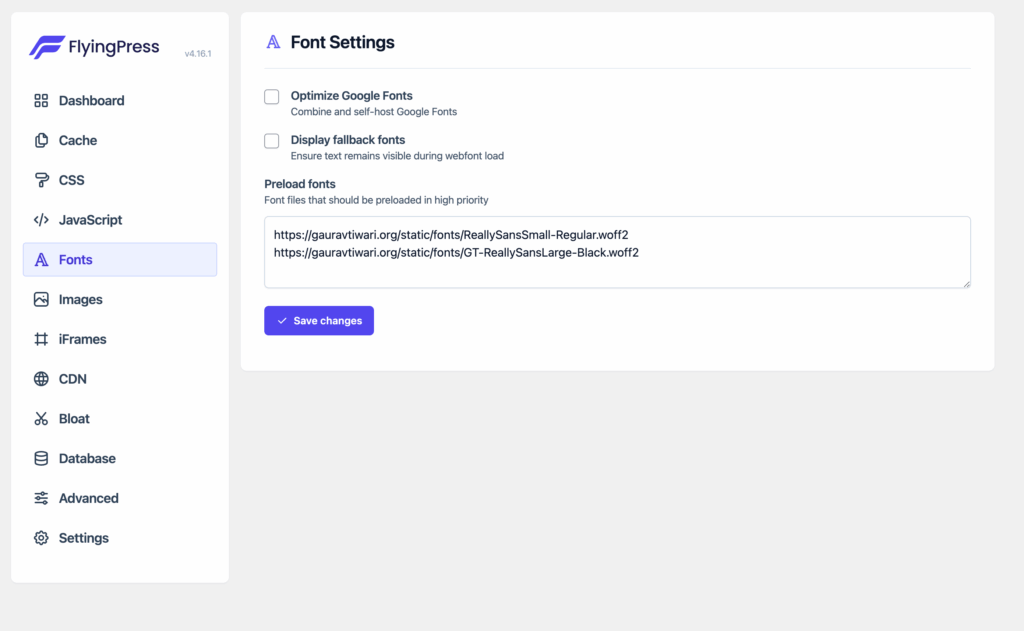
- Since I am not using Google Fonts, I kept the Optimized Google Fonts unchecked. But if you are, do it to improve performance by combining and self-hosting Google Fonts.
- Preload critical font files to improve rendering performance.
Image Settings
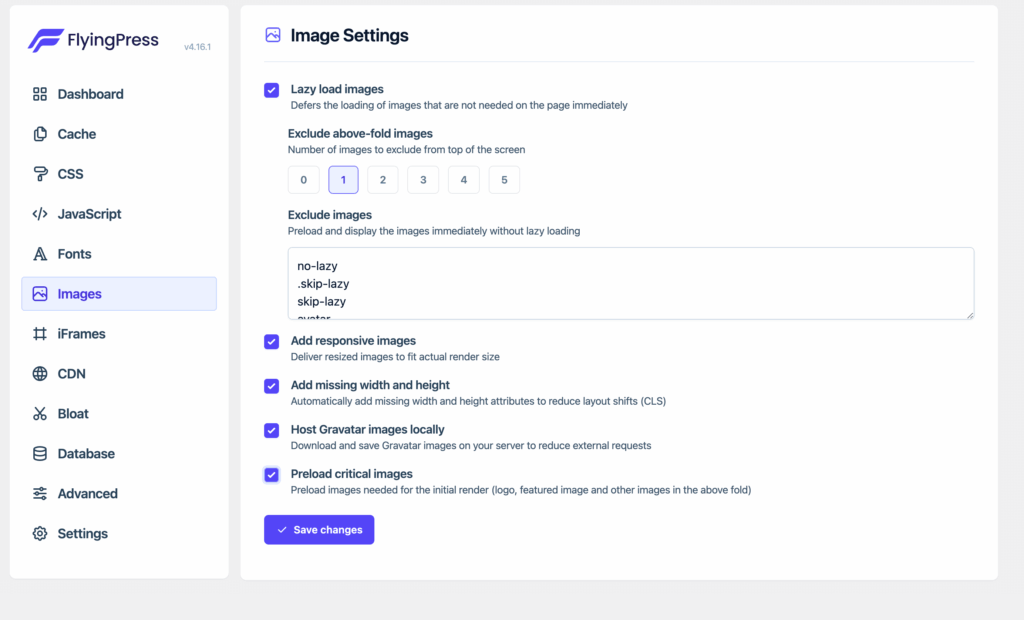
- Enabled “Lazy load images” to defer loading of below-the-fold images.
- Excluded above-the-fold images or logo from lazy loading to reduce CLS.
- Added responsive images to ensure optimal delivery for different screen sizes.
- Hosted Gravatar images locally to avoid external requests.
iFrame Settings
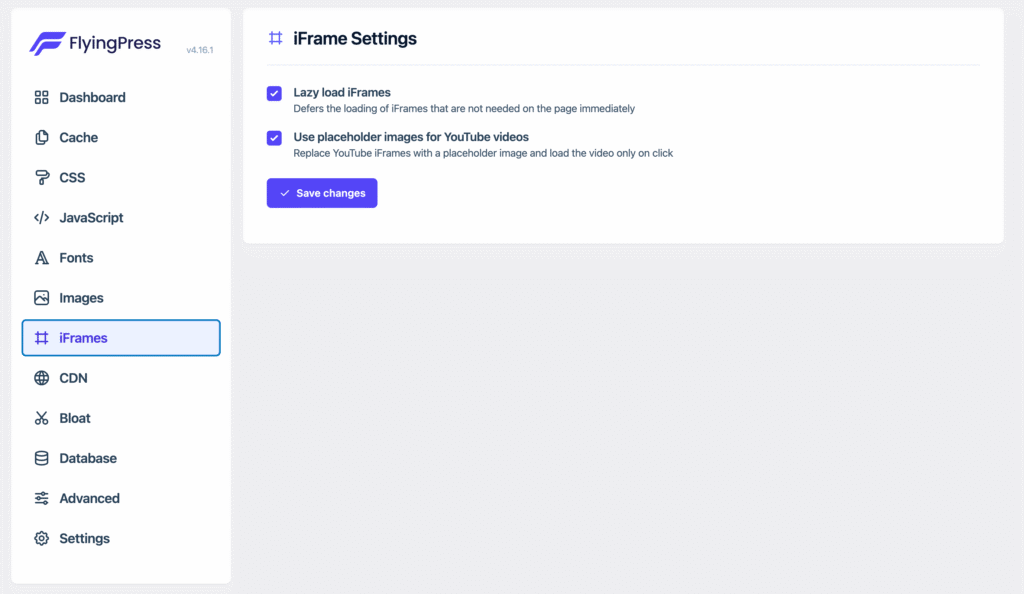
- Enable lazy loading for iFrames to defer non-critical content like YouTube videos.
- Use placeholder images for YouTube videos to load them only on user interaction.
CDN Settings
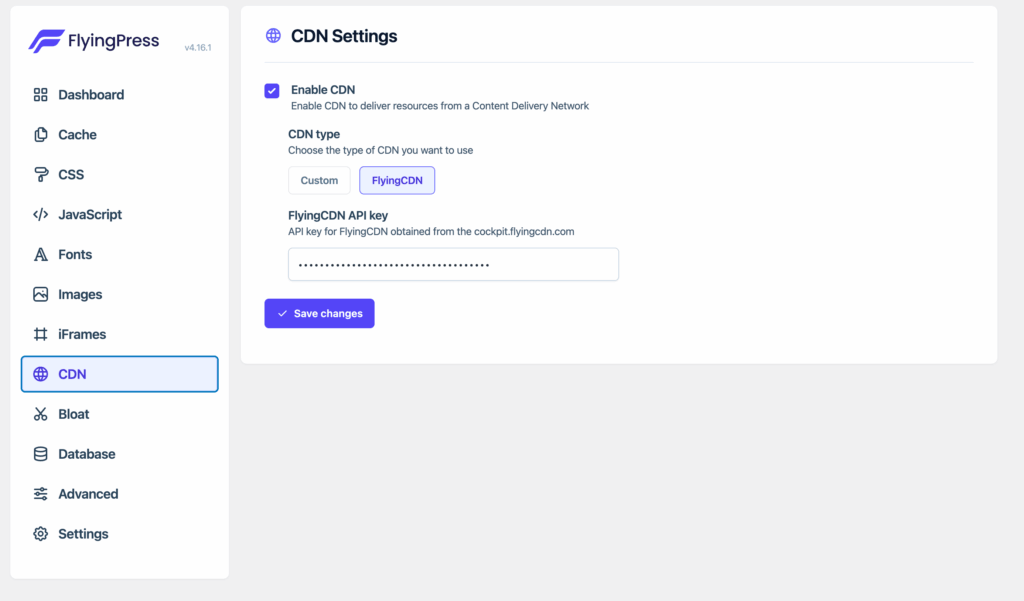
- Enabled FlyingCDN for faster resource delivery using an API.
- It costs $5 per month for a site and is very worth its cost.
Bloat Settings
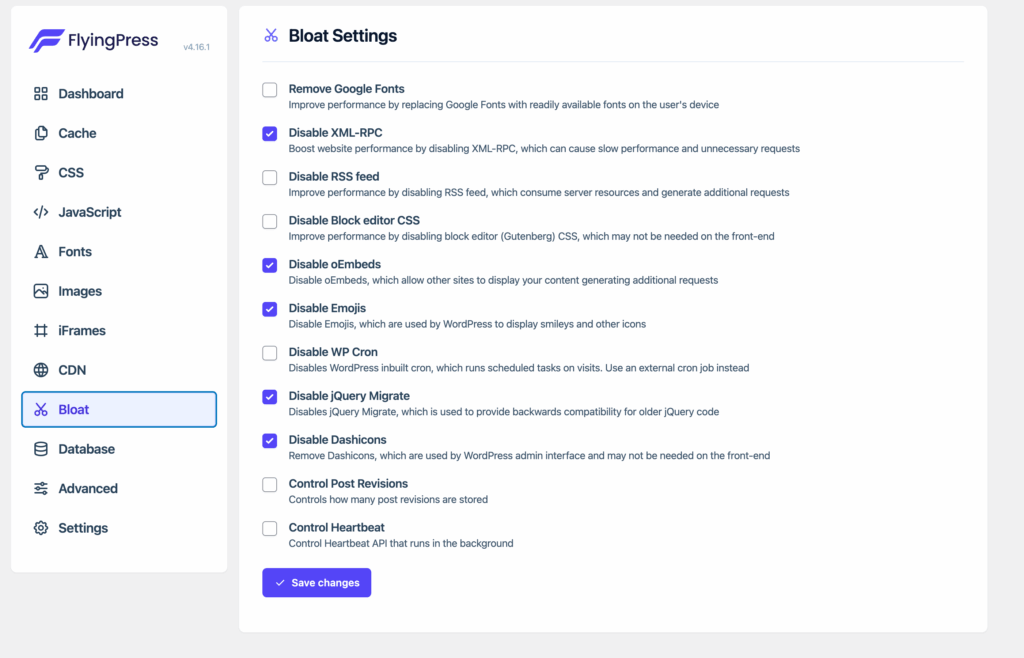
Disabled unnecessary features such as:
- XML-RPC
- Emojis
- Dashicons for frontend
- jQuery Migrate
Database Settings
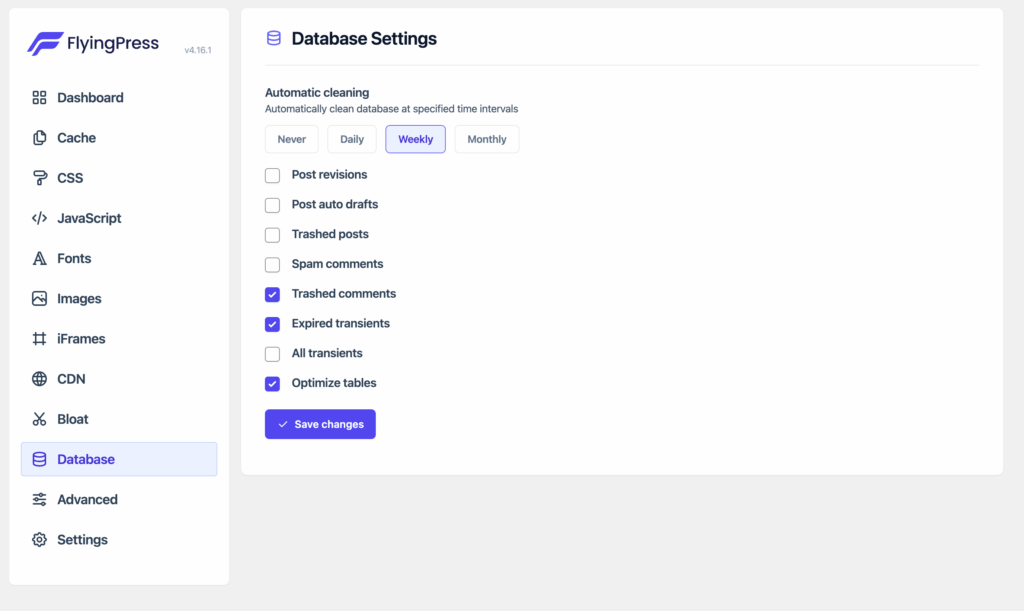
- Scheduled automatic cleaning for:
- Trashed comments
- Expired transients
- Optimizing tables
Advanced Settings
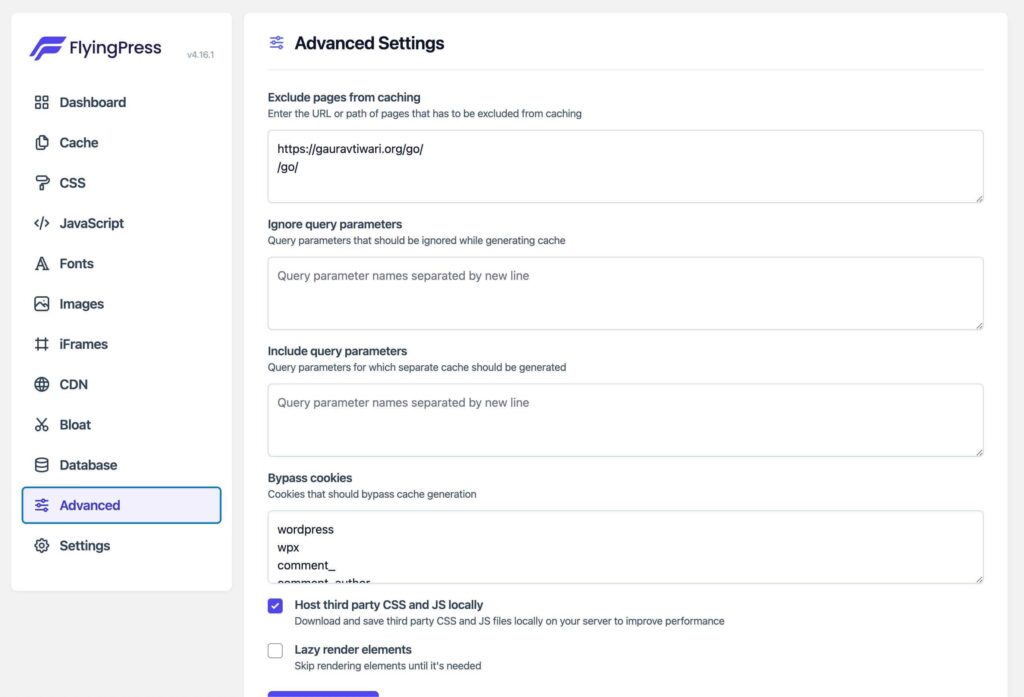
- Excluded specific pages from caching if required (e.g., dynamic or admin-only pages).
- Hosted third-party CSS and JS locally to reduce dependency on external sources.
- Avoid enabling “Lazy render elements” unless absolutely necessary.
Looking to quick start with the same settings?
Download my FlyingPress Configuration (JSON)
You can import this JSON file to the Settings tab in FlyingPress.
How do I score now?
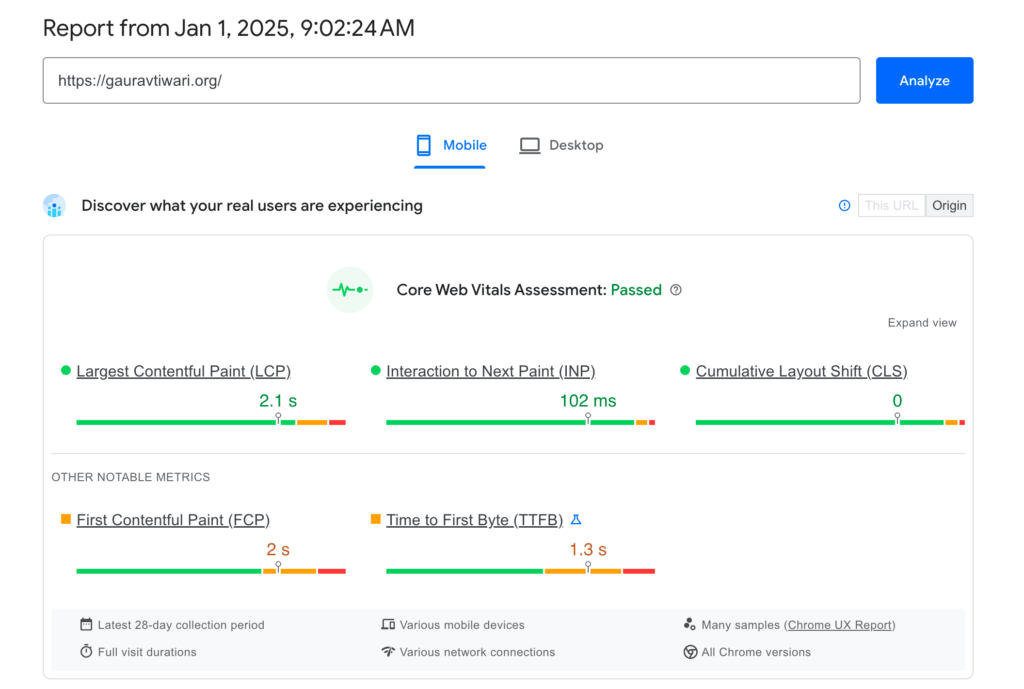
When I was using WP Rocket, my site’s performance first improved but over the last year it had noticeably slipped, with LCP (Largest Contentful Paint) hitting 3.7 seconds and FCP (First Contentful Paint) at 3.2 seconds.
Since switching to FlyingPress, these metrics have started improving significantly within a few weeks, now at 2.9 seconds for LCP and 2.6 seconds for FCP. However, with over 3,000 pages on gauravtiwari.org, achieving full Core Web Vitals (CWV) compliance across the site will take some time, but the progress is promising. (Update: It’s done. See below.)
For my important pages like this, the CWV is now clear.
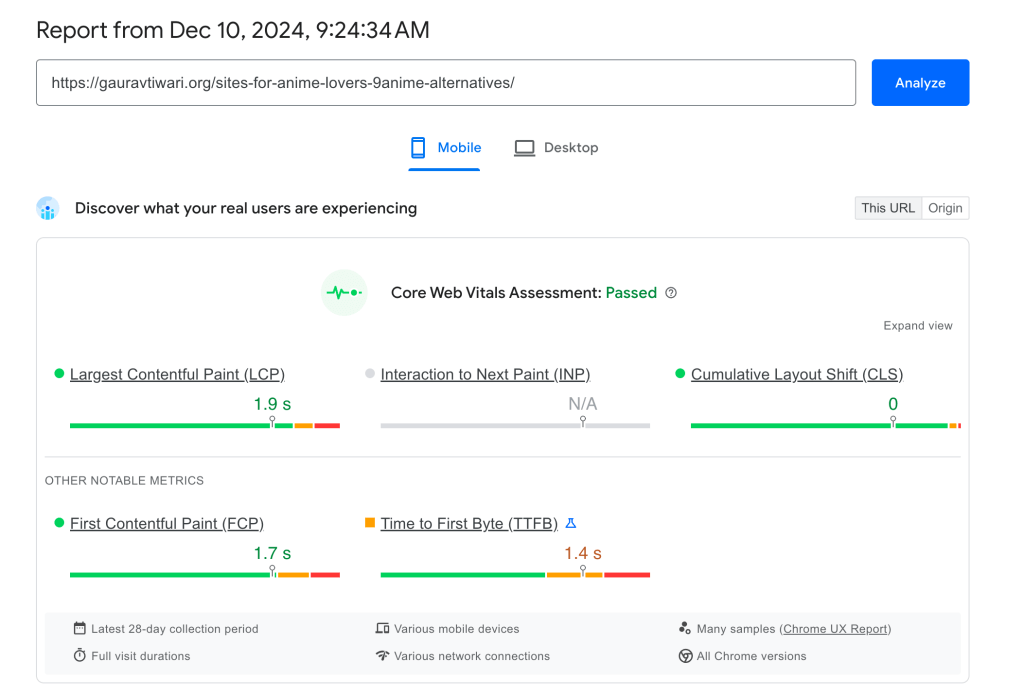
Update: Core Web Vitals for the complete site have now passed the assessment.
Who Should Use FlyingPress?
FlyingPress is perfect for:
- Bloggers and business owners who want fast, user-friendly websites.
- Developers who need granular control over optimizations.
- Agencies managing multiple sites, thanks to its reliability and scalability.
FlyingPress vs WP Rocket: Head-to-Head
I used WP Rocket for 10 years before switching to FlyingPress. Both are premium caching plugins. Both work well. But FlyingPress wins on performance, and the data backs it up.
| Feature | FlyingPress | WP Rocket |
|---|---|---|
| Core Web Vitals (Chrome UX) | Best in class | Good, not the best |
| Default Protocol | Optimized out of the box | Needs manual tuning |
| Built-in CDN | Yes (FlyingCDN) | No (requires Cloudflare or third-party) |
| Image Optimization | Built-in (WebP/AVIF) | Requires Imagify (separate plugin) |
| Unused CSS Removal | Yes | Yes |
| Delay JavaScript | Yes | Yes |
| Database Cleanup | Built-in | Built-in |
| Bloat Removal | Built-in (emojis, embeds, dashicons) | Limited |
| Price (1 site) | $49/year | $59/year |
| Renewal Price | Same | Same |
WP Rocket is easier for beginners. Its interface is more polished and it has a larger community with more tutorials. But FlyingPress delivers better default performance, bundles more features natively (CDN, image optimization, bloat removal), and costs less.
If you are happy with WP Rocket and your Core Web Vitals are passing, there is no urgent reason to switch. But if you are starting fresh or chasing the best possible performance scores, FlyingPress is the better choice in 2026.
FlyingPress vs LiteSpeed Cache
LiteSpeed Cache is free and excellent, but it only works on LiteSpeed servers. If your host runs LiteSpeed (Hostinger, A2 Hosting, Starter plans on many hosts), use LiteSpeed Cache. It integrates at the server level, which gives it a speed advantage no third-party plugin can match.
FlyingPress works on any server: Nginx, Apache, LiteSpeed, OpenLiteSpeed. If you are on Hetzner, Vultr, DigitalOcean, Cloudways (Nginx stack), or any non-LiteSpeed host, FlyingPress is the better option.
The simple rule: LiteSpeed server? Use LiteSpeed Cache (free). Anything else? Use FlyingPress ($49/year). Do not run both.
FlyingPress Pros and Cons
Pros:
- Best Core Web Vitals scores. Based on Chrome UX Report data, FlyingPress consistently outperforms WP Rocket and other caching plugins on real-world metrics.
- All-in-one. Caching, CDN, image optimization, unused CSS removal, JavaScript deferral, bloat removal, database cleanup. One plugin replaces three or four.
- FlyingCDN is genuinely fast. WireGuard-based with 100+ PoPs globally. Eliminates the need for Cloudflare or BunnyCDN in most setups.
- Cheaper than WP Rocket. $49/year vs $59/year, with more features included natively.
- Works on any server. Nginx, Apache, LiteSpeed, OpenLiteSpeed. No vendor lock-in.
- Clean, minimal interface. No upsells, no bloated dashboard. Settings are organized and straightforward.
Cons:
- Documentation is thin. Getting started is easy but troubleshooting specific issues requires more guidance than what is currently available.
- No regex for unused CSS. Removing specific CSS patterns requires manual exclusion lists. WP Rocket handles this more flexibly.
- Smaller community. Fewer third-party tutorials, fewer forum threads, fewer YouTube walkthroughs compared to WP Rocket.
- FlyingCDN costs extra. The CDN is not included in the plugin price. It starts at $7.5/month for 10 million requests. For high-traffic sites, this adds up.
- No free tier. WP Rocket does not have one either, but LiteSpeed Cache is completely free on LiteSpeed servers.
Is FlyingPress Worth It?
At $49/year for a single site, yes. The math is simple.
FlyingPress replaces your caching plugin ($59/year for WP Rocket), your image optimization plugin (Imagify or ShortPixel, $5-10/month), and potentially your CDN (if you use FlyingCDN instead of a separate service). That is $120-180/year in tools consolidated into one $49 plugin.
More importantly, it delivers better performance than the stack it replaces. I saw measurable Core Web Vitals improvements on every site I migrated from WP Rocket to FlyingPress. Not marginal differences. Meaningful improvements that show up in Chrome UX Report data.
The only scenario where FlyingPress is not worth it: if you are on a LiteSpeed server and LiteSpeed Cache handles your needs for free. In every other scenario, FlyingPress earns its $49.
Problems with FlyingPress
FlyingPress is nearly perfect, but a few areas could use improvement. The documentation, while helpful, isn’t as thorough or user-centric as it could be. Expanding and simplifying it would greatly benefit users.
Additionally, the lack of a regex option for removing unused CSS makes CSS-tweaking more time-consuming than necessary. Addressing these gaps would make an already excellent plugin even more user-friendly.
Other than these two, I couldn’t find any other issue that should be mentioned here.
FlyingPress Review: Indispensable
FlyingPress handles caching, but performance is a full-stack problem. Pair it with Perfmatters for asset management and proper image compression. For the hosting layer, the Hetzner vs Vultr vs RackNerd comparison covers high-performance, low-cost hosting. My performance optimization services include FlyingPress configuration as part of the full stack.
FlyingPress
Pros
- Best Core Web Vitals scores among all WordPress caching plugins based on Chrome UX data.
- Built-in FlyingCDN eliminates the need for a separate CDN service.
- Native image optimization with WebP/AVIF conversion and lazy loading.
- $49/year for single site. Cheaper than WP Rocket ($59/year) with better performance.
- WireGuard-based CDN with 100+ global PoPs for fast content delivery.
- Bloat removal features disable unused WordPress defaults (emojis, embeds, dashicons).
Cons
- Documentation could be more thorough and beginner-friendly.
- No regex option for removing unused CSS. Manual process required.
- Smaller user community than WP Rocket. Fewer third-party tutorials available.
- FlyingCDN is an additional cost ($7.5/month per 10M requests) on top of the plugin license.
Summary
FlyingPress is the best WordPress caching plugin I have used. I switched from WP Rocket after 10 years and have not looked back. It delivers the best Core Web Vitals scores based on Chrome UX data, includes built-in CDN (FlyingCDN), and handles image optimization natively. The only gaps are documentation depth and lack of regex for unused CSS removal. At $49/year for a single site, it is cheaper than WP Rocket and outperforms it on every metric I track.
Price: USD 49 /year
Try FlyingPressFrequently Asked Questions
Is FlyingPress better than WP Rocket?
For raw performance, yes. FlyingPress delivers better Core Web Vitals scores based on Chrome UX Report data, includes built-in CDN and image optimization, and costs $10/year less. WP Rocket has a better interface and larger community, so it depends on whether you prioritize performance or ecosystem.
Does FlyingPress work with Cloudflare?
Yes. You can use Cloudflare’s DNS and security features while FlyingPress handles page caching, CSS/JS optimization, and image optimization. If you use FlyingCDN, you don’t need Cloudflare’s CDN as well, but the two don’t conflict.
Is FlyingPress compatible with all WordPress themes?
Yes. I’ve tested it with GeneratePress, Kadence, Bricks Builder, and custom themes. Occasionally, aggressive JavaScript deferral can break interactive elements, but the exclusion settings handle those edge cases easily.
How much does FlyingPress cost?
Starter is $49/year for 1 site, Pro is $99/year for 3 sites, Business is $199/year for 25 sites, and Unlimited is $249/year. All plans include the same features. FlyingCDN costs an additional $7.5/month per 10 million requests.
Should I use FlyingPress with Perfmatters?
Yes. FlyingPress handles caching, CDN, and image optimization. Perfmatters handles asset management: disabling unused scripts per page, lazy loading specific elements, and fine-grained control over what loads where. I use both on every site I manage.
Does FlyingPress slow down the admin dashboard?
No. FlyingPress only affects the frontend. The admin dashboard performance isn’t impacted, and the plugin settings page loads quickly with a minimal, clean interface.
Can I migrate from WP Rocket to FlyingPress?
Yes. Deactivate WP Rocket, install FlyingPress, configure the settings, and clear the cache. No migration tool needed. The two plugins don’t share configuration, so you start fresh.
Is FlyingCDN worth the extra cost?
For most sites, yes. It’s WireGuard-based with 100+ global PoPs and serves static assets faster than most free CDN options. At $7.5/month for 10 million requests, it’s cost-effective up to around 200,000 monthly pageviews. High-traffic sites may find Cloudflare or BunnyCDN more economical at scale.
Does FlyingPress handle image optimization?
Yes. Built-in image optimization converts images to WebP and AVIF, applies lazy loading, and serves responsive images. It eliminates the need for Imagify or ShortPixel in most cases.
What hosting does FlyingPress work best on?
Any server: Nginx, Apache, LiteSpeed, or OpenLiteSpeed. It performs best on Nginx-based hosting like Hetzner, Vultr, DigitalOcean, or Cloudways. On LiteSpeed servers, the free LiteSpeed Cache plugin may be a better choice since it integrates at the server level.
Disclaimer: This site is reader-supported. If you buy through some links, I may earn a small commission at no extra cost to you. I only recommend tools I trust and would use myself. Your support helps keep gauravtiwari.org free and focused on real-world advice. Thanks. - Gaurav Tiwari