
 by
by
The best Black Friday student laptop deals aren’t always the ones with the biggest red discount sticker. They’re the ones where a laptop a student actually needs, light, long battery, a decent keyboard, drops to a price that fits a student budget. I’ve helped enough students and parents shop the late-November sales to know the traps: the doorbuster with 4GB of RAM, the “gaming” laptop nobody asked for, the Chromebook that can’t run the one app a course requires.
Here’s the thing most deal roundups skip. A student laptop lives a hard life: backpacks, lecture halls, coffee shops, and the occasional drop. So battery, weight, and build matter more than a flashy processor. A machine that lasts a full day of classes and survives the semester beats a slightly faster one that’s dead by lunch every time. Match the laptop to the major and the bag, then let Black Friday handle the price.
So I’ve picked six laptops worth buying when the price drops this year, from a $350 Chromebook to a MacBook Air that’ll last all of college. Each names the student it’s for and the honest reason to skip it. If you want options beyond the sale window, the best laptops for college students guide is the year-round version, and the budget work-from-home picks overlap if you also work.
The best Black Friday student laptop deals at a glance
Short on time? Here’s the ranked shortlist for 2026. Every pick is a laptop a student will actually be glad to own: light enough for a backpack, battery that survives a day of classes, and a real SSD. Prices swing during Black Friday week, so treat these as the range to hunt under.
- MacBook Air 13 (M4) — Best overall for students. All-day battery, silent, and it lasts all four years. The one to get if the budget reaches it.
- Acer Aspire 5 — Best budget Windows. A complete 15.6-inch laptop with an SSD for around $450, often less on sale.
- HP Envy x360 — Best 2-in-1 for note-taking. Folds into a tablet and takes a pen, ideal for marking up PDFs and lecture slides.
- Lenovo IdeaPad Slim 5 — Best value all-rounder. Ryzen 7 and 16GB of RAM with one of the best keyboards in the budget class.
- Lenovo Chromebook Plus — Best ultra-budget. A genuinely good laptop for browser-based study, often under $350 on sale.
- ASUS Vivobook 16 — Best big screen for STEM. A roomy 16-inch display for code, spreadsheets, and split-screen research.
When to buy: timing the Black Friday student laptop deals
The single most useful thing to know: the best laptop deals land in the Black Friday to Cyber Monday window, not before. Prices that look good in early November usually drop further, and the genuinely strong discounts go live the week of Black Friday. So set a target laptop and a target price now, then pounce when it hits, instead of buying early and watching it fall.
One caveat: popular configurations sell out. If a specific model with the RAM and storage you want goes on a deep discount, don’t wait for it to drop another $20, because it may be gone. The move is to know exactly what you want before the sale, so you can judge a deal in seconds instead of agonizing. Add a student discount on top, many retailers stack one, and a Black Friday price gets even better.
Best overall for students: MacBook Air 13 (M4)
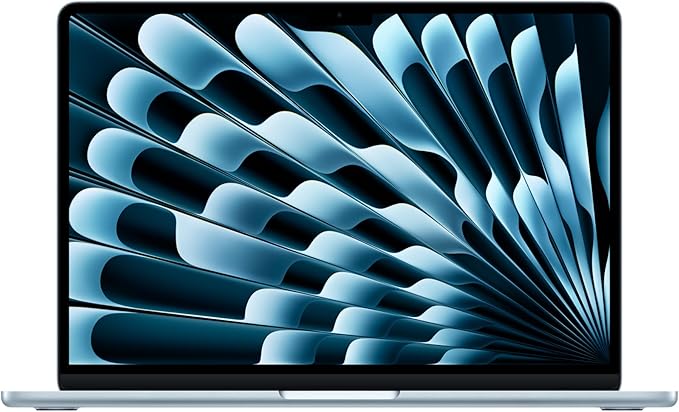
- Apple M4 chip, silent (no fan)
- 16GB unified memory + 256GB SSD
- 13.6-inch Liquid Retina display
- Up to 18 hours battery
If the budget reaches it, the MacBook Air M4 is the laptop I’d buy a student, and Black Friday is when it dips toward reasonable. The M4 chip is fast and completely silent, the battery genuinely lasts up to 18 hours so it survives a full day of classes without a charger, and the build quality means it’ll still feel good in senior year. It also holds its value if they sell it after graduation.
The catch is the entry price and the ecosystem. If a course requires Windows-only software, check before you buy. And the base 256GB fills up, so lean on cloud storage or budget for more. For most students writing papers, browsing, streaming, and light creative work, nothing here lasts as long or feels as polished. You can check the MacBook Air M4 on Amazon for the Black Friday price.
✅ Buy if you want a laptop that lasts all of college and your courses run on macOS. ❌ Don’t buy if the budget is tight or you need Windows software. The Acer Aspire does the core work for half the price.
Best budget Windows: Acer Aspire 5
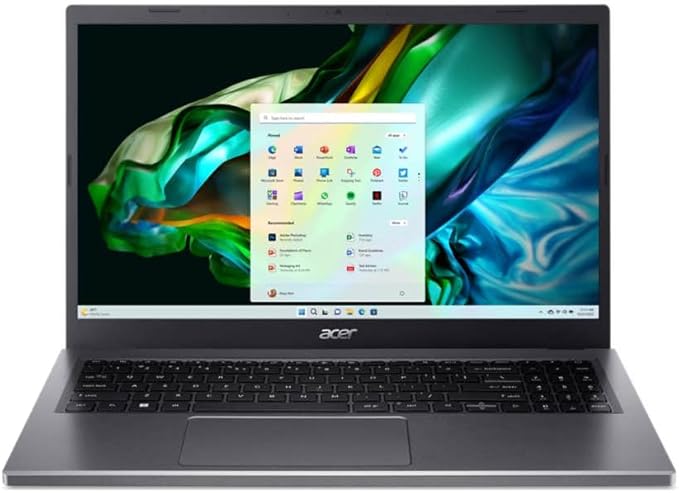
- Intel Core i5-1335U, 10 cores
- 8-16GB RAM + 512GB NVMe SSD
- 15.6-inch Full HD IPS display
- Backlit keyboard, Wi-Fi 6
For a student who needs Windows without spending much, the Aspire 5 is the value champion. For around $450, often less on Black Friday, you get a 15.6-inch Full HD IPS screen, a current Core i5, a real SSD, and a backlit keyboard. It’s the most complete Windows laptop at a price where rivals start cutting corners you’ll feel by midterms.
It’s plain and plastic, and the 8GB base config is the floor, so grab the 16GB version if the deal allows. But for writing, research, and everyday coursework, it’s hard to beat for the money. You can see the Acer Aspire 5 on Amazon, and the new-laptop checklist helps you judge the spec sheet.
✅ Buy if you need a capable Windows laptop on a budget and 1080p is enough. ❌ Don’t buy if you want to take handwritten notes. The HP Envy x360 folds into a tablet for that.
Best 2-in-1 for note-taking: HP Envy x360
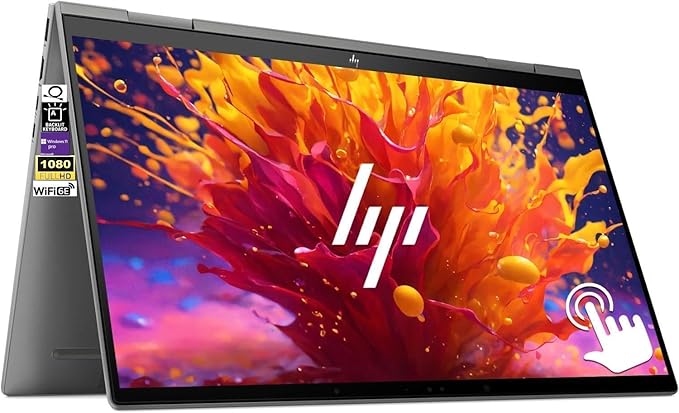
- Intel Core i5-1335U
- 16GB RAM + 1TB SSD
- 15.6-inch FHD touchscreen
- 360-degree hinge, pen support
If a student takes handwritten notes or marks up readings, a 2-in-1 changes the game, and the HP Envy x360 is the best value one for Black Friday. The 360-degree hinge folds it into a tablet, so they can scribble equations, annotate lecture slides, and sign PDFs with a pen, then flip it back to type an essay. The touchscreen is bright, the Core i5 is plenty for student work, and it usually lands well under premium 2-in-1 prices.
It’s heavier than a slim ultrabook because of the convertible hinge and touchscreen, and a stylus may be a separate purchase. But for note-heavy majors, law, medicine, math, design, the flexibility is worth it. You can check the HP Envy x360 on Amazon for the live price.
✅ Buy if you write notes by hand or annotate readings and want a laptop and tablet in one. ❌ Don’t buy if you only type. A clamshell like the IdeaPad is lighter and cheaper for that.
Best value all-rounder: Lenovo IdeaPad Slim 5
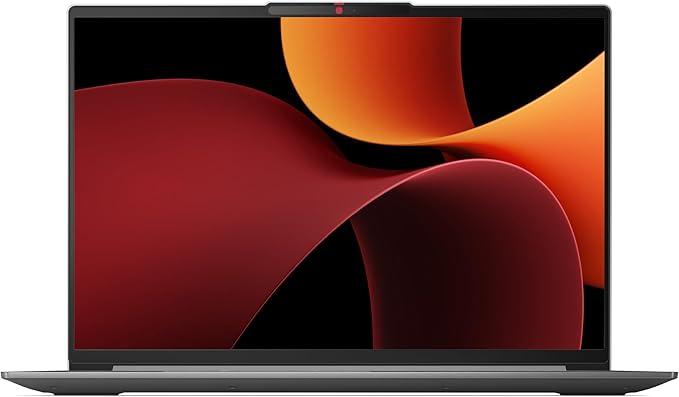
- AMD Ryzen 7 8845HS, 8 cores
- 16GB LPDDR5X + 512GB SSD
- 16-inch WUXGA IPS display
- Excellent keyboard, fingerprint reader
The IdeaPad Slim 5 is the smart middle pick: more laptop than the Aspire, less money than the MacBook. The Ryzen 7 and 16GB of RAM handle real multitasking, a dozen tabs, a video call, and a document at once, and Lenovo’s keyboard is genuinely excellent for typing essays and notes. The 16-inch screen gives a student room to work without a second monitor.
It’s a touch larger and heavier than a 14-inch ultrabook, so it leans desk-and-backpack rather than carry-in-one-hand. For a student who does real work and wants 16GB without overspending, it’s the sweet spot. Take a look at the Lenovo IdeaPad Slim 5 on Amazon.
✅ Buy if you multitask and want 16GB of RAM and a great keyboard for under $650. ❌ Don’t buy if you want the lightest bag. A 14-inch or the Chromebook is easier to carry.
Best ultra-budget: Lenovo Chromebook Plus
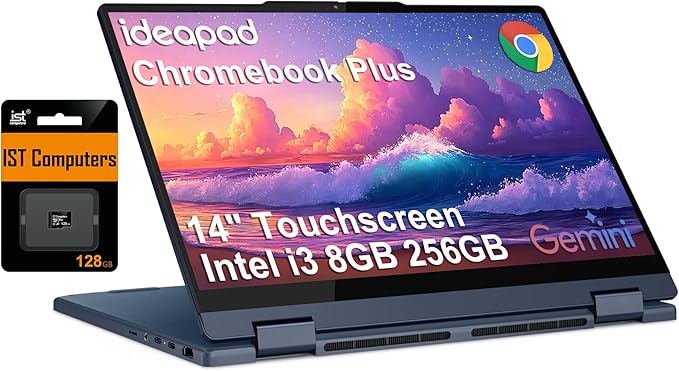
- Intel Core i3 N355
- 8GB RAM + 128GB storage
- 14-inch FHD+ touchscreen
- ChromeOS, all-day battery
For a student whose work lives in the browser, Google Docs, the LMS, email, research, and streaming, a Chromebook Plus is the cheapest smart buy, and Black Friday drives it under $350. The Chromebook Plus tier means more speed, RAM, and storage than basic Chromebooks, so it doesn’t feel sluggish. Battery is excellent, it boots in seconds, and it’s tough enough for daily campus life.
The honest limit: ChromeOS can’t run Windows or Mac desktop software, so confirm a course doesn’t require something like full Office desktop, SPSS, or a specific engineering app. For browser-first study, though, nothing matches the price-to-usefulness. You can check the Lenovo Chromebook Plus on Amazon.
✅ Buy if your work is browser-based and you want the most laptop for the least money. ❌ Don’t buy if a course needs Windows or Mac software. Get the Acer Aspire instead.
Best big screen for STEM: ASUS Vivobook 16
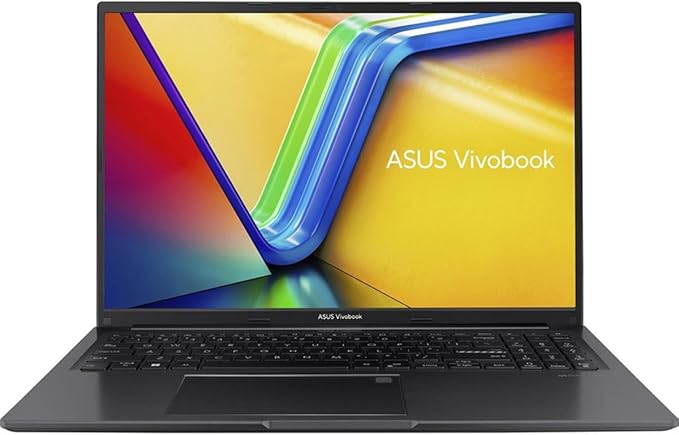
- AMD Ryzen 7 7730U
- 8-16GB RAM + 1TB SSD
- 16-inch WUXGA 16:10 display
- Fingerprint sensor, Windows 11
STEM students live in code editors, spreadsheets, and PDFs of dense papers, and screen space helps. The Vivobook 16’s roomy 16-inch 16:10 display shows more lines of code and more of a spreadsheet than a standard 14-inch laptop, which adds up over long study sessions. With a Ryzen 7 and 16GB of RAM in the better configs, it multitasks comfortably, and it’s priced like a midrange machine, not a premium one.
It’s bigger and heavier, so it’s more of a desk laptop than a carry-everywhere one. But for the money, it’s the most screen real estate a student can get, and that matters for technical work. Check the ASUS Vivobook 16 on Amazon. If the major is engineering specifically, the mechanical engineering laptop guide covers heavier CAD needs.
✅ Buy if you’re in a STEM major and want maximum screen for code and data. ❌ Don’t buy if you carry your laptop all day. The MacBook Air or Chromebook is far lighter.
Black Friday student laptops compared
Here’s the whole list side by side. Read it by the student: budget first, then the major, then how much they carry it. The right pick is the one that fits all three, not the one with the biggest discount.
| Laptop | CPU | RAM / SSD | Best for | Price |
|---|---|---|---|---|
| MacBook Air 13 (M4) | Apple M4 | 16GB / 256GB | Overall, longevity | ~$849 |
| Acer Aspire 5 | Core i5-1335U | 8-16GB / 512GB | Budget Windows | ~$450 |
| HP Envy x360 | Core i5-1335U | 16GB / 1TB | Note-taking (2-in-1) | ~$750 |
| Lenovo IdeaPad Slim 5 | Ryzen 7 8845HS | 16GB / 512GB | Value all-round | ~$600 |
| Lenovo Chromebook Plus | Intel Core i3 N355 | 8GB / 128GB | Ultra-budget | ~$350 |
| ASUS Vivobook 16 | Ryzen 7 7730U | 8-16GB / 1TB | Big screen, STEM | ~$500 |
How to choose a student laptop on Black Friday
A good student laptop deal isn’t about the percentage off. It’s about getting the right machine for the major and the budget at a fair price. Here’s the framework I use.
Start with the major, not the spec sheet
An English or business major needs battery, a good keyboard, and a screen, almost any laptop here works. A STEM major may need more RAM and a real CPU for code or data. An engineering or design major may need a dedicated GPU, which is a different guide entirely. Buy for the software the courses require, and check that required apps run on the operating system before you commit.
Battery and weight beat raw speed
A student carries the laptop all day and charges it at night. A real 8 to 10 hours of battery and a weight under about 3.5 pounds matter more day to day than a faster processor they’ll rarely push. This is why the MacBook Air and the Chromebook punch above their spec sheets for student life: they’re light and they last.
Don’t overbuy, and don’t underbuy RAM
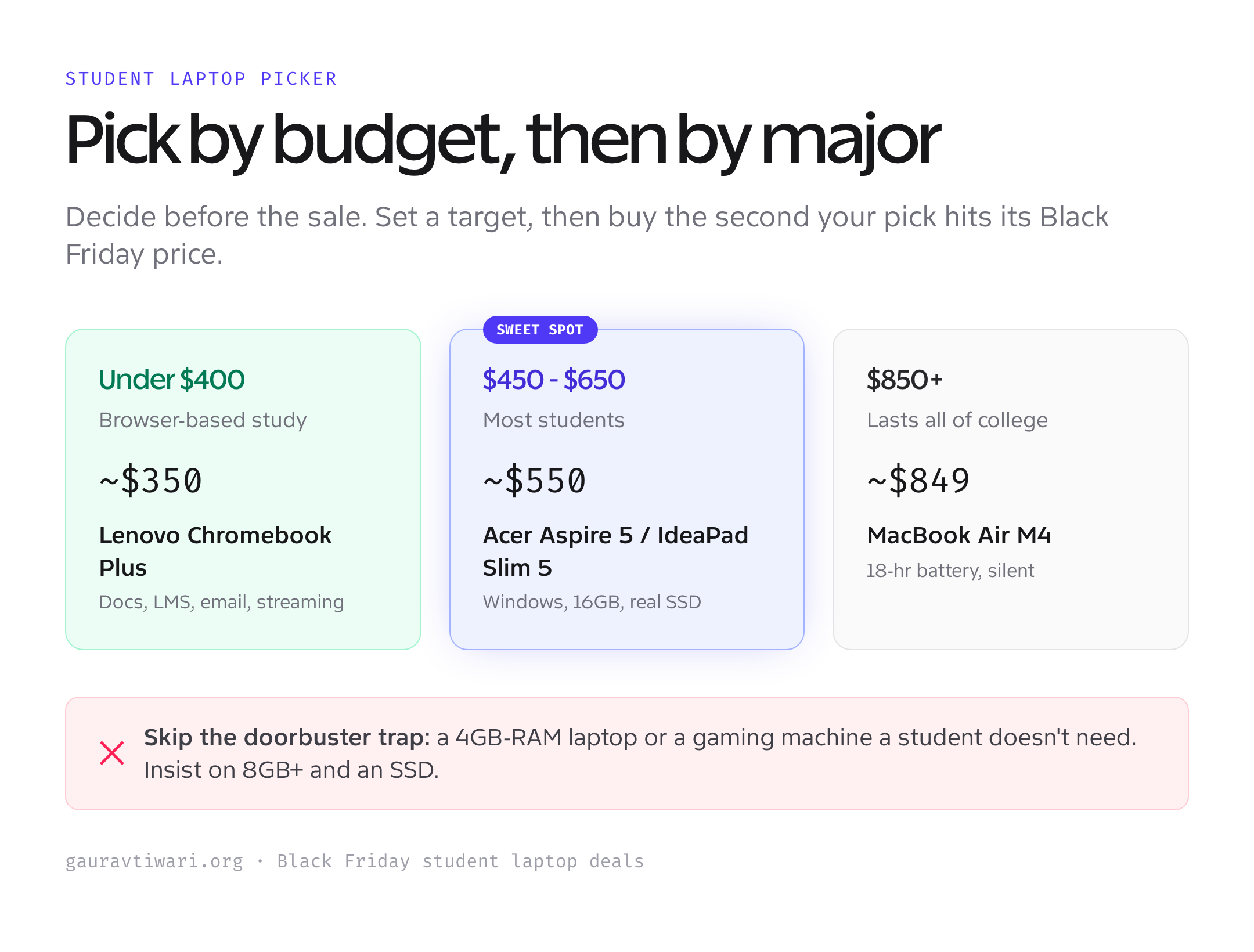
The most common Black Friday mistake is grabbing a “gaming” laptop a student doesn’t need, or a doorbuster with 4GB of RAM that’s miserable by week two. Aim for 8GB minimum, 16GB if the deal allows, an SSD always, and skip the discrete GPU unless the major calls for it. Spend the savings on a case and a cloud backup, not on power that sits idle.
Which one should you buy?
If the budget allows, the MacBook Air M4 is the student laptop I’d buy: it lasts all four years and then some. If money is tight, the Acer Aspire 5 covers Windows coursework for around $450, and the Lenovo Chromebook Plus does browser-based study for under $350.
For note-takers, the HP Envy x360 and its pen support is the pick. For a do-everything Windows machine with 16GB, the Lenovo IdeaPad Slim 5 is the value sweet spot, and STEM students who want screen space should look at the ASUS Vivobook 16. Decide before the sale, watch the price, and buy the second your pick hits its target. For more options outside the sale, see the educational laptop deals roundup.
Frequently asked questions
When do the best Black Friday student laptop deals go live?
The strongest discounts land in the Black Friday to Cyber Monday window, not in early November. Prices that look good before then usually drop further. Pick your laptop and target price in advance, then buy when it hits, because popular configurations sell out.
How much should a student laptop cost on Black Friday?
Around $350 gets a capable Chromebook Plus for browser-based study. $450 to $650 covers a solid Windows laptop like the Acer Aspire 5 or Lenovo IdeaPad Slim 5. The MacBook Air M4 dips toward $850 on sale and lasts all of college.
Is a Chromebook good enough for college?
For browser-based work, yes: Google Docs, the LMS, email, research, and streaming all run well on a Chromebook Plus. The limit is desktop software. Confirm your courses don’t require Windows or Mac apps like full Office desktop, SPSS, or engineering tools before buying.
MacBook or Windows laptop for students?
The MacBook Air M4 wins on battery, build, and four-year longevity if your courses run on macOS. A Windows laptop is safer if a course requires specific Windows software, and it’s cheaper to get started. Check your required apps first, then choose.
Is a 2-in-1 worth it for taking notes?
Yes, if you write by hand or annotate readings. A 2-in-1 like the HP Envy x360 folds into a tablet and takes a pen, so you can scribble equations and mark up PDFs, then flip back to type. If you only type, a regular clamshell is lighter and cheaper.
How much RAM does a student laptop need?
8GB is the minimum and handles writing, browsing, and streaming. 16GB is better for heavy multitasking or STEM work like coding and data. Avoid Black Friday doorbusters with 4GB of RAM, they feel slow within weeks. Always insist on an SSD, never a hard drive.
The bottom line
The best Black Friday student laptop deals reward the people who decide before the sale. Pick the MacBook Air M4 if the budget reaches it and you want a laptop for all of college. Drop to the Acer Aspire 5 for Windows on a budget, or the Lenovo Chromebook Plus for browser-based study under $350.
Match the laptop to the major and the backpack, set a target price, and buy the moment your pick hits it. Don’t get talked into a gaming laptop a student doesn’t need or a doorbuster that’s miserable by midterms. The right laptop at a fair Black Friday price beats the biggest discount on the wrong one, every time.