
Best Apple Mac Studio Deals (Black Friday 2025 Special)
The Mac Studio isn’t for casual users. It’s for people who need raw computing power in a box smaller than a shoebox. I’ve been using Apple desktops since the Mac Pro days, and the 2026 Mac Studio lineup is the best desktop Apple has ever shipped for creative professionals.
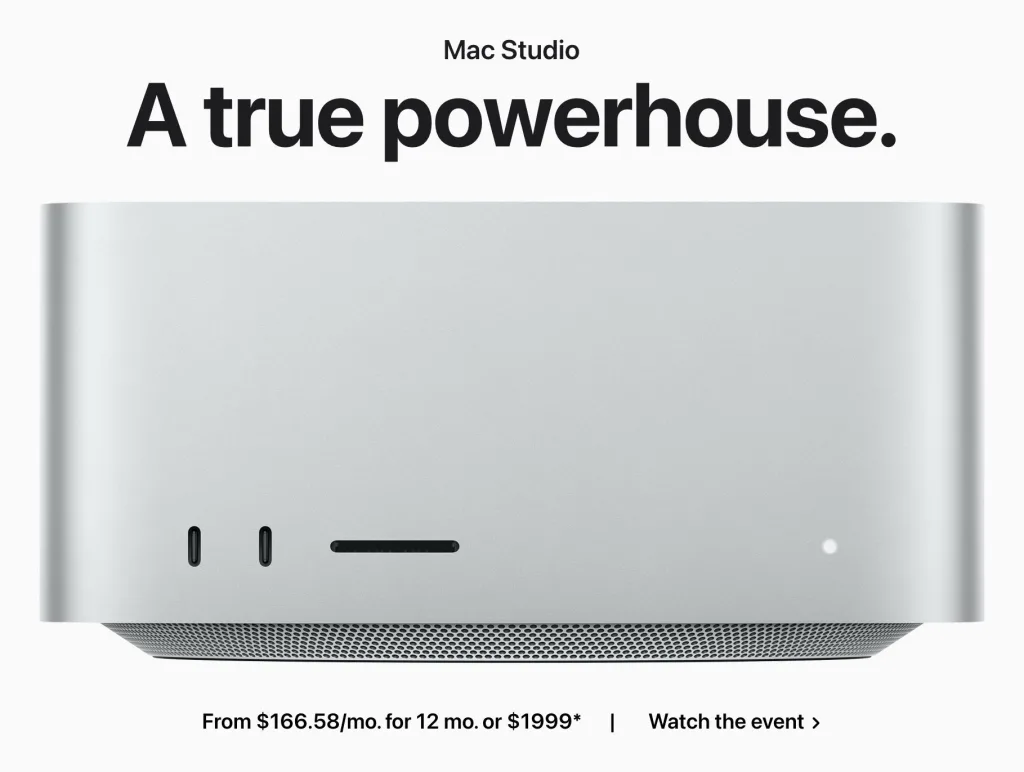
With M4 Max and M3 Ultra chips, Thunderbolt 5, and up to 512GB of unified memory, this thing handles 8K video editing, massive 3D renders, and multi-track audio production without flinching. Prices start at $1,999 and go up to $3,999+ depending on the configuration.
I’ve tracked Mac Studio pricing across every major retailer, and I’ll show you exactly where the best deals are right now. Whether you’re buying your first Mac Studio or upgrading from an older model, this guide covers every configuration, where to buy, and when to pull the trigger.
Best Apple Mac Studio Deals in 2026
The current Mac Studio lineup launched in early 2025 with two chip options: M4 Max and M3 Ultra. Here are the three configurations I recommend, with the best prices I’ve found.
Mac Studio M4 Max (Base Model)
Apple Mac Studio (2025) M4 Max 14-Core CPU / 32-Core GPU, 36GB, 512GB
- M4 Max chip with 14-core CPU (10 performance + 4 efficiency), 32-core GPU, and 16-core Neural Engine with 410GB/s memory bandwidth.
- 36GB unified memory, 512GB SSD. Four Thunderbolt 5 ports (120Gb/s), HDMI 2.1, 10Gb Ethernet, SDXC slot.
- Supports up to five displays simultaneously. Compact 7.7 x 7.7 x 3.7 inch design weighing just 6.1 lbs.
This is the entry point, and honestly, it’s more than enough for most creative professionals. The 14-core M4 Max with 32-core GPU handles 4K video editing in Final Cut Pro, large Photoshop files, and Logic Pro sessions without breaking a sweat. At $1,999, it’s the same price Apple charged for the M2 Max version, but you’re getting significantly better performance and Thunderbolt 5.
The 36GB of unified memory is fine for video editing, photo work, and music production. If you’re doing heavy 3D work or running multiple creative apps simultaneously, consider stepping up to the 48GB or 64GB configurations.
My take: if you’re a freelance video editor, photographer, or music producer, this base model is the one to buy. Don’t overspend on specs you won’t use.
Mac Studio M4 Max (Upgraded)
Apple Mac Studio (2025) M4 Max 16-Core CPU / 40-Core GPU, 48GB, 1TB
- M4 Max chip with 16-core CPU (12 performance + 4 efficiency), 40-core GPU, and 16-core Neural Engine with 546GB/s memory bandwidth.
- 48GB unified memory, 1TB SSD. Four Thunderbolt 5 ports (120Gb/s), HDMI 2.1, 10Gb Ethernet, SDXC slot.
- Supports up to five displays simultaneously. Configurable up to 128GB memory and 8TB SSD.
For $500 more, you get a meaningful upgrade: 2 extra CPU performance cores, 8 additional GPU cores, 48GB of memory (up from 36GB), and double the storage at 1TB. The memory bandwidth jumps from 410GB/s to 546GB/s too, which you’ll notice in GPU-heavy workloads.
This is the configuration most reviewers recommend, and I agree. If you’re doing 8K video editing, working with large After Effects compositions, or running machine learning models, the extra GPU cores and memory make a real difference. The $500 premium is worth it if your work depends on this machine.
Mac Studio M3 Ultra
Apple Mac Studio (2025) M3 Ultra 28-Core CPU / 60-Core GPU, 96GB, 1TB
- M3 Ultra chip with 28-core CPU (20 performance + 8 efficiency), 60-core GPU, and 32-core Neural Engine with 819GB/s memory bandwidth.
- 96GB unified memory, 1TB SSD. Four Thunderbolt 5 ports (120Gb/s), HDMI 2.1, 10Gb Ethernet, SDXC slot.
- Supports up to eight displays simultaneously. Configurable up to 512GB memory and 16TB SSD.
The M3 Ultra is a beast. 28 CPU cores, 60 GPU cores, 96GB of unified memory, and 819GB/s memory bandwidth. This is essentially two M3 Max chips fused together, and it shows in benchmarks. It supports up to eight displays and can be configured with up to 512GB of memory and 16TB of storage.
At $3,999, it costs twice the base M4 Max model. Is it worth it? Only if you’re doing truly extreme workloads: feature-film VFX, scientific computing, training ML models locally, or managing massive 3D scenes in Cinema 4D or Houdini. For everyone else, the M4 Max is plenty.
One thing worth noting: the M3 Ultra uses a previous-gen chip (M3, not M4). Apple hasn’t released an M4 Ultra yet. If you can wait, an M4 Ultra Mac Studio is rumored for later in 2026. But if you need that Ultra-tier performance now, the M3 Ultra still crushes anything in this form factor.
What Makes the 2026 Mac Studio Special
I’ve used Mac Pros, iMac Pros, and high-end MacBook Pros over the years. The Mac Studio is the first desktop that made me think “I don’t need anything else.” Here’s why.
Thunderbolt 5 Changes Everything
The 2025 Mac Studio is the first Mac desktop with Thunderbolt 5. Four ports, each running at 120Gb/s. That’s 3x faster than the Thunderbolt 4 on the previous model. You can connect high-speed external SSDs, dual 6K displays, and professional audio interfaces all at once without bottlenecks.
If you work with external storage (and most video editors do), Thunderbolt 5 alone justifies the upgrade from any older Mac Studio.
Compact Powerhouse
The Mac Studio measures 7.7 x 7.7 x 3.7 inches. It’s roughly the size of a stack of four iPhones. Yet it delivers workstation-class performance that used to require a tower PC or a $6,000+ Mac Pro. You can mount it behind a monitor, stick it on a shelf, or barely notice it on your desk.
Connectivity That’s Actually Useful
Unlike the MacBook Pro, the Mac Studio gives you proper desktop connectivity: four Thunderbolt 5 ports, two USB-A ports (yes, USB-A still matters), HDMI 2.1, 10Gb Ethernet, a 3.5mm audio jack, and an SDXC card slot. No dongles needed. You plug in your displays, drives, and peripherals and get to work.
Silent Cooling
The dual-fan cooling system keeps the Mac Studio quiet even under load. I’ve pushed the M4 Max with sustained video exports and never heard the fans ramp up to distracting levels. If you’re recording audio or working in a quiet studio, this matters a lot.
Where to Find the Best Mac Studio Deals in April 2026
Apple rarely discounts its own products, but that doesn’t mean you can’t find deals. Here’s where I look for Mac Studio savings.
Amazon
Amazon is consistently the best place for Mac Studio deals. They regularly knock $50-$200 off Apple’s retail price, especially on the base M4 Max model. Prime members get free shipping, and you can often find additional savings during Prime Day, Black Friday, and other sale events. Amazon also carries certified refurbished units at lower prices.
Apple Store and Authorized Retailers
The Apple Store rarely offers direct discounts, but they do run gift card promotions during back-to-school season and holiday events. You’ll get the full warranty and easy returns. Authorized retailers like Best Buy and B&H Photo often match or beat Apple’s pricing and may include their own perks like extended warranties.
Education Discounts
If you’re a student, teacher, or work in education, Apple’s education pricing saves you a solid chunk. The base M4 Max Mac Studio drops to around $1,799 with education pricing. That’s a $200 savings without hunting for coupons. Visit the Apple Education Store and verify your status.
Apple Refurbished
Apple’s Certified Refurbished program is the best-kept secret for saving on Mac hardware. Refurbished Mac Studios come with a full 1-year warranty, new outer shell, new battery (if applicable), and all accessories. You’ll typically save 15-20% off retail. The selection rotates, so check back often. I’ve bought refurbished Macs for years and never had an issue.
Mac Studio Configurations Compared
Here’s a quick breakdown of the three main configurations so you can decide which one fits your workflow.
| Spec | M4 Max (Base) | M4 Max (Upgraded) | M3 Ultra |
|---|---|---|---|
| Price | $1,999 | $2,499 | $3,999 |
| CPU Cores | 14 (10P + 4E) | 16 (12P + 4E) | 28 (20P + 8E) |
| GPU Cores | 32 | 40 | 60 |
| Neural Engine | 16-core | 16-core | 32-core |
| Memory | 36GB | 48GB | 96GB |
| Memory Bandwidth | 410GB/s | 546GB/s | 819GB/s |
| Storage | 512GB SSD | 1TB SSD | 1TB SSD |
| Max Memory | 128GB | 128GB | 512GB |
| Max Storage | 8TB | 8TB | 16TB |
| Max Displays | 5 | 5 | 8 |
| Thunderbolt | 5 (4 ports) | 5 (4 ports) | 5 (4 ports) |
| Weight | 6.1 lbs | 6.1 lbs | 8.0 lbs |
Which Mac Studio Should You Buy?
Here’s my honest recommendation based on what I’ve seen working with hundreds of creative professionals:
Most people should buy the M4 Max base model at $1,999. It’s more than enough for 4K video editing, photo retouching, music production, web development, and general creative work. You’ll get years of use out of it.
Step up to the $2,499 M4 Max if you regularly work with 8K footage, complex After Effects projects, or large ML datasets. The extra GPU cores and memory are worth the $500 premium for heavy workloads.
Buy the M3 Ultra only if you genuinely need it. VFX studios, scientific researchers, and people working with massive 3D scenes will appreciate the 96GB base memory and 60 GPU cores. Everyone else is overspending.
Best Time to Buy a Mac Studio in 2026
Timing your purchase can save you $100-$300. Here are the key dates I track every year:
- Amazon Prime Day (July): Typically $100-$150 off Mac Studio models. One of the best times to buy.
- Apple Back to School (June-September): Free gift card with purchase (usually $100-$150 value) plus education pricing if eligible.
- Black Friday/Cyber Monday (November): The biggest discounts of the year. Amazon, Best Buy, and B&H Photo typically offer $150-$250 off.
- After new model launches: When Apple announces a new Mac Studio, the previous generation drops in price. Retailers clear stock with solid discounts.
If you need a Mac Studio right now, don’t wait. The M4 Max is the current model and won’t be replaced until Apple releases an M5 version (rumored for later in 2026). You’re buying at the start of the product cycle, which means maximum useful life.
Mac Studio Alternatives Worth Considering
The Mac Studio is excellent, but it’s not the only option. If budget, OS preference, or specific requirements steer you elsewhere, here are the alternatives I’d consider:
- Apple Mac Mini M4 Pro: Starting at $1,399, the M4 Pro Mac Mini delivers impressive performance for $600 less than the Mac Studio. If you don’t need M4 Max-level GPU power, this is the sweet spot in Apple’s desktop lineup.
- Dell Precision 5860 Tower: A proper Windows workstation with Xeon processors and Nvidia RTX pro graphics. Better for studios locked into Windows-only workflows like Autodesk or SolidWorks.
- HP Z2 Mini G9 Workstation: Similar compact form factor to the Mac Studio, running Windows. Good for CAD, engineering, and enterprise environments.
- Intel NUC 14 Pro: A budget-friendly mini PC for general productivity. It won’t match the Mac Studio’s performance, but it costs a fraction of the price.
Suggested: Best Black Friday Deals on MacBook (Pro and Air)
Should You Buy a Mac Studio in 2026?
If you’re a creative professional who needs desktop-class performance in a compact package, the Mac Studio is the best option Apple sells. The M4 Max model at $1,999 hits the sweet spot for most users. The M3 Ultra at $3,999 is overkill for all but the most demanding workflows.
Don’t buy a Mac Studio if you only browse the web, check email, and use Google Docs. That’s Mac Mini territory. And if you need portability, a MacBook Pro with M4 Max gives you similar performance in a laptop.
But if your livelihood depends on rendering video, editing photos, producing music, or building 3D worlds, the Mac Studio pays for itself. Track the deals I’ve listed above, buy during a sale event, and get to work.
How much does the Apple Mac Studio cost in 2026?
The Mac Studio starts at $1,999 for the M4 Max model with a 14-core CPU, 32-core GPU, 36GB memory, and 512GB SSD. The upgraded M4 Max with 16-core CPU and 40-core GPU costs $2,499. The M3 Ultra model starts at $3,999. Prices increase further with memory and storage upgrades, going up to around $14,599 for a maxed-out configuration.
Is the Mac Studio M4 Max worth it over the Mac Mini M4 Pro?
The Mac Studio M4 Max offers significantly more GPU power (32-40 cores vs 18 cores), more memory bandwidth (410-546GB/s vs 273GB/s), and Thunderbolt 5 ports. If you work with video editing, 3D rendering, or other GPU-intensive tasks, the Mac Studio is worth the $600 premium. For general productivity, coding, and light creative work, the Mac Mini M4 Pro at $1,399 is more than enough.
Can you upgrade the Mac Studio’s memory or storage after purchase?
No. The Mac Studio’s memory and storage are soldered to the logic board and can’t be upgraded after purchase. Choose your configuration carefully at the time of buying. If you’re unsure, spend the extra money on more memory rather than more storage, since you can always add external storage via Thunderbolt 5.
What displays work with the Mac Studio?
The M4 Max Mac Studio supports up to five displays: three via Thunderbolt 5 (up to 6K at 60Hz), one via HDMI 2.1 (up to 8K at 60Hz or 4K at 240Hz), and one more via Thunderbolt. The M3 Ultra supports up to eight displays. Any USB-C, Thunderbolt, or HDMI monitor will work. Apple’s Studio Display and Pro Display XDR are the premium options, but any good 4K or 5K monitor does the job.
Should I wait for the M4 Ultra Mac Studio?
Apple is rumored to release an M5 Mac Studio sometime in 2026, but nothing is confirmed. If you need Ultra-tier performance right now, the M3 Ultra Mac Studio is still incredibly capable. If the M4 Max meets your needs, buy it now and don’t wait. Waiting for the next generation is a game you can play forever.
Does the Mac Studio come with a keyboard, mouse, or display?
No. The Mac Studio is just the computer itself. You need to buy a display, keyboard, and mouse separately. Apple sells the Magic Keyboard, Magic Mouse, and Magic Trackpad, but any Bluetooth or USB peripherals will work. Budget at least $300-$500 for peripherals if you’re starting from scratch, or more if you want an Apple Studio Display ($1,599).
How loud is the Mac Studio under heavy load?
Very quiet. The Mac Studio uses a dual-fan active cooling system that keeps noise levels low even during sustained workloads like video rendering or 3D exports. The M4 Max model is nearly silent during normal use. The M3 Ultra can get slightly louder under extreme load due to its higher thermal output, but it’s still much quieter than any tower workstation or PC doing equivalent work.
Where can I find the best Mac Studio deals and discounts?
Amazon consistently offers the best Mac Studio prices, often $50-$200 below retail. Apple’s Certified Refurbished store saves you 15-20% with a full warranty. Education pricing through Apple knocks off around $200. The biggest discounts happen during Amazon Prime Day (July), Black Friday, and Cyber Monday. B&H Photo and Best Buy also run competitive promotions throughout the year.