
Creating Engaging Content for Your Email Marketing Campaigns
The average email marketing open rate is 21%. Click-through sits at 2.3%. That means roughly 4 out of 5 subscribers ignore your emails, and of those who open, barely anyone clicks. Your emails aren’t competing with other marketing. They’re competing with 121 other messages hitting the same inbox every day.
Most email campaigns fail because they’re written for the brand, not the reader. Companies blast promotions, stuff in multiple CTAs, and wonder why unsubscribe rates climb. In 2026, Gmail’s AI filtering is smarter. Apple’s Mail Privacy Protection has changed how opens are measured. And subscribers have zero patience for generic content that reads like it was written by a committee.
This guide covers the strategies behind campaigns that consistently hit 35-40% open rates and 4-5% click-through. Not theory. Tested approaches with real numbers, specific subject line formulas, and the content structures that make people actually want to read your emails.
Know Your Audience Before You Write a Single Word
Every high-performing email starts with audience understanding. Not assumptions. Actual data about who reads your emails, what they care about, and where they are in their journey with your brand.
Segment Your List (The Single Biggest Lever)
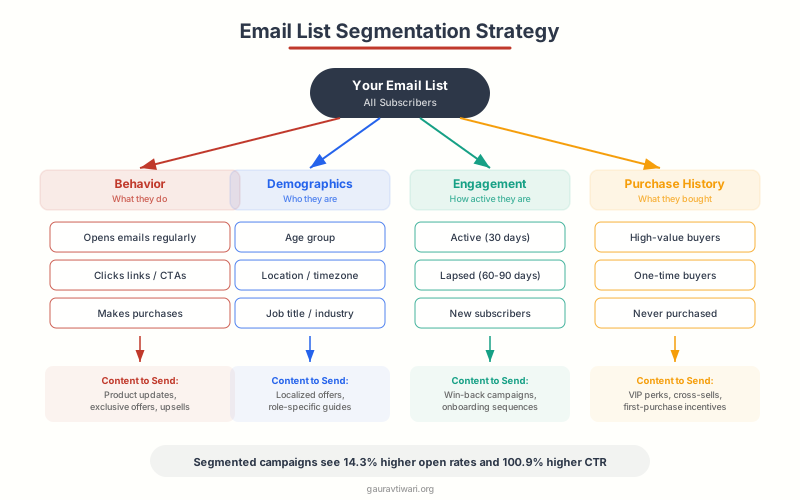
Segmented campaigns generate 760% more revenue than one-size-fits-all blasts, according to Campaign Monitor. That’s not a typo. Seven hundred and sixty percent. A single email to your entire list is lazy and expensive. Here’s how to segment effectively:
Behavioral segmentation. Group subscribers by what they’ve done: purchased in the last 30 days, abandoned a cart, clicked a specific link, opened 5+ emails this month, or haven’t opened anything in 90 days. Each group needs different content. A recent buyer wants post-purchase tips. A lapsed subscriber needs re-engagement. Don’t send the same email to both.
Demographic segmentation. Age, location, job title, company size. A SaaS product sells differently to a solopreneur than to an enterprise team lead. Adjust your examples, price references, and feature emphasis based on who you’re writing to.
Engagement-level segmentation. Your most engaged subscribers (opening 80%+ of emails, clicking regularly) are your VIPs. Give them early access, exclusive content, and insider pricing. Your least engaged subscribers need win-back sequences, not more of what they’re already ignoring.
Personalize beyond the first name. Reference their last purchase, their industry, or the content they’ve engaged with. “Hey Sarah” is table stakes. “Sarah, here’s a follow-up to the SEO guide you downloaded last week” is personal.
Write Subject Lines That Get Opened
Your subject line determines whether your email gets opened or buried. It’s the most important line of copy in the entire email. I’ve A/B tested over 500 subject lines across different industries. Here’s what consistently wins.
Subject Line Formulas That Work
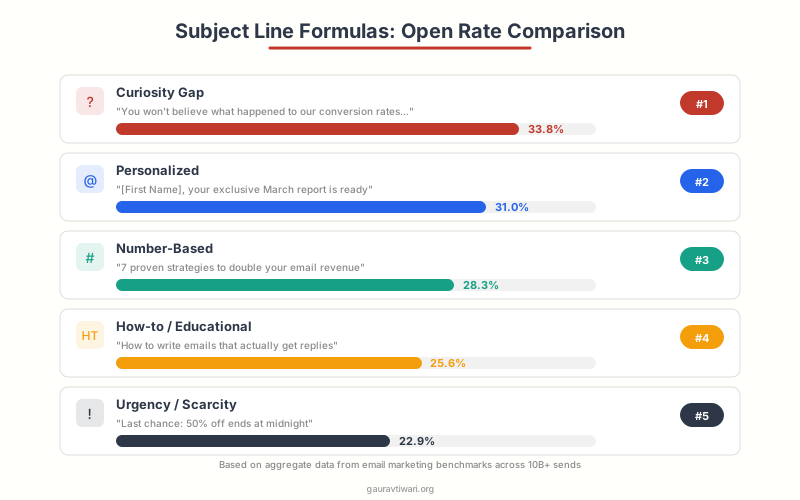
The curiosity gap. “The email mistake costing you $2K/month” or “Why your welcome sequence is broken.” These work because readers need to open the email to resolve the tension. Average open rate: 28-35%.
The specific number. “7 subject line formulas (with open rates)” or “I analyzed 1M emails. Here’s what I found.” Numbers signal concrete, scannable content. Average open rate: 25-32%.
The personal question. “Are you making this segmentation mistake?” or “Quick question about your email strategy.” Questions trigger a mental response that drives opens. Average open rate: 24-30%.
The urgency trigger. “Last chance: 40% off ends tonight” or “Your free trial expires in 24 hours.” Use sparingly. Real urgency works. Fake urgency trains subscribers to ignore you. Average open rate: 22-28% (higher for genuine deadlines).
The plain-text personal. “quick thought” or “saw this and thought of you.” These mimic real person-to-person email. They work incredibly well for B2B and creator emails. Average open rate: 30-40%.
Subject Line Rules
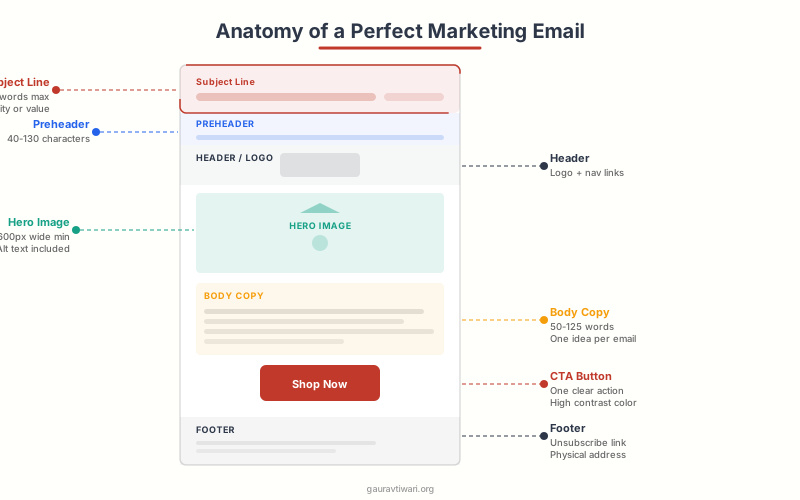
Keep subject lines under 50 characters (6-10 words). Mobile devices truncate anything longer. Write the preheader text too. It’s the supporting line that appears after the subject in the inbox preview. Together, they form a 1-2 punch: the subject hooks, the preheader sells the open.
Avoid spam trigger words: “free,” “guaranteed,” “act now,” “limited time” in all caps. Gmail’s spam filters have gotten aggressive. Also avoid: ALL CAPS, excessive punctuation (!!!), and emoji overuse. One emoji per subject line maximum, and only if it matches your brand voice.
Always A/B test subject lines. Send version A to 15% of your list, version B to another 15%, wait 2-4 hours, then send the winner to the remaining 70%. Most email platforms automate this. If yours doesn’t, switch platforms.
Email Body Copy That Gets Read and Clicked
Getting the open is half the battle. Now you need to keep readers engaged through the email and drive them toward your call to action. Here’s the framework I use for every marketing campaign email.
The One-Message Rule
Every email should have one primary message and one primary CTA. Not three promotions, two blog links, and a survey. One thing. When you give readers too many options, they choose none. This is the paradox of choice, and it kills click-through rates.
If you have multiple things to share, send multiple emails over multiple days. A focused email with one CTA consistently outperforms a newsletter-style email with 8 links. I’ve tested this dozens of times. The single-CTA email wins by 30-50% in click-through rate every time.
Writing Style That Converts
Write like you talk. Read your email draft out loud. If it sounds like a corporate memo, rewrite it. The best-performing emails sound like one person talking to another. Use “I” and “you.” Use contractions. Be direct.
Front-load the value. Don’t make readers scroll through three paragraphs of context before getting to the point. Lead with the benefit, the insight, or the offer. Then support it.
Short paragraphs. One to three sentences per paragraph. Long blocks of text are intimidating on mobile (where 60%+ of emails are read). White space is your friend.
Use formatting strategically. Bold key phrases. Use bullet points for lists. Break up sections with subheadings. But don’t over-format. An email that looks like a landing page feels salesy. An email that looks like a real message feels trustworthy.
Email Design and Structure That Drives Action
A well-structured email guides readers from the subject line to the CTA without friction. Think of it as a slide: everything should move the reader toward one action.
| Email Section | Purpose | Best Practice |
|---|---|---|
| Subject line | Get the open | 6-10 words, one clear hook |
| Preheader | Support the subject | 40-100 characters, extend the hook |
| Opening line | Keep them reading | Lead with benefit or story, not “Hi, I’m…” |
| Body | Deliver value | One message, 150-300 words, scannable |
| CTA | Drive the click | One button, action verb, contrasting color |
| Footer | Legal compliance + trust | Unsubscribe link, company info, social links |
Mobile-first design. Over 60% of emails are opened on mobile. Use a single-column layout (600px max width). Make CTA buttons at least 44×44 pixels (thumb-friendly). Use 16px minimum font size for body text. Test on both iOS Mail and Gmail on Android before sending.
Visual hierarchy. Use images sparingly. Some email clients block images by default. If your email is nothing but images, some subscribers see a blank email. Always include alt text on images, and make sure the email makes sense with images turned off.
CTA button design. Use a contrasting color that stands out against your email background. “Shop Now” and “Learn More” are weak CTAs. “Get Your 40% Discount” and “Download the Free Template” are specific and action-driven. Place one CTA above the fold and repeat it at the bottom for longer emails.
Best Email Marketing Platforms for Content-Focused Campaigns
The right platform makes creating, segmenting, and testing email content dramatically easier. Here are the four I recommend based on different needs and budgets.
Email Automation Sequences That Convert
Single broadcast emails are fine for announcements. But the real money in email automation comes from automated sequences that nurture subscribers over time. These run on autopilot once you set them up.
The Welcome Sequence (Most Important)
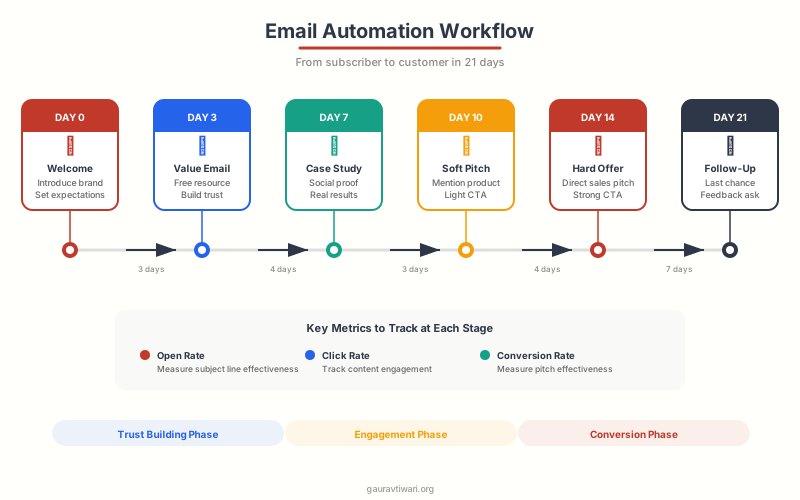
Your welcome sequence is the highest-engagement email you’ll ever send. Welcome emails have a 50-60% open rate on average. Here’s the sequence I use for most clients:
Email 1 (Immediate): Deliver what you promised (lead magnet, discount code, free trial access). Introduce yourself in 2-3 sentences. Set expectations for email frequency. One CTA: consume the thing they signed up for.
Email 2 (Day 2): Share your best piece of content. Something that demonstrates your expertise and delivers immediate value. “Here’s the most popular guide our subscribers love” works well.
Email 3 (Day 4): Tell a story. Share a case study, a personal experience, or a customer success story. Build trust through narrative. No hard sell.
Email 4 (Day 7): Soft pitch. Introduce your product or service in the context of a problem the subscriber faces. Frame it as a solution, not a sales pitch. Include social proof (testimonials, results, user count).
Email 5 (Day 10): Direct offer. Clear CTA, clear benefit, clear deadline if applicable. This is where the conversion happens. Don’t be shy about asking for the sale at this point. You’ve earned it over 4 value-driven emails.
Other High-ROI Sequences
Abandoned cart sequence (3 emails). Email 1 at 1 hour (reminder), Email 2 at 24 hours (objection handling + social proof), Email 3 at 72 hours (incentive like free shipping or small discount). This sequence alone recovers 5-15% of abandoned carts for most e-commerce businesses.
Re-engagement sequence (3 emails). For subscribers who haven’t opened in 60-90 days. Email 1: “Are you still interested?” with a compelling reason to stay. Email 2: “Last chance to stay subscribed.” Email 3: Automatic removal from list. Cleaning inactive subscribers improves your deliverability rates for everyone else.
Post-purchase sequence (4 emails). Thank you + order confirmation, then product tips/onboarding at day 3, then satisfaction check at day 7, then review request or upsell at day 14. This builds loyalty and repeat purchases.
Deliverability: Making Sure Your Emails Actually Arrive
The best email content in the world doesn’t matter if it lands in the spam folder. Deliverability has gotten more complex in 2026 with Gmail and Yahoo’s new sender requirements, Apple’s privacy changes, and increasingly aggressive spam filters.
Authentication is mandatory. Set up SPF, DKIM, and DMARC records for your sending domain. Gmail and Yahoo now require these for bulk senders (5,000+ emails/day). Without them, your emails get flagged or rejected outright. Your email platform should provide the DNS records you need. Most email marketing tools walk you through this setup.
Clean your list regularly. Remove hard bounces immediately. Suppress soft bounces after 3 consecutive failures. Remove subscribers who haven’t opened in 6+ months (after running a re-engagement sequence). A smaller, engaged list outperforms a large, inactive one every time. Use tools like Email List Validation to scrub your list quarterly.
Monitor your sender reputation. Check Google Postmaster Tools for your domain’s reputation. If you see “Bad” or “Low” reputation, stop sending immediately and investigate. Common causes: high spam complaint rates, purchased lists, or sending to old addresses that have been converted to spam traps.
One-click unsubscribe. Gmail and Yahoo require a List-Unsubscribe header with one-click functionality. Your email platform should handle this automatically. If they don’t, switch. Making it hard to unsubscribe doesn’t keep subscribers. It just makes them report you as spam, which is far worse.
Measuring Email Performance (The Metrics That Matter)
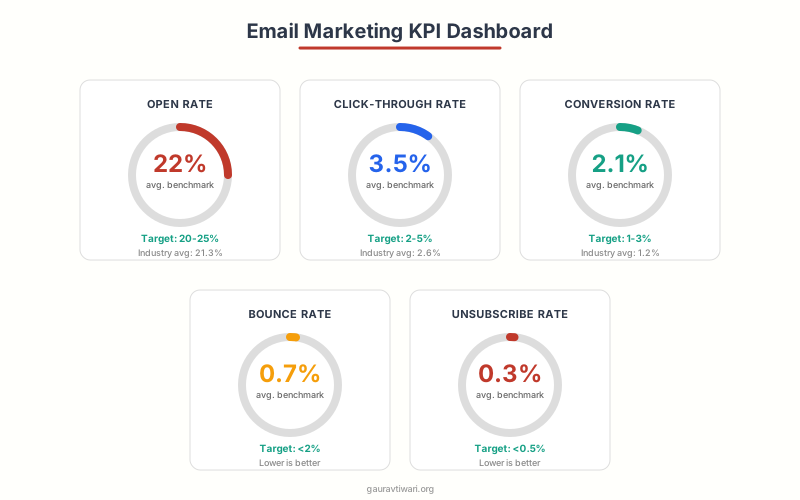
Not all email marketing metrics are equally useful. Open rates have become unreliable since Apple’s Mail Privacy Protection artificially inflates them for Apple Mail users. Focus on engagement metrics that actually correlate with revenue.
| Metric | What It Tells You | Healthy Benchmark | Action If Low |
|---|---|---|---|
| Click-through rate (CTR) | Content relevance and CTA effectiveness | 2-5% | Improve CTA, better segmentation |
| Click-to-open rate (CTOR) | How well content matches subject promise | 10-15% | Align subject line with email content |
| Conversion rate | Revenue impact of email | 1-3% | Improve landing page, offer, or CTA |
| Unsubscribe rate | Content relevance and send frequency | Below 0.5% | Reduce frequency, improve targeting |
| Bounce rate | List health | Below 2% | Clean list, remove invalid addresses |
| Revenue per email | Overall campaign profitability | Varies by industry | Improve offer and targeting |
Review your metrics weekly. Look for patterns: which subject line styles get the most clicks? Which content topics drive the most conversions? What send times produce the best engagement? Use this data to continuously refine your strategy. A/B test one variable at a time so you know exactly what’s working.
Common Email Content Mistakes (and How to Fix Them)
After auditing dozens of email programs, these mistakes appear in nearly every underperforming campaign.
Writing for the brand, not the reader. “We’re excited to announce our new feature!” Nobody cares about your excitement. Reframe it: “You can now do X, which saves you 3 hours a week.” Always answer: “What’s in it for the reader?”
Too many CTAs. If your email has 6 different links going to 6 different places, none of them will get meaningful clicks. One primary CTA per email. If you must include secondary links, make them clearly subordinate.
Ignoring mobile. Testing your email only on desktop and wondering why engagement is low. Check your analytics. If 60%+ of opens are mobile (likely), your mobile experience is your primary experience. Design for it.
No segmentation. Sending every email to your entire list. This tanks engagement rates because irrelevant content trains subscribers to ignore you. Even basic segmentation (new vs. existing customers) dramatically improves performance.
Inconsistent sending schedule. Going silent for 3 weeks, then sending 5 emails in 2 days. This confuses subscribers and triggers spam filters. Pick a cadence and stick to it. Two to three emails per week works for most businesses.
Not testing. Sending emails without A/B testing subject lines, send times, or content. Every email is a learning opportunity. At minimum, test subject lines on every campaign. The insights compound over time.
Email Content Quality Checklist
The best email marketers I know spend 50% of their time on the subject line and 50% on the email itself. If the subject line doesn’t get the open, nothing else matters. But if the email content doesn’t deliver on the subject line’s promise, you’ve lost that subscriber’s trust permanently.
What’s your biggest email marketing challenge?
Frequently Asked Questions
How long should a marketing email be?
For promotional emails, 50-125 words performs best (quick to scan, one clear CTA). For newsletters and educational content, 200-500 words works well. The key isn’t absolute length but information density. Every sentence should earn its place. If you can say it in fewer words, do. Test different lengths with your audience, as optimal length varies by industry and subscriber expectations.
What’s a good open rate for email marketing?
The average open rate across industries is 21%, but this metric has become less reliable since Apple’s Mail Privacy Protection artificially inflates opens for Apple Mail users (roughly 50% of email users). A realistic target for engaged lists is 25-35%. More importantly, focus on click-through rate (2-5% is healthy) and revenue per email, which are more accurate measures of email effectiveness.
How often should I email my subscribers?
For most businesses, 2-4 emails per week is the sweet spot. More than that risks fatigue and unsubscribes. Less than once a week and subscribers forget who you are. The right frequency depends on your audience expectations and content quality. A daily newsletter works if subscribers signed up for daily content. A monthly email works if it’s genuinely valuable. Monitor your unsubscribe rate: above 0.5% per email means you’re sending too frequently or your content isn’t relevant enough.
Should I use plain text or HTML emails?
It depends on your goal. Plain-text emails feel more personal and often perform better for B2B, relationship-building, and creator emails. HTML emails with designed layouts work better for e-commerce, product announcements, and visual brands. Many successful email marketers use a hybrid: mostly text with minimal branding (logo header, branded CTA button). Test both with your audience. Some brands see 20-30% higher click rates with plain text.
What’s the best time to send marketing emails?
Tuesday through Thursday, between 9-11 AM in your subscribers’ local timezone, tends to perform best across industries. But this varies significantly by audience. B2B emails do well during business hours. B2C emails often perform better in the evening (7-9 PM) when people browse on their phones. The real answer: use your email platform’s send-time optimization feature, which analyzes each subscriber’s engagement patterns and sends at their optimal time. ActiveCampaign, GetResponse, and Kit all offer this.
How do I grow my email list without buying subscribers?
Create a lead magnet that solves a specific problem (template, checklist, mini-course, free tool). Place opt-in forms on high-traffic pages, in blog posts (inline and exit-intent), and on your homepage. Use content upgrades (bonus content specific to each blog post). Run referral programs where existing subscribers earn rewards for referring friends. Guest on podcasts and mention your lead magnet. The key is offering something genuinely valuable in exchange for an email address, not just a vague promise to “stay updated.”
What email authentication do I need in 2026?
You need three DNS records: SPF (Sender Policy Framework, tells receiving servers which IPs can send email from your domain), DKIM (DomainKeys Identified Mail, cryptographic signature proving the email wasn’t modified), and DMARC (Domain-based Message Authentication, tells receivers what to do with failing emails). Gmail and Yahoo now require all three for bulk senders (5,000+ emails per day). Your email platform provides the specific records. Add them to your domain’s DNS settings and verify they’re working using tools like MxToolbox.
How do I re-engage inactive email subscribers?
Run a 3-email re-engagement sequence for subscribers who haven’t opened in 60-90 days. Email 1: Acknowledge the inactivity with a compelling reason to stay (“We miss you” + your best content piece). Email 2 (5 days later): Ask what they want (preference center or quick poll). Email 3 (5 days later): “Last chance before we remove you” with a clear CTA to stay. Remove anyone who doesn’t engage after all 3 emails. This improves your overall deliverability and engagement rates by cleaning out dead weight.
Creating engaging email content is a skill that compounds. Every email you send is an experiment. Every A/B test teaches you something about your audience. Every automation sequence you build works for you 24/7. Start with the fundamentals: know your audience, write subject lines that earn the open, deliver one clear message per email, and track what matters.
The email marketing funnels that generate the most revenue aren’t complex. They’re consistent, relevant, and built on real data. Pick one platform, set up your welcome sequence, segment your list into at least 4 groups, and commit to sending 2-3 emails per week. The results compound from there.
Disclaimer: This site is reader-supported. If you buy through some links, I may earn a small commission at no extra cost to you. I only recommend tools I trust and would use myself. Your support helps keep gauravtiwari.org free and focused on real-world advice. Thanks. - Gaurav Tiwari