
I spent my first two years in affiliate marketing flying blind. I’d check my affiliate dashboards once a month, see a number, feel good or bad about it, and go back to writing. No strategy. No system. Just vibes.
That changed when I started treating my affiliate blog like a business with real metrics. The difference was immediate. Within 90 days of setting up proper tracking, I’d doubled my revenue. Not because I was getting more traffic. Because I finally knew where to focus.
If you’re not tracking your affiliate performance properly, you’re leaving money on the table. And I don’t mean a little money. I mean 30-50% of what you could be earning. This chapter is about fixing that.
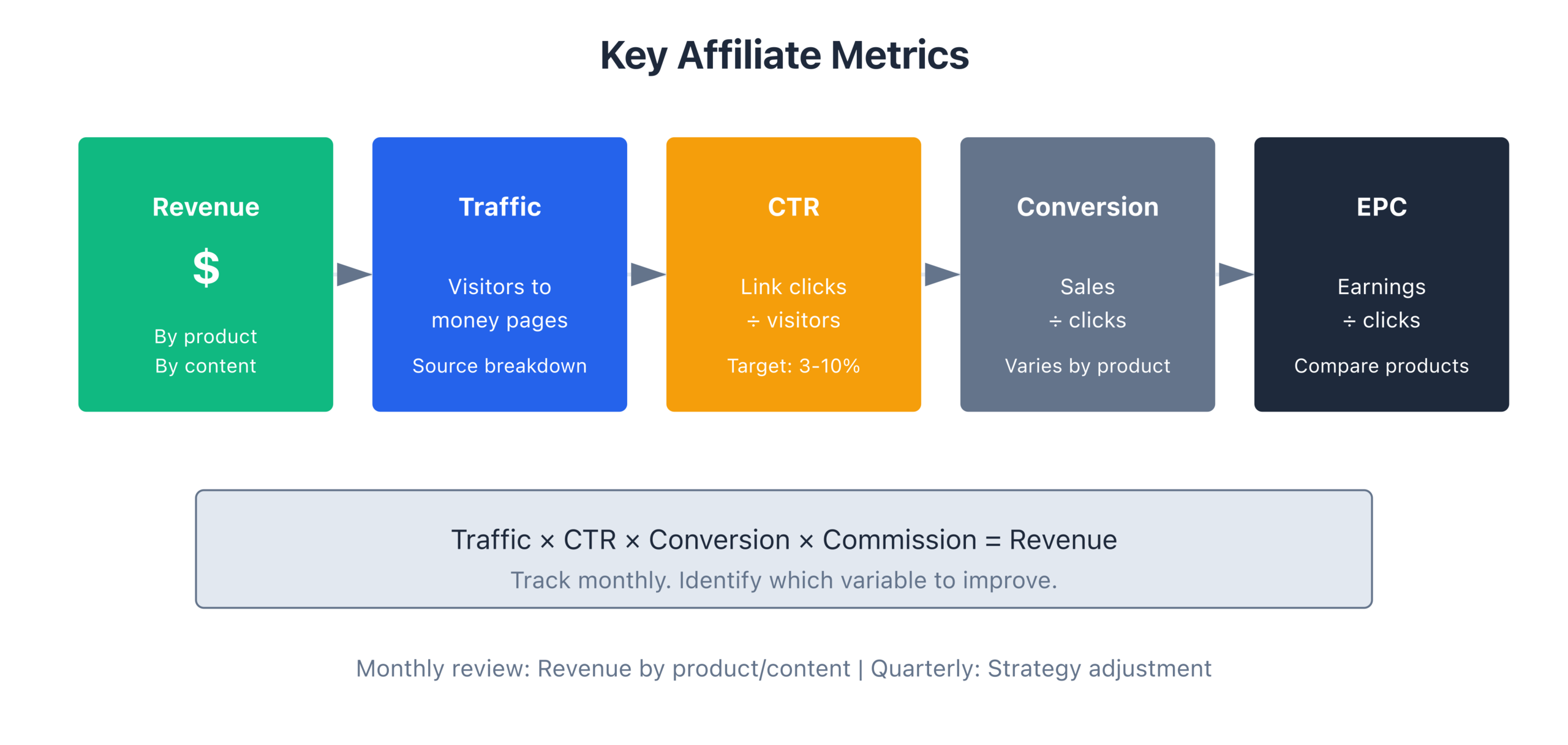
The Four Metrics That Actually Matter
You don’t need 47 metrics on a dashboard. You need four. Everything else is noise.
Earnings Per Click (EPC) is the single most important number in affiliate marketing. It tells you how much you earn every time someone clicks an affiliate link. If your EPC is $0.50, every click is worth half a dollar to you. If it’s $2.00, every click is worth four times more.
Calculate it by dividing your total affiliate earnings by total affiliate clicks for a given period. If you earned $500 from 1,000 clicks last month, your EPC is $0.50. Simple.
Why does this matter more than everything else? Because EPC combines conversion rate and commission amount into one number. A product with a 1% conversion rate and $200 commission has the same EPC as a product with a 10% conversion rate and $20 commission. Both are worth the same per click. EPC cuts through the noise.
Conversion Rate tells you what percentage of people who click your affiliate link actually buy. Most affiliate programs show this in their dashboard. A healthy conversion rate varies by niche, but here’s what I’ve seen across my sites over the years:
- Software/SaaS: 2-5% is solid
- Physical products on Amazon: 5-12% is normal
- Web hosting: 1-3% is standard (but commissions are high)
- Digital courses: 1-4% depending on price point
If your conversion rate is below 1% for any product, something’s wrong. Either the product isn’t a good fit for your audience, your pre-sell isn’t strong enough, or you’re sending the wrong traffic.
Revenue Per Thousand Visitors (RPM) measures how much you earn per 1,000 visitors to a specific page. This tells you which pages are your money pages. I’ve seen RPMs range from $5 on informational posts to $180 on well-optimized review pages. The gap is that wide.
Calculate page RPM by dividing the revenue a page generated by the number of pageviews, then multiplying by 1,000. If your “best web hosting” review earned $900 from 10,000 pageviews, that page has a $90 RPM. That’s a page worth investing in.
Affiliate Click-Through Rate (CTR) is the percentage of page visitors who click at least one affiliate link. If 100 people visit your review and 15 click an affiliate link, your CTR is 15%. Most affiliate pages I’ve optimized land between 10-25% CTR. If yours is below 8%, your calls to action need work.
Setting Up Tracking That Actually Works
Without proper tracking, you’re guessing. Here’s what I set up on every affiliate site I manage.
UTM Parameters are the foundation. Every affiliate link should carry UTM tags so you can trace revenue back to specific pages, placements, and campaigns in Google Analytics.
The structure I use:
utm_source: your site name (e.g., “gauravtiwari”)utm_medium: “affiliate”utm_campaign: the product name (e.g., “flyingpress”)utm_content: the placement (e.g., “comparison-table” or “sidebar-cta” or “intro-link”)
That last one, utm_content, is the one most people skip. But it’s how you figure out whether your in-content links, your comparison tables, or your CTA buttons are doing the heavy lifting. Once I started tagging placements, I discovered that my comparison tables converted 3x better than my in-text links. I immediately restructured my reviews to put the comparison table higher on the page. Revenue went up 22% from that one change.
SubIDs are the affiliate network equivalent of UTM parameters. Most networks like ShareASale, Impact, CJ, and individual programs let you add a SubID to your affiliate link. This is a custom identifier that gets tracked alongside each conversion.
I use SubIDs to tag the specific page and position:
subid=best-hosting-intro(the intro section of my hosting review)subid=hosting-comparison-table-row3(third row of the comparison table)subid=sidebar-widget-hosting(sidebar placement)
When a sale comes through, I can see exactly which page and which placement generated it. This data is gold when you’re deciding where to place links and which content to update.
Click Tracking with a tool like ThirstyAffiliates or PrettyLinks gives you a central dashboard for all your affiliate link clicks. You can see total clicks, clicks per page, clicks per link, and clicks over time. I’ve used both. ThirstyAffiliates is my pick for most bloggers because it handles link cloaking, geolocation redirects, and click reporting in one plugin.
The setup takes about an hour. Replace all your raw affiliate links with tracked links through the plugin. Yes, all of them. Don’t leave any naked affiliate links on your site. Every click should be tracked.
Google Analytics Events give you the deepest layer of tracking. Set up custom events to fire when someone clicks an affiliate link. This lets you see affiliate click data alongside all your other analytics: bounce rate, time on page, scroll depth, traffic source. You’ll start seeing patterns. Like the fact that visitors from Pinterest almost never click affiliate links, while visitors from Google convert at 3x the average. (That’s a real pattern I’ve seen on multiple sites.)
The Monthly Affiliate Analytics Review
This is a 30-minute ritual that I do on the first Monday of every month. It’s the single highest-ROI activity in my affiliate business, and I’m not exaggerating.
Minutes 1-5: Pull the numbers. Open every affiliate dashboard and note the previous month’s earnings, clicks, and conversion rate for each program. I keep this in a simple spreadsheet. Nothing fancy. Columns: Program, Clicks, Conversions, Revenue, EPC.
Minutes 5-10: Compare to the previous month. Look for changes greater than 15% in either direction. A 20% drop in EPC from one program? That’s a flag. A sudden spike in clicks but flat revenue? Something changed with the merchant’s landing page or offer.
Minutes 10-15: Identify top-performing pages. Sort your pages by revenue (your analytics should make this easy if you’ve set up tracking properly). Note your top 5 pages. These are your money makers. Are they ranking well? Are they getting internal links from other content? Are they up to date?
Minutes 15-20: Identify underperformers. Look for pages that get decent traffic but generate little or no affiliate revenue. These are optimization opportunities. Maybe the CTR is low (fix your link placement). Maybe the conversion rate is terrible (switch to a better-converting product). Maybe the content doesn’t match buyer intent (rewrite the intro and CTA).
Minutes 20-25: Check for broken or changed affiliate links. Click your top 20 affiliate links manually. Are they still working? Has the merchant changed their landing page? I’ve found broken affiliate links that had been losing me money for months because I didn’t check. This step alone has saved me thousands of dollars over the years.
Minutes 25-30: Make three decisions. Based on everything you just reviewed, decide on exactly three actions for this month. Not ten. Three. Maybe it’s “update the hosting review with current pricing,” “add a comparison table to the email marketing post,” and “test a different CTA button color on the top-performing page.” Write them down. Do them this week.
That’s it. Thirty minutes. The discipline of doing this every single month is what separates bloggers who make $500/month from those who make $5,000/month.
Identifying Your Top Performers and Doubling Down
Once you’ve been tracking for three months, patterns emerge. And those patterns will surprise you.
On one of my sites, I had 127 posts with affiliate links. When I ran the numbers, I found that 8 posts generated 76% of total affiliate revenue. Eight out of 127. The rest were noise.
Those 8 posts became my obsession. I updated them monthly. I built internal links pointing to them from every related post. I improved their page speed. I added better CTAs. I made sure they ranked for every possible keyword variation. I tested different affiliate products in them to find the highest-converting option.
The result? Those 8 posts went from generating $3,200/month to $7,800/month over six months. I didn’t need to create a hundred new posts. I needed to make my best posts even better.
How do you identify your top performers?
Sort all affiliate-linked pages by revenue. Take the top 10%. These are your A-tier pages. Now look at the data for each one:
- What’s the RPM? Is it above $50? Above $100?
- What’s the affiliate CTR? Is there room to improve placement?
- What keywords drive traffic to this page? Are there related keywords you’re not ranking for?
- When was it last updated? Is the information still accurate?
- What’s the page speed? Can you make it load faster?
For each A-tier page, create a dedicated optimization plan. Update it quarterly at minimum. These pages are your revenue engine. Treat them that way.
When to Drop Underperforming Products
This is where most affiliate bloggers get stuck. They promote a product that’s not converting, and they keep promoting it because they’ve already written the content. Sunk cost fallacy in action.
Here’s my rule: if a product has received 200+ clicks and has zero conversions, drop it. Something is fundamentally wrong. Either the product’s landing page is terrible, the pricing is off for your audience, or the product just isn’t what your readers want.
If a product converts but at a low rate (below 1% after 500+ clicks), give it one more chance. Check the merchant’s landing page. Has something changed? Try a different approach in your content, maybe more honest about limitations, or position it for a different audience segment. If it still underperforms after another month, replace it.
The replacement process is straightforward. Find a competing product with a good affiliate program. Sign up. Test the product yourself. Rewrite the relevant sections of your content. Monitor for 30 days. Compare the numbers.
I swapped out a hosting company I was promoting after seeing a steady decline in conversions over four months. The replacement converted at 3x the rate with a similar commission. That single product swap added $1,400/month to my revenue. It took me half a day to make the change.
Don’t get emotionally attached to products you promote. Follow the data.
The 80/20 of Affiliate Analytics
The Pareto principle hits hard in affiliate marketing. Here’s what I’ve observed across every affiliate site I’ve managed:
- 20% of your pages generate 80% of your affiliate revenue
- 20% of your affiliate programs generate 80% of your commissions
- 20% of your link placements generate 80% of your clicks
- 20% of your traffic sources generate 80% of your converting visitors
This isn’t theory. I’ve verified it with real numbers on sites ranging from 50 posts to 500+ posts. The ratio holds.
So what do you do with this knowledge?
First, stop spreading your effort equally across all content. Your time is limited. Spend 80% of your optimization effort on the 20% of pages that drive revenue. The other pages can exist, they can rank, they can bring in traffic. But they don’t need your attention every month.
Second, consolidate your affiliate programs. If you’re promoting 30 different products, I’ll bet 5-6 of them generate the vast majority of your income. Focus on those relationships. Reach out to those affiliate managers. Negotiate better rates. Get exclusive deals for your readers. The programs generating your revenue deserve your energy.
Third, double down on the traffic sources that convert. If organic search from Google sends you the highest-converting traffic (it usually does for affiliate content), invest more in SEO for your money pages. If email traffic converts well, build your list harder and send more targeted content to subscribers.
The bloggers I’ve seen grow fastest aren’t the ones creating the most content. They’re the ones who figured out their 20% and poured gasoline on it.
Chapter Checklist
- [ ] Set up affiliate link tracking with a link management plugin
- [ ] Add UTM parameters to all affiliate links
- [ ] Configure SubIDs for your top affiliate programs
- [ ] Set up Google Analytics events for affiliate link clicks
- [ ] Calculate EPC, conversion rate, RPM, and CTR for your top 10 affiliate pages
- [ ] Identify your top 5 revenue-generating pages
- [ ] Identify 3 underperforming products to evaluate
- [ ] Schedule your first monthly analytics review (first Monday of next month)
- [ ] Create a simple tracking spreadsheet with columns for each metric
Chapter Exercise
The Affiliate Audit
Pull data from the last 90 days across all your affiliate programs. Create a spreadsheet with one row per affiliate page. For each page, fill in:
- Page URL
- Monthly pageviews
- Affiliate clicks from that page
- Conversions from that page
- Revenue from that page
- Calculated EPC
- Calculated RPM
- Calculated affiliate CTR
Sort by revenue, highest first. Circle your top 5 pages. Put a star next to any page with 500+ pageviews but less than $10 in revenue (these are your biggest optimization opportunities). For your top 5 pages, write down one specific action you could take this week to improve performance. Then do it.
This exercise will take about two hours. It’s the most profitable two hours you’ll spend this quarter.
Disclaimer: This site is reader-supported. If you buy through some links, I may earn a small commission at no extra cost to you. I only recommend tools I trust and would use myself. Your support helps keep gauravtiwari.org free and focused on real-world advice. Thanks. - Gaurav Tiwari