
I’m going to tell you the single most underrated tactic in affiliate SEO. It’s not backlinks. It’s not keyword optimization. It’s not page speed.
It’s internal linking.
I know that sounds boring. Internal links aren’t sexy. Nobody writes Twitter threads about their internal linking strategy. Nobody brags about it at conferences. But I’ve watched internal linking improvements move pages from position 15 to position 5, from position 5 to position 2, and from “barely any traffic” to “top revenue page on my site.” Repeatedly. Consistently.
The reason internal linking works so well is that it’s one of the few SEO levers you control completely. You can’t force other sites to link to you. You can’t control Google’s algorithm. But you can decide exactly how your own pages connect to each other, which pages you want to pass the most authority to, and how readers flow through your site.
And for affiliate sites specifically, internal linking isn’t just about SEO. It’s about funneling readers from your informational content, which gets the most traffic, to your commercial content, which makes the most money. That’s the entire game.
The Hub & Spoke Model Explained
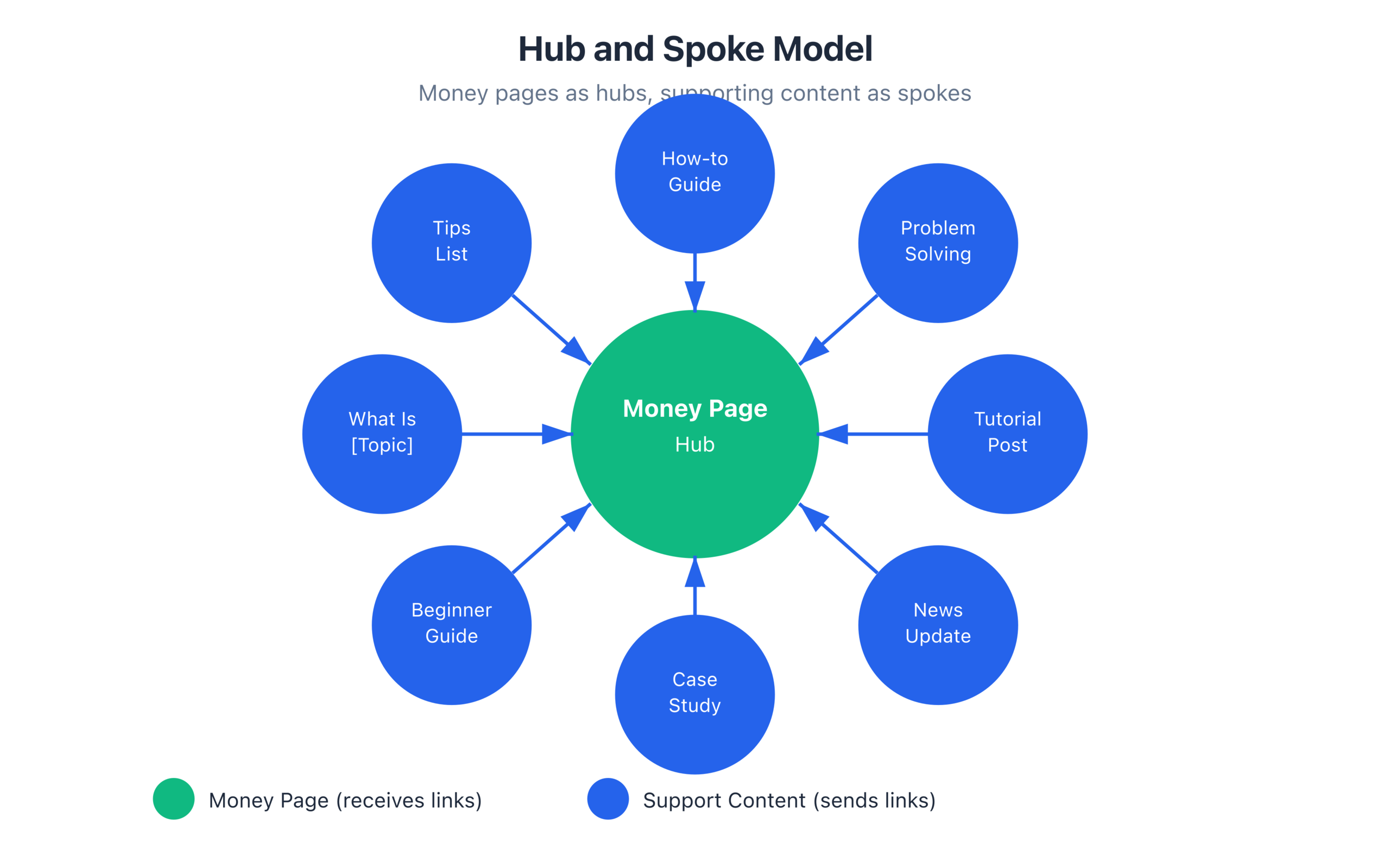
The Hub & Spoke model is a content architecture where a central “hub” page is surrounded by multiple “spoke” pages that link to it. Think of it like a wheel. The hub is the center. The spokes are the articles that radiate outward and point back to the center.
For affiliate sites, the model looks like this:
Hub Pages (Money Pages): These are your highest-value commercial content. “Best WordPress Caching Plugins” roundups. “FlyingPress Review.” “[Product A] vs [Product B]” comparisons. These are the pages with affiliate links. The pages you want to rank. The pages that generate revenue.
Spoke Pages (Support Content): These are informational articles that relate to the hub topic. “How WordPress Caching Works.” “Page Caching vs Object Caching Explained.” “How to Speed Up WordPress Without Plugins.” “What is a CDN and Do You Need One?” These pages attract traffic through educational search queries and funnel readers toward your hub pages.
The linking structure is specific:
- Every spoke page links to the hub page (with relevant, natural anchor text)
- The hub page links back to 2-3 of its most relevant spokes
- Spoke pages link to each other when contextually relevant
- The hub page is the primary link target, receiving the most internal links
This structure tells Google two things: first, that the hub page is your most important page on this topic (because more internal links point to it). Second, that your site has comprehensive coverage of this topic (because you have multiple supporting articles surrounding the hub).
Both signals help the hub page rank higher. And since the hub page is your money page, higher rankings translate directly to more affiliate revenue.
Why Internal Linking Is the Most Underrated Affiliate SEO Tactic
I’ve managed affiliate content on sites ranging from small blogs to sites with 500+ published articles. Across all of them, the pattern is the same: sites with strong internal linking outperform sites without it, even when the weaker-linked sites have better content.
Three reasons internal linking is so powerful for affiliate sites:
1. It passes authority to your money pages.
Your informational content typically earns more natural backlinks than your commercial content. People link to helpful tutorials, educational guides, and data-driven analysis. They rarely link to product reviews and roundups.
Without internal linking, those backlinks benefit only the informational pages. The authority stays trapped. With strategic internal linking, you channel that authority from your informational pages (which earn links) to your commercial pages (which earn money). It’s like plumbing. You’re building pipes that move link equity where it’s needed most.
I’ve seen cases where a single informational article with 30+ backlinks boosted the ranking of a connected money page by 5-8 positions because the internal link structure was channeling authority correctly. That money page itself had zero external backlinks.
2. It keeps readers on your site longer.
The average affiliate site visit lasts under 2 minutes. Most visitors read one page and leave. Internal linking changes that. When a reader finishes an article about “How WordPress Caching Works” and sees a link to “Best WordPress Caching Plugins (Tested and Compared),” there’s a natural progression. They just learned what caching is. Now they want to know which plugin to use. You’ve given them the next step without being pushy.
My sites with strong internal linking have average session durations 40-60% higher than sites without it. More page views per session means more chances for a reader to land on a monetized page and click an affiliate link.
3. It helps Google discover and index your content faster.
Google’s crawlers follow links. When your content is heavily interlinked, Google finds new pages faster and re-crawls existing pages more frequently. I’ve noticed that well-interlinked pages on my site get indexed within 24-48 hours of publishing, while orphaned pages (with no internal links) can take weeks.
For time-sensitive content like deal pages and product launches, fast indexing matters. If you publish a “Black Friday Hosting Deals” page and it takes Google two weeks to index it, you’ve missed the entire window. Internal links from your existing hosting articles speed that up dramatically.
Building Topic Clusters That Funnel Authority to Money Pages
A topic cluster is the practical application of the Hub & Spoke model. Here’s exactly how I build one for an affiliate product category:
Step 1: Identify your hub page.
This is the commercial content page that you want to rank highest. For a caching plugin cluster, my hub might be “Best WordPress Caching Plugins in 2025.” This is the page with affiliate links to every caching plugin I recommend.
Step 2: Plan 8-15 spoke pages.
Each spoke should target a specific informational or secondary commercial keyword related to the hub topic. For the caching cluster:
- How WordPress Caching Works (Beginner’s Guide)
- Page Caching vs Browser Caching vs Object Caching
- How to Set Up WP Rocket (Step-by-Step)
- How to Set Up FlyingPress (Step-by-Step)
- WP Rocket vs FlyingPress (Head-to-Head)
- FlyingPress Review (In-Depth)
- LiteSpeed Cache vs WP Rocket
- WordPress Caching for WooCommerce Sites
- Do You Need a Caching Plugin on Managed Hosting?
- How to Test Your WordPress Site Speed
- CDN vs Caching Plugin: What’s the Difference?
- How to Clear WordPress Cache (Every Method)
Each spoke targets a different keyword, attracts a different audience segment, and provides a natural opportunity to link to the hub page.
Step 3: Write the spoke content first.
I know this feels backwards. You want to write the money page first. But writing the spokes first has advantages: by the time you write the hub page, you already have supporting articles to link to, which makes the hub content richer and more authoritative. And your spoke articles start building topical signals immediately.
Step 4: Write the hub page and interlink everything.
The hub page should link to its most relevant spokes. Not all of them. Just the ones that add genuine value to the reader. If your roundup mentions FlyingPress, link to your FlyingPress review spoke. If you mention caching types, link to your “Page Caching vs Object Caching” spoke.
Each spoke should have at least one, ideally two, natural internal links pointing to the hub page. “For a complete comparison of the best caching plugins, see my full roundup” or a contextual mention within the content like “I ranked [X] as the top pick in my best caching plugins guide.”
Step 5: Cross-link spokes where relevant.
Your “How to Set Up FlyingPress” tutorial should link to your “FlyingPress Review” when it makes sense. Your “Page Caching vs Object Caching” article should link to your “How WordPress Caching Works” article. These cross-links create a web of connected content rather than isolated articles.
The result is a topic cluster where every piece of content supports every other piece. Google sees this interconnection as a signal of topical depth and authority. And readers who enter your cluster through any spoke can naturally navigate toward your money page.
Anchor Text Strategy for Internal Links
Anchor text is the clickable text of a link. And for internal links, your anchor text strategy matters more than most bloggers realize.
Three rules I follow:
1. Use descriptive, relevant anchor text.
“Click here” and “read more” are wasted opportunities. Your anchor text tells Google what the linked page is about. If you’re linking to your “Best WordPress Caching Plugins” roundup, use anchor text that includes relevant keywords: “my roundup of the best caching plugins” or “top WordPress caching plugins I’ve tested.”
2. Vary your anchor text.
Don’t use the exact same anchor text every time you link to a page. If every spoke links to your hub with “best WordPress caching plugins,” it looks unnatural. Vary it: “my caching plugin comparison,” “the caching plugins I recommend,” “top caching tools for WordPress.” Natural variation looks organic. Identical repetition looks like you’re trying to game the system.
I keep a simple rule: never use the exact same anchor text more than twice for the same target page. Every link should have slightly different wording that still describes the target page’s topic.
3. Don’t over-optimize anchor text.
In the early days of SEO, people would stuff exact-match keywords into every anchor text. That doesn’t work anymore and can actually hurt your rankings. Aim for naturally descriptive text that a human editor would write. If the anchor text sounds forced when you read the sentence aloud, rewrite it.
A good test: read the paragraph containing the link aloud. Does the anchor text flow naturally? Would you notice it’s a link, or does it feel like part of the sentence? If it flows naturally, it’s good. If it feels jammed in, revise it.
The Internal Linking Audit: Finding and Fixing Orphaned Content
Orphaned content is any page on your site that has zero or very few internal links pointing to it. These pages are practically invisible to Google and your readers. They exist, but nobody finds them because nothing connects to them.
Most sites have more orphaned content than they realize. I’ve audited sites where 30-40% of published articles had zero internal links from other pages. That’s months or years of content creation going to waste.
Here’s how I audit internal links:
Step 1: Crawl your site. Use a tool like Screaming Frog (free for up to 500 pages) or the site audit feature in Semrush. This gives you a map of every page and how many internal links point to each one.
Step 2: Identify orphans. Sort pages by “internal links in” (ascending). Any page with zero or one internal link is an orphan that needs attention.
Step 3: Categorize orphans. Are they still relevant? Some orphaned pages are outdated content you should delete or redirect. Others are perfectly good articles that just need to be connected to your link structure.
Step 4: Connect orphans to your cluster structure. For each relevant orphan, identify which topic cluster it belongs to. Then add internal links from existing cluster pages to the orphan, and from the orphan to the relevant hub page.
Step 5: Fix internal link distribution. Look at how internal links are distributed across your money pages. Are your highest-value pages also your most internally linked pages? If not, adjust. Your “Best [Product Category]” roundups and top-converting reviews should have the most internal links pointing to them.
I run this audit quarterly on my main affiliate site. Every audit reveals pages that have been accidentally orphaned through site restructuring, deleted articles, or simply being published without being properly linked. Each audit typically results in 20-40 new internal links being added, and I consistently see ranking improvements in the weeks following.
Automated vs Manual Internal Linking
There are WordPress plugins that automate internal linking. Link Whisper is the most popular one I’ve used. It scans your content and suggests internal linking opportunities based on keyword matching.
Should you use automated tools? My answer is nuanced.
Automated linking is good for:
- Finding opportunities you missed manually (especially on sites with 200+ articles)
- Identifying orphaned content quickly
- Adding basic internal links across a large content library in bulk
- Getting a baseline linking structure in place fast
Manual linking is better for:
- Strategic linking to money pages (you want to control exactly how authority flows)
- Writing contextual anchor text that feels natural
- Deciding which links add genuine reader value vs which are just SEO plays
- Maintaining quality over quantity (some automated suggestions are contextually irrelevant)
My approach: I use Link Whisper to find opportunities and identify gaps. But I make every linking decision manually. The tool shows me “this article mentions caching, and you have a caching roundup. Want to add a link?” I then decide if the context makes sense, write appropriate anchor text, and add the link.
Fully automated linking, where a plugin inserts links without your review, tends to create awkward, contextually poor links that readers notice. And readers who notice forced links trust your content less. Not worth it.
For sites with fewer than 100 articles, manual internal linking is manageable without any tools. Open your latest article, think about which other articles relate to it, and add 3-5 contextual internal links. Then go to those related articles and add a link back to your new piece. Takes 10-15 minutes per article.
For sites with 200+ articles, a tool like Link Whisper saves significant time on the discovery phase. But the decision-making and anchor text writing should still be yours.
One more tip that most bloggers miss: internal linking isn’t a one-time task. Every new article you publish creates new linking opportunities for existing content. When I publish a new spoke article, I spend 10 minutes updating 3-5 existing articles to include links to the new piece. This habit keeps your internal link structure growing organically with every publish.
Chapter Checklist
- [ ] I understand the Hub & Spoke model and can identify hub and spoke pages on my site
- [ ] My money pages are identified as hub pages in my content architecture
- [ ] Each hub page has at least 8-10 spoke pages supporting it
- [ ] Every spoke page links to its hub page with natural, descriptive anchor text
- [ ] Hub pages link back to their most relevant spokes
- [ ] I vary my anchor text for internal links (never the same exact text more than twice per target)
- [ ] I’ve run an internal linking audit and identified orphaned content
- [ ] Orphaned content has been either connected to a cluster, updated and redirected, or deleted
- [ ] My highest-value pages have the most internal links
- [ ] I spend 10-15 minutes on internal linking every time I publish a new article
- [ ] I have a system (manual or tool-assisted) for internal link management
Chapter Exercise
Take a topic cluster that exists on your site (even a small one) and audit its internal linking:
- Identify your hub page: Which page in this topic cluster is your money page? The one with affiliate links that you most want to rank?
- List your spoke pages: What supporting articles exist that relate to this hub topic? List every one, even if they’re not currently linked.
- Map current links: For each spoke, check if it has at least one link pointing to the hub page. For the hub, check if it links to its most relevant spokes. Use a spreadsheet: Spoke Page | Links to Hub? | Hub Links to Spoke?
- Find orphans: Are any of your spoke pages orphaned (zero or one internal links from other content)? List them.
- Fix the gaps: For every spoke missing a link to the hub, add one. For the hub, add links to any relevant spokes it’s missing. For orphans, add at least 2-3 internal links from related content. Write natural anchor text for every link you add.
- Check anchor text variety: List the anchor text used for every link pointing to your hub page. Are you using varied, natural language? If you’ve used the same phrase more than twice, rewrite one of them.
This exercise should take 30-60 minutes for a cluster of 10-15 articles. Do it once, and you’ll likely see ranking improvements within 2-4 weeks. Then repeat for every topic cluster on your site.
Disclaimer: This site is reader-supported. If you buy through some links, I may earn a small commission at no extra cost to you. I only recommend tools I trust and would use myself. Your support helps keep gauravtiwari.org free and focused on real-world advice. Thanks. - Gaurav Tiwari