
Why All Web Developers Should Learn Kubernetes?
It often feels like there is always one more thing to learn when you become a web developer. There seems to always be a new framework trending or a new way to deploy your apps to a server.
While it is impossible to keep up with everything happening in the web development world, learning specific technologies can make a significant difference to your skills and career as a web developer. One of the technologies senior developers recommend that all developers learn is Kubernetes.
What is Kubernetes?
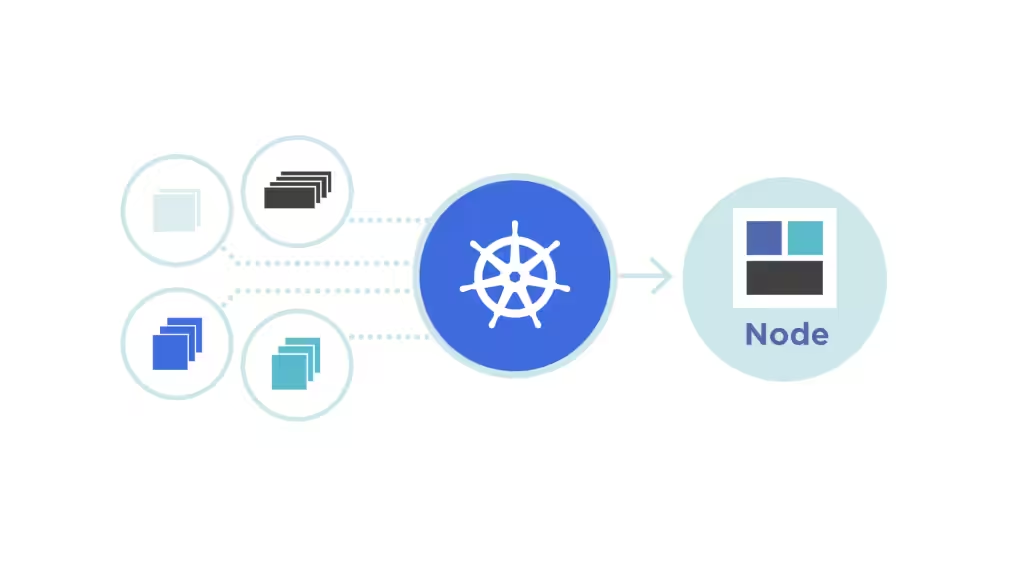
Kubernetes is an open-source system that lets users manage, scale, and deploy containerized applications automatically.
It makes it much easier for developers to manage such containers across hosts and nodes and provides load-balancing facilities and capabilities as well as crucial self-healing capabilities crucial for keeping servers, hosts, services, and applications healthy.
Learning Kubernetes Can Help Developers Understand Modern Deployment Practices
In the past, developers had to upload their websites to servers through FTP or SSH. The problem with this approach is that they did not have granular control of the underlying technology running their application or software. The process was also cumbersome and prone to errors.
Kubernetes has changed how websites are deployed in the modern age by introducing containerized deployments. This means developers can build their applications into images or containers that they can deploy on a server without having to think about the details of how the server will unravel everything to ensure their application runs as intended.
With modern companies and development studios switching to microservice-based software and application architectures, understanding modern deployment methods, including containerized solutions, can be an invaluable skill.
It Helps developers Understand How to Scale Their Applications
Deploying an application that serves only a few thousand or hundreds of thousands of people is different from deploying one that serves millions. The latter has to scale as the number of users increases, and this is something Kubernetes is great at.
In addition to using their understanding of scaling for their own applications, developers get a better understanding of what happens behind the scenes once their application or software is deployed. This understanding is crucial for collaboration with DevOps teams and making informed decisions about application development. By understanding how a website will scale once it has millions of users, developers can have scaling in mind from when they write the first line of code.
Kubernetes Enhances a Developer’s Troubleshooting Skills
Modern applications are complex pieces of code. They typically have several components working together, and it is a developer’s job to ensure they continue doing so smoothly. Kubernetes provides several functionalities and tools that help with troubleshooting problematic deployments.
Developers can use what they learn from working with Kubernetes in other areas of their work. The skills they gain from doing so can empower them to identify and resolve issues not only with containerized applications but with other types of applications, too.
Developers who have never worked with Kubernetes or its troubleshooting features can access numerous online resources that can arm them with the skills required to work with this technology. Additionally, they can work with the Kubernetes clusters and servers provided by companies like Gcore. While Gcore provides managed Kubernetes services, a familiarity of working with its servers and services, including with troubleshooting deployments, can be crucial in gaining the valuable skills they need to be successful developers.
Learning Kubernetes Opens More Opportunities
The web development, software development, and IT landscape is always evolving, and containerization is part of this evolution. Many companies now require developers to understand it and how to work with Kubernetes.
It is now common to see job descriptions on platforms like LinkedIn and Indeed mention Kubernetes as a required skill, especially for developers in mid-level and senior roles. This means any developer who learns this technology and its nuances has an opportunity to seek one of these better and more lucrative opportunities.
It also makes them a better candidate for companies that work heavily with Kubernetes. It is important to note that containerization is here to stay, so these skills should translate into additional opportunities in the future, too.
It Empowers Developers to Become Creators
The vast majority of web developers work for companies or as freelancers. While this is a viable arrangement for many of them, some wish to build their own projects that they can scale. Kubernetes gives them the skills they need in several ways.
The first is allowing them to launch a minimum viable product quickly. Once a developer has a few lines of code and a viable product, they can create a container and deploy it to a Kubernetes cluster. The power of iteration and continuous development and deployment that Kubernetes gives developers then becomes crucial for the improvement of this product or project.
A developer can add, remove, and improve features without impacting their products. Remember that Kubernetes has self-healing features that repair corrupted deployments and version control that allows developers to roll back problematic deployments.
Developers Gain Vendor Independence
Any developer who has worked on a personal project understands how bad vendor lo-in can be. A developer can be forced to pay more for a hosting solution because they cannot get out of their contract. They might also stay with the vendor due to porting difficulties if their application or software is tightly coupled with the solutions the vendor provides.
Kubernetes removes this limitation by being an open-source platform that runs on almost any infrastructure. Developers can run it on private data centers, enterprise servers, personal servers, and even hybrid environments. This means they do not have to stick with vendors who no longer serve their interests.
Secondly, working with cloud hosting providers who share on a pay-as-you-go basis, which many providers who support Kubernetes do, ensures developers can wrap everything up and move to different providers easily.
Kubernetes has become the preferred containerization solution for developers and companies that create microservice applications. It allows developers to easily develop, manage, and scale their applications while giving them the independence to run their applications in almost any environment they wish. While all these are great reasons to learn the technology, there is an additional reason in that it is in very high demand and can lead to lucrative career opportunities for developers working with the right companies.
Must-Read Books for Web Developers
I’ve been building websites since 2009. The three books that made the biggest difference in how I write code are all on this list. Clean Code changed how I name things. Code Complete changed how I structure projects. Design Patterns changed how I think about architecture.
These aren’t Kubernetes books. They’re software engineering fundamentals that make you better at everything, including container orchestration. If you already know how to code, these teach you to code well. For more dev resources, check out my guide on full stack frameworks.


Code Complete: A Practical Handbook of Software Construction, Second Edition
- Helpful Programming Code Book

Best Laptops for Kubernetes Development
Running local Kubernetes clusters with Minikube or Kind eats RAM. You need at least 16GB to run clusters without your machine crawling. The MacBook Air M2 handles Docker and Kubernetes comfortably. The Pro M4 is overkill for most, but worth it if you run multiple clusters daily.

- STRIKINGLY THIN DESIGN — The redesigned MacBook Air is more portable than ever and weighs just 2.7 pounds. It’s the incredibly capable laptop that lets you work, play or create just about anything — anywhere.
- SUPERCHARGED BY M2 — Get more done faster with a next-generation 8-core CPU, up to 10-core GPU and up to 24GB of unified memory.
- BUILT FOR APPLE INTELLIGENCE—Apple Intelligence is the personal intelligence system that helps you write, express yourself, and get things done effortlessly. With groundbreaking privacy protections, it gives you peace of mind that no one else can access your data—not even Apple.*
- UP TO 18 HOURS OF BATTERY LIFE — Go all day and into the night, thanks to the power-efficient performance of the Apple M2 chip.
- BIG, BEAUTIFUL DISPLAY — The 13.6-inch Liquid Retina display features over 500 nits of brightness, P3 wide color and support for 1 billion colors for vibrant images and incredible detail.

- SUPERCHARGED BY M4 — The 14-inch MacBook Pro with M4 chip gives you spectacular performance in a powerhouse laptop built for Apple Intelligence.* With all-day battery life and a breathtaking Liquid Retina XDR display with up to 1600 nits peak brightness, it’s pro in every way.*
- CHAMPION CHIP — The M4 chip brings spectacular speed and capability to blaze through everyday activities and multitask across multiple productivity and pro apps.
- BUILT FOR APPLE INTELLIGENCE—Apple Intelligence is the personal intelligence system that helps you write, express yourself, and get things done effortlessly. With groundbreaking privacy protections, it gives you peace of mind that no one else can access your data—not even Apple.*
- ALL-DAY BATTERY LIFE — MacBook Pro delivers the same exceptional performance whether it’s running on battery or plugged in.
- APPS FLY WITH APPLE SILICON — All your favorites, including Microsoft 365 and Adobe Creative Cloud, run lightning fast in macOS.*
Recommended Monitors for Development
Managing Kubernetes means juggling dashboards, logs, terminal windows, and your IDE. A single laptop screen isn’t enough. Even a budget 27-inch monitor doubles your usable workspace. For more on developer setups, see my Android development guide.
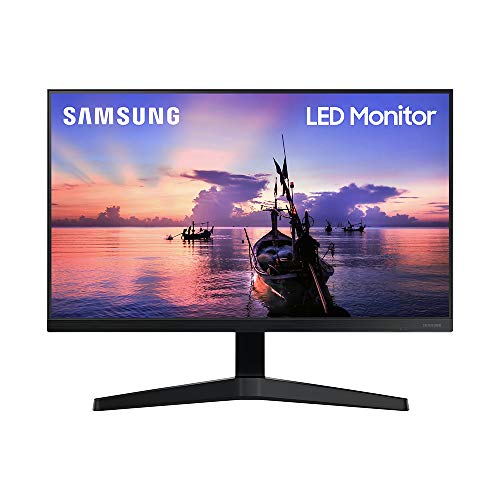
- ALL-EXPANSIVE VIEW: The 3-sided borderless display brings a clean and modern aesthetic to any working environment. In a multi-monitor setup, the displays line up seamlessly for a virtually gapless view without distractions.Aspect ratio:16:9.Response time:5.0 milliseconds
- IPS PANEL: Sit anywhere and have a full technicolor experience. The IPS panel preserves color vividness and clarity across every inch of the screen. Even on a display this wide, tones and shades look completely accurate from virtually any angle, with no color washing
- SYNCHRONIZED ACTION: Superfluid entertainment experience. AMD Radeon FreeSync keeps your monitor and graphics card refresh rate in sync to reduce image tearing. Watch movies and play games without any interruptions. Even fast scenes look seamless and smooth
- SEAMLESS, SMOOTH VISUALS: Now, the picture looks flawless. The 75Hz refresh rate delivers more fluid scenes. Whether you're catching up on your favorite TV drama, watching a video, or playing a game, your entertainment has no lag or ghosting effect
- MORE GAMING POWER: Ideal game settings instantly give you the edge. Get optimal color and image contrast to see scenes more vividly and spot enemies hiding in the dark. Game Mode adjusts any game to fill your screen with every detail in view

- 4K UHD with 1000:1 Contrast Ratio – This UltraFine display with a 1000:1 contrast ratio displays deeper blacks and vivid colors in UHD clarity. With wide viewing angles, it gives creative professionals the ability to view and work with highly-detailed, digital imagery.
- 4K HDR10 DCI-P3 – Explore HDR10 content the way it was meant to be seen with up to 90% DCI-P3 color gamut expression—an elevated color spectrum that brings brilliant color to life.
- Onscreen Control – You can customize the workspace by splitting the display or adjusting basic monitor options with just a few mouse clicks.
- Ergonomic Stand – The ergonomic stand makes it easy to flexibly adjust the tilt of the screen in the optimal position for you.
- What's In The Box – Stand Body, Stand Base, Screws, Power Adapter, HDMI Cable, Quick Start Guide, Registration Card, Warranty.