
Strategic Resource Allocation in Software Development Projects
 by
by
Strategic resource allocation in software development is the discipline of assigning scarce people, focused time, budget, tools, and decision rights to the work that creates the most value without hiding risk. It is not a utilization contest. A team can look fully booked while critical work waits behind one reviewer.
The useful unit is not a developer-hour. It is qualified capacity at a specific point in a dependency chain. Ten frontend hours cannot replace a missing security review, and adding another developer can make a review bottleneck worse.
I have been building and shipping software since 2008, now 18 years. The durable lesson is that allocation needs visible assumptions and a rollback. When a plan changes, you should know which constraint changed, what moved, and how to restore the last workable state.
What Strategic Resource Allocation Means in Software Projects
Good allocation answers five questions before work starts: what outcome matters, what work unlocks it, which capability is required, what can run concurrently, and what capacity must remain uncommitted.
- People: skills, domain knowledge, review authority, availability, learning needs, and backup coverage.
- Time: focused delivery hours after support, meetings, reviews, leave, and predictable operational work.
- Budget: labor, contractor, platform, cloud, license, and opportunity costs attached to the work.
- Tools and infrastructure: environments, CI capacity, test data, API quotas, design access, and deployment permissions.
- Decision rights: the person who can approve scope, security, architecture, release, and tradeoffs without creating a queue.
Headcount hides most of this. A four-person team with one security-capable engineer has one unit of security capacity, not four. The allocation map should expose that scarcity before the authentication task reaches review.
| Layer | Planning question | Evidence to keep |
|---|---|---|
| Outcome | What user or business change justifies the work? | Metric, owner, decision date |
| Work | Which smallest slice can deliver or test that outcome? | Acceptance and stop conditions |
| Capability | Which skills and approvals are required? | Skill and ownership map |
| Flow | What blocks what, and where can work queue? | Dependency and WIP view |
| Risk | What must stay available for incidents and change? | Buffer and rollback plan |
Why Software Projects Fail Without It (The Data)
Allocation is one controllable part of a larger project system. Current research does not justify blaming every delay on capacity. It does show that complexity, weak organizational systems, and too much work in process raise the cost of coordination.
- Complexity is normal: PMI Pulse of the Profession 2026 reports that 97% of surveyed project professionals managed at least one complex project in the previous year, and more than half called at least one significantly complex.
- Complex projects fail more often: PMI reports that about one-third of complex projects fail, compared with 13% of projects overall. These are cross-industry project results, not a software-only failure rate.
- Response matters: PMI says professionals who manage complexity effectively are five times more likely to deliver successful projects. The report emphasizes outcomes, alignment, and learning, not a tighter utilization target.
- AI amplifies the system: the 2025 DORA report concludes that AI magnifies organizational strengths and weaknesses, and that the largest returns come from the underlying organizational system rather than the tool alone.
That evidence changes the management question. Do not ask, “How do I keep everyone busy?” Ask, “What is preventing the most valuable work from reaching a safe release, and which capacity can remove that constraint?”
The Core Resource Allocation Methods
No single allocation method is enough. Capacity sets the ceiling, skill fit protects quality, value orders demand, dependencies protect flow, and buffer keeps the plan from collapsing at the first change.
1. Capacity planning
Start with observed time, not paid hours. For each person, subtract planned leave, recurring meetings, support rotation, code review, maintenance, and a risk reserve. Compare the result with actuals every week. Do not install a universal 70% or 85% target and call the work done.
2. Skill-based assignment
Match the capability and decision authority to the work. A junior can own a bounded feature with review support. A payment or authentication change may require a security owner. Record a backup for every scarce capability or accept that the schedule depends on one person.
3. Priority and value-based allocation
Rank work by expected value, urgency, risk reduction, learning value, and cost of delay. A high-value task still may not start if its dependency is missing. Priority decides what deserves capacity; readiness decides whether capacity can produce flow.
4. Critical-path and dependency-based allocation
Map dependencies before assigning dates. Give early attention to tasks that unlock several others, but do not confuse critical with large. A two-hour access decision can gate a week of engineering. Name the owner and due date for external approvals as if they were engineering tasks.
5. Buffer for the unknown
Reserve capacity from measured uncertainty. A stable product team can use recent incident, support, review, and unplanned-work history. A new team or migration needs more caution because its demand distribution is not known. Track buffer consumption instead of quietly filling it.
| Method | Decision it improves | Failure signal |
|---|---|---|
| Capacity | How much can be promised? | Actuals repeatedly exceed planned availability |
| Skill fit | Who can complete and verify it? | Rework or review collects around one person |
| Value | Which work deserves scarce capacity? | Low-impact urgency displaces the outcome |
| Dependencies | What must happen first? | Ready people wait on approvals or upstream work |
| Buffer | How much change can the plan absorb? | Unplanned work consumes the reserve every cycle |
Agile Capacity Planning With Story Points and Velocity
Velocity is a local forecasting aid, not a productivity score or a quota. Story-point scales differ across teams. Comparing them, rewarding increases, or forcing a target invites point inflation without delivering more value.
The current official Scrum Guide is still the November 2020 version. It does not prescribe story points or velocity. It says Developers create the Sprint plan and that confidence in forecasts comes from past performance, upcoming capacity, and the Definition of Done.
- Use completed work only. Partially finished items do not create a usable increment merely because hours were spent.
- Forecast from a range. Keep the recent distribution of completed work, not one average stripped of variability.
- Adjust for known capacity. Leave, on-call duty, migrations, and support change what the next Sprint can absorb.
- Do not fill to a point target. Pull the highest-value ready work that fits the team’s capacity and risk boundary.
For flow-based teams, throughput and cycle-time distributions are often more direct. Either way, the forecast should become less confident when work type, team membership, architecture, or dependency structure changes.
Avoiding Over-Allocation, Under-Allocation, and Context Switching
Maximum utilization is usually the wrong target because waiting work needs slack to move. If every specialist is booked, a new review, incident, or dependency has nowhere to go.
DORA’s work-in-process guidance recommends making the whole value stream visible, setting WIP limits that match capacity, including support and technical debt, and avoiding split attention across tasks. Its point is not that idle time is always good. It is that starting more work can make every item finish later.
- Over-allocation: demand exceeds usable capacity, so queues, unfinished work, errors, and overtime rise.
- Under-allocation: a capability is available but ready valuable work, access, or decisions are missing.
- Fragmentation: a person owns several active items and pays repeated setup, communication, and review costs.
- False utilization: people remain active on low-value work while the release waits on a different constraint.
The May 2025 Kanban Guide defines a current minimal reference for managing flow. Use WIP limits as a policy, then watch where work queues. The queue is evidence. It tells you which skill, approval, environment, or work definition needs attention.
Handling Dependencies and Bottlenecks
A bottleneck is the capacity that limits system throughput, not necessarily the busiest person. Measure ready time, queue time, active time, and blocked reason for each work item. The longest repeated queue is more useful than a color-coded utilization percentage.
Code review is a common gate. GitHub pull-request review documentation supports requested and required reviews, plus automatic requests through CODEOWNERS. Those controls can protect quality, but a required owner with no backup can also become the release constraint.
- Reduce demand: split changes, remove low-value work, and automate predictable checks before human review.
- Increase qualified capacity: cross-train, pair, document decisions, and assign more than one appropriate owner.
- Change sequence: complete access, schema, security, and environment work before dependent features are started.
- Protect the gate: route interrupts away from the constraint and reserve explicit review or release windows.
NIST SP 800-218 SSDF is useful here because security roles and practices must be integrated into the development life cycle. Security is not spare capacity you discover at release time.
The Tools That Make Allocation Visible
The best tool exposes conflicts early and stays current. A spreadsheet is enough when one person can update it and the team can see the whole system. Dedicated scheduling software earns its cost when people, projects, skills, leave, and budgets create conflicts that a flat sheet hides.
Jira connects allocation to issues and Sprints for teams already working there. Resource Guru focuses on people and equipment scheduling. Float combines scheduling, capacity, and forecasting. Forecast connects planning with project and financial data. Test the current product against your workflow before assuming a feature or price.
| Need | Minimum viable view | Useful control |
|---|---|---|
| One small team | Ranked work plus availability | Weekly owner review |
| Several projects | People-by-week allocation | Conflict and leave alerts |
| Specialist gates | Skill and backup ownership | Queue age and escalation |
| Budget control | Plan versus actual labor and cost | Forecast at completion |
| Regulated delivery | Roles, evidence, approvals, and release state | Required checks with backups |
Do not buy forecasting before fixing the source data. If work is not sized consistently, leave is missing, and assignments are stale, a more expensive dashboard will produce a more polished fiction.
The Metrics Worth Tracking
Track flow, quality, value, and sustainability together. One metric becomes a target and stops being trustworthy. A small paired set makes gaming harder and tradeoffs visible.
- Throughput: completed work items per period, grouped by work type when sizes differ.
- Cycle time: elapsed time from active start to done, shown as a distribution rather than one average.
- Queue and blocked time: time ready work waits for a person, dependency, decision, environment, or review.
- Allocation versus actual: planned and recorded time by work type, with recurring variance investigated.
- Quality: escaped defects, change failures, rework, and time to restore service.
- Value: the user, revenue, risk, learning, or cost outcome attached to released work.
- Sustainability: after-hours work, interrupt load, leave, and concentration of critical ownership.
The 2025 DORA report’s AI finding matters here: faster code generation can amplify an unhealthy delivery system. If review, testing, release, or product decisions are the constraint, counting generated code makes the allocation look better while the queue grows.
Common Resource Allocation Mistakes
Most allocation mistakes optimize activity instead of flow. They feel efficient in a plan and expensive in a queue.
- Planning every paid hour: support, review, meetings, leave, and incidents are treated as surprises.
- Assigning by availability alone: skill fit, domain knowledge, and review authority are ignored.
- Starting everything: WIP rises while completions and feedback slow down.
- Using velocity as performance: point inflation and unsafe shortcuts replace a local forecast.
- One owner for every critical gate: expertise becomes a single point of schedule failure.
- Adding people to the wrong constraint: more code arrives at an already overloaded review or test queue.
- No rollback: reallocation destroys the last known workable schedule, input, or release state.
When This Doesn’t Apply
Formal resource management is unnecessary when the coordination cost is lower than the management overhead. A solo developer with one short, clear workstream can use a ranked list, visible calendar, and weekly check.
- Keep it light when one team owns one small outcome, dependencies are few, and the next priority is obvious.
- Add structure when several projects compete, a specialist gates release, external approvals matter, or budget and leave conflicts are hard to see.
- Do not add ceremony to compensate for unclear goals. A perfect capacity sheet cannot decide which outcome is worth funding.
The threshold is not a fixed team size. Four people with independent work may need little coordination. Two people handling production, security, client approvals, and several deadlines may need an explicit allocation map.
How to Start Allocating Resources Strategically
Start with one release or four-week window and make the system auditable. List the tasks, dependencies, required skills, owners, usable capacity, rates or costs, buffer, and acceptance checks. Then compare one simple baseline with one deliberate allocation.
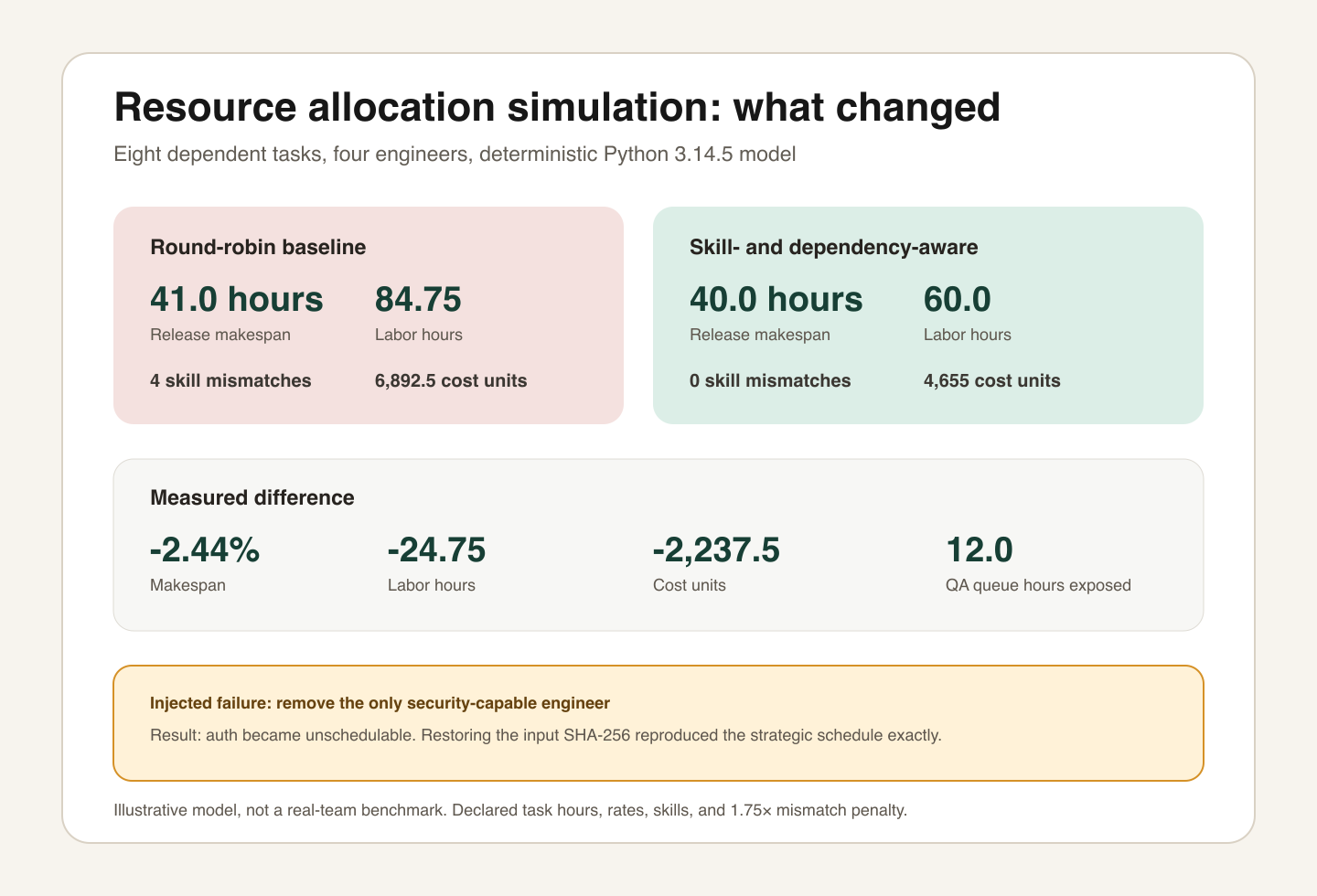
I built a deterministic illustration with eight dependent tasks and four engineers on macOS 27.0 arm64 using Python 3.14.5. The round-robin baseline assigned work without protecting skill fit. The strategic case chose qualified capacity and prioritized downstream dependencies.
| Measured output | Round-robin | Skill-aware | Difference |
|---|---|---|---|
| Release makespan | 41.0 hours | 40.0 hours | -2.44% |
| Labor | 84.75 hours | 60.0 hours | -24.75 hours |
| Modeled cost | 6892.5 units | 4655.0 units | -2237.5 units |
| Skill mismatches | 4 | 0 | -4 |
| Resource queue | 4.0 hours | 12.0 hours | +8.0 hours |
The result is deliberately uncomfortable: skill-aware allocation reduced modeled labor by 24.75 hours and cost by 2,237.5 units, but makespan improved by only one hour. It exposed a 12-hour QA queue because the same person owned frontend and QA work. Better assignment did not remove the constraint; it made the constraint measurable.
- Failure injected: removing the only security-capable engineer made the authentication task unschedulable.
- Rollback: restoring the original input SHA-256 reproduced the strategic schedule exactly.
- Limits: the model excludes meetings, reviews, interruptions, human learning, quality variation, and real estimation error.
- Decision: add or develop backup security capacity and separate the QA bottleneck before promising a shorter release.
Use the same sequence on a live plan: baseline, deliberate allocation, failure case, bottleneck inspection, and rollback. If you need more capacity, first decide when outside help makes sense for business software development and understand the control tradeoffs in outsourcing programming work.
Allocation also depends on technical shape. Read why architecture matters so much in custom software development before treating every task as independent capacity. Mobile products add store, device, release, and platform dependencies, which I cover in developing a mobile app.
Frequently Asked Questions
These answers keep the decision boundaries clear. Strategic resource allocation helps you manage a system; it cannot turn unclear value or missing capability into a trustworthy deadline.
What is strategic resource allocation in software development?
It is the deliberate assignment of people, focused time, budget, tools, and decision rights to work based on value, skill fit, dependencies, risk, and actual capacity. A useful allocation also protects slack for support and uncertainty, then changes when measured flow shows a different constraint.
Why do software projects fail from poor resource allocation?
Poor allocation can place scarce specialists on low-value work, overload reviewers, start too much work, hide dependencies, and leave critical tasks waiting. Those mechanisms create delay and rework. Project failure has many causes, so allocation should be treated as a controllable contributor, not a universal explanation.
What is the difference between capacity planning and resource allocation?
Capacity planning estimates how much usable time and capability exist for a period. Resource allocation decides where that capacity goes. Capacity sets the ceiling; allocation chooses the work, sequence, ownership, and buffer within that ceiling.
How much buffer should I leave when allocating developers?
There is no safe universal percentage. Measure recent support, review, incident, meeting, leave, and unplanned-work demand, then reserve capacity against that distribution. Start conservatively when the team or product is new and adjust from observed buffer consumption.
What tools are best for resource management in software projects?
Use the smallest tool that keeps work, ownership, capacity, WIP, dependencies, and actuals visible. A spreadsheet can be enough for one small team. Jira, Resource Guru, Float, and Forecast serve different planning depths. The data model and review habit matter more than the logo.
Does small teams or simple projects need formal resource allocation?
Usually not. A solo developer or small team with one short, clear workstream can use a ranked list and a brief weekly review. Add formal allocation when simultaneous projects, specialist dependencies, security gates, external approvals, or long horizons make conflicts hard to see.
Tell Google you want more of this.
Add Gaurav Tiwari as a preferred sourceOne tap, and this site shows up more often in your own Top Stories, AI Overviews and AI Mode. Remove it any time.