
Voice DNA Generator for AI Writing
Build a private Voice DNA Markdown profile from your writing samples. Analyze patterns locally, add your rules, and use the file with ChatGPT, Claude, or Gemini.
The useful definition
What is a Voice DNA generator?
A Voice DNA generator turns the patterns in your writing into instructions an AI model can follow. A useful profile covers sentence rhythm, paragraph shape, vocabulary, directness, teaching habits, preferred structures, banned habits, truth boundaries, and examples of corrections. It is closer to an editorial rulebook than a vague prompt such as “sound conversational.”
This tool combines two kinds of evidence. It measures visible patterns in the samples you paste, then asks you to judge which patterns are intentional. That second part matters. A calculator can count contractions or sentence length, but it cannot know whether a stiff paragraph reflects your voice, a client brief, or one rushed deadline.
Patterns plus judgment
What does this Voice DNA generator analyze?
The browser-side analysis describes the writing in front of it. It does not send the samples to an AI model or pretend that a handful of metrics can explain your personality. You get a baseline, then you add the decisions that make the file useful.
Rhythm and structure
Average sentence length, sentences per paragraph, sample count, repeated openings, and common content words reveal the shape of your writing.
Tone and address
Pronouns, contractions, questions, exclamations, and punctuation give you evidence for directness, warmth, formality, and conversational texture.
Rules and boundaries
You define what to prefer, what to avoid, how to teach, how to disagree, and which first-person claims the AI must never invent.
Better input, better rules
How do you create a useful Voice DNA file?
Start with writing you would happily publish again. Three to five samples from the same format usually teach you more than twenty unrelated documents. A sales page, technical tutorial, personal email, and social post may all be yours, but they solve different jobs and should not be flattened into one average voice.
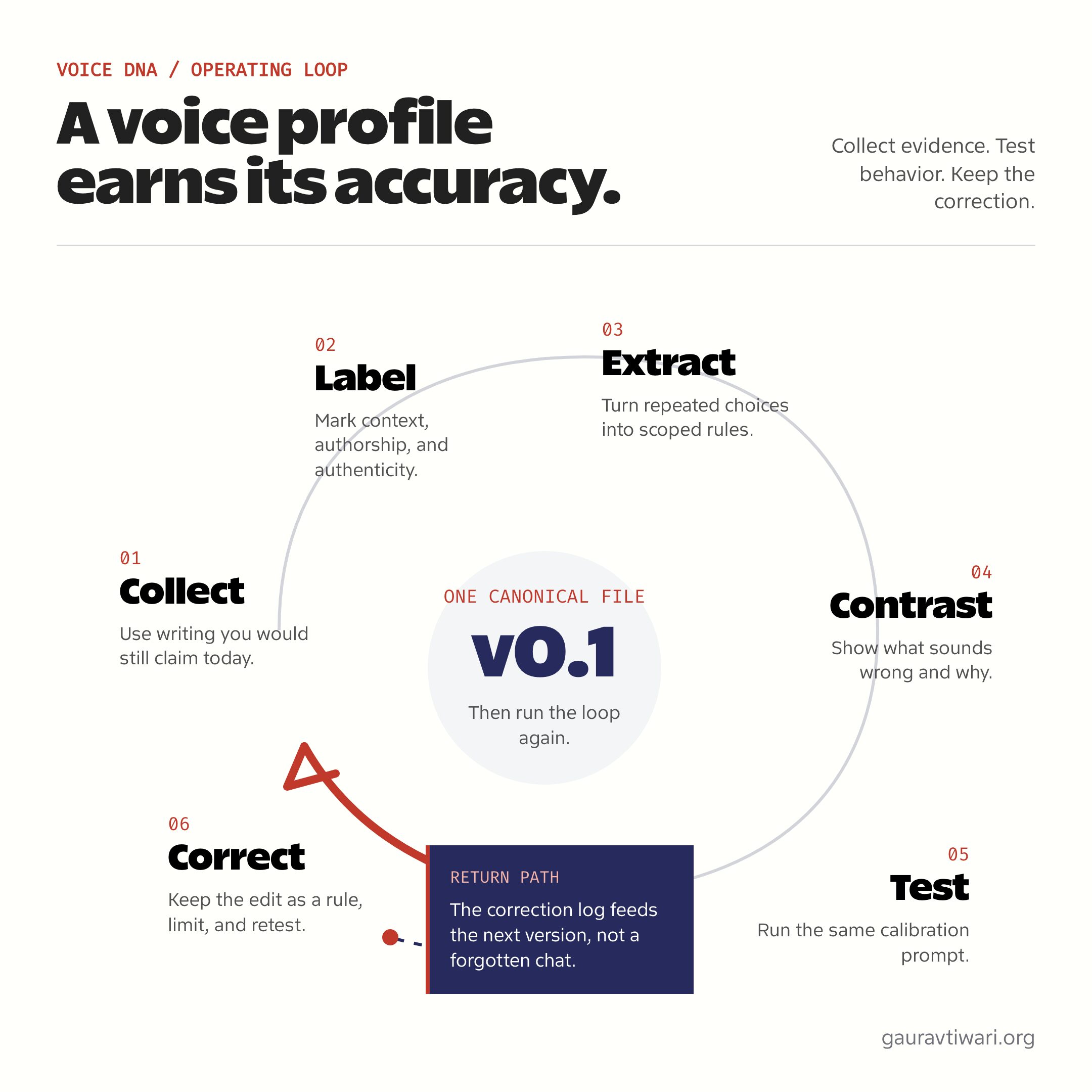
- Paste at least 500 words. More text makes the counts steadier, but relevance matters more than volume.
- Separate samples with three hyphens. Keep the original paragraph breaks so the tool can measure structure.
- Remove private details first. The analysis stays local, but names, passwords, client data, and unpublished financial information still do not belong in a writing sample.
- Treat metrics as clues, not quotas. An 11-word average sentence does not mean every future sentence should contain 11 words.
- Add anti-voice rules. Name the phrases, habits, claims, and structures that make a draft sound unlike you.
- Test one prompt repeatedly. Compare the output with your own edit, log the smallest useful correction, and update one rule at a time.
Portable by design
How do you use Voice DNA with ChatGPT, Claude, or Gemini?
Download the Markdown file, read every rule, and remove anything you cannot defend. Then give the file to the AI as persistent project context or paste the relevant sections into its custom instructions. Keep the task brief separate. Voice DNA explains how to write; your prompt still needs to explain what to write, for whom, and with which evidence.
ChatGPT
Add the Markdown file to a ChatGPT Project and put the highest-priority rules in Project instructions. Projects keep reference files, chats, and instructions together.
Claude
Use the file as project knowledge or copy its rules into a Claude custom Style. Claude can also create a Style from writing samples, but you should inspect and edit the generated instructions.
Gemini
Put the core rules into Gemini Gem instructions and attach the Markdown profile when the task needs the full reference. Keep separate Gems for formats that use different voices.
Use the same profile across models only as a starting point. ChatGPT, Claude, and Gemini interpret instructions differently. If you want to compare the surrounding tools, see my AI writing tools guide. For publishing workflows, my AI article writer for WordPress process shows where human research, editing, links, and SEO checks still belong.
Do not automate the judgment
What can a Voice DNA file not decide?
A Voice DNA file cannot prove that a claim is true, supply experience you do not have, or decide what your audience needs. It also cannot turn weak source material into strong writing. The file controls style and behavior. Research, evidence, judgment, and authorship still come from you.
Avoid asking the model to imitate every visible quirk. Repeated fragments, ellipses, questions, or favorite phrases can become a parody when turned into quotas. The better rule explains when a pattern helps and when it should disappear. That is the difference between a voice system and a bag of mannerisms.
Questions people ask
Voice DNA Generator FAQs
What is Voice DNA for AI writing?
Voice DNA is a structured description of how you write and how an AI should behave when drafting for you. It covers tone, rhythm, vocabulary, structure, teaching habits, preferences, banned patterns, truth boundaries, and corrected examples. The goal is repeatable guidance, not a one-line personality label.
How much writing should I paste into the generator?
Use at least 500 words. Three to five representative samples from the same writing mode are better than a large mixed archive. Keep paragraph breaks intact and separate samples with a line containing three hyphens. Remove private names, secrets, and client details before pasting anything.
Does the Voice DNA generator upload my writing?
No. The analysis runs in your browser and does not send writing samples to WordPress or an AI API. Browser saving is optional and stays off until you enable it. If you turn it on, the Clear private data button removes the saved generator data from that browser.
Can I use the Markdown file with ChatGPT, Claude, and Gemini?
Yes. The exported file is plain Markdown, so you can attach it to a ChatGPT Project, use it as Claude project knowledge or Style instructions, or add its core rules to a Gemini Gem. Test the same task in each model because instruction handling and output can differ.
Is this an audio voice cloning tool?
No. This generator analyzes writing style, not speech or audio. It does not record your voice, create a synthetic voice, or produce text-to-speech files. Here, Voice DNA means an editorial profile that helps an AI writing assistant follow your choices without pretending to be you.
Will Voice DNA make AI sound exactly like me?
No file can guarantee an exact match. A strong profile narrows the model’s defaults and reduces repeated editing, but the result still depends on the model, prompt, source material, and format. Treat the first export as version 0.1, compare drafts with your edits, and keep correcting the rules.
How often should I update my Voice DNA file?
Update it when the same unwanted pattern appears more than once, when your preferred structure changes, or when you start writing in a new format. Do not rewrite the whole file after one bad draft. Add the smallest rule that explains the miss, include a corrected example, and test again.
The generator is one of the browser-based utilities in my free tools collection. Your exported Markdown stays portable, so you can keep it with your own files instead of locking your writing profile inside one service.