
Top Strategies to Maximize Your LinkedIn Learning Experience
LinkedIn Learning has over 21,000 courses taught by industry professionals, but most people use it the wrong way. They browse randomly, start 10 courses, finish zero, and then wonder why the subscription didn’t help their career. I’ve completed dozens of courses on the platform, and the difference between wasting $30/month and getting genuine career value comes down to strategy, not just enrollment.
What is LinkedIn Learning?
LinkedIn Learning (formerly Lynda.com) is an online education platform integrated directly with LinkedIn’s professional network. It offers video courses across business, technology, and creative fields, all taught by vetted industry experts. Unlike platforms where anyone can upload a course, LinkedIn Learning curates its instructors, which keeps quality consistently high.
The killer feature is LinkedIn profile integration. When you complete a course, the certificate goes directly on your profile, visible to recruiters and hiring managers. That’s something Udemy and most other platforms can’t match.
LinkedIn Learning costs $29.99/month (or $239.88/year, which saves you roughly 33%). There’s a free 1-month trial that gives you full access to everything. Many employers also provide LinkedIn Learning access as a benefit, so check with your HR department before paying out of pocket.
Define Your Learning Goals First
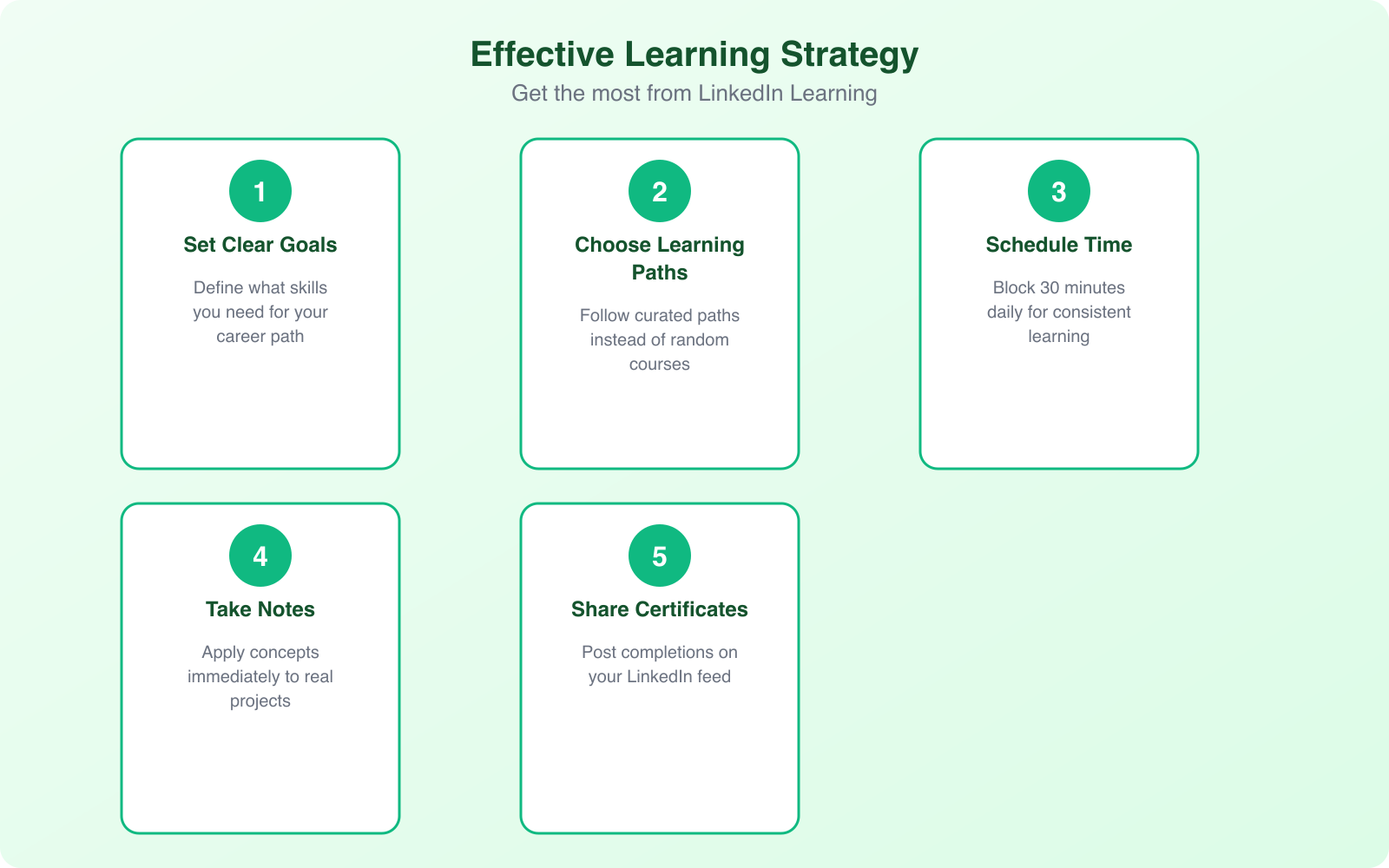
Before opening the course catalog, answer one question: what skill would make the biggest impact on your career right now? Not “what sounds interesting,” but what would actually move the needle on your next promotion, salary increase, or career pivot?
Here’s how to figure that out:
- Look at 5-10 job postings for roles you want next. What skills appear repeatedly?
- Ask your manager what skills would make you more effective in your current role
- Check LinkedIn’s “Skills” section on profiles of people who have the career you want
- Review your recent performance reviews for growth areas
Once you’ve identified 2-3 priority skills, search for those specific topics on LinkedIn Learning. Use the Learning Paths feature, which groups related courses into structured sequences. A learning path takes you from beginner to proficient in a logical order, which is far more effective than random course selection.
Choosing the Right Courses
LinkedIn Learning has multiple courses on the same topic. Five different Python courses, three project management courses, and so on. Here’s how to pick the right one:
Check the instructor. Look at their LinkedIn profile. Do they have real-world experience in the subject, or are they just professional course creators? The best courses come from practitioners who teach, not teachers who’ve never practiced.
Read the course description carefully. Make sure the syllabus covers what you actually need. A “Python for Data Science” course is very different from “Python for Web Development.” Matching your specific need to the course content prevents wasted time.
Check the reviews and completion rate. Courses with high ratings and high completion rates tend to be well-structured and engaging. If a course has a 30% completion rate, there’s probably a quality or pacing problem.
Look at the publish date. Technology courses older than 2 years may be outdated. Business and soft skills courses age better. Always prioritize recently updated content for technical topics.
Active Learning Strategies That Work
Watching videos passively is barely better than not watching at all. Research shows you retain only 10-20% of what you watch versus 75% of what you practice. Here’s how to make LinkedIn Learning courses stick:
Take notes by hand. Studies from Princeton found that handwriting notes forces you to process information more deeply than typing. Keep a dedicated notebook for each learning path.
Pause and practice. After each video, pause and try to apply what you just learned. If it’s a coding course, write the code yourself. If it’s a management course, think of a specific situation at work where you’d apply the concept.
Use the exercise files. Most LinkedIn Learning courses include downloadable exercise files. Don’t skip them. They’re designed to give you hands-on practice that reinforces the video content.
Take the quizzes seriously. Don’t rush through quizzes to get the certificate. If you get a question wrong, go back and review that section. The quizzes reveal your actual understanding versus your perceived understanding.
Set a weekly learning schedule and treat it like a meeting you can’t cancel. Block 30 minutes Monday through Wednesday for video lessons, Thursday for practice exercises, and Friday for review and application. At this pace, you’ll complete roughly one course every 1-2 weeks, which adds up to 25-50 courses per year.
LinkedIn Learning vs. Udemy vs. Skillshare vs. Coursera
Each platform has different strengths. Here’s my honest comparison:
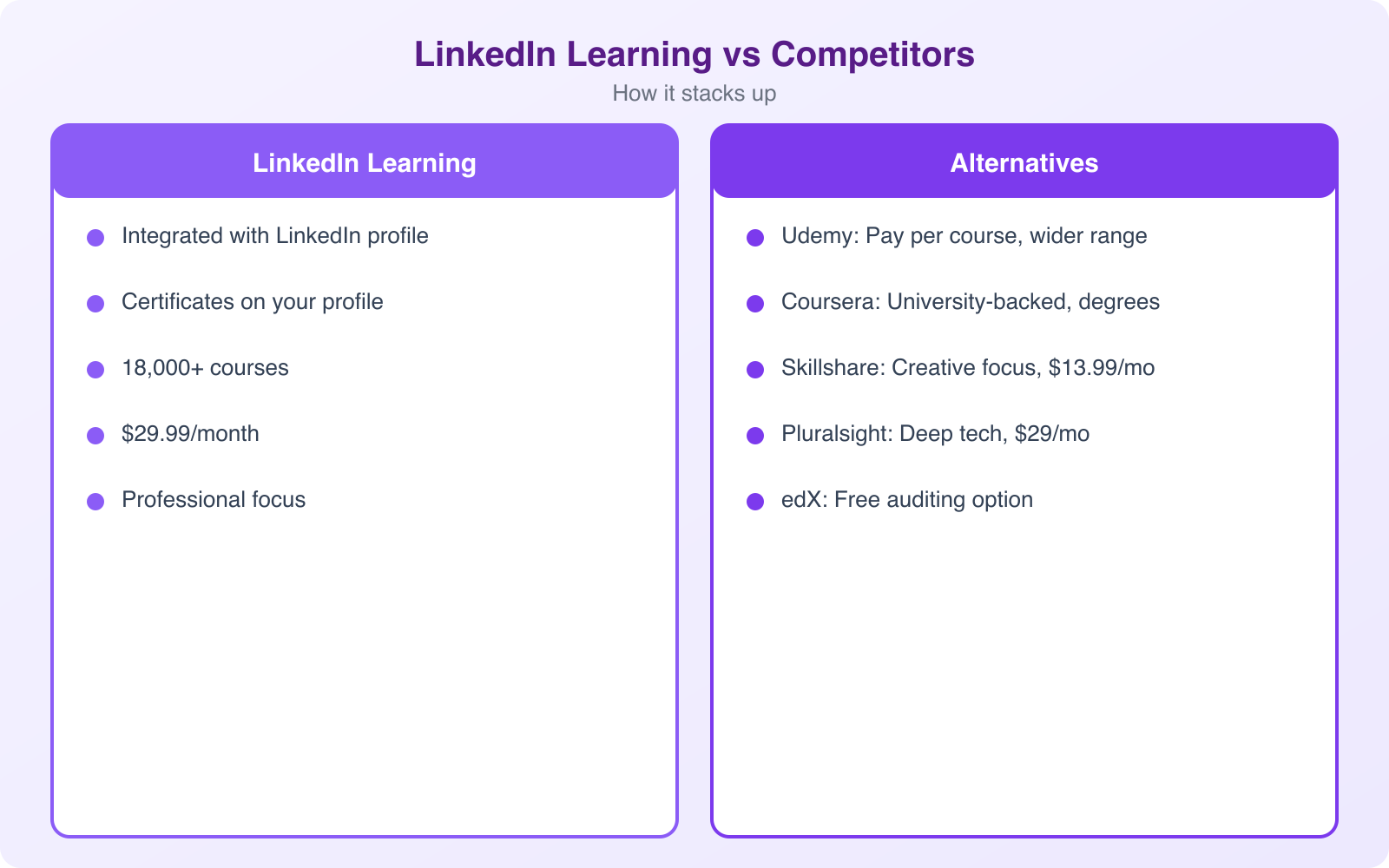
LinkedIn Learning ($29.99/month): Best for business professionals and tech workers who want certificates that display directly on LinkedIn. Quality is consistently high because instructors are curated. The integration with LinkedIn profiles is its unique advantage. The course library is smaller than Udemy but more focused and reliable.
Udemy (per-course pricing): Massive library with 210,000+ courses, but quality varies wildly. Wait for sales (courses regularly drop to $10-15). Best for one-off learning on very specific topics. No profile integration or structured learning paths.
Skillshare ($13.99/month): Best for creative skills like design, illustration, photography, and video. Project-based learning is its strength. No certificates, which limits its value for career advancement. Good for hobby learning and creative side projects.
Coursera ($49-79/month): Best for serious career changers who need university-backed credentials. Partners with Stanford, Google, IBM, and other major institutions. Certificates carry significant weight with employers. The most expensive option but also the most academically rigorous.
My recommendation: If you’re a working professional looking to upskill for your current career, LinkedIn Learning offers the best balance of quality, convenience, and profile visibility. If you’re changing careers entirely, Coursera‘s professional certificates carry more weight.
Showcasing Certificates on Your Profile
Completing a course is only half the value. The other half is making sure the right people see it. When you finish a LinkedIn Learning course, the certificate automatically appears on your profile. But don’t stop there.
Share completion posts. Write a brief post about what you learned and how you plan to apply it. Tag the instructor if they’re active on LinkedIn. These posts reach your network and signal that you’re investing in professional growth.
Update your Skills section. After completing relevant courses, add the corresponding skills to your profile. This improves your searchability when recruiters look for people with those specific skills.
Apply learning in your job. The most powerful demonstration of a skill isn’t a certificate. It’s a result. After completing a data analysis course, run an analysis for your team. After a leadership course, volunteer to lead a project. Real application of learning is what gets noticed by managers and peers.
Time Management for Consistent Learning
The biggest reason people fail with LinkedIn Learning isn’t lack of motivation. It’s lack of time management. Self-paced courses feel optional, so they get pushed aside by urgent tasks.
Here’s what works: block 30 minutes on your calendar, 3-4 times per week, specifically for learning. Treat it like a non-negotiable meeting. The LinkedIn Learning mobile app lets you download courses for offline viewing, so you can learn during commutes, lunch breaks, or waiting rooms.
Set course reminders. Mark your calendar with deadlines for completing each course. Without deadlines, “I’ll finish it this week” becomes “I’ll finish it next month” becomes “I forgot I started this.”
Break courses into daily chunks. Most courses are 1-4 hours total. At 30 minutes per session, you’ll finish a typical course in 3-8 sessions. One module per day is a sustainable pace that builds the habit of continuous learning without overwhelming your schedule.
If you’re unsure whether LinkedIn Learning is worth the subscription, start with the free 1-month trial and commit to completing 3-4 courses. If those courses provide actionable skills you apply at work, the $30/month investment pays for itself many times over. If you find yourself not using the platform, cancel before the trial ends. No harm done.
Networking Through LinkedIn Learning
LinkedIn Learning isn’t just about courses. It’s a networking tool. Engage with course instructors by commenting on their LinkedIn posts. Follow fellow learners who are taking similar courses. Join LinkedIn groups related to your learning topics.
Attend LinkedIn Events and webinars that complement your courses. These virtual gatherings connect you with industry leaders and subject matter experts in real-time. Ask questions, share insights, and make connections. The combination of structured courses and live networking creates a learning experience that goes far beyond video lectures.
The professionals who get the most from LinkedIn Learning treat it as part of a broader career development strategy, not a standalone product. Courses build skills. Posts demonstrate those skills. Networking applies them. Together, they create a virtuous cycle of learning, visibility, and opportunity.
Frequently Asked Questions
How much does LinkedIn Learning cost?
LinkedIn Learning costs $29.99/month (billed monthly) or $19.99/month (billed annually at $239.88/year). Many employers and universities provide free access as a benefit, so check with your organization before paying. The subscription includes unlimited access to all 18,000+ courses. If you’re already paying for LinkedIn Premium Career or Business, LinkedIn Learning is included in your subscription at no extra cost.
Are LinkedIn Learning certificates worth anything?
LinkedIn Learning certificates carry moderate weight. They’re most valuable as proof of initiative and continuous learning rather than as standalone credentials. Adding them to your LinkedIn profile shows hiring managers you invest in professional development. They’re not equivalent to industry certifications like AWS or Google, but they complement them well. The real value is the knowledge gained, not the certificate itself.
Can I use LinkedIn Learning for free?
LinkedIn offers a one-month free trial for new subscribers. Some courses offer free preview content. Many employers and public libraries provide free LinkedIn Learning access. Microsoft also includes LinkedIn Learning with certain Microsoft 365 Education plans. Check your local library’s website because many library systems have institutional subscriptions that give cardholders full access at no cost.
How long does it take to complete a LinkedIn Learning course?
Most individual courses run 1-4 hours of video content. Learning Paths (curated series of courses) take 10-30 hours depending on the topic. At 30 minutes per day, you can complete a typical course in one week and a Learning Path in one to two months. The platform saves your progress, so you can learn in short sessions. Focus on completing one course fully before starting another to maximize retention.
Is LinkedIn Learning better than Udemy or Coursera?
Each platform has different strengths. LinkedIn Learning excels at professional skills and integrates directly with your LinkedIn profile. Udemy offers a wider range of topics at pay-per-course pricing with frequent sales. Coursera provides university-accredited courses and actual degrees. Skillshare focuses on creative skills. For career-focused professional development, LinkedIn Learning is hard to beat. For deep technical education, Coursera or Pluralsight may be better choices.
Disclaimer: This site is reader-supported. If you buy through some links, I may earn a small commission at no extra cost to you. I only recommend tools I trust and would use myself. Your support helps keep gauravtiwari.org free and focused on real-world advice. Thanks. - Gaurav Tiwari