
Introducing WP-MCP: Manage Your WordPress Site Through AI
I’ve spent 16 years clicking through wp-admin. Creating posts, moderating comments, checking plugin updates, reviewing site health. The same screens, the same menus, the same workflows. Thousands of times across hundreds of client sites.
So I built something to stop doing that.
WP-MCP is an open-source MCP server that connects Claude (or any MCP-compatible AI assistant) directly to your WordPress site’s REST API. You talk to Claude. Claude talks to WordPress. Posts get created, settings get updated, plugins get checked. No browser tabs. No wp-admin. Just a conversation.
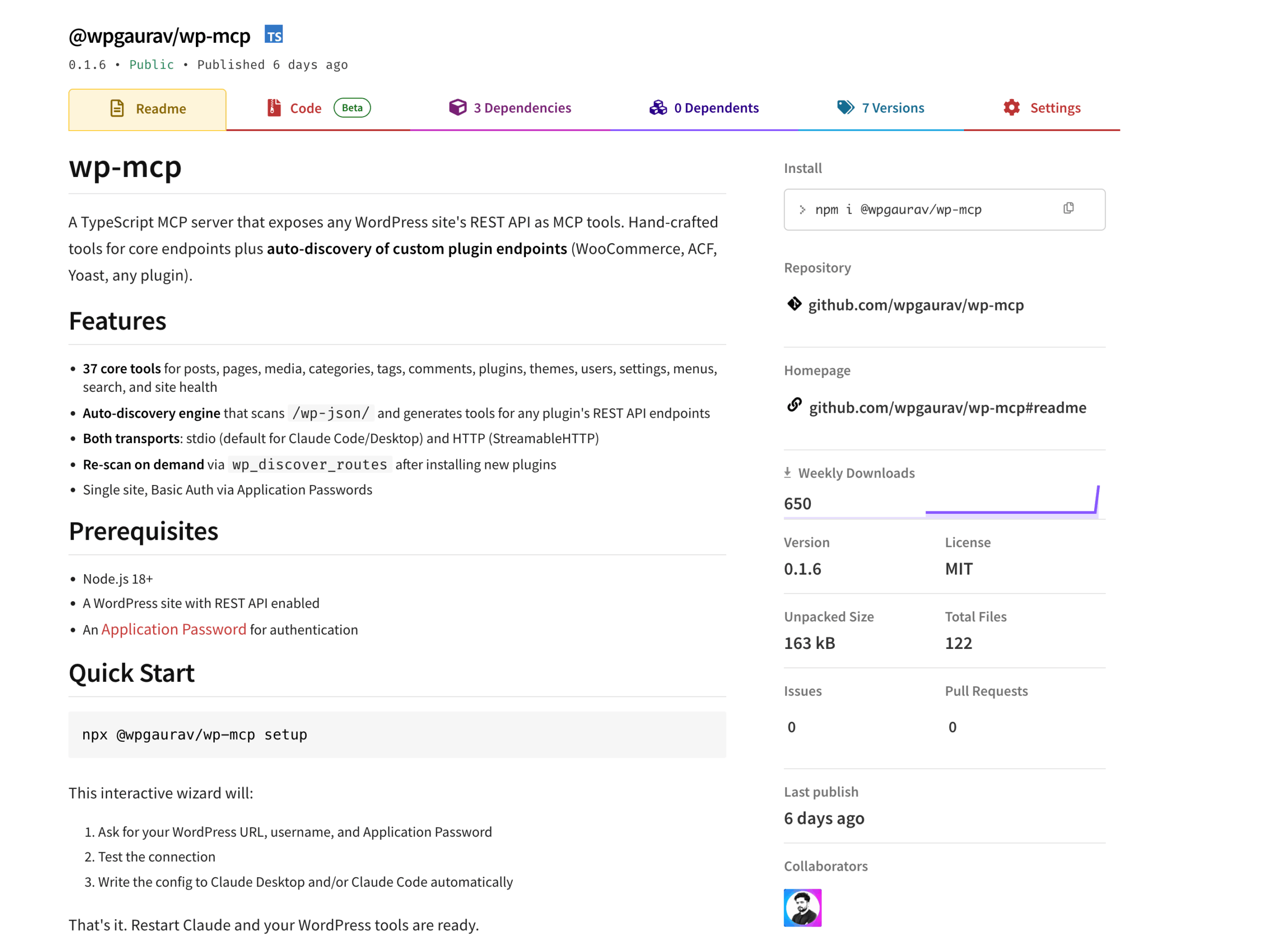
It’s live on npm right now. Install with npx @wpgaurav/wp-mcp setup and you’ll be running in under 5 minutes. No WordPress plugin installation required.
What Is MCP and Why WordPress Needs It
MCP (Model Context Protocol) is an open standard created by Anthropic that lets AI assistants interact with external services through defined tools. Think of it as a universal adapter between AI models and the software you already use. Instead of copying data between your AI chat and your CMS, MCP lets the AI talk to your CMS directly.
WordPress powers over 40% of the web. It has a mature REST API that exposes posts, pages, media, comments, users, plugins, themes, and settings. WP-MCP bridges these two things: it takes WordPress REST API endpoints and presents them as MCP tools that any MCP-compatible AI assistant can call.
The result: you can manage your WordPress site through a conversation with Claude, instead of clicking through wp-admin dashboards.
Why I Built WP-MCP
I built WP-MCP because managing 12+ WordPress sites through wp-admin was eating 10+ hours per week. I wasn’t trying to build a product. I was trying to fix my own workflow.
I manage multiple WordPress sites: client projects, my own blogs, and sites I consult on. Every week, I repeat the same tasks across all of them:
- Check site health and performance status
- Review and moderate pending comments
- Verify plugin update status and security
- Create draft posts from outlines I already wrote
- Audit content for missing featured images, outdated posts, broken categories
None of these tasks are hard. They’re just slow. And they add up. Across 5-6 sites, that’s easily 2-3 hours a week of repetitive dashboard work.
I’d already been using Claude for writing and development. The obvious question: why can’t Claude do these WordPress tasks directly? MCP made that possible. I just needed an MCP server that exposed WordPress REST API endpoints as tools Claude could call.
The existing options were either too complex to configure, required a WordPress plugin installation, or didn’t expose all the endpoints I needed. So I built my own, cleaned it up, added auto-discovery for plugin endpoints, and published it on npm.
What WP-MCP Does
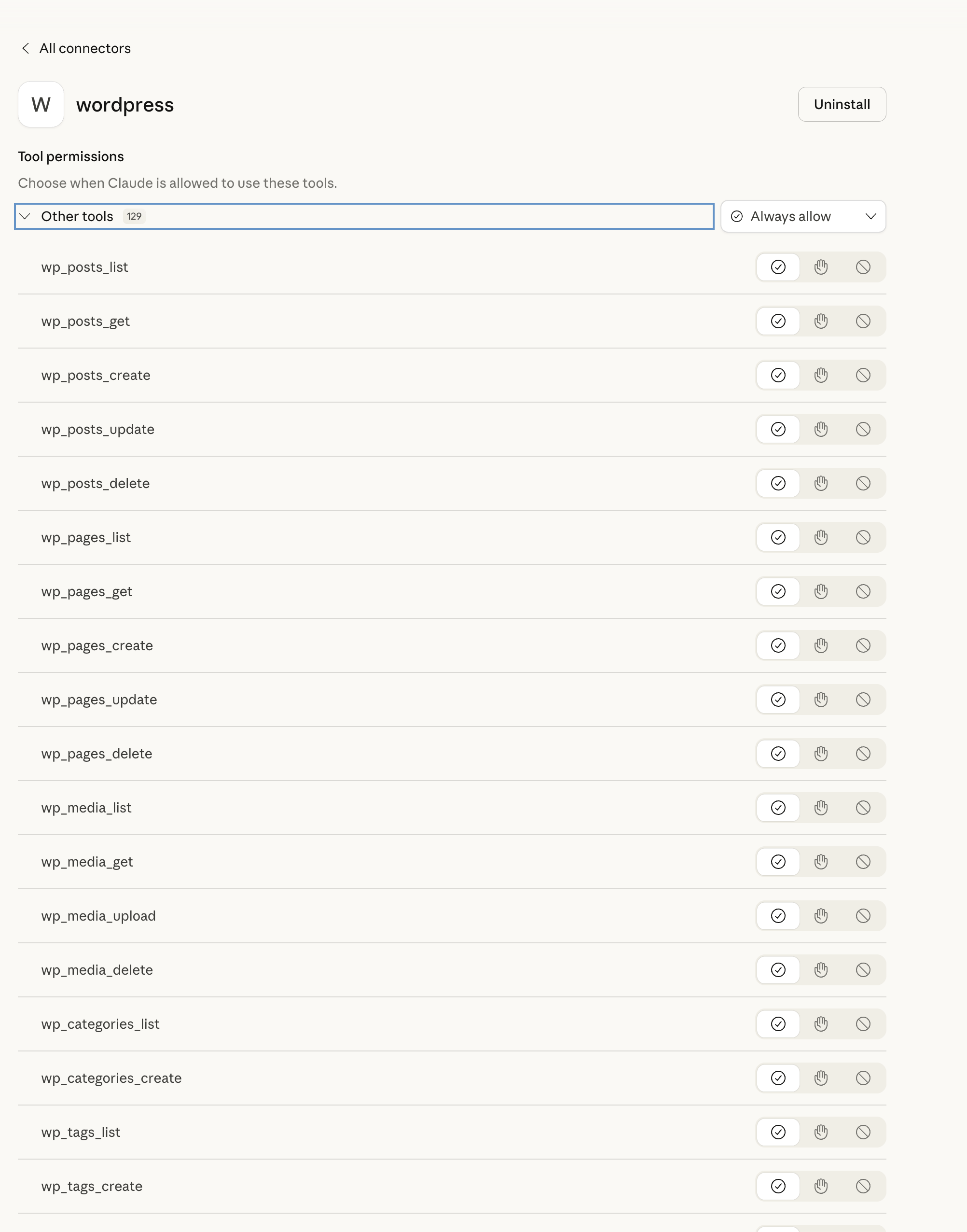
WP-MCP ships with 37 hand-crafted tools covering core WordPress REST API resources: posts, pages, media, categories, tags, comments, plugins, themes, users, settings, menus, search, and site health.
But the feature that makes it genuinely useful beyond basic sites is auto-discovery.
When you set WP_MCP_DISCOVER=true, WP-MCP scans your site’s /wp-json/ endpoint at startup and auto-generates tools for every plugin namespace it finds. This means:
- If WooCommerce is installed, you get WooCommerce product, order, and customer tools automatically
- If ACF exposes REST endpoints, those become tools too
- If Rank Math, Yoast, Gravity Forms, or any custom plugin has REST API endpoints, they get discovered and exposed
- Even custom post types registered with
show_in_restare auto-detected
Auto-discovered tools follow a clean naming convention: {namespace}_{resource}_{action}. For example, WooCommerce products become wc_products_list, wc_products_get, and wc_products_create.
Both STDIO and HTTP (StreamableHTTP) transports are supported. STDIO works with Claude Desktop and Claude Code. HTTP works for custom clients and remote setups.
How to Install and Set Up WP-MCP
Installation takes under 5 minutes with a single npx command. You need three things:
- Node.js 18+ on your local machine
- A WordPress site with REST API enabled (it’s on by default)
- An Application Password from your WordPress user profile
Generate your Application Password at Users > Your Profile > Application Passwords in wp-admin. Copy it when shown. You won’t see it again.
Guided Setup (Recommended)
Run this in your terminal:
npx @wpgaurav/wp-mcp setupThe interactive wizard will:
- Ask for your WordPress URL, username, and Application Password
- Test the connection to your site
- Write the config to Claude Desktop and/or Claude Code automatically
- That’s it. Restart Claude and your WordPress tools are ready.
Application Passwords are at /wp-admin/profile.php in your WordPress dashboard. Create one specifically for WP-MCP and label it clearly.
Manual Installation
# Run directly with npx (no install needed)
npx @wpgaurav/wp-mcp

# Or install globally
npm install -g @wpgaurav/wp-mcp
Environment Variables
Set these if you’re doing manual configuration:
| Variable | Required | Default | Description |
|---|---|---|---|
WP_URL | Yes | — | Your WordPress site URL (no trailing slash) |
WP_USERNAME | Yes | — | WordPress username |
WP_APP_PASSWORD | Yes | — | Application Password from wp-admin |
WP_MCP_TRANSPORT | No | stdio | stdio or http |
WP_MCP_PORT | No | 3000 | HTTP transport port |
WP_MCP_HOST | No | 127.0.0.1 | HTTP transport bind address |
WP_MCP_DISCOVER | No | true | Auto-discover plugin REST endpoints |
WP_MCP_MAX_TOOLS | No | 128 | Maximum total tools (core + discovered) |
Claude Desktop Configuration
Add this to your Claude Desktop config file (claude_desktop_config.json):
{
 "mcpServers": {
 "wordpress": {
 "command": "npx",
 "args": ["wp-mcp"],
 "env": {
 "WP_URL": "https://yoursite.com",
 "WP_USERNAME": "yourusername",
 "WP_APP_PASSWORD": "abcd 1234 efgh 5678 ijkl 9012"
 }
 }
 }
}
Claude Code Configuration
claude mcp add wordpress \
 -e WP_URL="https://yoursite.com" \
 -e WP_USERNAME="yourusername" \
 -e WP_APP_PASSWORD="abcd 1234 efgh 5678 ijkl 9012" \
 -- npx wp-mcp
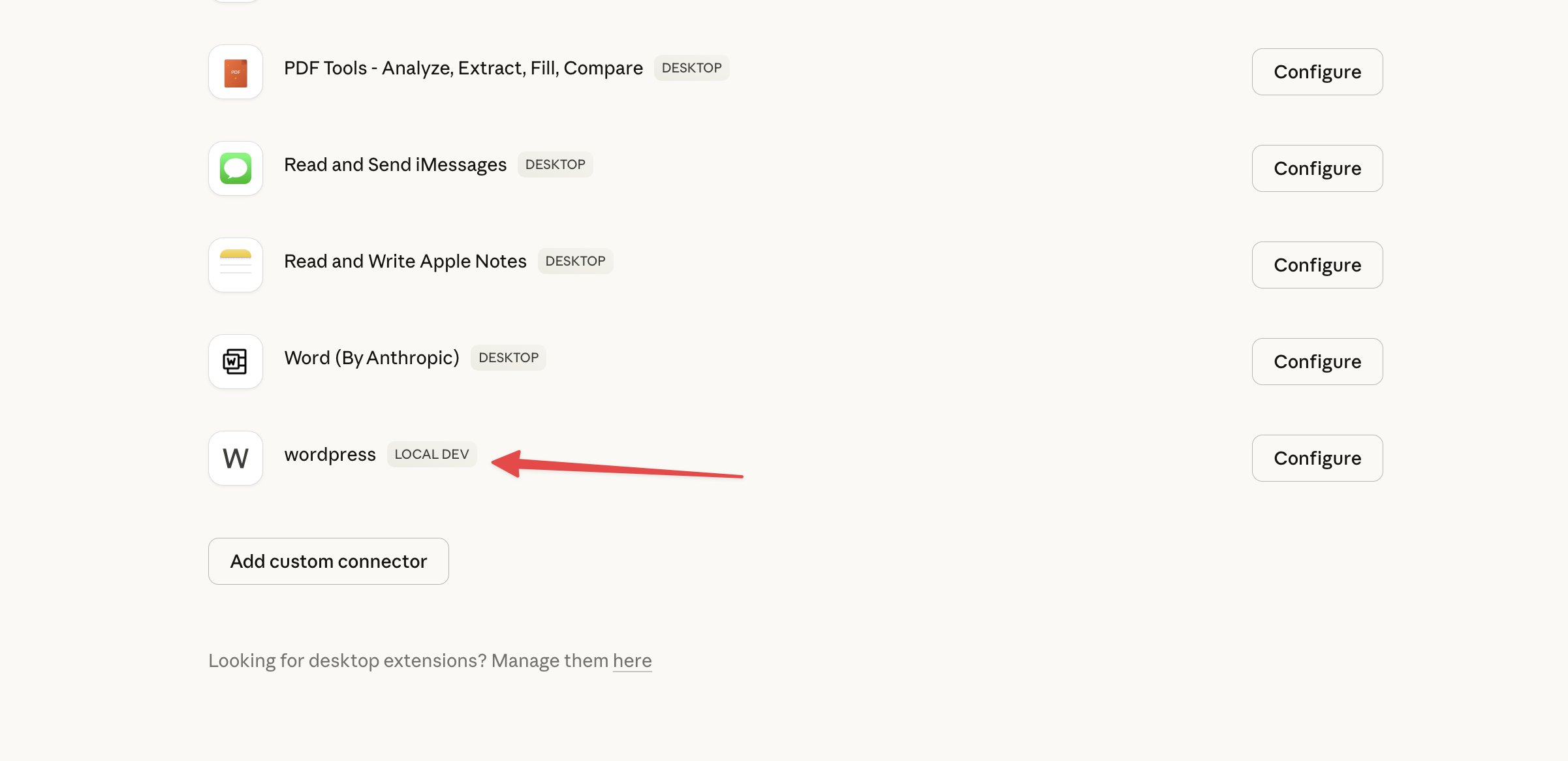
Restart Claude Desktop or open a fresh Claude Code session. Ask: “show me my latest 5 posts”. If your posts appear, setup is complete.
Full setup documentation on npm
No WordPress Plugin Required
WP-MCP Demo: Managing WordPress through Claude
This is a deliberate design choice. WP-MCP runs entirely on your local machine and connects to WordPress through the REST API + Application Passwords. No config files on WordPress. No JSON manifests on your server. No Docker. No plugin to install, update, or maintain.
This matters when you’re managing client sites where you can’t install plugins freely, or when you want to keep your plugin footprint minimal for performance reasons. Three environment variables and you’re done.
Real Workflows I Use WP-MCP For
I use WP-MCP daily for bulk content updates, comment moderation, plugin audits, and cross-site publishing. I don’t care about theoretical demos. These are the workflows I actually run every week on my own sites.
Weekly Site Health Checks
Every Monday morning, I ask Claude:
Show me the site health status.
Critical issues, recommendations, and passed tests show up in seconds. This used to take 10+ minutes of clicking through wp-admin dashboards. Now it’s one sentence.
Markdown to Draft Publishing
I write all my content in markdown. When I’m ready to push a draft:
Create a new draft post titled ‘Redis Object Caching on CloudPanel’ with this content. Category: WordPress. Tag: Performance.
Post created. No block editor fumbling. No copy-paste formatting cleanup. No forgotten category assignment. This is how I publish most of my developer-focused content now.
Comment Moderation
Show me all pending comments from the last 7 days.
I review comments in the chat, approve the legitimate ones, and trash spam. For sites with active comment sections, this is significantly faster than the wp-admin comments table with its endless pagination.
Plugin Security Audits
List all installed plugins with versions and update status.
Which plugins haven’t been updated by their developers in over a year?
That second query is gold for proactive WordPress maintenance. Abandoned plugins are a security risk, and this surfaces them instantly.
WooCommerce Inventory Queries
With auto-discovery enabled on a WooCommerce site:
Show me products with stock under 10 units.
Without WP-MCP, this query usually requires SQL or a reporting plugin. With it, one sentence gives you the answer.
Content Hygiene Audits
List published posts that don’t have a featured image.
Show posts published before 2023 that haven’t been updated since.
These were spreadsheet tasks before. Now they’re quick conversational queries with immediate results. I run content audits like these every month and they’ve helped me identify hundreds of posts that needed updates.
Design Decisions Behind WP-MCP
WP-MCP prioritizes safety, read-before-write patterns, and WordPress REST API compatibility over feature count. Every tool makes tradeoffs. Here are the deliberate choices I made and why.
Single-Site Focus
WP-MCP connects to one WordPress site per instance. Multi-site support is planned, but I shipped single-site first because it matches how I actually work: I focus on one site at a time. You can run multiple instances with different configs if you need to manage several sites.
External Server, No WordPress Plugin
WP-MCP runs on your local machine and connects through the REST API + Application Passwords. This is useful when you can’t install plugins (managed hosting restrictions, client sites) or when you want to keep your WordPress installation lean. It also means WP-MCP updates don’t require touching your WordPress site at all.
Hand-Crafted Core + Auto-Discovery
The 37 core tools have hand-designed parameter names, sensible defaults, and proper validation. Auto-discovery handles plugin endpoints where hand-crafting every method isn’t practical. This hybrid approach gives you polished tools for common tasks and functional tools for everything else.
WP-MCP vs Other WordPress MCP Servers
WP-MCP has the most tools (37) and requires no WordPress plugin installation, unlike alternatives like flavflavor/wp-mcp or developer-jeongwon/wp-mcp. I’m not claiming it’s the only option. The WordPress MCP ecosystem is growing, and that’s healthy. Here’s how the main options compare:
- Official WordPress MCP Adapter: A PHP plugin that runs inside WordPress using the Abilities API (WordPress 6.9+). Deep core alignment, but requires plugin/composer installation. Best long-term canonical path for teams invested in WordPress core.
- Automattic Remote MCP: Strong OAuth 2.1 enterprise security. Excellent for organizations with strict compliance requirements. More complex setup.
- Other community servers: Some are stronger on multi-site management or Dockerized deployment patterns.
- WP-MCP: Fastest setup (3 environment variables, no WordPress plugin), auto-discovery for plugin REST endpoints, and it works with any WordPress 5.6+ site immediately. Best for developers and site managers who want to start using AI with WordPress today without changing their WordPress setup.
Different workflows need different tradeoffs. If you need enterprise OAuth and deep core integration, the official adapter or Automattic’s server makes more sense. If you want to be up and running in 5 minutes with zero WordPress-side changes, WP-MCP is built for that.
Roadmap
Everything on this list is driven by real usage, not theoretical features:
- Multi-site support in one server instance
- Better error messages for auto-discovered routes
- Response caching for read-heavy tasks
- Improved handling of long block-heavy content payloads
- Batch operations for bulk updates
I’m also evaluating MCP resource primitives so the AI assistant can read passive site context before making tool calls, which would make sessions smoother and reduce unnecessary API requests.
Repository: wpgaurav/wp-mcp on GitHub
Package: @wpgaurav/wp-mcp on npm
Frequently Asked Questions
What is WP-MCP?
WP-MCP is an open-source Node.js MCP (Model Context Protocol) server that connects AI assistants like Claude to your WordPress site through the REST API. It ships with 37 hand-crafted tools for managing posts, pages, media, comments, plugins, themes, users, settings, and site health. It also auto-discovers plugin REST API endpoints (WooCommerce, Rank Math, ACF, etc.) and exposes them as additional tools. No WordPress plugin installation is required.
Do I need to install a WordPress plugin to use WP-MCP?
No. WP-MCP runs entirely on your local machine and connects to WordPress through the built-in REST API using Application Passwords. No plugin installation, no server-side configuration, no Docker. You need Node.js 18+ locally and a WordPress 5.6+ site with REST API enabled (it’s on by default).
Is WP-MCP safe to use on production WordPress sites?
Yes. WP-MCP uses the same REST API that WordPress itself uses internally. It cannot bypass WordPress permissions. Create a dedicated WordPress user with only the capabilities you need: Editor role for content work, Administrator only if you need plugin and theme management. The Application Password is scoped to that user’s role, and WordPress handles all permission checks server-side.
What WordPress version does WP-MCP require?
WordPress 5.6 or newer. Application Passwords were added to WordPress Core in version 5.6. The REST API has been available since WordPress 4.7, but you need 5.6+ for the authentication method WP-MCP uses.
Can I use WP-MCP with WooCommerce?
Yes. Set WP_MCP_DISCOVER=true (it’s on by default). WP-MCP will scan your site at startup and automatically generate tools for WooCommerce REST API endpoints including products, orders, customers, coupons, shipping, and more.
Does WP-MCP work with AI assistants other than Claude?
Yes. WP-MCP implements the MCP (Model Context Protocol) standard, so any MCP-compatible client can connect. Claude Desktop and Claude Code are the most common clients, but the protocol is open and other AI assistants that support MCP will work too.
How is WP-MCP different from the official WordPress MCP adapter?
The official WordPress/mcp-adapter is a PHP plugin that runs inside WordPress and uses the Abilities API in WordPress 6.9+. WP-MCP is an external Node.js server that connects via REST API + Application Passwords. WP-MCP requires no WordPress-side plugin installation, offers auto-discovery for any plugin’s REST endpoints, and can be set up in under 5 minutes with just 3 environment variables.
How do I manage multiple WordPress sites with WP-MCP?
Currently, each WP-MCP instance connects to one site. To manage multiple sites, add separate MCP server entries in your Claude config with different names (e.g., ‘wordpress-blog’, ‘wordpress-shop’). Multi-site support in a single instance is on the roadmap.
Get Started with WP-MCP
WP-MCP is free, open-source, and you can start using it right now. Run npx @wpgaurav/wp-mcp setup, enter your site credentials, and test it with a real task. If it saves even 30 minutes a week on WordPress admin work, that’s over 25 hours a year you get back.
If you’re a WordPress developer managing multiple sites, or a content creator tired of wp-admin for routine tasks, this is built for you. I use it daily on my own sites and I’m improving it based on what I actually need. For my broader WordPress management setup, I also use a Raycast extension that handles quick lookups without opening a browser.
Questions, bug reports, or feature requests: open an issue on GitHub or drop a comment below.