
Headless WordPress for Bloggers: Must Have or Just Overkill in 2026?
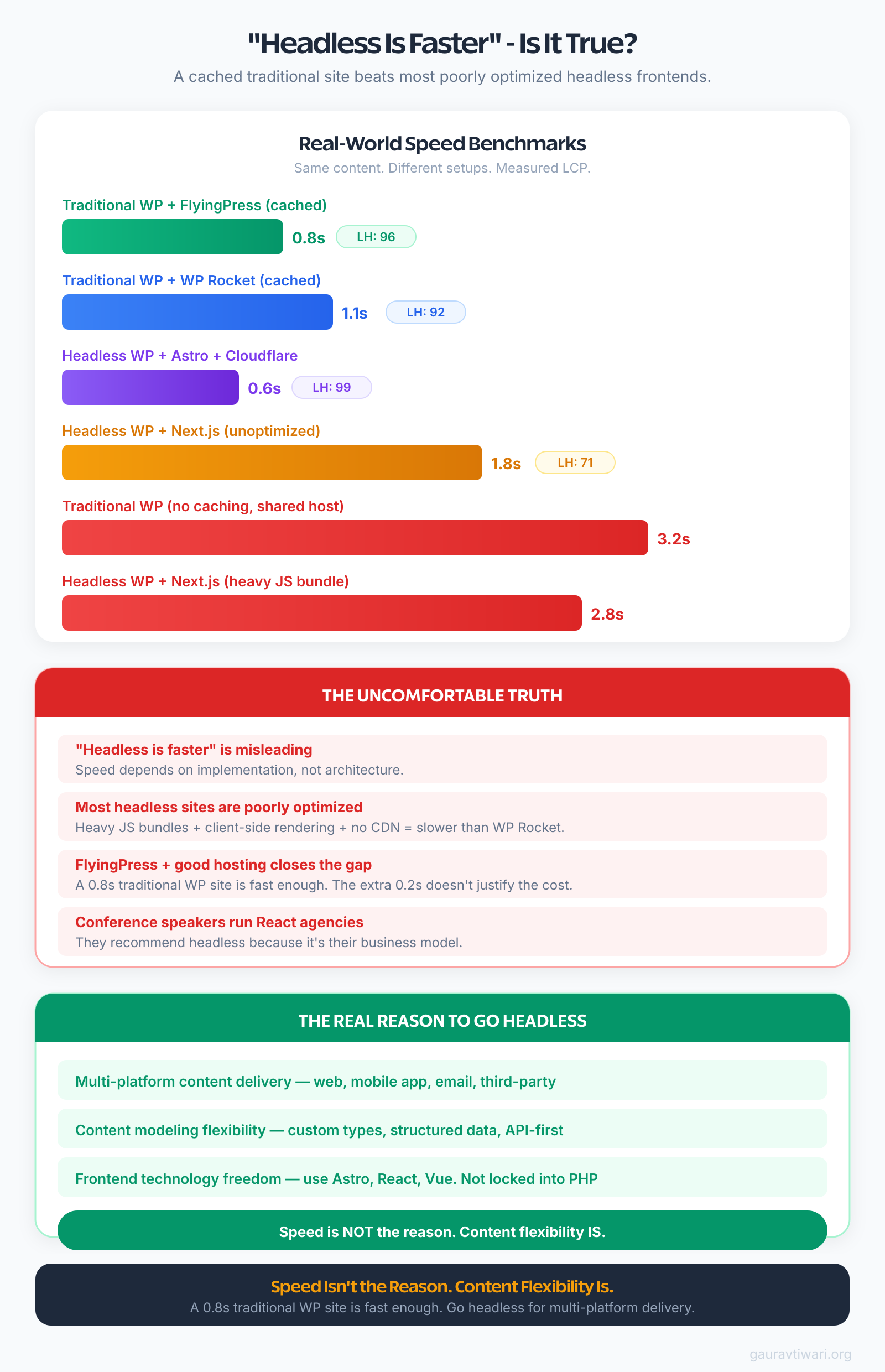
I’ve tested headless setups on my own sites. Built them for clients. Spent real money and real hours on the migration. And the fastest WordPress sites I’ve tested? They’re not headless. They’re traditional setups with smart caching, a lightweight theme, and a good CDN. Sub-second page loads. Perfect Core Web Vitals scores. No JavaScript framework required.
The uncomfortable truth is that headless WordPress isn’t useless, but most bloggers who adopt it are solving a problem they don’t have. I’ve watched three clients spend $5,000-15,000 on headless rebuilds only to end up with sites that performed the same as, or worse than, their original setup. Here’s exactly when headless makes sense, when it doesn’t, and what I’d do instead.
What “Headless WordPress” Actually Means
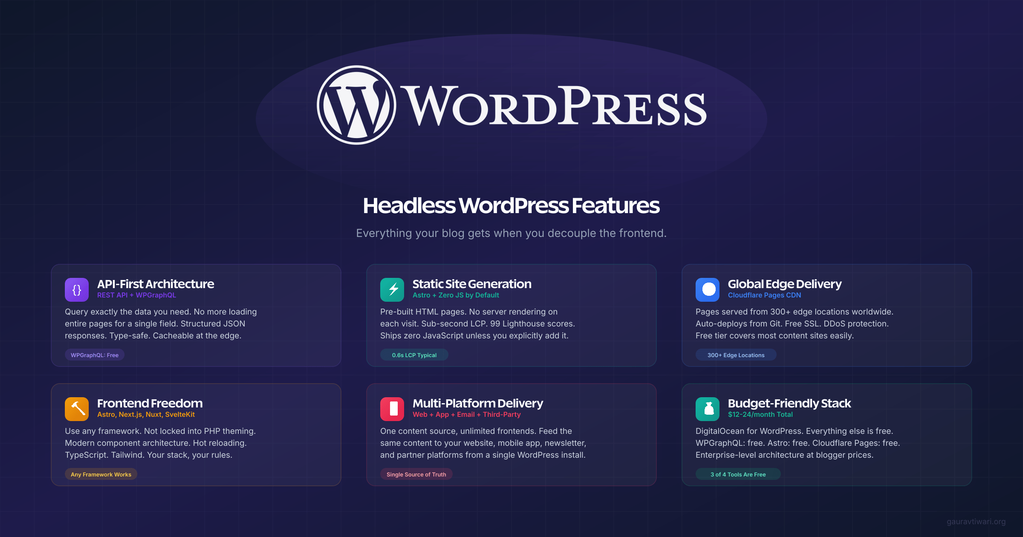
Read: How to Use WordPress as a Headless CMS with Front-end Frameworks?
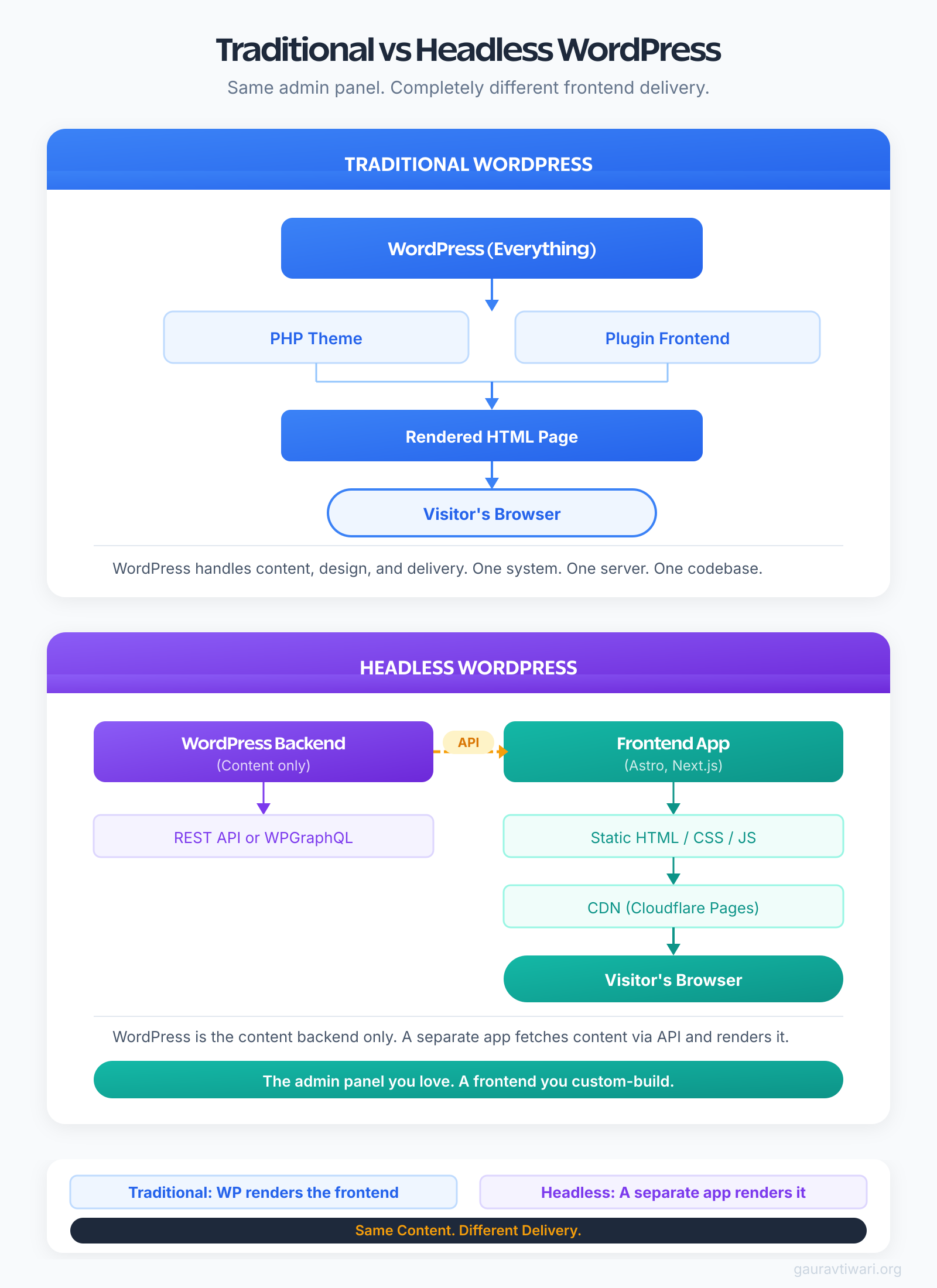
Traditional WordPress does two jobs. It stores your content (posts, pages, images, settings) and it displays that content to visitors using a theme. The theme controls how your site looks. Your hosting server runs PHP to build each page, and visitors see the result.
Headless WordPress splits those two jobs apart.
WordPress still handles the content. You write posts in the same editor, manage categories the same way, upload images like you always have. But it stops there. WordPress doesn’t build the pages visitors see. Instead, it exposes your content through an API, basically a structured data feed, and a completely separate application handles the display.
That separate application is typically built with something like Next.js, Astro, or Nuxt. It fetches your content from WordPress, builds the pages its own way, and serves them to visitors. Some developers are even running middleware on Cloudflare Workers to handle API caching and edge rendering between WordPress and the frontend. Your WordPress theme? It becomes irrelevant. Nobody sees it. WordPress becomes a backend content management system, nothing more.
Think of it like a restaurant kitchen that only does takeout. The kitchen (WordPress) still prepares the food (content), but the dining room (frontend) is a completely different building run by different people with different tools.
The API that connects them is usually either the built-in WordPress REST API or WPGraphQL, a plugin that lets you query exactly the data you need. WPGraphQL is the one most headless setups use because it’s more efficient. Instead of grabbing everything and filtering, you ask for exactly what you want. I’ve covered the technical setup in detail if you want the step-by-step.
The Real Reasons Bloggers Consider Headless
I’ve talked to dozens of bloggers who wanted to go headless. Most of them had the wrong reasons. But some had legitimately good ones. Here are the three that actually hold up.
Publishing Content to Multiple Platforms
If you’re running a blog, a mobile app, and maybe a newsletter platform that all need the same content, headless makes sense. WordPress becomes your single source of truth. Your blog frontend pulls from it. Your mobile app pulls from it. Your email system pulls from it.
I worked with a media company that published the same articles across a website, an iOS app, and a daily digest email. Before headless, they were copying content between three systems. After, everything pulled from WordPress. One update, three platforms. That’s a real use case.
But honestly, most bloggers don’t have this problem. If you’re publishing to one website and maybe sharing on social media, you don’t need a content API. You need WordPress doing what WordPress does.
You’ve Maxed Out Traditional Performance
This is the one I respect most. You’ve already done everything right. You’re running a lightweight theme like GeneratePress or Astra Theme. You’ve got FlyingPress or WP Rocket handling caching. You’ve set up a proper CDN. Your server is tuned. And you’re still hitting performance walls because of complex layouts, heavy dynamic content, or traffic volumes that push PHP to its limits.
At that point, serving pre-rendered static pages through a framework like Astro, deployed to an edge network, can shave another 200-400ms off your load times. That matters when you’re already fast and competing for those last few Core Web Vitals points.
But I want to be clear. I’ve helped sites pass Core Web Vitals without going anywhere near headless. Most bloggers haven’t actually maxed out traditional performance. They just think they have.
Modern Developer Experience
If you’re a developer who blogs, and you genuinely prefer writing React or building with Astro over wrestling with PHP templates, headless gives you that freedom. You can use TypeScript, component-based architecture, modern build tools, and deploy to platforms like Vercel, Cloudflare Pages, or Netlify. You can even use Cloudflare Workers to build custom API endpoints that sit between your WordPress backend and your frontend, handling things like search, content transformations, or real-time personalization at the edge.
I get the appeal. Writing JSX components is more fun than debugging template hierarchy issues in functions.php. But “more fun for the developer” isn’t the same as “better for the reader.” Keep those separate in your head.
The only valid reasons to go headless are multi-platform publishing, performance ceilings you’ve genuinely hit, or strong developer preference. “Because it’s modern” isn’t on that list. If you can’t point to a specific problem headless solves for your blog, you don’t need it.
When Traditional WordPress Still Wins
OK, here’s where I need to be direct. For the vast majority of bloggers, traditional WordPress is still the better choice. And it’s not even close.
Your Plugin Library Disappears
That’s the biggest thing people don’t realize before they start a headless migration. Every plugin that renders something on the frontend stops working. Your SEO plugin’s schema markup? Gone. Your page builder layouts? Gone. Your contact form plugin? Gone. WooCommerce product pages? You’re rebuilding those from scratch.
I consulted for a blogger who was excited about headless. We sat down and audited their site. They had 14 plugins that rendered content on the frontend. Fourteen. Their rebuild estimate, just to get back to feature parity, was roughly 3x their annual hosting and tool budget. For a blog that was already loading in under 2 seconds.
They stayed on traditional WordPress. Smart move.
SEO Tools Don’t Port Over Cleanly
You’re probably using Rank Math or Yoast. Those plugins generate meta tags, schema markup, Open Graph tags, sitemaps, and breadcrumbs. All of that gets rendered by your WordPress theme.
Go headless, and none of that renders automatically. You need to fetch the SEO data through the API and manually output it in your frontend application. It’s doable, but it’s extra work. And if you miss something, like hreflang tags for multilingual sites, you might not notice until your search rankings drop.
Live Preview Becomes Painful
In traditional WordPress, you click “Preview” and see exactly what visitors will see. It works because the same system that renders the preview also renders the live site.
With headless, the preview needs to talk to your frontend application. Setting up preview mode in Next.js or Astro requires custom configuration. It works, sort of, but it’s never as smooth as the traditional experience. Content editors notice this immediately and they hate it.
Familiar Workflows Break
If you’re the only person publishing, you can adapt. But if you have writers, guest contributors, or a content team, going headless means retraining everyone. Things they expect to work, like drag-and-drop block layouts, custom widgets in sidebars, “View Post” links in the dashboard, all of that either breaks or needs custom solutions.
The Headless Stack That Actually Works for Bloggers
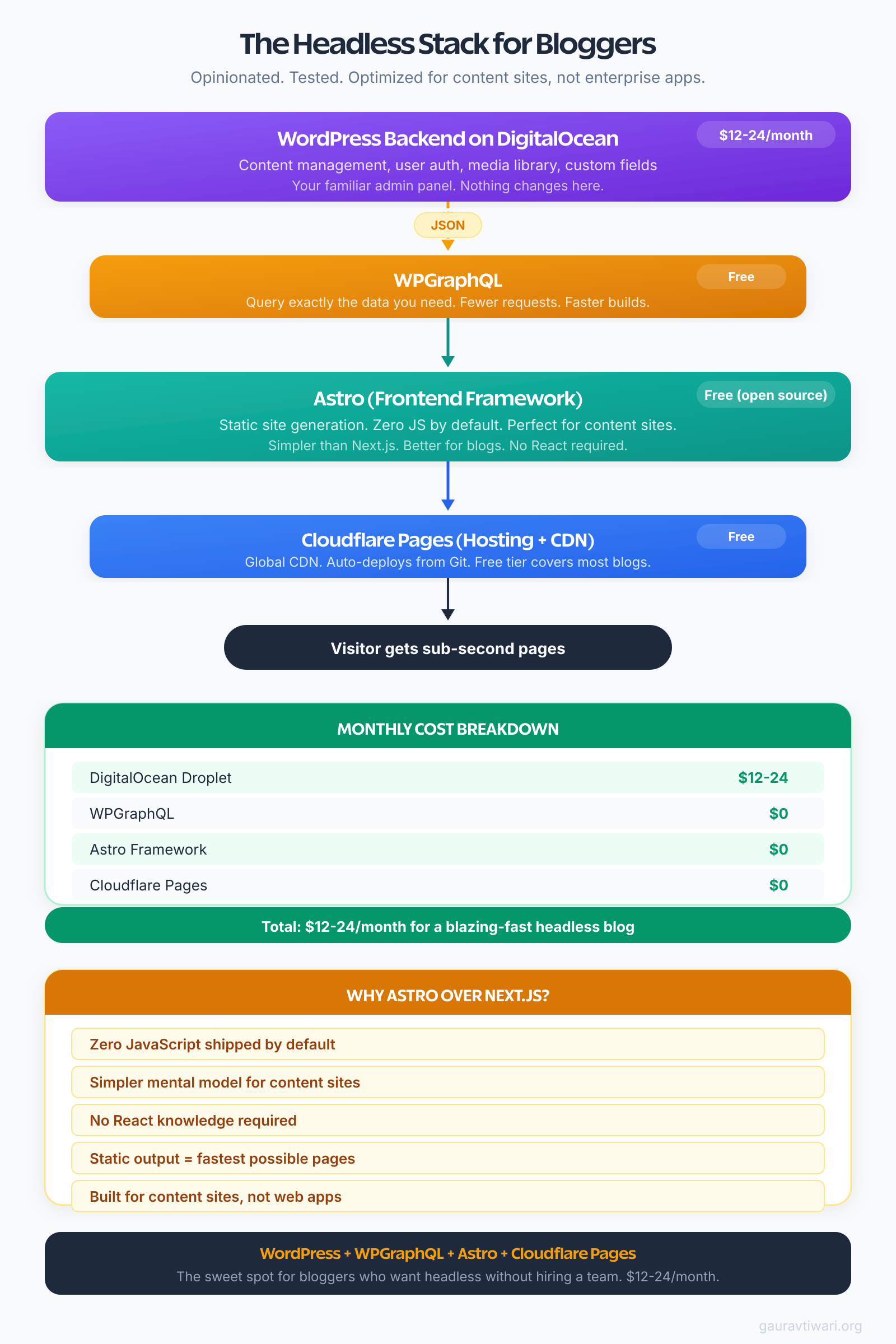
If you’ve read everything above and you still want to go headless, here’s the stack I’d recommend. I’ve tested different combinations and this one balances performance, cost, and maintainability.
- WordPress Backend: Self-hosted on Racknerd ($5-$10 /month) or DigitalOcean ($12-24/month for a droplet with enough power for API serving). You don’t need expensive managed hosting when WordPress is just serving API responses. No visitors hit this server directly.
- Content API: WPGraphQL. It’s free, actively maintained, and lets you query exactly the content you need. The REST API works too, but GraphQL is more efficient for complex content structures. You request only the fields you need instead of getting entire post objects with 50 fields you’ll ignore.
- Frontend Framework: Astro. Not Next.js.
Look, I know Next.js gets all the attention in the headless WordPress world. But for a blog, Astro is the better choice. It ships zero JavaScript by default. Your pages are pre-rendered static HTML. You only add JavaScript where you actually need interactivity. For a content-heavy site, that means most pages are pure HTML and CSS. Seriously fast.
Next.js made sense when server-side rendering was the main advantage. But Astro’s static-first approach with selective hydration is better suited to blogs. You don’t need React running in the browser to display an article.
Hosting the Frontend: Cloudflare Workers and Pages. Free for most blogs. It deploys your static Astro site to Cloudflare’s global edge network. Every visitor gets served from a server close to them. Build times are fast. The free tier is generous. And if you need dynamic functionality like handling form submissions or proxying API requests, Cloudflare Workers integrates natively with Pages. You can add server-side logic without spinning up another hosting account.
CDN/Media: Bunny CDN or Cloudflare R2 for image delivery and media assets. Both are cheap (about $0.01/GB), have global PoPs, and handle image optimization on the fly. Way more cost-effective than Cloudflare Images for most blogs.
Total monthly cost? About $5-30 for the WordPress backend depending on your needs, $0-5 for Cloudflare Pages, and $1-5 for Bunny CDN. So roughly $20-40/month. Compared to a good managed WordPress host at $25-50/month where you’d get the traditional setup working just fine.
If you go with Astro, use its Content Collections feature to define your WordPress content schema locally. It gives you type safety and auto-completion for your post data, which saves hours of debugging when your API responses don’t match what you expected.
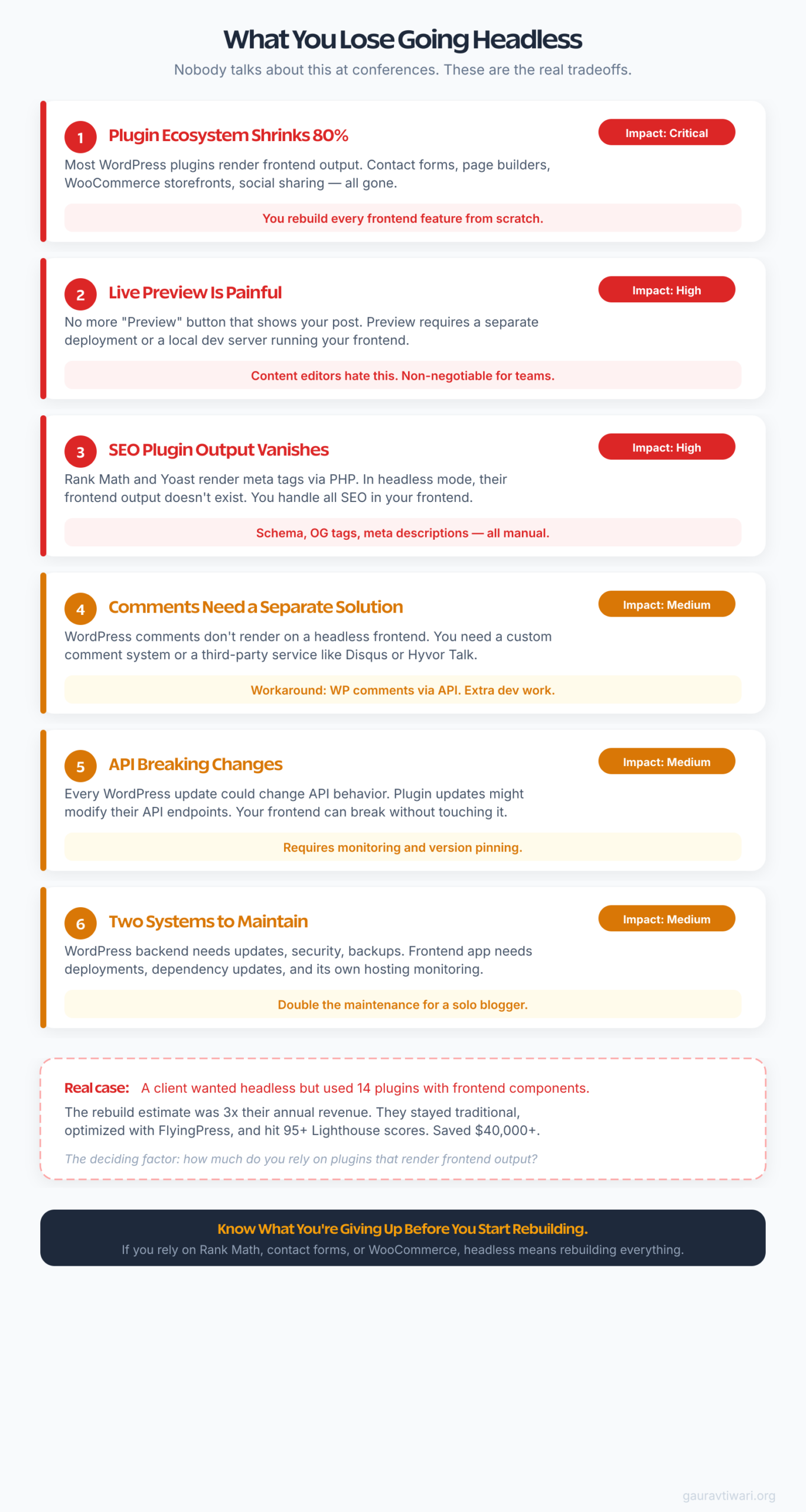
What You Lose Going Headless (Nobody Talks About This)
Nobody talks about this. People make headless sound like pure upside. Faster sites! Modern tooling! Infinite flexibility! But nobody spends 30 minutes on what you give up. And what you give up is significant.
80% of Your Plugins Become Useless
I’m not exaggerating. I went through the WordPress plugin directory and categorized the top 100 plugins by whether they work with headless setups. About 80 of them rely on frontend rendering. Contact Form 7, Elementor, WooCommerce, Yoast, Wordfence’s login protection, popup plugins, slider plugins, social sharing buttons, all of these either partially or completely break.
What remains? Plugins that only work on the backend. ACF (Advanced Custom Fields) works because it stores data. Redirection works because it handles server-side redirects. Some admin-only plugins survive. But everything your visitors interact with needs to be rebuilt in your frontend framework.
Comments Need a Separate Solution
WordPress comments are rendered by your theme. Go headless, and you need to either build a custom comment system that talks to the WordPress comments API, or use a third-party solution like Giscus (GitHub-based) or a hosted service.
I’ve seen bloggers spend an entire weekend just getting comments working in their headless setup. For something that worked out of the box with a three-line template tag in traditional WordPress.
SEO Plugin Output Doesn’t Render Automatically
I mentioned this earlier, but it deserves its own callout because the consequences are real. Your SEO plugin still generates the data. Rank Math still creates your schema markup, your meta descriptions, your Open Graph tags. But that data just sits in the WordPress database.
Your frontend application needs to explicitly fetch it and render it into your HTML tags. Miss one field and you’ve got pages without proper social sharing images, or missing structured data, or broken canonical URLs. I’ve debugged headless sites where traffic dropped 20% because schema markup wasn’t rendering correctly. The fix took 10 minutes. Finding the problem took two weeks.
Maintenance Complexity Doubles
With traditional WordPress, you maintain one system. One hosting account, one set of updates, one deployment process.
With headless, you maintain two. The WordPress backend needs its own hosting, updates, backups, and security. The frontend application needs its own hosting, build pipeline, dependency updates, and deployment. When something breaks, you need to figure out which side caused it.
For agencies with DevOps teams, this is fine. For a solo blogger? That’s a lot of extra surface area to manage.
A Decision Framework: Should YOUR Blog Go Headless?
I put together five questions. Answer honestly. Score yourself.
- Question 1: Do you publish the same content to 3+ platforms (web, app, newsletter system)?
Yes = 2 points. No = 0 points. - Question 2: Have you already optimized with caching, CDN, and a lightweight theme, and STILL can’t hit performance targets?
Yes = 2 points. No = 0 points. “I haven’t tried yet” = negative 1 point. - Question 3: Are you comfortable maintaining two separate systems (WordPress backend + JavaScript frontend)?
Yes = 1 point. No = negative 2 points. - Question 4: Do you rely on fewer than 5 frontend-rendering plugins?
Yes = 1 point. No = negative 1 point per plugin above 5. - Question 5: Do you have a developer (or are one) who can build and maintain a custom frontend long-term?
Yes = 2 points. No = negative 2 points.
Scoring:
- 6-8 points: Headless could genuinely benefit you. Start with a proof-of-concept.
- 3-5 points: Consider the hybrid approach (covered in the next section) before committing.
- 0-2 points: Traditional WordPress is your best path. Optimize what you have.
- Below 0: Headless would actively hurt your blog. Don’t do it.
Most bloggers I’ve walked through this score between 0 and 3. And that’s fine. It means traditional WordPress is working for them.
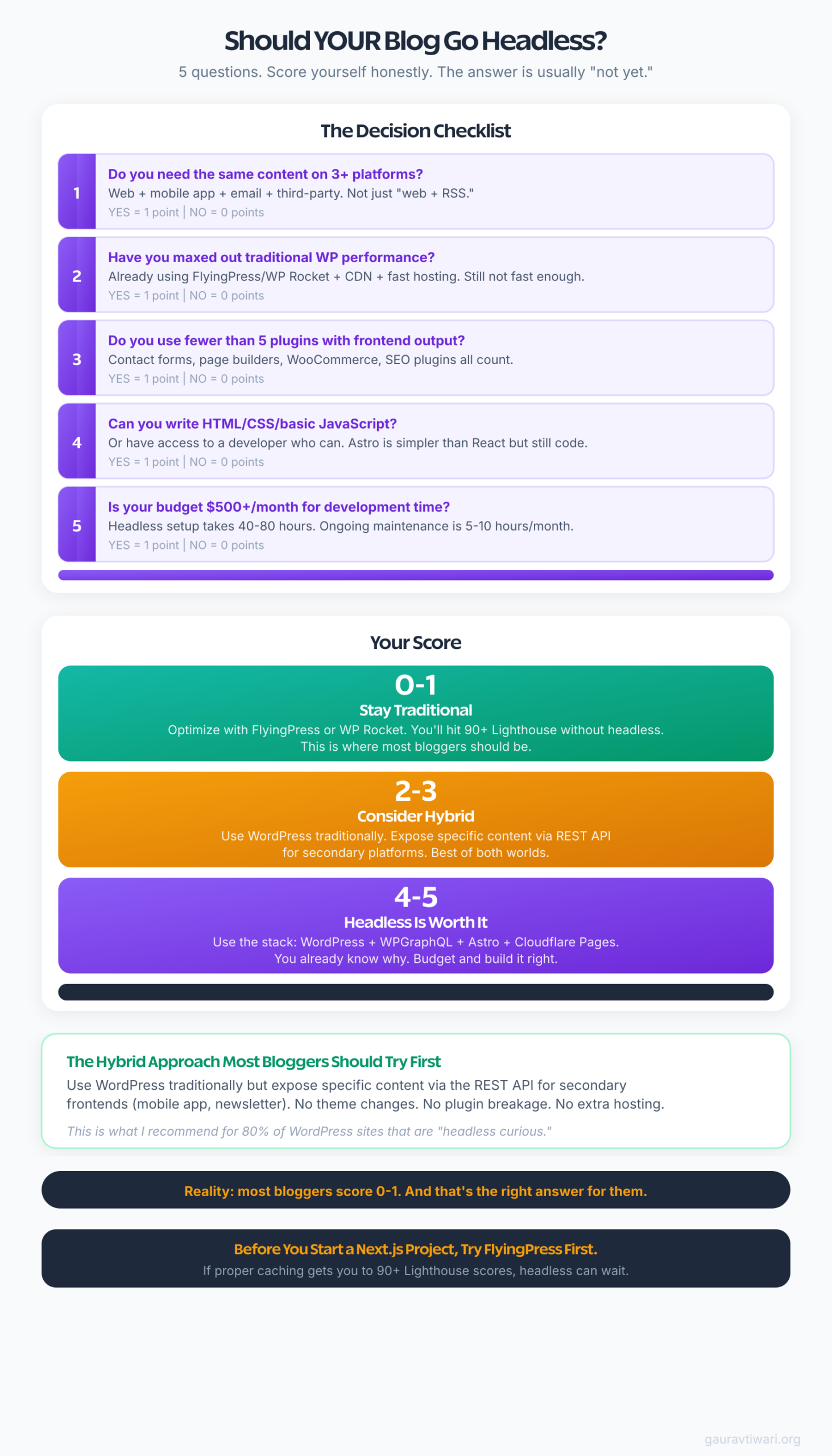
The Hybrid Approach Most Bloggers Should Try First
Here’s what I actually recommend for most bloggers who are curious about headless. Don’t go full headless. Go hybrid.
Keep your WordPress site running exactly as it is. Traditional theme, traditional hosting, all your plugins working normally. Your visitors see a regular WordPress site.
But use the WordPress REST API to expose specific content for secondary use cases.
Want to build a standalone landing page with Astro? Pull the content from your WordPress API, build a single static page, deploy it to Cloudflare Pages. Your WordPress blog stays untouched.
Want a mobile reading experience? Build a lightweight app that fetches posts from the REST API. Your WordPress site still serves as the main platform.
Want to display your latest posts on a different website or tool? The REST API is already there. No plugins needed.
This approach gives you the API benefits of headless without any of the downsides. Your main site keeps working. Your plugins keep working. Your SEO setup stays intact. And you can experiment with headless concepts on the side, at zero risk.
If you’re running a WordPress site with a solid CDN setup and proper caching, you’re already getting 95% of the performance benefit that headless promises. The hybrid approach gets you most of the remaining 5% for specific use cases.
I’ve written about SaaS tools that extend WordPress in ways that don’t require going headless. Many of the “features” people think need headless, like fast page loads, API-driven content delivery, and modern frontends, can be achieved with the right traditional setup.
And if you’re still figuring out whether WordPress.com or self-hosted WordPress is right for you, headless definitely isn’t your next step. Get the basics sorted first.
Before Going Headless: Pre-Flight Checklist
Before You Rip Out Your Theme
I’ll leave you with this. Before you spend a month rebuilding your blog as a headless application, spend one weekend optimizing what you already have.
Install FlyingPress or WP Rocket. Set up Bunny CDN or Cloudflare R2. Switch to a lightweight theme if you’re not on one already. Optimize your images. Clean up unused plugins. Need help? Hire me!
If you’re hitting 90+ on all three Core Web Vitals metrics after that weekend, you don’t need headless. Your site is fast. Your plugins work. Your workflow is simple. Keep it that way.
Headless WordPress is a real architecture with real benefits. But those benefits are for specific situations, like multi-platform publishing, extremely high-traffic sites, or teams that genuinely prefer JavaScript frontends. For the average blogger publishing articles and trying to grow organic traffic, traditional WordPress with good optimization is still the answer.
The most exciting technology isn’t always the right technology. Sometimes the boring stack that just works is exactly what your blog needs.
Questions you may have
Is headless WordPress harder to maintain than traditional WordPress?
Yes, significantly. With traditional WordPress, you maintain one system: your WordPress installation with its theme and plugins. With headless, you maintain two separate systems. The WordPress backend still needs hosting, updates, backups, and security monitoring. The frontend application needs its own hosting, build pipeline, dependency management, and deployments. When something breaks, you have to diagnose which system caused the issue. For solo bloggers or small teams, this added complexity is the biggest practical downside of going headless.
Can I use Rank Math or Yoast with a headless WordPress setup?
You can use them on the WordPress backend to manage your SEO data, meta descriptions, schema markup, and Open Graph tags. The plugins still generate and store all that information. The catch is that none of it renders automatically on your headless frontend. You need to fetch the SEO data through the REST API or WPGraphQL and manually output it in your frontend application’s HTML head tags. Both Rank Math and Yoast expose their data through the API, so it’s technically possible. But you’re responsible for making sure every field actually shows up in your rendered pages. Missing even one field, like canonical URLs or structured data, can hurt your search rankings without any obvious warning.
How much does a headless WordPress setup cost per month?
A practical headless setup runs about $20-40 per month for a blogger. That breaks down to roughly $12-24 for a DigitalOcean droplet running WordPress as the backend API server, $0-5 for Cloudflare Pages hosting your static frontend (the free tier is generous enough for most blogs), and $1-5 for a CDN like Bunny to handle image delivery. Compare that to $25-50 per month for good managed WordPress hosting where everything works out of the box with traditional WordPress. The hosting costs are similar, but the headless setup requires more development time upfront and ongoing maintenance. Factor in developer hours and the real cost of headless is much higher.
Do I need to know React or JavaScript to run a headless WordPress blog?
You need working knowledge of at least one frontend JavaScript framework. Most headless WordPress tutorials use Next.js (which is React-based) or Astro. Astro is the easier option for bloggers because it doesn’t require deep React knowledge, and it generates static HTML by default. You’ll need to understand concepts like fetching data from APIs, templating components, and deploying static sites. If terms like API endpoints, build pipelines, and environment variables feel unfamiliar, headless WordPress is going to be a steep learning curve. You’d be better served optimizing your traditional WordPress setup first and learning frontend development as a separate project.
Can I switch back to traditional WordPress after going headless?
Yes, and this is one of the underappreciated advantages of the headless approach. Since WordPress still manages all your content, switching back means installing a traditional theme and deactivating WPGraphQL or stopping your frontend application. Your posts, pages, categories, media, and all your content remain exactly where they are in the WordPress database. The reverse migration, from traditional to headless, is actually the harder direction because you need to rebuild all your frontend functionality. Going back to traditional just means letting WordPress do what it was originally designed to do: serve pages through a theme.
Disclaimer: This site is reader-supported. If you buy through some links, I may earn a small commission at no extra cost to you. I only recommend tools I trust and would use myself. Your support helps keep gauravtiwari.org free and focused on real-world advice. Thanks. - Gaurav Tiwari