
 by
by
You have a blog full of posts, a few service pages and maybe a newsletter archive, and you still can’t say which page to improve next. So you publish another article. Six months later two posts answer the same question, the page that explains your pricing is still thin and nobody can tell whether any of it brings in work.
A content matrix fixes that by putting every piece in one table, next to the reader question it answers and the job it does. Once it is on one screen, the gaps and the duplicates show up, and the next decision is usually obvious: update this page, merge those two, create the one thing that is missing.
I would start with a simple table rather than a complicated diagram. List the reader’s question, the content that answers it and the next useful step. Then use the matrix to find gaps and choose a small number of changes you can actually complete. The worked example and the template further down are ready to copy.
What Is a Content Matrix?
A content matrix is a planning table or diagram that organizes your content against a few chosen criteria, such as audience, buyer stage, topic or purpose. It helps you compare what you have with what your readers need, and it tells you what to update, what to create and what not to publish.
One established version is the four-quadrant Content Marketing Matrix from Smart Insights. It organizes content by its emotional or rational appeal and its position between awareness and purchase. A working spreadsheet can extend that overview with URLs, next steps, owners and measures of success, and that spreadsheet is where the day to day decisions happen.
Keep the two ideas separate in your head. “Content matrix” is the general tool, and any sensible set of columns counts. “Content Marketing Matrix” usually means the specific Smart Insights diagram, which is one useful way to fill the purpose column.
How the Content Marketing Matrix Works
Dave Chaffey and Dan Bosomworth first published the Content Marketing Matrix on Smart Insights in March 2012, and it has been redrawn in many versions since. The original is built on 2 axes:
- The horizontal axis runs from awareness on the left to purchase on the right, which is where the reader sits in the buying journey.
- The vertical axis runs from emotional at the top to rational at the bottom, which is how the content appeals to that reader.
Those 2 axes give you 4 quadrants, and each quadrant is a purpose rather than a format.
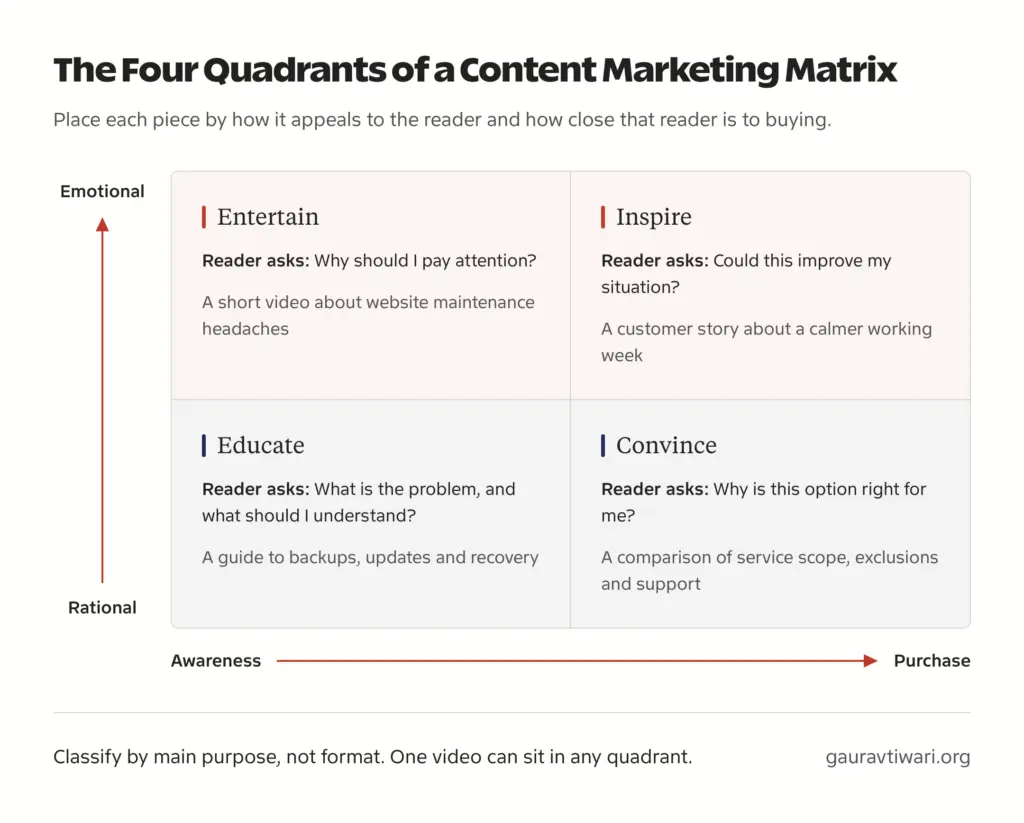
| Quadrant | Position | Reader question | Illustrative example |
|---|---|---|---|
| Entertain | Emotional, closer to awareness | Why should I pay attention? | A relatable video about website maintenance frustrations |
| Inspire | Emotional, closer to purchase | Could this improve my situation? | A customer story showing a more manageable working week |
| Educate | Rational, closer to awareness | What is the problem, and what should I understand? | A guide to backups, updates and recovery |
| Convince | Rational, closer to purchase | Why is this option suitable for me? | A service comparison explaining scope, exclusions and support |
Treat these as planning categories. A video can educate, entertain or convince, so you should classify each asset by its main purpose and ignore its file type.
Emotional and rational appeals are also not mutually exclusive. A customer story can offer reassurance and measurable evidence in the same page. That is why I’d use the diagram for the overview and a working table for the real decisions: URLs, owners, next steps and results don’t fit inside four boxes.
Content Matrix Example
Here is a completed matrix for a hypothetical WordPress maintenance provider. It is a planning demonstration, so none of the rows describe a real business or its results. Each row starts from a question a reader actually has and ends with something you can measure.
| Stage | Reader question | Proposed asset | Next step | Outcome to measure |
|---|---|---|---|---|
| Awareness | What maintenance does my WordPress site need? | Maintenance checklist | Read the ongoing responsibilities explanation | Relevant visits and next-step clicks |
| Consideration | Should I maintain it myself or hire someone? | DIY versus managed comparison | Review the service scope | Visits to the scope page |
| Decision | What is included, excluded and required from me? | Scope, pricing and onboarding FAQ | Submit a suitable inquiry | Qualified inquiries |
| Onboarding | How do I give access safely and request work? | Client onboarding guide | Complete onboarding | Completion and unresolved questions |
| Retention | What was done, and what needs attention next? | Maintenance report with recommendations | Approve work or clarify priorities | Responses and approved actions |
The last 2 rows go beyond the classic awareness-to-purchase diagram. That is deliberate. A matrix for a service business should cover what happens after the sale too, because onboarding and reporting pages are content as well, and they decide whether a client stays.
Now suppose this business already has several maintenance tutorials but no clear explanation of what its service includes. I would fix that scope page before commissioning another beginner tutorial. That page answers the question most likely to stop a suitable customer from taking the next step, and no number of extra tutorials does that job.
Content Matrix Template
Use one row per asset. Start with these fields and add others only when your team will actually use them. You can paste this header row straight into Google Sheets, Excel or Notion.
Audience | Reader question | Journey stage | Primary purpose | URL or working title | Next step | Success metric | Recommended action | Owner | Review dateHere is what each column should hold:
| Field | What to record |
|---|---|
| Audience | The specific reader group |
| Reader question | The question this asset should answer |
| Journey stage | Where the question fits in the journey you chose |
| Primary purpose | One main purpose, such as educate or convince; secondary tags go in a separate column |
| URL or working title | The existing asset, or a planned asset clearly marked as planned |
| Next step | The connected resource or action the reader should take next |
| Success metric | A measurable outcome that fits the purpose |
| Recommended action | Keep, update, consolidate, create or defer |
| Owner | The person responsible for the next action |
| Review date | When to reassess the decision and the result |
Useful optional fields are format, distribution channel, evidence source, production effort and actual results. A plain spreadsheet is enough for all of this. You don’t need to buy software to learn the method, and a tool only earns its place once the table is too big to scan.
How to Create a Content Matrix
Building one comes down to 6 decisions, and each decision leaves you with something written down. If you skip one, the matrix still looks finished but it stops telling you what to do.
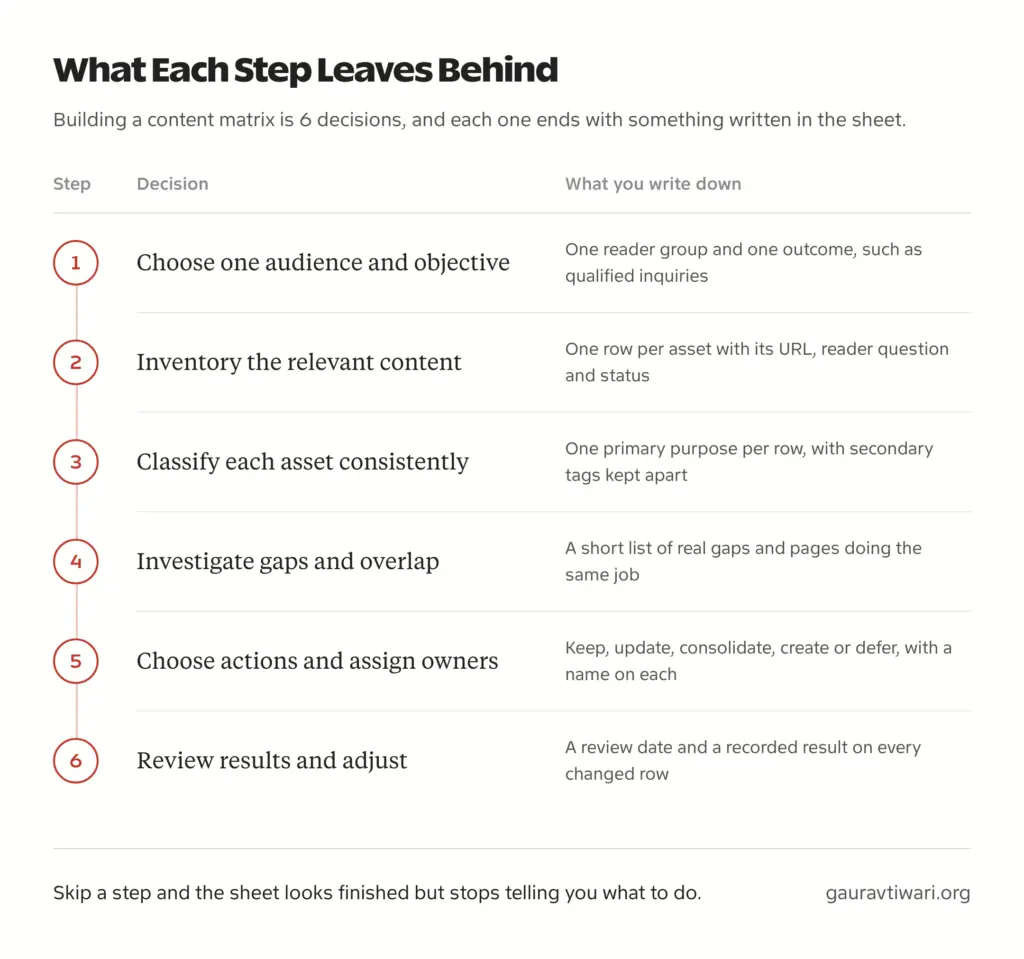
Choose One Audience and Objective
For a first attempt, pick one defined reader group and one outcome, such as qualified maintenance inquiries. Mapping every audience and every channel at once gives you a spreadsheet nobody finishes. If you haven’t settled who you write for yet, define your content strategy first and come back.
Inventory the Relevant Content
Record the URL or working title, the reader question, the purpose and the status of every asset that serves this audience. A full-site audit is not a prerequisite. If you want the deeper version, you can audit your existing content with a proper inventory, but 20 relevant rows are enough to start.
I would start with the pages already on the site rather than a blank list of new ideas. Before adding another article, I want to know whether an existing page can answer the question better, whether two pages are doing the same job and whether readers have a useful next step.
Classify Each Asset Consistently
Give every asset one primary purpose for counting and put any secondary purposes in a separate tag column. Otherwise one customer story gets counted as inspire and convince, and your coverage totals look better than they are. Write down your classification rules once, so the second person filling in the sheet puts the same page in the same box.
Investigate Gaps and Overlap
An empty part of your matrix is a question to investigate before it becomes a new article. Start by checking what the reader needs to know, for example:
- Is a comparison missing for readers choosing between options?
- Is the pricing or scope unclear on the page that should explain it?
- Is there proof, such as a case or a sample report, where the reader needs reassurance?
- Does a useful article end without pointing to the next relevant resource?
Sometimes the gap is missing content. Sometimes it is an outdated page or a weak connection between pages, and you can often connect related pages with useful internal links instead of writing anything new. I would prioritize gaps supported by reader questions, search demand or sales and support feedback, and you can validate search demand before committing to a new page. I would not publish something just to give every quadrant an equal number of entries.
Choose Actions and Assign Owners
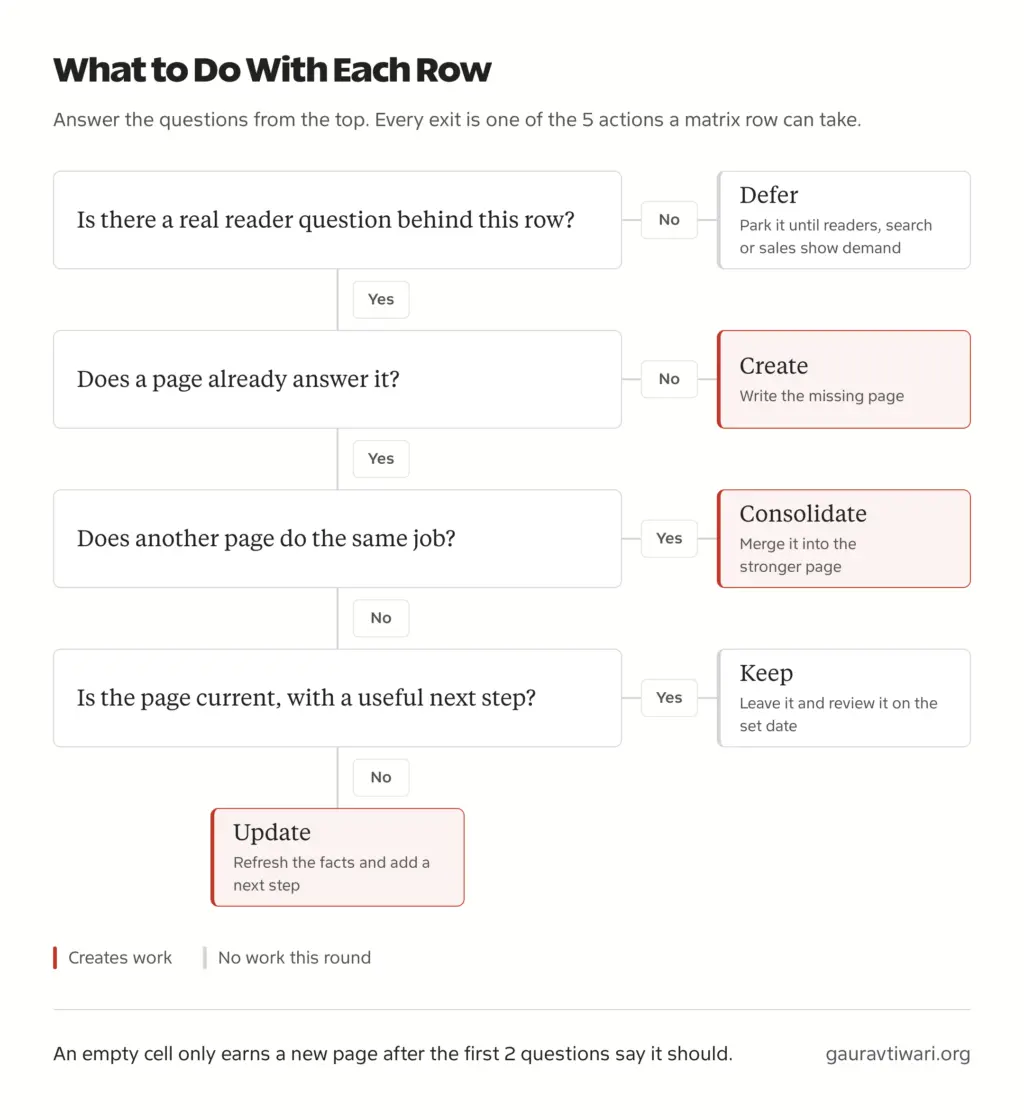
Every row gets one of 5 actions: keep, update, consolidate, create or intentionally defer. Review two overlapping pages side by side before you merge them, because sharing a keyword alone isn’t a reason to combine pages that serve different readers. Then put a name against each action. A matrix without owners is an inventory with extra labels.
Review Results and Adjust
Set a review date for every changed row and check the result against its success metric when that date arrives. Record what you changed, when and what happened, even when the answer is “no clear effect yet”. The next round of decisions gets easier because the matrix now carries its own history.
Content Matrix vs Inventory, Mapping and Calendar
These 4 terms get used interchangeably, and they are 4 different jobs that feed each other in this order:
- Content inventory records what exists: URLs, titles, dates and status.
- Content matrix organizes those assets against chosen dimensions such as stage and purpose, so gaps and overlap become visible.
- Content mapping connects assets to audience needs and stages, including the channels and calls to action that move a reader from one piece to the next.
- Content calendar schedules the approved work: who writes what, and when it goes live.
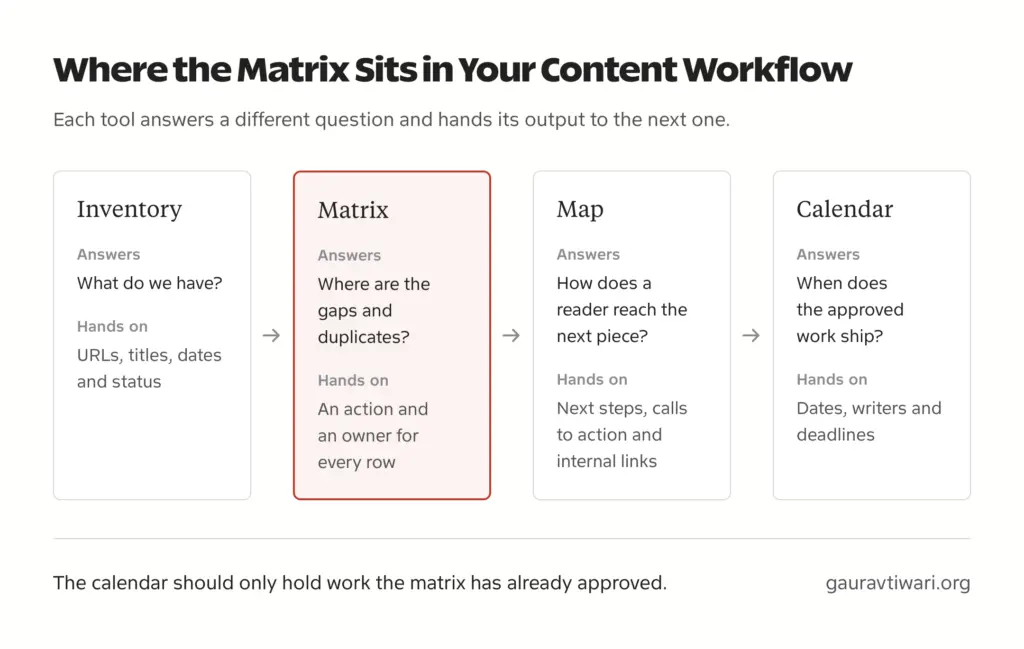
Dave Chaffey describes content mapping as reviewing content types against the customer lifecycle, which is why the matrix and the map overlap so much in practice. The simplest way I’d hold it: the matrix decides what deserves work, and the calendar schedules the work you approved.
How to Measure the Content in Your Matrix
Your content matrix organizes the work. It does not measure success on its own, so every row needs its own outcome and a place where you will read it. For each asset, record 4 things:
- The intended action, such as a next-step click, a signup or an inquiry.
- The metric that shows it happened.
- The measurement period.
- The data source, whether analytics, your CRM or a support inbox.
The metric should fit the purpose. An educational guide is judged on relevant visits and useful next-step clicks, a comparison on qualified inquiries, and an onboarding guide on completion and fewer repeated support questions. Judging all of them by the same traffic target is how good decision pages get labeled as failures.
A spreadsheet field does not prove the tracking works either. In Google Analytics 4 you mark the important action as a key event, then use the Realtime or DebugView report to confirm the event is actually being collected before you trust any number in the sheet.
Cost math needs the same care. Here is a hypothetical example: a content project costs ₹25,000 and produces 10 tracked, qualified inquiries during the chosen period. Its cost per qualified inquiry is ₹2,500. That is not ROI. Calculating ROI also needs a defensible estimate of the profit those inquiries actually produced, and a consistent attribution rule so that 3 pages don’t each take full credit for the same sale.
When the data is missing, mark it as unknown. Do not turn an assumption into a performance claim because it fits neatly into a spreadsheet.
Common Content Matrix Mistakes
These are the mistakes I’d watch for. Each one makes the table look more complete while telling you less.
- Forcing balance. Say 18 of your 20 assets sit in awareness, which is 90%. That count alone doesn’t tell you the traffic split, whether the 2 decision pages are any good, whether readers get a next step or whether inquiries are tracked. A single pricing page can bring more relevant visits than all 18 articles combined, so investigate the gap before you rebalance anything.
- Classifying by format. Putting every video in entertain and every PDF in educate hides what the content is for.
- Prescribing an appeal before diagnosing the question. Weak conversions don’t automatically call for more emotional content. The missing answer might be a rational comparison or a clear pricing explanation.
- Counting one asset several times. Without a single primary purpose, one page inflates 2 or 3 coverage totals.
- Treating planned content as coverage. A working title is a plan, and it belongs in the sheet marked as planned.
- Inventing metrics. A success column filled with guesses is worse than an empty one, because it looks like evidence.
- Leaving rows without owners. A row without a named person rarely gets updated.
Content Matrix FAQs
What is a content matrix?
A content matrix is a planning table or diagram that organizes your content by criteria such as audience, buyer stage and purpose. It shows what you have next to what readers need, so you can decide which page to update, merge, create or leave alone.
What are the four quadrants of a content marketing matrix?
The Smart Insights version uses entertain, inspire, educate and convince. Content is placed by its emotional or rational appeal and by how close the reader is to purchase. Treat the quadrants as planning categories. They describe a piece’s main purpose and promise nothing about how an audience will respond.
Should every quadrant contain the same amount of content?
No. Put effort where your audience’s questions, your business goals and your capacity point. A perfectly balanced matrix can still leave the most important question unanswered, while a lopsided one can be exactly right for a business whose buyers need mostly rational comparison content.
Can one asset belong to several quadrants?
Yes. A customer story can inspire through its narrative and convince through its evidence. Give each asset one primary purpose for counting and record the others as secondary tags, so a single page doesn’t inflate several coverage totals.
How do I start a content matrix without existing content?
Begin with one audience and write down its questions at each stage. Add the assets you plan to create and mark them as planned, so they are never counted as published coverage. Prioritize the questions you hear in sales calls, support tickets or search data.
How often should I update a content matrix?
Review it during editorial planning and after any important change to your product, pricing, audience or strategy. A monthly working review is a reasonable place to start, and you can slow it down once the rows stop changing.
Can a content matrix improve SEO?
Only indirectly. The matrix helps you organize useful work, such as answering missing questions, merging duplicate pages and linking related content. Those changes can help search performance. The spreadsheet itself does nothing for rankings until the pages it points to actually get better for readers.
Where to Start
Start with one audience and 5 relevant pieces of content. Write down the question each piece answers, its main purpose and the next useful step for the reader.
Then choose one meaningful gap to address. Update a weak page, clarify a decision or create something genuinely missing. A useful content matrix should change what you do next, and if it only gives you another document to maintain, cut it back to the columns you actually read.
Tell Google you want more of this.
Add Gaurav Tiwari as a preferred sourceOne tap, and this site shows up more often in your own Top Stories, AI Overviews and AI Mode. Remove it any time.
