
10 Best WordPress Migration Plugins for Effortless Site Transfer
Moving a WordPress site to a new host sounds simple until you’re staring at a corrupted database, broken image paths, and a homepage that won’t load. I’ve migrated over 200 sites across client projects, and I’ve seen every failure mode: serialized data that breaks during a manual SQL import, media files that vanish because the URL paths didn’t update, and white screens that show up right when the client checks their site.
The right migration plugin handles all of this for you. It rewrites URLs, preserves serialized data, moves files and databases in one package, and gets the job done in minutes instead of hours. The wrong plugin (or worse, doing it manually through phpMyAdmin) turns a 15-minute task into a weekend project.
I’ve tested every major migration plugin on real client sites, from 50MB blogs to 8GB WooCommerce stores. These 10 plugins actually work in 2026, and I’ve ranked them by reliability, speed, and how well they handle large sites.
Quick Summary: Best WordPress Migration Plugins in 2026
- WP Migrate: Best for developer workflows (push/pull between staging and production)
- Solid Backups: Best for backup + migration in one tool (Stash Live cloud storage)
- All-in-One WP Migration: Best free option for small sites under 256MB
- Backup Migration: Best for selective migrations (granular exclusion rules)
- Migrate Guru: Best for large sites up to 200GB (offloads processing to external servers)
- BlogVault: Best for WooCommerce and business sites (real-time incremental backups)
- Duplicator: Best for cloning and staging (installable site packages)
- Clone: Best for localhost migrations (free, lightweight)
- UpdraftPlus: Best for cloud backup flexibility (10+ storage destinations)
- WP BackItUp: Best for beginners who want one-click simplicity
Best WordPress Migration Plugins in 2026
The WordPress plugin repository lists over 100 migration plugins, and there are dozens more premium options outside of it. Most of them aren’t worth your time. I’ve narrowed it down to 10 that I’ve personally used on client projects and my own sites.
WP Migrate
Best for: Developers who push and pull databases between staging and production environments.
- Serialized data safe search-and-replace
- Push and pull between environments
- Migrations complete in minutes, not hours
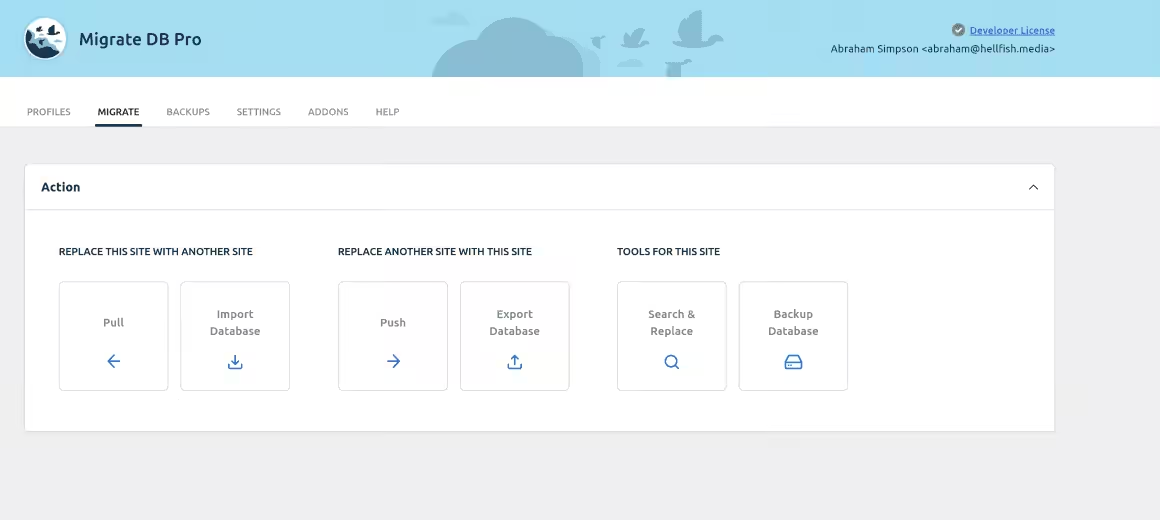
WP Migrate (formerly WP Migrate DB Pro) holds a 4.8 out of 5 rating on WordPress.org, and it’s earned. The plugin handles the one thing most migration tools get wrong: serialized data. It runs a find-and-replace across your entire database, including serialized arrays, so URLs and file paths don’t break after the move. It comes in a free lite version and a pro version starting at $90/year.
WP Migrate is a must-have for every WordPress user. I was able to migrate my website from one domain to another in less than 10 minutes! This is a great tool to have if you ever need to switch hosting accounts or move your site to a new domain.
Solid Backups
Best for: Site owners who want backup and migration handled by one plugin with cloud storage built in.

- Scheduled automatic backups
- Stash Live cloud backup
- One-click site migration and restore

SolidWP’s Solid Backups (previously BackupBuddy) does two things well: backups and migrations. You can create a full site backup, store it on their Stash Live cloud, and restore it on a completely different server with one click. It also handles multisite network deployments.
Migrations work through one-click restores. You can move sites to new locations or create new sites from existing backups. It also includes automated backup scheduling, incremental saves through Stash Live, and AES-256 encryption for security.
It’s not free, but at $99 per year you get backup, migration, and cloud storage in one license. That’s cheaper than buying separate plugins for each.
All-in-One WP Migration
Best for: Non-technical users migrating small sites (under 256MB) for free.

- Single-file export and import
- No technical knowledge required
- Free for sites under 256MB

All-in-One WP Migration exports your entire site (database, media, themes, plugins) as a single .wpress file. You install the plugin on the new host, upload the file, and you’re done. The free version works for sites under 256MB. Anything larger needs the Unlimited extension ($69).
Backup Migration
Best for: Selective migrations where you need granular control over what gets backed up and moved.

- Automated backup scheduling
- Handles large databases efficiently
- Free tier available on WordPress.org

Backup Migration is a newer plugin that focuses on giving you control over what gets migrated. You can run full or partial backups (database only, media library only, or specific folders) with custom exclusion rules.
Backup Migration plugin can conduct full and partial backups and migration, e.g. database only or media library folder, but it also has several thoughtfully created exclusion rules, so you can leave unwanted stuff out of the backup.
Additional features are being added with each plugin update, and support is available to both free and (prioritized) premium users.
Migrate Guru
Best for: Large WordPress sites (up to 200GB) that need server-side processing during migration.

- No server overload during migration
- Handles sites up to 200GB
- Completely free to use

Migrate Guru was built by the same team behind BlogVault, and it solves one specific problem: migrating large sites without crashing your server. It processes migrations on BlogVault’s own servers, so your site stays live and fast during the move. It handles sites up to 200GB.
The free version covers most use cases. If you’re running a 50GB+ WooCommerce store or a multisite network, their paid tier adds priority support and hands-on migration help.
BlogVault
Best for: WooCommerce and business sites that need real-time incremental backups alongside migration.

- Real-time incremental backups
- Built-in staging environment
- One-click migration included

BlogVault’s standout feature is incremental backups. Instead of creating a full backup every time, it only saves the changes since the last backup. For a WooCommerce store processing orders every hour, this means your backup is always minutes old, not days.
The premium version ($89/year) adds a staging environment, real-time backups, and built-in security scanning. If you’re running an eCommerce site that can’t afford downtime during migration, BlogVault is worth the price.
Duplicator
Best for: Creating installable site packages for cloning, staging, or moving to a new domain.

- Create full site packages
- Drag-and-drop site duplication
- Supports multisite networks

Duplicator packages your entire WordPress site (files, database, plugins, themes) into a single installable zip. You upload the zip and an installer.php file to the new host, run the installer, and the site goes live. Over 1.5 million sites use it. The free version handles basic migrations, while the Pro version ($49.50/year) adds scheduled backups, cloud storage, and multisite support.
Clone
Best for: Moving sites to and from localhost, and quick one-click backups on a budget.

- One-click backup and restore
- Cloud storage integration
- Lightweight and simple to use

Clone works well for moving WordPress sites to and from localhost. You can also use it for general backups and site copies. I haven’t stress-tested it on large sites, but for small to medium WordPress installs, it gets the job done. It’s 100% free.
UpdraftPlus
Best for: Users who want scheduled backups to 10+ cloud storage services with migration as a bonus.

- 3 million+ active installs
- Backs up to 10+ cloud storage services
- Scheduled automatic backups

UpdraftPlus is primarily a backup plugin, but its migration features are solid. With 3 million+ active installs, it’s the most widely used WordPress backup plugin. The free version backs up to Dropbox, Google Drive, S3, and seven other cloud services. You can clone your site and move it to a new host from any backup.
The premium version ($70/year) adds multisite support, database search-and-replace, and priority support. If you already use UpdraftPlus for backups, it makes sense to use its migration feature instead of adding another plugin.
WP BackItUp
Best for: Beginners who want one-click backup and restore without touching any settings.

- One-click backup for beginners
- Simple restore process
- Downloadable backup files

WP BackItUp does one thing: creates a downloadable backup of your site that you can restore on another host. No cloud integrations, no staging environments, no advanced options. You click “Backup,” download the file, and restore it on the new server. The premium version ($79/year) adds scheduled backups, automatic migrations, and priority support.
What is WordPress Migration?
WordPress migration means moving your entire site (database, files, themes, plugins, media) from one server to another. Common reasons include switching hosting providers, moving from shared hosting to a VPS, changing domain names, or pushing a local development site to production.
You can do it manually by exporting your database through phpMyAdmin, downloading your wp-content folder via FTP, and uploading everything to the new server. But manual migration breaks serialized data, misses URL references in the database, and takes hours.
A migration plugin automates the entire process. It creates a packaged backup, handles the database URL rewrite, and restores everything on the new host. What takes 2-3 hours manually takes 10-15 minutes with a plugin. I’ve written a step-by-step WordPress migration guide if you want the full walkthrough.
Which WordPress Migration Plugin Should You Pick?
If you’re a developer moving databases between staging and production, go with WP Migrate. Its serialized data handling is the best I’ve used across 200+ migrations. Start with WP Migrate Lite (free, 4.5-star rating) and upgrade to Pro if you need push/pull between environments.
If you’re not technical and just need to move a small blog, All-in-One WP Migration is the safest free option. For large WooCommerce stores over 5GB, Migrate Guru won’t crash your server during the move.
And if your hosting provider offers free migration (most managed WordPress hosts like Cloudways, Kinsta, and SiteGround do), use that first. A plugin is your backup plan when the host can’t handle it.
Disclaimer: This site is reader-supported. If you buy through some links, I may earn a small commission at no extra cost to you. I only recommend tools I trust and would use myself. Your support helps keep gauravtiwari.org free and focused on real-world advice. Thanks. - Gaurav Tiwari