
Best Web Hosting: Tested on Real Sites
I’ve hosted WordPress sites on shared hosting, managed hosting, VPS providers, dedicated servers, and cloud platforms. After testing 20+ providers across 800+ client projects, I’ve learned that hosting is the one thing you can’t optimize around. A slow server stays slow no matter how many caching plugins you throw at it.
This guide covers what I actually recommend based on real-world testing, not affiliate payouts. Some of the highest-commission hosting providers are the ones I recommend least.
My Hosting Recommendation
For most WordPress sites in 2026, a VPS from Hetzner managed through xCloud is the best value. I moved this site from DigitalOcean to Hetzner in 2023 and cut hosting costs by 65% while improving performance.
The total cost: $4.15/month for a Hetzner CX22 (2 vCPU, 4GB RAM, 40GB NVMe SSD) plus xCloud management. Compare that to $30-100/month for managed WordPress hosts that offer similar or worse raw performance.
Recommended reading:
- Hetzner vs Vultr vs RackNerd — Full VPS comparison with TTFB benchmarks, stress tests, and cost analysis
Types of WordPress Hosting
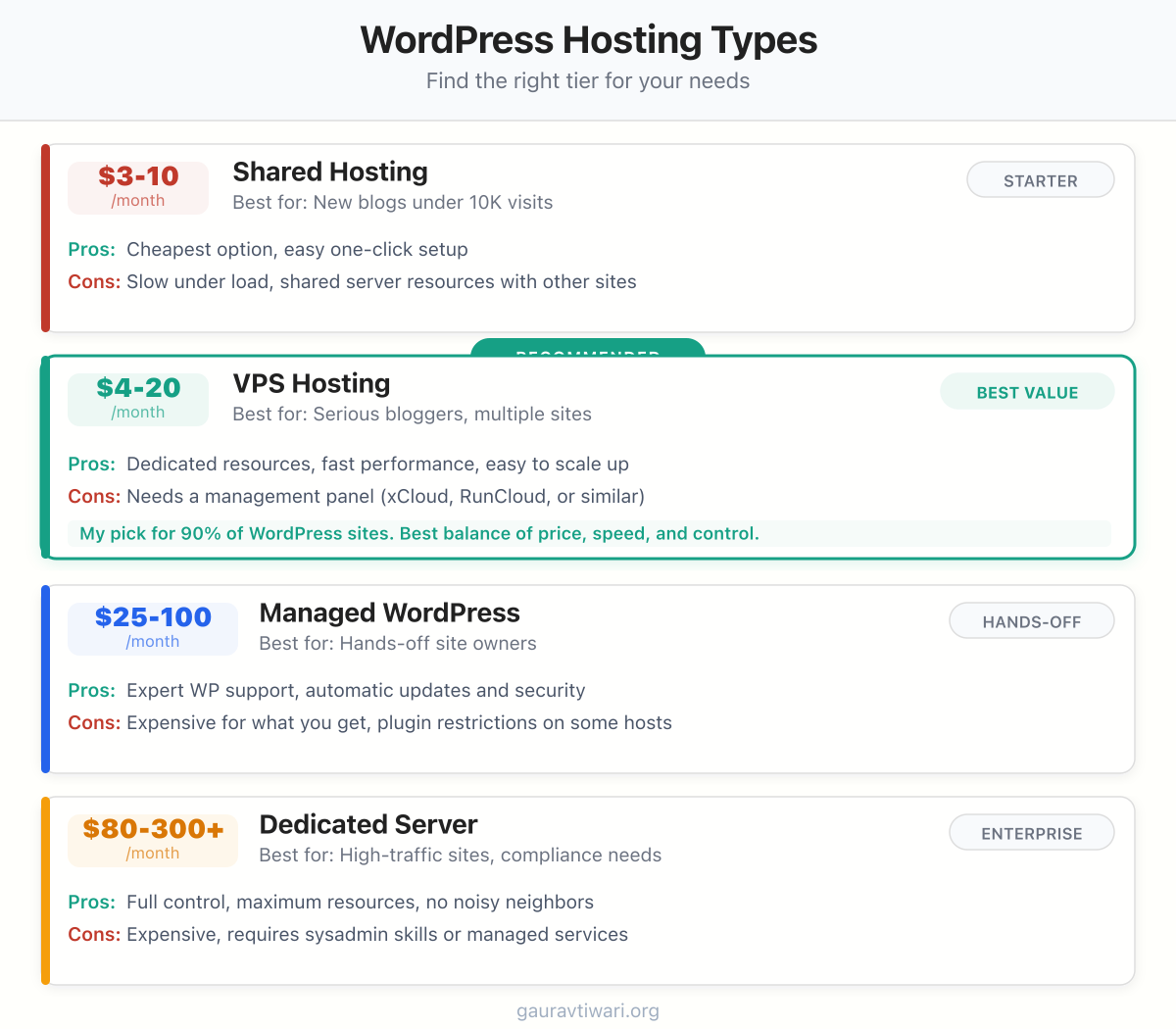
Understanding the categories helps you pick the right tier for your site’s needs:
- Shared hosting ($3-10/month) — Fine for starting out. You share server resources with other sites. Performance degrades under traffic spikes.
- VPS hosting ($4-20/month) — Dedicated resources on a virtual server. This is where most serious sites should be. Hetzner, Vultr, DigitalOcean are the top providers.
- Managed WordPress hosting ($25-100+/month) — VPS performance with managed updates, backups, and support. Kinsta, Cloudways, WP Engine. Worth it if you value convenience over cost.
- Dedicated servers ($80-300+/month) — A full physical server. Only needed for very high-traffic sites or specific compliance requirements.
What to Look for in a Host
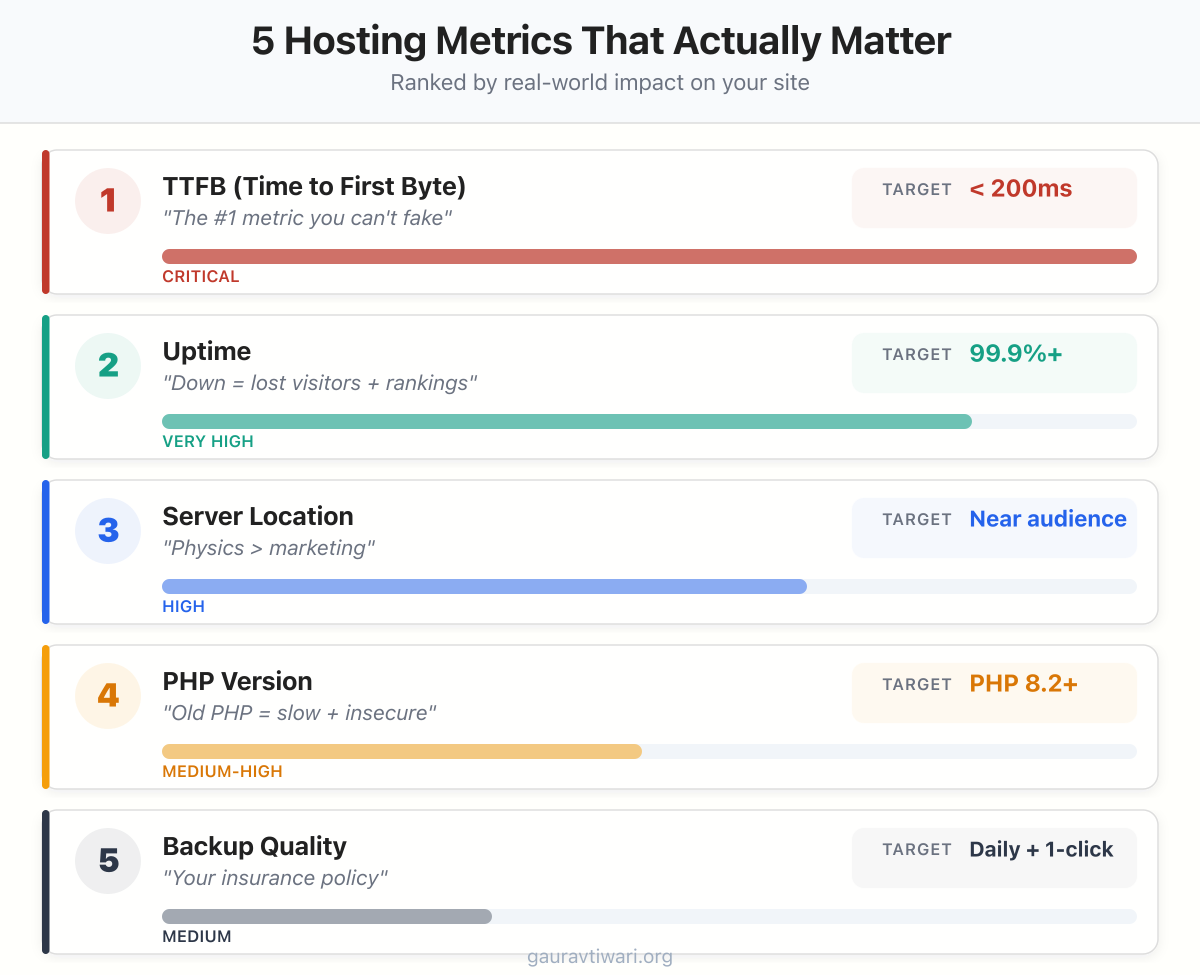
The metrics that matter, in order of importance:
- TTFB (Time to First Byte) — Should be under 200ms. This is the most honest performance metric.
- Uptime — 99.9% minimum. Anything less costs you visitors and search rankings.
- Server location — Choose a datacenter near your primary audience. Hetzner’s US and EU options cover most use cases.
- PHP version support — Must support PHP 8.2+. If they’re still on PHP 7.4, move immediately.
- Backup quality — Daily automated backups with one-click restore. Not weekly, not manual.
Hosting and Performance
Hosting is the foundation of the WordPress performance stack. A fast host + FlyingPress + Perfmatters + Cloudflare = a site that loads in under a second for most visitors.
The hosting industry is built on affiliate commissions. Bluehost pays $65+ per signup. SiteGround pays $50+. That’s why every “best hosting” article recommends them. I’m not saying they’re terrible, but a $4/month Hetzner VPS outperforms a $12/month Bluehost shared plan in every benchmark I’ve run. The affiliate money flows toward shared hosting because it converts beginners easily. My job is to tell you what’s actually fast, not what pays me the most.
Best Hosting for Different Needs
I’ve narrowed it down to four picks that cover every budget and skill level. Each one I’ve either used personally or tested extensively on client sites.
- From $2.99/mo
- Free domain included
- 1-click WordPress setup
- LiteSpeed web server
- Good for < 10K visits/mo
- Free SSL certificate
- From ~$7/mo total
- 2 vCPU, 4GB RAM, NVMe
- Full root server control
- Host 5-10 WordPress sites
- Auto backups + staging
- TTFB under 150ms
- From $20.83/mo
- 30-sec live chat support
- Free site migrations
- Built-in CDN
- Auto malware scanning
- 5 sites included
- From $35/mo
- Google Cloud Premium Tier
- 37 global data centers
- APM + analytics built-in
- Staging environments
- Enterprise-grade CDN
For New Blogs and Beginners
Starting a blog and need to keep costs under $5/month? Hostinger is the most practical starting point. The setup takes 10 minutes, the interface is clean, and you get a free domain for the first year. Don’t overthink hosting at this stage. Start here and upgrade to a VPS when traffic hits 10,000 monthly visitors.
- Starts at $2.99/month with free domain for first year
- LiteSpeed web server with built-in caching
- 100 GB SSD storage, free SSL, weekly backups
- 1-click WordPress installer with staging on Business plan
- 24/7 live chat support
For Serious Bloggers (Best Value)
This is what I run on this site. A Hetzner VPS managed through xCloud gives you 10x the performance of shared hosting at a fraction of managed hosting prices. I moved here from DigitalOcean in 2023, cut costs by 65%, and improved every performance metric.
- 2 vCPU + 4GB RAM + 40GB NVMe SSD for $4.15/mo
- TTFB consistently under 150ms on this site
- Host 5-10 WordPress sites on a single server
- xCloud provides 1-click staging, cloning, and SSL
- Automated daily backups with easy restore
- 65% cheaper than my previous DigitalOcean setup
For Hands-Off Site Owners
Not everyone wants to manage a server. WPX Hosting handles updates, security, and backups so you can focus on content. Their live chat responds in under 30 seconds. I recommend WPX over Cloudways for bloggers who want true managed hosting.
- 30-second average live chat response time
- Free unlimited site migrations from any host
- Custom-built CDN included at no extra cost
- Automated daily backups with 28-day retention
- Malware scanning, removal, and DDoS protection
Need flexible cloud scaling for WooCommerce or high-traffic spikes? Cloudways lets you pick your infrastructure (DigitalOcean, AWS, Google Cloud) while handling the server stack. Good middle ground between DIY VPS and fully managed hosting.
For Maximum Performance
When budget isn’t the constraint and you want the best infrastructure available, Kinsta runs on Google Cloud’s premium tier with 37 data centers. Their dashboard, staging environments, and built-in APM are best-in-class. Expensive, but worth it for sites where load time directly impacts revenue.
- Google Cloud Platform Premium Tier infrastructure
- 37 global data center locations to choose from
- Built-in APM for performance monitoring
- 1-click staging environments for safe testing
- Edge caching via Cloudflare integration
What I actually run: Hetzner CX22 ($4.15/mo) + xCloud ($2.50/mo) + FlyingPress ($8/mo) + Cloudflare (free). Total: ~$15/month for a site that loads in under 800ms globally. I’ve been on this stack since 2023.
Detailed Hosting Reviews
Want individual reviews with pricing breakdowns and feature comparisons? My detailed hosting comparison covers 10+ providers with TTFB benchmarks, pricing tables, and pros/cons for each.
Related hosting guides:
- Best Web Hosting Services — Full provider-by-provider comparison
- Hetzner vs Vultr vs RackNerd — VPS performance benchmarks
- Hosting Black Friday Deals — Best seasonal discounts
Fastest WordPress Hosting
Speed comes from server hardware, caching layers, and proximity to your visitors. The fastest WordPress hosts use NVMe SSD storage, LiteSpeed or Nginx servers, built-in object caching, and global CDN networks.
Based on my testing across client sites, the fastest WordPress hosting options in 2026 are:
- Cloudways on Vultr High Frequency — sub-400ms TTFB consistently. Best speed-to-cost ratio for sites with real traffic.
- Hetzner Cloud with a tuned Nginx/Redis stack — fastest raw performance under $10/month, but requires server management skills. See my Hetzner vs Vultr vs RackNerd comparison.
- ScalaHosting managed VPS — SSD storage, dedicated resources, SPanel (no cPanel license costs). Good balance of speed and managed convenience.
Shared hosting (Hostinger, Bluehost, GoDaddy) will never match VPS or cloud hosting on speed. If page load time matters to your business, budget at least $14-30/month for proper hosting.
Best Web Hosting for Beginners
If you are launching your first website and need something simple, affordable, and functional without server management knowledge:
- Hostinger — cheapest entry point ($2.99/month intro), user-friendly control panel, one-click WordPress install. Good enough for the first year. Watch the renewal pricing (jumps to $7.99-11.99/month). See my Hostinger alternatives for when you outgrow it.
- Chemicloud — slightly more expensive than Hostinger but better support and more moderate renewal increases. See my Hostinger vs Chemicloud comparison.
- SiteGround — premium shared hosting with excellent support. More expensive ($14.99/month) but the support quality justifies it for beginners who will need help.
Start cheap, learn the basics, and upgrade to VPS or cloud hosting when your traffic justifies it. Most sites do not need VPS until they pass 25,000-50,000 monthly visitors.
Best Month-to-Month Hosting (No Long Contracts)
Most shared hosts require 1-4 year commitments to get their advertised prices. If you want month-to-month flexibility, your options change.
- Cloudways — truly month-to-month with no contracts. Pay for what you use. Cancel anytime. Starts at $14/month for a DigitalOcean server.
- Hetzner/Vultr/DigitalOcean — hourly billing on cloud VPS. You can spin up a server for $5-10/month and delete it whenever you want. Requires technical knowledge.
- A2 Hosting — offers monthly billing on shared hosting plans, though prices are higher than annual plans ($12.99/month vs $2.99/month for the annual rate).
Month-to-month hosting costs more per month but gives you flexibility to switch without losing a prepaid balance. If you are testing a new project or unsure about long-term commitment, start with Cloudways or a cloud VPS.
Web Hosting Price Comparison (Intro vs Renewal)
| Host | Intro Price | Renewal Price | Type | Best For |
|---|---|---|---|---|
| Hostinger | $2.99/mo | $7.99-11.99/mo | Shared | Cheapest entry point |
| Chemicloud | $2.95/mo | $4.95/mo | Shared | Lower renewal jump |
| SiteGround | $2.99/mo | $17.99/mo | Shared | Best support |
| Bluehost | $2.95/mo | $11.99/mo | Shared | WordPress.org recommended |
| A2 Hosting | $2.99/mo | $12.99/mo | Shared | Month-to-month option |
| Cloudways | $14/mo | $14/mo (same) | Cloud | No price jump, dedicated resources |
| ScalaHosting | $14.95/mo | $14.95/mo | Managed VPS | VPS power, managed convenience |
| Hetzner Cloud | $4.50/mo | $4.50/mo | Unmanaged VPS | Cheapest fast hosting (DIY) |
The intro price is what gets you in. The renewal price is what you actually pay long-term. Cloudways, ScalaHosting, and Hetzner do not play the bait-and-switch pricing game. Shared hosts do.
Frequently Asked Questions
Is shared hosting good enough for a new blog?
For the first few months, yes. If your blog gets under 5,000 monthly visitors, shared hosting won’t be a bottleneck. But plan to move to a VPS within 6-12 months. The migration is painless and the performance improvement is dramatic.
How much should I spend on hosting?
$4-7/month for a VPS is the sweet spot for most WordPress sites. You don’t need to spend $30+ unless you want fully managed hosting with 24/7 support. More expensive doesn’t always mean faster.
Do I need managed WordPress hosting?
Only if you don’t want to manage server updates, security, and backups yourself. A VPS with xCloud or RunCloud gives you managed-like convenience at VPS prices. Fully managed hosts like Kinsta are great but expensive, starting at $35/month.
Can I host multiple WordPress sites on one VPS?
Absolutely. A 4GB Hetzner VPS can comfortably host 5-10 WordPress sites with moderate traffic. I run multiple sites on a single VPS and the total cost stays under $10/month. xCloud and RunCloud make multi-site management straightforward.
Need help choosing the right host or migrating your site? I offer hosting setup services and migration services for WordPress sites.
Last updated: April 10, 2026