
How to Detect and Prevent Web Scraping Without Hurting SEO
A practical guide to finding scraping bots in your logs, verifying Googlebot and other good crawlers, and blocking unwanted scrapers with rate limits, Cloudflare rules and WordPress settings without hurting search.
 by
by
Web scraping shows up in your server logs long before it shows up anywhere else. One IP address walks through every article in your archive overnight, something calling itself Googlebot requests pages Google has never crawled, and a few weeks later your posts appear word for word on a site you’ve never heard of.
The tempting fix is to block everything that looks like a bot. That is how sites end up blocking Googlebot and their own uptime monitor while the scrapers pretending to be Chrome carry on as before. To prevent web scraping without hurting SEO, you should work through it in this order:
- Detect the pattern in your server or CDN request logs, because Google Analytics hides most bots from you.
- Verify what each bot claims to be before you trust it or block it.
- Apply the narrowest rule that stops the behavior, then test that readers, search crawlers and your own integrations still get through.
Most of this works with free tools: your logs, robots.txt, nginx or Apache and Cloudflare’s free plan. For scrapers that rotate residential IPs and drive real browsers, a managed service such as the DataDome solution for web scraping and content theft scores every request and blocks the automated ones before they reach your pages. The commands below assume a WordPress site on nginx or Apache, often behind Cloudflare, but the order works on any stack.
Which Bots Should You Block?
You should block the behavior you don’t want from bots you can’t verify, and leave everything else alone. Automated traffic is now a large share of every site’s requests: Thales’ 2026 Bad Bot Report says bots made up more than 53% of web traffic in 2025, with bad bots alone at 40%. Those figures describe Thales’ dataset rather than your site, so your own logs decide what you do.
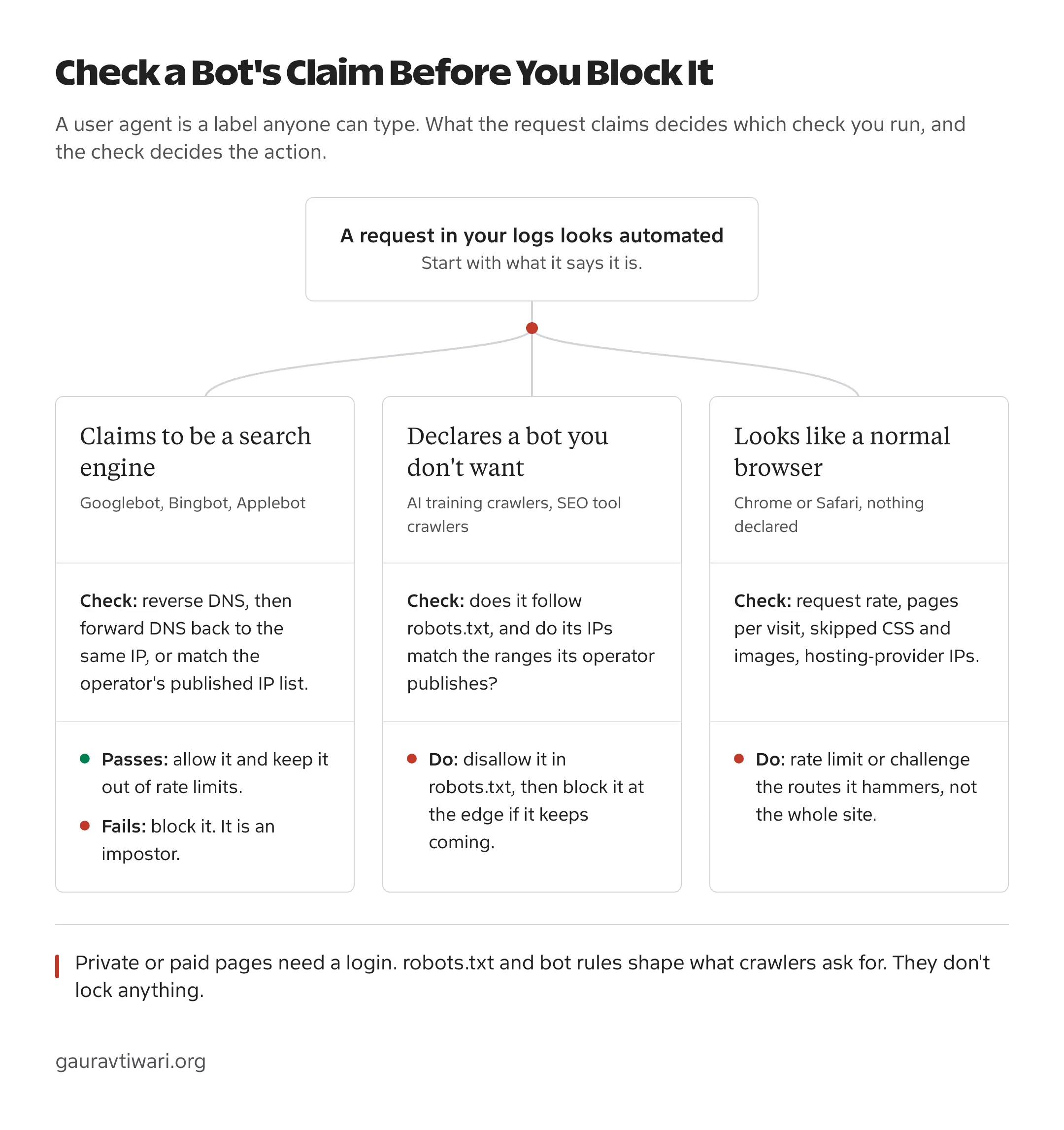
There are generally three kinds of automated traffic on a site, and each one needs a different answer:
- Bots you want, such as Googlebot, Bingbot, Applebot, social link-preview fetchers, your uptime monitor and payment webhooks. Verified ones should be allowed and kept out of rate limits.
- Declared bots you may not want, such as AI training crawlers (GPTBot, ClaudeBot, CCBot) and SEO tool crawlers (AhrefsBot, SemrushBot). They name themselves, publish their rules and mostly follow robots.txt, so letting them in is a policy decision.
- Undeclared scrapers, which send an ordinary Chrome or Safari user agent or borrow Googlebot’s name. They want your content, prices or listings, and they won’t read robots.txt.
A declared bot can still be expensive. At one point Meta’s training crawler was the busiest bot on gauravtiwari.org, making more than twice as many requests as Googlebot, the crawler that actually sends visitors.
How to Detect Web Scraping
You detect web scraping in request logs. Your CDN, firewall or web server records every request with its IP address, user agent, URL, status code and response size, and scraping bots show up there as a pattern long before they show up as a problem.
Google Analytics 4 is the wrong place to start. GA4 excludes known bot traffic automatically and doesn’t tell you how much it removed, and scrapers that fetch raw HTML never run the analytics script at all. A strange spike in GA4 is worth a look, but the evidence lives in the logs.
Read Your Request Logs
Pick a window, the last 24 hours is a good start, and look at these four things:
- the IP addresses and user agents with the most requests
- the URLs they asked for, and whether they walked the archive in order
- status codes, especially runs of 404s on URLs you never published
- whether they fetched CSS, JavaScript and images or only the HTML
On an nginx or Apache server using the default combined log format, these commands get you most of the way:
# Top 20 IP addresses by request count
awk '{print $1}' access.log | sort | uniq -c | sort -rn | head -20

# Top 20 user agents
awk -F'"' '{print $6}' access.log | sort | uniq -c | sort -rn | head -20

# Busiest IP in any single minute (catches bursts a daily total hides)
awk '{print $1, substr($4, 2, 17)}' access.log | sort | uniq -c | sort -rn | head -20

# Heavy IPs that never fetched a stylesheet or a script
awk '{n[$1]++} $7 ~ /\.(css|js)/ {a[$1]++}
     END {for (ip in n) if (n[ip] > 300 && !a[ip]) print n[ip], ip}' access.log | sort -rn | head
Two things change what those numbers mean. Behind Cloudflare, the first field in your origin log is a Cloudflare IP until you restore the visitor’s address, which the WordPress section below covers. And a CDN that caches CSS and JavaScript means your origin rarely sees asset requests from anyone, so the last check belongs on the CDN’s logs. On Cloudflare, the security analytics and events views group the same traffic by path, user agent and network without touching the server.
Signals That Point to a Scraper
No single signal proves scraping. A combination usually does, and each signal has an innocent explanation you should rule out before you write a rule.
| Signal | Innocent explanation to rule out | What to check next |
|---|---|---|
| One IP requests hundreds of different articles in a few minutes | Your own site audit crawler, an SEO tool or a feed reader catching up | Reverse DNS and network (ASN) of the IP, and whether it matches a tool you run |
| Requests say Googlebot but come from a hosting provider | None. Real Googlebot resolves to Google | The DNS check in the next section. A failed check means a fake |
| Only HTML is fetched, never CSS, JavaScript or images | A text-only client, an accessibility tool or a CDN serving the assets | CDN logs for asset requests, and the request rate |
URLs requested in sequence: /page/2/, /page/3/ and onward | A search engine crawling pagination | Whether the crawler verifies, and how fast it moves |
| Bursts of 404s on URLs you never published | Broken internal links or old slugs | Whether the URLs follow a guessed pattern such as ?p=1 and ?p=2 |
| Many IPs share one odd user agent, the same paths and the same timing | A shared office network or a mobile carrier | Whether the IPs belong to hosting networks or residential proxies |
| A rise in 429 responses | Your own rate limit catching real readers or an integration | Which rule fired, on which path and for whom. A 429 only says a limit was hit |
Rule Out the Bots You Asked For
Before you block anything, list the automated traffic you already depend on. These are the first things a careless rule breaks:
- uptime and performance monitors
- your own SEO crawler or site audit tool
- backup, security and CDN health checks
- payment gateway, form and webhook callbacks
- feed readers and newsletter services that pull your RSS
- link-preview fetchers from Facebook, LinkedIn, Slack and X
Note each one’s user agent and, where the vendor publishes them, its IP ranges. That list becomes your allowlist, and it stops a scraping scare from taking your payment webhooks down with it.
How to Verify Googlebot
A user agent is only a claim. Anyone can put Googlebot in the header, and scrapers do it because so many sites wave Googlebot through. Google documents two ways to verify a Googlebot request: a DNS check on the IP address, or a match against the IP ranges Google publishes.
Reverse and Forward DNS
The DNS check takes 3 steps, and you can run it from any terminal:
- Run a reverse DNS lookup on the IP address from your log.
- Confirm the hostname ends in
googlebot.com,google.comorgoogleusercontent.com. - Run a forward DNS lookup on that hostname and confirm it returns the same IP address.
$ host 66.249.66.1
1.66.249.66.in-addr.arpa domain name pointer crawl-66-249-66-1.googlebot.com.

$ host crawl-66-249-66-1.googlebot.com
crawl-66-249-66-1.googlebot.com has address 66.249.66.1
Both lookups have to agree. Whoever controls an IP address can set its reverse DNS to any name they like, including one ending in googlebot.com, but they can’t make Google’s DNS point that name back at their IP. A check that stops after the reverse lookup is exactly how fake Googlebots get through.
Published IP Ranges
A DNS lookup on every request is too slow for a firewall, so Google also publishes its crawler IP ranges as JSON files that you can load into an allowlist:
common-crawlers.jsonfor Googlebot and the other common crawlersspecial-crawlers.jsonfor special-case crawlers such as AdsBotuser-triggered-fetchers.json,user-triggered-fetchers-google.jsonanduser-triggered-agents.jsonfor fetches a person sets off, which Google says ignore robots.txt
Bingbot works the same way. Its reverse DNS ends in search.msn.com, Microsoft publishes bingbot.json and Bing Webmaster Tools has a Verify Bingbot tool. OpenAI and Anthropic publish range files for their crawlers too. On Cloudflare the work is already done: requests from bots Cloudflare has verified carry the cf.client.bot field, so one custom rule catches every impostor.
(http.user_agent contains "Googlebot" and not cf.client.bot)Set that rule’s action to Block. A real Googlebot passes Cloudflare’s verification and never matches it. Inside WordPress, Wordfence rate limiting can exempt only verified Google crawlers, checked by reverse DNS, so a fake Googlebot gets rate limited like any other crawler.
How to Block Web Scrapers
To block web scrapers without collateral damage, you should pick the narrowest control that stops the client you found. Each control below solves a different problem, and most sites end up using two or three of them together.
| Control | What it does | Where it falls short |
|---|---|---|
| robots.txt | Tells cooperative crawlers which paths to skip | Voluntary. Scrapers ignore it, and it protects nothing private |
| Rate limiting | Caps requests per IP or other key on the paths you choose | Scrapers that rotate IPs slip under it, and a careless threshold hits real readers |
| Edge rules (WAF) | Blocks or challenges by user agent, network, country, path or bot verification | Needs upkeep, and challenges break API clients, feeds and webhooks |
| Managed bot protection | Scores every request on device, behavior and network signals | Costs money, and exceptions still need tuning |
| Login or paywall | Keeps content away from anyone not signed in | Only fits content you don’t need in search results |
Robots.txt
robots.txt works for declared crawlers that choose to follow it. RFC 9309, the standard behind the file, states that its rules are not a form of access authorization, so a scraper that ignores the file faces no barrier at all. Here is a group that refuses three common training crawlers and leaves search crawlers alone:
User-agent: GPTBot
User-agent: ClaudeBot
User-agent: CCBot
Disallow: /
You should keep Googlebot and Bingbot out of any blanket Disallow unless you mean to leave search. A URL blocked in robots.txt can still be indexed from links, without its content, because Google never fetches the page and so never sees its noindex tag. The full file I’d start from, with the crawler groups explained, is in this WordPress robots.txt configuration guide.
Rate Limiting
A rate limit caps how many requests one client can make in a time window. Scrapers want your archive pages, search results, product listings, feeds and REST API responses, so those paths deserve limits before the rest of the site does.
There’s no universal number, and copying one from another site is how real readers get blocked. Take the busiest legitimate visitor or integration in your logs, leave generous headroom above it and run the rule in log-only mode first. This nginx setup does exactly that:
# In the http {} block: one shared counter per visitor IP
limit_req_zone $binary_remote_addr zone=pages:10m rate=2r/s;

# In the server {} block
location / {
    limit_req zone=pages burst=30 nodelay;
    limit_req_status 429;
    limit_req_dry_run on;   # log what would be limited, reject nothing
    try_files $uri $uri/ /index.php?$args;
}
The rate and burst values are placeholders for your own numbers. limit_req_dry_run counts every request that would have been limited without rejecting any of them. Add $limit_req_status to your access log format and those requests show up as REJECTED_DRY_RUN, so you can read a few days of real traffic before you remove that line. The nginx limit_req documentation covers the remaining options. Behind Cloudflare, $binary_remote_addr is Cloudflare’s address until you restore the visitor IP, so this rule would rate limit Cloudflare itself.
Cloudflare rate limiting rules do the same job at the edge, before your server spends any work on the request. The Free plan gets 1 rule that counts by IP over 10 seconds, blocks for 10 seconds and can match only on the path and verified-bot status. Paid plans add longer windows, more rules and challenge actions. You should add not cf.client.bot to the rule’s expression so verified crawlers never count toward it.
Edge Rules
Edge rules act on what your logs showed you before the request reaches your server. In Cloudflare these are WAF custom rules, and the Free plan includes 5 of them. These three earn their place on most sites:
(http.user_agent contains "Googlebot" and not cf.client.bot)with Block, for fake Googlebots.(ip.src.asnum in {14061 16509} and http.request.uri.path contains "/page/")with Managed Challenge, for cloud servers walking your archive. The example uses DigitalOcean (14061) and Amazon (16509); swap in the networks from your own logs.(http.user_agent contains "python-requests" or http.user_agent contains "Scrapy")with Block, for scraping libraries running with their default user agent. Exclude your own scripts first.
Managed Challenge suits browser traffic because a real person usually passes it without noticing. It breaks API clients, RSS readers and webhooks, though, so you should keep /wp-json/, /feed/ and webhook paths out of challenge rules and give them a rate limit instead.
Bot Fight Mode on the Free plan is a blunter switch. It challenges traffic Cloudflare considers automated across the whole site, and a custom rule can’t skip it for one path because it runs outside the rules engine. If it breaks an integration you depend on, you can allow that integration’s IPs with an IP Access rule, move to Super Bot Fight Mode on a paid plan for proper exceptions or turn it off.
Logins for Private Content
If a page must not be copied, it shouldn’t be public. robots.txt, hidden menu links and noindex tags do nothing against a scraper that already has the URL. Members-only posts, paid downloads and customer data belong behind authentication.
You should check what a logged-out request receives, because some membership setups hide content in the theme while the feed or the REST API still returns the full post. Open /feed/ and /wp-json/wp/v2/posts in a private window and read what comes back.
How to Stop Scraping on WordPress
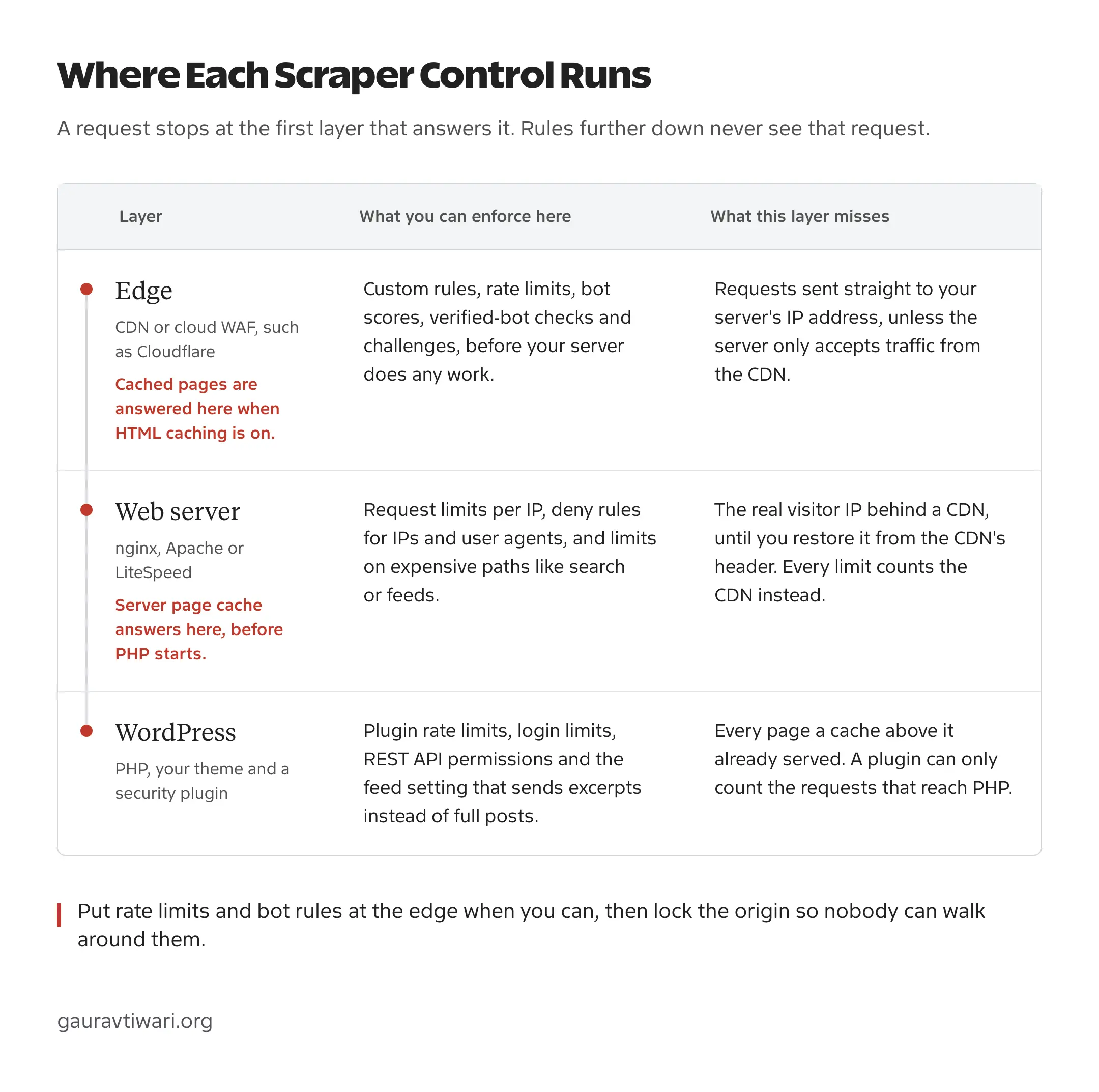
WordPress adds three questions to the checklist: which layer each rule runs on, which IP address your server sees and which side doors hand out the same content. Where a rule runs decides what it can see, because a request stops at the first layer that answers it.
Restore the Visitor IP
Behind Cloudflare or any other proxy, your server sees the proxy’s IP address on every request. Rate limits then count Cloudflare instead of the scraper, and an IP block aimed at the scraper lands on a Cloudflare server that also carries your readers. Cloudflare sends the visitor’s real address in the CF-Connecting-IP header, and your server should trust that header only on requests that come from Cloudflare’s published IP ranges:
# Trust the visitor IP header only from Cloudflare.
# Repeat set_real_ip_from for every range listed at cloudflare.com/ips
set_real_ip_from 173.245.48.0/20;
set_real_ip_from 2400:cb00::/32;
real_ip_header CF-Connecting-IP;
Apache does the same job with mod_remoteip, and Cloudflare’s guide to restoring original visitor IPs covers both servers. Security plugins have a setting for it too, and in Wordfence it’s the option for how Wordfence gets IPs. You should point it at the Cloudflare header only when the site sits behind Cloudflare, because anyone can send that header to a server that accepts it from everywhere.
Lock the Origin
Edge rules only work when traffic has to pass through the edge. If your server answers anyone who connects to its IP address directly, a scraper that finds that IP skips every rule you wrote in Cloudflare. Origin IPs leak through old DNS records, subdomains that aren’t proxied and the headers of emails your server sends.
Closing that door takes one of these:
- a server or host firewall that accepts ports 80 and 443 only from your CDN’s IP ranges
- Cloudflare Tunnel, which connects your origin outward so it needs no open web ports
- Authenticated Origin Pulls, so the origin only accepts connections that present Cloudflare’s client certificate
Keep SSH and admin access on their own rules so the lock doesn’t lock you out as well. If you’re starting from zero, the Cloudflare setup for WordPress guide covers the DNS, SSL and caching side.
Feeds, Search and the REST API
WordPress publishes the same content in several machine-friendly formats, and scrapers know every one of them:
- The RSS feed. Content scraping on WordPress often starts here, because autoblogs that republish your posts usually read the full-text feed. Setting For each post in a feed, include to Excerpt under Settings > Reading gives feed readers a summary and the copy sites very little.
- Search results. A
?s=request usually skips the page cache and runs a database query, so search deserves a tighter rate limit than your articles. - The REST API.
/wp-json/wp/v2/postsreturns full posts as JSON, up to 100 per request.
You shouldn’t disable the REST API to stop this. The block editor and many plugins depend on it, and the WordPress REST API FAQ warns that turning it off breaks admin features. Hiding posts from the API also protects nothing that the HTML pages already show. The better move is a rate limit on /wp-json/ at the edge, plus restrictions on routes that expose extra information, such as the users endpoint.
Security Plugins
A WordPress security plugin runs inside PHP, which is both its strength and its limit. It understands logins, users and REST routes in a way no CDN does, and it never sees a page served from Cloudflare’s cache or your server’s page cache. Wordfence’s own documentation says its rate limiting may not work when a caching plugin serves static pages before PHP runs, and the same holds for any cache in front of WordPress. That makes a plugin a good second layer behind edge rules and a weak first one. This comparison of WordPress security plugins covers which plugin does what.
How to Block AI Crawlers Without Blocking Search
You should make three decisions separately: whether AI companies can train on your content, whether their search products can fetch it and whether their assistants can open a page when someone asks. The larger operators use a different crawler for each job, so your three answers don’t have to match.
| Operator | Training | Search | Fetches for a user |
|---|---|---|---|
| OpenAI | GPTBot | OAI-SearchBot | ChatGPT-User |
| Anthropic | ClaudeBot | Claude-SearchBot | Claude-User |
| Google-Extended (robots.txt token only) | Googlebot | Google user-triggered fetchers | |
| Apple | Applebot-Extended (robots.txt token only) | Applebot | No separate crawler |
| Perplexity | No separate crawler | PerplexityBot | Perplexity-User |
Two details catch people out. Google-Extended has no user agent of its own; it’s a robots.txt token that controls whether Google can use your content for Gemini training and grounding, and it doesn’t affect Google Search. AI Overviews and AI Mode follow Googlebot’s rules instead, and since August 31, 2026 Search Console has a Search generative AI setting that can exclude a site from them without touching regular search results.
User-triggered fetchers are the other surprise, because they act for a person asking a question. OpenAI’s crawler documentation says robots.txt rules may not apply to ChatGPT-User, while Anthropic says it honors robots.txt for all three of its bots, Claude-User included.
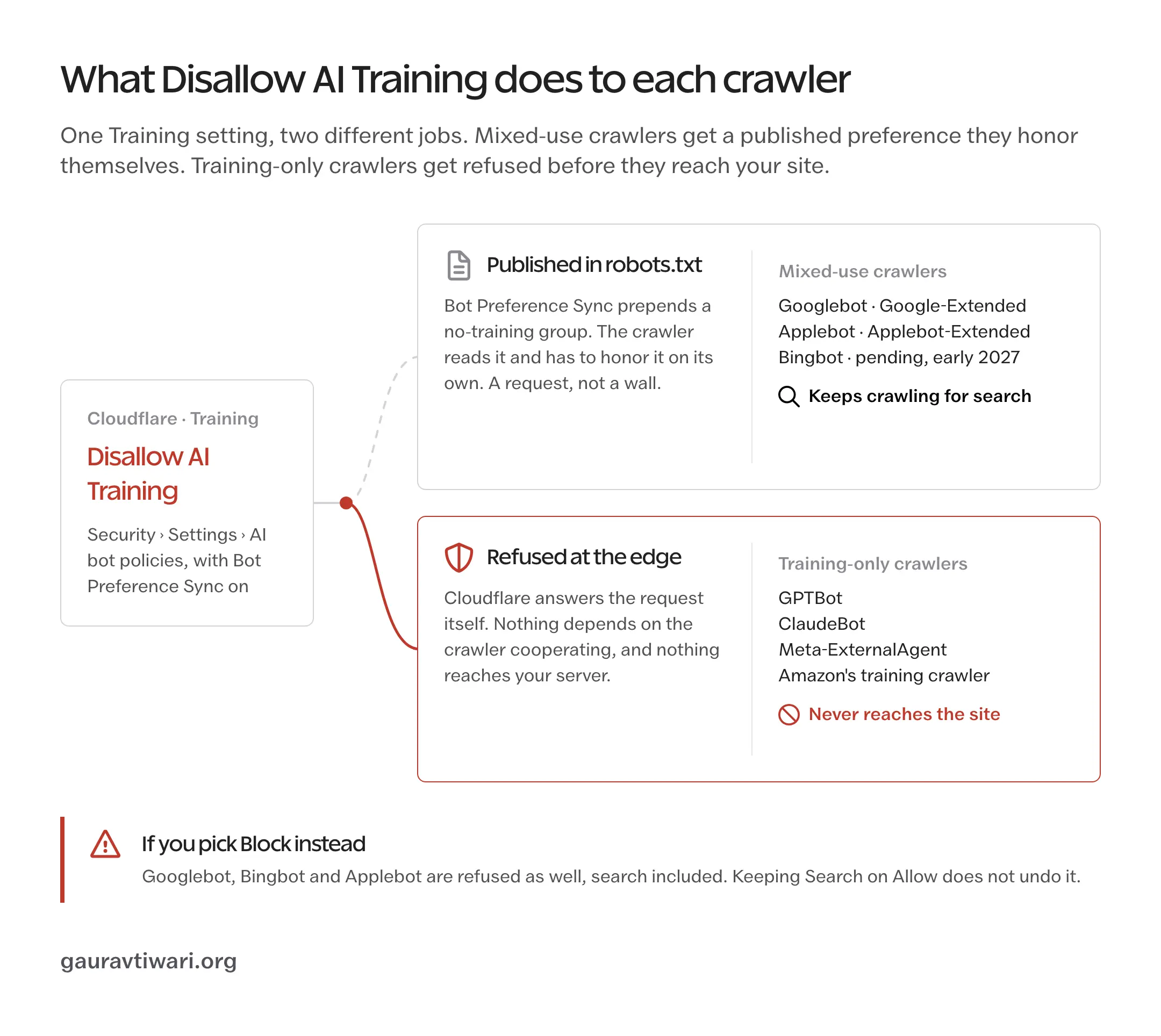
On Cloudflare, the AI bot settings split this into Search, Training and Agent policies. To refuse training and keep search, you should set Search to Allow, set Training to Disallow AI Training and turn on Bot Preference Sync. Don’t pick Block under Training: since Cloudflare’s September 15, 2026 change it also blocks Googlebot, Bingbot and Applebot, search included. Bing can’t read the no-training preference yet, and Microsoft is targeting early 2027, so for now that setting doesn’t reach Bing. The full setup is in this guide on how to block AI training without blocking Google Search.
Declared AI crawlers aren’t the whole story. In August 2025 Cloudflare reported that Perplexity fetched pages with a generic Chrome user agent and rotating IP addresses after its declared crawlers were blocked, and Perplexity disputed the report. Whichever side is right, it is the reason rate limits and edge rules should sit behind your robots.txt policy.
If AI citations matter to you, keep the search crawlers in. Earning citations in AI search and optimizing for Generative Engine Optimization (GEO) both start with letting OAI-SearchBot, Claude-SearchBot and PerplexityBot fetch your pages.
Test Your Rules Before You Trust Them
Every new rule should run in a log-only or dry-run mode first where your platform offers one. On Cloudflare the Log action is Enterprise-only, so on other plans you should start the rule on one narrow path, preferably with Managed Challenge, and watch its security events for a day before widening it.
Then check the rule against everything you rely on:
- Search Console’s URL Inspection live test still fetches your home page, an article and a category page
- the block editor still saves and previews posts, since it talks to the REST API
- logged-out visitors on mobile data and VPNs aren’t challenged on every page
- uptime checks, payment webhooks, forms and your newsletter’s RSS pull still work
- Cloudflare’s security events, or your server’s error log, show the rule firing on the traffic you meant
Then measure what the rule was for. Compare a week before with a week after: requests and bytes served to the pattern you targeted should drop, while Search Console’s crawl stats, organic clicks and conversions stay steady. A rising block count by itself proves nothing.
Write every rule down with the date, the reason and the undo step. Six months later nobody remembers why a cloud network is challenged on archive URLs, and a forgotten rule like that can block a partner’s integration with nobody knowing why.
When Managed Bot Protection Makes Sense
Free controls handle crude scraping bots well: one IP, one user agent, a predictable path. They struggle with scrapers that rotate residential proxies, drive real headless browsers and solve challenges, because every request looks like a person on a home connection. Most of the popular web scraping tools do some of that out of the box.
That is where managed bot protection earns its cost. DataDome runs in front of your site or app, scores each request on device, behavior and network signals and decides in real time whether to allow, challenge or block it. DataDome says its AI analyzes 5 trillion signals a day. That is the vendor’s own figure, and the part you can test is how it behaves on your traffic.
DataDome’s own guide on how to protect website from scraping goes deeper into the fingerprinting and behavioral checks it relies on, and it is worth reading even if you stay on free tools.
DataDome’s case study with Mansueto Ventures, the publisher of Inc. and Fast Company, shows the problem it targets. Pirate sites were copying their articles word for word and outranking the originals in search. DataDome went in alongside their existing Fastly CDN, and Mansueto reported that unauthorized scraping was “virtually eliminated” within days and that the original articles got their rankings back. Like any vendor case study, it tells you what the customer reported rather than what your site will see.
You should judge any managed service on these points:
- it verifies good bots and lets you set exceptions per path and per API client
- it can run in monitor mode before it blocks anything
- it fits your stack, whether that’s a CDN integration, a server module or a plugin
- its dashboard shows which pages scrapers target and how much they took
- its pricing scales with your traffic in a way you can predict
For a blog with a few thousand visitors a day, Cloudflare’s free tier plus the rules above is enough. Managed protection makes sense when scraping costs real money: prices on an ecommerce store, listings on a marketplace, paywalled journalism or an API that competitors keep harvesting.
FAQs on Preventing Web Scraping
Can web scraping be detected?
Yes, most of it. Crude scrapers show up in request logs as high volume, URLs requested in sequence and pages fetched without their CSS or JavaScript. Scrapers that rotate residential IPs and run real browsers are harder to spot, and that is where behavior-based bot management helps.
Does robots.txt stop web scrapers?
No. robots.txt only tells cooperative crawlers which paths to skip, and RFC 9309 says its rules are not a form of access authorization. Anything that has to be enforced needs a rate limit, an edge rule or a login.
Can Google Analytics show scraping bots?
Not reliably. GA4 excludes known bots automatically and doesn’t report how many it removed, and most scrapers never run the analytics script. Server or CDN request logs are the place to look.
Can I keep my site out of Google AI Overviews?
Yes. Since August 31, 2026, Search Console has a Search generative AI setting with Include, Exclude and Inherit options. Exclude keeps the site out of AI Overviews, AI Mode and generative AI features in Discover without affecting regular search rankings, and it takes a day or two to apply. Google-Extended doesn’t control those features.
Will blocking scrapers hurt my SEO?
Only if a rule catches real search crawlers. Verify Googlebot and Bingbot by DNS or published IP ranges instead of trusting the user agent, keep verified crawlers out of rate limits and run Search Console’s live URL test after every change.
Can I block AI training but allow AI search?
Yes, for operators that separate the two. You can disallow GPTBot and ClaudeBot while allowing OAI-SearchBot and Claude-SearchBot, and Google-Extended controls Gemini training without affecting Google Search. Allowing search crawlers makes a citation possible, but it doesn’t guarantee one.
What rate limit should I use to prevent web scraping?
There’s no universal number. Find the busiest legitimate visitor or integration in your logs, set the limit well above it for the specific paths scrapers hit and run the rule in log-only mode before you enforce it.
Should I disable the WordPress REST API to prevent web scraping?
No. The block editor and many plugins depend on it, and hiding posts from the API protects nothing the HTML pages already show. Rate limit /wp-json/ at the edge and restrict only the routes that expose extra information.
Does blocking a crawler remove content it already scraped?
No. A rule only affects future requests. Copies already collected, or already used for training, stay where they are. If someone republishes your work, a DMCA notice to their host and a removal request to Google are the usual route.
Where to Start
Start with the fake Googlebots. They’re the easiest pattern to prove and the safest to block, and one Cloudflare custom rule handles them before they reach your server. Then pick the next pattern from your logs, give it the narrowest rule that stops it and run that rule in log mode before you enforce it.
If your posts are already being republished elsewhere, blocking only stops the next copy. DMCA notices and Google removal requests are covered in this guide to protecting your content as a blogger.
Tell Google you want more of this.
Add Gaurav Tiwari as a preferred sourceOne tap, and this site shows up more often in your own Top Stories, AI Overviews and AI Mode. Remove it any time.