
10 Product Page Optimizations That Will Persuade Visitors to Checkout
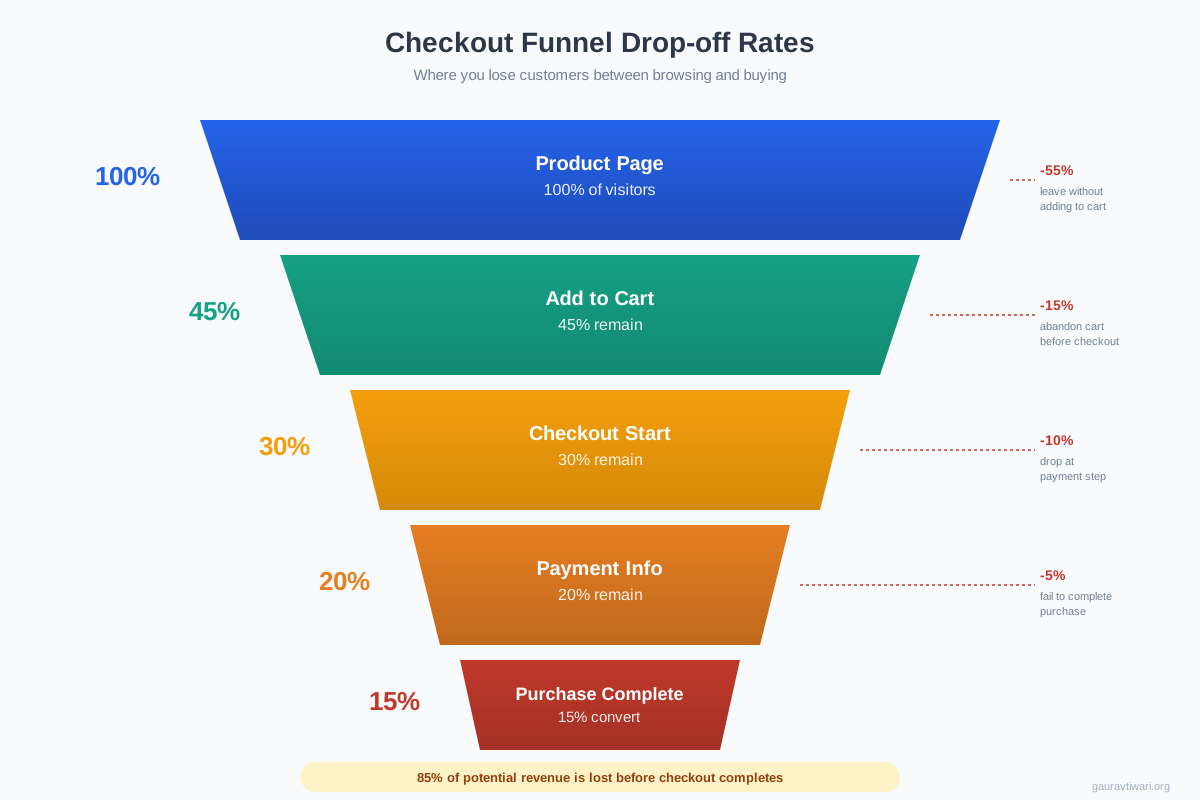
The average cart abandonment rate across e-commerce is 70.19%. That means for every 10 people who add something to their cart, only 3 actually complete the purchase. The other 7 walk away. And the reasons aren’t mysterious: confusing checkout flows, missing trust signals, slow pages, and product pages that fail to close the sale.
I’ve optimized product pages for e-commerce clients running on Shopify, WooCommerce, and custom platforms. The same 10 optimizations show up in virtually every successful store. Some of these changes take 15 minutes to implement and produce measurable conversion lifts within a week.
Here are the 10 product page optimizations that actually move the needle, ranked roughly by impact.
1. Improve Your Product Visuals
93% of consumers consider visual appearance the key factor in purchasing decisions. Your product images are doing more selling than your copy. And yet, most e-commerce stores still use 2-3 low-resolution photos against a plain background.
What high-converting product pages actually include:
- Multiple angles: 5-8 images minimum. Front, back, sides, detail shots, and lifestyle/context photos showing the product in use.
- 360-degree views or video: Products with video convert 80% higher than those without. Short product demo videos (15-30 seconds) outperform image carousels.
- User-generated content: Customer photos in reviews feel more authentic than professional photography. Feature them prominently.
- Zoom functionality: Pinch-to-zoom on mobile and hover-zoom on desktop let visitors inspect details. This is especially important for apparel, jewelry, and home decor.
- AR try-ons: In 2026, augmented reality product previews are no longer experimental. Shopify’s AR integration lets customers see furniture in their room or try on sunglasses. Stores using AR see 40% lower return rates.
Beautiful product images mean nothing if they take 5 seconds to load. Use WebP or AVIF formats, implement lazy loading for below-the-fold images, and serve properly sized images (not 4000px originals scaled down by CSS). A 1-second delay in page load reduces conversions by 7%.
2. Show Checkout Progress
Checkout abandonment drops significantly when customers can see where they are in the process. A progress bar or step indicator (Cart > Shipping > Payment > Confirmation) reduces anxiety by answering the question every buyer silently asks: “How much longer is this going to take?”
The ideal checkout flow has 3-4 steps maximum. Research from the Baymard Institute shows that the average US checkout has 23 form fields, but only 8 are actually necessary. Every field you remove reduces friction and increases completion rates.
Multi-step checkouts with visible progress indicators outperform single-page checkouts for complex purchases (multiple items, shipping options, gift wrapping). For simple single-item purchases, one-page checkout wins. Know your typical order and optimize accordingly.
3. Include a Product Summary at Checkout
Before asking for payment, show customers exactly what they’re buying. A clear order summary with product thumbnail, name, size/color, quantity, individual price, shipping cost, taxes, and total eliminates the uncertainty that causes last-minute abandonment.
The summary should also include estimated delivery dates. “Arrives by Friday, March 14” is infinitely more reassuring than “Ships in 3-5 business days.” Amazon trained customers to expect delivery estimates, and that expectation has spread to every e-commerce store.
Include an “Edit” link next to each item so customers can modify quantities or remove items without starting over. Forcing customers to go back to the cart page and re-enter information is a conversion killer.
4. Simplify the Checkout Form
Every additional form field reduces conversion rates by approximately 11%. That’s not a guess. That’s tested across millions of e-commerce transactions. The most impactful simplifications:
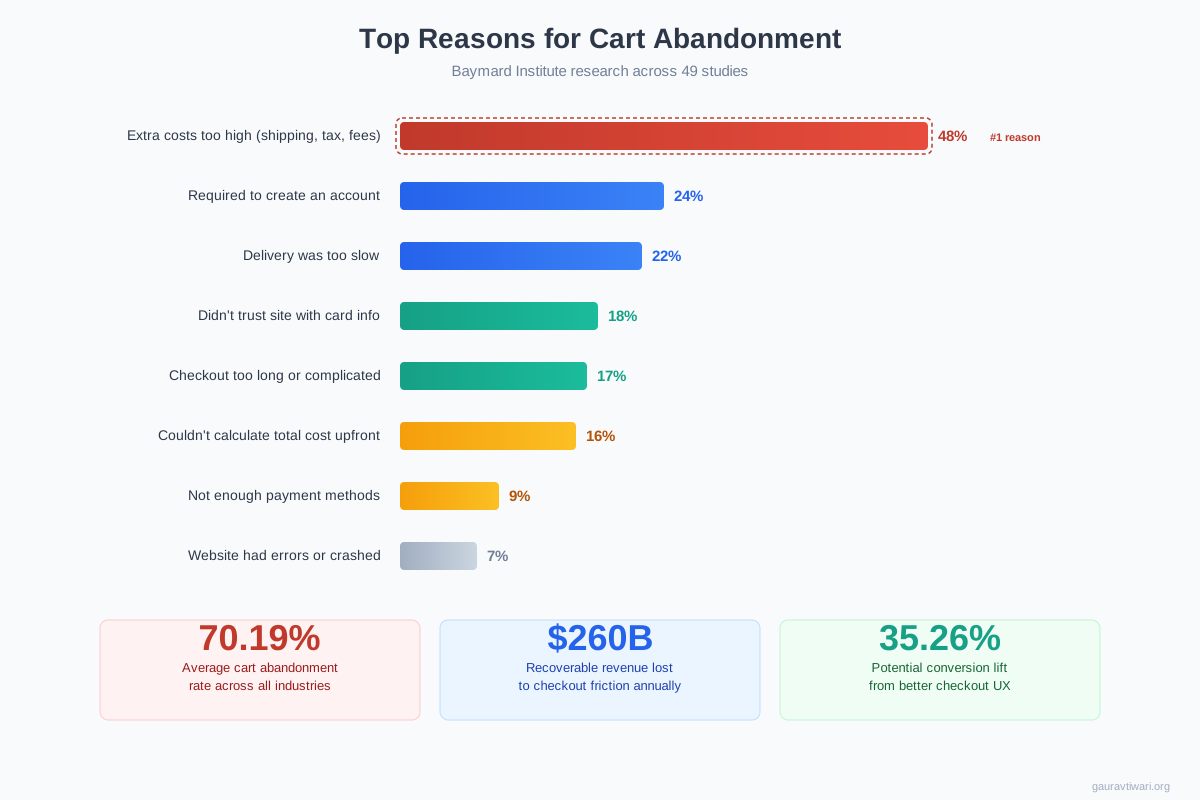
- Offer guest checkout. 24% of shoppers abandon carts because the site requires account creation. Let them buy first, offer account creation after the purchase.
- Auto-fill where possible. Use browser autofill, address autocomplete (Google Places API), and auto-detect city/state from zip code.
- Single address field. Combine address lines into one field. Most customers don’t have an “Address Line 2.”
- Express checkout options. Shop Pay, Apple Pay, Google Pay, and PayPal Express skip the entire form. These one-tap options can increase mobile conversion rates by 50%+.
Over 60% of e-commerce traffic is mobile, but mobile conversion rates are roughly half of desktop. The #1 reason? Tiny form fields, awkward keyboards, and checkout flows designed for mouse-and-keyboard. Test your entire checkout flow on a phone. If you struggle to complete a purchase with one thumb, your customers will too.
5. Add Multiple Checkout Buttons
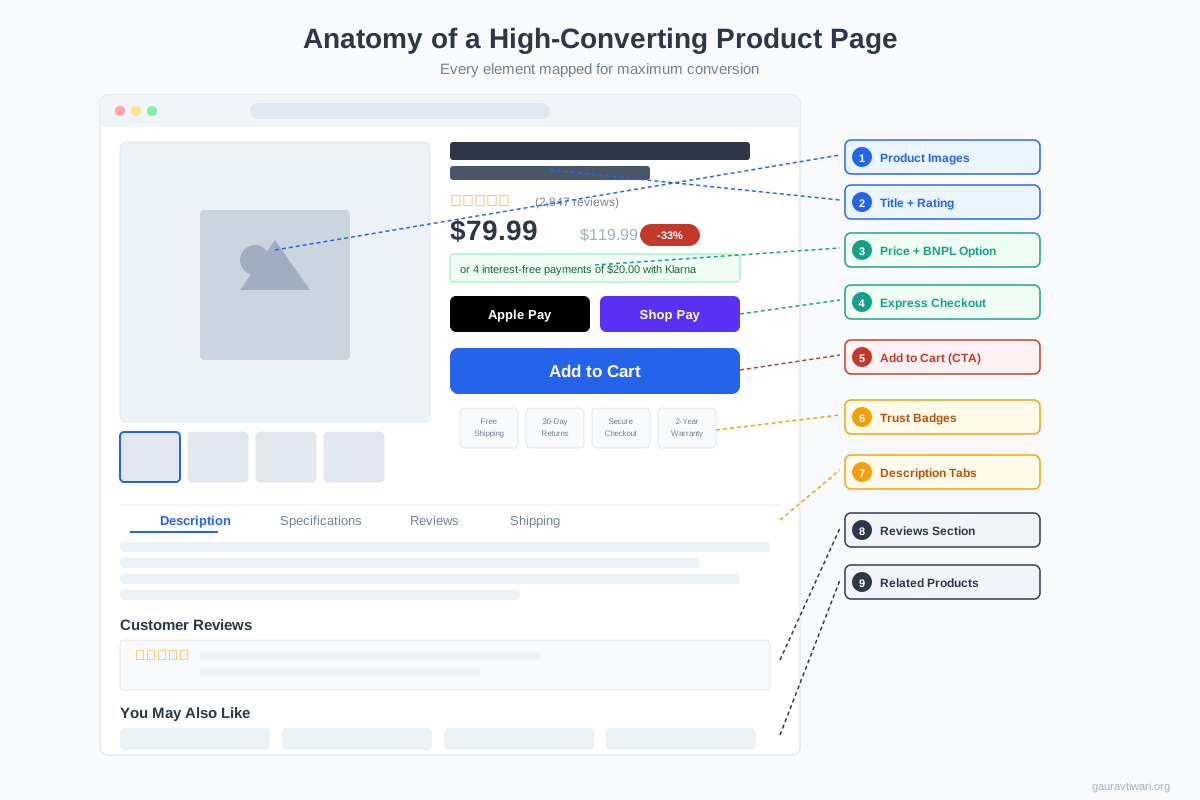
Don’t make customers scroll to find the checkout button. Place it at the top of the cart page, at the bottom, and consider a sticky “Checkout” button on mobile that stays visible as the customer scrolls. The goal is simple: no matter where someone is on the page, the next step is always one tap away.
Sticky add-to-cart bars on product pages (the kind that appear when you scroll past the main CTA) can increase add-to-cart rates by 8-12%. Brands like Adidas and Everlane use them on every product page. They’re standard on Shopify through themes like Dawn and apps like Sticky ATC.
6. Recommend Related Products
Cross-selling and upselling account for 10-30% of e-commerce revenue. Product recommendations (“Frequently bought together,” “Customers also viewed,” “Complete the look”) increase average order value without requiring new customer acquisition.
The language matters. “You might also like” feels generic. “Pairs well with” (used by beauty brands) or “Complete your setup” (used by tech brands) feels curated. AI-powered recommendations using browsing history and purchase patterns outperform static “related products” grids by 15-30%.
Placement: show related products on the product page (below the fold), in the cart drawer, and in the post-purchase confirmation email. The cart page cross-sell is particularly effective because the customer has already committed to buying. Adding a $15 accessory to a $100 purchase feels like a small decision.
7. Add User Reviews and Social Proof
95% of consumers read online reviews before making a purchase, and products with reviews convert 270% better than products without them. These aren’t just nice-to-have elements. They’re the most powerful trust signals on your product page.
What separates good review implementations from great ones:
- Verified purchase badges. Reviews from confirmed buyers carry significantly more weight.
- Photo and video reviews. Customer-submitted images outperform text-only reviews for conversion. Sephora’s review system, which prominently features customer photos and detailed skin type/age information, is the gold standard.
- Aggregate ratings visible above the fold. Show the star rating and total review count near the product title, not buried below.
- Respond to negative reviews. A thoughtful response to a 2-star review actually increases trust more than another 5-star review.
8. Promote Free Shipping
Shipping costs are the #1 reason for cart abandonment, cited by 48% of consumers who abandon purchases. Free shipping isn’t just a nice perk. It’s a conversion requirement for most e-commerce categories in 2026.
If your margins can’t support free shipping on everything, use a minimum order threshold. “Free shipping on orders over $50” does two things: it eliminates the #1 abandonment driver and it increases average order value by 15-30% as customers add items to qualify.
Display the shipping offer prominently on every page, not just in the footer. A persistent banner (“Free shipping on orders over $50, you’re $12 away!”) creates urgency and guides purchasing behavior. Amazon’s “Add $7.23 to qualify for free shipping” message is one of the most effective upselling mechanisms ever created.
Most successful e-commerce stores increase product prices by 10-15% and offer “free shipping” rather than showing a lower product price plus shipping at checkout. The psychology is clear: a $45 product with free shipping converts dramatically better than a $39 product with $6 shipping, even though the customer pays more in the first scenario.
9. Add Multiple Payment Options
9% of shoppers abandon carts because there aren’t enough payment methods. In 2026, “credit card only” is leaving money on the table. The payment landscape has changed dramatically:
- Express checkout: Apple Pay, Google Pay, Shop Pay. These bypass the entire form and complete purchases in one tap. Essential for mobile.
- Buy Now, Pay Later (BNPL): Klarna, Afterpay, Affirm. Offering BNPL increases average order value by 20-30% and reduces cart abandonment for higher-priced items. 45% of Gen Z shoppers prefer BNPL options.
- Digital wallets: PayPal, Venmo, Cash App. PayPal alone has 400+ million active users. Not offering it means losing a chunk of your audience.
- Traditional methods: Credit/debit cards remain the baseline. Stripe or Shopify Payments handle the heavy lifting.
Display accepted payment icons (Visa, Mastercard, Apple Pay, PayPal, Klarna) in your footer and near the checkout button. Trust badges showing these logos increase perceived security and reassure customers that their preferred method is available before they invest time in the checkout flow.
10. Differentiate Your CTA Buttons
Your “Checkout” button and “Continue Shopping” button should not look the same. This sounds obvious, but I see it on dozens of sites during audits. The primary CTA (Checkout, Add to Cart, Buy Now) should be the most visually prominent element on the page: solid color, high contrast, full width on mobile.
Secondary actions (Continue Shopping, Save for Later, Add to Wishlist) should be visually subordinate: outlined buttons, text links, or muted colors. The visual hierarchy tells customers what you want them to do without saying a word.
One more detail: use descriptive button text. “Checkout Now” outperforms “Submit.” “Add to Cart, $49” outperforms “Add to Cart” because it sets price expectations before the next page. Micro-confirmations in button text reduce anxiety and increase click rates.
Over 60% of e-commerce traffic is mobile, but mobile conversion rates are about half of desktop. Test your buttons on actual phones. Can you tap them with your thumb without accidentally hitting something else? Are they full-width on narrow screens? Do they stay visible above the keyboard when forms are open? These details separate 2% conversion rates from 4% conversion rates.
Related: How to use Product Pages to Convert Visitors into Customers
Related: How to Design for Conversion Rate Optimization
Related: 8 Website Design Tips for High-Converting Ecommerce Store
Related: How to Get More Sales with Conversion Ready Pages
Related: Optimizing Web Design for Conversions: Tiny Tweaks vs. Bold Changes
Frequently Asked Questions
What is the average cart abandonment rate for e-commerce?
The average cart abandonment rate is 70.19% according to the Baymard Institute, based on 49 different studies. This means roughly 7 out of every 10 shoppers who add items to their cart leave without completing the purchase. The top three reasons are unexpected costs (shipping, taxes, fees), being required to create an account, and a checkout process that is too complicated.
How many form fields should a checkout have?
The ideal checkout has 6-8 form fields. The average US checkout has 23 fields, but research shows only 8 are actually necessary to complete a purchase: name, email, address (street + city + state + zip), and payment information. Each additional field beyond the essentials reduces conversion rates by approximately 11%. Use auto-fill, address autocomplete, and express checkout options to minimize manual input.
Should I offer guest checkout?
Yes. 24% of shoppers abandon carts because a site requires account creation. Always offer guest checkout as the default option. You can prompt account creation after the purchase is complete, when the customer’s payment information is already stored and creating an account requires just a password. This approach captures the sale first and the account second.
Does free shipping really increase conversions?
Shipping costs are the #1 reason for cart abandonment, cited by 48% of consumers. Offering free shipping (even with a minimum order threshold) eliminates this friction. Free shipping thresholds also increase average order value by 15-30% as customers add items to qualify. Many stores increase product prices by 10-15% and offer “free” shipping, which converts better than lower prices plus visible shipping charges.
What payment methods should my store accept in 2026?
At minimum: credit/debit cards, PayPal, Apple Pay, Google Pay, and at least one Buy Now Pay Later option (Klarna, Afterpay, or Affirm). 9% of shoppers abandon carts due to insufficient payment methods. Express checkout options like Shop Pay and Apple Pay can increase mobile conversion rates by 50%+ by bypassing form entry entirely. BNPL options increase average order value by 20-30%.
How do product reviews affect conversion rates?
Products with reviews convert 270% better than products without them, and 95% of consumers read reviews before purchasing. Photo and video reviews are particularly powerful because they show the product in real-world use. Verified purchase badges increase review credibility. Even negative reviews can help when you respond thoughtfully, as it demonstrates customer service quality and transparency.
What is the best checkout layout for mobile?
The best mobile checkout uses full-width form fields, large tap targets (minimum 44×44 pixels), a sticky checkout button that stays visible while scrolling, and express payment options (Apple Pay, Google Pay) prominently displayed at the top. Multi-step checkout with a visible progress bar works better than long single-page forms on mobile. Remove navigation menus and footers during checkout to eliminate distractions.
Disclaimer: This site is reader-supported. If you buy through some links, I may earn a small commission at no extra cost to you. I only recommend tools I trust and would use myself. Your support helps keep gauravtiwari.org free and focused on real-world advice. Thanks. - Gaurav Tiwari