
 by
by
Making a link nofollow means adding rel="nofollow" to the anchor tag so search engines know you don’t want to pass ranking authority to the destination. In raw HTML, it’s one attribute. In Gutenberg, it’s a checkbox. In Rank Math, Yoast, AIOSEO, and Dynamic Functionalities, it’s a toggle. In Classic Editor, you type the attribute yourself.
The mechanics are easy. The part most tutorials still get wrong is what nofollow actually does now. Google reclassified nofollow, sponsored, and ugc as “hints” in 2019. Since March 2020, Google may or may not pass some signal through them depending on context. Bing still treats nofollow as a harder block. The rules for affiliate links tightened further in 2024 with Google’s stricter sponsored content and bulk sender policies.
This guide covers three things: how to add nofollow in every common editor and SEO plugin, when to use nofollow vs sponsored vs ugc, and what the SEO impact really is in 2026.
What Nofollow Does in 2026

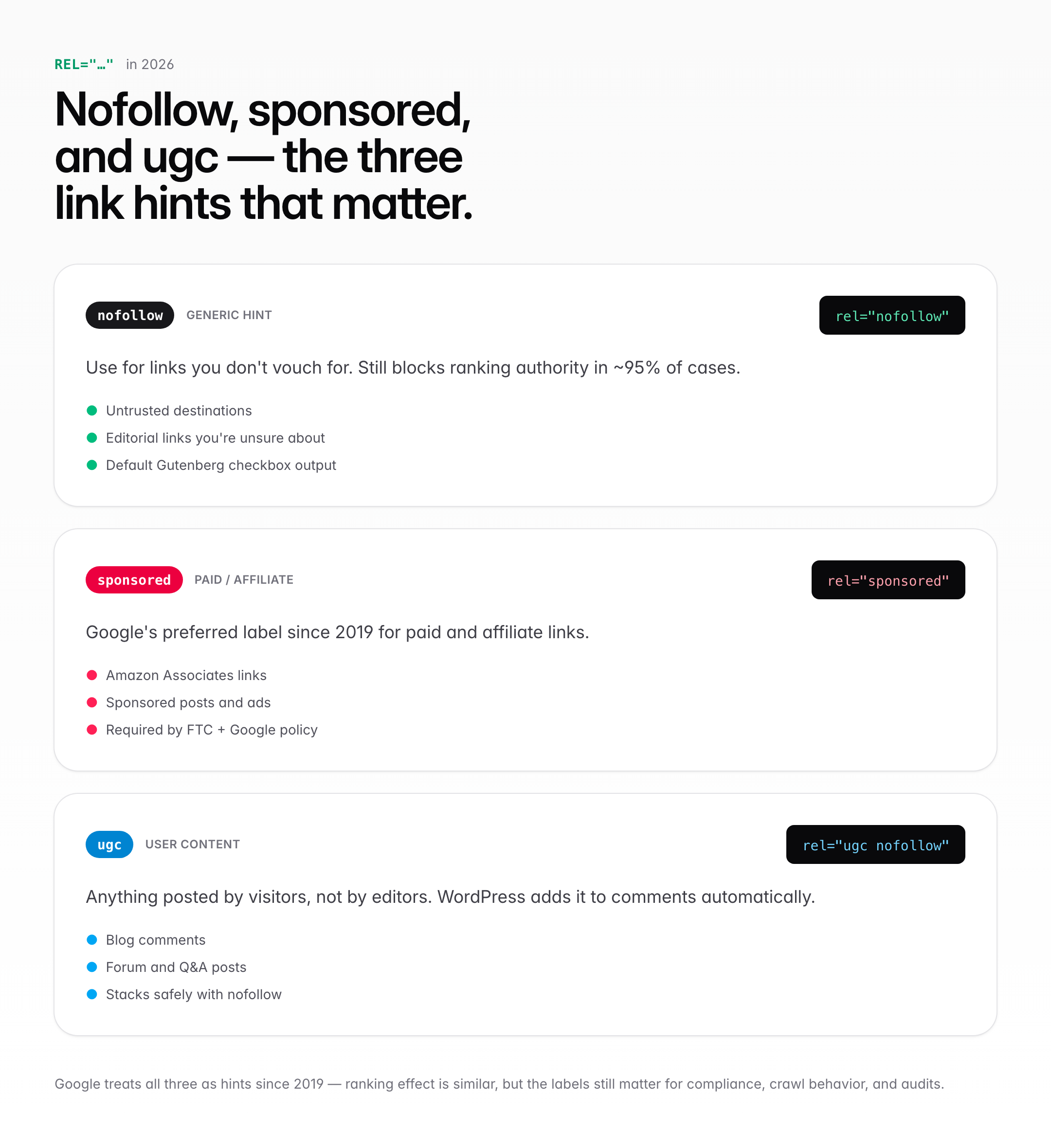
A nofollow link tells search engines to treat the link differently from a regular (dofollow) link. The historical purpose was to prevent passing PageRank. Google’s 2019 update changed three things:
- Nofollow became a “hint” rather than a directive. Google may still follow the link for crawling and indexing purposes.
- Two new rel values arrived:
sponsored(for paid and affiliate links) andugc(for user-generated content like comments). - All three are now hints, meaning Google decides case-by-case whether to pass ranking signals.
In practice, nofollow still:
- Blocks ranking authority from passing in 95%+ of cases
- Is required by Google’s guidelines for paid and affiliate links (sponsored is the newer, preferred value)
- Is the FTC’s recommended practice for disclosing advertising relationships
Nofollow does not:
- Stop the link from being clicked
- Stop users reaching the destination
- Prevent the destination site from ranking for other reasons
- Reliably prevent Googlebot from crawling the URL (the link can still be discovered)
Bing, DuckDuckGo, and Brave Search still treat nofollow closer to the old strict interpretation. Yandex follows Google’s hint model. Baidu has its own rules that generally respect nofollow.
How to Add Nofollow in Raw HTML
The basic method. Anywhere you have access to the HTML of a page:
<a href="https://example.com" rel="nofollow">Example Link</a>Multiple rel values stack with spaces:
<a href="https://example.com" rel="nofollow noopener">Example</a>
<a href="https://amazon.com/product" rel="sponsored">Sponsored Product</a>
<a href="/comments" rel="ugc nofollow">Comment Link</a>
Common combinations you’ll see in the wild:
rel="nofollow noopener": external link that opens in a new tab, doesn’t pass authorityrel="sponsored nofollow": affiliate link with belt-and-suspenders disclosure (nofollow is redundant if sponsored is present, but doesn’t hurt)rel="ugc": link inside user-generated content (comments, forum posts)rel="noopener noreferrer": security attributes, separate from SEO (don’t confuse with nofollow)
Order of values doesn’t matter. Google parses them as a set, not a sequence.
How to Add Nofollow in WordPress Gutenberg
The block editor has built-in nofollow support since WordPress 5.4 (March 2020). Six steps:
- Highlight the text you want to link
- Click the link icon in the toolbar (or press Cmd/Ctrl + K)
- Enter the URL
- Click the arrow (▼) to expand link options
- Check “Mark as nofollow”
- Confirm
WordPress adds rel="nofollow" on save. The same popup has “Open in new tab”, which adds rel="noopener" alongside.
What’s missing from Gutenberg’s native UI:
- No option for
sponsoredorugcvalues - No bulk option to mark all external links as nofollow
- No way to toggle nofollow across existing content at scale
For those, you need a plugin. Rank Math, Yoast, AIOSEO, or Dynamic Functionalities all cover the gap in different ways.
How to Add Nofollow in WordPress Classic Editor
If you’re running the Classic Editor plugin or TinyMCE, the default link UI doesn’t expose nofollow. You have three options.
Option 1: Text (HTML) editor tab. Switch from Visual to Text at the top right of the editor. Edit the anchor tag directly:
<a href="https://example.com" rel="nofollow">link text</a>Option 2: Advanced Editor Tools (TinyMCE Advanced). Adds a full HTML attributes panel to the Classic Editor link modal, including rel.
Option 3: Bulk search-replace. Use the Better Search Replace plugin or WP-CLI’s wp search-replace to add rel="nofollow" to all external links in one pass. Back up the database first. Always.
Classic Editor usage has been sliding since 2018 but still powers roughly 15-20% of active WordPress sites. If that’s you, learn the Text tab shortcut. It’s faster than any plugin-added UI.
How to Add Nofollow With Rank Math
Rank Math gives you the most granular per-link control of the big three SEO plugins. Steps:
- Highlight anchor text in the editor
- Click the link icon
- Enter the URL
- In the expanded panel, toggle what you need: open in new tab (
target="_blank"), nofollow, sponsored, or UGC
Rank Math also offers site-wide rules under SEO → General Settings → Links:
- Add nofollow to all external image links
- Add nofollow to all external links, with a domain exclusion list
- Redirect attachment URLs to the attachment itself
The “Nofollow external links” toggle with an exception list used to be my default. I’d drop gauravtiwari.org, github.com, and a handful of trusted reference domains into the exclude list, and everything else got nofollowed automatically.
How to Add Nofollow With Yoast SEO
Yoast handles per-link rel values in a slightly lighter way. The link modal adds three toggles:
- Open link in a new tab
- Add nofollow
- Add sponsored
There’s no built-in UGC toggle in Yoast as of version 22.x. Site-wide nofollow management lives under Yoast SEO → Advanced → Link Attributes, and it’s narrower than Rank Math’s. Yoast assumes you’ll mostly manage nofollow per-link rather than with sweeping rules. For a two-person publishing team, that’s fine. For a 40-article/month site, you want bulk rules.
How to Add Nofollow With All in One SEO (AIOSEO)
AIOSEO covers nofollow two ways. The free version extends Gutenberg’s link modal with sponsored and nofollow toggles (UGC only on premium). The premium Link Assistant, from $49/year, adds bulk rel management:
- Link Assistant → Links Report
- Filter by external/internal
- Bulk apply rel attributes
AIOSEO also has an External Links setting under Search Appearance that nofollows all external links site-wide with a domain whitelist, same pattern as Rank Math. The Link Assistant is only worth the upgrade if you have 500+ posts to audit and retrofit.
How to Add Nofollow With Dynamic Functionalities
This is the plugin I now use on gauravtiwari.org for sitewide link rules. Full disclosure: I built it. Dynamic Functionalities is free on WordPress.org, and its Link Management module does exactly what the Rank Math and AIOSEO equivalents do without needing an SEO plugin at all.
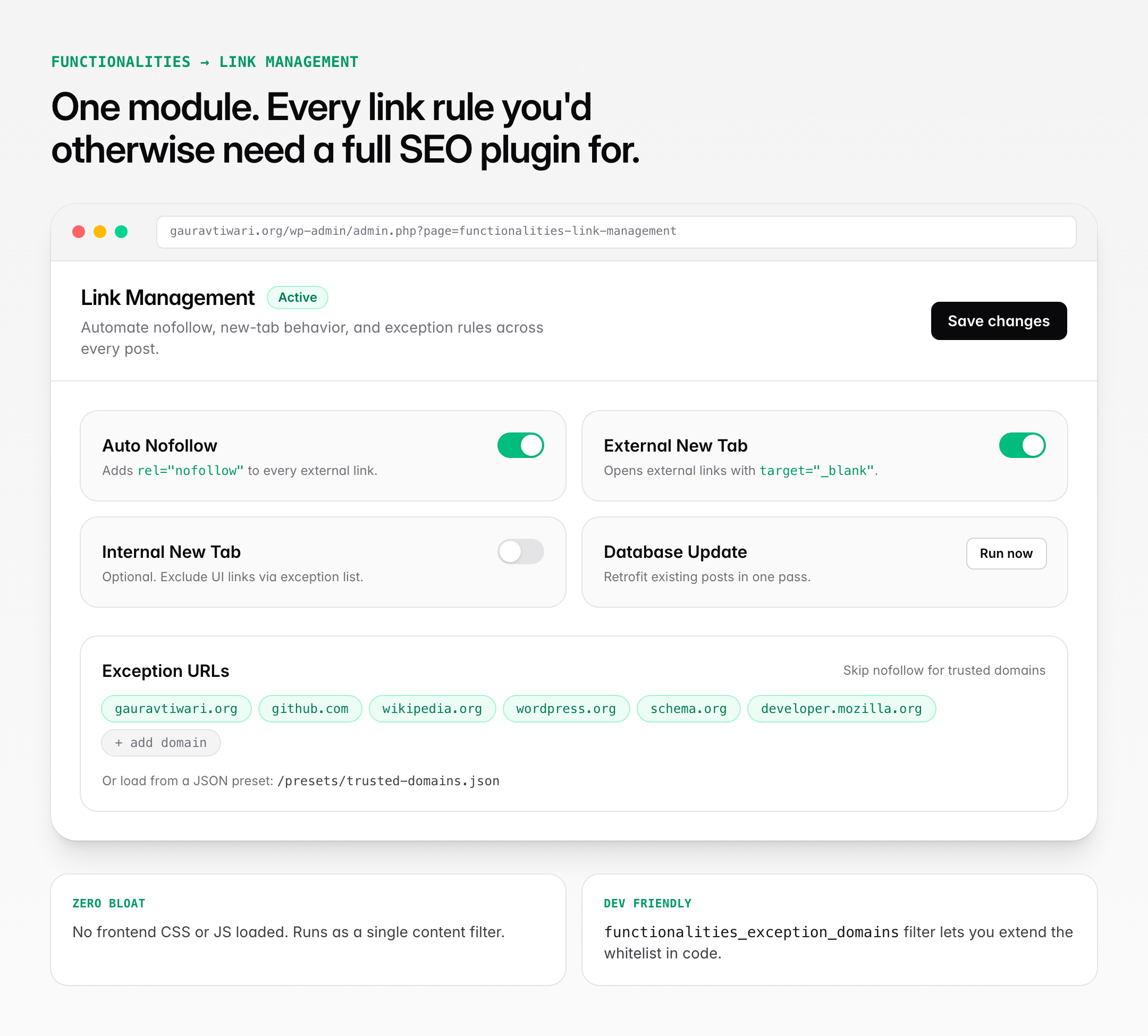
What the Link Management module gives you:
- Auto Nofollow — add
rel="nofollow"to every external link automatically - External New Tab — open external links in a new tab with
target="_blank" - Internal New Tab — optional, with its own exception list
- Exception URLs — whitelist trusted domains or specific URLs that should stay dofollow
- JSON Presets — load exception lists from a JSON file, useful if you maintain a shared trusted-domains list across several sites
- Database Update — bulk-add
rel="nofollow"to existing content, not just new posts
To set it up: install Dynamic Functionalities, enable the Link Management module from the dashboard, open its settings, and turn on Auto Nofollow. Add your trusted domains (gauravtiwari.org, github.com, wikipedia.org, whatever you editorially vouch for) to the exception list. If you want to retrofit old posts too, run the Database Update once.
Exception URLs use a simple format:
{
  "urls": [
    "example.com",
    "trusted-partner.org",
    "https://specific-url.com/page"
  ]
}
Developers can extend the exception list with a filter:
add_filter( 'functionalities_exception_domains', function( $domains ) {
    $domains[] = 'my-trusted-site.com';
    return $domains;
} );
Why I moved to this setup: I didn’t want to keep Rank Math installed on a few sites that didn’t need its full SEO stack. Dynamic Functionalities loads zero frontend assets for this module and runs as a single content filter. No extra database tables, no admin bloat. If you’re already running Rank Math or AIOSEO happily, stick with their sitewide toggle; it does the same job. If you want nofollow rules without committing to an SEO plugin, this is the smaller footprint.
Rank Math vs Yoast vs AIOSEO vs Dynamic Functionalities
Quick side-by-side of what each plugin offers for nofollow management:
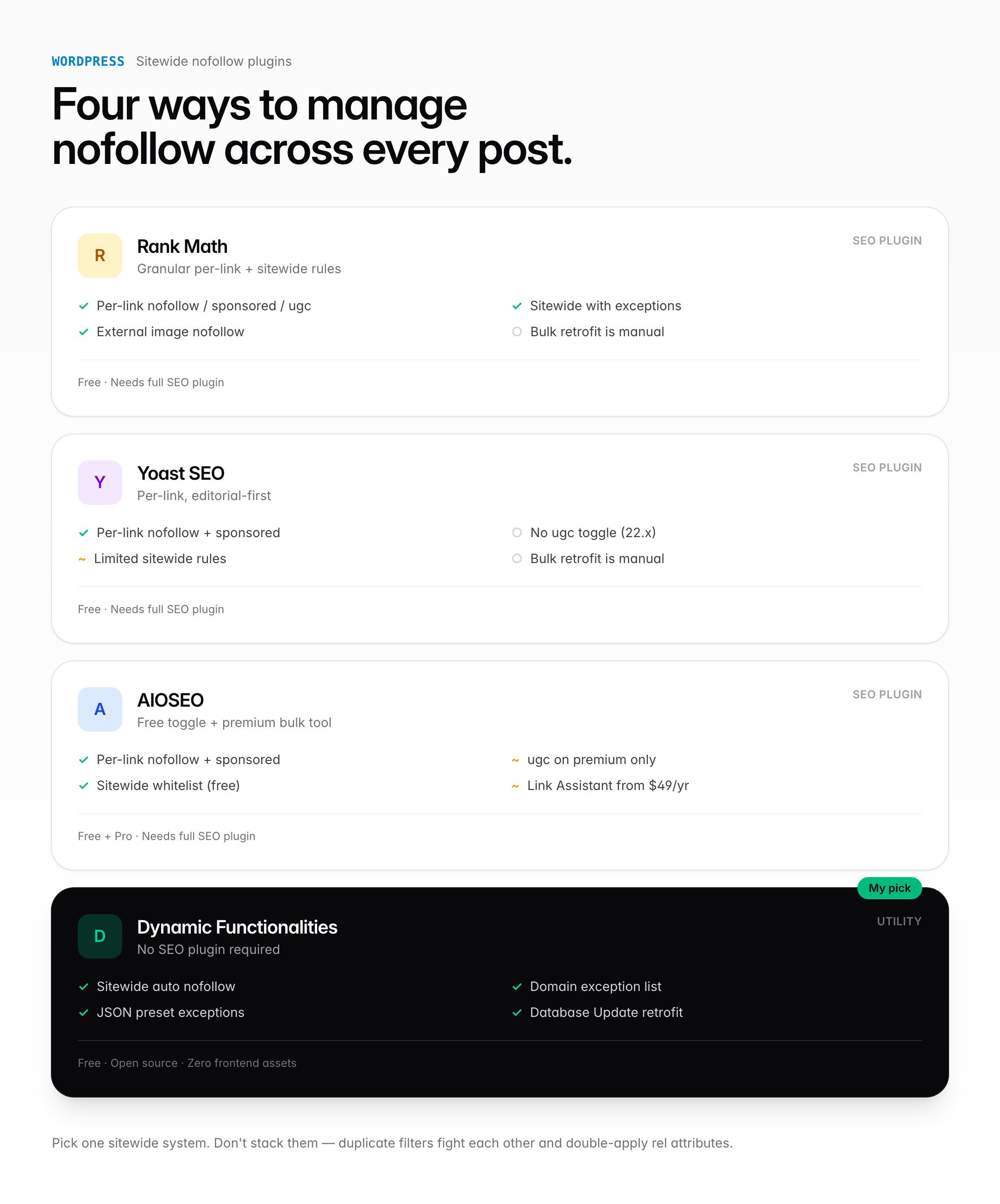
| Feature | Rank Math | Yoast | AIOSEO | Dynamic Functionalities |
|---|---|---|---|---|
| Per-link nofollow | Yes | Yes | Yes | Uses Gutenberg default |
| Sponsored toggle | Yes | Yes | Yes | Uses Gutenberg default |
| UGC toggle | Yes | No | Premium only | Uses Gutenberg default |
| Sitewide nofollow with exceptions | Yes (free) | Limited | Yes (free) | Yes (free) |
| Bulk retrofit to old posts | Manual | Manual | Premium ($49+/yr) | Free, one-click |
| JSON/file-based exception list | No | No | No | Yes |
| Needs full SEO plugin | Yes | Yes | Yes | No |
Practical picks: Rank Math if you already run it for SEO. AIOSEO if you like its UI and don’t mind the price tag for bulk. Yoast if you prefer its editorial workflow. Dynamic Functionalities if you want the link rules without the SEO plugin overhead, or you already use a different SEO setup and just need the link-management layer.
When to Use Nofollow vs Sponsored vs UGC
The three rel values are meant for different contexts. Google’s guidance since 2019:
| rel value | When to use | Example |
|---|---|---|
sponsored | Paid links, affiliate links, sponsored content | Amazon Associates links, sponsored post mentions |
ugc | User-generated content | Blog comments, forum posts, Q&A answers |
nofollow | General “don’t vouch for this” | Untrusted destinations, editorial links you’re unsure about |
Google treats all three as hints for ranking, so the practical ranking effect is similar. The labels still matter for:
- FTC and regulatory compliance. Sponsored specifically identifies paid relationships.
- Crawl behavior. Google may prioritize crawling sponsored and ugc differently than plain nofollow.
- Analytics and audit. Filtering “all sponsored links” vs “all nofollowed comment links” has real-world uses.
Stacking is allowed. rel="sponsored nofollow" is redundant but harmless. rel="ugc nofollow" is what most comment systems output by default.
Should You Nofollow Affiliate Links in 2026?
Yes. Use sponsored specifically, though nofollow also satisfies Google’s guidelines.
Google’s policy since 2005 has required disclosure of paid and affiliate links. Penalties are rare in practice but well-documented:
- Overstock.com, 2011: 60-day penalty for paid link coupons
- J.C. Penney, 2011: manual action for link network
- Interflora UK, 2013: 11-day penalty for advertorial links
Modern enforcement is less about penalties and more about devaluation. If your blog is outbound affiliate links with no sponsored or nofollow, Google’s algorithm quietly reduces your topical authority score and your rankings fade.
My rule across gauravtiwari.org: every affiliate link gets rel="sponsored nofollow", either through my link manager (which adds it automatically) or manually in the editor. No exceptions. The handful of cases where I link to a product with genuine first-party experience and no affiliate relationship? Dofollow, because that’s an editorial decision, not a paid placement.
What About Internal Nofollow (PageRank Sculpting)?
Don’t do it. Google clarified in 2009 that using nofollow on internal links for PageRank sculpting doesn’t work the way it used to. Any “PageRank” on a page is distributed across all links, nofollow or not. Nofollowing internal links just loses some of that distribution to the void.
Exceptions where internal nofollow is still legitimate:
- Login, register, and admin pages you don’t want crawled (robots.txt or meta robots is cleaner)
- Pagination in specific SEO strategies (debatable; John Mueller has advised against)
- Internal links to user-generated profile pages where quality is inconsistent
For editorial internal links (related posts, contextual links in articles, footer category links), never nofollow. You’re hurting yourself.
Nofollow and Affiliate Disclosure: Latest Rules
Google’s updated affiliate content policy as of 2024 explicitly requires:
- The
sponsoredornofollowrel attribute on all affiliate links - Clear disclosure of the affiliate relationship somewhere on the page
- Genuine added editorial value (reviews with hands-on content, not rewritten Amazon descriptions)
Google’s Reviews update series (first launched April 2021, multiple iterations since) specifically targets thin affiliate content. Sites leaning on auto-generated affiliate pages got hit hardest. Sites with real reviews and clear disclosures largely survived.
My disclosure format, at the top of every affiliate-heavy article:
Some links below are affiliate links. I earn a commission at no extra cost to you if you purchase through them. I only recommend products I’ve actually used.
Short. Honest. Above the first affiliate link. The FTC requires disclosure be “clear and conspicuous.” A link to a terms page 50 pixels tall isn’t conspicuous. A sentence in plain text at the top of the article is.
Common Nofollow Mistakes
Four mistakes I see consistently on audits:
1. Applying nofollow to every outbound link. Some WordPress themes do this by default. You end up nofollowing Wikipedia, government sources, and authoritative references. Bad for users (signals distrust) and useless for SEO. Nofollow only what deserves it.
2. Forgetting to update old affiliate links. Sites that started pre-2020 often still have rel="nofollow" on affiliate links when rel="sponsored" is now preferred. Not a disaster. Worth updating over time. The Database Update option in Dynamic Functionalities, or the equivalent bulk tool in AIOSEO, handles this in one pass.
3. Nofollowing your own CDN URLs. Your image CDN and subdomain links don’t need nofollow. It’s harmless but pointless.
4. Mixing up nofollow and noindex. Nofollow is about link authority. Noindex is about whether the page itself appears in search results. Different tools, different jobs. Nofollowing a page doesn’t de-index it.
How to Check if a Link Is Nofollow
Three fast methods:
- Browser inspect element. Right-click the link, Inspect, look for
rel="nofollow"in the HTML. - NoFollow browser extension. Chrome and Firefox extensions that highlight nofollow links on any page. Free, accurate.
- View source. Cmd+U (Mac) or Ctrl+U (Windows), search for your link URL, check the surrounding anchor tag.
For bulk auditing across your site, Screaming Frog’s free crawler lists rel attributes for every link it discovers.
Frequently Asked Questions
How do I make a link nofollow in HTML?
Add rel=’nofollow’ to the anchor tag: <a href=’https://example.com’ rel=’nofollow’>link text</a>. Multiple rel values can stack with spaces, like rel=’nofollow noopener’. Attribute order doesn’t matter to search engines.
Does nofollow still work in 2026?
Yes. Google treats nofollow as a hint since 2019 rather than a strict directive, but in practice 95%+ of nofollow links still don’t pass ranking authority. Bing and DuckDuckGo still treat nofollow as a harder block. It remains the right choice for paid, affiliate, and untrusted links.
Should I use nofollow or sponsored for affiliate links?
Use sponsored. Google introduced it in 2019 specifically for paid and affiliate links. Nofollow still satisfies Google’s guidelines for compliance purposes, but sponsored is the more precise label and what Google recommends for affiliate and paid content.
Do all external links need to be nofollow?
No. Only links you don’t want to vouch for: paid, affiliate, untrusted, or user-generated. Linking to Wikipedia, government sources, or reputable publications should be dofollow. Nofollowing everything hurts user trust signals and doesn’t help SEO.
Does Google penalize sites for not using nofollow on paid links?
Rarely via manual action, but algorithmic devaluation is real. Sites with heavy paid-link footprints and no disclosure see ranking decay over time. Google’s product reviews updates specifically target thin affiliate content, so proper rel attributes plus disclosure plus original reviews protect rankings.
Can I bulk change all links to nofollow in WordPress?
Yes. Rank Math and AIOSEO have site-wide ‘Nofollow external links’ toggles with domain exceptions. Dynamic Functionalities has the same feature as a standalone module, plus a Database Update action that retrofits existing posts in one pass. Pick exceptions for trusted domains like Wikipedia and major publishers.
What’s the difference between nofollow, noopener, and noreferrer?
Nofollow is SEO: don’t pass ranking authority. Noopener is security: prevent the new tab from accessing your page via window.opener (default behavior since 2021). Noreferrer is privacy: don’t send HTTP referer header. All three can coexist on the same link.
Do comment links need nofollow?
WordPress automatically adds rel=’nofollow ugc’ to commenter links since version 5.3 (2019). This is the correct modern default. If you’re running a custom comment system, make sure it outputs these attributes to stay compliant with Google’s guidelines.
The Bottom Line on Nofollow
Nofollow isn’t dead. It’s just more nuanced than it was a decade ago. The mechanics are trivial: one HTML attribute or one editor checkbox. The judgment calls are where the work lives.
Use sponsored for anything paid, including affiliate links. Use ugc for user-contributed content. Use nofollow when you want to link but don’t want to vouch. Use dofollow for editorial links you stand behind.
For WordPress, pick one sitewide system and stick with it. Rank Math’s per-link toggles plus its site-wide external link rule is the cleanest all-in-one SEO setup. AIOSEO works similarly if that’s your stack. Dynamic Functionalities gives you the same link-management layer without an SEO plugin, and it’s what I run on most of my sites today. Gutenberg’s native nofollow checkbox handles the one-off basics. Classic Editor users should keep the Text tab one click away.
Don’t nofollow everything. Don’t forget to disclose affiliate relationships. Don’t leave old articles sitting with outdated rel values. The rest is ordinary SEO hygiene. Get it right once, let the plugin defaults carry you forward, and you’ll never think about it again.
Tell Google you want more of this.
Add Gaurav Tiwari as a preferred sourceOne tap, and this site shows up more often in your own Top Stories, AI Overviews and AI Mode. Remove it any time.