eSpatial vs Maptive for Sales Territory Mapping

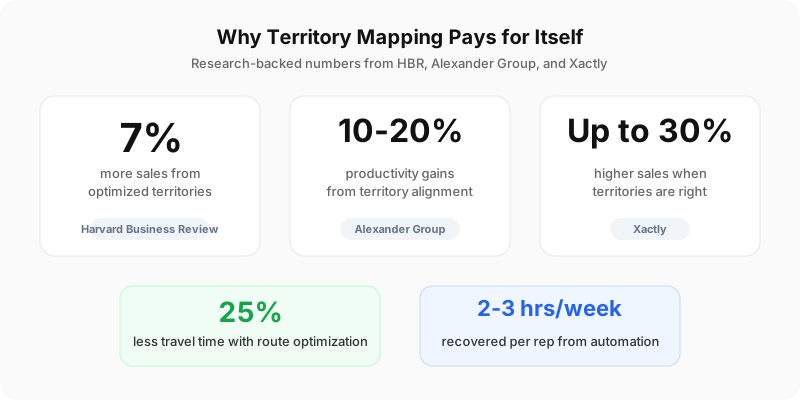
Badly drawn sales territories cost money. Not in an abstract “we could do better” way. In a measurable, trackable, your-reps-are-driving-past-each-other’s-accounts kind of way. Harvard Business Review found that optimizing territory design can increase sales by up to 7%. Alexander Group reported productivity gains between 10% and 20%. Those aren’t rounding errors.
eSpatial and Maptive both solve this problem, but they come at it from completely different angles. One is a focused tool built tightly around Salesforce and workload balancing. The other is a broad platform running on Google Maps with 60+ features unlocked on every plan. I’ve dug into both to help you figure out which one actually fits your team.
Why Territory Mapping Software Earns Its Budget
Spreadsheet-based territory planning works until your team grows past a handful of reps. Then it falls apart. Manual planning can’t account for drive time, workload balance, customer density, and growth potential at the same time. Not without someone spending days fighting with data that’s already outdated by the time they finish.
Dedicated mapping platforms handle these variables together. You can model different territory structures, test alignment scenarios, and commit only after reviewing actual data. Xactly’s research showed companies getting territories right see up to 30% higher sales performance. Route optimization alone cuts travel time by up to 25%, which means more face time with customers and shorter deal cycles.
CRM integration is a baseline requirement now. When your mapping tool lives in isolation from CRM data, territory plans get stale fast. The best tools pull in live CRM data so boundaries stay aligned with real account activity.
eSpatial: Built for Sales Operations Teams
eSpatial is a cloud-based mapping platform founded in 1997 in Dublin, Ireland. It’s built specifically for sales and RevOps teams that need data-driven territory design. Its biggest strength? What-if scenario planning. You can model different territory structures to balance workload, potential, and geographic coverage before committing to changes.
Territory Balancing and Hierarchy
The balancing tools are where eSpatial shines. You can balance territories on any metric or create an index from multiple variables. Most teams balance on workload or potential sales rather than historic revenue or a simple account count. The workload index is particularly detailed. It uses call frequency, time spent in calls, and an algorithm to calculate travel time, producing territories that feel fair to the reps working them. At the enterprise tier, you get up to 6 levels of hierarchy with dedicated support.
Map Types and Data Import
eSpatial generates pin maps, territory maps, radius maps, bubble maps, heat maps, and route maps. On the data import side, you upload from spreadsheets, CRMs, or other sources. It supports multiple file types so your team can get started with minimal prep.
Salesforce Integration
The Salesforce connection is native. eSpatial is listed on the Salesforce AppExchange as a standalone solution for territory design, routing optimization, and mapping. If your team lives inside Salesforce, this native connection means territory data stays synchronized without manual export-import cycles. That’s a big deal for teams where Salesforce is the single source of truth.
Mobile and Support
eSpatial offers native mobile apps for Android and iOS, letting field staff manage and optimize routes on the road. Customer support comes through chat, email, and phone. Users consistently describe it as fast, knowledgeable, and friendly. One reviewer called it “second to none.”
Pricing
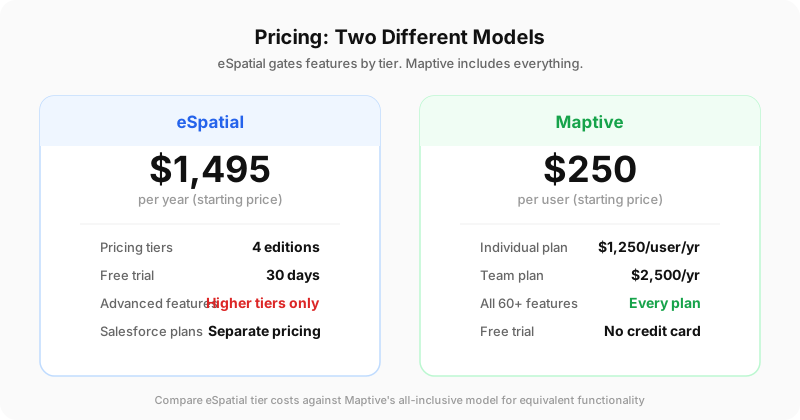
Pricing starts at $1,495 per year with a 30-day free trial. There are 4 pricing editions plus separate Salesforce plans. The catch? Features like algorithmic optimization and multi-level hierarchy are reserved for higher tiers. You’ll need to check which tier actually includes what you need before signing up.
What Users Say
On SelectHub, eSpatial holds a 95% user satisfaction rating based on 49 reviews. The pattern in reviews is clear: people love the support team and find the platform well-suited for enterprises that want a focused mapping solution without a steep learning curve.
Maptive: A Full-Featured Platform on Google Maps
Maptive is a browser-based mapping platform based in Salt Lake City, running since 2011. It’s built on Google Maps Platform infrastructure with WebGL rendering, processing datasets exceeding 200,000 markers with sub-second response times. Amazon, General Electric, the US Department of Energy, and Coca-Cola all run spatial operations on it.
No Feature Gates
This is the structural difference that matters most. All 60+ mapping and analysis features are available on every plan. No tiered restrictions. Territory optimization, demographic overlays, route planning… you get everything regardless of what you pay. That’s unusual in this category, and it changes the pricing math completely when you compare against platforms that lock advanced features behind higher tiers.
Territory Creation and Optimization
Maptive uses an AI-powered algorithm (developed by We Map Sales, a company focused on territory optimization) to create balanced territories from geographic boundaries. The algorithm factors in salesperson locations, existing assignments, workload distribution, and multiple data fields. According to Maptive, businesses see a 20% increase in sales productivity with travel-efficient and balanced territories.
Performance and Large Datasets
The iQ release introduced WebGL rendering for 200,000+ markers, 300% more drive-time calculation points, split-screen editing, automated territory optimization, spreadsheet versioning, and enhanced demographic overlays with mobile signal data achieving 90% precision. No browser freezing, no special hardware required. If your organization works with very large datasets, this is the kind of technical capability that matters on a daily basis.
Route Optimization
Maptive handles multi-stop route planning with up to 73 stops per trip, powered by Google’s Vehicle Routing Problem solver. You get drag-and-drop customization, automatic path optimization, and turn-by-turn navigation exports. One field service company reported an 18% drop in fuel costs and a 22% increase in completed service calls after adopting Maptive iQ.
Sales route planning tools that integrate with your CRM can cut travel time by up to 30%, boost selling time from roughly 35% to 50%, and reduce fuel bills by 15-20%. That’s 2-3 hours per week recovered per rep. Across an entire field team, that time compounds fast.
Demographic Data and Market Analysis
Users will soon access 100,000+ demographic and market data layers, including socioeconomic indicators, consumer spending, healthcare statistics, and real estate metrics. Census data is already available at the state, county, ZIP, and census tract levels.
CRM Integrations
CRM integrations rolled out in Q4 2025. The platform connects to Salesforce, HubSpot, Zoho, Keap, and Pipedrive. Beta users with Salesforce report map and data updates synchronize in under 90 seconds. If your organization uses multiple CRM platforms across departments, this range of integrations is a practical advantage over Salesforce-only tools.
Security and Reliability
256-bit SSL encryption protects data in transit and at rest. Two-factor authentication, single sign-on, and role-based access controls meet enterprise security requirements. Maptive passed the Salesforce AppExchange security review, and zero major outages were documented in 2025.
Customer Support
Maptive connects you with human mapping specialists in San Francisco through phone, email, and live chat, with first response times under 15 minutes. No bots, no scripts. Most issues resolve same-day. Data cleanup and import help are included at no extra cost on every plan.
Pricing
Pricing starts at $250 per user. The Individual plan runs $1,250 per user per year, and the Team plan is $2,500 per year. There are 4 editions total, and the free trial gives you full access to all features with no credit card required. Since every feature is included at every tier, the real comparison against eSpatial requires figuring out which eSpatial tier you’d actually need to match the functionality.
What Users Say
On Capterra, Maptive holds a 4.6 rating based on verified reviews. One reviewer said Maptive helped them “grasp opportunities from a marketing perspective” and praised the support as “prompt and really helpful.” Another called the drive time radius tool “very useful for site selection” with “top notch” support. CROClub listed it as best for turning data into custom Google maps. Most users report productive mapping within 30 minutes of signing up.
How They Compare Side by Side
The differences come down to focus, architecture, and pricing philosophy.
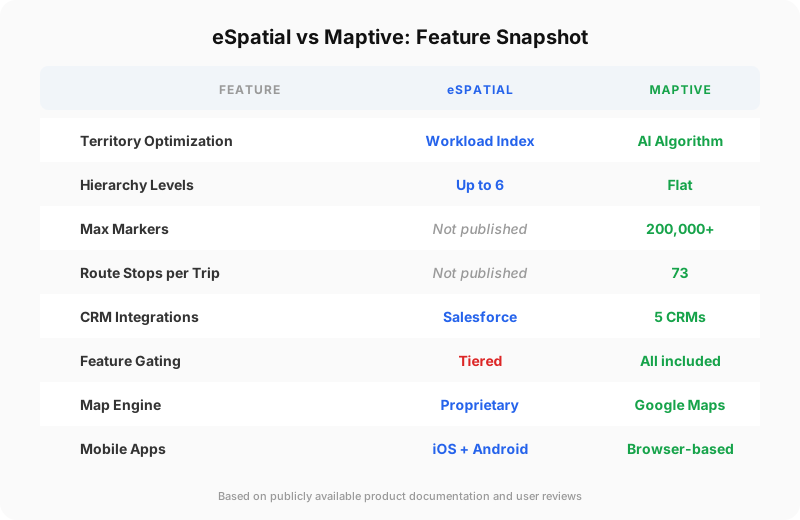
eSpatial is focused on sales operations workflows, particularly for teams deeply embedded in Salesforce. Its workload index methodology and multi-level hierarchy support (up to 6 levels) make it especially relevant for large, complex sales organizations running territory alignment projects. The native Salesforce AppExchange listing gives it a longer track record in that ecosystem.
Maptive takes a broader platform approach. Territory mapping sits alongside heat maps, demographic analysis, route optimization, and a wide range of visualization tools, all built on Google Maps. The WebGL rendering engine handles 200,000+ markers, which gives it a technical edge for organizations working with large datasets. Its CRM integrations span Salesforce, HubSpot, Zoho, Keap, and Pipedrive, serving multi-CRM organizations well.
On route optimization, Maptive handles up to 73 stops per trip through Google’s Vehicle Routing Problem solver. eSpatial also provides route optimization with drive-time analysis but doesn’t publish a specific stop limit.
The pricing difference is structural. eSpatial’s tiered model locks territory management and algorithmic optimization behind higher tiers above the $1,495 starting point. Maptive’s all-features-included model gives every buyer every capability from day 1. The price reflects individual vs. team access, not feature access.
Both platforms offer free trials, so you can test against your actual datasets before committing.
Keeping Territories Aligned Over Time
Territory mapping isn’t a one-time project. Markets change, reps come and go, accounts grow or shrink. Experts recommend reviewing territories quarterly during periods of growth or change. Mature teams can often shift to semi-annual reviews once performance stabilizes.
Combining multiple criteria (customer density, growth potential, competitor locations, and historical sales) produces a richer and more actionable view of each territory than relying on a single data point. The collaborative dimension matters too. Mapping solutions that support multi-user access and real-time editing let team members work together and make updates from anywhere.
The Verdict
Both eSpatial and Maptive are credible, well-reviewed platforms with real strengths. Either one represents a meaningful upgrade over spreadsheet-based planning.
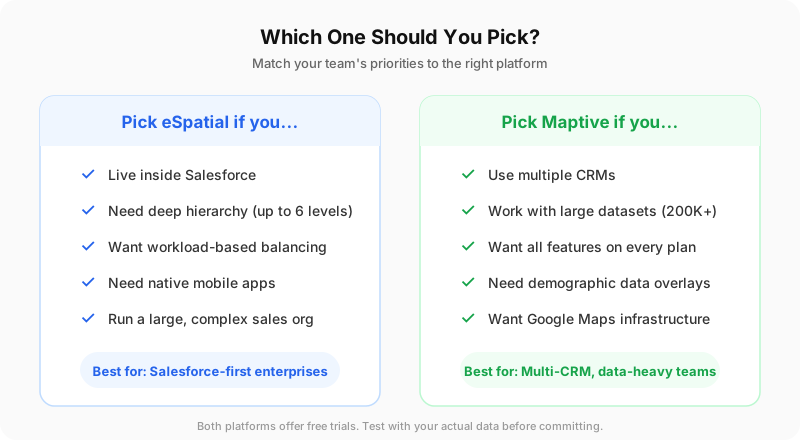
eSpatial is the better pick if your team lives in Salesforce and needs deep territory optimization with sophisticated workload balancing and multi-level hierarchy. It’s a focused tool that does its core job very well.
Maptive is the stronger choice if you need the widest range of mapping capabilities without worrying about feature gates. Strong route optimization, demographic analysis, multi-CRM connectivity, and sub-second rendering of large datasets give it an edge for most buyers looking at territory mapping in 2026. The all-features-included pricing model is a genuine differentiator.