
Cheap Email Hosting in 2026: Best Options from Free to $7/Month
You need a professional email address on your own domain. You don’t need to pay Google $7 per user per month to get one. The email hosting market in 2026 is packed with options that cost a fraction of Workspace or Microsoft 365, some under a dollar a month, a few completely free.
I’ve tested most of these services over the past decade, and this guide covers every viable and cheap email hosting option from budget picks to privacy-focused providers, with real pricing and honest opinions about each one.
Best Cheap Email Hosting Compared
Here’s a side-by-side comparison of every email hosting provider worth considering in 2026. Prices reflect the cheapest plan that supports custom domains.
| Provider | Price | Storage | Custom Domain | Best For |
|---|---|---|---|---|
| Zoho Mail (Free) | Free | 5 GB | Yes (up to 5 users) | Startups, solo users |
| Zoho Mail (Lite) | $1/mo per user | 10 GB | Yes | Small teams on a budget |
| Namecheap Private Email | $0.91/mo | 5 GB | Yes | Domain owners on Namecheap |
| Hostinger Email | $0.99/mo | 10 GB | Yes | Bundled with hosting |
| MXroute | ~$50 lifetime | 10-25 GB | Unlimited domains | Power users, multiple domains |
| Migadu | $19-199/yr | Shared pool | Unlimited domains | Privacy-conscious users, Swiss hosting |
| Purelymail | ~$10/yr | 10 GB | Yes | Cheapest per-mailbox option |
| Google Workspace | $7/mo per user | 30 GB | Yes | Teams needing full Google suite |
| Microsoft 365 | $6/mo per user | 50 GB | Yes | Outlook/Office users |
| Proton Mail | $4/mo | 15 GB | Yes (1 domain) | End-to-end encryption |
| Tuta (Tutanota) | $3/mo | 20 GB | Yes | Encrypted email on a budget |
| Fastmail | $5/mo | 50 GB | Yes | Best UX, power users |
| Hey.com | $99/yr | 100 GB | Yes (Hey for Domains) | Opinionated email workflow |
| iCloud+ Custom Domain | $0.99/mo | 50 GB | Yes (up to 5 domains) | Apple ecosystem users |
| Posteo | €1/mo | 2 GB | No (aliases only) | Green, privacy-first email |
| Mailbox.org | €1-9/mo | 2-100 GB | Yes | German privacy + office suite |
| Amazon WorkMail | $4/mo per user | 50 GB | Yes | AWS-integrated teams |
| Cloudflare Email Routing | Free | N/A (forwarding) | Yes | Free receive + Gmail send |
Zoho Mail
Zoho Mail remains the best value in email hosting, full stop. The free plan gives you 5 users with 5 GB each on your custom domain, no credit card required. The paid Mail Lite plan at $1 per user per month bumps storage to 10 GB and adds IMAP/POP access, which the free tier lacks. For $1.25/mo you get the Mail Premium plan with 50 GB storage, email backup, and large attachment support up to 1 GB.
The webmail interface is clean and fast. Zoho’s suite includes a calendar, contacts, notes, and tasks built in. Their admin panel handles SPF, DKIM, and DMARC configuration with clear step-by-step guides, critical since Google and Yahoo started enforcing authentication requirements in early 2024. Mobile apps are solid on both iOS and Android. The main drawback is brand recognition: recipients occasionally flag Zoho-hosted emails as unfamiliar, though deliverability is generally good if you set up authentication records properly.
Best for: anyone who wants professional email on a custom domain without spending money. The free plan is genuinely useful, not a crippled trial. If you’re a freelancer or running a small business with under 5 people, start here.
Namecheap Private Email
Namecheap’s Private Email service starts at $0.91/month (Starter plan) with 5 GB storage and support for 2 mailboxes. The Pro plan at $2.48/month gives you 30 GB. It’s powered by Open-Xchange on the backend, which means you get a competent webmail client, calendar, and contacts. If you already register domains through Namecheap, this is the path of least resistance, DNS records are configured automatically.
The interface won’t win design awards, but it’s functional. IMAP and POP3 are included on all plans, so you can use any email client. Namecheap includes basic spam filtering and virus protection. Where it falls short: no two-factor authentication on the cheapest plan, limited mobile app quality compared to Zoho or Fastmail, and the webmail experience feels dated. Storage on the Starter plan is tight if you receive a lot of attachments.
Best for: people who already use Namecheap for domains and want the simplest possible setup. The price-to-value ratio is hard to beat at under a dollar per month.
Hostinger Email
Hostinger offers email hosting starting at $0.99/month with 10 GB of storage per mailbox. Their email service runs on a custom platform and includes a clean webmail interface, calendar, and mobile apps. The real value comes if you’re already hosting a website with Hostinger, many of their web hosting plans include email at no extra cost, which makes it effectively free.
Setup is straightforward with automatic DNS configuration for domains managed through Hostinger. The spam filtering is decent, and they include DKIM signing out of the box. The Business Email plan at $3.99/month adds 50 GB storage and advanced features. Hostinger’s biggest limitation is that email-only plans lack some enterprise features like shared mailboxes or advanced admin controls. Their uptime has been solid in my testing, though support response times can be slow on the cheapest tier.
Best for: users who want simple, affordable email bundled with web hosting. Not the best standalone email service, but excellent value as part of a hosting package.
MXroute
MXroute is the cult favorite of the budget email world. Run by a single operator (Jarland Donnell), MXroute periodically offers lifetime deals, typically around $50 for 10 GB, through LowEndTalk and Black Friday promotions. You get unlimited domains and unlimited mailboxes on every plan; only storage is metered. That makes it absurdly cost-effective if you manage multiple domains or client sites.
The service uses a combination of DirectAdmin for management and Roundcube/Snappymail for webmail. It’s not pretty, but it’s functional and reliable. MXroute handles SPF, DKIM, and DMARC well, and deliverability is generally good. The catch: there’s no phone support, no SLA, and the one-person operation means if Jarland is unavailable, you wait. It’s also not ideal for mission-critical business email, there’s no redundancy guarantee. But for personal domains, side projects, and portfolio sites, nothing beats the per-dollar value.
Best for: developers, freelancers, and anyone managing multiple domains who wants rock-bottom pricing. Buy a lifetime deal when one appears and don’t look back.
Migadu
Migadu is a Swiss email hosting provider that charges based on daily sending limits rather than per-mailbox, a refreshingly different model. Plans range from $19/year (Micro, 20 outgoing messages/day) to $199/year (Maxi, 500 outgoing/day). All plans support unlimited domains and unlimited mailboxes. Storage is pooled across your account rather than per-mailbox.
Being Swiss-based means your data falls under Swiss privacy laws, which are among the strongest in the world. Migadu’s admin interface is clean and well-documented. They support IMAP, POP3, SMTP, CardDAV, and CalDAV. The webmail runs on Roundcube. Migadu is transparent about their infrastructure and has a detailed status page. The daily sending limit is the main constraint, if you send a lot of outbound email, you’ll need a higher-tier plan. Receiving is unlimited on all plans.
Best for: privacy-conscious users who want Swiss jurisdiction without paying Proton Mail prices, especially those with multiple domains. The unlimited domains/mailboxes model is ideal for agencies and consultants.
Purelymail
Purelymail is possibly the cheapest email hosting that actually works. The pricing model is pay-as-you-go: roughly $10/year covers most individual users. You pay a small per-domain fee ($1/year) plus a per-user fee ($3/year base) and storage costs. For a single domain with one mailbox, you’re looking at about $10 annually, less than what most providers charge per month.
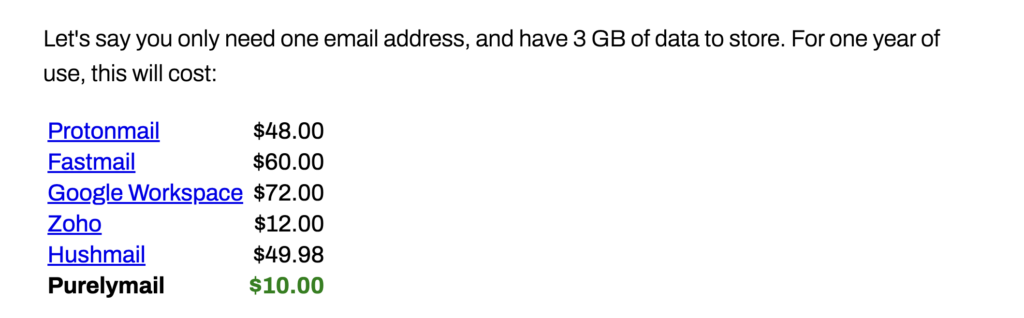
Like MXroute, Purelymail is a small operation. The service includes IMAP/SMTP access, DKIM signing, catch-all aliases, and basic spam filtering via Rspamd. There’s no custom webmail, you use an external client like Thunderbird, Apple Mail, or the Gmail app. The admin dashboard is minimal but functional. Purelymail has had occasional reliability hiccups over the years, including a notable outage in 2023, but has since improved its infrastructure. It’s not for mission-critical business email, but for personal or side-project use, the price is unbeatable.
Best for: tech-savvy users who want the absolute cheapest custom domain email and are comfortable using third-party clients. Bring your own webmail.
Google Workspace
Google Workspace (formerly G Suite) is the default choice for business email, and at $7/user/month for the Business Starter plan, it’s the most expensive option on this list. You’re paying for the Gmail interface, which is still the best webmail client ever built, plus seamless integration with Google Drive, Calendar, Meet, Docs, and the entire Google ecosystem. The Business Standard plan at $14/month adds 2 TB of storage and recording in Meet.
In 2025-2026, Google has added Gemini AI features across Workspace: smart compose, email summarization, and “Help me write” in Gmail. Whether those features justify the premium depends on your workflow. Deliverability is unmatched, emails from Google’s servers virtually never hit spam folders. The admin console is powerful for managing teams. Google was also at the forefront of enforcing DKIM, SPF, and DMARC requirements starting February 2024, which ironically made their own product the gold standard for authentication compliance.
Best for: teams that live in the Google ecosystem and need collaborative tools beyond email. If you’re a solo user who just needs email, you’re overpaying. Look at Zoho or Fastmail instead.
Microsoft 365
Microsoft 365 Business Basic starts at $6/user/month and gives you 50 GB of Exchange-based email plus Teams, SharePoint, and web versions of Office apps. The Business Standard plan at $12.50/month adds desktop Office apps. Outlook on the web has improved significantly, the new Outlook client that Microsoft has been rolling out since 2024 unifies the desktop and web experience, though it has been controversial among power users who preferred the classic version.
Microsoft has integrated Copilot AI across 365, including email summarization and drafting in Outlook, though Copilot requires an additional $30/user/month add-on for the full experience. Exchange Online’s deliverability is excellent, and the admin center offers granular control over mail flow, compliance, and security policies. If your organization uses Active Directory or needs advanced compliance features (litigation hold, DLP, eDiscovery), Microsoft 365 is the clear choice.
Best for: organizations already invested in the Microsoft ecosystem, or those needing enterprise compliance features. Like Google Workspace, it’s overkill for solo email, but the 50 GB mailbox is generous.
Proton Mail
Proton Mail is the most recognized name in encrypted email. The Mail Plus plan at $4/month (billed annually) gives you 15 GB of storage, 10 email addresses, and support for one custom domain. The Proton Unlimited plan at $10/month bundles Mail, VPN, Drive, Calendar, and Pass with 500 GB of storage and 3 custom domains. All email stored on Proton’s Swiss servers is end-to-end encrypted at rest, even Proton cannot read your messages.
The web interface has matured significantly and now feels modern and responsive. Proton Bridge enables IMAP/SMTP access for desktop clients like Thunderbird and Apple Mail by decrypting messages locally. The mobile apps are polished. The encryption is genuinely zero-access, great for journalists, activists, lawyers, and anyone handling sensitive communications. The downside: encrypted email only works end-to-end when both parties use Proton (or PGP). Messages to regular email providers are encrypted at rest on Proton’s side but travel in plain text.
Best for: users who prioritize privacy and encryption above all else and are willing to pay a premium for Swiss-hosted, zero-access email. Note that Skiff Mail, which was a competitor in this space, was acquired by Notion in February 2024 and shut down, making Proton and Tuta the primary encrypted options remaining.
Tuta (formerly Tutanota)
Tuta (rebranded from Tutanota in 2024) offers end-to-end encrypted email starting at $3/month for the Revolutionary plan with 20 GB of storage and custom domain support. There’s a free plan with 1 GB storage, but it doesn’t support custom domains. Tuta encrypts not just email bodies but also subject lines and contacts, a step beyond what Proton Mail does. Their encryption protocol is custom-built and post-quantum resistant, which is a forward-looking advantage.
The web and mobile apps are clean and fast. Unlike Proton Mail, Tuta does not support IMAP or POP3, you must use their apps or web interface exclusively. This is a deliberate security choice but limits flexibility. There’s no integration with third-party email clients. Tuta is based in Germany and subject to German privacy laws, which are strong but not quite Swiss-level. The calendar is encrypted and included. Tuta is open source and has been independently audited.
Best for: privacy-focused users who want the cheapest encrypted email and don’t need third-party client support. The $3/month price undercuts Proton Mail and includes more storage.
Fastmail
Fastmail is the email provider I recommend most often. At $5/month (Standard plan, billed annually) with 50 GB of storage, it offers the best user experience of any independent email service. The interface is fast, keyboard-shortcut-rich, and thoughtfully designed. Fastmail supports custom domains, aliases, masked emails (for signups and privacy), calendars via CalDAV, and contacts via CardDAV. Their JMAP protocol implementation is the most polished anywhere.
Fastmail is based in Australia and has been operating since 1999, they have a longer track record than most providers on this list. Deliverability is excellent. The admin tools are clean, DNS setup guides are clear, and they handle SPF/DKIM/DMARC configuration with minimal friction. The mobile apps are native and responsive. Fastmail also integrates with 1Password for masked email generation, which is a killer feature for privacy-conscious users. The $3/month Basic plan exists but only offers 2 GB, not practical for most users.
Best for: anyone who wants premium email without the Google/Microsoft ecosystem lock-in. If you care about email as a product and want the best standalone experience, Fastmail is it.
Hey.com
Hey.com from Basecamp (37signals) costs $99/year and takes an opinionated approach to email. Instead of folders and labels, Hey uses three categories: the Imbox (important mail), the Feed (newsletters), and the Paper Trail (receipts and transactional email). New senders are screened, you decide whether to let them in or block them permanently. It’s a love-it-or-hate-it system that genuinely changes how you interact with email.
Hey for Domains (also $99/year per user) adds custom domain support for business use. Storage is 100 GB. The apps are native on every platform and beautifully designed. Hey includes features like Reply Later, Set Aside, and Clips (saving specific parts of emails). There’s no IMAP or POP3, you’re locked into Hey’s apps entirely. No calendar integration either. If Hey’s workflow resonates with you, it can be transformative. If it doesn’t, there’s no way to bend it into a traditional email client.
Best for: people overwhelmed by email who want a radically different approach. Not for teams or anyone who needs calendar integration, IMAP access, or conventional email workflows.
iCloud+ Custom Domain Email
Apple quietly added custom domain email support to iCloud+ in 2022, and it’s one of the best-kept secrets in email hosting. Any iCloud+ subscription ($0.99/month for 50 GB, $2.99/month for 200 GB, $9.99/month for 2 TB) includes the ability to use up to 5 custom domains with your iCloud Mail. You can create up to 3 email addresses per domain and invite family members to use your domain.
The setup is done through iCloud settings on your Apple device or icloud.com. Apple handles DKIM and SPF record generation. The email experience is standard iCloud Mail, clean, integrated with Apple’s ecosystem, and reliable. You get the same spam filtering, Hide My Email (alias generation), and Mail Privacy Protection features. The limitations: no IMAP access to third-party clients outside of Apple Mail and Outlook, the 3-addresses-per-domain cap is restrictive for businesses, and the web interface at icloud.com is basic compared to Gmail or Fastmail.
Best for: Apple ecosystem users who already pay for iCloud+ storage and want custom domain email at no additional cost. It’s essentially free email hosting if you’re already an iCloud subscriber.
100% Free Business Email Options
If you genuinely need free custom domain email, you have three realistic options in 2026.
- Zoho Mail Free remains the only true free email hosting with custom domain support. You get up to 5 users, 5 GB per user, and a functional webmail interface. The catch: no IMAP/POP access on the free plan, so you’re locked into Zoho’s web and mobile apps. For many people, that’s perfectly fine.
- Cloudflare Email Routing + Gmail is the power-user’s free option. Cloudflare Email Routing (free for any domain on Cloudflare) forwards incoming mail to your Gmail or other email account. You then configure Gmail’s “Send mail as” feature using an SMTP relay (some people use their ISP’s SMTP, a free SendGrid account, or Gmail’s own servers with an app password) to send from your custom domain. It takes 15 minutes to set up and works surprisingly well. You get Gmail’s full interface with your custom domain, for free.
- Host-bundled email is included with many web hosting providers like cPanel-based hosts, SiteGround, and A2 Hosting. The quality varies wildly. Some hosts run well-configured mail servers; others dump you on shared IPs with terrible deliverability. If your host includes email, test it thoroughly before relying on it. Check your IP against blacklists, verify SPF/DKIM setup, and send test emails to Gmail and Outlook to confirm delivery. Host-bundled email is fine for low-volume personal use but risky for business-critical communication.
How to Choose Email Hosting
Choosing email hosting comes down to five factors: price, privacy, deliverability, ecosystem integration, and how many domains you need to support.
- If budget is the priority: Start with Zoho Mail free. If you need IMAP, upgrade to Zoho Lite ($1/mo) or try Purelymail (~$10/year). MXroute lifetime deals are the ultimate long-term value.
- If privacy matters most: Proton Mail ($4/mo) or Tuta ($3/mo) for end-to-end encryption. Migadu ($19/yr) for Swiss hosting without encryption overhead. Posteo (€1/mo) and Mailbox.org (€1-9/mo) for German-hosted privacy-focused alternatives, Mailbox.org is particularly good with its included office suite and custom domain support on higher plans.
- If you want the best product: Fastmail ($5/mo) is the answer. Best interface, best features, best developer community, 25+ years of uptime history.
- If your team needs collaboration tools: Google Workspace ($7/mo) or Microsoft 365 ($6/mo). Pay the premium, the productivity suite justifies the cost for teams.
- If you manage multiple domains: MXroute or Migadu. Both offer unlimited domains on every plan, which is rare and valuable.
- If you’re a developer: Amazon WorkMail ($4/mo per user) integrates with AWS and supports standard protocols. Cloudflare Workers with Email Workers lets you programmatically process incoming email, useful for building automated workflows without a full mailbox.
One critical factor for 2026: email authentication. Since February 2024, Google and Yahoo require SPF, DKIM, and DMARC records for bulk senders. Even if you’re not a bulk sender, missing authentication records will increasingly cause delivery problems. Whatever provider you choose, make sure they support automated DKIM signing and provide clear DNS setup instructions. Every provider on this list does, but the quality of documentation and setup wizards varies significantly.
Once your email hosting is sorted, the next piece of the stack is sending. If you run newsletters, drip campaigns, or transactional mail, pair your mailbox with a dedicated email marketing platform, and clean your list regularly with the best email verification tools to protect deliverability.
FAQ
What is the cheapest email hosting for a custom domain?
Zoho Mail is free for up to 5 users with custom domain support. If you need IMAP access, Purelymail at roughly $10 per year is the cheapest paid option. MXroute lifetime deals at around $50 are the best long-term value if you can catch one during a promotion.
Is Google Workspace worth the price for email?
Only if you use the full Google suite, Drive, Docs, Meet, Calendar, as a team. For email alone, Google Workspace at $7 per user per month is overpriced. Fastmail at $5 per month or Zoho Mail at $1 per month deliver excellent email experiences at a fraction of the cost.
What happened to Skiff Mail?
Skiff was acquired by Notion in February 2024. All Skiff services including Mail, Drive, Pages, and Calendar were shut down by August 2024. Proton Mail offered a migration tool for former Skiff users. Skiff is no longer an option for email hosting.
Do I need DKIM and SPF records for my email in 2026?
Yes, absolutely. Since February 2024, Google and Yahoo require SPF and DKIM authentication for all senders, with DMARC required for bulk senders (over 5,000 messages per day). Even small senders should configure all three records to ensure reliable delivery. Most email hosting providers handle DKIM signing automatically, you just need to add the DNS records they provide.
Can I get free email hosting for my domain?
Yes. Zoho Mail offers a free plan with up to 5 users and 5 GB storage per user on your custom domain. Alternatively, you can use Cloudflare Email Routing (free) to forward incoming emails to a Gmail account and configure Gmail to send from your custom domain. Some web hosting providers also include basic email hosting with their plans at no extra cost.
Which email provider has the best privacy?
Proton Mail and Tuta offer end-to-end encryption where even the provider cannot read your messages. Proton Mail is based in Switzerland and Tuta in Germany, both with strong privacy laws. For non-encrypted but privacy-respecting email, Posteo, Mailbox.org, and Migadu are excellent European alternatives that do not monetize your data.
Is Rackspace Email still safe to use?
Rackspace suffered a major security breach in December 2022 that affected their Hosted Exchange environment, causing weeks of downtime and permanent data loss for some customers. While they still offer email hosting, the incident significantly damaged trust. Most users would be better served by migrating to a more reliable provider like Fastmail, Zoho, or Google Workspace.
What is the best email hosting for multiple domains?
MXroute and Migadu both support unlimited domains on all plans, making them ideal for users managing multiple websites or client domains. MXroute’s lifetime deals (around $50) offer the best value. Migadu’s plans start at $19 per year with unlimited domains and mailboxes, charged by daily sending volume instead of per-mailbox.
Should I use my web host’s free email or a dedicated email provider?
For personal or low-volume use, host-bundled email is fine, but verify deliverability by testing with Gmail and Outlook, and check your server IP against blacklists. For business-critical email, use a dedicated provider. Shared hosting mail servers often have poor deliverability due to other users on the same IP sending spam. A dedicated provider like Zoho ($1 per month) or Fastmail ($5 per month) is worth the small investment for reliable delivery.
Disclaimer: This site is reader-supported. If you buy through some links, I may earn a small commission at no extra cost to you. I only recommend tools I trust and would use myself. Your support helps keep gauravtiwari.org free and focused on real-world advice. Thanks. - Gaurav Tiwari