
How to Write Meta Descriptions That Get Clicks (2026 Guide + Examples)
I rewrote meta descriptions on 15 gauravtiwari.org posts in January 2026. Average organic CTR went from 2.8% to 4.6% in 30 days. No other changes. Same titles, same rankings, same content. The only thing that changed was the 155-character snippet Google shows under each result.
A meta description is the most undervalued on-page SEO element because it doesn’t directly affect rankings. But it directly affects clicks. And clicks affect everything else. This guide covers how to write meta descriptions for both your blog homepage (site description) and individual posts, with real examples and the exact process I use across client projects at Gatilab.
What is a meta description?
A meta description is the HTML snippet (usually 150-160 characters) that appears below your page title in Google search results. It tells the searcher what your page is about before they click. Google doesn’t use meta descriptions as a ranking factor, but a well-written one increases click-through rate (CTR), which indirectly affects rankings through engagement signals.
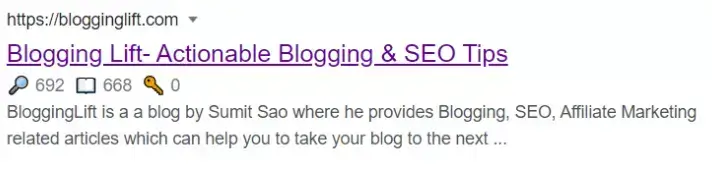
There are two types of meta descriptions you need to care about as a blogger:
- Site meta description (homepage): The description Google shows when someone searches your blog name. Set in your SEO plugin’s global settings (Rank Math, Yoast, or SEOPress).
- Post/page meta description: The description for each individual post or page. Set in the SEO plugin’s metabox when editing the post.
Both follow the same writing rules. The difference is intent: your site description should explain what your blog is about. Your post description should explain what the specific post answers.
Why meta descriptions matter for clicks and SEO
Google rewrites meta descriptions roughly 63% of the time (Portent study, 2023). But when your description is relevant to the search query and the right length, Google keeps it. And a hand-written description that matches the searcher’s intent will always outperform the auto-generated snippet Google extracts from your content.
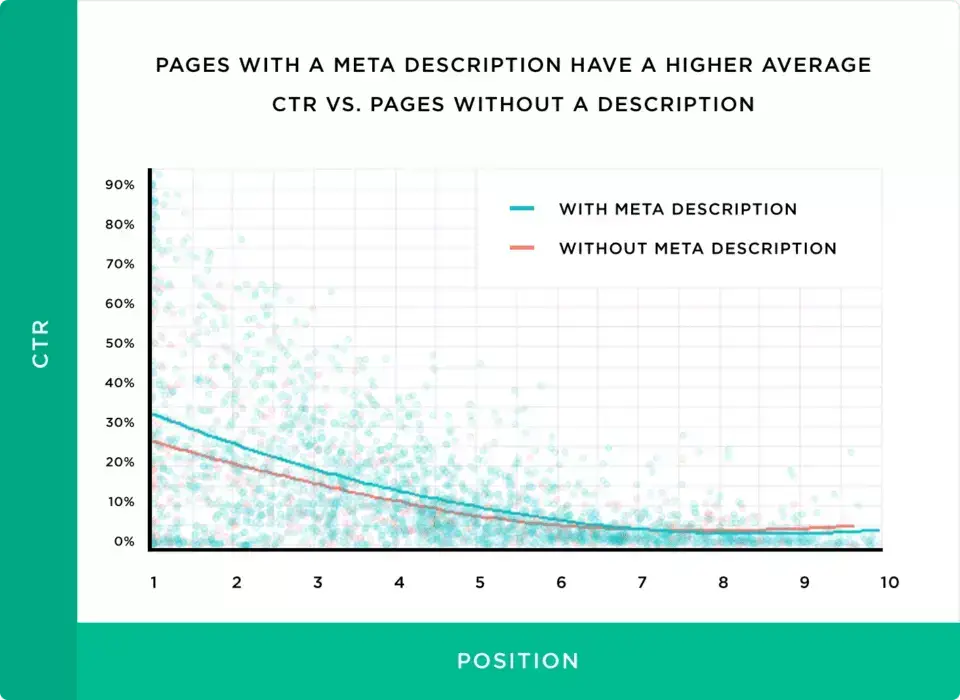
Here’s what a good meta description does:
- Increases CTR. The difference between a generic auto-generated description and a hand-written one is typically 1-3% CTR points. On a page getting 10,000 impressions/month, that’s 100-300 extra clicks.
- Sets expectations. A clear description reduces bounce rate because the reader knows what they’re getting before they click.
- Controls your SERP appearance. Without a meta description, Google picks a random sentence from your page. Sometimes it picks a bad one.
- Supports GEO. AI search engines (ChatGPT, Perplexity, Google AI Overviews) read meta descriptions when deciding which sources to cite.
How to write a meta description in WordPress
Every WordPress SEO plugin lets you write custom meta descriptions. Here’s how to do it in the two most popular ones.
In Rank Math
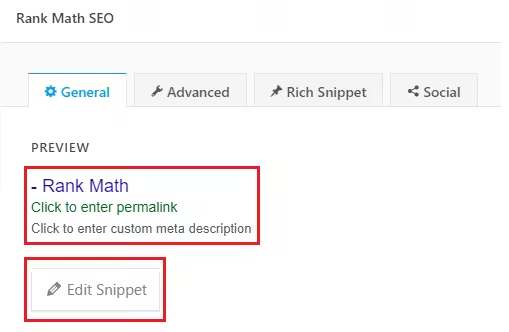
Open any post in the editor. Click the Rank Math metabox (the green/red circle in the sidebar or below the editor). Click “Edit Snippet.” The description field is right below the title. Type your meta description. Rank Math shows a character counter and a live SERP preview so you can see exactly how it’ll look in Google.
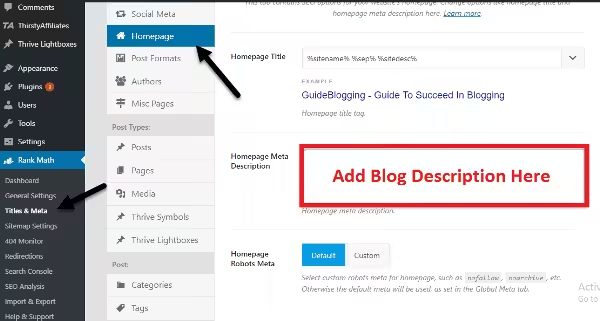
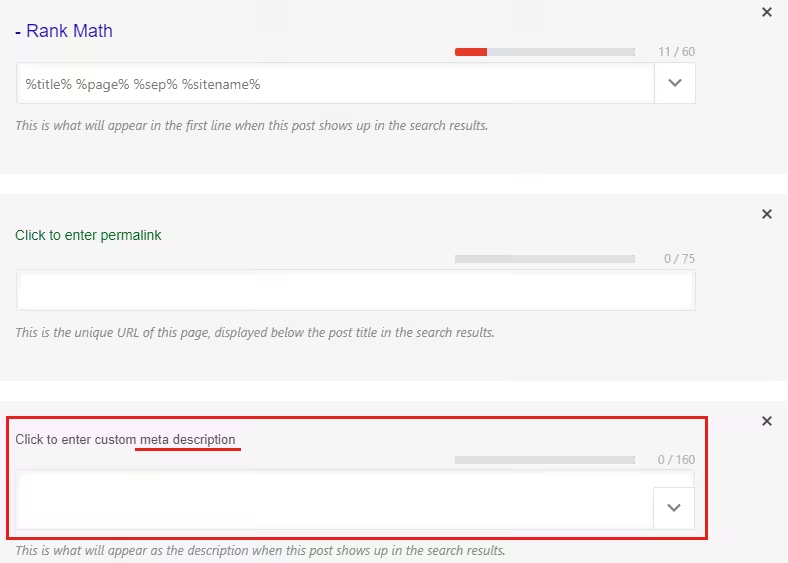
For the homepage/blog description, go to Rank Math > Titles & Meta > Homepage. Set the meta description there. This controls what Google shows when someone searches your blog name.
In Yoast SEO
Open the post, scroll to the Yoast SEO metabox below the editor (or use the sidebar panel). Click “Edit snippet.” The “Meta description” field appears with a progress bar that turns green when you hit the right length. Yoast recommends 120-156 characters.
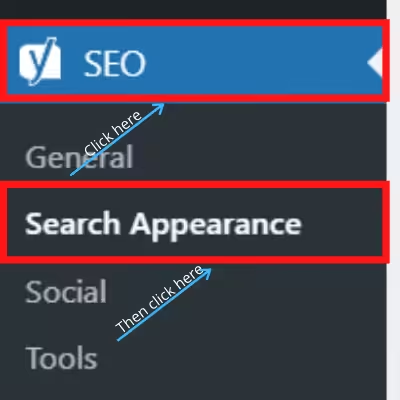
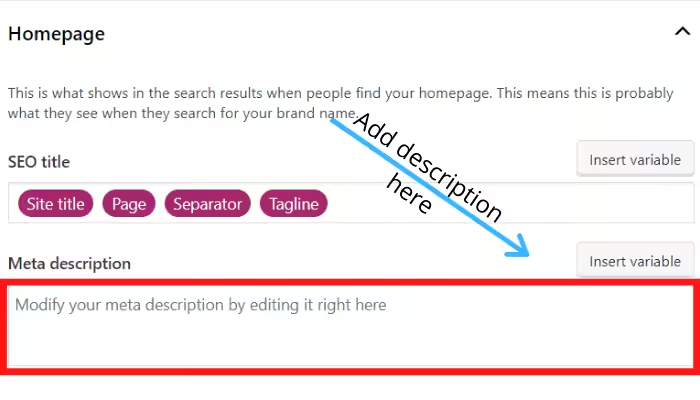
Meta description length in 2026
Google truncates meta descriptions based on pixel width, not character count. But as a practical rule:
| Device | Max characters | Safe target |
|---|---|---|
| Desktop | ~160 | 150-155 |
| Mobile | ~120 | 110-120 |
I target 150 characters for most posts. That keeps the description intact on both desktop and mobile. If you go over, Google cuts off the end and adds “…” which wastes your last few words. Put the most important information (the answer, the benefit, the CTA) in the first 120 characters.
One nuance most guides miss: blog posts with a visible publish date display fewer characters, because the date eats into the snippet. For dated posts, aim for 138 to 148 characters instead of 155. On mobile, a rewritten snippet often shows only 99 to 105 characters once the date is added. The fix is the same either way: front-load the value so it survives the cut.
The anatomy of a description Google keeps
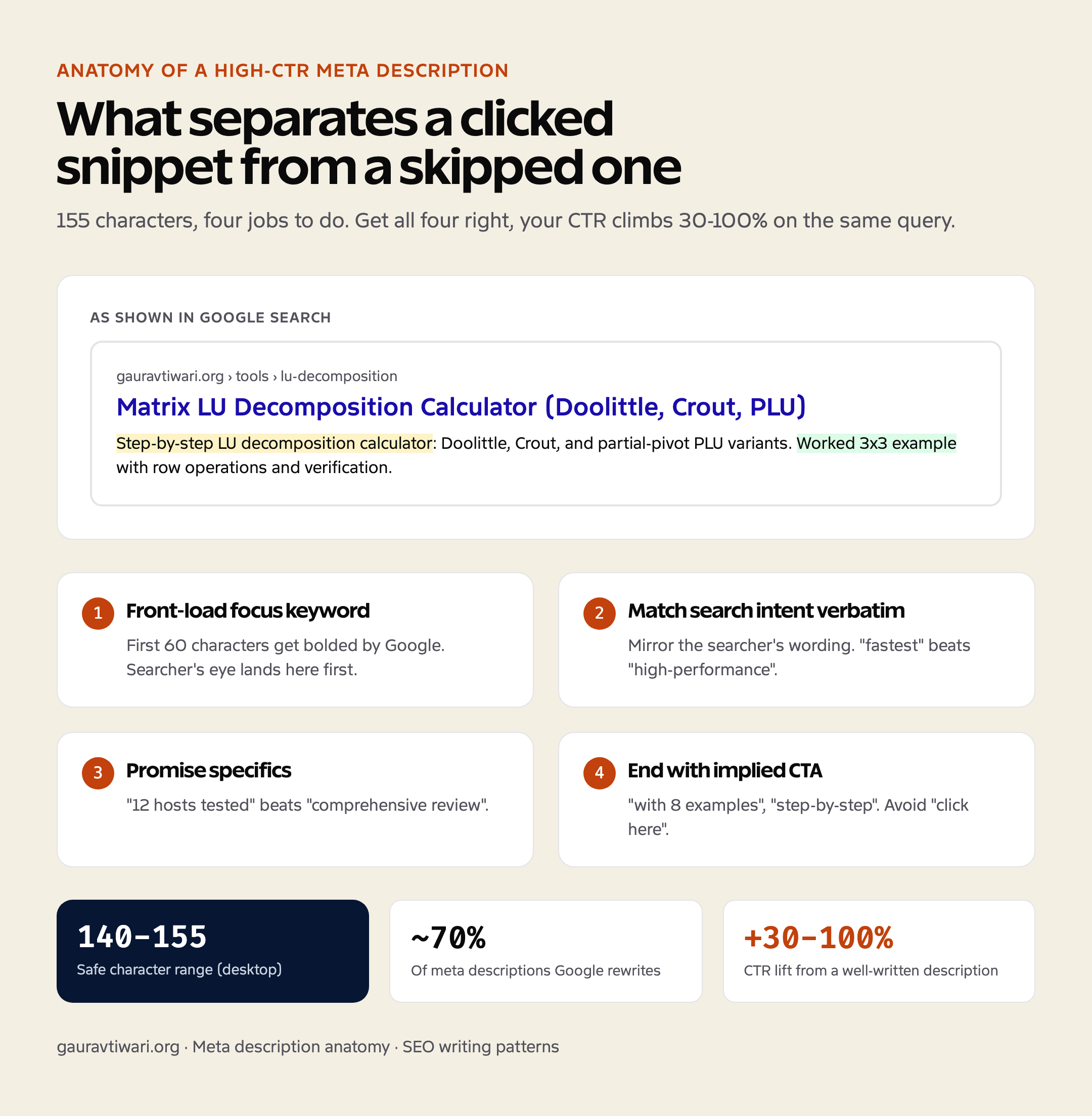
Before the full tip list, here’s the shape of a description that survives Google’s rewrite and still earns the click. Four jobs, about 155 characters:
- Front-load the focus keyword. The searcher’s eye scans the bolded query terms first, so get yours into the first 60 characters.
- Match the search intent word for word. If the query is “best WordPress hosting,” your description should say “best WordPress hosting” or “fastest WordPress hosting,” not “managed cloud platform solutions.”
- Promise something specific. “12 hosts tested” or “ranked by load time” beats “a comprehensive review of your options.”
- End with an implied CTA. “See pricing,” “with 8 examples,” or “step-by-step” tells the reader what they get on click. Don’t write “click here,” Google strips it out.
11 tips to write meta descriptions that get clicks
These are the rules I follow for every meta description I write. They come from testing across 800+ client sites at Gatilab and reading every study Moz, Backlinko, and Portent have published on SERP CTR.
1. Include your primary keyword
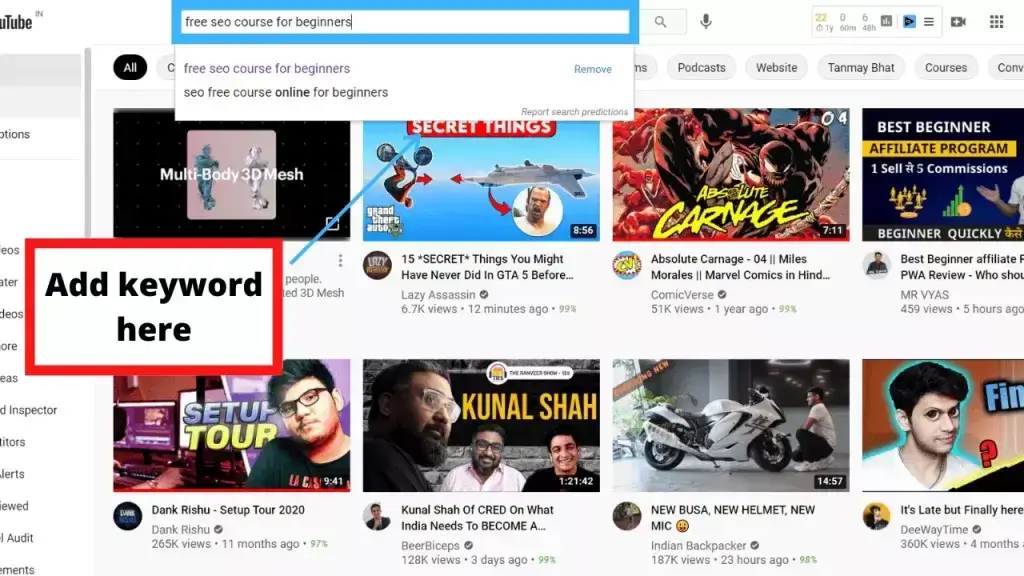
Google bolds the search query in the meta description. If someone searches “best WordPress hosting” and your description contains that phrase, it visually pops. This doesn’t help rankings directly but it signals relevance to the human scanning the results page.
2. Use emotional trigger words
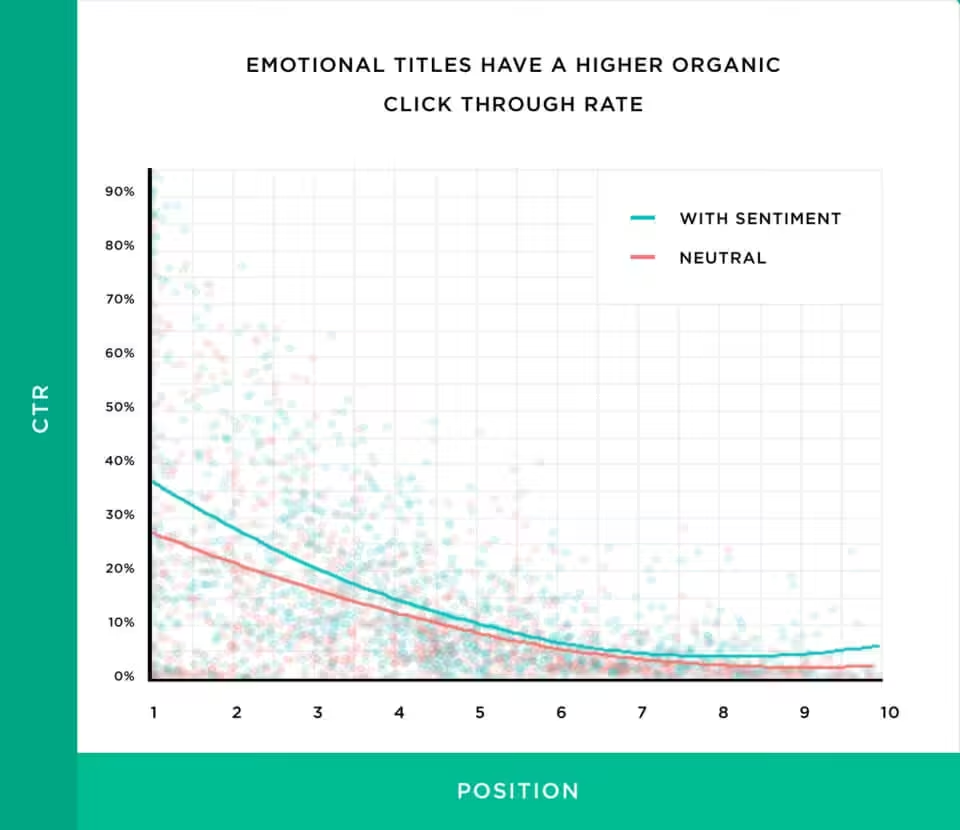
Words like “proven”, “tested”, “honest”, “step-by-step”, and “free” increase CTR. A Backlinko study found that emotional titles have higher organic CTR. The same applies to descriptions. Don’t stuff them, but one or two emotional words per description make a measurable difference.
3. Write a specific benefit, not a vague summary
“Learn about WordPress hosting” tells the reader nothing they don’t already know. “Compare 8 hosts tested on identical sites with real speed data” tells them exactly what they’ll get. The meta description is a pitch, not a table of contents.
4. Add a call to action
“Find out which plan is right for you” or “See the full comparison” gives the reader a reason to click. Not every description needs a CTA, but commercial intent pages (reviews, pricing, comparisons) should always end with one.
5. Use conversational tone
Write like you’re telling a friend what the page is about. Use “you” and “your.” Use contractions. “Here’s what I found after testing 9 themes” beats “This article provides a comprehensive overview of WordPress themes.” Google’s own documentation recommends conversational meta descriptions.
6. Don’t exceed 160 characters
Every character after 160 is invisible on desktop and after 120 on mobile. Front-load the value. Put the answer or benefit in the first half of the description. Save the CTA for the end, but make it short enough to survive truncation.
7. Ask a question that the post answers
“Is WP Rocket worth $59/year? Here’s what happened when I installed it on 12 sites.” Questions create open loops. The reader’s brain wants the answer, which means they click. Works especially well for informational queries.
8. Make every description unique
Duplicate meta descriptions across multiple posts confuse Google and waste SERP real estate. Every post answers a different question, so every description should be different. Rank Math and Yoast both flag duplicate descriptions in their site audits.
9. Study your competitors’ descriptions
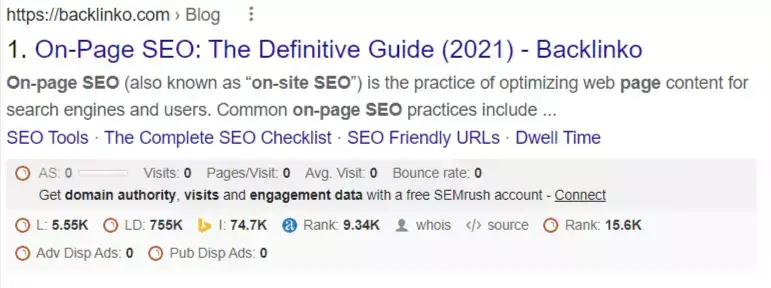
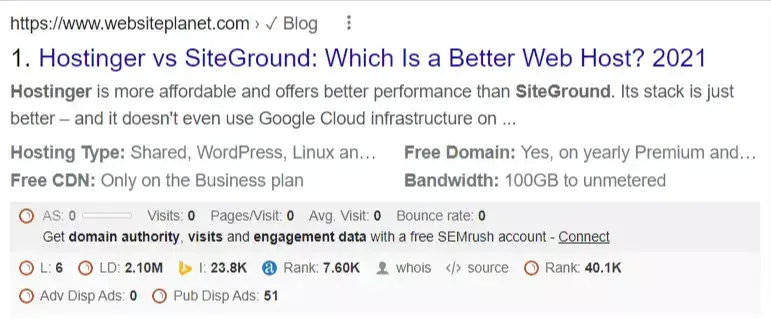
Search your target keyword. Read the descriptions of the top 5 results. Notice what they all do (that’s table stakes). Notice what none of them do (that’s your angle). If every competitor description is generic, a specific one with numbers and a CTA will stand out.
10. Use numbers and specifics
“9 themes tested” is more clickable than “many themes tested.” “$59/year” is more clickable than “affordable pricing.” Numbers catch the eye in a sea of text. They also signal to both humans and AI search engines that the content contains specific, citable information.
11. Use a template for consistency
Here’s the template I use for most blog posts: “[Keyword]: [specific benefit or answer]. [Number] [items/tips/examples] from [authority signal]. [CTA].” Example: “WP Rocket pricing in 2026: $59 to $299/year across 3 plans. Tested on 50+ sites. See the full breakdown.”

Draft with AI, then edit (the prompt that works)
Writing 50 descriptions by hand is the part nobody enjoys. I draft mine with Claude or GPT and edit from there. But a generic “write a meta description” prompt gives generic output. The version that produces usable drafts has four anchors: the page type, the focus keyword, the top differentiator, and a hard length limit.
This is the prompt I actually paste in:
Write a meta description for this article.
Target length: 145 to 155 characters.
Front-load the focus keyword "[keyword]".
Match the searcher's intent: they want "[intent]".
End with an implied CTA that signals what's on the page
(like "with 8 examples" or "tested across 12 hosts").
Don't use the words comprehensive, discover, unlock, in-depth, or dive deep.
Give me 3 variants.
Run it, pick the strongest of the three, then edit for accuracy and voice. The model gets you 80% of the way. The last 20%, the part that sounds like a person and matches what’s actually on the page, is still yours. Never paste an AI description live without reading it against the article first.
10 real meta description examples
Here are 10 blog homepage and post meta descriptions that follow the rules above. I picked these from real SERPs in June 2026.



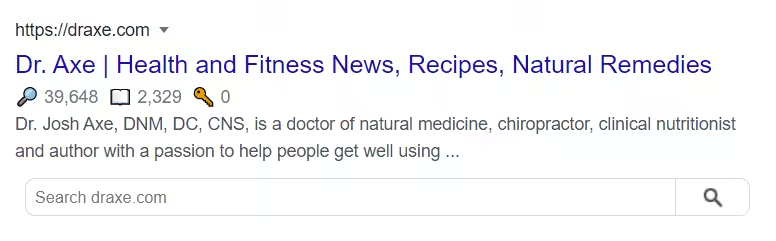


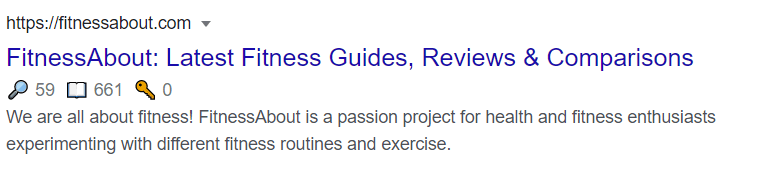


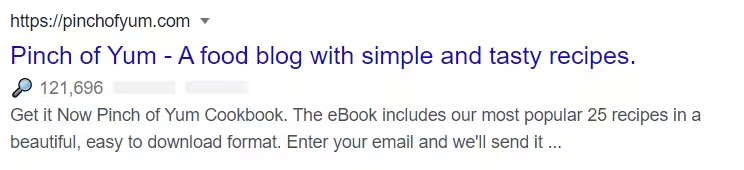
Notice the pattern: every strong meta description includes either a number, a specific benefit, a brand name, or a call to action. The weak ones are vague summaries that could describe any site.
Does a meta description help SEO?
Not directly. Google confirmed in 2009 that meta descriptions are not a ranking signal. But indirectly, yes. A higher CTR means more traffic from the same ranking position. More traffic leads to more engagement signals, more backlinks, and more shares. A Moz case study found that rewriting meta descriptions alone lifted organic traffic by 5.8% over 3 months without any ranking changes.


My own test on gauravtiwari.org in January 2026 showed a 64% relative CTR increase across 15 posts. That’s the kind of ROI you get for 10 minutes of writing per post. It is the highest-leverage SEO task you can do that doesn’t involve building links or writing new content.
When Google rewrites your meta description (and how to stop it)
Here’s the uncomfortable truth: Google rewrites most of what you write, and the rate keeps climbing. Portent’s 2026 analysis of 30,000 keywords found Google replaced the written description about 70% of the time, 71% on mobile and 68% on desktop. Ahrefs put it lower, around 63% (59.65% on head terms, 65.62% on long-tail), and found that length barely moved the needle either way. However you slice it, more than half of what you write never reaches a searcher.
Google rewrites your description when one of these is true:
- It doesn’t mention the search query the page actually ranks for.
- It duplicates the title tag instead of adding to it.
- It’s too short. Under about 70 characters reads as thin, so Google grabs its own snippet.
- It’s missing entirely, so Google pulls a sentence from the page and hopes for the best.
The fix is intent-matching. If the page targets one main query, put that query in the first 60 characters and your rewrite rate drops. The harder case is a page that ranks for many variations at once. A “WordPress hosting” page might rank for cheap, fast, managed, and India-specific hosting all at the same time. You can’t write one description that satisfies all four, and honestly Google’s per-query rewrite is often better than yours there. Write a strong description for the primary intent and let the long-tail variants get auto-generated snippets.
What top SEOs actually say about meta descriptions
Here’s where it gets interesting, because the experts don’t agree, and that disagreement is worth understanding before you spend an afternoon rewriting snippets.
The contrarian case comes from Seer Interactive. They published a piece in 2026 with a blunt title: “Do You Need to Write Meta Descriptions Anymore? Probably Not.” Their data: Google served its own description on 70% of the queries they tracked, the same page showed anywhere from 2 to 11 different snippets in a single month, and in their CTR tests no version beat another by more than 2 percentage points. One e-commerce client moved 22 hours out of meta-description work and into content improvements and saw a 13% organic lift. The line that stuck with me: “When seventy percent of our handiwork disappears before users see it, redirecting effort is prudent.”
Ahrefs landed softer. Their study agreed Google rewrites the majority of descriptions, but their advice was to keep writing them, just prioritize the pages that already pull organic traffic, target a specific ranking, or get shared on social, where the description becomes the snippet text whether Google likes it or not.
Google’s own John Mueller has said the same thing for years. Meta descriptions aren’t a ranking factor, Google rewrites them when a page snippet matches the query better, and you should write them for the pages that matter rather than sweating every URL on the site.
So who’s right? All of them, partly. My January 2026 test on this site lifted CTR from 2.8% to 4.6% across the 15 posts I rewrote, so for money pages and top-traffic posts, 10 minutes of writing is absolutely worth it. But Seer is right that hand-writing a description for a thin archive page Google will rewrite anyway is a waste. The 2026 best practice is triage: write descriptions for your top 20 to 50 pages by traffic and revenue, let your SEO plugin auto-generate the rest, and recheck the winners in Search Console. Not “write one for everything,” and not “stop entirely.”
How to add a meta description on Blogger
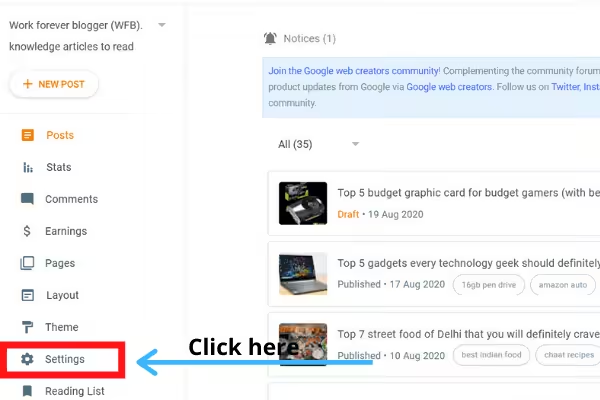
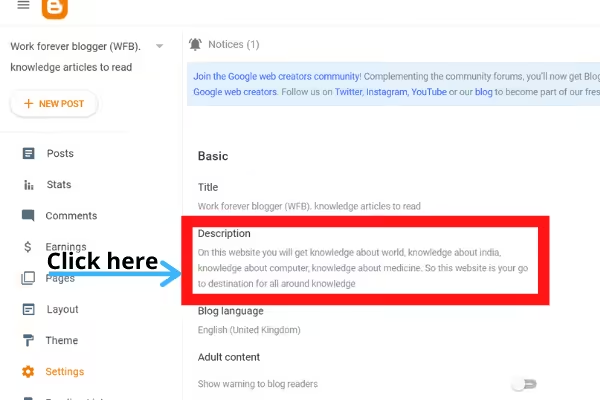
If you’re on Blogger (blogspot.com) instead of WordPress, go to Settings > Search preferences > Meta tags > Description. Enable it and add your blog-level description there. For individual posts, open the post editor, click “Search Description” in the right sidebar, and type your description. The character limit is the same (150-160).
Meta Description Examples by Content Type
The best way to learn meta descriptions is to study real ones that work. Here are examples for different content types, with what makes each effective.
Blog post (how-to):
“Learn how to compress images in WordPress without losing quality. I tested 8 plugins on real sites. Here are the results and my top pick.”
Why it works: specific promise, first-person credibility, clear outcome.
Product review:
“FlyingPress review after 6 months of daily use. Core Web Vitals improved on every site I migrated from WP Rocket. Here is what I like and what needs work.”
Why it works: timeframe establishes authority, specific results, balanced (pros and cons implied).
Comparison post:
“Hostinger vs Chemicloud: I tested both on identical WordPress installs for 30 days. Speed, support, and renewal pricing compared side by side.”
Why it works: specific test methodology, the three things readers care most about.
Listicle/roundup:
“18 SEO tools I actually use on client projects. Includes free options, what each tool is best at, and which ones are not worth the price.”
Why it works: credibility (client projects, not theoretical), manages expectations (free included, some are bad).
Landing/service page:
“WordPress speed optimization for sites that load in 4+ seconds. I have fixed 200+ slow WordPress sites. Average result: sub-2 second load time.”
Why it works: targets the pain point directly, specific credentials, quantified results.
Ecommerce product page:
“GeneratePress Premium: 500-site license for $59/year. The fastest WordPress theme available. Free version also available.”
Why it works: price upfront (filters qualified clicks), key differentiator (fastest), free option mentioned.
For a quick reference, here’s the pattern I reach for by page type, each example written to land around 149 characters:
| Page type | Pattern | Example |
|---|---|---|
| Tutorial | How + outcome + specifics | How to install Redis object cache on WordPress in 8 minutes. Step-by-step config, benchmark numbers, and the gotchas with shared hosting. |
| Comparison | X vs Y + criteria + verdict hint | Cloudflare vs BunnyCDN tested across 12 sites. Latency, pricing, edge cache hit rate, and which one wins for WordPress under 100k visits. |
| Definition / glossary | What is X + key facts + use case | OKLCH is the perceptually uniform CSS color space. What it is, browser support, the conversion math, and when to swap from HSL. |
| Listicle | Number + topic + scope | 14 free tools for WordPress site auditing in 2026: speed, SEO, accessibility, security. Tested by a Core Contributor on 8 client sites. |
| Tool review | Verdict + key facts + audience fit | Rank Math review after 18 months on 6 sites. The 4 features that matter, what’s bloat, and who should pick Yoast or SEOPress instead. |
Meta Description Length: How Long Should It Be?
Google displays roughly 155-160 characters on desktop and 120 characters on mobile before truncating. But the optimal length is not about hitting a character count. It is about saying something useful in the space available.
- Target 120-155 characters. This ensures the full description shows on both desktop and mobile.
- Front-load the value. Put the most important information in the first 120 characters in case mobile truncates the rest.
- Google rewrites 60-70% of meta descriptions. If your description does not match the search query well, Google will pull a different snippet from your page content. Write a good meta description anyway because the 30-40% of the time Google uses it matters for click-through rate.
Quick poll: Be honest, do you write meta descriptions for every post?
Frequently asked questions
What is a meta description?
A meta description is the short text snippet (usually 150-160 characters) that appears below your page title in Google search results. It doesn’t directly affect rankings, but a well-written one increases click-through rate, which indirectly affects traffic and engagement signals.
How long should a meta description be in 2026?
Target 150 characters. Google truncates at roughly 160 characters on desktop and 120 on mobile. Writing to 150 keeps your description intact on both devices. Put the most important information in the first 120 characters so it survives mobile truncation.
Does Google use meta descriptions as a ranking factor?
No. Google confirmed in 2009 that meta descriptions are not a ranking signal. However, a better description increases CTR, and higher CTR leads to more traffic, engagement, and backlinks, all of which do affect rankings indirectly. A Moz case study found a 5.8% organic traffic lift from rewriting meta descriptions alone.
How often does Google rewrite meta descriptions?
About 63% of the time, according to a 2023 Portent study. Google rewrites your description when it thinks a different snippet from your page better matches the search query. Writing a relevant, keyword-rich description that closely matches the page content reduces the chance of Google overriding it.
Should I write a meta description for every blog post?
Yes. Without a custom description, Google pulls a random sentence from your page, and sometimes it picks a bad one. Writing your own takes 5-10 minutes per post and gives you control over how your content appears in search results.
What’s the difference between a meta description and a title tag?
The title tag is the blue clickable link in search results and IS a ranking factor. The meta description is the gray text below the title and is NOT a ranking factor. Both affect CTR, but the title tag carries more SEO weight. Optimize the title first, then write a description that complements it.
Are auto-generated meta descriptions good enough?
No. Auto-generated descriptions from SEO plugins like Rank Math and Yoast just pull the first sentence of your post, which rarely makes a compelling pitch. Hand-written descriptions that include a keyword, a specific benefit, and a call to action consistently outperform auto-generated ones on CTR.
How do I check if Google is using my meta description?
Search for your exact page URL or title in Google and compare the snippet shown against what you wrote. You can also use Google Search Console’s URL Inspection tool to see how Google renders your page. If Google is rewriting your description, try making it more relevant to the queries driving traffic to that page.
Final word
A meta description takes 5-10 minutes to write and can lift your CTR by 50% or more on a single post. Use the template: keyword, specific benefit, number, CTA. Keep it under 155 characters. Write one for every post you publish and go back and rewrite the ones on your top 20 pages this week. If you need help with the broader SEO picture, read the blog post SEO guide or the best SEO tools comparison. Questions? Find me on X @wpgaurav or through the contact form.
Hello Nishant,
Blog description is something that can’t be ignored. But writing an SEO friendly description is really an art to convince both the users as well as bots to click through the link.
This detailed article is really helpful to write a blog description that increases the CTR.
Thanks!
-Nitin Dabas
Thanks for the valuable comment Nitin bro. Loved to see that you are liking my content
After reading this blog post,I can’t able to stop myself to drop comment.
I got to learn lot of things from this blog post about meta description & I am going to implement it. Very valuable information & keep sharing such content
Thanks jiten bro for this valuable comment. After reading this comment I now think that every bit of hard work on this blog is worth it now!
Nishant, This is very in-depth I ever read about blog description. You done it well with all the essential stuff the blog post requires. The way you explained seperately for Yoast, Rank Math, Custom made pages is the highlight here. Enjoyed reading this and would love to read more blog posts from the blog.
Thanks Yasar bro for commenting on my blog. It is a great feeling coming from you.
Cheers,
Nishant