
14 Visual Content Ideas to Take Your Marketing Strategy to the Next Level in 2026
Walls of text don’t convert. They never did, but in 2026 the gap between text-heavy pages and visual-first content is wider than ever. Posts with relevant images get 94% more views than those without. Video content generates 1,200% more shares than text and images combined. And AI image generators have made creating custom visuals faster and cheaper than hiring a designer.
The problem isn’t knowing that visual content works. It’s knowing which types to use, when to use them, and how to create them without blowing your budget or your timeline. I’ve tested every format on this list across client campaigns and my own properties. Some deliver immediate engagement spikes. Others build long-term search visibility. A few do both.
Here are 14 visual content ideas ranked by effectiveness, with the tools and tactics that actually work right now.
Why Visual Content Matters More Than Ever
Visual content isn’t a nice-to-have anymore. It’s a ranking factor, a conversion driver, and the primary way people consume information online. The human brain processes images 60,000 times faster than text. That’s not a marketing stat someone made up. It’s how our neurology works.
Here’s what the data shows in 2026:
- Engagement: Articles with images every 75-100 words get 2x the social shares compared to articles with fewer visuals
- SEO: Pages with optimized images rank higher in Google Image Search, which drives 22.6% of all web searches
- Conversion: Landing pages with video increase conversions by up to 86%
- Retention: People retain 65% of information when paired with a relevant image, compared to 10% with text alone
- AI search: AI engines like Perplexity and ChatGPT cite content with original visuals more frequently than text-only pages
The shift to AI-generated imagery has also democratized visual content creation. Tools like Canva, Midjourney, DALL-E 3, and OpenArt AI mean you don’t need a graphic designer on staff to produce professional-quality visuals. A single person with the right prompts can output in an afternoon what used to take a design team a week.
Add a visual element (image, chart, screenshot, or embedded video) every 75-100 words. This isn’t about decoration. It’s about maintaining reader attention and improving time-on-page, both of which signal quality to search engines.
1. Original Photography
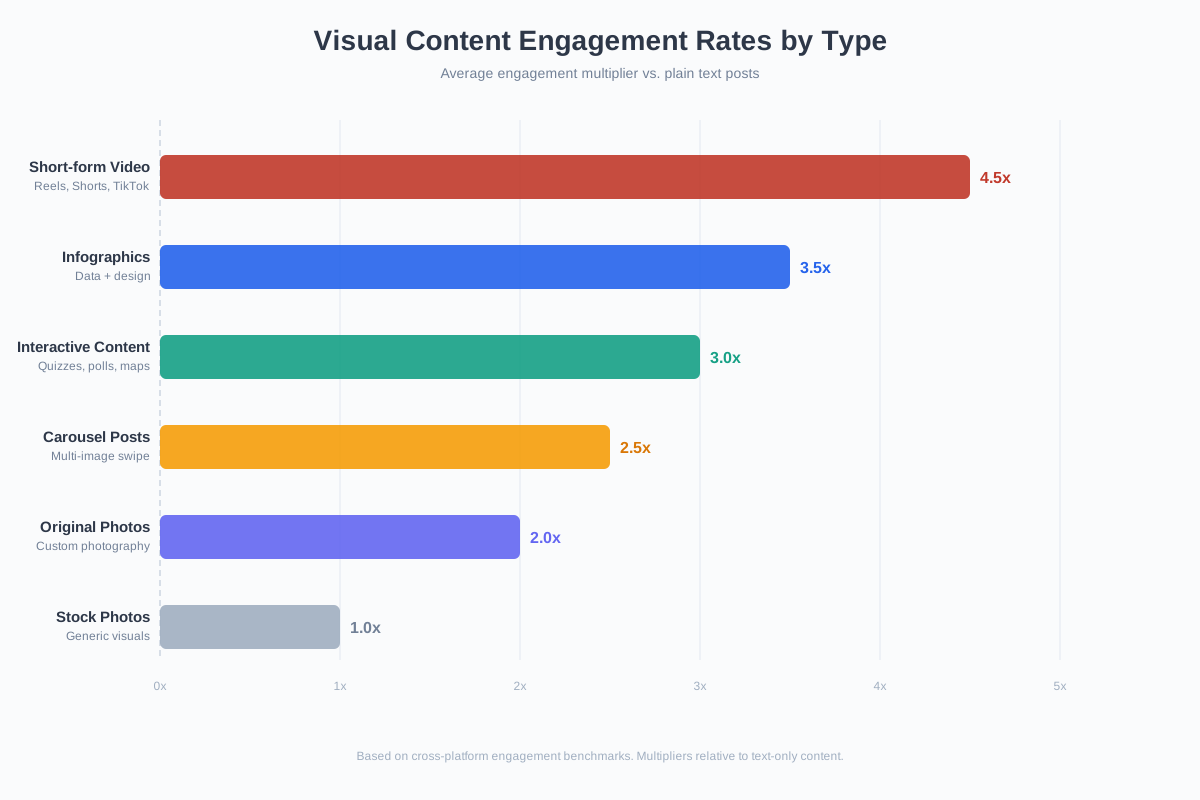
Original photos outperform stock images by a significant margin. Websites using authentic photography see 35% higher conversion rates compared to those relying on generic stock. The reason is trust. People can spot a staged stock photo instantly, and it signals “we didn’t care enough to take real pictures.”
You don’t need a professional camera. Modern smartphones (iPhone 15 Pro, Samsung Galaxy S24 Ultra, Google Pixel 8 Pro) shoot at resolutions that rival DSLRs. What matters more than equipment is consistency in lighting, composition, and brand alignment.
Types of original photos that perform best:
- Behind-the-scenes: Show your team, your workspace, your process. These humanize your brand and build connection
- Product in context: Don’t just photograph the product. Show it being used, in a real environment, by real people
- Before/after: Nothing sells a transformation better than a visual comparison. These dominate Pinterest and Instagram
- User-generated content: Repost customer photos (with permission). UGC converts 4.5% higher than brand-created content
For editing, Canva handles basic photo editing well. For more advanced work, Adobe Lightroom or Snapseed (free) gives you professional-grade controls on mobile.
2. Infographics
Infographics are shared 3x more than any other content type on social media. They compress complex data into scannable, visually appealing formats that work across every platform. A well-designed infographic can earn backlinks for years after publication.
The infographic landscape has evolved significantly. Static infographics still work, but interactive and animated infographics now drive 2-3x more engagement. AI tools have slashed production time from days to hours.
Tools for creating infographics in 2026:
- Canva: Best for beginners. Thousands of templates, drag-and-drop editor, free tier available. Pro plan at $12.99/month unlocks premium templates and brand kit
- Piktochart: Purpose-built for infographics. Better data visualization tools than Canva, with chart generators that pull from spreadsheets. Starts at $14/month
- Venngage: Strong for process infographics and timelines. Good template variety for business use cases
- AI-generated: Tools like OpenArt AI and Midjourney can create custom illustration elements. Combine these with a layout tool for unique results
Always include the full text content of your infographic as HTML on the same page. Search engines can’t read text embedded in images. The text version ensures your data gets indexed while the visual version drives shares and backlinks.
3. Short-Form Video (Reels, Shorts, TikTok)
Short-form video is the highest-ROI content format in 2026. TikTok alone has 1.5 billion monthly active users. Instagram Reels account for 30% of time spent on the platform. YouTube Shorts hit 70 billion daily views. If you’re not creating short-form video, you’re invisible to an entire generation of consumers.
The sweet spot is 30-90 seconds. Anything shorter feels incomplete. Anything longer loses the algorithmic boost these platforms give to short content. The first 3 seconds determine whether someone watches or scrolls, so lead with the hook, not your logo.
What works across platforms:
- Tutorial clips: “How to [do X] in 60 seconds” consistently outperforms other formats. Quick tips and hacks get saved and shared
- Before/after transformations: Product demos, room makeovers, design improvements. The visual contrast creates dopamine hits that keep viewers watching
- Behind-the-scenes: Showing your process (packing orders, creating a design, coding a feature) feels authentic and drives engagement
- Trending audio + your niche: Don’t fight the algorithm. Use trending sounds with your own twist. This is how small accounts go viral
Production doesn’t need to be fancy. Some of the highest-performing Reels are shot on a phone with natural lighting and edited in CapCut (free). For batch creation, tools like Descript and Canva Video let you repurpose one long-form video into dozens of clips.

4. AI-Generated Images and Graphics
AI image generation has gone from novelty to essential marketing tool in under two years. In 2026, brands are using AI-generated visuals for blog headers, social media posts, ad creatives, product mockups, and even packaging concepts. The quality from tools like Midjourney v6, DALL-E 3, and Stable Diffusion XL is now indistinguishable from professional illustration in many use cases.
The cost difference is staggering. A custom illustration from a freelance designer costs $200-$1,000+. The same concept generated by AI costs pennies and takes minutes instead of days. This doesn’t replace designers for brand-critical work, but for content marketing at scale, it’s transformative.
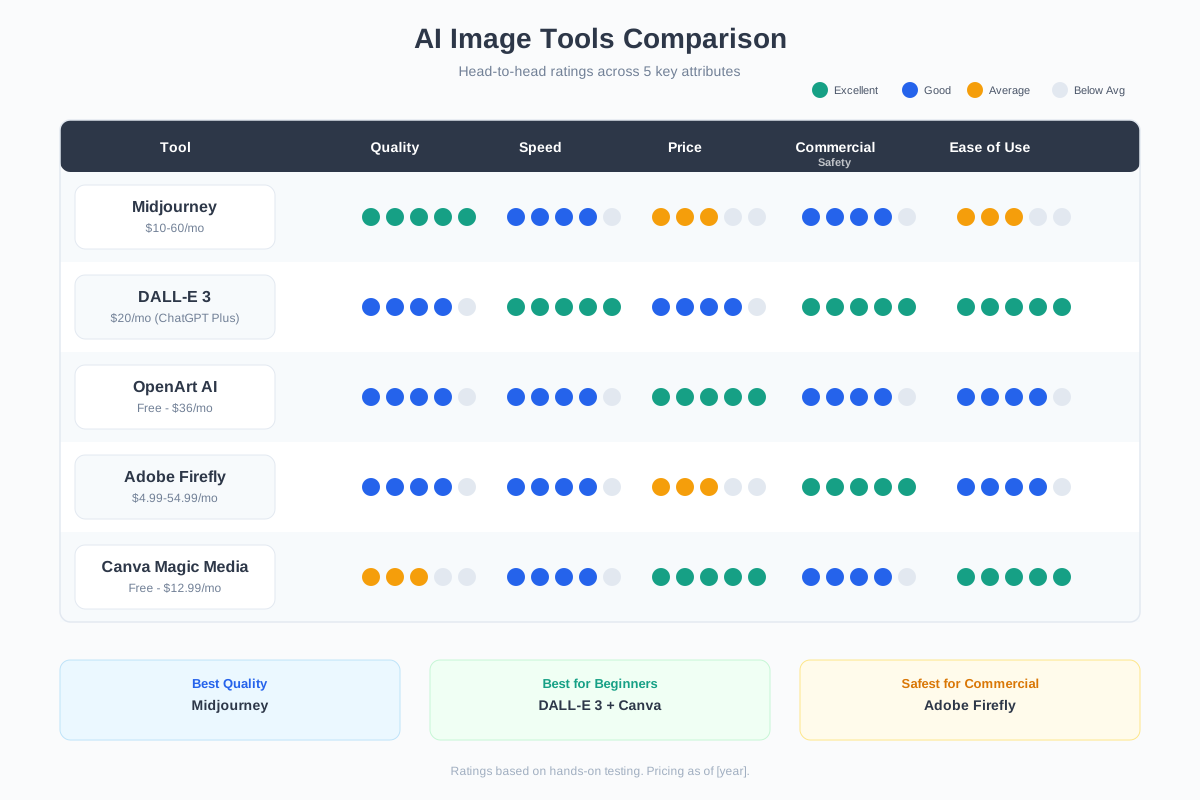
Best AI image tools by use case:
- Midjourney: Best overall quality for artistic and photorealistic images. $10/month for basic plan. Requires Discord
- DALL-E 3 (via ChatGPT): Best for text-in-image accuracy and quick iterations. Included with ChatGPT Plus ($20/month)
- OpenArt AI: Best for variety. Access to multiple AI models (Stable Diffusion, DALL-E, custom fine-tuned models) from one interface
- Canva Magic Media: Best for non-technical users. AI image generation built right into your design workflow
- Adobe Firefly: Best for commercial-safe images. Trained only on licensed content, so you won’t face copyright issues
Not all AI-generated images are safe for commercial use. Midjourney and DALL-E grant commercial rights to paid subscribers, but images generated from copyrighted prompts or that closely resemble existing works can still create legal risk. Adobe Firefly is the safest option for commercial use since it’s trained exclusively on Adobe Stock and public domain content.
5. Video Tutorials and How-To Content
“How to” is the most-searched phrase on YouTube, with over 500 million searches per month. Tutorial videos build authority faster than any other content format because they demonstrate expertise rather than just claiming it. When someone watches you solve their problem, trust is established instantly.
Tutorial videos don’t need high production value. In fact, overly polished tutorials can feel less trustworthy than authentic screen recordings or phone-shot demos. What matters is clarity, pacing, and actually solving the problem you promised to solve.
The production stack I recommend:
- Screen recording: Loom (free for 25 videos) or OBS Studio (free, unlimited). Both work on Mac and Windows
- Editing: Descript for AI-powered editing (removes filler words, generates subtitles). CapCut for quick mobile edits
- Thumbnails: Canva with YouTube thumbnail templates. Use high-contrast text and an expressive face for best click-through rates
- Hosting: YouTube for discovery. Embed on your own site for SEO. Use Wistia or Vidyard for gated content (lead gen)
The secret to tutorial videos that rank: answer one specific question per video. “How to remove background in Canva” will outperform “10 Canva tips” every time because it matches exact search intent.
6. Branded Graphics and Templates
Consistent branded graphics make your content instantly recognizable in a crowded feed. When someone sees your color palette, typography, and layout style, they should know it’s you before reading a single word. This is how brands like HubSpot, Buffer, and Later dominate social media with static posts.
The key is creating a template system, not designing each post from scratch. Build 5-10 branded templates in Canva or Adobe Express, then swap out the text and images for each new post. This cuts production time from 30 minutes per post to 5 minutes.
Types of branded graphics that perform well:
- Quote cards: Your insights, customer testimonials, or industry quotes in your brand style. These get saved and shared frequently on LinkedIn and Instagram
- Data cards: Single-stat graphics (“87% of marketers use video”). Perfect for carousel posts and Twitter/X
- Carousel posts: Multi-slide educational content. These get 3x the engagement of single-image posts on Instagram and LinkedIn
- Announcement graphics: Product launches, events, milestones. Consistent branding makes these feel professional rather than random
7. Data Visualizations and Charts
Original data visualizations are link magnets. When you turn your own research, customer data, or industry analysis into a clean chart or graph, other sites cite and link to it. This is one of the most reliable ways to earn backlinks without outreach.
The formats that work best depend on the data type:
- Bar charts: Best for comparisons (tool pricing, feature counts, performance benchmarks)
- Line charts: Best for trends over time (traffic growth, market adoption, price changes)
- Pie/donut charts: Best for composition (market share, budget allocation, audience demographics)
- Heatmaps: Best for behavioral data (click patterns, engagement zones, time-of-day activity)
- Comparison matrices: Best for multi-dimensional data (software feature comparisons, pros/cons across options)
Tools: Piktochart for presentation-ready charts, Datawrapper for interactive web charts (free), Google Sheets for quick charts you can screenshot, and Flourish for animated data stories.
Add your source, date, and website URL directly into the chart image. When people share your chart on social media or embed it in their articles, your attribution travels with it. This passive branding drives referral traffic for months.
8. Interactive Content
Interactive content generates 2x more conversions than passive content. Quizzes, calculators, interactive maps, assessments, and configurators keep visitors engaged 4-5x longer than static pages. They also collect zero-party data (information users voluntarily share), which is increasingly valuable as third-party cookies disappear.
Types of interactive content that deliver results:
- Quizzes: “Which [product type] is right for you?” quizzes segment your audience while entertaining them. Buzzfeed proved this format scales. Tools like Typeform and Interact make them easy to build
- Calculators: ROI calculators, savings calculators, pricing estimators. These provide immediate, personalized value and capture leads naturally
- Interactive infographics: Click-to-reveal data points, hover effects, animated transitions. Tools like Visme and Genially make these without coding
- 360-degree product views: Essential for e-commerce. Let customers spin, zoom, and inspect products. Reduces return rates by up to 25%
- Polls and surveys: Quick engagement drivers that also provide market research data. Native options on LinkedIn, Instagram, and Twitter/X
9. Memes and Humor-Based Content
Memes are the internet’s native language. Brands that use humor effectively build stronger emotional connections than those that play it safe with corporate polish. The catch: meme marketing has to feel natural, not forced. Nothing kills brand credibility faster than a “How do you do, fellow kids?” moment.
When memes work in marketing:
- Industry-specific humor: Jokes that only your target audience understands create in-group feeling. Marketing Twitter, developer memes, design humor. These build community
- Trend-jacking: Jumping on viral meme formats with your brand’s angle. Speed matters. A meme that’s 48 hours old is already stale
- Self-deprecating humor: Brands that can laugh at themselves (like Wendy’s on Twitter or Duolingo on TikTok) earn massive organic reach
- Comparison memes: “Expectation vs reality” or “me before/after” formats applied to your product or industry
Create memes in Canva (has meme templates), Imgflip (free, browser-based), or Kapwing (good for video memes). The key is speed. Have a simple process so you can create and post within minutes of spotting a trend.
10. Animated Graphics and GIFs
Motion catches the eye. Animated graphics and GIFs stop the scroll in a way that static images can’t. They’re especially effective for explaining processes, showing product features, and adding personality to otherwise dry content. Email marketers love them because animated emails see 26% higher click-through rates.
The best use cases for animation in marketing:
- Product feature demos: Show a feature in action with a 3-5 second loop. More effective than a paragraph of description
- Process explanations: Step 1 → Step 2 → Step 3 animated sequences make complex workflows digestible
- Loading states and micro-interactions: Small UI animations that add polish to your website and reduce perceived wait times
- Social media content: Animated posts in feeds get 15% more engagement than static images on average
- Email headers: A subtle animation in your email header increases open-to-click rates significantly
Tools: Lottie (for web animations), Canva (simple animations), After Effects (professional), or Rive (interactive animations). For GIFs specifically, GIPHY and Tenor are both creation platforms and distribution networks.
11. Custom Illustrations
Custom illustrations give your brand a visual identity that stock photos never can. Companies like Slack, Mailchimp, Dropbox, and Notion built distinctive brands partly through their unique illustration styles. When your visuals are ownable, your content becomes instantly recognizable.
In 2026, you have three paths to custom illustrations:
- Hire an illustrator: Best for brand-defining work. Expect $500-$5,000+ for a custom illustration set. Find illustrators on Dribbble, Behance, or Fiverr
- AI illustration: Midjourney and OpenArt AI can generate illustrations in consistent styles using style references. Not as unique, but 100x faster and cheaper
- Illustration libraries: Services like Shutterstock, unDraw, Humaaans, and Blush provide customizable illustrations you can adapt to your brand colors
The best approach for most businesses: use AI to generate initial concepts and mood boards, then hire an illustrator to refine the final brand assets. This gives you speed and uniqueness at a reasonable budget.
12. Presentations and Slideshows
SlideShare still drives traffic. LinkedIn carousel documents (PDF slideshows) get 2.2x more engagement than regular posts. And presentation-style content works because it’s modular. Each slide is a self-contained idea that readers can consume at their own pace.
Beyond traditional presentations, the format has expanded:
- LinkedIn carousels: Upload a PDF with 8-12 slides. Each slide has one idea, one visual, minimal text. This is currently the highest-reach organic format on LinkedIn
- Instagram carousels: Educational carousels (swipe-through lessons) get 3x the engagement of single-image posts and 1.4x the reach
- Webinar slides: Repurpose webinar presentations as standalone content. Upload to SlideShare, turn into blog posts, break into social media carousels
- AI-generated presentations: Tools like Gamma, Beautiful.ai, and Canva Magic Design generate entire presentation decks from a text prompt
For business presentations, keep slides to 6-8 words maximum. The slide supports what you’re saying. It doesn’t replace it.
13. Screenshots and Screen Recordings
Screenshots are the most underrated visual content type. They provide proof, build trust, and show rather than tell. When you’re reviewing software, explaining a process, or sharing results, a screenshot does more than a paragraph of description ever could.
Smart ways to use screenshots:
- Social proof: Screenshot customer DMs, reviews, or testimonials (with permission). These feel more authentic than designed testimonial cards
- Software tutorials: Annotated screenshots (with arrows, highlights, numbered steps) are the backbone of technical how-to content
- Results and data: Screenshot your analytics dashboards, A/B test results, or revenue reports. Numbers with visual proof carry more weight
- Competitor analysis: Screenshot competitor pricing pages, features, or UI for comparison content
Tools: CleanShot X (Mac, $29 one-time) is the gold standard for annotated screenshots. On Windows, ShareX (free) is excellent. For screen recordings, Loom is the fastest path from recording to sharing.
Before publishing screenshots, check for sensitive information: email addresses, customer names, API keys, financial data, browser tabs. Use your annotation tool’s blur feature to redact anything that shouldn’t be public. One leaked API key in a blog post screenshot can cost thousands.
14. Stock Photos and Videos
Stock content gets a bad reputation, but it still has a place in your visual toolkit. The key is using it strategically rather than lazily. Generic “business people shaking hands” images hurt your brand. Carefully selected, edited stock that matches your brand aesthetic fills gaps when original content isn’t available.
How to use stock content without looking generic:
- Apply brand filters: Run every stock image through your brand color filter in Canva or Lightroom. Consistent color grading makes stock photos feel cohesive
- Combine with overlays: Add text, icons, or graphic elements on top of stock photos to make them yours
- Use diverse, modern collections: Shutterstock, Adobe Stock, and Getty have dramatically improved diversity and authenticity in their collections
- Free alternatives: Unsplash, Pexels, and Pixabay offer high-quality free stock. Quality varies more, but the price is right
Pricing comparison for stock libraries:
| Platform | Price | Library Size | Best For |
|---|---|---|---|
| Shutterstock | $29/month (10 images) | 450M+ images | Variety and volume |
| Adobe Stock | $29.99/month (10 images) | 300M+ assets | Creative Cloud integration |
| Getty Images | From $49.99/5 images | 500M+ assets | Premium editorial content |
| Unsplash | Free | 3M+ images | Blog headers, social media |
| Pexels | Free | 3M+ photos/videos | Video and photo combo |
Building Your Visual Content Strategy
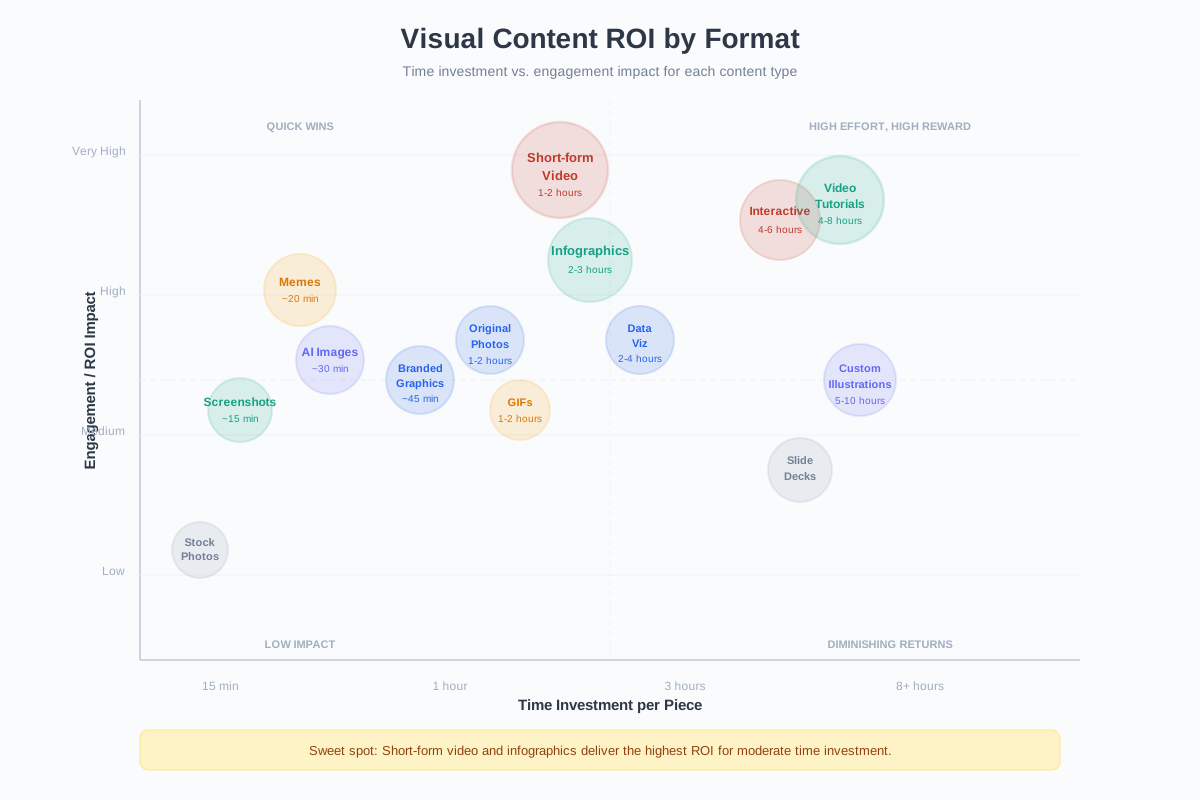
Having 14 visual content options doesn’t mean you should use all 14 at once. The most effective approach is picking 3-4 formats that match your audience, your resources, and your distribution channels, then executing consistently.
Here’s how to choose:
- If you’re B2B: Focus on infographics, data visualizations, screenshots, and LinkedIn carousels. These drive authority and backlinks
- If you’re B2C: Prioritize short-form video, branded graphics, and user-generated content. These drive engagement and sales
- If you’re resource-limited: Start with AI-generated images and branded templates in Canva. Lowest time investment, highest consistency
- If you want SEO value: Original photography, infographics with embedded text, and video tutorials with transcripts. These earn backlinks and rank in image/video search
- If you want social growth: Short-form video + memes + carousel posts. Volume and consistency beat production quality
The content marketing strategy that works is the one you can sustain. Start with two formats, master them, then add more. I’ve seen too many brands try to do everything at once and end up doing nothing well.
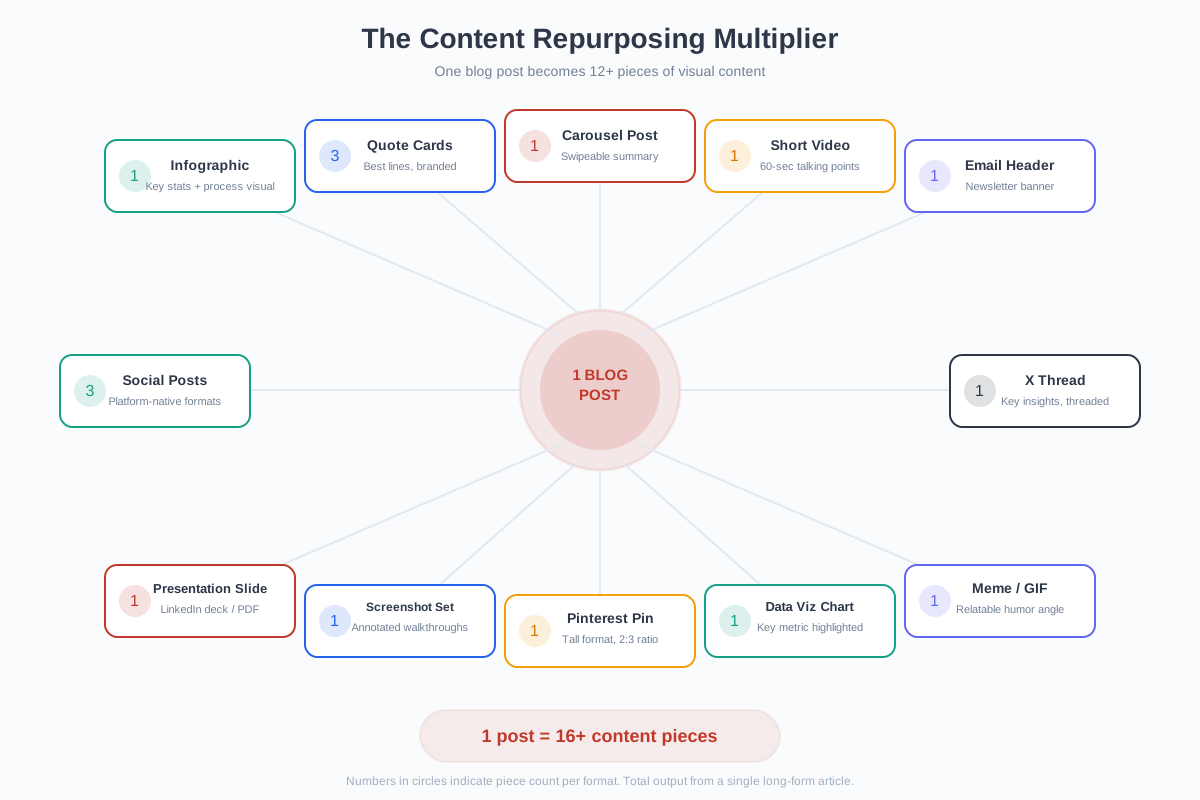
One piece of content can become 10+ visual assets. A blog post becomes an infographic, a carousel, 3 quote cards, a short-form video script, and a thread. Build your workflow around repurposing rather than creating from scratch every time. Tools like Canva and Descript make this process nearly automatic.
Track what works by measuring engagement rate (not just views), saves and shares (signals of actual value), click-through rate to your site, and time-on-page for visual-heavy content vs. text-heavy equivalents. The numbers will tell you which formats your specific audience prefers.
Visual content isn’t optional anymore. The brands that win in 2026 are the ones treating visual creation as a core competency, not an afterthought. Pick your formats, build your templates, and start creating. Your audience is already watching everyone else’s visuals. It’s time they watched yours.
Frequently Asked Questions
What is the best type of visual content for SEO?
Original infographics and data visualizations are the best for SEO because they earn backlinks naturally. Other sites reference and link to unique data. Video tutorials also rank well since YouTube is the second-largest search engine. Always include alt text on images and transcript text alongside videos for maximum search visibility.
How much does visual content creation cost?
It ranges from free to thousands per piece. Free tools like Canva, Unsplash, and CapCut let you create professional visuals at no cost. AI image generators cost $10-$20/month. Stock subscriptions run $29-$50/month. Hiring freelance designers costs $50-$500+ per piece. Most small businesses can produce great visual content for under $50/month using Canva Pro and free stock libraries.
What visual content works best on LinkedIn?
Carousel documents (PDF slideshows) and infographics get the highest engagement on LinkedIn. Carousel posts get 2.2x more engagement than regular posts. Data visualizations, comparison charts, and step-by-step process graphics also perform well because LinkedIn’s audience values educational and professional content over entertainment.
Can AI-generated images be used commercially?
Yes, most paid AI image tools grant commercial usage rights. Midjourney, DALL-E 3, and OpenArt AI all allow commercial use for paid subscribers. Adobe Firefly is the safest option since it’s trained only on licensed content. However, generating images that closely resemble copyrighted characters, brands, or specific artists’ styles can still create legal risk. Always check each platform’s terms of service.
How often should I post visual content?
Consistency matters more than frequency. For social media, 3-5 visual posts per week is a good baseline. For blog content, include 5-8 images or visuals per 2,000-word article. For video, one quality piece per week beats five rushed ones. Use a content calendar and batch-create visuals (create a week’s worth in one sitting) to maintain consistency without burnout.
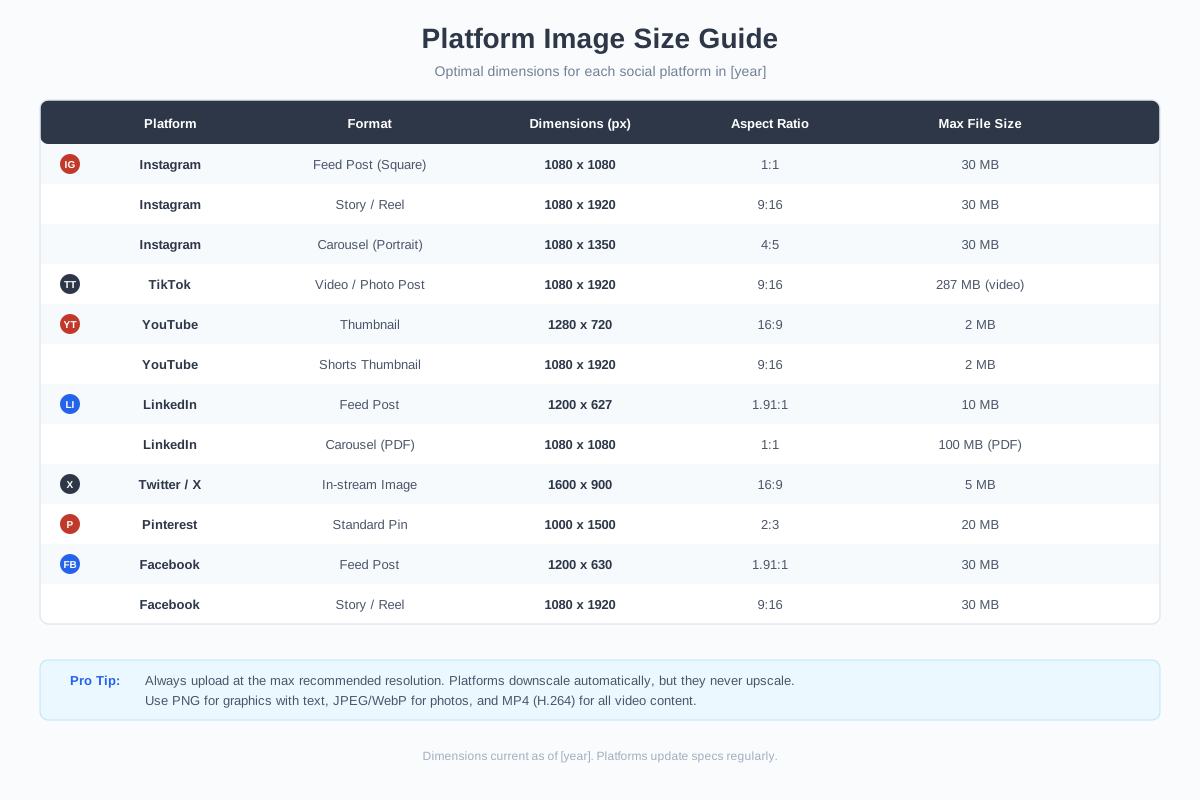
What is the ideal image size for different social media platforms?
Instagram posts: 1080x1080px (square) or 1080x1350px (portrait, recommended). Instagram Stories/Reels: 1080x1920px. Facebook posts: 1200x630px. LinkedIn posts: 1200x627px. Twitter/X posts: 1600x900px. Pinterest pins: 1000x1500px. YouTube thumbnails: 1280x720px. TikTok: 1080x1920px. Always design for mobile first since over 80% of social media use is on mobile devices.
What are the best free tools for creating visual content?
Canva Free for graphic design and presentations. CapCut for video editing. Unsplash and Pexels for stock photos. GIPHY for GIF creation. Datawrapper for interactive charts. OBS Studio for screen recording. Google Slides for presentations. Figma (free tier) for design. These cover 90% of visual content needs without spending a dollar.
Disclaimer: This site is reader-supported. If you buy through some links, I may earn a small commission at no extra cost to you. I only recommend tools I trust and would use myself. Your support helps keep gauravtiwari.org free and focused on real-world advice. Thanks. - Gaurav Tiwari