
Best Smart Light Switches and Dimmers to Buy
I’ve been swapping out dumb light switches for smart ones in my home office and living room for the past few years. And I’ll tell you what surprised me most: the biggest upgrade isn’t voice control or app scheduling. It’s walking into a room and having the lights already set to exactly the brightness you want, without touching anything.
But picking the right smart switch isn’t straightforward. Some need a neutral wire (most older homes don’t have one). Some require a hub. Some only work on 2.4GHz Wi-Fi, which trips people up when they’ve got a dual-band router. I’ve tried about a dozen different models, returned a few, and settled on the ones that actually work without headaches.
If you’re upgrading your home lighting, these are the smart light switches and dimmers I’d recommend in 2026. I’ve picked options across different budgets and use cases, from single-pole basics to multi-gang setups and Z-Wave options for serious smart home builders.

Best Smart Light Switches and Dimmers in 2026
I’ve tested and compared these switches based on installation difficulty, app quality, voice assistant support, and long-term reliability. Every pick on this list works with Alexa and Google Assistant out of the box.
- TP-Link Tapo Smart light switch
- Smart light switch Treatlife single-pole switch
- Gosund smart dimmer switch
- Kasa smart light switch HS200
- Smart light switch Treatlife dimmer light switch
- Lutron Caseta Deluxe Smart Dimmer Switch
- Milfra smart light switch 2 gang – Wi-Fi smart light
- Nexete smart Wi-Fi double light switch
- GE Enbrighten z-wave plus smart light switch
- Moesgo Wi-Fi wall push button smart light switch
TP-Link Tapo Smart light switch

- 【Easy Guided Install】Neutral wire is required, standard wall plate size. No need to understand complex switch wiring or master…
- 【Voice Control】Enjoy the hands-free convenience of controlling the lights in your home with your voice via Amazon Alexa, or…
The TP-Link Tapo S500 is my pick if you want a dead-simple smart switch that just works. The design is clean, compact, and has a small LED indicator so you can find it in the dark. It connects directly over 2.4GHz Wi-Fi, so there’s no hub to buy. Setup through the Tapo app takes about 5 minutes on Android or iOS. You get Alexa and Google Assistant support, and you can schedule lights to turn on or off at specific times. If you’re new to smart switches and don’t want to overthink it, start here.
Smart light switch Treatlife single-pole switch

- Easy and Secure Installation: Easily install Treatlife light switches with clear, step-by-step instructions. Comes with standard…
- Voice-Activated Lighting: Experience the ultimate convenience of controlling your home lights with just your voice. Our wifi…
The Treatlife 4-pack is the best value pick if you’re outfitting multiple rooms at once. Each switch comes with everything you need for installation, including wire nuts and a wall plate. I like that it works with Alexa, Google Assistant, and SmartThings, so you’re not locked into one ecosystem. The Smart Life app is decent for scheduling and remote control. Wi-Fi reception is solid even in rooms where signal tends to be weak. And yes, it works with ceiling fans too, which is a common question. If you’re on a budget and want to convert 3-4 switches in one go, this is the pack to grab.
Gosund smart dimmer switch
The Gosund smart dimmer is a solid pick if you want dimming capability without spending a lot. It comes in a 4-pack, and each switch gives you a 0% to 100% dimmable range, which is great for living rooms and bedrooms where you want mood lighting. It works with Alexa, Google Assistant, and the Gosund app. The polycarbonate build feels sturdy, and the sleek profile sits flush against the wall. One thing I appreciate is the large heat sink design, which keeps the switch cool during extended use and should help it last longer. Best for anyone who wants dimming on a budget.
Kasa smart light switch HS200

- Easy guided install: Neutral wire is required, standard wall plate size. No need to understand complex switch wiring or master vs…
- Control from anywhere: Monitor your light status. Turn electronics on and off from anywhere with your smartphone using the Kasa…
The Kasa HS200 is one of the most reliable smart switches I’ve used. TP-Link’s Kasa app is polished and lets you control lights, ceiling fans, and other hardwired fixtures from your phone wherever you are. No hub needed. It works with Alexa and Google Assistant, and the front LED indicator is a nice touch for finding the switch at night. The HS200 comes with a 2-year warranty, which tells you TP-Link stands behind it. If you want a single, well-made switch from a brand you can trust, this is it. Best for people who value reliability over flashy features.
Smart light switch Treatlife dimmer light switch

- Easy Installation: Neutral Wire is required, no hub needed, standard wall plate size, the smart switch supports up to 150W LED/CFL…
- 0% – 100% Dimming: The smart dimmer switch can smoothly adjust the brightness from 1% to 100%, it meets the atmosphere needs of…
This is Treatlife’s dimmer version, and it’s the one I’d pick for bedrooms and dining rooms where you want granular brightness control. The dimming range goes from 1% to 100%, so you can dial in exactly the mood you want. It supports up to 150W LED/CFL loads, works with Alexa and Google Assistant, and you can control it through the Smart Life or Treatlife app. The timer and countdown features are handy for bedtime routines. It’s FCC-certified with flame-retardant materials and overheat protection, so safety isn’t an afterthought. If you want dimming plus smart control in a 4-pack, this is the best deal.
Lutron Caseta Deluxe Smart Dimmer Switch
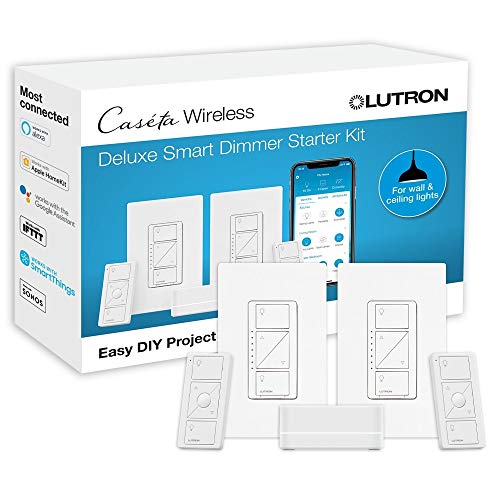
- Includes: (2) white Caseta smart dimmer switches, (2) Pico wireless remotes, (2) wall plates, and (1) Lutron Caseta Smart Hub
- PEACE OF MIND: Set lights to automatically adjust with changing seasons so your family always comes back to a well-lit home; you…
The Lutron Caseta is the pick for people who are serious about building a proper smart home. Yes, it requires a hub (included in the kit), and yes, it costs more. But the payoff is rock-solid reliability and the widest compatibility I’ve seen. It works with Apple HomeKit, Alexa, Google Assistant, Serena shades, and Sonos. The kit comes with 2 dimmer switches, 2 Pico remotes, wall plates, and the Smart Hub. The Pico remotes are a standout feature since you can mount them anywhere as a wireless secondary switch. You can schedule lights to adjust with the seasons through the Lutron app, so your home is always lit when you walk in. Best for Apple HomeKit users and anyone who wants premium reliability.
Milfra smart light switch 2 gang – Wi-Fi smart light
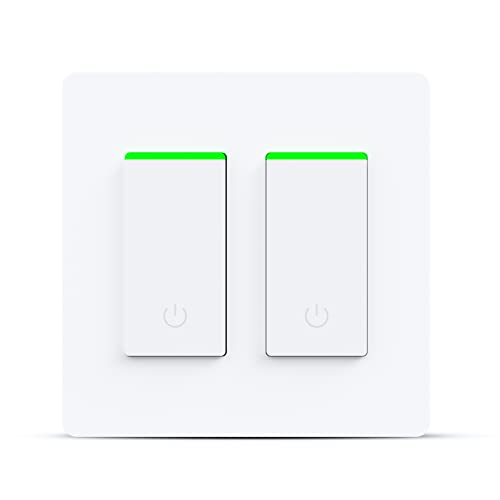
- 【Warm Tips】Single-pole application only. Neutral wire is required. Only works with 2.4 GHz Wi-Fi network. Not Support 5G….
- 【Voice Control】Milfra smart switch compatible with Amazon Alexa,Google Assistantand IFTTT,voice command to turn On/Off your…
If you’ve got a double-gang box where two switches sit side by side, the Milfra 2-gang is worth considering. It replaces both switches with a single smart unit, which looks much cleaner than jamming two separate smart switches into one box. It’s FCC and ETL certified, connects over 2.4GHz Wi-Fi, and works with Alexa, Google Assistant, and IFTTT. The Smart Life app walks you through installation step by step. One caveat: it only supports single-pole wiring and requires a neutral wire. Check your junction box before you order. Best for bathrooms, kitchens, or anywhere you’ve got two lights controlled from one location.
Nexete smart Wi-Fi double light switch
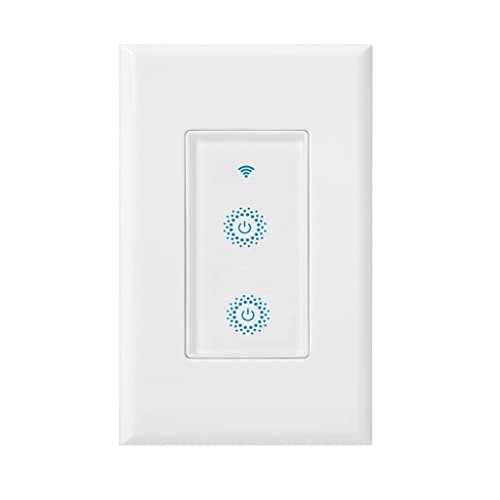
- NEW DESIGN Double Combination Switch : A double switch allows you to operate light & fan or appliances from the same location….
- VOICE CONTROL: Works with Amazon Alexa and Google Assistant for voice control.Control devices connected to the Smart Switch…
The Nexete is another double-switch option, and its strongest selling point is the 2-in-1 design that lets you control a light and a fan (or any two appliances) from the same wall plate. It works with Alexa, Google Assistant, and IFTTT, and the scheduling feature through the app is reliable. No hub required. I like the built-in safety features: overcharging protection, overheating prevention, and overload protection. It also eliminates standby power drain, which is a small but nice energy-saving touch. Best for rooms where you control a light and a ceiling fan from the same switch box.
GE Enbrighten z-wave plus smart light switch
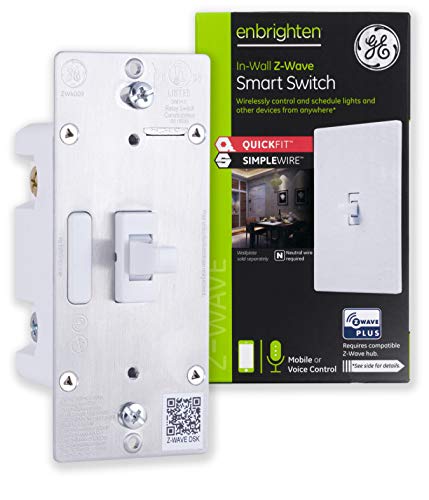
- Revolutionary design – QuickFit and SimpleWire technologies offer groundbreaking home automation features. Unique advancements…
- QuickFit – Improved components reduced the housing depth by up to 20% compared to previous Z-Wave models and eliminated the need…
This one’s for the Z-Wave crowd. If you’ve already got a SmartThings, Hubitat, or similar Z-Wave hub, the GE Enbrighten is the switch I’d recommend. The QuickFit design is 20% smaller than older Z-Wave models, which matters when your junction box is already cramped with wires. SimpleWire technology means you can install it without a traveler wire in 3-way setups, which saves a lot of hassle. It doubles as a Z-Wave repeater, extending your mesh network’s range with every switch you add. It responds fast to voice commands through your hub’s Alexa or Google integration. Best for homes already invested in a Z-Wave smart home ecosystem.
Moesgo Wi-Fi wall push button smart light switch

- 【Attention】Neutral wire required/ Only support 2.4GHz WiFi/ Install without power/This switch is considered a conventional…
- 【A New Idea For 3 Way Control】: Not only as single pole, but also can multi-control. Multiple switches control 1 light.
The MoesGo 4-gang is the most versatile switch on this list. Its standout feature is multi-control: you can link multiple MoesGo switches through the Smart Life/Tuya app so that two or more switches control the same light. That’s a software-based 3-way setup without running extra wiring. It works with Alexa and Google Home, and you can pair it via Wi-Fi or Bluetooth. The push-button design feels like a regular switch, so guests won’t be confused by it. Scheduling and countdown timers work through the app. It comes with a 2-year warranty and a 2-month refund guarantee. Best for hallways, staircases, or any room where you want multiple switches controlling the same light without rewiring.
Conclusion
I’ve narrowed this down to 10 smart light switches that cover most situations you’ll run into. For a straightforward single switch, the TP-Link Tapo or Kasa HS200 won’t disappoint. If you want dimming, the Treatlife dimmer 4-pack gives you the best price per switch. And if you’re building a full smart home on Z-Wave, the GE Enbrighten is the one to get.
One thing that’s true across all of these: installation is easier than you’d expect. Every switch on this list comes with a companion app that walks you through the wiring step by step. You don’t need to be an electrician. Just make sure you have a neutral wire in your junction box before you order (most homes built after 2000 do).
Pick the one that fits your setup, install it in 15-20 minutes, and you’ll wonder why you waited so long to make the switch.
Frequently Asked Questions
What should I look for when buying smart light switches?
First, check if your junction box has a neutral wire. Most smart switches need one, and if you don’t have it, your options shrink fast. After that, think about what voice assistant you use (Alexa, Google, or Siri/HomeKit) and make sure the switch supports it. I’d also check whether it needs a hub or connects directly over Wi-Fi. For most people, a no-hub Wi-Fi switch is the easiest starting point.
Are expensive smart light switches worth the premium price?
It depends on what you’re building. If you just want to control a couple of lights from your phone, a $15-20 switch like the Treatlife or Tapo works great. But if you’re setting up a whole-home system with 15+ switches, investing in something like the Lutron Caseta pays off with better reliability and a dedicated hub that won’t slow down your Wi-Fi network. I’ve seen cheap switches drop off Wi-Fi when you have too many on one network.
How often should I replace or upgrade smart light switches?
Most smart switches last 5-10 years without issues. The electronics are simple and there aren’t many moving parts. You’d typically upgrade when the manufacturer stops supporting the app, when you switch smart home ecosystems (say, from Google to Apple), or when newer switches offer features like energy monitoring or Matter support that you actually want.
Can I find good smart light switches on a tight budget?
Yes, and you don’t have to sacrifice much. The Treatlife 4-pack gives you solid smart switches for about $5-7 per switch when bought in bulk. Amazon Prime Day and Black Friday are the best times to stock up. I’d avoid no-name brands under $5 per switch though. At that price, you’re likely getting poor Wi-Fi connectivity and apps that stop getting updates within a year.
Where is the best place to buy smart light switches?
Amazon is my go-to because of easy returns. Smart switches are one of those products where compatibility with your specific wiring matters, and being able to return a switch that doesn’t work in your setup is important. Home Depot and Lowe’s carry the bigger brands like Lutron and GE if you want to see them in person before buying. Buying directly from manufacturer websites sometimes gets you bundle discounts, but return policies tend to be stricter.
What warranty should I expect with smart light switches?
Most budget switches come with a 1-year warranty. Brands like TP-Link (Kasa/Tapo) and MoesGo offer 2 years, which is solid. Lutron gives you an industry-leading warranty on their Caseta line. I’d always register your product after purchase since some manufacturers require it to honor the warranty. And keep your Amazon order confirmation as proof of purchase. It’s saved me a couple of times.