
To track link clicks in GA4 reliably, stop counting them in the browser. This integration sends a Measurement Protocol event from the server during each GT Link Manager redirect, which means ad blockers, disabled JavaScript, and bounced visitors can’t create gaps in your click data. Every redirect becomes a custom event in your GA4 property.
Requirements
- GT Link Manager 1.5+ installed and active
- A Google Analytics 4 property with a web data stream
- A Measurement Protocol API secret (Admin > Data Streams > your stream > Measurement Protocol API secrets)
- Your GA4 Measurement ID (starts with
G-)
Installation
- Add the snippet below to your theme’s
functions.phpor a site-specific plugin - Replace
G-XXXXXXXXXXwith your GA4 Measurement ID - Replace
your_api_secret_herewith your Measurement Protocol API secret
The Code
<?php
/**
 * GT Link Manager - Google Analytics 4 (GA4) Integration
 *
 * Tracks every redirect click as a GA4 event via the Measurement Protocol.
 * Server-side — works even when users have ad blockers or JS disabled.
 *
 * Setup:
 * 1. Get your GA4 Measurement ID (G-XXXXXXXXXX) from Admin > Data Streams
 * 2. Create a Measurement Protocol API Secret from Admin > Data Streams > your stream > Measurement Protocol API secrets
 * 3. Update the constants below with your credentials
 *
 * Event name: "link_click"
 * Event params: link_name, link_slug, target_url, redirect_type, category, referrer
 *
 * @see https://developers.google.com/analytics/devguides/collection/protocol/ga4
 */

defined( 'ABSPATH' ) || exit;

// ── Configuration ────────────────────────────────────────────────────────────
define( 'GTLM_GA4_MEASUREMENT_ID', 'G-XXXXXXXXXX' );       // Your GA4 Measurement ID
define( 'GTLM_GA4_API_SECRET',     'your_api_secret_here' ); // Measurement Protocol API secret
// ─────────────────────────────────────────────────────────────────────────────

add_action( 'gtlm_before_redirect', 'gtlm_ga4_track_click', 10, 4 );

/**
 * Send a GA4 event via Measurement Protocol when a redirect fires.
 *
 * @param array  $link       Link data from the database.
 * @param string $target_url Final destination URL.
 * @param int    $status     HTTP redirect status code.
 * @param array  $headers    Response headers being sent.
 */
function gtlm_ga4_track_click( array $link, string $target_url, int $status, array $headers ): void {

	if ( GTLM_GA4_MEASUREMENT_ID === 'G-XXXXXXXXXX' || GTLM_GA4_API_SECRET === 'your_api_secret_here' ) {
		return; // Not configured yet.
	}

	// Generate or reuse a client ID from a cookie to maintain session continuity.
	$client_id = gtlm_ga4_get_client_id();

	$payload = [
		'client_id' => $client_id,
		'events'    => [
			[
				'name'   => 'link_click',
				'params' => [
					'link_id'       => (int) $link['id'],
					'link_name'     => mb_substr( $link['name'] ?? '', 0, 100 ),
					'link_slug'     => $link['slug'] ?? '',
					'target_url'    => mb_substr( $target_url, 0, 500 ),
					'redirect_type' => $status,
					'category_id'   => (int) ( $link['category_id'] ?? 0 ),
					'referrer'      => mb_substr( $_SERVER['HTTP_REFERER'] ?? '(direct)', 0, 500 ),
					'user_agent'    => mb_substr( $_SERVER['HTTP_USER_AGENT'] ?? '', 0, 200 ),
				],
			],
		],
	];

	$url = add_query_arg(
		[
			'measurement_id' => GTLM_GA4_MEASUREMENT_ID,
			'api_secret'     => GTLM_GA4_API_SECRET,
		],
		'https://www.google-analytics.com/mp/collect'
	);

	wp_remote_post(
		$url,
		[
			'body'     => wp_json_encode( $payload ),
			'headers'  => [ 'Content-Type' => 'application/json' ],
			'blocking' => false, // Non-blocking — don't delay the redirect.
			'timeout'  => 1,
		]
	);
}

/**
 * Get or create a GA4 client ID from the _ga cookie.
 *
 * Falls back to a random UUID if cookie is not present (server-side only sessions).
 *
 * @return string Client ID in GA4 format.
 */
function gtlm_ga4_get_client_id(): string {

	// Try to extract from the _ga cookie set by gtag.js / GA4 client-side.
	if ( ! empty( $_COOKIE['_ga'] ) ) {
		$parts = explode( '.', sanitize_text_field( $_COOKIE['_ga'] ) );
		if ( count( $parts ) >= 4 ) {
			return $parts[2] . '.' . $parts[3];
		}
	}

	// Fallback: generate a random client ID for server-side only tracking.
	return wp_generate_uuid4();
}
How It Works
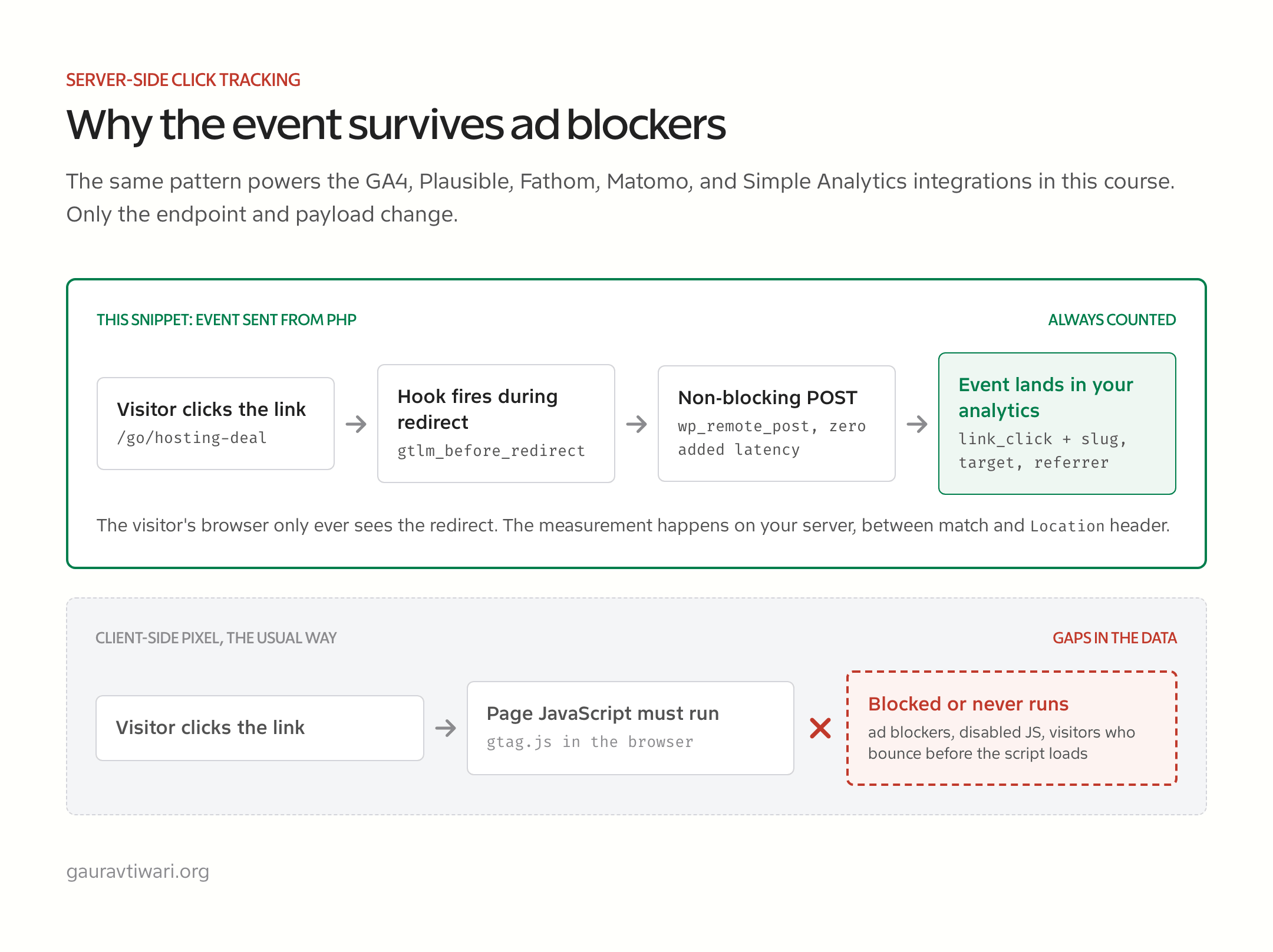
- Hooks into
gtlm_before_redirectwhich fires just before every redirect - Sends a non-blocking
wp_remote_postto the GA4 Measurement Protocol endpoint - Uses the
_gacookie (if present) to maintain session continuity with client-side GA4 - Falls back to a random UUID for server-side-only sessions
- Tracks: link name, slug, target URL, redirect type, category, referrer, and user agent
Configuration Notes
The event appears in GA4 as link_click. To see it in reports, go to Reports > Engagement > Events. You can also create custom dimensions from the event parameters (link_name, link_slug, etc.) under Admin > Custom definitions.
The request is non-blocking ('blocking' => false) so it adds zero latency to the redirect.
If GA4 feels heavier than your needs, the Plausible integration is the lighter route, and my Independent Analytics review covers a WordPress-native alternative entirely.