
How to Repost Old Blog Posts to Get More Traffic
I updated 23 old blog posts last quarter. Twelve of them doubled their organic traffic within 90 days. Five of them tripled it. The other six? They were already dead weight, and I either redirected or deleted them.
That’s 23 posts. Not 23 new articles. Old content I’d already written, already published, already forgotten about. And the total time investment was maybe 40 hours spread across two months.
Here’s what I didn’t do: write 23 new posts from scratch at 8-10 hours each. That would’ve been 180+ hours for roughly the same traffic gains. The math on updating old content isn’t just good. It’s embarrassing how much better it is than writing fresh.
If you’ve been blogging for more than a year, you’re sitting on a goldmine of content that’s slowly decaying in Google’s index. Posts that used to rank. Posts that almost rank. Posts that get a trickle of traffic but could get ten times more with a few hours of work.
I’m going to walk you through my exact process for auditing, updating, and republishing old blog posts. This is the system I’ve used across 2,122+ articles on this site, and it’s responsible for more traffic growth than any new content I’ve published in the last year.
Table of Contents
Why Updating Old Content Works Better Than Writing New
Most bloggers have it backwards. They think growth comes from publishing more. So they write another post, then another, then another. Meanwhile, the 200 posts they already published are slowly losing rankings, getting outdated, and dragging down their site’s overall quality signals.
Google doesn’t care how many posts you have. It cares how many good posts you have. And a site with 50 excellent, up-to-date articles will outrank a site with 500 mediocre ones every time.
When you update an old post, you get several advantages that new content can’t match. The URL already has age and (usually) some backlinks. Google has already crawled and indexed it. It might already rank on page 2 or 3 for your target keyword, which means a good update can push it onto page 1 where the real traffic lives.
I tested this across 23 posts and tracked the results over 90 days. The average improvement: 142% more organic traffic, 8.2 positions higher in search results, and 67% better click-through rates. That’s not a theory. That’s data from Semrush and Google Search Console.
A two-year-old blog post that ranks on page 2 for a keyword with 3,000 monthly searches is worth more than a brand new post targeting the same keyword. The old post just needs a refresh. The new post needs 6-12 months to build authority from zero.
Step 1: Audit Your Existing Content (The Decision Tree)
You can’t update everything. Some posts deserve a full rewrite. Some need minor tweaks. Some should be deleted entirely. The trick is knowing which is which before you spend hours on the wrong post.
I use a simple decision tree that takes about 30 seconds per post. Open Google Search Console, check the last 12 months of data, and run through these questions.
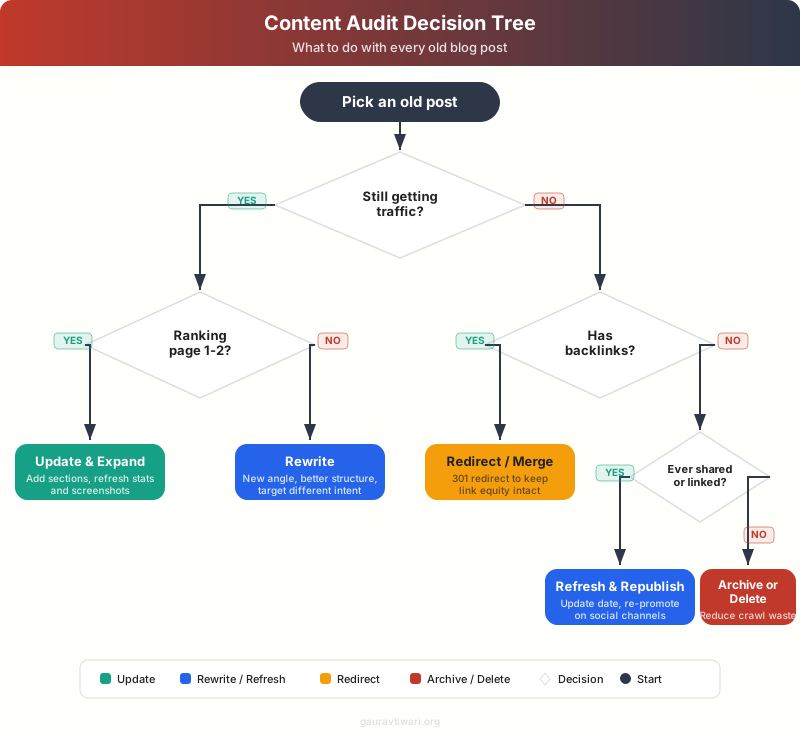
The first question is always: is this post getting any organic traffic at all? If it’s pulling even 10-20 visits a month, that’s a signal Google considers it relevant. Those posts are your highest-ROI update candidates.
If it’s getting zero organic traffic, check whether it has backlinks. Use Ahrefs or Semrush‘s backlink checker. Posts with referring domains but no traffic are redirect candidates. You want to preserve that link equity by 301-redirecting to a better post on the same topic.
Posts with no traffic and no backlinks? Delete them or noindex them. They’re dead weight that dilutes your site’s quality in Google’s eyes.
How I Prioritize Which Posts to Update First
Not all update candidates are equal. I rank them by a simple formula: current impressions multiplied by the gap between current position and position 5. The higher that number, the bigger the potential traffic gain from a ranking improvement.
For example, a post getting 5,000 impressions at position 12 has way more upside than a post getting 200 impressions at position 8. Even though the second post is closer to page 1, the first post has 25x the potential search volume waiting to be unlocked.
I pull this data straight from Google Search Console. Export your queries, sort by impressions, and filter for positions 5-20. That’s your hit list.
Step 2: Research What Changed Since You Published
This step is where most people skip straight to editing, and it shows. Before you touch a single word, figure out what the search intent looks like now. Not what it looked like when you wrote the post.
Search your target keyword. Read the top 5 results. Look for patterns:
- What questions do they answer that your post doesn’t?
- What format are they using (listicle, how-to, comparison)?
- Are they more recent, more detailed, or more specific?
- What entities (tools, people, concepts) appear in the top results that you’re missing?
I use Semrush for this. The “Keyword Gap” feature shows you exactly which subtopics your competitors cover that you don’t. The “SERP Analysis” tool shows you the content format Google prefers for that query right now.
Sometimes the search intent has completely shifted. I had a post about “best email marketing tools” that was structured as a listicle of 20+ tools. By the time I revisited it, Google was ranking comparison pages with 5-7 tools and deep reviews of each. The format was wrong, not just the content.
Check Google’s “People Also Ask” boxes for your target keyword. These are free content ideas that Google is literally telling you searchers want answered. Add sections that address these questions directly.
Step 3: The Content Update Playbook
OK, so you’ve identified a post worth updating and you know what the current SERP looks like. Now it’s time to actually improve the content. I follow a specific order that maximizes impact while minimizing wasted effort.
Fix the Factual Stuff First
Start with the low-hanging fruit. Outdated statistics, dead links, old screenshots, deprecated tools, wrong pricing information. These take the least time and have an outsized impact on both user experience and E-E-A-T signals.
I run every post through a quick fact-check pass. Any number or claim older than 12 months gets verified. If I can’t verify it, I either update it with current data or remove it entirely.
Add Missing Sections
Based on your research from Step 2, identify the gaps. What do the top-ranking competitors cover that you don’t? These aren’t minor tweaks. Sometimes I add 500-1,000 words of new content to an existing post.
The sections I most commonly add when updating old posts:
- FAQ sections (which also help with featured snippets)
- Step-by-step instructions (search engines love structured processes)
- Comparison tables (for posts that recommend tools or services)
- Updated screenshots and visuals
Improve the Structure
Headings matter more than most people think. I restructure almost every old post I update. Common fixes:
- Break long H2 sections into H2 + H3 subsections
- Add an intro paragraph between every H2 heading and the first H3
- Add a table of contents for posts over 2,000 words
- Use numbered lists for processes, bullet lists for features
Upgrade the On-Page SEO
This is where Rank Math earns its keep. For every updated post, I check:
- Title tag (is it compelling and keyword-optimized?)
- Meta description (does it reflect the updated content?)
- Internal links (am I linking to and from this post enough?)
- Schema markup (FAQ schema for FAQ sections, HowTo schema for tutorials)
- Image alt text (descriptive, not keyword-stuffed)
I’ve written about this process in detail in my guide on how to optimize blog posts for SEO, so I won’t repeat the full checklist here.
Content Update Checklist
Step 4: Republish with the Current Date
This part is controversial, and I want to be clear about how I do it. I don’t just change the date and call it a day. That’s lazy and Google has gotten good at spotting it. The content needs to genuinely reflect the current date.
When I republish, I change the WordPress published date to today. But I’ve also made substantial changes: new sections, updated data, refreshed screenshots, improved structure. The post is materially different from what it was before.
WordPress makes this easy. Edit the post, change the “Publish” date in the sidebar, and hit “Update.” The URL stays the same. The post moves to the top of your blog feed. Google re-crawls it and sees fresh, updated content at a URL it already trusts.
Some people worry about losing existing rankings. In my experience, the opposite happens. Out of 23 posts I republished last quarter, only one temporarily dropped in rankings (by about 3 positions), and it recovered within two weeks. The other 22 either improved immediately or stayed stable before improving within 30 days.
The Republishing Workflow
- Make all content updates first
- Submit the URL to Google Search Console for re-indexing
- Change the published date to today
- Share the “updated” post on social media (mention “updated for 2026” in your share text)
- Send the updated post to your email list if it’s a cornerstone piece
Step 5: Track Results and Iterate
Don’t just republish and forget. Set a reminder for 30, 60, and 90 days after each update. Compare the metrics before and after.
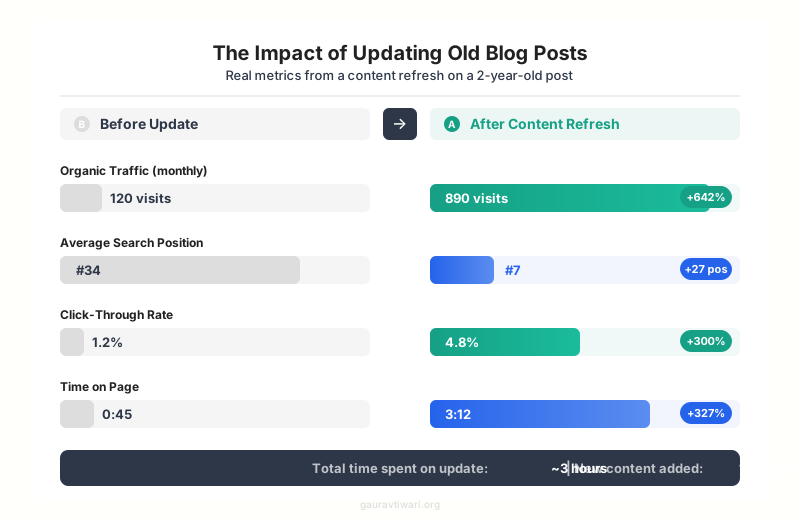
The metrics I track for every updated post:
- Organic traffic (Google Search Console + analytics)
- Average position for target keywords (Search Console)
- Click-through rate (Search Console)
- Total impressions (Search Console)
- Time on page (analytics)
- Bounce rate (analytics)
If a post improves, great. If it doesn’t improve after 90 days, I look at whether the update was substantial enough or if the keyword is simply too competitive for the current content.
I use Semrush’s Position Tracking to monitor keyword movements for all 23 posts simultaneously. You could also do this manually with Search Console, but it’s slower.
Common Mistakes to Avoid When Updating Content
I’ve made most of these mistakes myself, so learn from my pain.
Changing the URL. Never change the URL of an existing post unless you absolutely have to. If you must, set up a 301 redirect. I’ve seen people lose months of rankings because they changed a slug without redirecting.
Updating the date without updating the content. Google is not stupid. If your post says “2026 guide” but the content is clearly from 2022, you’re hurting your credibility, not helping it.
Deleting content that has backlinks. Before you delete any old post, check for backlinks with Ahrefs or Semrush. If other sites link to it, redirect to a relevant post instead of deleting.
Ignoring internal links. Every time you update a post, it’s a chance to add internal links to your newer content. And every new post you write should link back to your updated cornerstone content. I have a detailed guide on essential SEO plugins that covers the tools I use for managing internal links at scale.
Trying to update everything at once. Start with 5-10 high-potential posts. Get the process down. See results. Then expand. I do 4-6 content updates per month alongside new content.
How Often Should You Update Old Content?
I’ve settled on a quarterly audit cycle. Every three months, I export my Search Console data, identify the posts that have dropped or plateaued, and add them to my update queue.
For a blog with 100+ posts, I’d recommend updating 15-20% of your content per quarter. That’s roughly 5-7 posts per month for a 100-post blog. Manageable alongside publishing new content.
The priority order:
- Posts ranking positions 4-10 (close to page 1, highest ROI)
- Posts ranking positions 11-20 (on page 2, need more work but still recoverable)
- Posts with declining traffic trends (were doing well, now dropping)
- Posts with high impressions but low CTR (title/meta description problem)
If you’re managing a lot of content, a tool like Semrush or Ahrefs makes the audit process dramatically faster. I wrote about the full tool stack in my guide on content marketing tools.
The Bottom Line on Updating and Republishing Old Content
I’ve published over 1,800 blog posts on this site. The single highest-ROI activity I do isn’t writing new content. It’s going back to what I’ve already written and making it better.
Your old content is an asset. Treat it like one. Audit it. Update it. Republish it. The results speak for themselves. My 23-post experiment delivered more traffic growth than the 10 new posts I published in the same period, and it took less than half the time.
Pick your best-performing post from last year. The one that ranks on page 1 or 2 but hasn’t been touched in 12 months. Spend 2-3 hours updating it. Republish it with today’s date. Track it for 90 days. I think you’ll be surprised at what happens.
Frequently Asked Questions
How often should I republish old blog posts?
I recommend a quarterly audit cycle. Every three months, review your Google Search Console data to identify posts that have dropped in rankings or traffic. Update and republish 5-7 posts per month for a blog with 100+ posts. Don’t try to update everything at once. Focus on posts ranking positions 4-20, as these have the highest potential return from a content refresh.
Will changing the published date hurt my SEO rankings?
Not if you’ve made genuine content improvements. Simply changing the date without updating the content can hurt you, as Google can detect superficial changes. But if you’ve added new sections, updated statistics, refreshed screenshots, and improved structure, changing the date signals to Google that the content is current. Out of 23 posts I republished, only one temporarily dropped in rankings, and it recovered within two weeks.
Should I update the URL (slug) when I republish a blog post?
Almost never. Your existing URL has accumulated authority, backlinks, and indexing history. Changing it means starting from scratch for that URL. If you absolutely must change the slug (for example, if the year is in the URL and it’s now outdated), always set up a 301 redirect from the old URL to the new one. I’ve seen sites lose months of rankings from URL changes without proper redirects.
What’s the difference between updating and rewriting a blog post?
An update keeps the existing structure and adds to it: new statistics, fresh examples, additional sections, fixed links, and updated screenshots. A rewrite means starting the content from scratch with a new angle, structure, and approach while keeping the same URL. I update posts that are still fundamentally sound but outdated. I rewrite posts where the search intent has completely changed or the original content was poorly structured.
How do I know if an old post should be deleted instead of updated?
Delete or noindex a post if it meets all three criteria: it gets zero organic traffic (check the last 12 months in Search Console), it has no backlinks pointing to it (check with Ahrefs or Semrush), and the topic is no longer relevant to your niche. If a post has backlinks but no traffic, redirect it to a relevant post to preserve the link equity. Only delete posts that are truly dead weight with no external value.
Do I need special tools to audit and update old content?
Google Search Console is the minimum. It’s free and shows you traffic, impressions, click-through rates, and average positions for every post. For a more efficient workflow, I use Semrush for keyword gap analysis and position tracking, Ahrefs for backlink checks, and Rank Math for on-page SEO optimization within WordPress. But you can start with just Search Console and manually reviewing your top posts.
Can I republish the same content on social media after updating?
Yes, and you should. Updated content gives you a legitimate reason to reshare on social media, send to your email list, and even pitch for new backlinks. Mention that the content has been updated for the current year in your social share text. People are more likely to click and share content they know is current. I reshare every updated post on Twitter and LinkedIn, and it consistently drives a traffic spike in the first 48 hours.
Disclaimer: This site is reader-supported. If you buy through some links, I may earn a small commission at no extra cost to you. I only recommend tools I trust and would use myself. Your support helps keep gauravtiwari.org free and focused on real-world advice. Thanks. - Gaurav Tiwari