
Open any mathematics textbook published in the last forty years. Look at the equations. Notice how the fractions sit at exactly the right height, how the integral signs curve gracefully, how the subscripts and superscripts never collide. That consistent, elegant typesetting is almost certainly the work of TeX and its modern descendant, LaTeX.
What Is LaTeX?
LaTeX (pronounced “LAH-tek” or “LAY-tek,” never “lay-teks”) is a document preparation system. You write plain text with markup commands, and a compiler transforms it into a beautifully typeset PDF.
The workflow looks like this:
- Write your content in a
.texfile using any text editor. - Run the LaTeX compiler (
xelatex,pdflatex, orlualatex). - The compiler produces a PDF with professional typography.
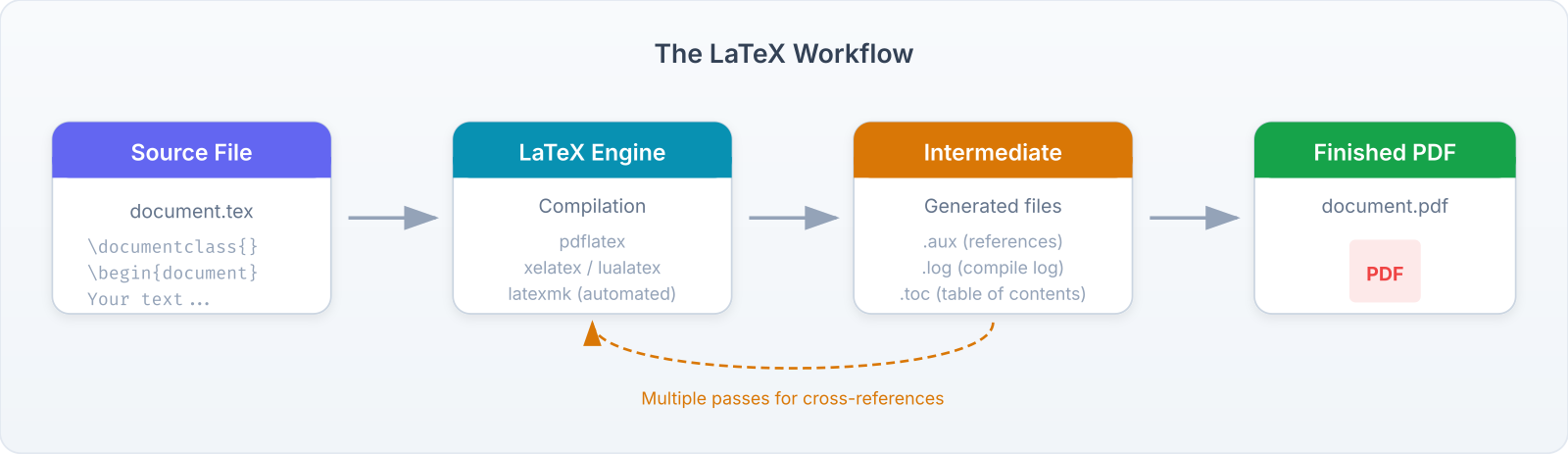
This is fundamentally different from word processors like Microsoft Word or Google Docs, where you see the formatted output as you type (called WYSIWYG: What You See Is What You Get). LaTeX separates content from presentation. You focus on what you’re saying; the system handles how it looks.
The TeX Ecosystem
Understanding the terminology helps:
TeX — The typesetting engine created by Donald Knuth in 1978. It handles the low-level placement of characters on a page. You rarely interact with it directly.
LaTeX — A set of macros built on top of TeX by Leslie Lamport in 1984. It provides the \documentclass, \section, \begin{equation} commands you’ll use daily.
Packages — Extensions that add functionality: amsmath for advanced math, graphicx for images, hyperref for clickable links. There are thousands on CTAN (the Comprehensive TeX Archive Network).
Distributions — Bundled installations that include the engine, LaTeX, and packages. The major ones are TeX Live (cross-platform), MiKTeX (Windows), and MacTeX (macOS).
Engines — Different compilers with different capabilities: pdflatex (the classic), xelatex (Unicode and system fonts), and lualatex (programmable with Lua). This book uses xelatex.
Tip: If someone says “I wrote this in LaTeX,” they mean they used the LaTeX macro package compiled by one of the engines above. The distinction between TeX, LaTeX, and the engine rarely matters in daily use.
LaTeX vs. Word Processors
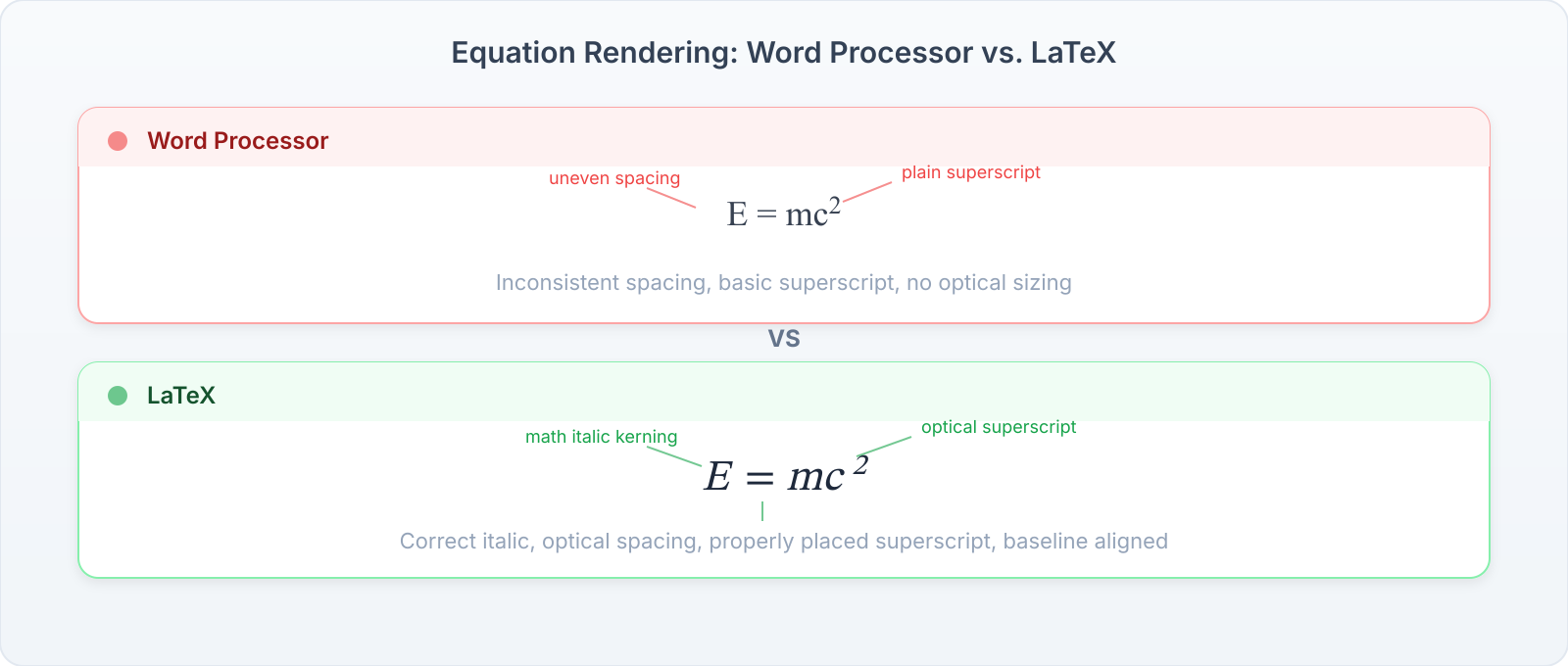
The question isn’t which is “better.” It’s which is better for your task.
Where LaTeX Wins
- Mathematics. This is the killer feature. LaTeX handles equations that would be painful or impossible in a word processor. Try typesetting a multi-line aligned derivation with cross-references in Word. Then try it in LaTeX.
- Consistency. Numbering, cross-references, citations, and formatting are automatic. Change a section title, and every reference updates.
- Typography. Kerning, ligatures, hyphenation, and micro-typography are handled by algorithms refined over four decades. The output simply looks better.
- Large documents. A 300-page thesis with hundreds of equations, figures, and citations is routine for LaTeX. Word processors start to struggle.
- Version control. Since
.texfiles are plain text, you can track changes with Git, diff between versions, and collaborate without binary file conflicts. - Longevity. A
.texfile from 1990 still compiles today. Try opening a Word 95 document in modern Word.
Where Word Processors Win
- Collaboration. Real-time editing with comments and suggestions. Google Docs excels here. (Overleaf brings some of this to LaTeX, but it’s not as seamless.)
- Quick documents. A one-page letter, a meeting agenda, a simple report. LaTeX is overkill.
- Track changes. Built-in review workflows with accept/reject. LaTeX relies on external tools or
latexdiff. - Non-technical collaborators. If your co-author can’t handle a text editor, you’ll spend more time teaching than writing.
- WYSIWYG editing. Sometimes you need to see the layout as you work. Page-precise design (like a poster or flyer) is easier in design tools.
Important: The practical rule: If your document has more than a handful of equations, or if you’re writing a thesis, research paper, or technical book, use LaTeX. For everything else, use whatever your collaborators prefer.
When Students Need LaTeX
You’ll encounter LaTeX in several common scenarios:
- Homework submissions. Many STEM professors require or strongly prefer typeset homework. Some provide LaTeX templates.
- Theses and dissertations. Most universities have official LaTeX templates. Using one saves you from formatting nightmares during the most stressful part of your degree.
- Research papers. Journals in mathematics, physics, computer science, and engineering typically accept (or require) LaTeX submissions. arXiv only accepts LaTeX.
- Presentations. The
beamerclass creates PDF slides with the same typographic quality as your documents. Equations look identical in your paper and your talk. - Course notes. Some students take live lecture notes in LaTeX. It’s fast once you’re fluent, and the output is immediately readable.
Real Examples
Every book at https://gauravtiwari.org/shop/ was typeset with LaTeX using the same tools this book teaches. Here’s what’s possible:
- A Trip to Mathematics: From Logic to Equations — a 200-page book covering logic, set theory, and algebra. Uses
amsmath,tcolorbox, and custom theorem environments. - Foundations of Analysis — dense mathematical content with hundreds of equations, all cross-referenced and indexed.
- The Raman Effect — a physics book with diagrams, tables, and spectroscopic notation.
All three use STIX Two fonts, the ramanujanblue color scheme, and the tcolorbox environments you’ll learn in this book. The consistency across books comes from sharing a common preamble — a technique we’ll cover in the Document Structure chapter.
Browse the bookshop for live examples
What You’ll Learn
By the end of this book, you’ll be able to:
- Install LaTeX and set up a productive editing environment.
- Write documents with professional structure: chapters, sections, cross-references, and bibliographies.
- Typeset mathematics ranging from simple fractions to multi-line aligned derivations with custom operators.
- Choose and configure fonts, control page layout, and create figures and tables.
- Understand MathML, KaTeX, and MathJax for web-based mathematics.
- Publish your work as PDF, HTML, and EPUB. Submit to arXiv and journals.
- Put math on websites using WordPress, React, and static site generators.
Exercises
- Open any textbook or research paper and identify three typographic features that suggest it was produced with LaTeX (consistent equation numbering, professional math fonts, etc.).
- Visit https://arxiv.org and download any paper’s source files. Open the
.texfile in a text editor and identify the\documentclass,\usepackage, and\begin{document}lines.- List three documents you’ve written (or will write) in the next year that would benefit from LaTeX.