
6 Content Marketing KPIs You Should Track
Most content marketers measure the wrong things. They track pageviews and call it a strategy. They screenshot a ranking improvement and declare victory. Then the CEO asks “what’s the ROI of our blog?” and nobody has an answer. I’ve seen this play out dozens of times, and the root cause is always the same: people track what’s easy to measure, not what actually matters.
The fix isn’t complicated, but it requires discipline. You need a measurement framework that connects every piece of content to business outcomes, from the first pageview all the way through to revenue. That’s what this guide builds. Every KPI below includes what it measures, how to track it in GA4, benchmark ranges so you know if your number is good or bad, and what to do when the metric underperforms.
Why Most Content Marketers Measure Wrong
The measurement problem starts with a fundamental confusion between activity metrics and outcome metrics. Publishing 12 blog posts per month is activity. Generating 347 email signups from those posts is an outcome. Most content teams report on the former and wonder why leadership doesn’t take content seriously.
There’s also the GA4 transition problem. Universal Analytics made it easy to check basic traffic numbers. GA4 is more powerful but significantly harder to navigate. Many marketers never properly set up their GA4 events, conversions, and explorations. So they end up with incomplete data and draw wrong conclusions from it.
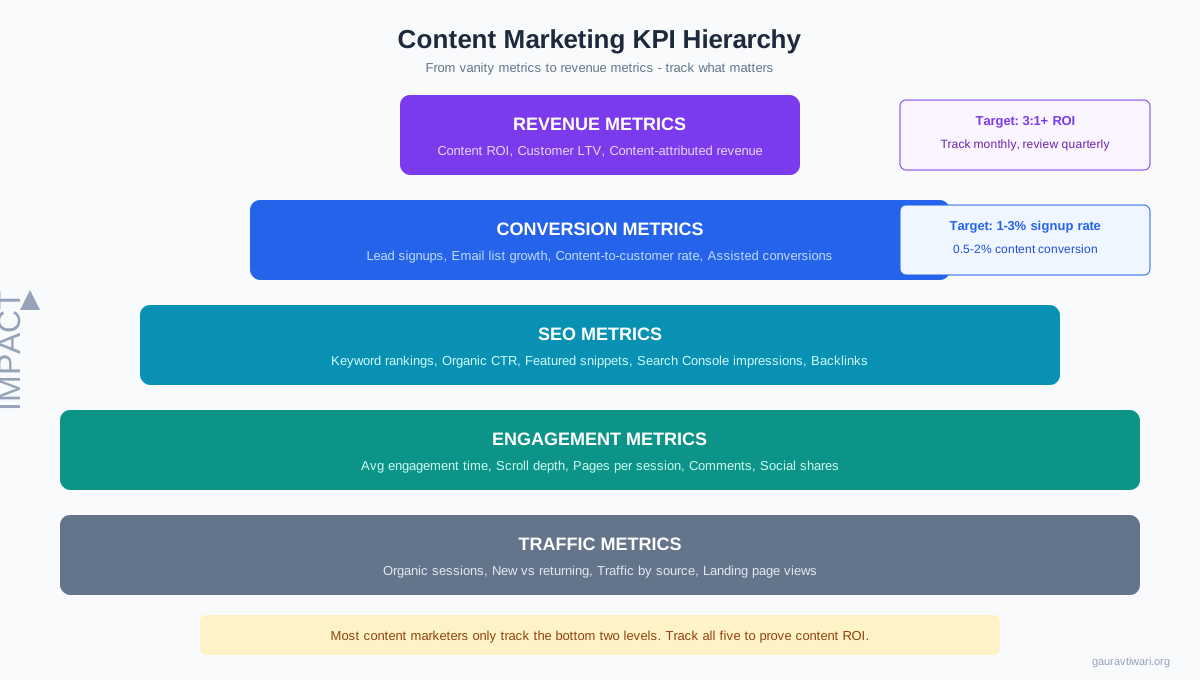
The framework below organizes KPIs into five tiers, from foundational traffic metrics up to revenue metrics. You don’t need to track every single one from day one. Start with traffic and engagement, then layer in conversion and SEO metrics as your program matures. Revenue metrics should be in place by month 6. If you’re building a content marketing plan from scratch, this hierarchy tells you exactly what to measure at each stage.
Traffic Metrics: The Foundation
Traffic metrics tell you whether people are finding your content. They’re the bottom of the measurement pyramid, necessary but insufficient on their own. A blog getting 50,000 monthly sessions that produces zero leads is a vanity project, not a marketing channel.
Organic Sessions
This is the core traffic KPI for content marketing. Organic sessions measure how many visits come from search engines without paid ads. In GA4, find it under Acquisition > Traffic acquisition > filter by “Organic Search.” Track month-over-month and year-over-year to account for seasonal patterns.
Benchmark: Healthy content programs see 15% to 25% organic traffic growth per year. New blogs should aim for 30% to 50% annual growth in the first 2 years. If organic traffic is flat or declining for 3+ consecutive months, you have a content decay problem that needs immediate attention.
When it’s bad: Audit your top 20 landing pages in Search Console. Look for declining impressions (Google showing you less), declining CTR (people not clicking), or declining position (ranking drops). Each has a different fix. Declining impressions means your content needs updating or your keywords have shifted. Declining CTR means your titles and meta descriptions need work. Declining position means competitors have published better content on the same topics.
New vs. Returning Visitors
This ratio reveals whether your content attracts new audiences or mainly serves existing readers. In GA4, check Reports > User attributes > Overview. A healthy content program typically runs 70% to 80% new visitors and 20% to 30% returning.
When it’s bad: If new visitors are below 60%, your content isn’t reaching new audiences. You’re likely publishing topics your existing audience already knows about. Expand your keyword targeting to top-of-funnel informational queries that attract people who haven’t discovered you yet.
Traffic by Source
Don’t just track total traffic. Break it down by source: organic search, social media, email, referral, and direct. In GA4, this lives under Acquisition > Traffic acquisition. Content programs over-reliant on a single source are fragile. Aim for organic search driving 50% to 65% of content traffic, with email and social providing meaningful secondary channels.
When it’s bad: If organic is under 40% of your content traffic, your SEO isn’t working. If social drives over 50%, you’re dependent on algorithms you don’t control. Build organic as your primary and most predictable channel. Use social and email to amplify and accelerate, not as your foundation.
Landing Page Performance
In GA4, go to Engagement > Pages and screens. Sort by sessions and engagement time to identify your highest-performing content and your weakest. This report tells you which topics resonate and which fall flat. I check this weekly and use it to decide what to update, what to prune, and what topics deserve follow-up content.
Engagement Metrics: Are People Actually Reading?
Traffic without engagement is empty calories. These metrics tell you whether visitors find your content valuable enough to actually consume it. This is also where AI search visibility gets interesting, because GEO (Generative Engine Optimization) rewards content that generates real user engagement signals.
Average Engagement Time
GA4 replaced “average session duration” with “average engagement time,” which only counts time when the page is actively in focus (not background tabs). This is a much more honest metric. Find it in Engagement > Pages and screens.
Benchmark: For long-form blog content (2,000+ words), aim for 2 to 4 minutes average engagement time. Under 1 minute means people are bouncing before they reach the good stuff. Over 5 minutes is excellent and usually indicates deep, reference-style content.
When it’s bad: Low engagement time almost always means one of three things: the opening doesn’t hook readers, the content doesn’t match search intent, or the page loads too slowly. Fix the opening first. If visitors don’t get past the first 200 words, nothing else matters.
Scroll Depth
GA4 automatically tracks scroll events when users reach 90% of the page. But 90% is a binary metric, not very useful. Set up custom scroll events at 25%, 50%, and 75% to understand where people stop reading. In GA4, go to Admin > Events > Create event. Track “scroll” events with the percent_scrolled parameter.
Benchmark: For a well-structured 2,500-word article, expect 60% to 70% of readers to reach 25%, 40% to 50% to reach 50%, and 25% to 35% to reach 75%. If you lose more than half your readers before the 25% mark, your intro and first section need work.
Pages Per Session
This measures how many pages visitors view in a single session. Higher numbers mean your internal linking strategy is working and readers find your content ecosystem valuable. In GA4, find it in Reports > Engagement > Overview.
Benchmark: 1.5 to 2.5 pages per session for blog content. Under 1.3 means readers aren’t finding related content (poor internal linking). Over 3.0 is excellent and indicates strong topical clusters.
Bounce Rate (In Context)
GA4 redefines bounce rate as the inverse of engagement rate. A “bounce” in GA4 is a session that wasn’t engaged (under 10 seconds, no conversion events, no additional page views). This is more useful than the old Universal Analytics definition.
Benchmark: Blog content bounce rates typically run 55% to 75%. A 65% bounce rate is perfectly normal for informational content. Don’t panic about bounce rate on its own. Instead, look at it alongside engagement time. A page with 70% bounce rate but 3-minute engagement time from the 30% who stay is doing fine. Content that answers a question completely in one visit has done its job.
Conversion Metrics: Turning Readers into Leads
This is where content marketing proves its value to the business. Traffic and engagement set the stage, but conversions are the performance. If you can’t draw a line from content to leads to revenue, your content program will always fight for budget.
Content-Assisted Conversions
Most content doesn’t convert on the first visit. A reader discovers your blog post via Google, comes back a week later through email, then converts on a product page. In GA4, use the Model comparison report under Advertising > Attribution to see which content pages appear in the conversion path, even if they weren’t the last touchpoint. This is the metric that proves content’s role in the sales funnel.
Benchmark: Content should assist 20% to 40% of your total conversions, even if the final conversion happens on a product or pricing page. If content-assisted conversions are under 10%, your content isn’t targeting the right keywords or stages of the buyer journey.
Email List Growth Rate
Your email list is your owned audience. Social media followers can disappear when algorithms change. Email subscribers stay. Track the number of new email signups per month from content pages, and calculate the signup rate (signups divided by unique visitors to pages with signup forms).
Benchmark: 1% to 3% signup rate from content pages is typical. Under 1% means your lead magnets aren’t compelling or your CTAs are poorly placed. Over 3% is excellent. Track this weekly and test different lead magnet formats (checklists, templates, mini-courses) to find what your audience responds to.
When it’s bad: If your signup rate is under 0.5%, test three things in this order: move your signup CTA above the fold (before readers scroll), offer a more specific lead magnet related to the article topic, and add a popup trigger at 50% scroll depth. One of those three will move the needle.
Content-to-Customer Attribution
This is the holy grail metric: how many customers first touched your brand through content? In GA4, set up a User segment for customers and then look at their first acquisition channel and landing page. You can also use the “Acquisition > User acquisition” report filtered by first user medium = organic.
Benchmark: For SaaS businesses, 20% to 35% of customers typically first discover the brand through content. For ecommerce, it’s 10% to 20%. Understanding your customer acquisition cost and payback period makes this metric actionable, because you can calculate the actual cost per customer acquired through content vs. paid ads.
SEO Metrics: Ranking and Visibility
SEO metrics bridge the gap between content production and traffic results. They tell you whether your content is visible in search and whether that visibility is improving. These numbers also matter for zero-click search visibility, where your content appears in featured snippets and AI overviews even when users don’t click through.
Keyword Rankings by Position Band
Don’t just track whether a keyword went up or down. Categorize all your target keywords into position bands and track movement between bands. This gives you a much clearer picture of SEO progress.
Position 1 to 3: Money positions. These keywords drive the majority of organic traffic. Guard them aggressively by keeping content fresh and building internal links. Position 4 to 10: First page but below the fold. These are your biggest opportunities for quick wins. Optimize titles, add FAQ sections, improve content depth. Position 11 to 20: Striking distance. A content refresh and 2 to 3 quality backlinks can push these to page one. Position 21 to 100: Visibility. Google sees your content but it needs more authority and better optimization.
Track the total count of keywords in each band monthly. A healthy SEO program shows keywords graduating from lower bands to higher ones over time. Use Semrush Position Tracking to automate this.
Organic Click-Through Rate (CTR)
CTR measures the percentage of people who see your listing in search results and actually click. Find it in Google Search Console under Performance > Search results. Filter by page to see CTR for individual content pieces.
Benchmark by position: Position 1 gets roughly 25% to 30% CTR. Position 3 gets 10% to 15%. Position 5 gets 5% to 8%. Position 10 gets 2% to 3%. If your CTR is significantly below these ranges for a given position, your title tags and meta descriptions need improvement. Test more compelling headlines with numbers, power words, and clear value propositions.
Featured Snippet Wins
Featured snippets appear above the regular search results (position zero) and drive outsized traffic and visibility. In Semrush, use the Organic Research report and filter for SERP Features > Featured snippet. Track how many featured snippets your content holds and which ones you’ve gained or lost month-over-month.
Benchmark: Established content sites should aim for featured snippets on 5% to 15% of their ranking keywords. Winning snippets requires answer-first paragraph structure (give the direct answer in the first 1 to 2 sentences after the heading), structured content with clear H2/H3 hierarchy, and tables or lists where appropriate.
Search Console Impressions Growth
Impressions measure how often your pages appear in search results, regardless of whether anyone clicks. This is your leading indicator for traffic. Impressions increase before clicks do, usually by 2 to 4 weeks. A steady rise in impressions means Google is showing your content to more people, and traffic growth should follow.
Benchmark: Look for 10% to 20% monthly impressions growth during active content production periods. Flat impressions for 3+ months means your new content isn’t gaining visibility. Check that your content targets keywords with actual search volume, and that your site’s technical SEO isn’t blocking indexing.
Content ROI: The Metric That Justifies Your Budget
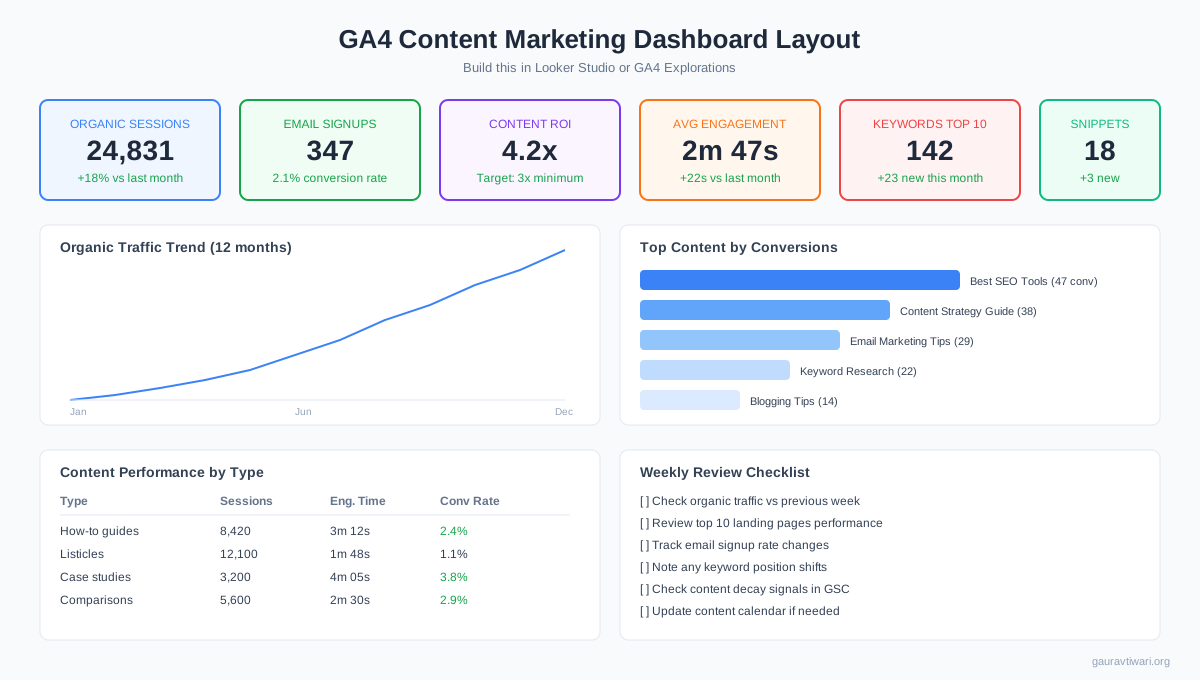
Content ROI is the single most important metric for proving that content marketing works. The formula is straightforward: (Revenue from Content minus Cost of Content) divided by Cost of Content. A 3:1 ROI means every dollar you spend on content generates three dollars in revenue. That’s the target.
How to Calculate Content Revenue
Content revenue comes from multiple sources, and you need to track all of them to get the full picture.
Direct conversions from content pages. Set up conversion events in GA4 for your key actions (purchases, signups, form submissions). Use the Pages and screens report filtered by conversion events to see which content pages drive direct conversions. Content-assisted conversions. Use the attribution model comparison report to see which content pages appear in multi-touch conversion paths. Organic search revenue. Multiply organic traffic from content pages by your conversion rate and average order value. Affiliate and ad revenue. If you monetize with affiliate links or ads, track per-page revenue.
How to Calculate Content Cost
Be honest about costs. Include everything: writer fees ($150 to $500 per article for freelancers), SEO tool subscriptions ($100 to $500 per month for Semrush or Ahrefs), design and media production, internal time for editing and strategy, and hosting costs allocated to content. Most teams underestimate costs by 30% to 40% because they forget internal time.
Benchmark: Below 1:1 means you’re losing money. 1:1 to 3:1 is the break-even zone where content is covering its costs. 3:1 to 5:1 is good and where most mature content programs land. 5:1+ is excellent and signals you should invest more. Content ROI typically takes 6 to 12 months to become positive because of the lag between publishing and ranking.
Building a Content Dashboard in GA4
A dashboard that shows all your key metrics in one view saves hours of report-building every week. I use Looker Studio (formerly Google Data Studio) connected to GA4 and Search Console. Here’s the layout that works.
Top row: Scorecard metrics. Six cards showing: organic sessions (with month-over-month change), email signups (with conversion rate), content ROI (calculated monthly), average engagement time, keywords in top 10, and featured snippet count. These give you an instant health check in under 10 seconds.
Middle row: Trend charts. Two charts. Left side: 12-month organic traffic trend line (to show growth trajectory and seasonal patterns). Right side: Top 10 content pieces by conversions (bar chart, to identify your revenue drivers).
Bottom row: Performance tables. Left: Content performance by type (how-to guides vs. listicles vs. case studies vs. comparisons) with sessions, engagement time, and conversion rate for each. Right: Weekly review checklist, because a dashboard nobody looks at is worthless.
Set up the dashboard once using Google Workspace and Looker Studio, and schedule it to email you every Monday morning. That automated reminder forces the weekly review habit. You can also manage your editorial calendar and content tasks in Monday.com, which integrates cleanly with Google Workspace for team-based content operations.
Benchmark Numbers for 2026
Here are the benchmark ranges I use when evaluating content marketing performance. These come from running content programs across different industries and business sizes. Your numbers will vary, but these give you a reasonable target to aim for.
| Metric | Poor | Average | Good | Excellent |
|---|---|---|---|---|
| Organic traffic growth (annual) | Below 5% | 5-15% | 15-25% | 25%+ |
| Email signup rate from content | Below 0.5% | 0.5-1% | 1-3% | 3%+ |
| Content conversion rate | Below 0.3% | 0.3-0.5% | 0.5-2% | 2%+ |
| Avg engagement time (long-form) | Below 1 min | 1-2 min | 2-4 min | 4+ min |
| Pages per session | Below 1.3 | 1.3-1.5 | 1.5-2.5 | 2.5+ |
| Keywords in top 10 | Below 20 | 20-50 | 50-200 | 200+ |
| Content ROI | Below 1:1 | 1:1-2:1 | 3:1-5:1 | 5:1+ |
| Featured snippets held | 0 | 1-5 | 5-20 | 20+ |
One important note on benchmarks: these assume you’re producing content consistently (at least 4 to 8 quality pieces per month) and have been doing so for 6+ months. New content programs will take time to reach “average” benchmarks. Don’t compare month-two results to these numbers and panic.

- Track keyword rankings by position band with daily updates
- Content audit scores for every indexed page on your site
- Backlink analytics with quality scoring and competitor gaps
- Content optimization tool with real-time SEO recommendations
- Plans from $129.95/mo with 14-day free trial
- Visual content calendar with editorial workflow automation
- Track content production from brief to published in one board
- Integrates with Google Workspace, Slack, and marketing tools
- Dashboards for team productivity and content pipeline metrics
- Free for individuals. Team plans start at $9/seat/month

- Looker Studio for automated content marketing dashboards
- Google Sheets for custom KPI tracking and reporting
- Gmail and Meet for content team collaboration
- Native integration with GA4 and Search Console data
- Business Starter plan at $7/user/month
AI and Content Measurement: What’s Changing
AI search engines like Perplexity, ChatGPT, and Google’s AI Overviews are changing how content gets consumed. Readers increasingly get answers without clicking through to your site. This creates a measurement blind spot that traditional analytics can’t fully capture.
Impressions are growing, but clicks might not keep pace. Google Search Console shows impressions for queries where your content appears in AI Overviews, but users might get the answer from the AI summary without clicking. Watch for the gap between impressions growth and click growth. If impressions are up 30% but clicks are only up 10%, AI overviews are likely consuming some of your potential traffic.
Brand search becomes a critical metric. When AI cites your content, readers learn your brand name even if they don’t click. Track branded search volume in Google Trends and Search Console. If branded searches are increasing alongside your content production, your content is building awareness through AI citations even when direct traffic doesn’t show it.
Content structure matters more than ever. AI engines extract and cite content that’s structured with answer-first paragraphs, specific numbers, named entities, and clear headings. Content that formats well for AI search also tends to win featured snippets. Structure your content for extractability, and both traditional SEO and GEO benefit.
Track “Share of Voice” in AI tools. Search your target topics in Perplexity and ChatGPT. Does your brand or content get cited? This is qualitative tracking right now since there’s no automated tool for AI share of voice yet. But keeping a monthly log of AI citation checks gives you early signal on whether your content strategy is working for the next generation of search.
Which content marketing metric do you track most closely?
The Weekly Content Review Ritual
Data is useless if you don’t look at it regularly. I review content metrics every Monday morning in a 30-minute ritual. Here’s the exact process.
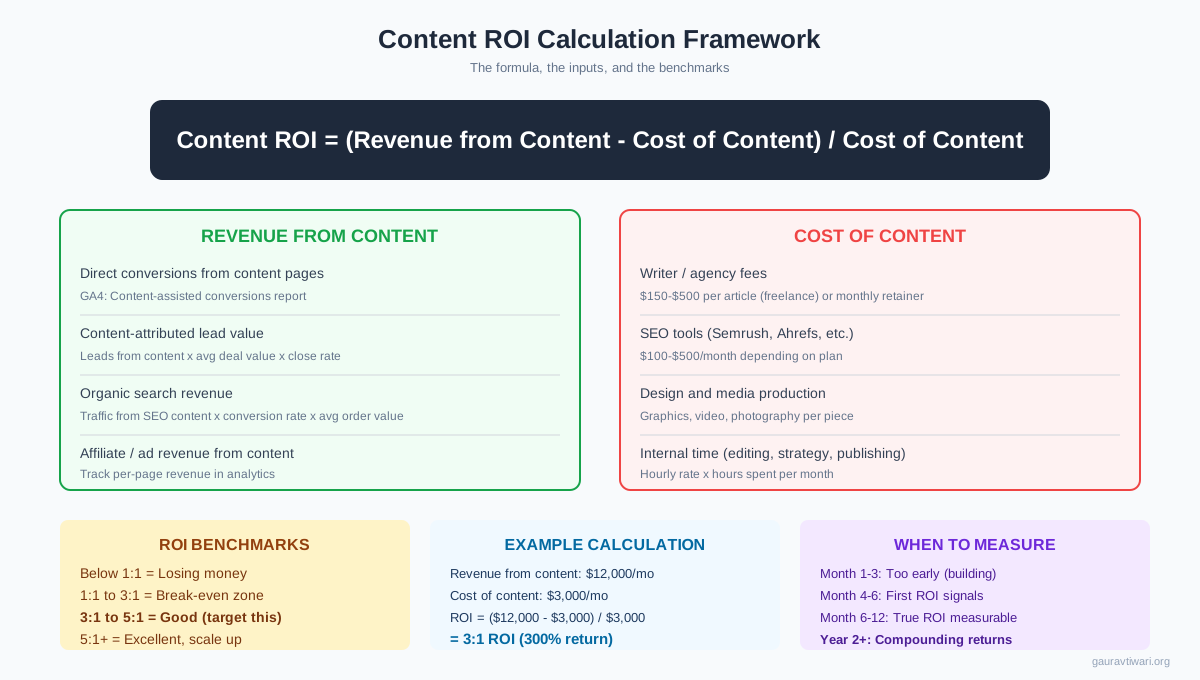
Check organic traffic vs. previous week and previous year (2 minutes). GA4 > Acquisition > Traffic acquisition > Organic Search. Compare date ranges. Look for sudden drops or spikes.
Review top 10 landing pages by engagement time (3 minutes). GA4 > Engagement > Pages and screens. Sort by average engagement time. Identify your strongest content this week.
Check email signup rate (2 minutes). Your email provider dashboard. Calculate signups / content page visits. Is the rate trending up or down?
Review keyword position changes (5 minutes). Semrush Position Tracking. Filter for changes of 5+ positions (up or down). Investigate any significant drops.
Check Search Console for content decay signals (5 minutes). GSC > Performance > Sort pages by declining clicks (compare last 28 days vs. previous 28 days). Flag any pages losing more than 20% of clicks for a content refresh.
Review new backlinks (3 minutes). Semrush Backlink Analytics > New backlinks. Note any high-quality wins and any spam links that need disavowing.
Update content calendar (10 minutes). Based on the data above, adjust priorities. Promote topics that are gaining traction. Schedule updates for decaying content. Deprioritize topics that aren’t resonating. If you’re producing content at volume, this weekly recalibration prevents wasted effort on topics that won’t perform.
Total time: 30 minutes. That half hour is the difference between content marketing that drifts and content marketing that compounds. Build this habit and you’ll catch problems early, double down on what works, and always have data-backed answers when someone asks “is content actually working?”
Frequently Asked Questions
How often should I check content marketing KPIs?
Check core metrics weekly (traffic, engagement, signups) and comprehensive metrics monthly (ROI, keyword rankings, backlinks, content-assisted conversions). Quarterly reviews should analyze trends, update benchmarks, and adjust strategy. Daily checking leads to overreacting to normal fluctuations. Weekly reviews give you enough frequency to catch problems early without creating anxiety over noise.
What’s a good content marketing ROI to aim for?
Target a 3:1 ROI as your baseline. That means every dollar spent on content generates three dollars in attributable revenue. This typically takes 6 to 12 months to achieve because content assets compound over time. Content ROI will be negative in months 1 to 6, break even around months 6 to 9, and hit the 3:1 target by month 12 in most cases. Mature content programs (2+ years) often achieve 5:1 to 10:1 ROI because older content continues generating traffic at zero marginal cost.
Which GA4 report is most important for content marketers?
The Pages and screens report under Engagement. It shows every page on your site with sessions, engagement time, conversions, and bounce rate. Sort by different columns to identify your best-performing content (by engagement time), your highest-converting content (by conversions), and your most-visited content (by sessions). Combine this with the Traffic acquisition report filtered by Organic Search to understand which content drives organic growth specifically.
How do I track content marketing ROI when conversions are offline?
For businesses with offline conversions (phone calls, in-store visits, consultations), use proxy metrics. Track form submissions, phone number clicks (set up as GA4 events), and appointment bookings as online conversion events. Assign estimated values to each (e.g., a consultation request is worth $500 based on your close rate and average deal size). This isn’t perfect, but it gives you a workable ROI number. You can also ask new customers how they found you and track the ‘first heard about us through blog/content’ response rate.
Should I track social media metrics for content marketing?
Track social shares and referral traffic from social as secondary indicators, but don’t make them primary KPIs. Social engagement is noisy, algorithm-dependent, and poorly correlated with business outcomes. A post can go viral on LinkedIn and generate zero conversions. Focus your primary measurement on organic search, email, and conversion metrics. Use social metrics mainly to decide which content to repurpose and which topics resonate for awareness purposes.
How does AI search affect content marketing measurement?
AI search (Google AI Overviews, Perplexity, ChatGPT) can increase your content’s impressions while reducing click-through rates. Users get answers from AI summaries without visiting your site. To adapt: track branded search volume as a proxy for AI-driven awareness, monitor the gap between impressions growth and clicks growth in Search Console, and periodically check if AI engines cite your content. Structure content with answer-first paragraphs and specific data points to increase AI citation likelihood. The measurement landscape for AI search is still evolving, but these signals give you early indicators.
What tools do I need to track content marketing KPIs?
At minimum: Google Analytics 4 (free) for traffic, engagement, and conversion tracking. Google Search Console (free) for SEO metrics and search visibility. An SEO tool like Semrush ($129.95 per month for Pro) for keyword tracking, backlink monitoring, and content audits. Looker Studio (free) for dashboard building. Your email marketing platform’s built-in analytics for signup tracking. Monday.com or a similar project tool for tracking content production metrics. Total minimum cost: about $130 per month plus your email platform.
Content marketing measurement isn’t complicated. It just requires discipline. Start with the weekly review ritual, build your GA4 dashboard, and track the five tiers of metrics from traffic up to revenue. Within 3 months, you’ll know exactly which content drives business results and which is dead weight. That clarity is what separates content programs that get budget increases from ones that get cut. The numbers don’t lie. Start tracking them properly, and let the data guide every content decision you make.
Disclaimer: This site is reader-supported. If you buy through some links, I may earn a small commission at no extra cost to you. I only recommend tools I trust and would use myself. Your support helps keep gauravtiwari.org free and focused on real-world advice. Thanks. - Gaurav Tiwari