
How is AI transforming SaaS products, and why is it bad?
You’re paying 30-50% more for your SaaS tools this year, and the reason on every pricing page is the same three letters: AI. I’ve watched 40+ SaaS products I use add “AI-powered” features over the past two years. About half of them genuinely changed how I work. The other half? They slapped an AI label on basic automation, hiked the price, and hoped nobody would notice. The problem isn’t AI itself. It’s that most SaaS companies are using AI as a pricing lever, not a product improvement. You deserve to know the difference before you hand over your credit card for another “AI-enhanced” upgrade.
The AI Washing Epidemic in SaaS
“AI washing” is when companies rebrand existing features as artificial intelligence to justify higher prices and attract investment. It’s the greenwashing of the tech industry, and it’s everywhere in 2026. A Gartner report found that over 40% of companies claiming to use AI don’t actually deploy meaningful machine learning in their products. They use rule-based automation, basic pattern matching, or simple API calls to ChatGPT and call it “proprietary AI.”
I’ve seen this firsthand. A project management tool I used for three years added an “AI assistant” that turned out to be a pre-written template suggestion engine. No machine learning. No natural language understanding. Just if-then logic with a chatbot skin. They moved it to a $30/month premium tier. Another email marketing platform rebranded its send-time optimization (a statistical feature that existed since 2019) as “AI-powered send intelligence” and raised the plan price by 40%.
The SEC has started cracking down on AI washing in public companies. But for the average SaaS buyer? You’re on your own. You need to learn how to tell the difference between real AI and marketing theater.
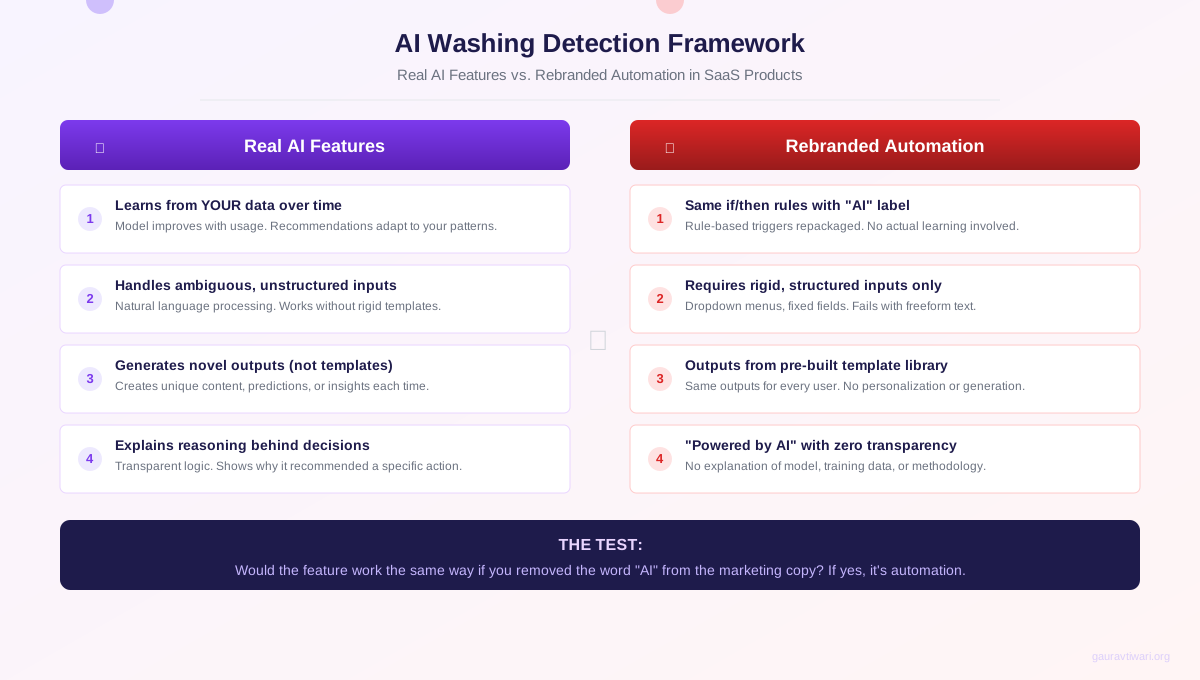
How to Spot AI Washing
There are three reliable tests I use. First, does the feature improve with usage? Real AI learns from your data and gets better over time. Fake AI gives you the same output whether you’ve used it once or a thousand times. Second, can you get the same result from a basic rule or template? If the “AI recommendation” is always the same generic suggestion, it’s not AI. Third, does the company explain what model or technique powers the feature? Legitimate AI companies are proud to share their approach. AI washers stay vague because there’s nothing to explain.
AI Features That Actually Matter for Creators
Not everything is hype. Some AI implementations have genuinely transformed how I create content, manage marketing strategies, and run my business. These are the categories where AI delivers measurable value, not marketing promises.
Grammar and Writing Assistance
Sapling is the grammar tool I actually use in 2026. It catches context-aware errors that basic spell checkers miss, completes sentences based on your writing patterns, and works directly inside Chrome. The AI here is real. It learns your vocabulary, adapts to your tone, and the suggestions improve as it processes more of your writing. I’ve measured it saving me 15-20 minutes per article on editing alone.

- Context-aware grammar and style corrections
- AI autocomplete that learns your writing patterns
- Works inside Chrome, Gmail, LinkedIn, and more
- Team snippets and knowledge base integration
- Enterprise-grade security with SOC 2 compliance
SEO and Content Intelligence
Semrush has built AI features that go beyond keyword research into genuine content strategy. ContentShake AI analyzes your competitors, identifies content gaps, and generates data-backed briefs. The Keyword Magic Tool uses machine learning to cluster semantically related terms. I use it to plan content clusters for clients, and the AI-driven topic suggestions have uncovered opportunities I would have missed manually. It cut my content planning time from 4 hours to about 90 minutes per month.
- AI-powered ContentShake for content briefs and drafts
- Keyword Magic Tool with semantic clustering
- Competitor gap analysis across 26B+ keywords
- Position tracking with AI trend predictions
- Site audit with automated fix recommendations
AI Content Generation
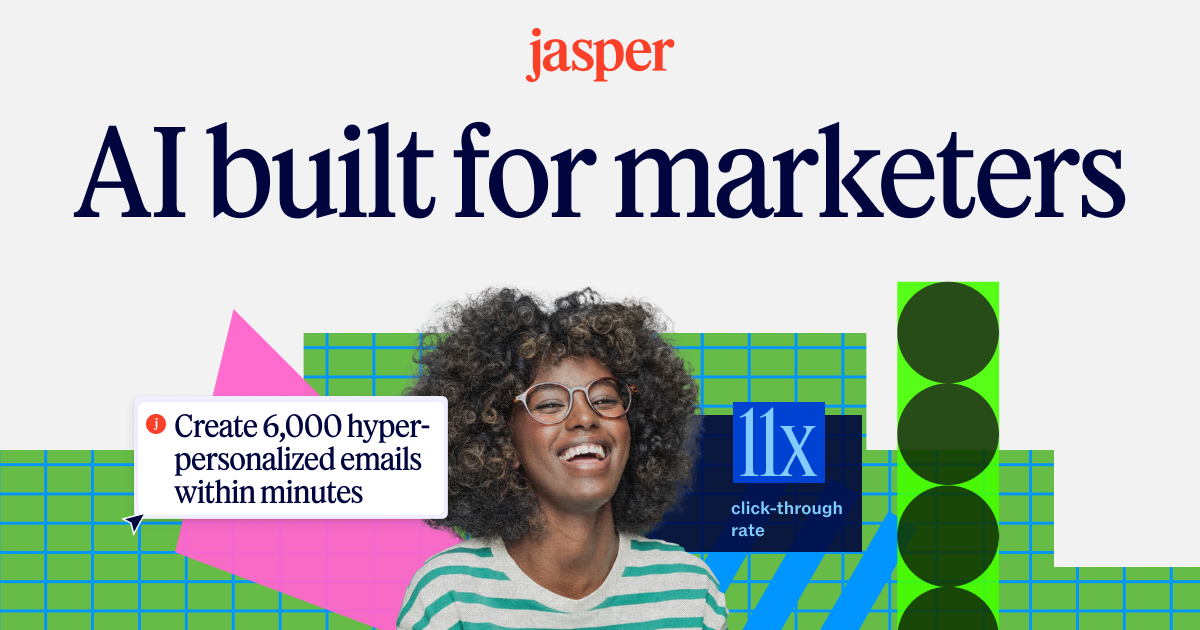
Jasper is one of the few AI writing tools that understands brand voice at a practical level. You feed it your existing content, and it builds a style profile that keeps outputs consistent across blog posts, emails, and social media. I’ve used it for first-draft generation on product descriptions and email sequences. It doesn’t replace the writing process, but it cuts first-draft time by 40-60% on structured content types. The key distinction: Jasper is a drafting accelerator, not a publishing tool. Everything still needs human editing.
- Brand voice training from your existing content
- 50+ templates for emails, ads, blog posts, social
- Team collaboration with shared brand assets
- Chrome extension for AI writing anywhere
- SEO mode with Surfer SEO integration
Design and Visual Content
Canva is probably the best example of AI done right in SaaS. Magic Design generates layouts from a text prompt. Background Remover works in one click. Magic Resize adapts a single design to 50+ formats instantly. These features work because they solve specific, repetitive tasks that designers waste hours on. I use Canva’s AI features daily for social media graphics and blog images. The Magic Eraser alone saves me from opening Photoshop for 80% of image edits.
Project Management and Productivity
Notion AI has become genuinely useful for knowledge management. It can summarize meeting notes, extract action items from long documents, and answer questions about your workspace content. The Q&A feature searches across your entire Notion workspace using semantic understanding, not just keyword matching. For teams with large knowledge bases, this is a real productivity gain. I use it to search through 200+ client project pages instantly instead of manually browsing folders.
The Pricing Problem: AI as an Upsell Weapon
SaaS companies have found that adding “AI” to a feature name lets them charge 30-50% more for functionally similar tools. This isn’t speculation. I tracked pricing changes across 25 SaaS products I use between 2024 and 2026. The pattern is consistent: features move from standard tiers to “AI-powered” premium tiers, base prices increase, and usage limits tighten.
Here’s what I found. Notion raised its per-seat price and added Notion AI as a $10/member/month add-on. Canva Pro went from $12.99 to $15/month when it bundled AI features. Jasper, which started at $29/month, now starts at $49/month. Semrush increased its Pro plan from $119.95 to $139.95 while adding AI tools. These increases range from 15% to 70% depending on the product.
Running AI models is genuinely expensive. OpenAI charges per token. GPU compute isn’t cheap. I understand that. But many SaaS companies are using AI infrastructure costs as cover for margin expansion. When a company rebrands a 5-year-old statistical feature as “AI-powered” and moves it to a higher tier, that’s not an infrastructure cost. That’s a pricing strategy.
The most dangerous SaaS pricing trend isn’t the AI surcharge itself. It’s that companies are training customers to accept annual 20-30% increases as normal because AI costs keep rising. Once that expectation is set, it never comes back down.
The smarter approach for your business budget: calculate the actual hours each AI feature saves you per month, multiply by your hourly rate, and compare that to the price increase. If the AI tier costs $50 more but saves you 2 hours at $75/hour, that’s a good deal. If it saves you 20 minutes, it’s a tax on your FOMO.
Data Privacy: The Hidden Cost of AI Features
Every AI feature in your SaaS stack is processing your data. The question most people don’t ask: where does that data go, and who else benefits from it? When your CRM uses AI to predict lead scores, it’s analyzing your customer data. When your writing tool suggests improvements, it’s reading your content. When your analytics platform uses AI for insights, it’s processing your business metrics.
Many SaaS companies use customer data to train their AI models. Your proprietary information, your customer interactions, your business patterns feed the models that serve your competitors using the same tool. Some companies are transparent about this. Most aren’t. Zoom’s 2023 terms of service controversy (where they claimed rights to use customer data for AI training) wasn’t an isolated incident. It was the one that got caught.
I’ve started reading the AI data policies of every SaaS tool I use. Here’s what I check: Does the company use my data to train models? Can I opt out of AI data processing? Is data sent to third-party AI providers like OpenAI or Anthropic? Is my data processed in a region that complies with GDPR or CCPA? You should check these too. If a company can’t give you clear answers, that’s your answer.
The EU AI Act and California’s CCPA are starting to create guardrails. But regulation moves slower than product launches. For now, you’re responsible for understanding what happens to your data when you click “Enable AI features.”
The 5-Question AI Feature Evaluation Framework
After testing dozens of “AI-powered” SaaS tools across client projects, I built a simple framework for deciding whether an AI feature is worth your money. I use these five questions before upgrading to any AI tier or adopting a new AI-powered tool.
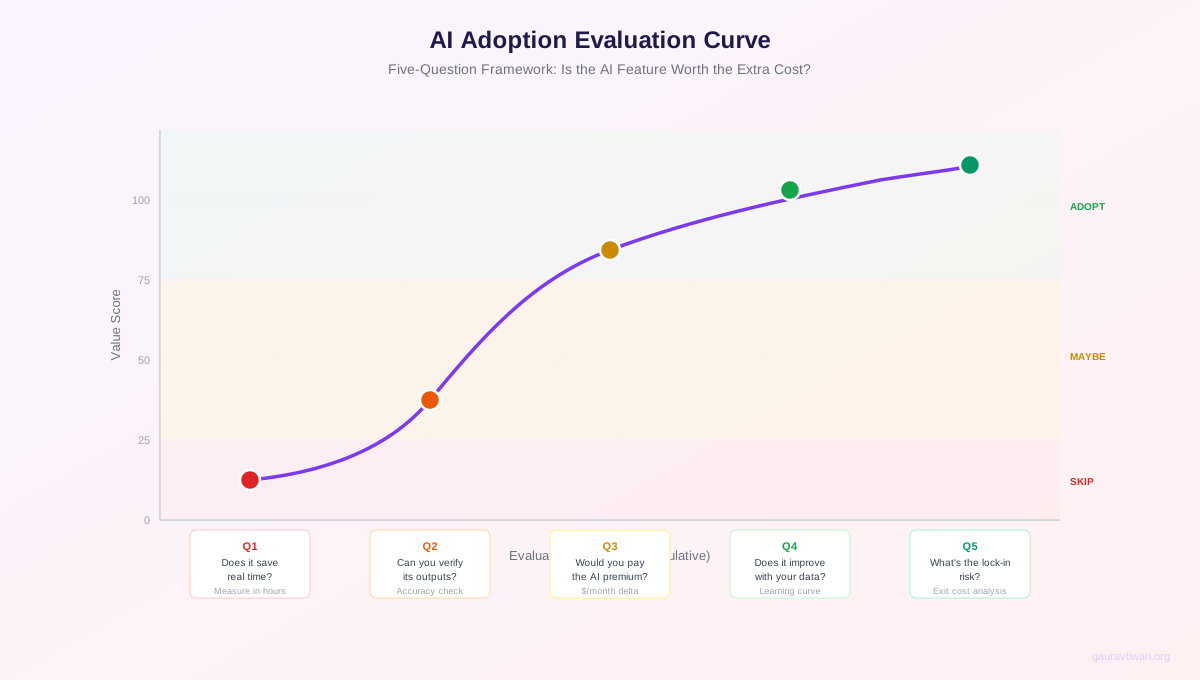
- Does it save me 30+ minutes per week? If the AI feature doesn’t save at least half an hour weekly, the complexity and cost aren’t justified. I track this with a timer during the trial period. No guessing.
- Can I verify the outputs independently? If there’s no way to check whether the AI’s recommendations are correct, you’re operating on blind faith. AI that makes opaque decisions about your lead generation or customer targeting is a liability, not an asset.
- Does it improve over time with my data? Real AI learns from your usage patterns and gets more accurate. Fake AI gives you the same generic output on day 1 and day 100. Ask the vendor: “How does this feature use my historical data to improve results?”
- Is the data handling transparent? Read the AI-specific data policy. If the company can’t clearly explain whether your data trains shared models, be cautious. This matters for competitive advantage and compliance.
- Does it work within my existing workflow? AI features that require you to restructure how you work often create more friction than value. The best AI is invisible. It enhances what you already do without adding new steps.
I apply this framework religiously. It’s saved me from subscribing to at least 15 “AI-powered” tools that turned out to be basic automation wrapped in machine learning buzzwords. Three yes answers out of five means proceed. Fewer than three means skip it or use ChatGPT directly.
Do you pay extra for AI features in your SaaS tools?
AI by SaaS Category: What’s Real, What’s Hype
Not all SaaS categories benefit equally from AI. Some are natural fits where machine learning creates genuine, measurable value. Others are force-fitting AI features that add complexity without improving outcomes. Here’s my honest assessment based on tools I’ve used in each category.
CRM and Sales: Real Value
AI excels at lead scoring, predicting deal outcomes, and suggesting next actions. Salesforce Einstein, HubSpot’s predictive lead scoring, and Pipedrive’s AI Sales Assistant all use genuine machine learning on structured data. The patterns are clear, the ROI is measurable, and the predictions improve with more data. This is AI at its best in SaaS.
Marketing and SEO: Mostly Real
Content optimization, audience segmentation, and campaign performance prediction are strong AI use cases. Semrush uses AI to analyze content quality and predict ranking potential. Email platforms like Mailchimp use AI to optimize send times based on recipient behavior data. The AI here is genuine because marketing generates massive datasets that machine learning can meaningfully pattern-match against.
Customer Support: Strong ROI
AI chatbots and ticket routing have genuinely reduced response times. Zendesk and Intercom handle routine queries effectively, freeing human agents for complex issues. The data shows 60-70% of basic support tickets resolved without human intervention. But watch out for companies that eliminate human support entirely and hide behind AI. That’s cost-cutting disguised as innovation.
Cybersecurity: Essential
This is arguably where AI adds the most critical value. Real-time threat detection, anomaly identification, and automated response at the speed AI operates are capabilities human analysts can’t replicate at scale. CrowdStrike and Okta use machine learning to spot patterns across billions of events. For businesses handling sensitive data, AI security isn’t optional. It’s the baseline.
Project Management: Mostly Hype
Most project management AI features are still rudimentary. “AI-powered timeline estimation” usually means basic averaging of past task durations. “Smart task assignment” is often keyword matching, not understanding. Monday.com, Asana, and ClickUp are all adding AI features, but I haven’t found one that reliably improves project outcomes beyond what a competent project manager does with a spreadsheet.
Design Tools: Genuinely Transformative
Canva, Figma, and Adobe are shipping AI features that solve real design problems. Background removal, image generation, layout suggestions, and format resizing are tasks that used to take hours and now take seconds. The AI here is trained on massive visual datasets and the output quality is consistently high. This category has the strongest ratio of real AI to marketing fluff.
The SaaS categories where AI works best share one thing: structured, abundant data that machine learning can meaningfully learn from. Where data is sparse or unstructured, AI features are usually just automation wearing a lab coat.
My Creator AI Stack: What I Use vs. What I Dropped
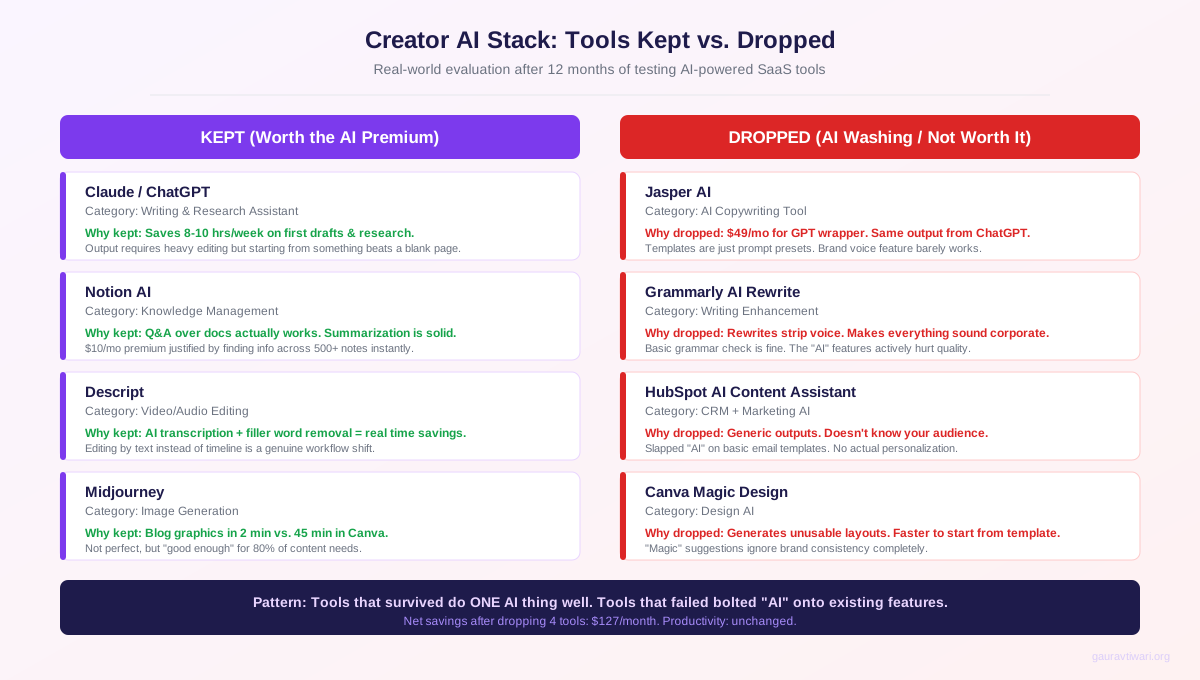
I test a lot of AI tools. Most don’t survive more than 30 days in my workflow. Here’s my honest breakdown of what stuck and what didn’t, with the specific reasons behind each decision.
Tools I Kept
Sapling replaced my grammar checker because the AI autocomplete saves genuine time. It learns my vocabulary and the suggestions get better monthly. Claude and ChatGPT handle research, brainstorming, and first-draft generation for structured content. I use Claude for analysis and ChatGPT for creative ideation. Semrush with its AI content tools cut my keyword research and content planning time significantly. Canva AI features (Magic Design, Background Remover, Magic Eraser) eliminated my dependency on Photoshop for 80% of image tasks. Notion AI summarization and Q&A became essential once my workspace crossed 500 pages.
Tools I Dropped
Grammarly Premium got replaced by Sapling because Sapling’s autocomplete is faster and the pricing is more transparent. Copy.ai produced generic marketing copy that always needed heavy rewriting. Faster to write from scratch. Writesonic had the same problem. Quantity over quality. Loom AI summaries were rarely accurate enough to trust without watching the full video anyway. Otter.ai transcription quality dropped noticeably when they pivoted to “AI meeting assistant” features. I switched to recording locally.
The pattern is clear. Tools that automate a specific, measurable task stayed. Tools that promised to “transform your workflow” with vague AI magic got cut. If you can’t point to the exact minutes the AI saves you each week, it’s not pulling its weight.
The Dark Side: AI Risks Nobody Talks About
The conversation about AI in SaaS usually focuses on features and pricing. But there are deeper risks that affect your business in ways that don’t show up on a pricing page.
Algorithmic Bias and the Black Box
AI systems learn from historical data, and historical data reflects historical biases. When a recruitment SaaS uses AI to screen candidates, it can systematically downrank applicants from certain demographics because the training data reflected past hiring biases. When your CRM’s AI lead scoring says a prospect is “low priority,” can you explain why? In most cases, no. Machine learning models make decisions through processes that even their creators can’t fully explain.
This creates real business risk. If you can’t understand why your AI tool made a recommendation, you can’t verify it’s correct. You can’t explain it to stakeholders. You can’t audit it for compliance. The EU AI Act classifies high-risk AI systems and imposes transparency requirements, but most SaaS buyers don’t know what their tools qualify as.
Over-Dependence and Silent Failures
When your entire workflow depends on AI-powered tools and those tools fail, everything stops. I’ve seen teams lose days of productivity when their AI customer service platform went down and nobody remembered how to handle tickets manually. AI systems can fail silently, producing plausible-looking outputs that are completely wrong. Unlike a crashed server (which you notice immediately), a subtly broken AI model can corrupt decisions for weeks before anyone catches the problem.
Build fallback systems for every AI-powered workflow. Document your non-AI processes before you automate them away. When (not if) the AI fails, your team needs to know how to operate without it.
Job Displacement Is Real
AI in SaaS is eliminating jobs. Customer service teams are shrinking as AI chatbots handle more tickets. Data entry roles are disappearing. Junior content writers are being supplemented by AI writing tools. Marketing analysts are being replaced by AI analytics platforms. Yes, AI creates new roles. But the transition is happening faster than most workers can retrain. The people losing their jobs to AI-powered SaaS tools aren’t automatically qualified for the AI management positions being created.
The Future: Predictions from Someone Who Uses These Tools
AI in SaaS isn’t slowing down. But the hype cycle is maturing, and the market is starting to separate real value from marketing theater. Here are my honest predictions based on what I’m seeing across the tools I use daily.
Prediction 1: Half of “AI features” will be quietly rebranded back to “automation” by 2026. Once the AI hype premium stops justifying price increases, companies will drop the label on features that were never AI to begin with. The SEC’s AI washing enforcement will accelerate this.
Prediction 2: AI agents will replace AI assistants. The next wave isn’t chatbots that answer questions. It’s autonomous agents that complete multi-step workflows independently. Think: an AI that doesn’t just suggest email copy but writes, tests, segments, sends, and optimizes the entire campaign. We’re 18-24 months from this being standard in major SaaS platforms.
Prediction 3: Data privacy will become a competitive advantage. Companies that offer “zero data training” guarantees will win enterprise deals. Privacy-first AI is already a selling point for tools like Claude Enterprise and Notion Team. This trend will accelerate as GDPR enforcement tightens and California’s privacy laws expand.
Prediction 4: The creator’s toolkit will consolidate. You won’t need 8 AI tools. You’ll need 2-3 that do everything well. I expect ChatGPT Plus, one AI-enhanced creative suite (probably Canva), and one domain-specific tool (like Semrush for SEO) to handle 90% of what creators need by late 2026.
Prediction 5: The human advantage will matter more, not less. As AI-generated content floods every channel, the creators who bring original research, lived experience, and genuine opinions will stand out. AI handles the mechanics. Humans provide the meaning. The best creators in 2026 and beyond will use AI to handle the repetitive work so they can spend more time on the thinking and experimentation that AI can’t replicate.
How to Navigate AI in SaaS Responsibly
After working with dozens of AI-powered SaaS products, here’s the practical advice that actually works.
Start with the problem, not the technology. Don’t look for ways to use AI. Identify your biggest workflow bottlenecks, then check if AI-powered tools address them effectively. AI is a means, not an end.
Keep humans in the loop on critical decisions. Use AI for suggestions and analysis, but keep humans on decisions that affect customers, employees, or significant business outcomes. A human should always review before an AI-generated email goes to 50,000 subscribers.
Audit your AI tools quarterly. Check outputs for accuracy drift, bias patterns, and degradation. AI models can drift over time as the data they process changes, producing increasingly unreliable results without obvious warnings. Set a calendar reminder.
Read every AI data policy. Before adopting any AI-powered SaaS tool, understand how your data is used. Is it used to train models? Can you opt out? Is data shared with third parties? These questions matter for compliance and competitive advantage.
Use the 5-question framework before every AI upgrade. Save time, verify outputs, improve over time, transparent data handling, fits existing workflow. Three out of five yes answers means proceed. Fewer than three means skip.
The companies that use AI thoughtfully will gain genuine competitive advantages. The ones that adopt it uncritically will waste money, introduce risks, and complicate workflows that were working fine before. Choose which side you’re on.
Frequently Asked Questions
How is AI changing SaaS pricing models in 2026?
AI is pushing SaaS toward usage-based and tiered pricing that charges premium rates for AI features. Most products have added AI-specific tiers priced 30-50% above standard plans. Some charge per AI query or per generated output, creating unpredictable costs. Before upgrading, run a 14-day trial and calculate whether the AI features save enough time to justify the price increase at your hourly rate.
What are the biggest risks of AI in SaaS for small businesses?
The three biggest risks are data privacy (your business data may train shared AI models serving competitors), vendor lock-in (migrating AI-customized workflows is harder than switching traditional SaaS), and cost unpredictability (AI compute costs are high and vendors pass them through usage-based pricing). Read every AI data policy before signing up.
Will AI replace traditional SaaS products entirely?
No. AI augments SaaS products rather than replacing them. You still need CRMs, project management tools, and accounting software. What changes is the interface (more natural language), the automation level (less manual data entry), and the intelligence (predictive suggestions vs. static reports). The core product categories remain. AI makes them smarter but also harder to evaluate because AI-powered has become a marketing buzzword.
How can I tell if a SaaS product’s AI features are genuinely useful?
Use the 5-question framework: Does it save 30+ minutes per week? Can you verify its outputs? Does it improve with your data over time? Is the data handling transparent? Does it fit your existing workflow? Test during a free trial with real data, not demo scenarios. If you can’t answer yes to at least three questions, the AI is likely superficial marketing.
What is AI washing and how do I avoid it?
AI washing is when companies rebrand basic automation or rule-based features as artificial intelligence to justify higher prices. Over 40% of companies claiming AI don’t use meaningful machine learning. To spot it, check three things: Does the feature improve with usage? Could a basic rule or template produce the same result? Can the company explain what AI technique powers the feature? If the answers are no, yes, and no, it’s AI washing.
Which SaaS categories benefit most from AI?
Cybersecurity benefits most because real-time threat detection requires AI-speed analysis. CRM and sales tools benefit from predictive lead scoring on structured data. Marketing platforms gain from content optimization and audience segmentation. Design tools like Canva deliver strong ROI on repetitive visual tasks. Project management AI features are still mostly rudimentary and rarely outperform a competent human project manager.
Should I use ChatGPT directly instead of paying for AI SaaS features?
Often, yes. ChatGPT Plus at $20/month handles many tasks that SaaS companies charge $50-100+ per month for through AI add-ons. Content drafting, data analysis, summarization, and brainstorming work well in ChatGPT directly. The exception is when the SaaS AI feature is deeply integrated with your existing data (like Semrush analyzing your specific keyword rankings or Notion AI searching your workspace). Integration with your data is what justifies the premium.
How do I protect my data when using AI-powered SaaS tools?
Read the AI-specific data policy for every tool. Check if your data trains shared models and opt out where possible. Use enterprise or team plans that typically offer better data protection (Notion Team, ChatGPT Enterprise, Claude Enterprise all offer zero-training guarantees). Avoid pasting sensitive customer data into AI features unless the tool guarantees data isolation. Review your tools’ GDPR and SOC 2 compliance documentation before onboarding.
Disclaimer: This site is reader-supported. If you buy through some links, I may earn a small commission at no extra cost to you. I only recommend tools I trust and would use myself. Your support helps keep gauravtiwari.org free and focused on real-world advice. Thanks. - Gaurav Tiwari