
WPX Hosting Coupon Code 2026: Current Deals and Pricing
Most hosting coupon pages are the same story. A big “80% OFF!!!” headline, a code that gives you a cheap first month, and zero mention of what happens when your renewal hits at triple the price.
WPX Hosting is different. Not the coupon page. The hosting itself.
Here’s the deal: you can get 50% off your first month of WPX Hosting right now. That’s real. But the bigger deal is that WPX doesn’t increase prices on renewal. Your second month costs the same as your 24th month. In an industry where SiteGround charges $3.99 to get you in the door and $17.99 to keep you, that’s the coupon code that actually matters.
I’ve moved client sites to WPX, tested their speeds, talked to their support, and watched the billing cycle. Here’s the full pricing breakdown, the working coupon codes, what you’re actually getting, and whether the discounted price beats competitors.
Current WPX Hosting Coupon Code
Use code FIFTYOFF at checkout for 50% off your first month.
This is the official WPX coupon code. It works on all three WordPress hosting plans: Business, Professional, and Elite. Apply it during checkout on the WPX Hosting signup page.
What the discount looks like per plan:
| Plan | Regular Monthly Price | First Month with Code | Annual Price (per month) | Sites Included |
|---|---|---|---|---|
| Business | $24.99/mo | $12.50/mo | $20.83/mo | 5 |
| Professional | $49.99/mo | $25.00/mo | $41.58/mo | 15 |
| Elite | $99/mo | $49.50/mo | $83.25/mo | 35 |
Annual billing gets you 2 months free automatically. No code needed. You pay for 10 months, get 12. That works out to roughly 17% off every year for the life of your account.
Important: The 50% coupon code applies to the first month only. From month 2 onward, you pay the standard rate. But unlike most hosting companies, the standard rate stays the same. No renewal price increase. Ever.
WPX Hosting Plans and Pricing (With Discount)
Let me break down what each plan includes so you know exactly what you’re paying for.
Business Plan ($24.99/mo / $20.83/mo annual)
Best for solo bloggers and small businesses running up to 5 WordPress sites. Includes 15GB SSD storage and 200GB bandwidth. This is WPX’s entry point but it comes with everything their premium plans have: free CDN, free SSL, free daily backups, free malware removal, and free email hosting. The only limits are storage, bandwidth, and site count.
For a single blog or portfolio site, this is the plan. At $20.83/mo on annual billing, it’s $4.17/month per site. Try getting managed WordPress hosting at that per-site price anywhere else.
Professional Plan ($49.99/mo / $41.58/mo annual)
The sweet spot for freelance developers and small agencies running client sites. 15 websites, 30GB storage, 200GB bandwidth. At $2.77/site on annual billing, this is where the economics start to look very good compared to hosts that charge per site.
Compare this to WP Engine ($30/mo for 1 site) or Kinsta ($35/mo for 1 site). WPX’s Professional plan hosts 15 sites for less than Kinsta charges for one.
Elite Plan ($99/mo / $83.25/mo annual)
Built for agencies managing 35 sites with 60GB storage and unlimited bandwidth. At $2.38/site, this is the best per-site value in managed WordPress hosting. The unlimited bandwidth means you don’t need to worry about traffic spikes during product launches or viral content.
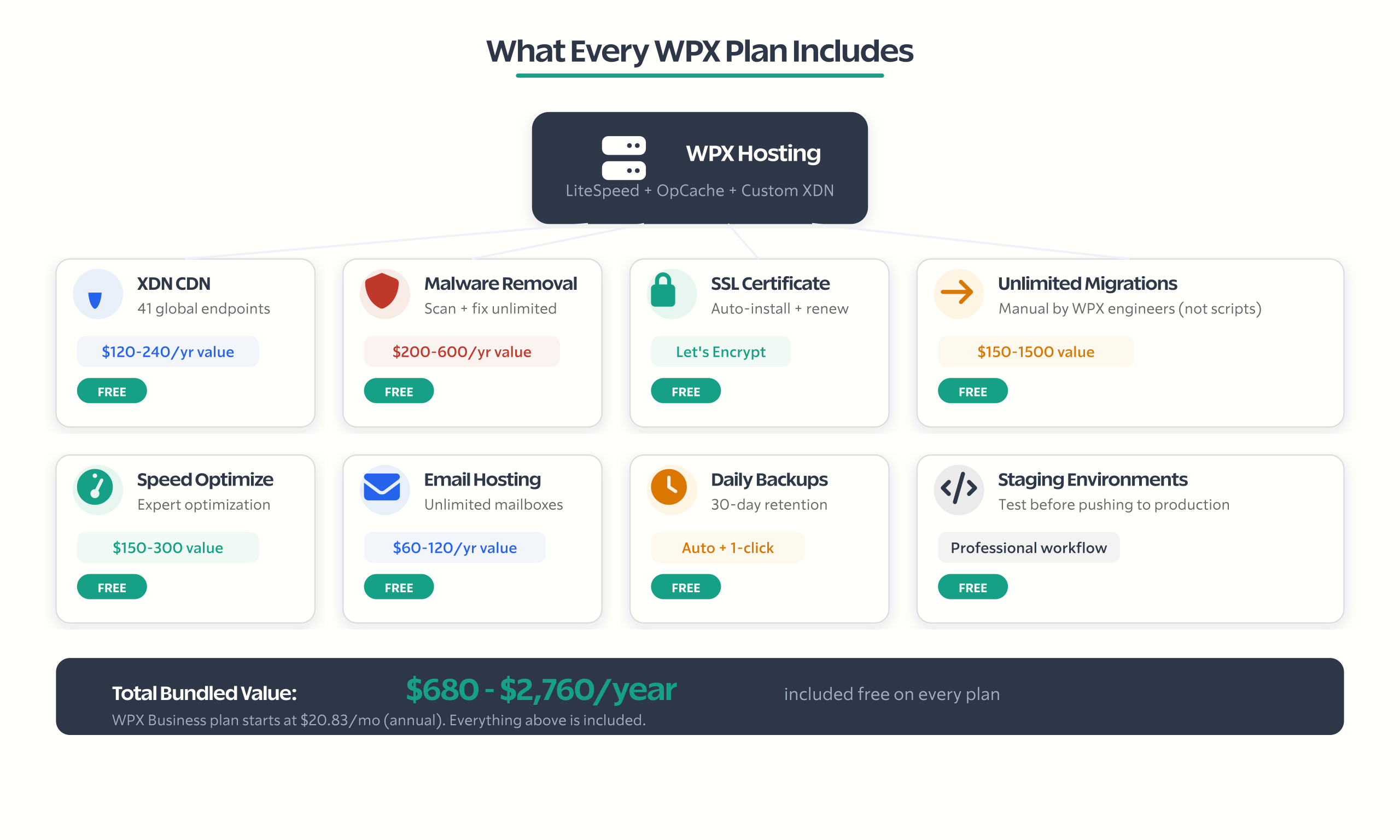
What’s Included in Every WPX Plan
Every coupon page lists features. I’m going to tell you what those features are actually worth so you can calculate the real value of the deal.
Free XDN CDN ($10-20/mo value). WPX built their own CDN called XDN with 41-42 global endpoints. It’s included free on every plan. Comparable CDN services from Cloudflare Pro, BunnyCDN, or KeyCDN cost $10-20/mo. This isn’t a rebranded Cloudflare integration. It’s custom-built and tuned for WordPress.
Free daily malware scanning and removal ($100-300/incident value). If your site gets hacked, WPX removes the malware and repairs your site at no extra charge. This is their “Fixed For You” guarantee. External malware removal services like Sucuri charge $199-499 per incident. WPX includes unlimited cleanups.
Free SSL certificates. Let’s Encrypt SSL on all plans, auto-installed and auto-renewed. Some hosts still charge for this or make it complicated.
Free unlimited site migrations. WPX’s team manually migrates your sites from any host. Not automated scripts. Human engineers. I’ve seen migration services quoted at $150-300 per site. If you’re moving 5 sites, that’s $750-1,500 in migration value alone.
Free professional speed optimization. Each account gets one free speed optimization by WPX experts. They’ll configure LiteSpeed Cache, optimize your database, compress images, and tune server settings. This service runs $150-300 from independent WordPress speed optimization consultants.
Free business email hosting. Unlimited mailboxes with your domain. Most managed WordPress hosts either don’t offer email or charge extra. Cloudways, for example, doesn’t include email at all. You’d need to add Google Workspace ($7.20/user/mo) or another email provider.
Free daily backups (30-day retention). Automated daily backups stored on separate servers with one-click restore. 30-day retention means you can roll back a full month.
Staging environments. Test changes on a copy of your site before pushing to production. A must-have for any professional WordPress workflow.
Add up the hidden value: CDN ($120-240/yr) + malware removal ($200-600/yr average) + migrations ($150-1,500 depending on site count) + speed optimization ($150-300) + email hosting ($60-120/yr). Conservative estimate: $680-2,760 in bundled value depending on your usage.
Is WPX Hosting Worth It? My Experience
I’ve tested WPX on client sites and tracked the performance numbers. Here’s what I found.
Speed: WPX runs LiteSpeed servers with LiteSpeed Cache and OpCache. On a clean WordPress install, I measured a GTmetrix score of 100%, Google PageSpeed Mobile score of 93/100, and TTFB (Time to First Byte) under 100ms for US visitors. On a real site with 55+ images and multiple plugins, PageSpeed still scored 93/100.
Compared to SiteGround in the same testing conditions: WPX loaded in 1.47 seconds vs SiteGround at 2.5 seconds. That’s a significant difference for Core Web Vitals.
Support: WPX’s live chat averages under 30 seconds response time. I’ve used it multiple times and never waited more than a minute. You get actual WordPress specialists, not tier-1 support reading from scripts. Their Trustpilot rating is 4.9/5 from 3,219+ reviews, with 97% five-star ratings. That’s not a number you get without genuinely exceptional support.
Limitations I noticed:
- Only 3 data centers (Chicago, London, Sydney). If your audience is primarily in Asia, South America, or Africa, you’re relying on the XDN CDN to compensate. Compare this to Cloudways with 116 data center options or SiteGround with 11.
- No cPanel. WPX uses a custom control panel. It’s clean and functional, but if you’re used to cPanel, there’s a learning curve.
- Email sending limit. 50 emails per 30 minutes. Fine for transactional emails, not great if you’re sending newsletters directly from the server. Use a dedicated email service like Mailchimp or ConvertKit for bulk sends.
- Storage can feel tight. The Business plan’s 15GB fills up quickly with media-heavy sites. Consider the Professional plan if you regularly upload high-resolution images or video.
Bottom line: WPX is among the best managed WordPress hosts I’ve tested for speed, support, and total value when you factor in everything that’s included. The 3-data-center limitation is real but the CDN mitigates it for most use cases.
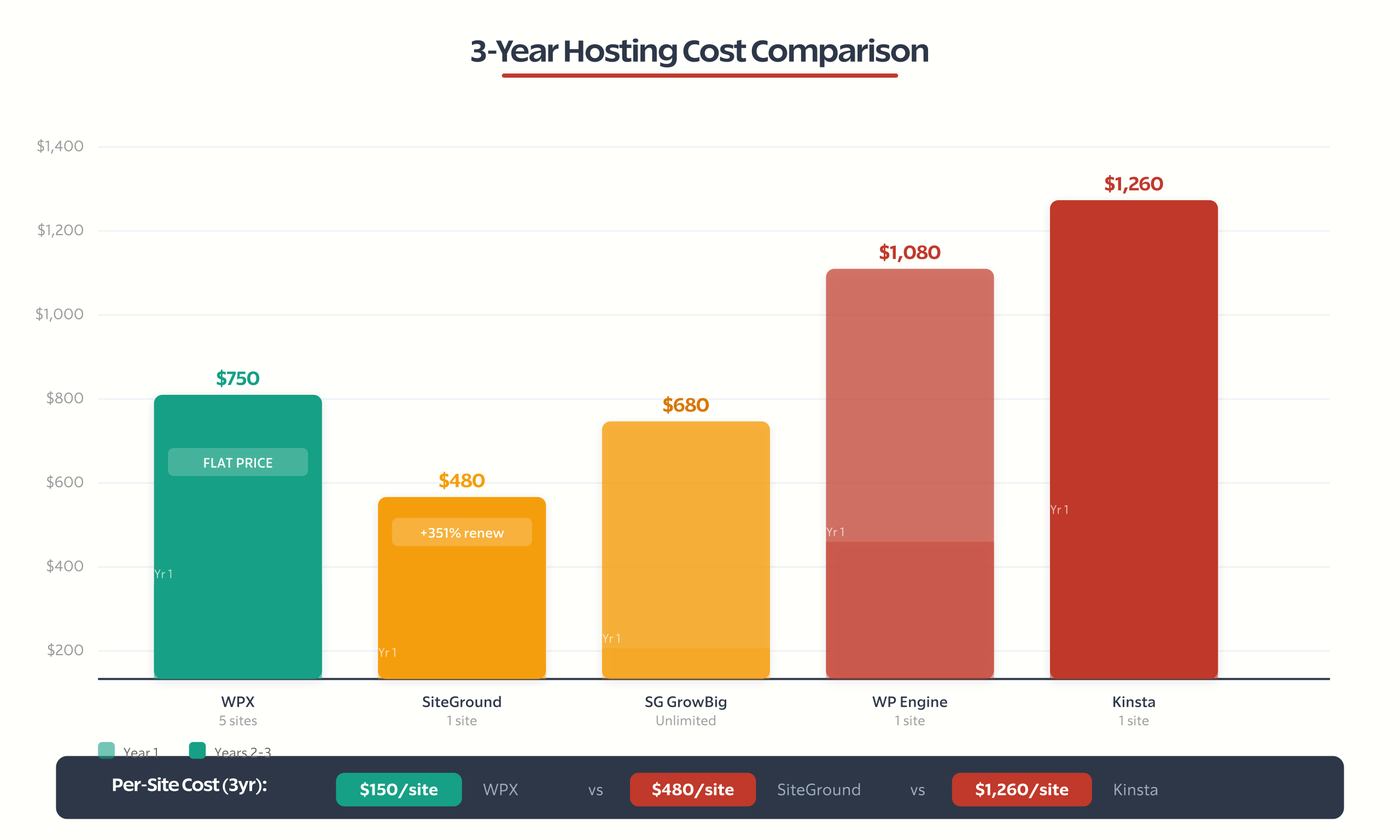
WPX vs. Competitors at Discounted Price
This is where most coupon articles fail. They don’t show you whether the discounted WPX price is actually competitive with other hosts.
| Host | Monthly (Year 1) | Monthly (Year 2+) | Sites Included | 3-Year Total Cost |
|---|---|---|---|---|
| WPX Business | $20.83 | $20.83 | 5 | $749.88 |
| SiteGround StartUp | $3.99 | $17.99 | 1 | $479.64 |
| SiteGround GrowBig | $6.69 | $24.99 | Unlimited | $680.04 |
| WP Engine Startup | $30.00 | $30.00 | 1 | $1,080.00 |
| Kinsta Starter | $35.00 | $35.00 | 1 | $1,260.00 |
| Cloudways (DO, 2GB) | $28.00 | $28.00 | Unlimited | $1,008.00 |
The 3-year calculation tells the real story. SiteGround looks cheapest until year 2 when the 350% renewal increase kicks in. For unlimited sites, SiteGround’s GrowBig plan costs $680 over 3 years vs WPX’s $750. But WPX includes 5 sites with free CDN, free malware removal, and free email that SiteGround charges extra for.
Per-site cost over 3 years:
- WPX Business: $150/site (5 sites)
- SiteGround StartUp: $480/site (1 site)
- WP Engine: $1,080/site (1 site)
- Kinsta: $1,260/site (1 site)
If you’re hosting more than one site, WPX’s value is hard to beat.
How to Apply the WPX Coupon Code
Step-by-step, takes about 3 minutes:
- Go to WPX Hosting and click “Get Started”
- Select your plan (Business, Professional, or Elite)
- Choose monthly or annual billing (annual gets 2 months free automatically)
- Enter your domain name or register a new one
- In the checkout form, look for the “Coupon Code” field
- Enter
FIFTYOFFand click Apply - Verify the discount appears in your order summary
- Complete payment
Annual billing tip: If you go annual, the 2 months free is applied automatically. The FIFTYOFF code works on monthly billing. You can start monthly to test WPX risk-free with the 30-day guarantee, then switch to annual after you’re satisfied.
Refund caveat: WPX offers a 30-day money-back guarantee, but note that using their free professional speed optimization service within the 30-day window voids refund eligibility. If you’re unsure about staying, skip the speed optimization until after day 30.
What the Migration to WPX Actually Looks Like
One of the biggest values in any WPX plan is their free unlimited site migrations. And unlike hosts that run automated migration scripts, WPX does it manually. Their engineers handle the transfer personally.
Here’s what the process looks like:
- Submit a migration request through your WPX dashboard. You’ll provide your current hosting credentials (cPanel login or FTP details), WordPress admin login, and any specific instructions.
- WPX assigns a technician and gives you an estimated timeline. Most migrations complete within 24 hours. Complex sites (large databases, WooCommerce stores, multisite) might take 48 hours.
- They handle DNS and SSL. After the migration, WPX configures your free SSL certificate and provides updated nameserver details. You just update your domain’s DNS records at your registrar.
- Post-migration check. Test your site on WPX before pointing your DNS. WPX gives you a temporary URL to verify everything works.
I’ve migrated sites from Bluehost, SiteGround, GoDaddy, and Cloudways to WPX. The process was smooth every time. The only issue I’ve seen is with very large databases (10GB+), which took an extra day. For a standard WordPress blog or business site, expect zero downtime.
Migration limitations to know about:
- Local WordPress installations (Local by Flywheel, MAMP) aren’t supported for migration. Export and import manually.
- WordPress multisite networks are supported but may require additional coordination.
- Non-WordPress sites (Drupal, Joomla, custom PHP) are not supported. WPX is WordPress-only.
Pro tip: Request migration on a Tuesday or Wednesday. Weekday migrations get assigned faster than weekend requests. And make sure your current host’s account stays active until you’ve verified everything works on WPX and pointed your DNS.
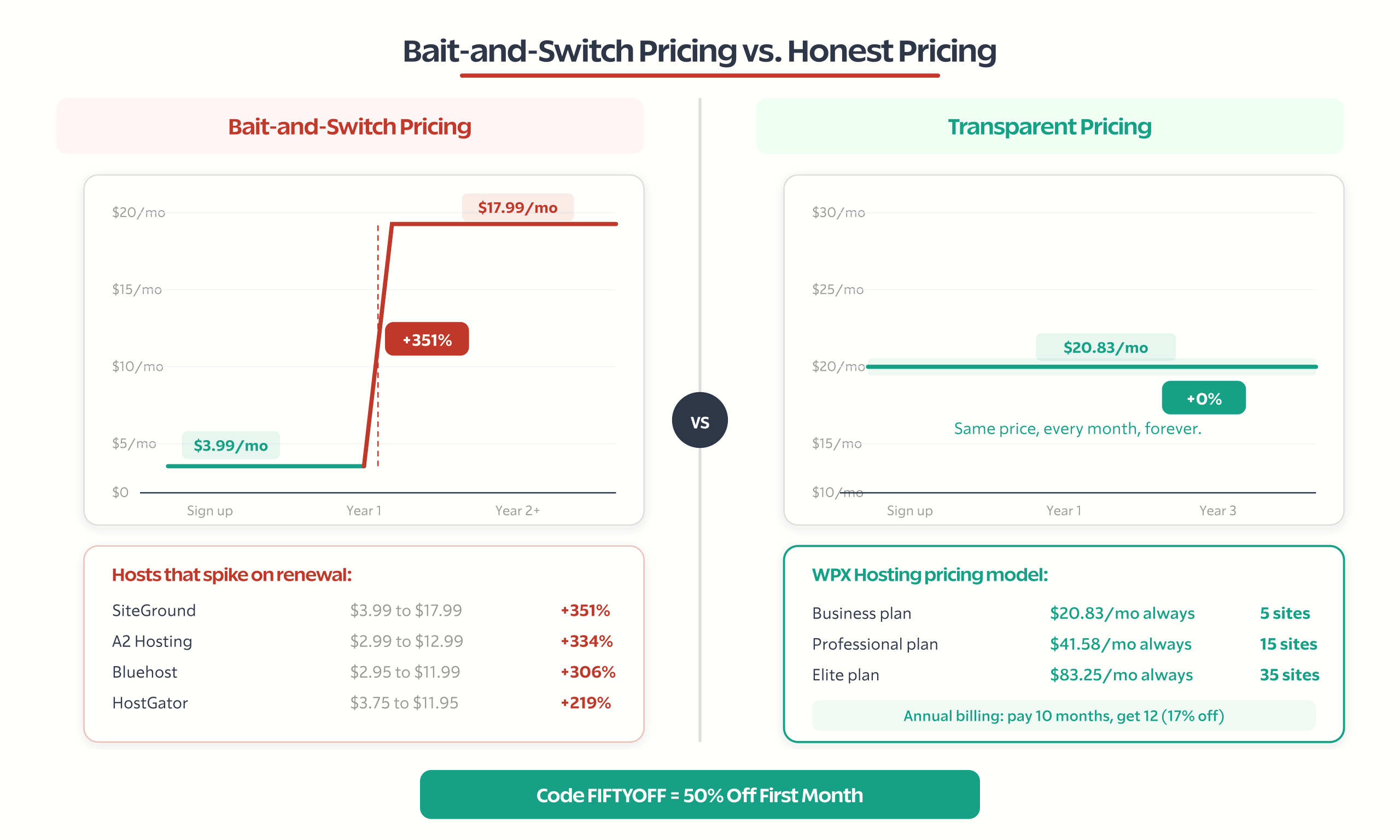
Renewal Pricing: What to Expect After Year 1
This is the most important part of any hosting deal. And it’s where WPX genuinely stands apart.
WPX renewal price: same as the price you signed up at. No increase. Not after year 1, not after year 3, not after year 5. The $20.83/month you pay on annual billing is the $20.83/month you’ll pay as long as you’re a customer.
Here’s what renewal looks like at other hosts:
| Host | Intro Price | Renewal Price | Price Increase |
|---|---|---|---|
| WPX Hosting | $20.83/mo | $20.83/mo | 0% |
| SiteGround | $3.99/mo | $17.99/mo | +351% |
| Bluehost | $2.95/mo | $11.99/mo | +306% |
| HostGator | $3.75/mo | $11.95/mo | +219% |
| A2 Hosting | $2.99/mo | $12.99/mo | +334% |
The cheap introductory prices from budget hosts are marketing bait. They get you in at $3-4/month and hit you with $12-18/month when you renew. WPX’s model is transparent: the price you see is the price you pay. That’s the real “coupon.”
WPX vs. Cloudways: The Most Common Decision
This comes up constantly. Cloudways starts at $11/month with access to DigitalOcean, Vultr, AWS, and Google Cloud servers. WPX starts at $24.99/month. Why would anyone pay double?
Because Cloudways is a control panel on top of cloud infrastructure. WPX is fully managed WordPress hosting. The difference matters when things break.
Choose WPX when:
- You want zero server management. WPX handles everything: updates, security, caching, backups, malware removal.
- You need email hosting included. Cloudways doesn’t offer email at all. You’d need Google Workspace ($7.20/user/mo) or another provider.
- Support speed matters. WPX responds in under 30 seconds. Cloudways support is good but slower.
- You want a flat, predictable price with everything bundled.
Choose Cloudways when:
- You need specific data center locations. Cloudways offers 116 data centers worldwide vs WPX’s 3.
- You need granular server control (custom PHP settings, server-level caching configuration, root access).
- You’re running non-WordPress applications alongside WordPress.
- You’re comfortable with some server administration or have a dev team.
The real cost comparison. A Cloudways DigitalOcean 2GB plan at $28/month looks competitive. But add email hosting ($7.20/month for Google Workspace), a CDN (BunnyCDN at $3/month), and a malware removal subscription (Sucuri at $16.58/month), and you’re at $54.78/month. WPX’s $24.99/month includes all of that.
For WordPress-only sites where you want everything managed, WPX wins on total cost of ownership. For developers who need cloud flexibility and multi-app hosting, Cloudways is the better fit.
Best Time to Buy WPX Hosting
If you need hosting now, use the FIFTYOFF code and start today. The deal is available year-round.
But if you can wait, WPX runs seasonal promotions that are significantly better:
- Black Friday / Cyber Monday (November): The biggest discounts. In 2025, WPX offered up to 85% off monthly plans and 24 months free on 5-year plans. In 2024, it was 50% off plus 4 months free on annual plans.
- Holiday sales (December-January): Usually 50-65% off first month with extended free months on annual billing.
- Anniversary and mid-year sales: Occasional promotions with 50-60% off.
My recommendation: If you’re within 2-3 months of Black Friday, wait. The Black Friday deal usually saves 2-3x more than the standard coupon. If Black Friday is 4+ months away, start now with FIFTYOFF and don’t overthink it. The $12.50 you save on one month isn’t worth months of subpar hosting.
Which WPX Plan Should You Choose?
Don’t just pick the cheapest plan. Pick the right one for your situation.
Business ($24.99/mo), best for:
- Solo bloggers running 1-3 sites
- Small business owners with a company site and a blog
- Personal projects where 15GB storage is sufficient
Professional ($49.99/mo), best for:
- Freelance developers hosting client sites
- Small agencies managing 5-15 WordPress installations
- Media-heavy sites that need 30GB storage
- Anyone outgrowing the Business plan’s 5-site limit
Elite ($99/mo), best for:
- Agencies managing 15-35 client sites
- High-traffic sites that need unlimited bandwidth
- Businesses running multiple brands on separate WordPress installations
WooCommerce plans:
If you’re running an online store, WPX now offers dedicated WooCommerce plans: Powerstore ($34.99/mo), Superstore ($74.99/mo), and Hyperstore ($149.99/mo). These are optimized specifically for WooCommerce with additional server resources allocated to handle product catalogs, checkout processes, and dynamic page generation.
Get Started with WPX Hosting
The FIFTYOFF code gets you 50% off your first month. That’s the immediate deal. But the real value of WPX Hosting is what you get beyond the discount: LiteSpeed servers with under 100ms TTFB, support that responds in 30 seconds, a custom CDN with 41+ endpoints, free malware removal, and pricing that doesn’t double on renewal.
If you’re currently on shared hosting paying $4/month but watching your renewal climb to $18/month, do the math over 3 years. WPX at $20.83/month flat is cheaper than SiteGround at $17.99/month renewal when you factor in all the services WPX includes for free.
The coupon code saves you $12.50 on month one. WPX’s transparent pricing model saves you hundreds over the life of your hosting account.
Frequently Asked Questions
What is the best WPX Hosting coupon code?
Use code FIFTYOFF for 50 percent off your first month of WPX Hosting on any WordPress hosting plan including Business, Professional, and Elite. For annual billing, 2 months free is applied automatically at checkout without needing a code. The best overall discounts come during Black Friday when WPX has historically offered up to 85 percent off monthly plans.
Does WPX Hosting increase prices on renewal?
No. WPX Hosting charges the same price on renewal as your initial signup rate. This is a major differentiator from competitors like SiteGround which increases 351 percent, Bluehost at 306 percent, and A2 Hosting at 334 percent at renewal. The $20.83 per month you pay on annual billing remains $20.83 per month for the life of your account.
Is WPX Hosting faster than SiteGround?
In direct testing, WPX loaded in 1.47 seconds versus SiteGround at 2.5 seconds. WPX uses LiteSpeed servers with a custom XDN CDN featuring 41 to 42 global endpoints, achieving TTFB under 100 milliseconds for US visitors and GTmetrix scores of 100 percent. However, SiteGround offers 11 data centers versus WPX’s 3, which may matter for specific geographic audiences.
What is included in every WPX Hosting plan?
Every WPX plan includes free XDN CDN with 41 to 42 global endpoints, free SSL certificates via Let’s Encrypt, free daily automated backups with 30-day retention, free malware scanning and removal, unlimited free site migrations handled by human engineers, free business email with unlimited mailboxes, staging environments, and LiteSpeed servers with OpCache optimization.
How does WPX Hosting compare to Cloudways?
WPX is fully managed WordPress hosting starting at $24.99 per month with email, CDN, and malware removal included. Cloudways is a cloud control panel starting at $11 per month but excludes email hosting, CDN, and malware protection. Adding Google Workspace, BunnyCDN, and Sucuri to Cloudways brings the real cost to approximately $54.78 per month, making WPX cheaper for total cost of ownership.
Does WPX Hosting offer a money-back guarantee?
WPX Hosting provides a 30-day money-back guarantee on all plans. You can test their hosting risk-free and receive a full refund if unsatisfied. One important caveat: using their free professional speed optimization service within the 30-day window voids your refund eligibility. Wait until after day 30 to request the speed optimization if you are still evaluating the service.
What is the best WPX Hosting plan for beginners?
The Business plan at $24.99 per month or $20.83 per month on annual billing is best for solo bloggers and small businesses running up to 5 WordPress sites. It includes 15 GB SSD storage and 200 GB bandwidth with all premium features like free CDN, SSL, daily backups, and malware removal. At $4.17 per site on annual billing, it offers excellent value for managed WordPress hosting.
When is the best time to buy WPX Hosting?
The best discounts come during Black Friday and Cyber Monday in November. In 2025, WPX offered up to 85 percent off monthly plans and 24 months free on 5-year plans. If Black Friday is more than 4 months away, use the FIFTYOFF coupon code now rather than waiting on subpar hosting. Annual billing automatically includes 2 months free regardless of when you sign up.
Disclaimer: This site is reader-supported. If you buy through some links, I may earn a small commission at no extra cost to you. I only recommend tools I trust and would use myself. Your support helps keep gauravtiwari.org free and focused on real-world advice. Thanks. - Gaurav Tiwari