
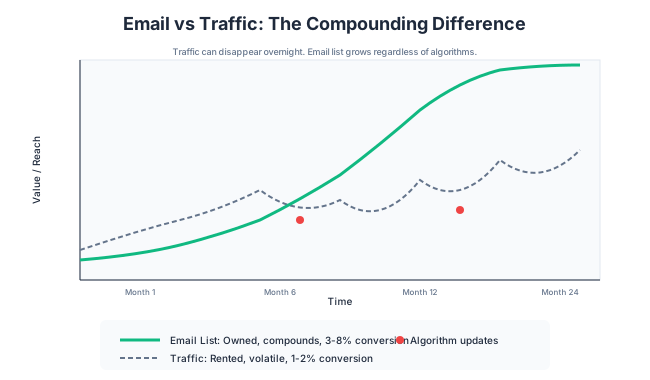
Traffic is rented. Google can change an algorithm and cut your visitors in half overnight. Social platforms can throttle your reach whenever they want. Every channel you don’t own is borrowed.
Email is different. Your email list is yours. No algorithm decides whether your subscribers see your messages. No platform can take it away from you. It’s the only channel that compounds reliably over time.
I’ve built my email list to over 5,000 subscribers. These subscribers convert at 5-10x the rate of random blog visitors. They’re the foundation of my most predictable revenue. This chapter shows you how to build the same.
Why Email Beats Everything Long-Term
If I had to choose between keeping my blog traffic or my email list, I’d keep the list. The traffic can be rebuilt with search and content. The direct relationship with thousands of readers? That’s irreplaceable.
Algorithm Independence
Google updates happen several times a year. Every update creates winners and losers. Even if you’re doing everything right, an algorithm change can tank your traffic.
I’ve watched sites lose 50% of their traffic overnight. They didn’t do anything wrong. Google just changed how it evaluates content, and they ended up on the wrong side.
Email has no algorithm deciding who sees your messages. You send, subscribers receive. Open rates depend on your relationship and subject lines, not a black-box algorithm you can’t control.
Direct Relationship
When someone gives you their email address, they’re inviting you into their inbox. That’s a more intimate channel than a blog visit.
Blog visitors are anonymous. You don’t know who they are. They visit and leave, and most never come back.
Email subscribers have names. They’ve raised their hand and said, “I want to hear from you.” That changes the relationship completely.
Conversion Rates: Email vs. Other Channels
The numbers aren’t even close:
Average conversion rates by channel:
- Organic search visitor: 1-2%
- Social media visitor: 0.5-1%
- Email subscriber: 3-8%
A list of 1,000 engaged subscribers is worth more than 5,000-10,000 monthly blog visitors for monetization purposes.
I’ve launched affiliate promotions to my email list that converted at 8%. The same offer on my blog? 2%. The list trusts me more because we have an ongoing relationship.
The Asset Value of a List
Your email list is a business asset with real value.
Some rough benchmarks:
- Engaged list value: $1-3 per subscriber per month in revenue potential
- List sale value: $0.50-2.00 per subscriber if you ever sold the business
A 5,000 subscriber list might be worth $5,000-15,000/month in revenue potential and $2,500-10,000 as a business asset. That’s not theoretical. I’ve seen these numbers in real acquisitions.
Build your list from day one, even if you have no idea how you’ll monetize it.
Lead Magnets That Actually Work
A lead magnet is something valuable you offer in exchange for an email address. The quality of your lead magnet determines how fast your list grows.
The Specificity Principle
Vague lead magnets convert poorly. Specific lead magnets convert well.
Vague: “Subscribe for blogging tips”
Specific: “Get my 12-week topic map template for WordPress bloggers”
Vague: “Free marketing guide”
Specific: “The exact email sequence I use to welcome new subscribers (with templates)”
Specificity works because:
- It makes the value concrete
- It attracts the right people (who want that specific thing)
- It creates urgency (this solves my specific problem right now)
Format Options
Different formats work for different audiences:
PDF guides/checklists: Easy to create, easy to consume. Best for action-oriented audiences. “The 10-Point WordPress Security Checklist”
Templates: Highly valuable, immediately usable. “My Content Calendar Template (Google Sheets)”
Email courses: Multi-part delivery builds relationship. “5-Day Course: Build Your First Affiliate Funnel”
Tool or calculator: Interactive value. “Website Speed Calculator: Is Your Site Fast Enough?”
Swipe files: Curated examples. “50 Blog Post Headlines That Actually Worked”
Video training: Higher perceived value, more time to create. “30-Minute Workshop: WordPress Speed Optimization”
Choose a format that matches your audience’s preferences and your ability to create quality.
The “Quick Win” Requirement
The best lead magnets deliver a quick win. The subscriber should experience value within 10-15 minutes of downloading.
Long ebooks fail this test. A 50-page guide feels overwhelming. Most subscribers never read it, never get value, and never engage with your emails.
Short, action-oriented resources win:
- A checklist they can implement today
- A template they can customize immediately
- A short video they can watch right now
- A swipe file they can reference instantly
Deliver a small win fast. It builds trust and makes subscribers anticipate your next email.
Examples by Niche
WordPress/tech niche:
- “WordPress Launch Checklist (PDF)”
- “PageSpeed Optimization Guide (with screenshots)”
- “My Favorite Plugins List (and why I use each)”
Marketing niche:
- “Content Calendar Template”
- “Email Subject Line Swipe File”
- “SEO Audit Checklist”
Personal finance:
- “Monthly Budget Spreadsheet”
- “Debt Payoff Calculator”
- “Investment Tracker Template”
Food/lifestyle:
- “7-Day Meal Plan (with shopping list)”
- “Recipe Template for Your Own Cookbook”
- “Kitchen Organization Checklist”
The best lead magnets solve a specific problem your audience has right now.
Opt-in Placement and Design
Where and how you present your lead magnet affects conversion rates dramatically.
In-Content Offers (Highest Conversion)
Opt-ins within your content convert best because they’re contextually relevant.
Someone reading about WordPress speed should see an opt-in for your speed checklist. Someone reading about affiliate marketing should see your affiliate email templates.
Placement options:
- After the introduction (hook them early)
- Mid-content break (after a major section)
- End of post (catch completers)
Format: A simple text callout works well:
Want the complete checklist? I put together a downloadable version of everything in this post, plus 5 bonus tips. [Get it free here.]
This feels helpful, not pushy.
Dedicated Landing Pages
For promoting on social media, podcasts, or anywhere outside your blog, dedicated landing pages convert better than homepage opt-ins.
Effective landing page elements:
- Clear headline promising the lead magnet benefit
- Bullet points of what’s included
- Image/mockup of the lead magnet
- Simple form (email only, or email + first name)
- Social proof if available
Keep landing pages focused. No navigation, no competing offers. Just the lead magnet and the opt-in.
Exit Intent (When It Makes Sense)
Exit intent popups trigger when someone moves their cursor toward closing the tab. They’re a last chance to capture someone leaving.
When exit intent works:
- The offer is genuinely valuable
- You’re not already bombarding visitors with popups
- The design is clean and professional
- You respect visitors who close it
When exit intent hurts:
- You’re already showing multiple popups
- The offer is weak or generic
- It appears too aggressively (every page, every visit)
- Mobile experience is bad
One exit intent popup per session maximum. Make it count with your best offer.
Pop-ups Without Annoying Readers
Pop-ups have a bad reputation because most are annoying. Done well, they can significantly boost subscriptions without harming user experience.
Rules for non-annoying pop-ups:
- Wait 30-60 seconds before showing (let them engage first)
- Show only once per session (not every page)
- Make closing easy (clear X button)
- Mobile-friendly (not blocking entire screen)
- Relevant to the page content
- Valuable offer (not just “subscribe for updates”)
Test different timing and triggers. Some audiences prefer scroll-triggered (appears after 50% scroll). Others respond better to time-delayed.
The Welcome Sequence
What happens after someone subscribes matters as much as getting them to subscribe. Your welcome sequence sets the tone for the entire relationship.
Email 1: Deliver the Lead Magnet + Set Expectations
Timing: Immediately after signup
Content:
- Thank them for subscribing
- Deliver the promised lead magnet
- Tell them what to expect (email frequency, content type)
- One quick win or tip they can use immediately
Example:
Subject: Here’s your [Lead Magnet Name]
Hey [Name],
Thanks for grabbing the [Lead Magnet]. Here’s your download link: [link]
Quick thing you can do right now: [One actionable tip from the lead magnet]
Going forward, I’ll send you [frequency, e.g., “one email per week”] with [content type, e.g., “WordPress tips and the occasional deal I think is worth your time”].
If you ever have questions, just reply to any email. I read everything.
[Name]
Email 2: Your Story and Credibility
Timing: 1-2 days after Email 1
Content:
- Brief version of your story
- Why you’re qualified to help them
- Connection point (show you understand their situation)
Example:
Subject: The $8K mistake that changed how I approach [topic]
Quick story:
[2-3 paragraph story about a relevant mistake or lesson]
That’s why I’m so focused on [your approach]. I learned the hard way so you don’t have to.
I’ve been doing this for [X years] and have [credentials/results]. But more importantly, I’ve made all the mistakes and can help you skip them.
Tomorrow, I’ll share [preview of next email].
[Name]
Email 3: Best Content Introduction
Timing: 2-3 days after Email 2
Content:
- Link to your best/most helpful content
- Brief context for why it’s valuable
- Invitation to explore your site
Example:
Subject: Start here (my best stuff)
If you’re new, here’s where I’d start:
[Link to cornerstone content 1] – Best if you’re [situation]
[Link to cornerstone content 2] – Best if you’re [situation]
[Link to cornerstone content 3] – Best if you’re [situation]These are the posts readers find most helpful. They’re also the ones I’m most proud of.
Browse around. Hit reply if you have questions.
[Name]
Email 4: Problem Deepening
Timing: 3-4 days after Email 3
Content:
- Address a common pain point in depth
- Show you understand the problem
- Provide value (tip, insight, framework)
- Tease that you have solutions
Example:
Subject: Why [common approach] isn’t working
I hear this all the time:
“[Quote from reader expressing frustration]”
Sound familiar?
Here’s what’s actually going on:
[Explain the root cause of the problem]
The good news: [Brief hint at solution]
Tomorrow, I’ll share exactly how I [solve this problem].
[Name]
Email 5: Soft Pitch or Next Step
Timing: 4-5 days after Email 4
Content:
- Introduce a relevant offer (affiliate product, your service, etc.)
- Frame it as a solution to the problem from Email 4
- No pressure, just an option
Example:
Subject: How I [achieve outcome] (and how you can too)
Yesterday I talked about [problem].
Here’s how I solve it:
[Your approach and the tool/service you recommend]
I’ve been using [product] for [time]. It [specific benefit].
If you’re dealing with [problem], check it out: [link]
Not ready to invest? No worries. [Alternative free approach or reminder you’ll keep sending helpful content]
[Name]
Timing and Frequency
Welcome sequence timing:
- Email 1: Immediate
- Email 2: Day 2
- Email 3: Day 4
- Email 4: Day 6
- Email 5: Day 8
After the welcome sequence, transition to your regular email cadence (weekly, bi-weekly, etc.).
Retargeting Basics for Bloggers
Retargeting shows ads to people who’ve already visited your site. It’s a way to stay in front of potential customers after they leave.
When Retargeting Makes Sense
Retargeting makes sense when:
- You have decent traffic (1,000+ monthly visitors minimum)
- You have something to sell (affiliate products, services, your own products)
- You have budget for ads ($100-500/month to start)
- Your audience is on platforms that support retargeting (Facebook, Google)
Retargeting doesn’t make sense when:
- You have minimal traffic
- You have nothing to monetize yet
- Your budget is zero
- You’re not willing to learn ad platforms
For most bloggers, email should be the priority. Retargeting is an advanced tactic for those already doing well.
Pixel Setup Simplified
To retarget, you need tracking pixels on your site:
Facebook Pixel: Install via plugin or manually. Tracks visitors so you can show them Facebook/Instagram ads later.
Google Ads Remarketing: Similar concept for Google Display Network.
Process:
- Create ad account on platform
- Generate your pixel code
- Install on your site (via plugin like PixelYourSite or manually)
- Wait for audience to build (need 100+ people minimum)
- Create retargeting campaign
Most WordPress sites can install pixels in under 30 minutes using plugins.
Audience Segments That Matter
Don’t retarget everyone the same way. Segment based on behavior:
High-intent visitors: Visited product review pages, pricing pages, or comparison content. These are closest to buying. Show them specific offers.
Content consumers: Read blog posts but didn’t visit commercial pages. Show them more content or lead magnets.
Email subscribers: Already on your list. Can retarget with special offers or promotions.
Cart abandoners (if selling): Started checkout but didn’t finish. Most valuable segment.
Different segments get different messages and different budgets.
Budget Allocation
Start small and scale what works:
- Test budget: $5-10/day for 2 weeks
- Measure: Click-through rate, cost per click, conversions
- Scale: Increase budget on winning audiences and ads
- Cut: Stop spending on segments that don’t convert
Retargeting typically has lower cost per conversion than cold traffic because you’re reaching people who already know you.
Chapter Checklist
- [ ] Do I have a lead magnet that delivers a quick win?
- [ ] Is my lead magnet specific, not vague?
- [ ] Do I have opt-in forms in my content, not just the sidebar?
- [ ] Do I have a welcome sequence that builds relationship?
- [ ] Am I emailing my list regularly (at least 2x/month)?
- [ ] Have I considered retargeting if I have sufficient traffic?
Chapter Exercise
Task: Create a lead magnet outline and 5-email welcome sequence structure.
Time required: 90 minutes
Deliverable: A lead magnet concept and outline for 5 welcome emails.
Process:
-
Choose your lead magnet (20 minutes)
- What specific problem does your audience have?
- What format would deliver a quick win? (checklist, template, guide)
- What title would make someone immediately want this?
- What would be included?
-
Outline the lead magnet content (20 minutes)
- List the main sections or items
- Keep it focused (not 50 pages)
- Make it actionable
-
Plan your welcome sequence (50 minutes)
For each email, write:
- Subject line
- Main purpose
- Key content points
- Call to action
Email 1: Deliver + Set expectations
Email 2: Your story + Credibility
Email 3: Best content links
Email 4: Problem deepening
Email 5: Soft pitch
Example output:
Lead Magnet: “WordPress Speed Checklist: 15 Fixes I Use on Every Client Site”
Format: PDF checklist
Contents:
- Server-level fixes (3 items)
- Caching configuration (4 items)
- Image optimization (3 items)
- Database cleanup (2 items)
- Frontend optimization (3 items)
- Each item has a brief explanation and difficulty rating
Welcome Sequence:
Email 1: “Your WordPress Speed Checklist”
- Deliver the PDF
- Tell them to start with item #1 (easiest win)
- Set expectations: weekly emails about WordPress performance
Email 2: “The 4-second load time that cost my client rankings”
- Story about a client’s slow site
- How I fixed it
- Establishes my expertise
Email 3: “Where to go next”
- Link to my caching plugin guide
- Link to my Core Web Vitals post
- Link to my hosting comparison
Email 4: “Why caching plugins alone won’t fix slow WordPress”
- Explain the common misconception
- Cover what else matters
- Tease the solution
Email 5: “The tool I use on every speed optimization”
- Introduce FlyingPress as my recommendation
- Explain why I chose it
- Affiliate link with my reasoning
This gives you a complete system for growing your list and nurturing new subscribers.