
Most bloggers track too many metrics and act on too few. They check their traffic daily, celebrate arbitrary milestones, and make zero changes based on what the data tells them.
Good analytics are simple. They focus on numbers that actually inform decisions. They’re checked regularly but not obsessively. And they lead to action, not just dashboards.
This chapter shows you how to track what matters and ignore what doesn’t.
The Vanity Metrics Trap
Some metrics feel good to track but don’t help you make decisions. These are vanity metrics, and they’re a dangerous distraction.
Pageviews Without Context
“I got 50,000 pageviews this month!” sounds impressive. But without context, it means nothing.
Questions that give pageviews meaning:
- What pages drove those views?
- Did those visitors take any action?
- How does it compare to last month?
- What’s the trend over 6 months?
50,000 pageviews that don’t lead to email signups, affiliate clicks, or revenue are just server load. High pageviews with zero conversions might actually indicate a problem (wrong audience, weak CTAs, misaligned content).
Social Followers That Don’t Convert
10,000 Twitter followers sounds great until you realize only 50 people click through to your site monthly.
Social follower counts are particularly dangerous vanity metrics because:
- They’re visible and easy to compare
- They don’t correlate strongly with revenue
- They can be artificially inflated
- They distract from channels that actually work
I’d rather have 500 email subscribers than 10,000 social followers. The email subscribers convert at 10-20x the rate.
Rankings That Don’t Drive Revenue
“I’m ranking #1 for [keyword]!” might matter, or might not.
Rankings only matter if:
- The keyword has search volume
- The searchers have purchase intent
- You’re actually monetizing that traffic
Ranking #1 for a keyword with 10 monthly searches and zero buying intent accomplishes nothing. Ranking #5 for a keyword with 5,000 monthly searches and high purchase intent could be worth thousands per month.
Focus on rankings that connect to revenue, not just rankings you can brag about.
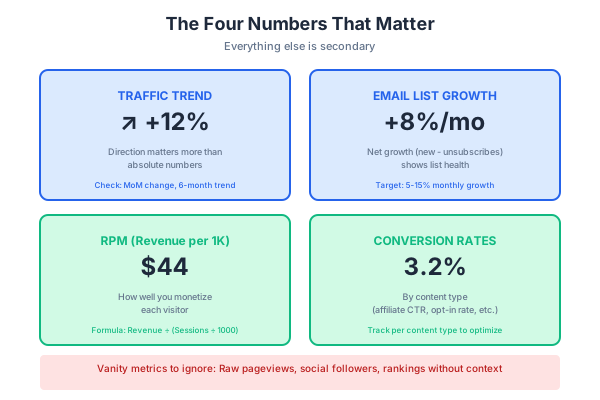
The Four Numbers That Matter
I track four core metrics. Everything else is secondary.
Traffic Trend (Direction, Not Absolute)
The absolute traffic number matters less than the direction.
- 5,000 visitors/month and growing 10% monthly = healthy
- 50,000 visitors/month and declining 10% monthly = problem
I check traffic trend monthly, looking at:
- Month-over-month change
- Same month last year (accounts for seasonality)
- 6-month trendline
A consistent upward trend means your strategy is working. A declining trend requires investigation and action.
Email List Growth Rate
Your list should grow every month. If it’s not, something’s broken.
Track:
- New subscribers per month
- Unsubscribes per month
- Net growth
- Growth rate percentage
Healthy benchmarks:
- New blogs: 50-200 subscribers/month to start
- Established blogs: 200-1,000+ subscribers/month
- Growth rate: 5-15% monthly net growth is solid
If growth has stalled, look at:
- Is your lead magnet compelling?
- Are opt-in forms visible?
- Is traffic growing?
- Are you promoting email signup across channels?
Revenue Per 1,000 Visitors (RPM)
RPM tells you how well you’re monetizing your traffic.
Formula: (Monthly revenue / Monthly sessions) × 1,000
Example: $2,000 revenue / 50,000 sessions = $40 RPM
This metric matters because:
- It’s comparable across different traffic levels
- It shows monetization efficiency
- It helps you spot problems and opportunities
Rough RPM benchmarks (varies hugely by niche):
- Low: $5-15 RPM
- Medium: $20-50 RPM
- High: $50-100+ RPM
If your RPM is low, you have a monetization problem. If it’s high, you might focus on traffic growth. If traffic is growing but RPM is falling, something’s off with your conversion.
Conversion Rate by Content Type
Different content types should have different conversion rates.
Track conversion rate for:
- Money pages (affiliate content): 2-5% click-through to affiliate links
- Email opt-in content: 1-5% of visitors subscribe
- Service pages: 1-3% inquiry rate
These benchmarks vary by niche and audience quality. The key is tracking your own rates and improving them over time.
If your affiliate content converts at 1% and you improve it to 2%, you’ve doubled your affiliate revenue from that content without needing more traffic.
Metrics by Revenue Model
Different monetization strategies require tracking different metrics.
Affiliate Metrics
Click-through rate (CTR): What percentage of visitors click your affiliate links?
- Benchmark: 2-5% for well-placed links in relevant content
- Track per post to identify high and low performers
Earnings per click (EPC): How much do you earn per affiliate click?
- Formula: Total commissions / Total clicks
- Compare across affiliate programs to identify best performers
Conversion rate: What percentage of clicks become sales?
- This is often only visible in affiliate dashboards
- Low conversion might indicate audience mismatch or product issues
Sponsored Metrics
CPM equivalent: What do you effectively earn per 1,000 impressions?
- Formula: Sponsored post payment / (Post views / 1,000)
- Helps compare to display ad rates
Renewal rate: What percentage of sponsors come back for repeat deals?
- High renewal = you’re delivering value
- Low renewal = investigate what’s not working
Inquiry rate: How many sponsorship inquiries do you get monthly?
- Growing inquiries = growing reputation
- Declining inquiries = may need to promote availability
Service Metrics
Inquiry rate: What percentage of service page visitors inquire?
- Benchmark: 1-5%
- Low rate = page needs work
Close rate: What percentage of inquiries become clients?
- Benchmark: 20-50%
- Low rate = qualification or sales process issue
Client lifetime value: How much does an average client pay over the relationship?
- Matters for deciding how much effort to put into acquiring clients
The Monthly Review Process
Checking stats daily breeds obsession without insight. A structured monthly review drives better decisions.
What to Look at Monthly
Traffic: Total sessions, month-over-month change, top pages, traffic sources
Email: New subscribers, unsubscribes, net growth, open rates
Revenue: Total by source (affiliate, sponsored, services), RPM
Content: Top performing posts, posts that dropped, new content performance
Action items: What needs attention? What’s working to double down on?
What to Look at Quarterly
Trends: 3-month rolling averages, direction of key metrics
Big picture: Is the overall strategy working? Are you on track for annual goals?
Pivots: Any major changes needed?
Content audit: Which posts need updating? Which should be combined or removed?
The 30-Minute Review Ritual
Here’s my monthly review process:
Minutes 1-5: Traffic overview
- Open analytics
- Check total sessions vs. last month
- Note any significant changes
- Identify top traffic sources
Minutes 6-10: Email health
- Check subscriber count and growth
- Review open rates and click rates
- Identify any concerning trends
Minutes 11-20: Revenue analysis
- Pull affiliate dashboard numbers
- Calculate RPM
- Compare to last month
- Note best performers
Minutes 21-25: Content check
- Which posts drove the most revenue?
- Which new posts performed well?
- Any posts that need attention?
Minutes 26-30: Action items
- Write 3-5 specific actions based on the data
- Schedule them
- Close the dashboards
This review happens once monthly. The rest of the month, I’m executing, not analyzing.
Spotting What to Double Down On
Analytics should tell you what’s working so you can do more of it.
Finding Your Winners
Look for patterns in your top-performing content:
- Topic clusters that drive revenue
- Content formats that convert best
- Traffic sources that bring quality visitors
- Products that your audience buys
Once you identify winners:
- Create more content in winning topic clusters
- Replicate successful formats
- Invest more in high-quality traffic sources
- Focus promotion on high-converting products
The 80/20 Content Analysis
Most of your results come from a small percentage of your content.
Analysis process:
- Export your top posts by traffic
- Export your top posts by revenue (if trackable)
- Identify the 20% of posts driving 80% of results
- Analyze what they have in common
Common patterns in top performers:
- Specific topics or subtopics
- Certain content formats
- Particular keyword types
- Specific monetization approaches
Your job is to find these patterns and create more content that matches them.
When to Update vs. Create New
Update existing content when:
- A post is ranking but could rank higher
- Content is outdated but the topic is still relevant
- You have new information or better examples
- The post has traffic but low conversion
Create new content when:
- You have a topic gap in your strategy
- There’s a new opportunity you haven’t covered
- Existing content can’t be improved enough
- You need fresh content for search engines
Often, updating old content is higher ROI than creating new content. A post already ranking on page 2 can be pushed to page 1 with improvements. A new post starts from zero.
Chapter Checklist
- [ ] Am I focusing on metrics that drive decisions, not vanity metrics?
- [ ] Do I know my traffic trend direction?
- [ ] Am I tracking email list growth rate?
- [ ] Do I know my RPM?
- [ ] Am I tracking conversion rates by content type?
- [ ] Do I have a regular review process that leads to actions?
Chapter Exercise
Task: Build your monthly review dashboard template.
Time required: 45 minutes
Deliverable: A one-page template you’ll fill out each month to guide your review.
Process:
-
Set up your metrics table (20 minutes)
Create a simple spreadsheet or document with:
Metric This Month Last Month Change Target Total Sessions Unique Visitors Email Subscribers (Total) New Subscribers Unsubscribes Affiliate Revenue Sponsored Revenue Service Revenue Total Revenue RPM -
Add your top performers section (10 minutes)
- Top 5 traffic pages this month
- Top 3 revenue-generating pages this month
- Best-performing affiliate product
- Best traffic source
-
Create your action items section (10 minutes)
- What needs urgent attention?
- What’s working to double down on?
- What experiments to try next month?
- Content to update?
- Content to create?
-
Schedule your review (5 minutes)
- Pick a specific day each month (e.g., first Monday)
- Block 30 minutes on your calendar
- Set a reminder
Example filled template:
- Metric: Total Sessions | This Month: 42,000 | Last Month: 38,500 | Change: +9% | Target: 50,000
- Metric: Email Subscribers | This Month: 4,250 | Last Month: 4,100 | Change: +150 | Target: 5,000
- Metric: New Subscribers | This Month: 210 | Last Month: 185 | Change: +13% | Target: 250
- Metric: Affiliate Revenue | This Month: $1,850 | Last Month: $1,620 | Change: +14% | Target: $2,500
- Metric: RPM | This Month: $44 | Last Month: $42 | Change: +5% | Target: $50
Top Performers:
- “Best Caching Plugins” – 4,200 views, $420 revenue
- “WP Rocket vs FlyingPress” – 2,100 views, $380 revenue
- “WordPress Speed Guide” – 3,800 views, 65 email signups
Action Items:
- Update “Best Hosting” post (outdated, was #2 revenue last year)
- Create FlyingPress setup tutorial (search demand, no current coverage)
- Test new lead magnet on top traffic post
- Increase promotion of caching content on Pinterest
Fill this out monthly. In 30 minutes, you’ll have clarity on what’s working and what to do next.